
Chapter 13.17
Maintenance and vendor reports
Five reports answer the questions a maintenance review asks: what was repaired and who paid for it, what is still waiting and for how long, what the meters read and what was charged, what the books owe on each building, and whether the vendors may still be sent into a unit. This chapter runs all five for Summit's first maintenance review, ties every total to the work orders, invoices and bills behind it, and shows the one question the reports refuse to answer.
When you finish this chapter you will be able to:
- Find the five Maintenance and vendors reports and say which question each one answers.
- Use the choices, exports and refusals that the property reports share, and tell them from the controls of Chapter 6.1.
- Read the Work Orders report and tie its lines, bills and chargebacks to the work orders and invoices.
- Read Tasks Aging and explain how a task's age is counted, and why it cannot look ahead.
- Tie a utility charge on the Meter Readings report to its reading, rate and invoice.
- Reconcile Unpaid Bills by Property to Aged Payables and the payables ledger.
- Use Vendor Compliance and the Vendors list to keep every vendor's insurance current.
The Maintenance and vendors group
Open Reports → Property management → Maintenance and vendors in the left menu, or scroll the Reports page to the subgroup of the same name. It is the sixth of the six property management subgroups (Chapter 6.1, Section 1) and holds five cards.
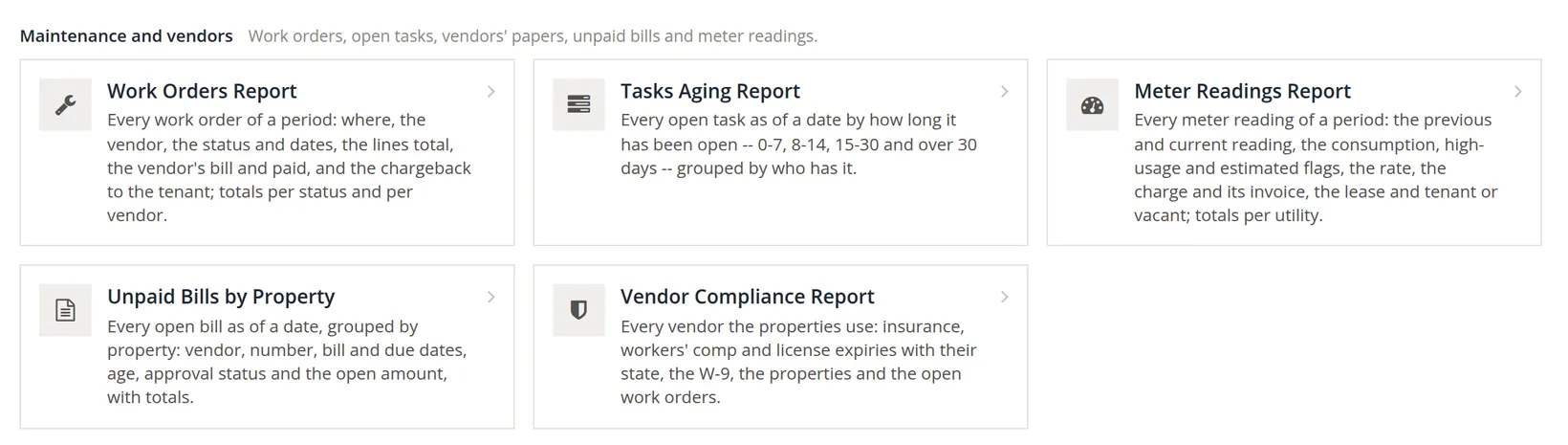
Each report answers one question. Read the question before you open the report: it tells you which date to set. Each report's page heading, breadcrumb and exports carry the same title as its card.
| Report (title on its card and page) | The question it answers | Date | Its own choices | Page right |
|---|---|---|---|---|
| Work Orders Report | What did we repair in the period, what did it cost, and who paid? | From, To; Dates on: opened or completed | Vendor, Status | Work orders |
| Tasks Aging Report | What is still waiting, for how long, and on whose desk? | As of, never after today | Assigned to, Category, Kind | Tasks |
| Meter Readings Report | What did each meter read, and what was charged for it? | From, To, by the read day | Utility, State | Units |
| Unpaid Bills by Property | What do we owe on each building, and what waits for approval? | As of | none beyond the property | Vendors |
| Vendor Compliance Report | May we still send this vendor into a unit? | always today; Expiring within 30, 60 or 90 days | State, Trade | Vendors |
All five also offer Property and Property group. Summit has one group, Bend portfolio (the Galveston Building and the Riverside Fourplex, Chapter 13.1). Each report has its own row under Reports in Users and permissions (Chapter 15.7), and it also needs the view right of the module page in the last column.
How the property reports differ from Chapter 6.1
The financial reports of Chapter 6.1 open with an options panel and offer a drill-down from every figure. The property management reports are built on a simpler frame. The statement looks the same (the company, the title, a caption that says what is shown, groups, a Total line, Notes and the Report information box), but the controls around it are different.
| In Chapter 6.1 | In the property reports |
|---|---|
| Change report opens the options above the report | The choices sit in a row above the statement all the time; Run report applies them. |
| Period presets (this month, last quarter ...) | Plain dates. A period report starts at the first of the books' month and ends today (11/01/2026 to 11/06/2026 on Friday the 6th, so this chapter types 11/05/2026 in To); an as-of report is set to today. |
| Saved reports | None. The choices travel in the page address, so a bookmark opens the report exactly as it was run. |
| Statement or Working paper; Detail | One view. The facts of each line (lease, vendor, dates, state) follow its title in small type. |
| Tap any amount for the postings behind it | The amounts are not links. Open the work order, bill or invoice from its own page. |
| PDF, Excel, Google Sheet, Print | PDF / Print, Excel and CSV (Section 8). No Google Sheets. |
| Review notices | None. A choice that makes no sense is refused in words where the statement would be, for example "The period ends before it starts." |
The Report information box under each statement says who read the data and when ("Data read November 6, 2026 at 7:54 PM PST by Alex Morgan"), which properties were selected, the subtotals the report keeps (by status and vendor, by age and assignee, by utility, by property), and the fingerprint, a code such as 1DA2-CF9D-A150. The fingerprint covers the figures, captions and notes of the run but not the time or the user, so a PDF and a screen that show the same code show the same figures.
Under the buttons each report says "Figures as the books hold them now. Run report again after a change." The page does not refresh itself. If someone closes a work order or pays a bill while you read, the open report is out of date until you click Run report.
Work Orders: what was repaired, and who paid
The Work Orders report lists every work order of the period, one line each, in work order number order. The line reads number -- title -- unit; the facts after it give the property, the lease, the vendor, the status, the days it was opened, scheduled and completed, its age (days from opening to completion, or to today while it is open), whether the vendor's bill is paid, and the chargeback invoice. Three amount columns follow: Lines, the total of the work order's own cost lines; Bill, the vendor's bill made from or matched to it; and Charged back, the invoice posted to the tenant's lease.
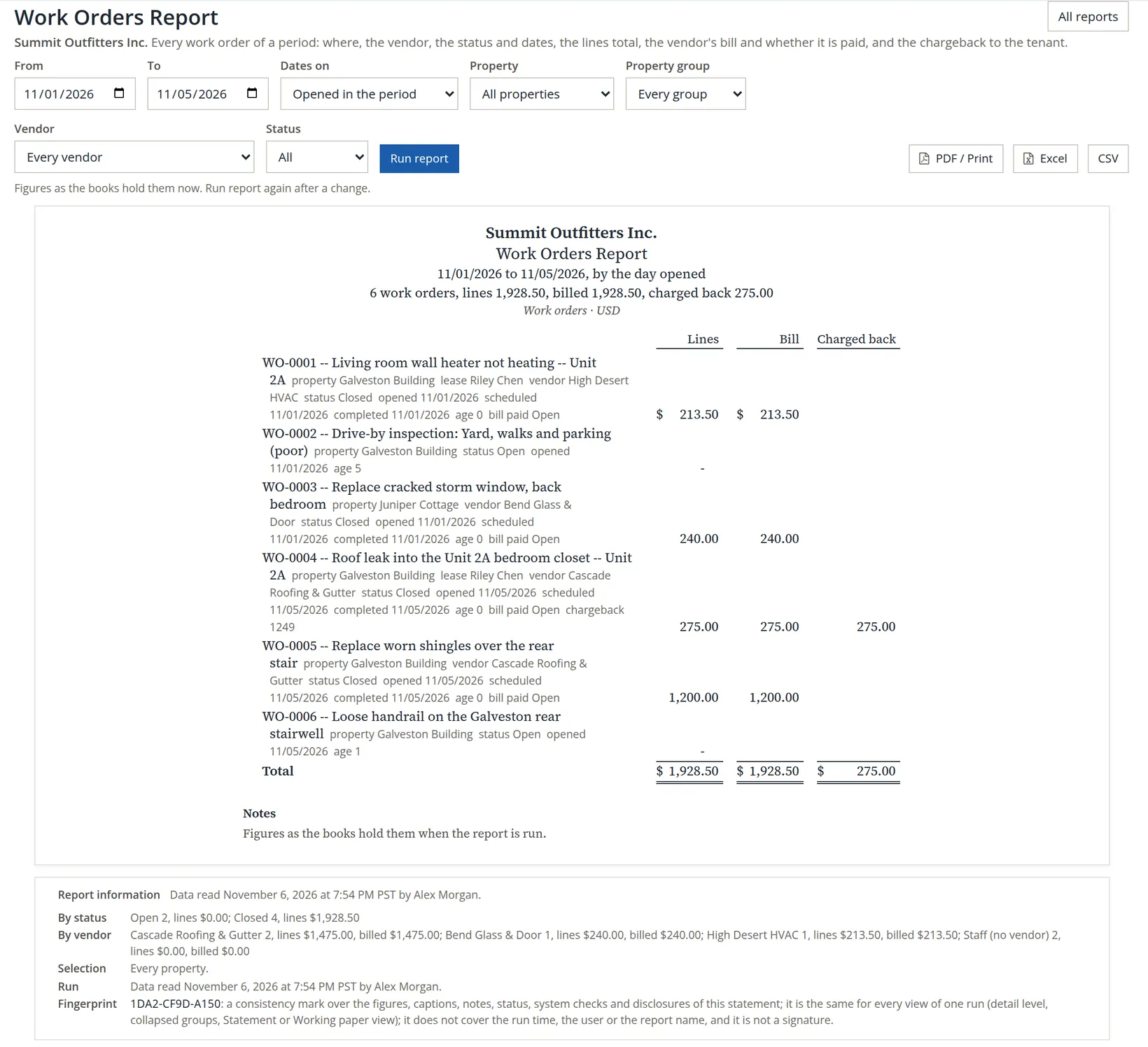
Each line goes back to a work order made in an earlier chapter. Check them one by one:
| Work order | Lines | Bill | Charged back | Where it came from |
|---|---|---|---|---|
| WO-0001 wall heater, unit 2A | 213.50 (145.00 labor + 68.50 parts) | 213.50, High Desert HVAC | -- | Chapter 13.8, Procedures A and B |
| WO-0002 drive-by: yard, walks and parking | -- | -- | -- | Chapter 13.9, Procedure A (open) |
| WO-0003 storm window, Juniper Cottage | 240.00 | 240.00, Bend Glass & Door | -- | Chapter 13.111 |
| WO-0004 roof leak into 2A's closet | 275.00 (180.00 + 95.00) | 275.00, Cascade Roofing & Gutter | 275.00, invoice 1249 to Riley Chen | Chapter 13.8, Procedure C |
| WO-0005 worn shingles, rear stair | 1,200.00 (720.00 + 480.00) | 1,200.00, Cascade, pending approval | -- | Chapter 13.8, Procedure D |
| WO-0006 loose handrail | -- | -- | -- | Chapter 13.10, Procedure C (open) |
| Total | 1,928.50 | 1,928.50 | 275.00 |
The arithmetic: 213.50 + 240.00 + 275.00 + 1,200.00 = 1,928.50, the same in the Lines and Bill columns, because every bill was created from its work order's lines and nobody has changed one since. When the two columns differ, a bill was edited after it was created or a different bill was matched: open that work order before you trust either figure. The four bills all read bill paid Open: the 1,200.00 bill cannot be paid until a second person approves it, and the other three wait for the next payment run (Chapter 3.3). Section 6 finds the same four bills on Unpaid Bills by Property.
The Charged back column holds the only income here: 275.00, invoice 1249 on Riley Chen's lease. Chapter 13.8 showed its two entries: the building's repairs account carries the full 275.00 and its Tenant Reimbursements account the 275.00 recovered, so the net cost of WO-0004 is 275.00 − 275.00 = 0.00. On this report, Lines less Charged back is the building's own share of the repairs: 1,928.50 − 275.00 = 1,653.50.
Opened or completed
Switch Dates on to Completed in the period and run again: the caption reads "4 work orders, lines 1,928.50, billed 1,928.50, charged back 275.00". WO-0002 and WO-0006 drop out, because neither is finished, and their lines are zero, so the money stays the same. Use Opened to see what came in during the month, and Completed to match the work to the month whose bills it produced. Status narrows the list to one step of the six (Chapter 13.8, Section 1); Open means the first step only, so Open lists WO-0002 and WO-0006 and nothing scheduled or in progress, and the Selection line reads "Every property, open work orders."
The totals per status and per vendor
The card on the Reports page promises "totals per status and per vendor". They are in the Report information box (pins 12 and 13), and they add back to the caption:
| Line | What it reads | Arithmetic |
|---|---|---|
| By status | Open 2, lines $0.00; Closed 4, lines $1,928.50 | 2 + 4 = 6 work orders; 0.00 + 1,928.50 = 1,928.50 |
| By vendor | Cascade Roofing & Gutter 2, lines $1,475.00, billed $1,475.00; Bend Glass & Door 1, $240.00; High Desert HVAC 1, $213.50; Staff (no vendor) 2, $0.00 | 275.00 + 1,200.00 = 1,475.00; 1,475.00 + 240.00 + 213.50 + 0.00 = 1,928.50 |
The vendor line is the one to read before a payment run: it is what each vendor's work in the period will cost. To list one vendor's work orders, choose it under Vendor. The Vendor picker lists every vendor contact of the books, store suppliers included; only three have work orders.
Tasks Aging: what is waiting, and on whose desk
Tasks Aging lists every open task on one date, grouped by who has it: first each person, then the unassigned tasks by the role queue that picks them up (Bookkeeper, Leasing, Manager, Maintenance; Chapter 13.10). Each task is counted once, in one of four columns by its age: 0-7 days, 8-14 days, 15-30 days and Over 30 days. The age is the number of days from the day the task was made to the as-of date. It is not counted from the due date: a task made today and due last week is 0 days old. As of a past date the report shows the tasks that were open on that day, even those finished or skipped since, so a month-end review can be run afterwards.
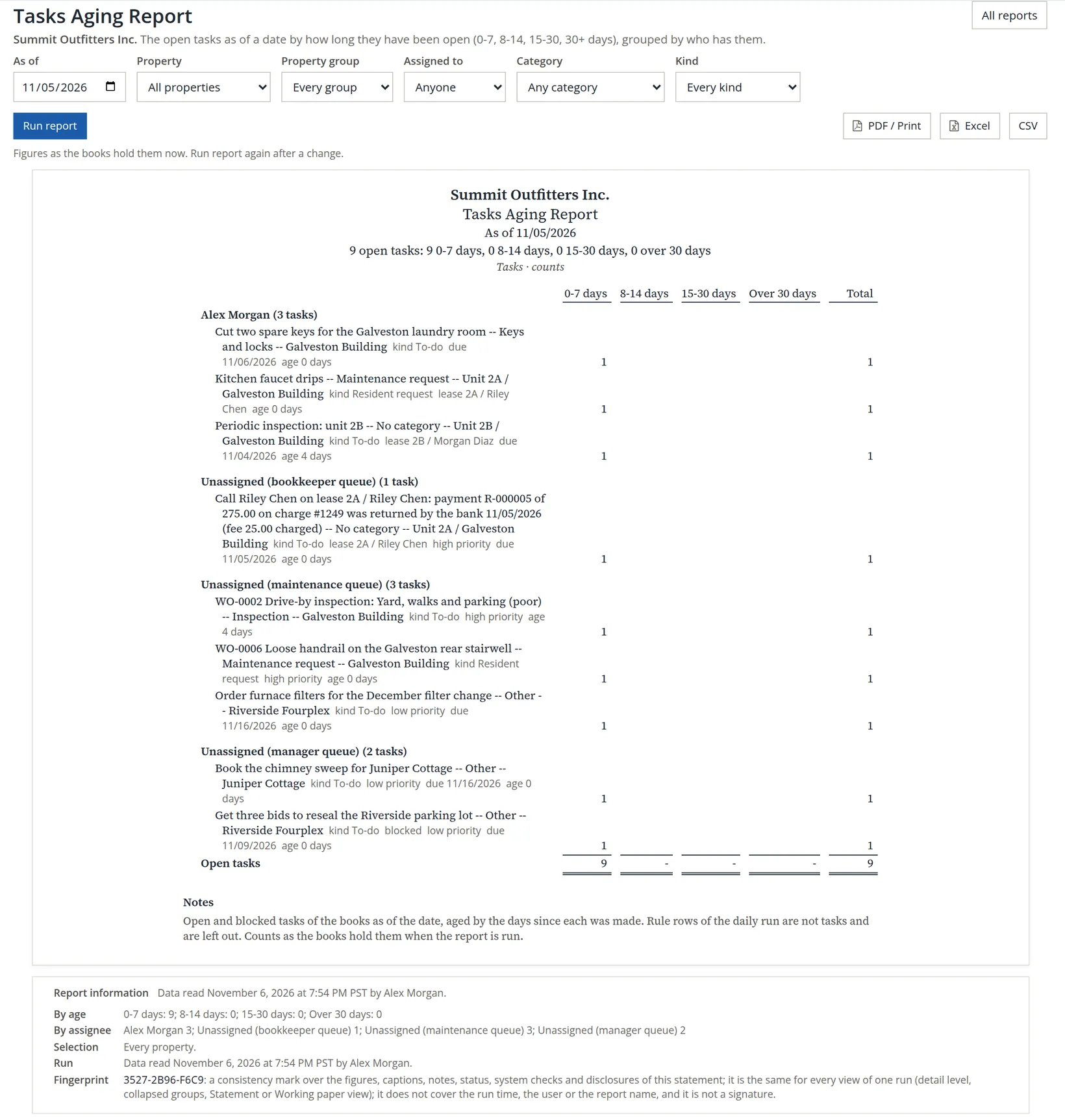
The counts add up across and down. Alex Morgan has 3 tasks, the Bookkeeper queue 1, the Maintenance queue 3 and the Manager queue 2: 3 + 1 + 3 + 2 = 9, and all 9 sit in the 0-7 days column. Chapter 13.10 ended Alex's session with the same nine. Two of them are already four days old, and both were made on November 1: the 2B periodic inspection, scheduled for November 4 in Chapter 13.9 and not walked, because the manager was called to another building that day and Summit is agreeing a new time with the tenant (Chapter 13.10), and WO-0002, the drive-by's gutter repair (5 − 1 = 4 days each). Everything else was made on November 5 and is 0 days old.
Two kinds of row are treated differently. A blocked task is still open work and stays in the count; the statement marks it blocked after its kind, and the CSV's State column reads blocked for the parking-lot bids. The automatic rows of the daily run, such as Close October 2026 and the October trust reconciliations on the Today board, are not tasks and are left out, as the report's note says. Run it as of October 31 and it answers "No open tasks as of 10/31/2026.", because the first task was made on November 1.
The question the report refused
The manager asked what the list would look like at the end of the month if nothing more were done. Alex set As of to 11/30/2026 and clicked Run report.

The report measures the past; it does not forecast. It cannot know which tasks will be done by November 30, nor which will be added. The answer has to be worked out by hand, from the report as of 11/05/2026: a task still open on 11/30 that was made on 11/01 would be 30 − 1 = 29 days old, in the 15-30 days column, and one made on 11/05 would be 30 − 5 = 25 days old, in the same column. So if nothing moves, all nine land in 15-30 days on November 30, and the 2B inspection and WO-0002 cross into Over 30 days on December 2, when they turn 31. To see what falls due ahead, use the due dates instead: the Tasks page filters by due date (Chapter 13.10, Procedure D).
Nobody needs to discuss a task that is two days old. Start the review at Over 30 days and work left; ask of each old task whether it is really waiting for something (then block it, with the reason) or simply forgotten. A task written down two days after the call also looks two days younger than it is, so add tasks while the caller is still on the line.
Meter Readings: what was read, and what was charged
The Meter Readings report lists every reading of the period by its read day, grouped by property, one line per reading: the unit, the utility and its unit of measure, the meter's serial and the read day, then the previous reading, the reading, the consumption, any flags (Start, High usage, Estimated, Rollover), the rate in force, the invoice, the lease and tenant (or Vacant) and the state: Recorded (saved, not yet charged), Charged or Void. The two amount columns are Base, the base charge billed with the reading, and Charge, what was billed in all.
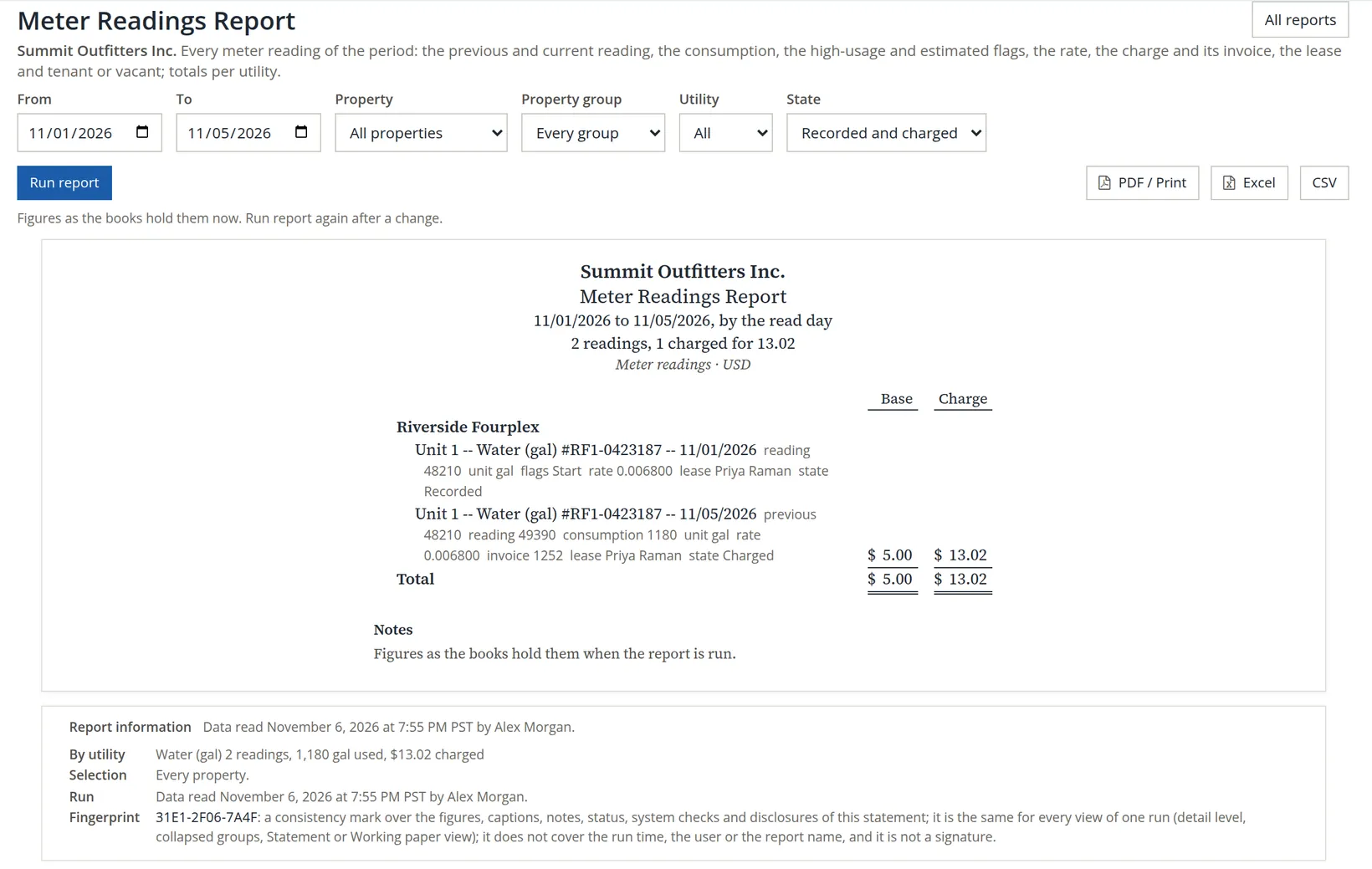
Check the charged line against Chapter 13.9, where the meter was read and the charge posted:
| Step | Arithmetic | Result |
|---|---|---|
| Consumption | (49,390 − 48,210) × multiplier 1 | 1,180 gal |
| Usage at the rate | 1,180 × 0.006800 | 8.024 |
| Plus the base per reading | 8.024 + 5.00 | 13.024 |
| Rounded once, half up, to the cent | 13.02, invoice 1252 |
The invoice ties to the ledger as Chapter 13.9 showed it: Accounts Receivable (Priya Raman) debit 13.02, Revenue:Riverside Fourplex:Tenant Reimbursements credit 13.02. The Charge column's total, 13.02, is therefore the water income of the period, and it agrees with the caption.
The Base column follows the charge. The start reading is never charged (there is nothing before it to measure from), so its Base is empty; the 11/05 reading carries the 5.00 base billed with it. The Base total, 5.00, is therefore the base actually billed, and the Charge total less the Base total is the usage: 13.02 − 5.00 = 8.02, the 8.024 of the table rounded. The totals per utility that the card promises are in the Report information box: one By utility line per utility, here Water (gal) 2 readings, 1,180 gal used, $13.02 charged. A line still Recorded after the next read day is a reading waiting for a charge run, usually because no rate was in force (Chapter 13.9, Procedure F).
Unpaid Bills by Property: what the books owe, building by building
Unpaid Bills by Property lists every bill open on the as-of date. A bill belongs to a property when its lines use that property's accounts (for example Expenses:Galveston Building:Repairs); every other bill, the store's included, goes under Books. Each line gives the vendor, the vendor's bill number when there is one, the bill and due dates, the age, the approval state, and the Amount, Paid and Open columns. The age counts days past the due date, in five groups: Current (not yet due), 1-30 days, 31-60 days, 61-90 days and over 90 days.
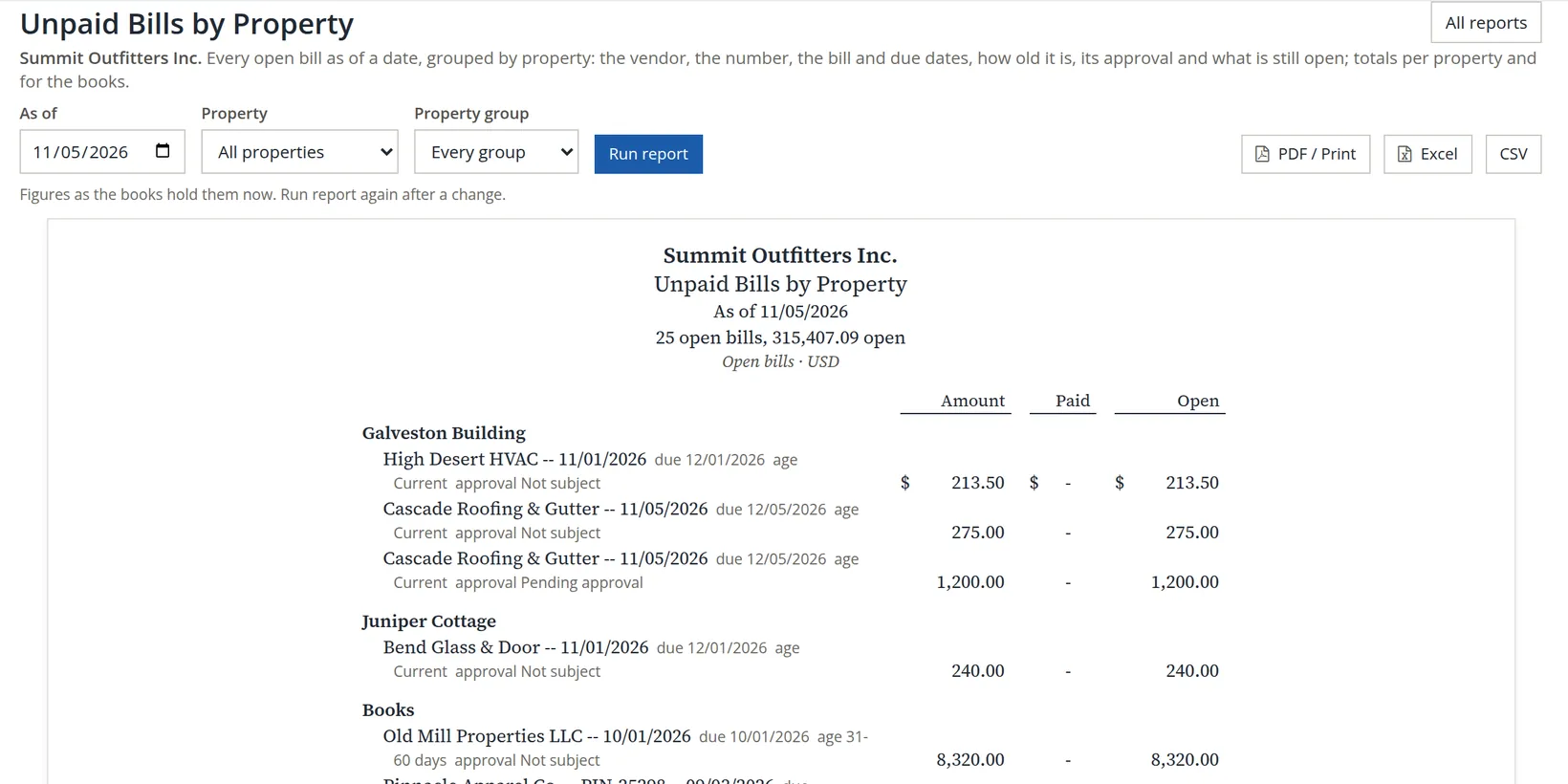
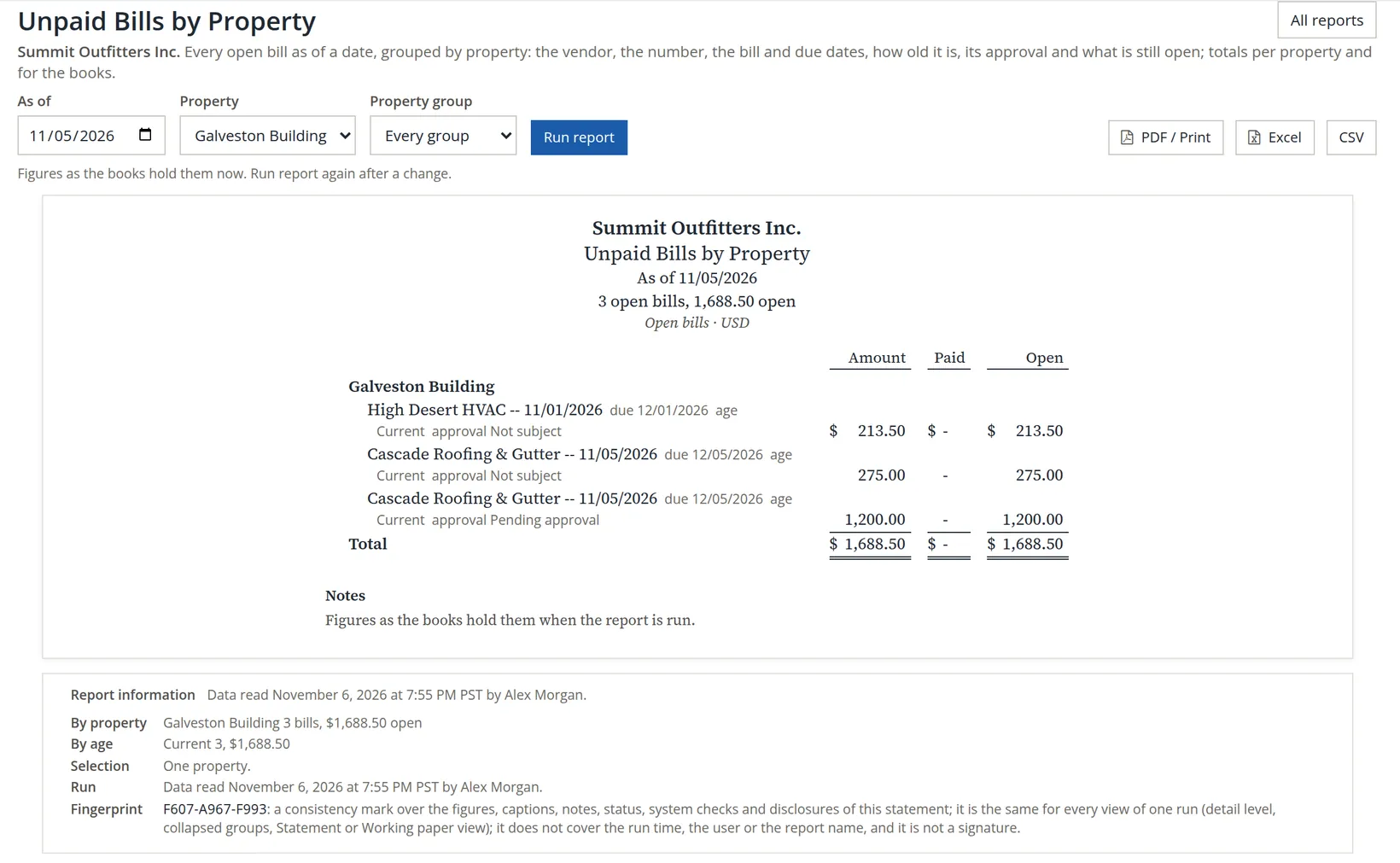
The approval column takes one of four words. Pending approval is the 1,200.00 roofing bill of WO-0005: it is at or above the Galveston rule's 1,000.00 and waits for a second person (Chapter 13.8, Procedure D). Not subject means no rule held the bill: WO-0004's 275.00 is under the limit, and WO-0001's 213.50 was entered before the rule existed. Approved and Rejected appear once someone decides. The approval is a flag on the bill, not an entry: the 1,200.00 is in the books' payables like any other bill.
The subtotals are under the statement, in the Report information box: one line by property and one by age.

To see one building's bills alone, choose it under Property and run again.
Tie the report to the work orders, the vendors and the ledger
| Check | Arithmetic | Agrees with |
|---|---|---|
| The Galveston Building | 213.50 + 275.00 + 1,200.00 = 1,688.50 | the figure above, and By property |
| Galveston Building plus Juniper Cottage | 1,688.50 + 240.00 (Juniper Cottage) = 1,928.50 | Work Orders, billed 1,928.50: no work order bill is paid yet |
| The store's bills (Books) | 315,407.09 − 1,928.50 = 313,478.59, 21 bills | By property, Books 21 bills |
| Paid and open | 315,483.09 billed − 76.00 paid (Alpine Sports Wholesale INV319135) = 315,407.09 | the report's Total line |
| By age | Current 14,234.58 + 1-30 227,056.51 + 31-60 74,116.00 (8,320.00 + 65,796.00) = 315,407.09 | By age, and Aged Payables below |
Aged Payables (Reports → Vendors and payables; it reads like Aged Receivables, Chapter 6.6) is the books' own list of what is owed, and it checks itself against the payables ledger. Type the same day, 11/05/2026, in its As of date and click Apply. Under the statement, Report information reads "All system checks agree."; click Show details beside it to open the System checks shown at the foot of the figure.
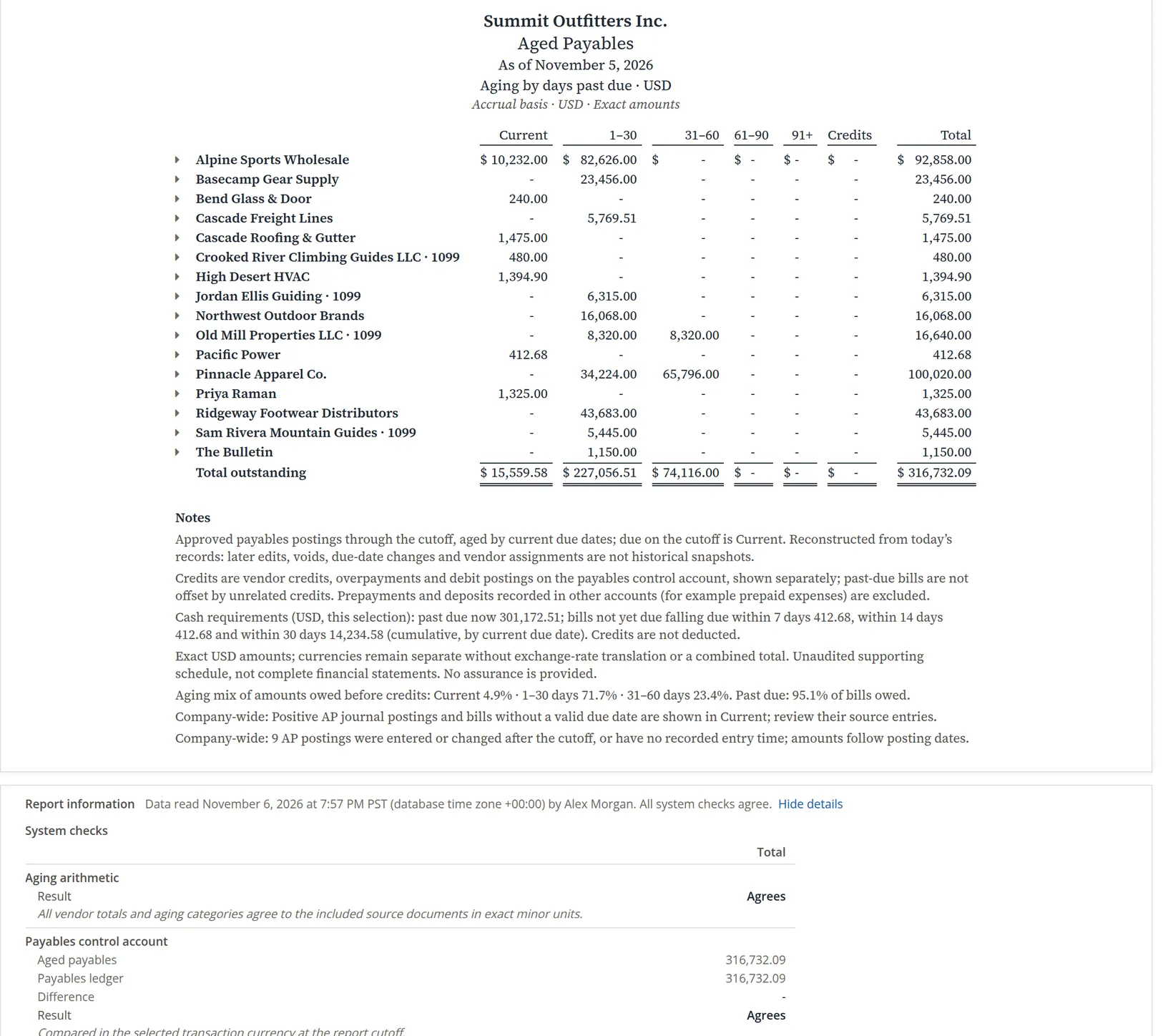
The two reports differ by one line. Aged Payables lists 26 open documents; Unpaid Bills by Property lists 25 bills. The 26th is Priya Raman's 1,325.00: the prepaid rent that the opening-balance import made a customer credit (Chapter 13.2), which Aged Payables counts with the payables because the books owe it to her.3 So 315,407.09 + 1,325.00 = 316,732.09, and the same 1,325.00 is the whole difference in the Current column: 14,234.58 + 1,325.00 = 15,559.58. The 1-30 and 31-60 columns agree to the cent. Through Aged Payables' system check, every bill on the property report is tied to the payables ledger.
Leave Aged Payables on Friday's date and it reads 30 open documents, 18 vendors and 316,907.09, still Agrees. The extra 175.00 (316,907.09 − 316,732.09) is two rent concessions given on 11/06 and held as customer credits until the next rent charge: 75.00 to Avery Quill, the new tenant of Riverside unit 2, and 100.00 to Riley Chen (Chapter 13.5). Like Priya's credit, they are owed to tenants, not bills, and any later credit to a tenant will raise the figure again. That is why the review types its own date into every report.
A bill marked Pending approval cannot be paid, and Combined Bill Payments leaves it out (Chapter 13.8). Before each payment run, look down the approval column: every pending bill needs an approver lined up, or the vendor waits while the bill sits in Current and then moves into 1-30.
Vendor Compliance: may this vendor still go into a unit?
The Vendor Compliance Report (the Vendors page links to it under the same name) lists every vendor in use: linked to a property, on a work order of the last twelve months, or with a compliance record. One line per vendor gives its trades and properties, the insurance expiry and its state, the workers' compensation and license expiries, the W-9 and the open work orders. The vendor's state is the worst of its records: worst first, Expired, Missing, Expiring (within the chosen window) or Current, and the lines are listed in that order. The report has no date box: it is always as of today, Friday 11/06/2026 in the figure, and Expiring sets the window, 30, 60 or 90 days. It has no money of its own, so its one column, Rows, counts the vendors, one per line.
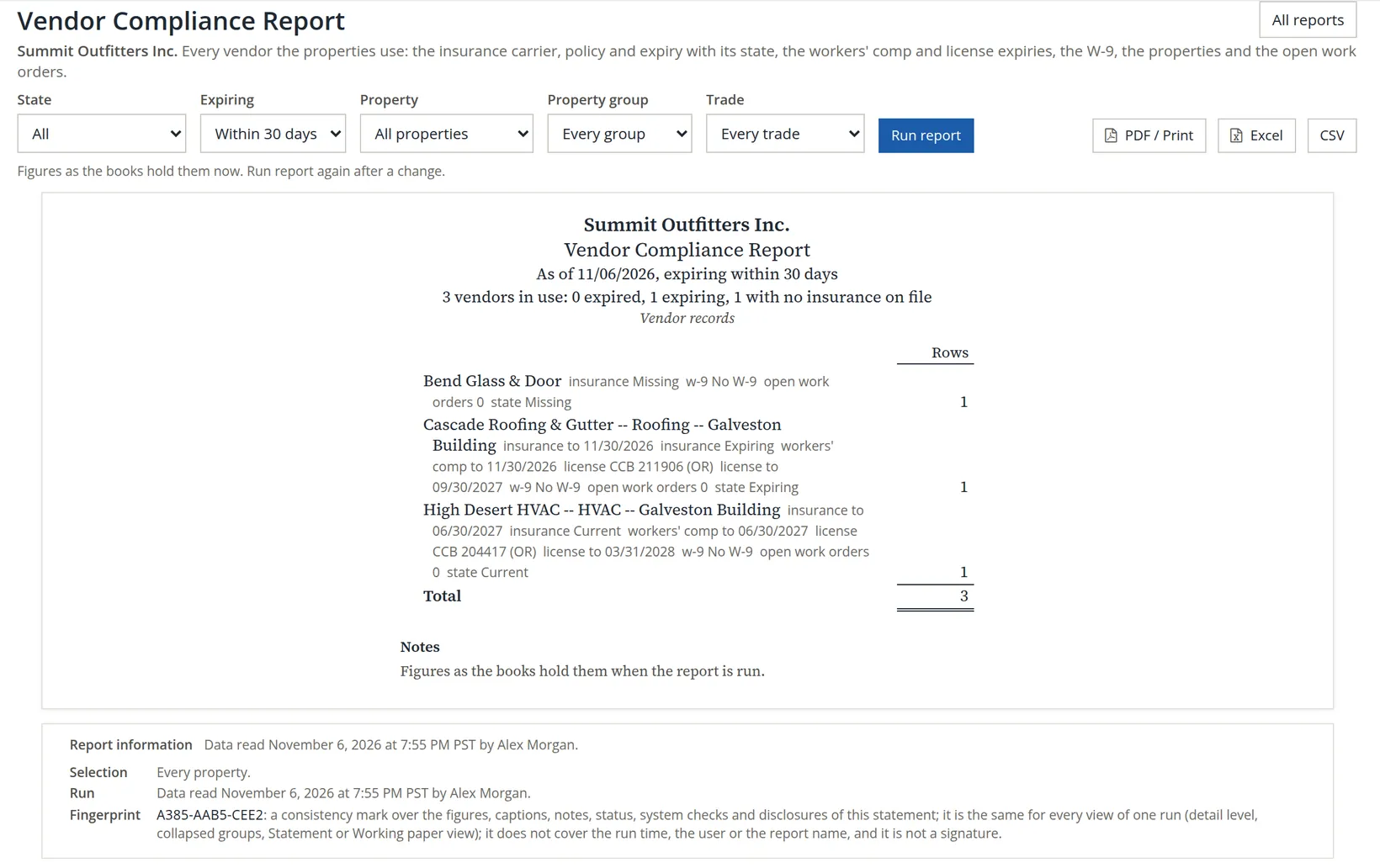
Read the three lines as the manager would. Cascade Roofing & Gutter is insured to 11/30/2026, which is 30 − 6 = 24 days away on Friday, inside even the 30-day window; its license (CCB 211906, to 09/30/2027) is fine.4 Chapter 13.8 noted that its agent has promised the renewal certificate before November 30: until the new expiry date is entered on the vendor's Compliance card, Cascade stays Expiring, and after November 30 it turns Expired. High Desert HVAC is current for 236 more days, to 06/30/2027. Both counts are taken on the day of the run (Friday here) and fall by one each day. Bend Glass & Door was never linked to a property and nobody recorded its insurance, but it did the storm window at Juniper Cottage (WO-0003), so it is in use and shows as Missing. All three read No W-9, which matters at year end for the 1099s (Chapter 6.9).
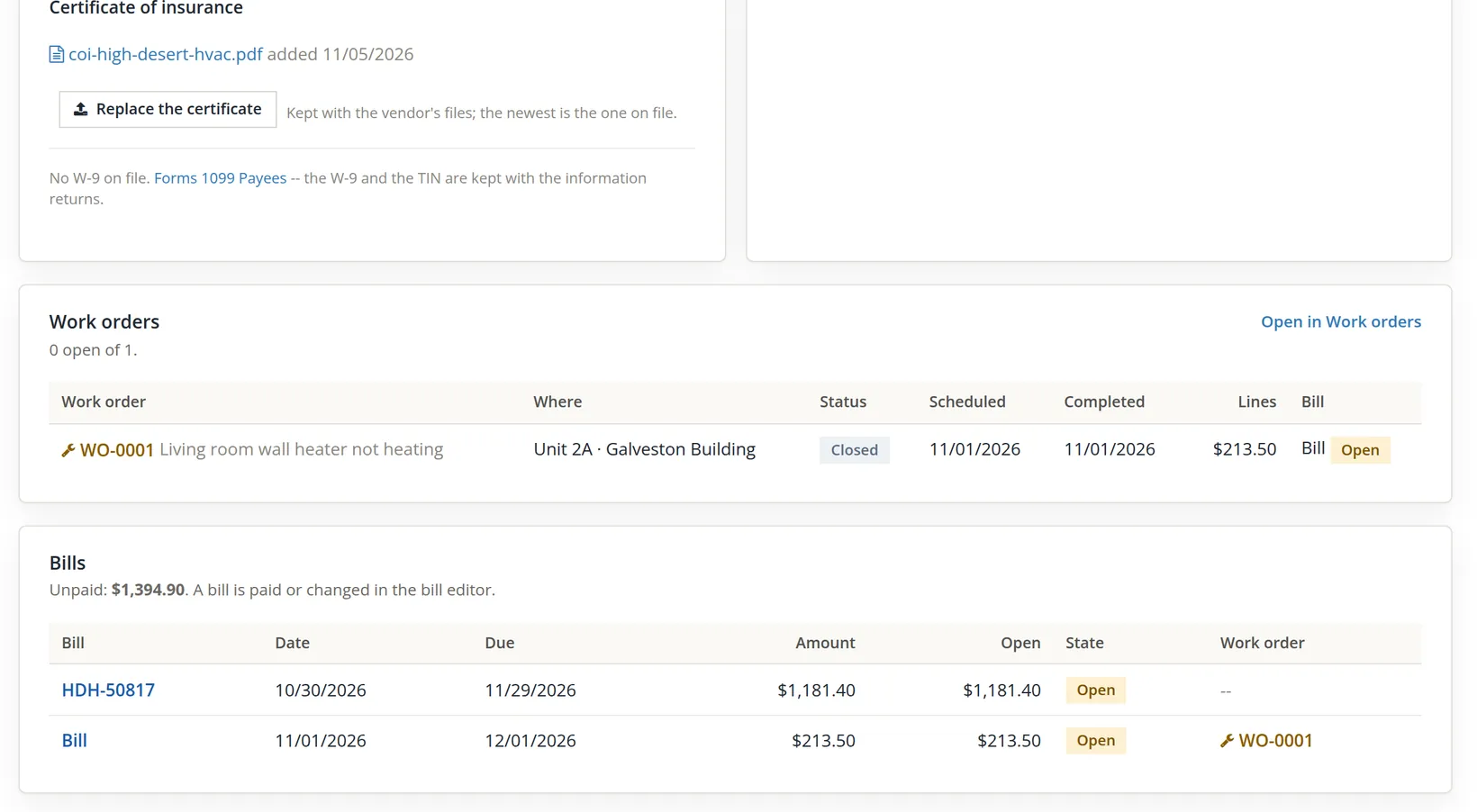
The report shows the state of the records, not the paper. The certificate itself is filed on the vendor's page, and the Vendors list carries the same states as chips, with what the books owe each vendor.
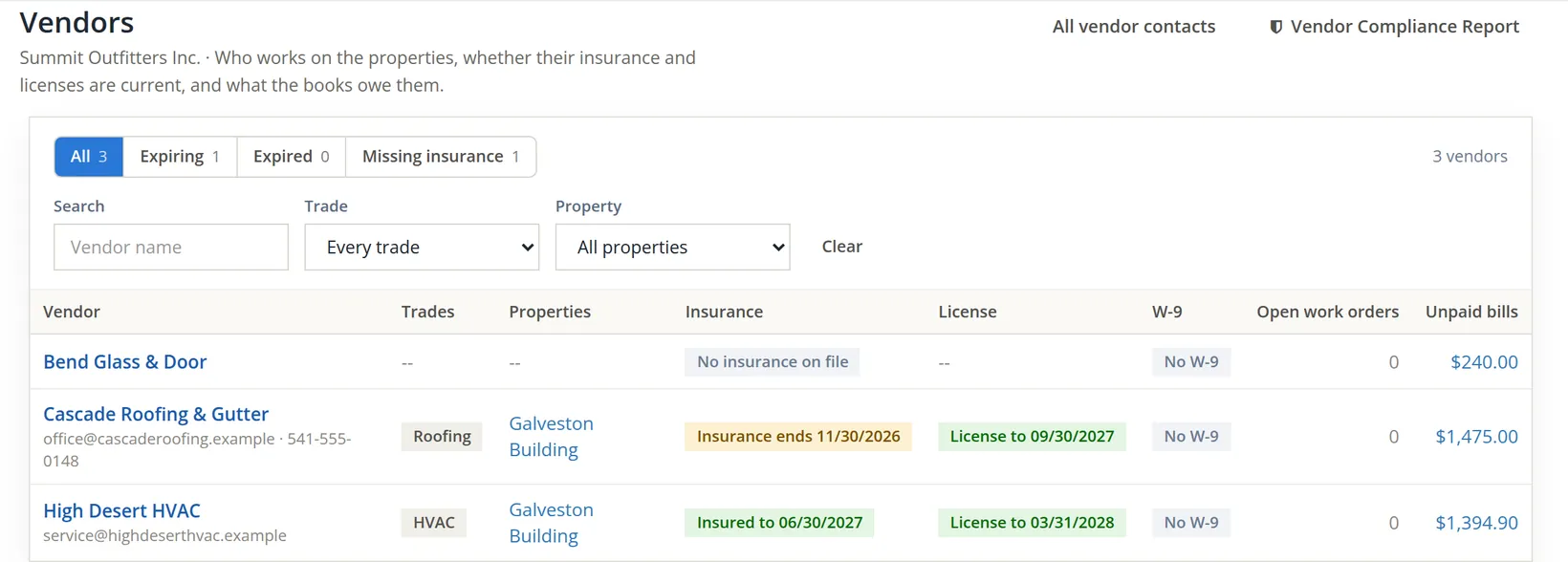
The Unpaid bills column of the Vendors list ties to the bills report and to Aged Payables: Cascade 275.00 + 1,200.00 = 1,475.00; Bend Glass & Door 240.00; High Desert HVAC 213.50 + 1,181.40 = 1,394.90. The 1,181.40 is HDH-50817, the store's October rooftop service, so it sits under Books on Unpaid Bills by Property and not under the Galveston Building: the Vendors list adds up everything the books owe the vendor, the property report splits it by the accounts on each bill. Open the vendor to see both, and the certificate.
An insurer takes a week or two to issue a renewal certificate, and a vendor's agent takes longer to send it. Running Vendor Compliance with Expiring at Within 60 days at each monthly review gives two reminders before a certificate lapses, and a third look on the Vendors list's Expiring chip. With Require current vendor insurance on work orders switched on (Chapter 13.1), an expired vendor cannot be put on a new work order at all.
PDF, Excel and CSV
The three buttons beside Run report export the run you see, with the same choices.
- PDF / Print opens a PDF on letter paper in a new tab: the statement as on screen, the report's title and the company in the footer of each page (for example Work Orders Report | Summit Outfitters Inc.), and the Report information with the fingerprint on the last page. File it with the review, or print it from the viewer.
- Excel downloads the statement as a workbook with two sheets, Statement and Report information.
- CSV downloads one row per record with every column, including those the statement folds into small type, and the caption as its first line. Dates are written 2026-11-05, amounts without separators (1200.00) and states as the module stores them (closed, recorded, missing); the age groups of Unpaid Bills read as on the screen (31-60 days).
| Report | CSV columns |
|---|---|
| Work Orders | WO no., Title, Property, Unit, Lease, Vendor, Status, Opened, Scheduled, Completed, Age, Lines, Bill no., Bill, Bill paid, Chargeback, Charged back |
| Tasks Aging | Assignee, Category, Property, Subject, Kind, Unit, Lease, Priority, Due, Age (days), Age bucket, State |
| Meter Readings | Property, Unit, Meter, Read on, Previous, Reading, Consumption, Unit, Flags, Rate, Base, Charge, Invoice, Lease, State |
| Unpaid Bills by Property | Property, Vendor, Bill no., Bill date, Due, Age, Approval, Amount, Paid, Open |
| Vendor Compliance | Vendor, Trades, Properties, Insurance to, Insurance, Workers' comp to, License, License to, W-9, Open work orders, State |
The CSV is the version to sort and filter. Sorting Tasks Aging by Age (days), or Unpaid Bills by Due, gives the review its order of business in one click, and filtering the State column of Tasks Aging to blocked lists every task that is waiting on something.
The monthly maintenance review
Run the five reports in this order on the first working day of the month, for the month just ended. Each step names what to look for and what to do about it.
- 1
Work Orders for the month just ended, opened and then completed
There are no period presets: type the first and last day of the month in From and To (10/01/2026 and 10/31/2026 for October) and click Run report; then set Dates on to Completed in the period and run again. Every line with a vendor should have a bill by the end of the month; compare Lines with Bill and open any work order where they differ. Every chargeback chosen should show an invoice number. A work order still Open after the month is either waiting for a vendor (schedule it) or forgotten.
- 2
Tasks Aging, as of the last day of the month
Type the month's last day in As of and click Run report. Start at Over 30 days. Each old task is done, blocked with a reason, or reassigned before the meeting ends. Sort the CSV by age for the list.
- 3
Meter Readings for the month just ended, then State Recorded
Type the month's first and last day in From and To. Every submetered reading after the start should be Charged with an invoice. A reading still Recorded needs a rate or a charge run (Chapter 13.9). The Charge total is the month's utility income for all the properties selected; for one property's figure, choose it under Property and run again.
- 4
Unpaid Bills by Property, as of the last day of the month
Type the month's last day in As of. Run it once for every property; the subtotals per building and per age group are in Report information. Find an approver for every Pending approval. Then run Aged Payables as of the same day and explain any difference, as in Section 6.
- 5
Vendor Compliance, within 60 days
Set Expiring to Within 60 days and click Run report. Nobody under Expired or Missing gets the next work order. Ask every Expiring vendor for the renewal certificate, enter the new dates on its Compliance card, and file the certificate (Chapter 13.8, Section 2).
- 6
File the PDFs
Save the five PDFs with the meeting notes. The fingerprint on each proves later which figures the meeting saw.
At Summit this first review ended with three actions: find a second member with edit on lease ledgers to approve the 1,200.00 roofing bill, chase Cascade's renewal certificate before November 30, and ask Bend Glass & Door for a certificate and a W-9 before it works on a rental again. The 2B inspection stays open until the new time agreed with the tenant, and the aging report will keep it in view.
Maintenance reporting hygiene
- [x] Each report was run with the date its question needs: a period for Work Orders and Meter Readings, an as-of date for Tasks Aging and Unpaid Bills.
- [x] Work Orders: Lines equal Bill on every billed work order, and every tenant chargeback has an invoice.
- [x] Tasks Aging: nothing in Over 30 days without a reason; blocked tasks carry the reason they are waiting.
- [x] Meter Readings: no reading left Recorded after its charge run; Charge total agrees with the utility invoices.
- [x] Unpaid Bills by Property: every Pending approval bill has an approver; the total agrees with Aged Payables, with every difference explained.
- [x] Vendor Compliance: nothing Expired; every Expiring vendor has a renewal certificate requested; Missing vendors get no new work.
- [x] The PDFs, with their fingerprints, are filed with the review notes.
Check your understanding
1. The Work Orders report shows lines 1,928.50 and charged back 275.00. What did the period's repairs cost the buildings themselves, and why?
Answer
1,928.50 − 275.00 = 1,653.50. The 275.00 of WO-0004 was charged back to Riley Chen on invoice 1249, so once it is paid it offsets that repair in full.
2. Why does Work Orders by Completed in the period list 4 work orders, but the same 1,928.50 of lines, as by Opened?
Answer
WO-0002 and WO-0006 are not completed, so they drop out, and neither has any cost lines yet, so the total does not change.
3. A task was made on November 1 and is due November 20. How old is it on the report as of November 5, and in which column?
Answer
4 days, in 0-7 days. The age counts from the day the task was made, not from the due date.
4. You want Tasks Aging as of November 30 to see what will be late. What happens, and what do you do instead?
Answer
The report refuses: "The as-of day cannot be after today." Work it out from today's report (a task made on 11/01 would be 29 days old on 11/30), or filter the Tasks page by due date.
5. The Meter Readings report shows Base 5.00 and Charge 13.02, and the start reading has no Base. How much was billed for the usage itself, and why is the start reading's Base empty?
Answer
8.02: the charge 13.02 less the base of 5.00 (1,180 × 0.006800 = 8.024, rounded). The start reading is never charged, because there is nothing before it to measure from, so it carries no base.
6. Unpaid Bills by Property totals 315,407.09, Aged Payables 316,732.09. Is something wrong?
Answer
No. The 1,325.00 difference is Priya Raman's customer credit from the import, which Aged Payables lists with the payables and which is not a bill. Aged Payables agrees with the payables ledger.
7. Why does Bend Glass & Door appear on Vendor Compliance, although it is linked to no property?
Answer
It did a work order (WO-0003) in the last twelve months, so it is a vendor in use. With no insurance recorded, its state is Missing.
Notes
- Chapter 13.11 counts the 240.00 bill among the approved bills for the owner's balance, because it needs no approval; on this chapter's reports it reads Not subject, because the Galveston approval rule does not cover Juniper Cottage. ↑
- The State choices are Recorded and charged (the default, every live reading), Recorded, Charged, Void, and All, void too, which adds the voided readings to the live ones. ↑
- Chapter 13.9's last note explains why the 1,325.00 is a customer credit and not a prepayment that the lease applies by itself. ↑
- What insurance and licenses a contractor must carry, and whether a landlord may hire one without them, depends on state law and the property's own insurance. Oregon contractors carry a CCB license. This chapter is not legal advice. ↑