
Chapter 3.3
Paying Bills
How to pay one bill, how to pay several bills of one or many vendors in a single sitting, and how to choose what to pay first when cash is limited.
When you finish this chapter you will be able to:
- Pay a single bill, in full or in part, by check, transfer or card.
- Pay several bills at once, one payment per vendor.
- Explain the entry a bill payment makes.
- Plan a payment run around due dates and cash.
Contents
What happens in the books
The bill already recorded the cost and the debt. Paying it settles the debt with money from the bank:
| Payment | Debit | Credit |
|---|---|---|
| Pacific Power, $412.68 | Accounts Payable 412.68 | Operating Checking 412.68 |
| Alpine Sports Wholesale, check 2257 | Accounts Payable 61,702.00 | Operating Checking 61,702.00 |
No expense account is touched: the cost was counted when the bill was entered.2
Pay one bill
Open the bill and click Pay this bill, or click Pay beside it on the Bills to pay list.
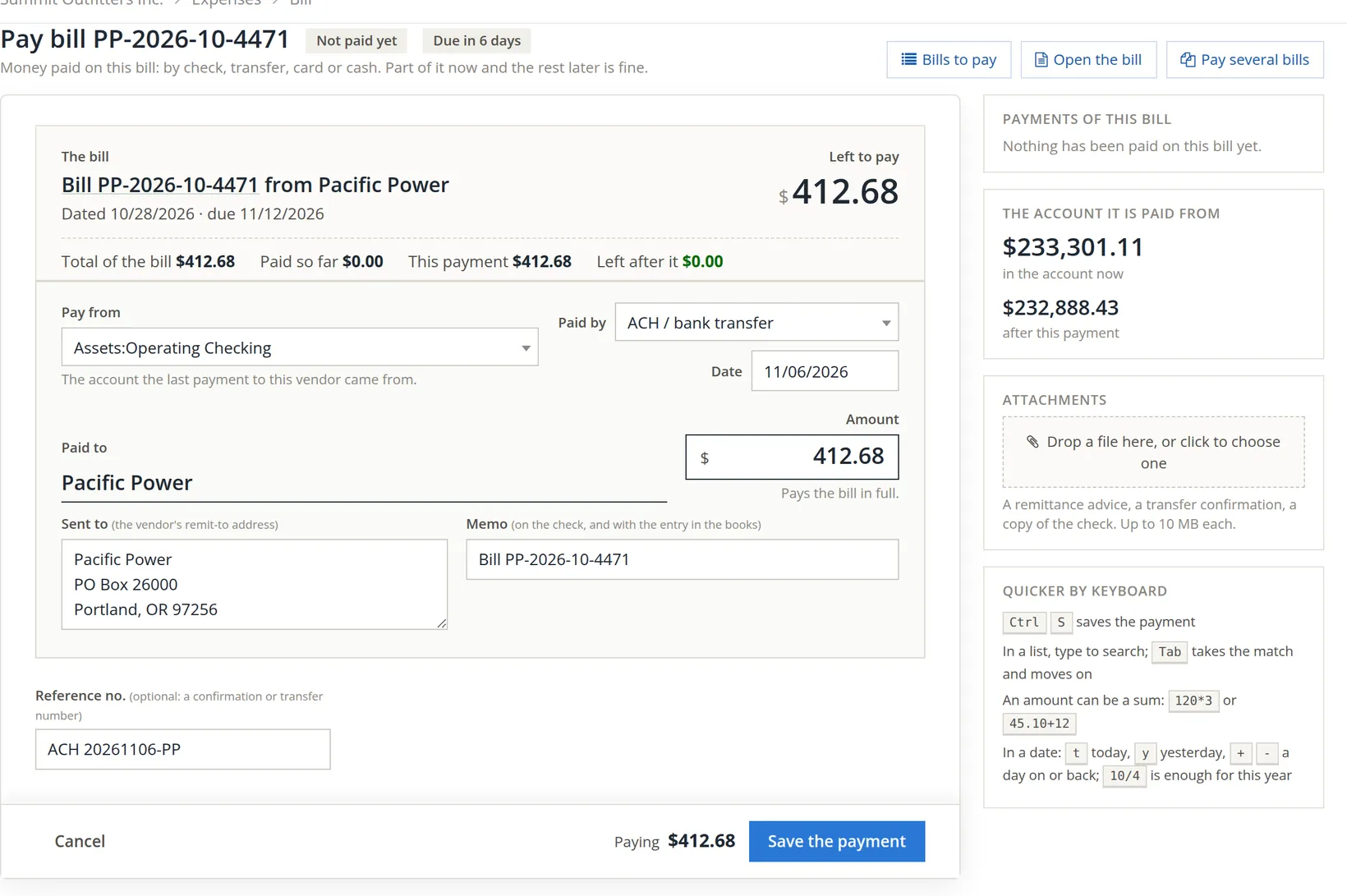
- 1
Choose the account it is paid from 1
BizBooks360 offers the account the last payment to this vendor came from. The side panel A shows its balance before and after, so you see at once whether the money is there.
- 2
Choose how it is paid 2 and the date 3
Check, ACH or bank transfer, EFT, wire, credit or debit card, a payment platform, cash or other. The date is the day the money leaves, or the date on the check.
- 3
Check the amount 4
It starts at what is left to pay, and the line under it says "Pays the bill in full." Type less to pay part now and the rest later.
- 4
Check where it is sent 5 and the memo 6
The remit-to address and a memo naming the bill fill themselves in. For a check, the memo prints on it; vendors use it to match the payment to their invoice.
- 5
Add the reference 7 and save 8
For a transfer, its confirmation number. Then Save the payment. The banner confirms: "The bill is paid in full."
To print the check rather than write it by hand, set up check printing first (Chapter 3.1, and Chapter 4.5 for printing checks in batches).
Where the books require a second person to approve a property's bills over a set amount (Chapter 13.8), a bill under that rule cannot be paid until it is approved. Its Pay this bill buttons are greyed, and if you reach its payment page anyway, BizBooks360 sends you back to the bill with a red message, "This bill is waiting for approval: it cannot be paid yet.", which stays until you close it. Someone other than the person who entered the bill approves it under Property Management → Money → Approvals; then pay it as above.
Pay several bills
Go to Expenses → Combined Bill Payments. Every unpaid bill is listed, oldest due first. The bills of one vendor are paid together, as one payment: one check, one line on the bank statement.
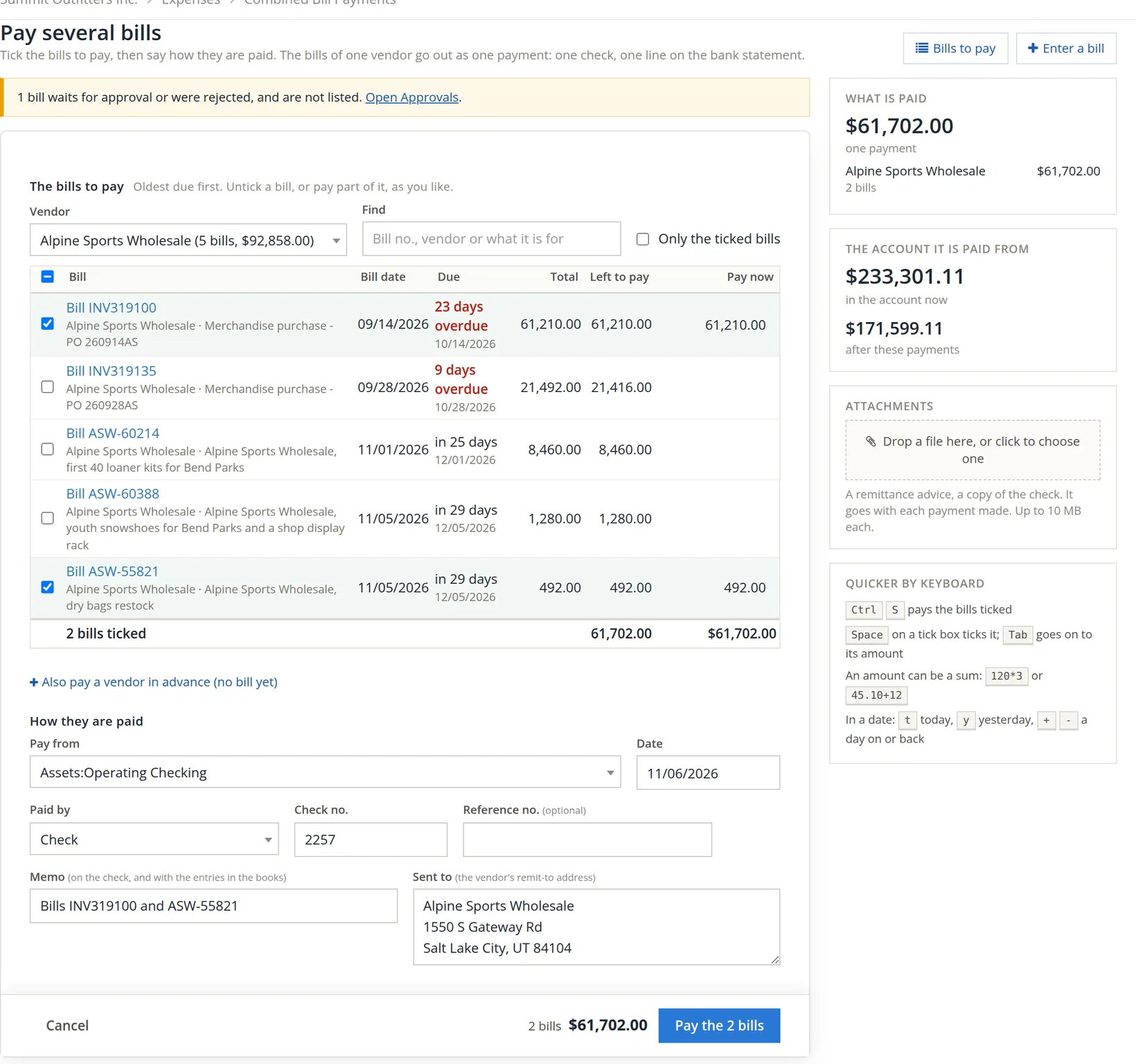
- 1
Narrow the list 1
Choose a vendor (each shows its number of bills and total owed), or search with Find. Only the ticked bills 2 hides everything you have not ticked, for a last check.
Bills that wait for a second person's approval, or that were rejected, are not on the list at all. When there are any, a yellow strip above the list counts them B, and its Open Approvals link goes to Property Management → Money → Approvals, where they are decided.
- 2
Tick what to pay 3 and untick what to leave 4
Alpine has five bills open. Summit pays INV319100 and the new dry-bag bill, leaves INV319135 for next week, and leaves the two bills not due until December (ASW-60214 and ASW-60388) unticked. A ticked bill's Pay now 5 starts at what is left; change it to pay part.
- 3
Check the total 6
"2 bills ticked … $61,702.00". Also pay a vendor in advance (no bill yet) 7 adds a prepayment to the same run.
- 4
Say how they are paid 8
Pay-from account, date, method, the check number 9, a memo. The Sent to address is the vendor's. Look hard at Pay from: it starts on an account BizBooks360 proposes, which need not be the one the check is drawn on (in Summit it offered Money Market Savings), so Summit changes it to Operating Checking before typing check no. 2257.
- 5
Click Pay the 2 bills 10
The button names how many bills and how much, as a last check.

Planning a payment run
Pay bills once or twice a week, not as they arrive. In each run:
- Look at the Cash forecast on the Dashboard (Chapter 1.4) and decide how much you can pay.
- Open Combined Bill Payments. Bills are oldest due first.
- Pay first what costs most to pay late: payroll taxes, rent, utilities, anything with a late fee or a supplier who will stop shipping.
- Take early-payment discounts when the terms offer them.3
- Leave the rest ticked off, and note in each bill's accounts-payable note when you expect to pay it.
The sample company has $301,172.51 of bills past their due date, 15 bills in all and some of them five weeks late, while holding more than enough cash. Paying vendors late when the money is there costs goodwill and, often, better prices. A regular payment run prevents it.
Common mistakes and how to fix them
| Mistake | What happens | Fix |
|---|---|---|
| Paying with a new expense or check instead of paying the bill | The cost is counted twice and the bill stays open. | Delete the expense or check, then pay the bill. Deleting needs the delete permission for that kind of entry; ask the owner if it is refused. |
| Wrong pay-from account | One bank account is short, another long, and neither reconciles. | Open the payment and change the account. |
| Check number typed wrong | The check register and the bank statement disagree. | Open the payment and correct the number. |
| Paying a bill twice | The vendor holds a credit; your bank is short. | Ask the vendor for a refund, or record a vendor credit to use on their next bill (Chapter 3.4). |
Check your understanding
1. Which account is debited when a bill is paid?
Answer
Accounts Payable. The bank is credited.
2. You tick three bills: two from one vendor, one from another. How many payments are made?
Answer
Two: one per vendor.
3. A $5,000 bill can only be half paid this week. What do you type in Pay now?
Answer
2,500.00. The bill stays open with $2,500.00 left to pay.
Notes
- Notes give background, exceptions and the reasons behind a rule. ↑
- On the cash basis, reports count the cost when it is paid. The entries are the same; only the reports differ (Chapter 1.2, Section 4). ↑
- "2/10 net 30" means 2% off if paid within 10 days, otherwise the full amount in 30. Skipping a 2% discount to keep the money 20 more days costs the equivalent of about 36% a year. ↑