
Chapter 3.2
Entering a Bill
How to record a vendor's bill you will pay later: the vendor, the dates, what it was for, and goods received into stock, so that what you owe is always known and nothing is paid twice or forgotten.
When you finish this chapter you will be able to:
- Say when to enter a bill and when to record an expense instead.
- Enter a bill with its number, dates, terms and accounts.
- Receive stock on a bill so inventory and average cost update.
- Explain the entry a bill makes, and find bills to pay.
Contents
Bill or expense?
| You have… | Record | Chapter |
|---|---|---|
| A bill to pay later (it has a due date) | A bill, now; then a bill payment when you pay | 3.2, 3.3 |
| A receipt for something already paid (card, debit, cash) | An expense | 3.1 |
| A payment you are making by check right now, with no bill entered | A check | 3.1 |
The bill form says so itself: "Something to pay later… Already paid? Record an expense instead."
What happens in the books
A bill records the cost now and the debt now, even though no money moves until you pay:
| Bill | Debit | Credit |
|---|---|---|
| Pacific Power, $412.68 | Utilities 412.68 | Accounts Payable 412.68 |
| Alpine Sports Wholesale, $492.00 | Merchandise Inventory 456.00 Freight-In 36.00 | Accounts Payable 492.00 |
Paying the bill later (Chapter 3.3) debits Accounts Payable and credits the bank.
Enter a bill
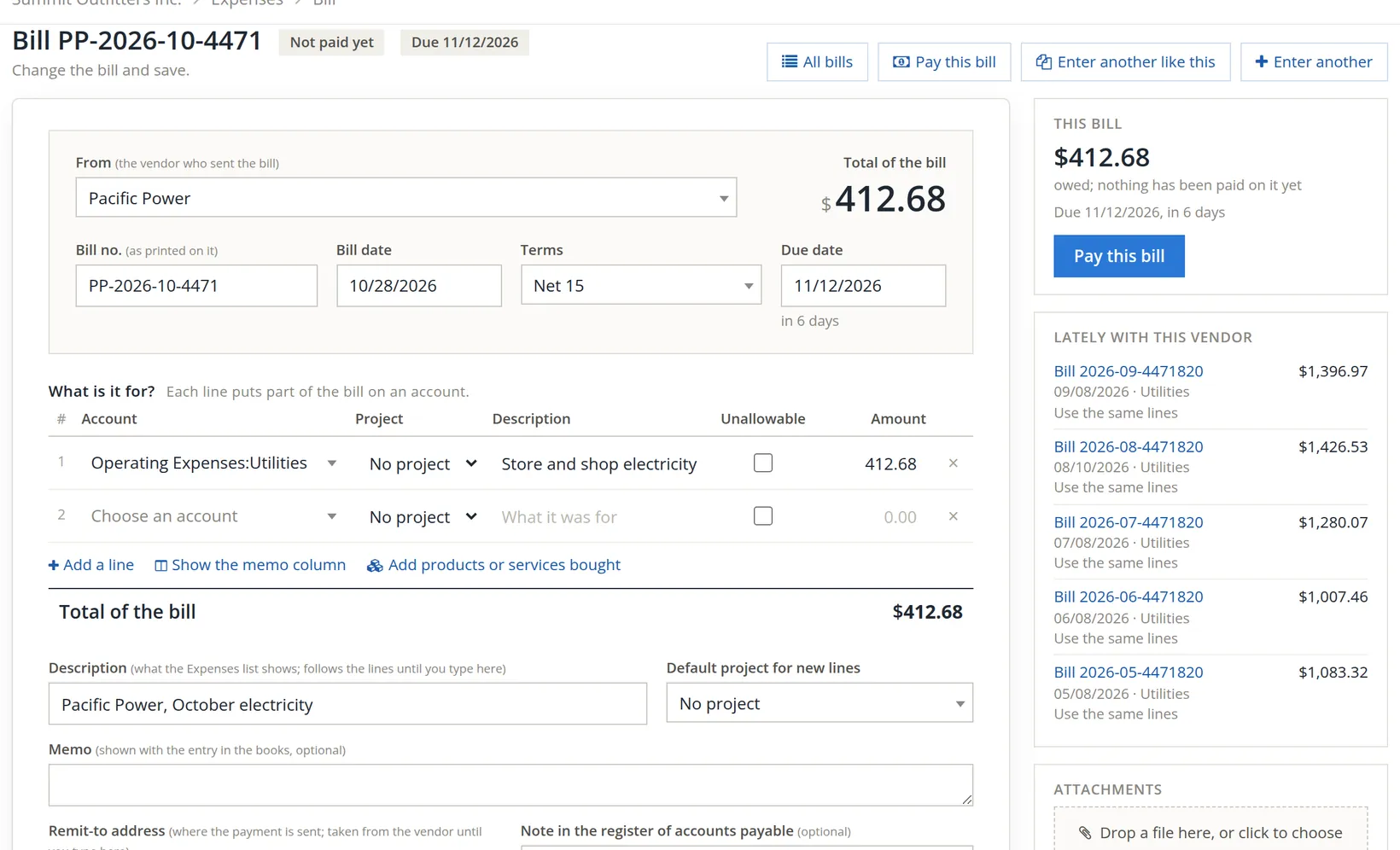
Go to Expenses and click + Bill. The picture shows the Pacific Power bill after saving; the form looks the same while you enter it.
- 1
Choose the vendor 1
Their usual terms fill in, and the side panel lists their recent bills with Use the same lines: one click copies the accounts of last month's bill.
- 2
Type the bill number exactly as printed 3
It is how you find the bill later, how a bill entered twice is spotted, and what the vendor will quote when they chase you.
- 3
Set the bill date 4 and terms 5
The bill date is the date printed on the bill, not today. The due date 6 follows: 10/28 plus Net 15 is 11/12.2
- 4
Put each part of the bill on an account 7
One line per account, with a short description and the amount. A phone bill that is half internet and half mobile gets two lines. Add products or services bought 8 is for goods (Procedure B).
Each line also has a Project column 10, shown when your books have projects: leave it on No project unless this part of the bill belongs to a job. The Unallowable tick 11 marks a cost that may not be billed to a government contract; a ticked line asks why, in 10 characters or more. Leave it unticked for an ordinary electricity bill.3 A short description such as "Store and shop electricity" shows whole; a long one, or a long account name, is cut off at the edge of its box, so click into it to read or change the whole text.
- 5
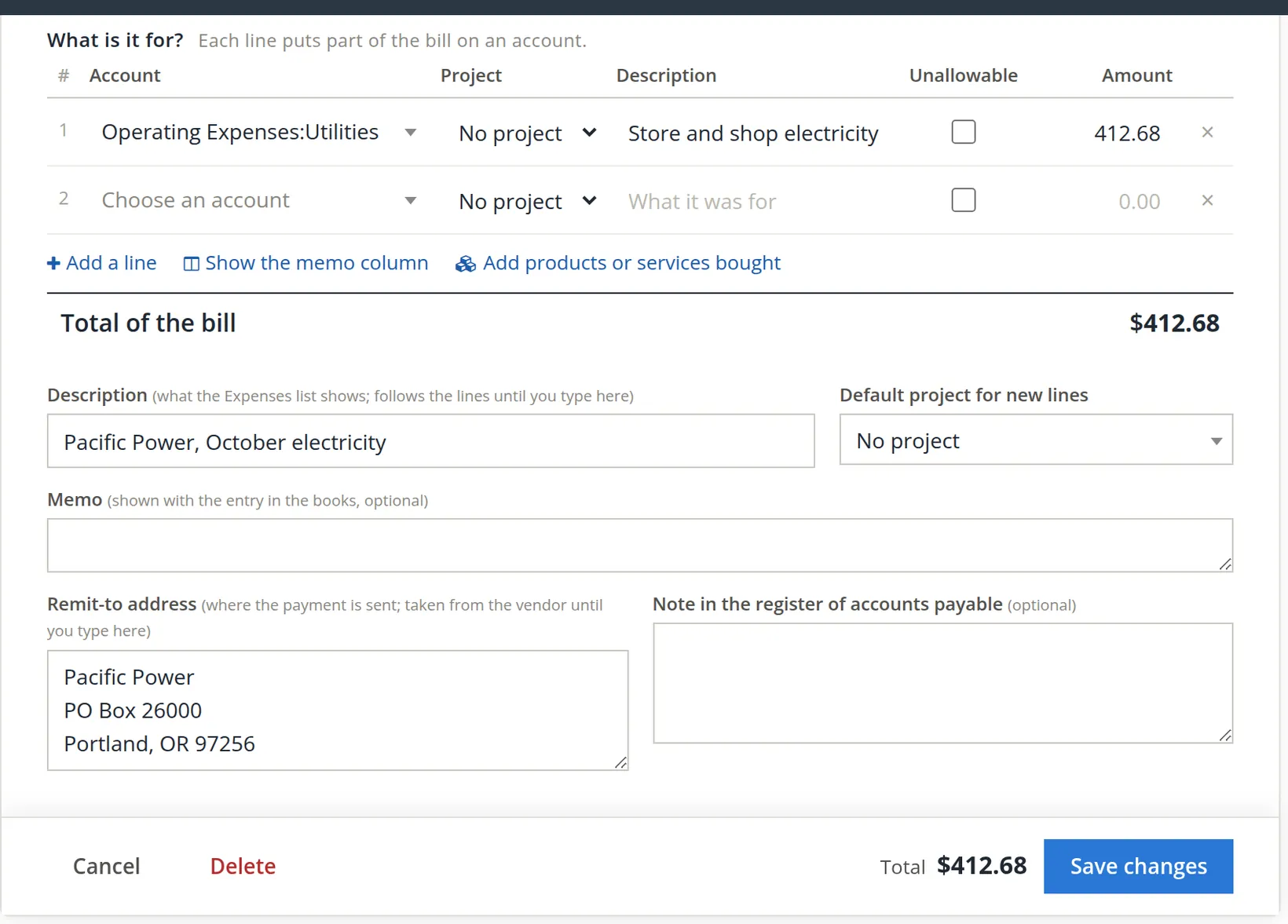
Check Total of the bill 2 against the paper
It must match to the cent.
- 6
Check the description 1
It fills itself from the lines until you type in it. To write your own, select all the text first (Ctrl+A) and then type, or your words are mixed into the old ones.4 Default project for new lines 2 puts a project on every line you add after choosing it: choose it first when the whole bill belongs to one job. A line can still name a different project in its own column.
- 7
Optionally, a memo 3, the remit-to address 4, and a note for accounts payable 5
The remit-to address comes from the vendor; change it here if this bill says to pay somewhere else.
- 8
Attach the bill, and save
Drop the PDF on Attachments, then Save, or Save and new for the next bill in the pile.
Books that use Property Management can require a second person to approve a property's bills over a set amount (Chapter 13.8). Such a bill saves as usual, but its page then shows an amber banner, for example "Waiting for approval under Property rule (Galveston Building): 1,000.00 or more; it cannot be paid yet. A second person approves: you entered this bill." Both Pay this bill buttons, in the header and in the side card, are greyed, and the side card adds "Waiting for approval: it can be paid once it is approved." Someone other than the person who entered it approves it under Property Management → Money → Approvals; after that it is paid like any other bill. The bills used in this chapter are not under such a rule.
A bill for stock you bought
When the bill is for goods you keep in stock, list them as items, not as an expense account. That is what puts them into inventory.
- 1
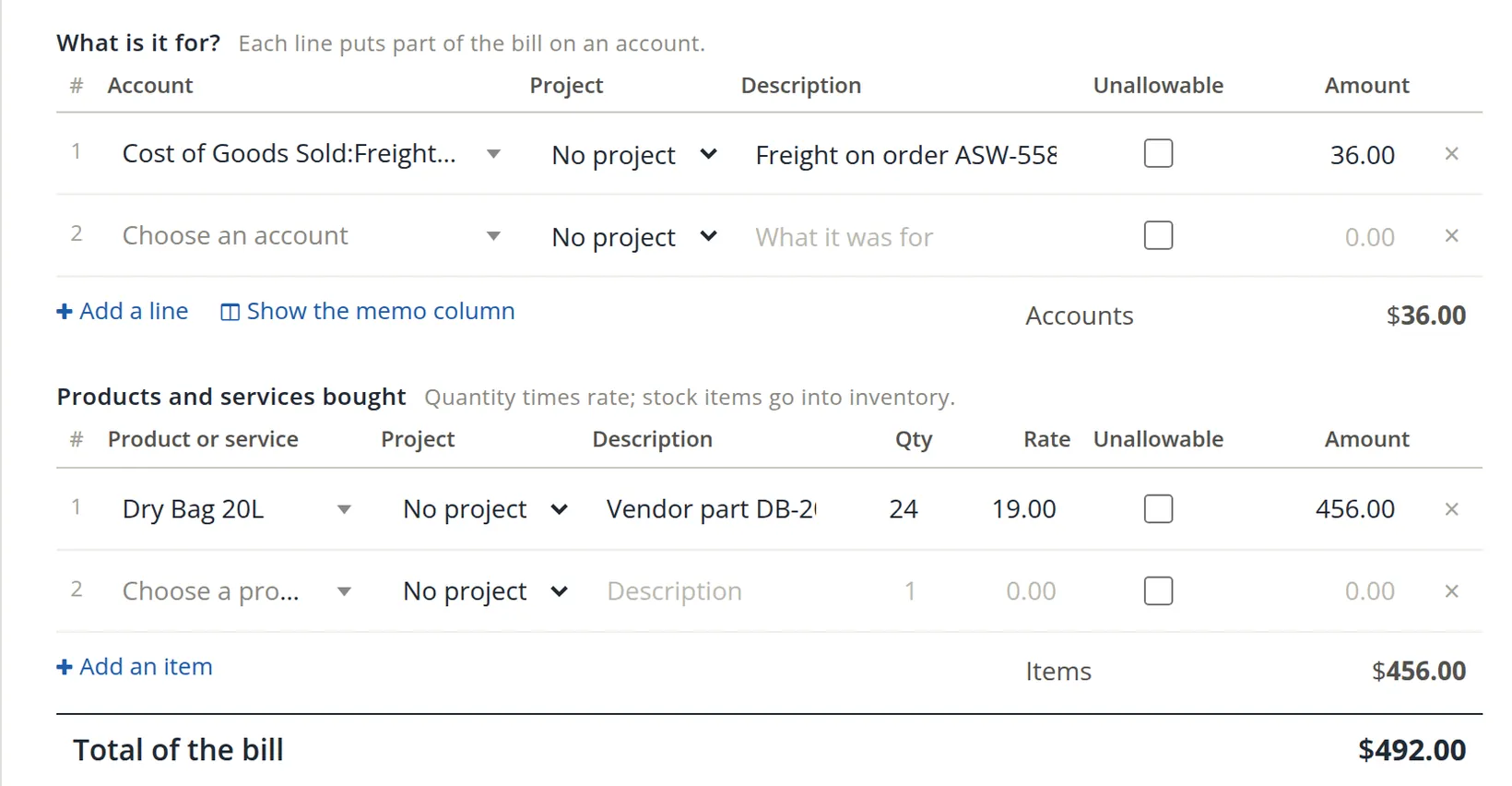
Click Add products or services bought
A second table opens: Products and services bought 2, "quantity times rate; stock items go into inventory."
- 2
Choose the item, then quantity and rate 3
The description fills from the item's "description on bills" (here the vendor's part number), and the rate from its current cost. Type the price on this bill: 24 at $19.00 = $456.00. Item lines have their own Project and Unallowable columns, which work as on the account lines; stock for the shelves takes no project. The item columns run Qty, Rate, Unallowable, then Amount last, the same way round as the account lines above them.
- 3
Put extras such as freight on an account line 1
Freight-In, $36.00.
- 4
Check the total 4, and save
$456.00 of items plus $36.00 of freight: $492.00.
- 5
Answer the direct-cost question
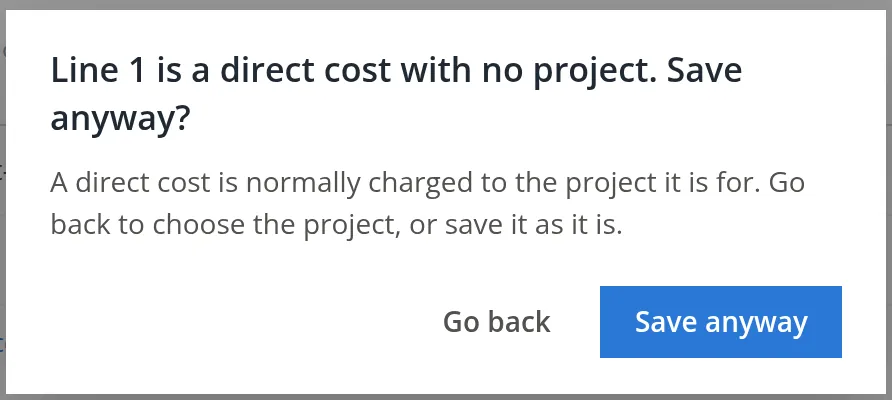
Freight-In is a cost of goods sold account, and Summit's books treat it as a direct cost: a cost that normally belongs to a project. So, on Save, BizBooks360 asks "Line 1 is a direct cost with no project. Save anyway?" Freight on stock for the shelves is not for any project, so click Save anyway 1. Had the freight been for a job, you would click Go back 2 and choose the project on that line.5
Before the bill: 60 on hand at $18.50 ($1,110.00). After this bill: 84 on hand, and the average cost is ($1,110.00 + $456.00) ÷ 84 = $18.64, exactly as the Products page showed once the bill was saved (Chapter 2.7, Section 3). The four bags sent back in Chapter 3.4 later bring it to 80.
Bills to pay
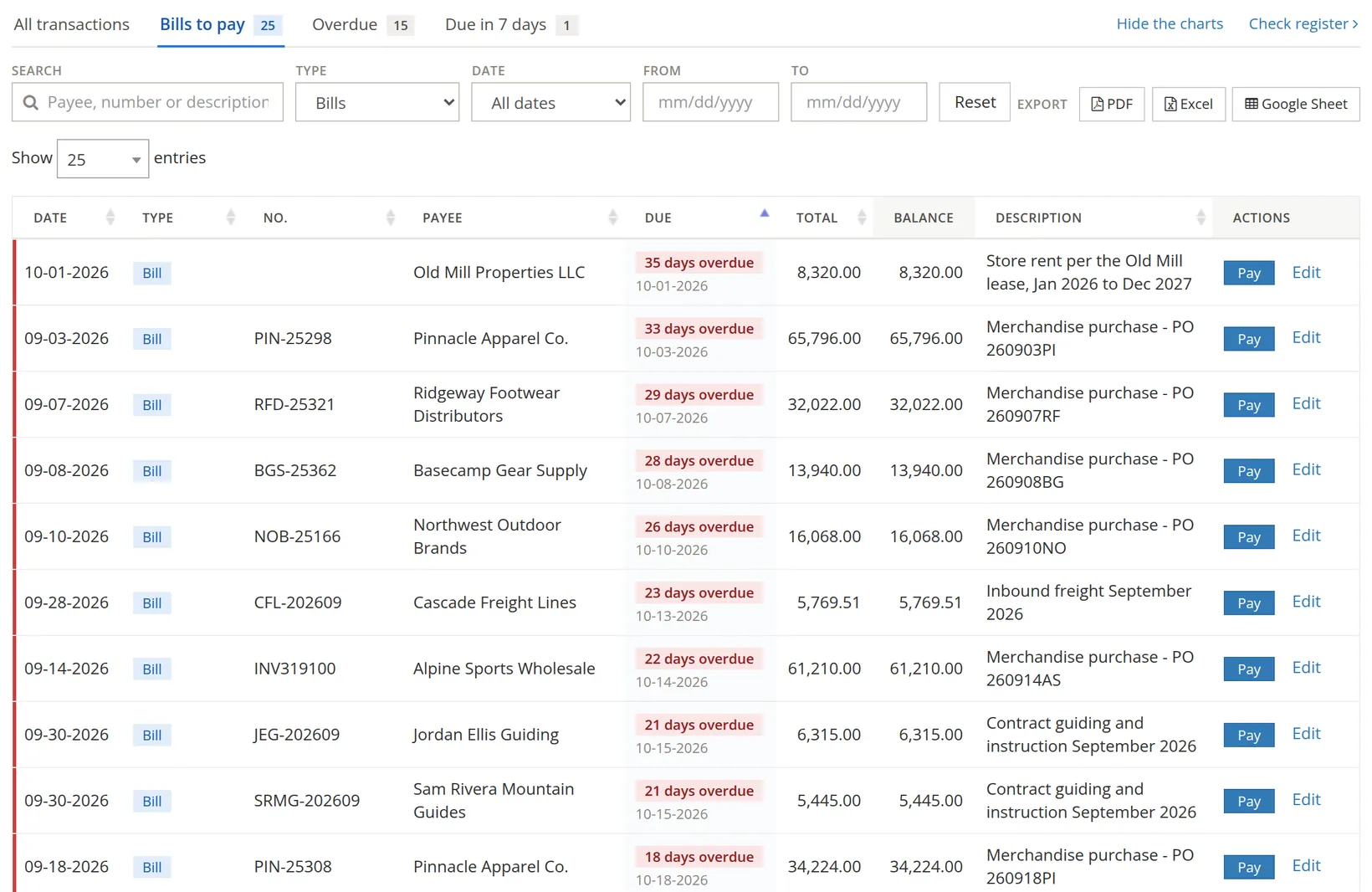
The Bills to pay tab on the Expenses page lists every unpaid bill, oldest due first, with how late it is and a Pay button. Chapter 3.3 covers paying them. Above the tabs, the Bills to pay chart adds up the same bills by how long they are past due and names the vendors you owe the most (Chapter 3.1); Hide the charts folds the charts away.
Common mistakes and how to fix them
| Mistake | What happens | Fix |
|---|---|---|
| Entering a bill, and then also an expense or check when paying | The cost is counted twice; the bill stays unpaid. | Delete the expense or check and pay the bill (Chapter 3.3). Deleting needs the delete permission for that kind of entry; ask the owner if it is refused. |
| Today's date instead of the bill date | Due date and month of the cost are wrong. | Open the bill, correct the date. |
| Stock entered on an expense account line | Inventory does not grow; the cost hits the P&L at once. | Move it to the items table. |
| Bill number left blank | A bill entered twice is hard to spot. | Always type the number as printed. |
Check your understanding
1. A bill dated 10/28 has Net 15 terms. When is it due?
Answer
November 12. October has 31 days, so 3 days take you to October 31 and 12 more to November 12.
2. Which account is credited when a bill is saved?
Answer
Accounts Payable.
3. You buy 24 Dry Bags on a bill. Where do they go: an expense account or the items table?
Answer
The items table. That adds them to inventory and updates the average cost.
Notes
- Notes give background, exceptions and the reasons behind a rule. ↑
- If you change the bill date after choosing terms, check that the due date moved with it. If it did not, choose the terms again (another term, then the right one) to make BizBooks360 work it out afresh. ↑
- The idea comes from US government contract cost rules (FAR Part 31): some costs, such as entertainment or alcohol, may not be billed to the government, so they are kept apart from a project's direct costs. A ticked line can also name the cost principle that applies. This is a summary, not legal or accounting advice. ↑
- The sample bills were first saved with exactly that problem and had to be corrected, which is how this tip came about. ↑
- The rule is set under Settings → Projects → Direct costs and unallowables: "Direct cost lines need a project" can be Refuse, Warn (Summit's choice, which asks this question) or Off. Which accounts count as direct comes from the books' cost elements (direct labor, subcontracts, materials, travel, other direct costs). With government contract controls on, the rule is always Refuse, and the line must have a project before the bill saves. ↑