
Chapter 13.8
Work orders, vendors and bill approvals
Buildings break, and someone has to fix them, be let in and be paid. This chapter follows a no-heat call from a tenant through a work order to the vendor's bill, records a vendor's insurance and files its certificate, charges a tenant for damage they caused, and sets a rule that makes a large repair bill wait for a second person before anyone can pay it.
When you finish this chapter you will be able to:
- Open a work order with its unit, lease, vendor, schedule and cost lines.
- Record a vendor's insurance and license, and explain why the work order warns without it.
- Move a work order through its six steps and create the vendor's bill from it.
- File a vendor's certificate of insurance and read the property's Vendors tab.
- Charge a repair the tenant caused back to the tenant's lease, and read both entries it makes.
- Set a bill approval rule and follow a bill over the limit through the Approvals page.
The life of a work order
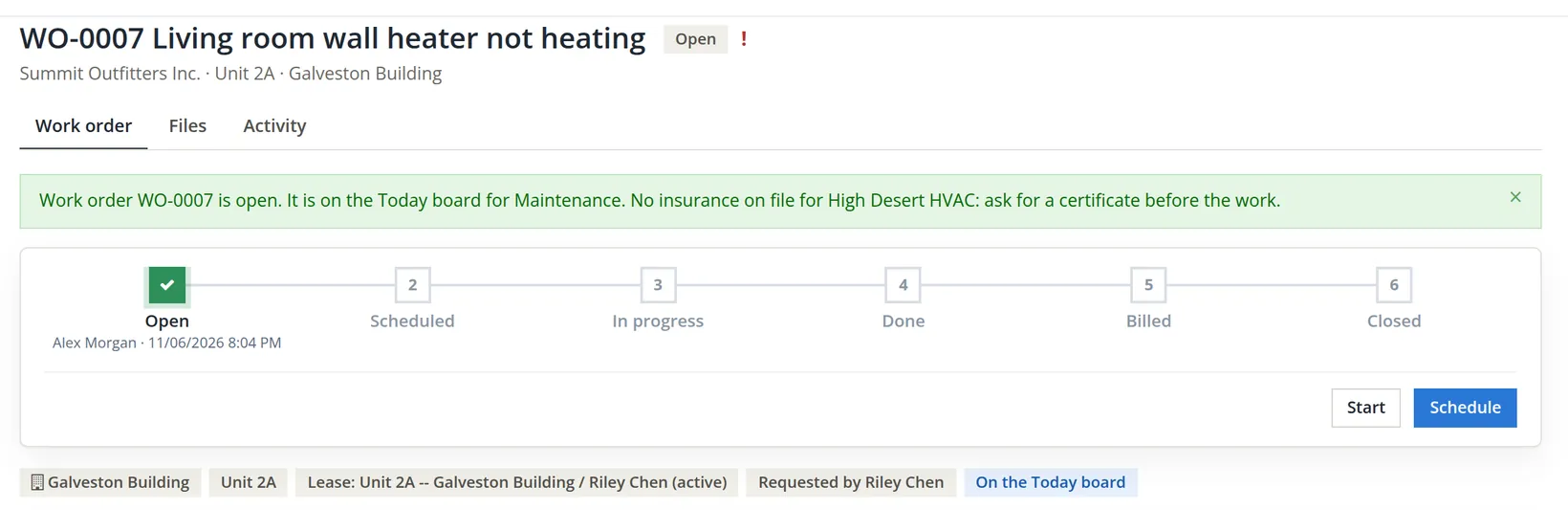
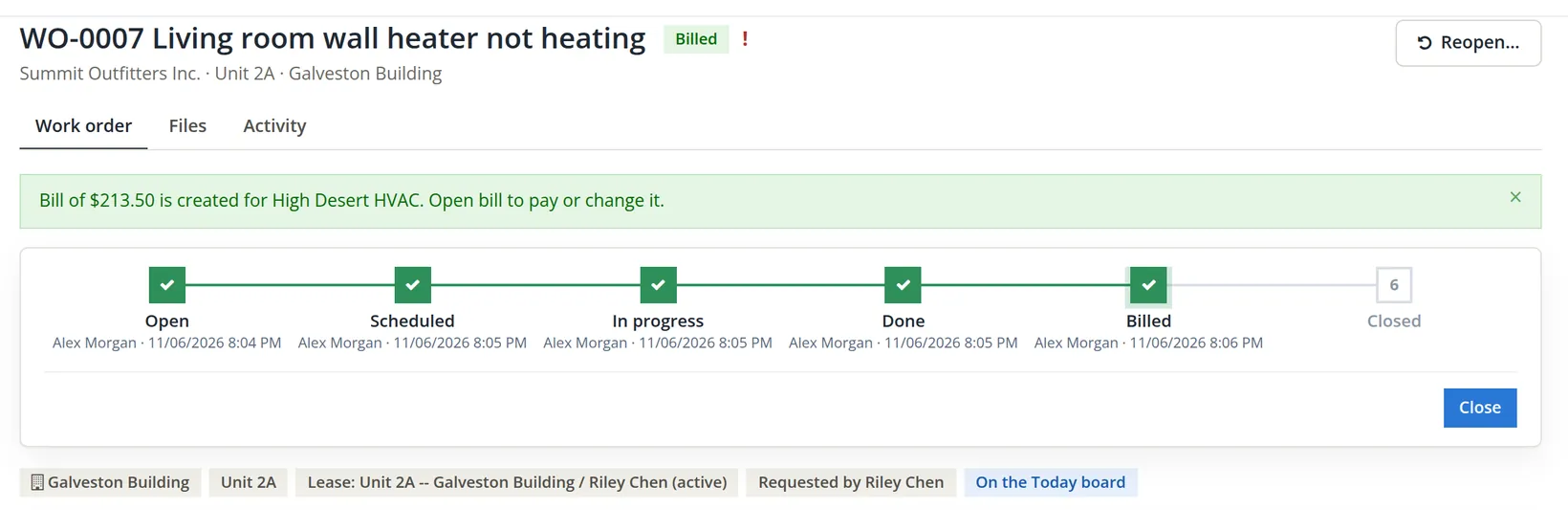
A work order is the file for one repair: what is wrong, where, who fixes it, when they may enter, what it costs and who pays. It moves through six steps, shown as a stepper across the top of its page. Each step is stamped with the person and the time.
| Step | Meaning | Button that leads to it |
|---|---|---|
| 1 Open | Reported; on the Today board for Maintenance. | Open work order |
| 2 Scheduled | A date and a vendor are set. | Schedule |
| 3 In progress | Someone is on site. | Start |
| 4 Done | The work is finished, on a completion date no later than today. | Done |
| 5 Billed | The vendor's bill is matched or created. | Match, or Create the bill |
| 6 Closed | Nothing left to do; the Today row is done. | Close |
The work order never posts to the ledger itself. Its lines (parts and labor) become the vendor's bill, an ordinary bill paid the usual way (Chapter 3.3), and, if the tenant caused the damage, a chargeback invoice on the lease.
Open the work order
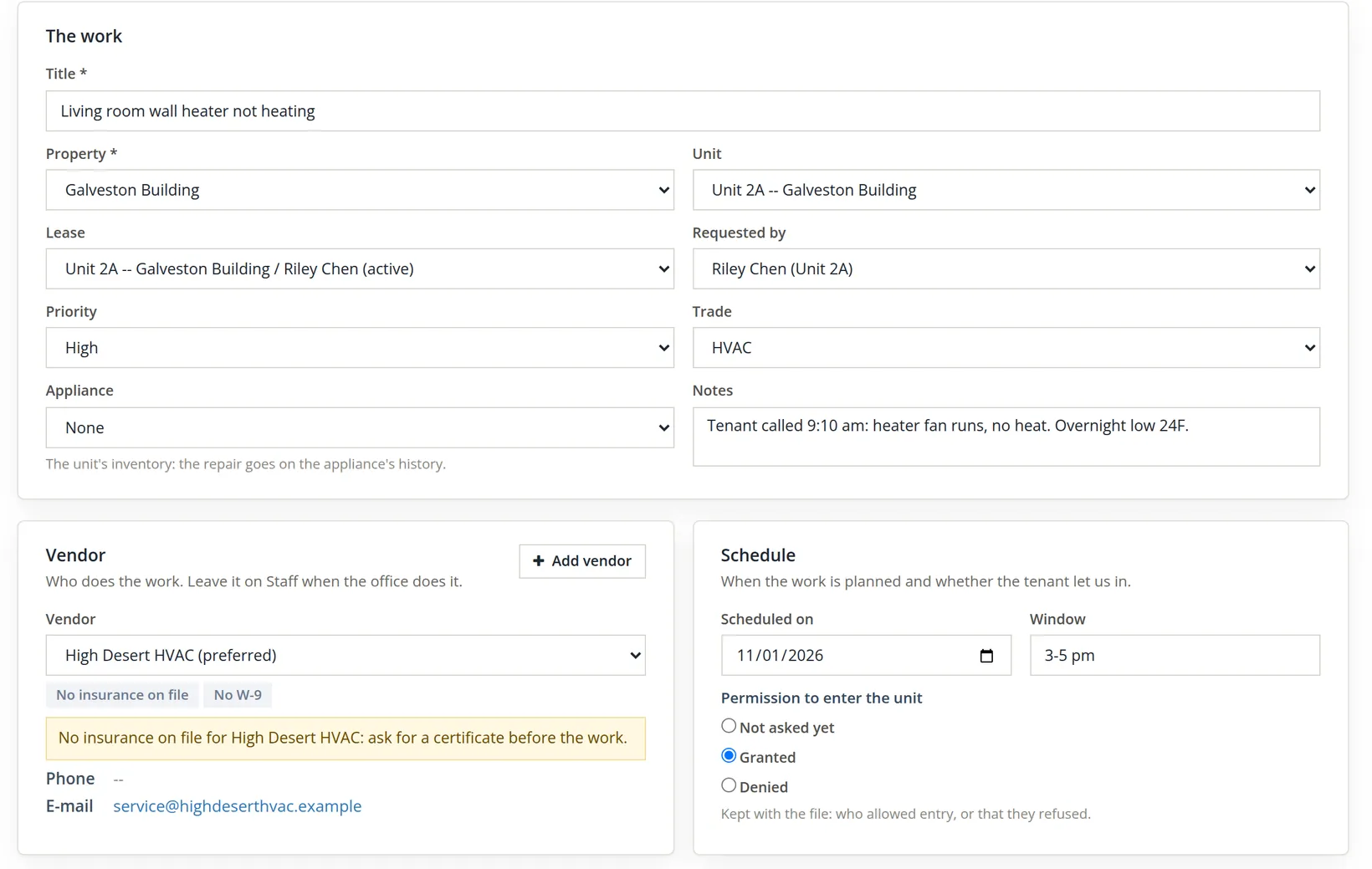
Maintenance → Work orders → New work order. Fill the form top to bottom; the property narrows the unit list, and the unit narrows the leases.
- 1
Describe the work
A title a stranger would understand, the property, unit and lease, who reported it, the priority and the trade. A no-heat call in November is High. Put what the tenant said, word for word, in the notes.
- 2
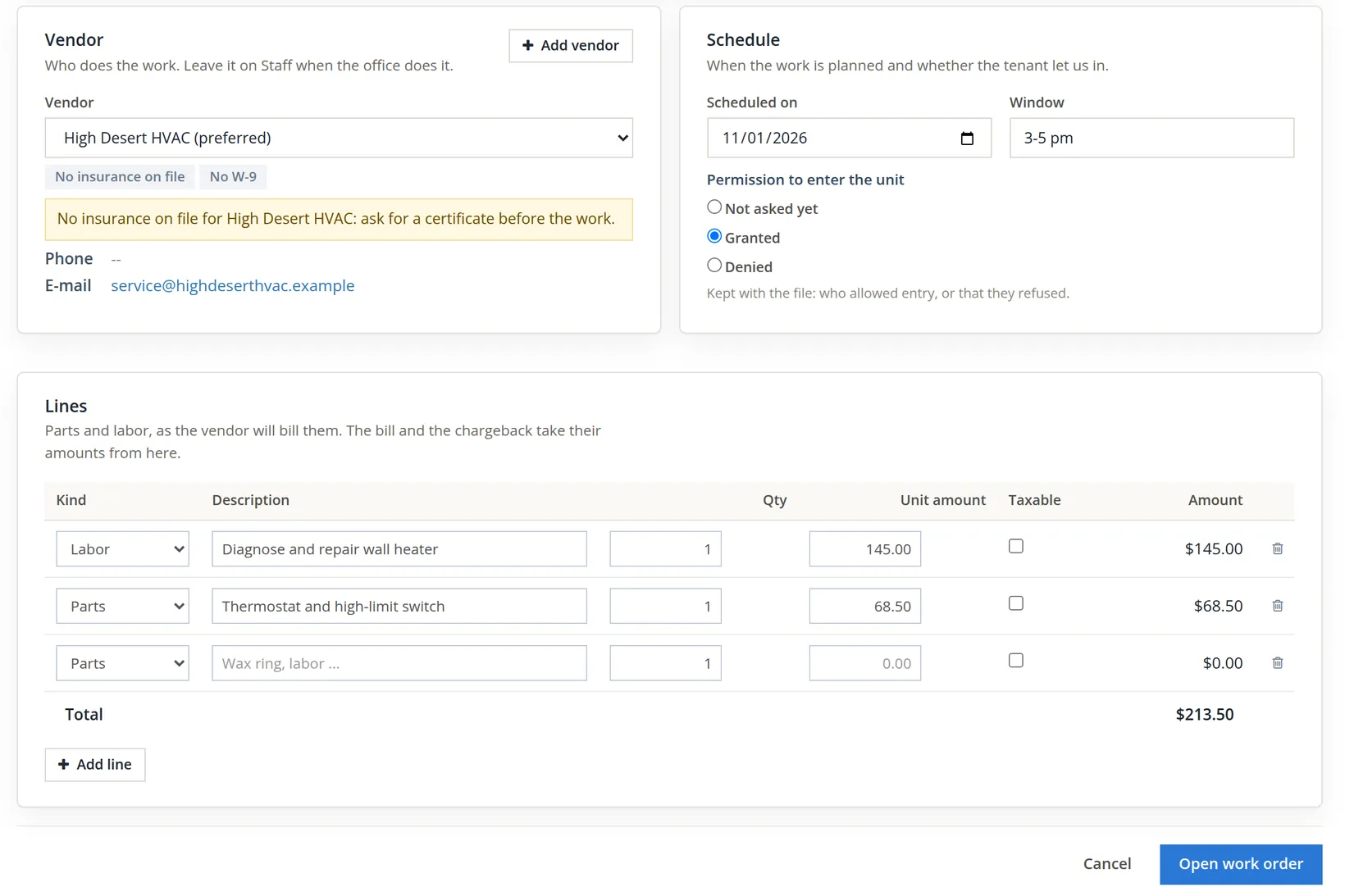
Schedule it, record the permission to enter, and enter the lines
Riley agreed to let the technician in between 3 and 5 pm, so choose Granted. The lines are the vendor's quote: labor $145.00 and parts $68.50, total $213.50. "The bill and the chargeback take their amounts from here." Click Open work order.
The warning on the new work order
The work order opened as WO-0001, but the banner carried a second sentence, the one the form had already shown under the vendor.1
High Desert HVAC had worked on the store for years, but nobody had ever recorded its insurance in the books. If a technician is hurt in a tenant's apartment, or burns it down, the first question is whose insurance pays. A work order warns about a vendor with no current insurance; with Require current vendor insurance on work orders switched on (Chapter 13.1), it refuses the vendor instead.
- 1
Open the vendor: Maintenance → Vendors, then the vendor's name
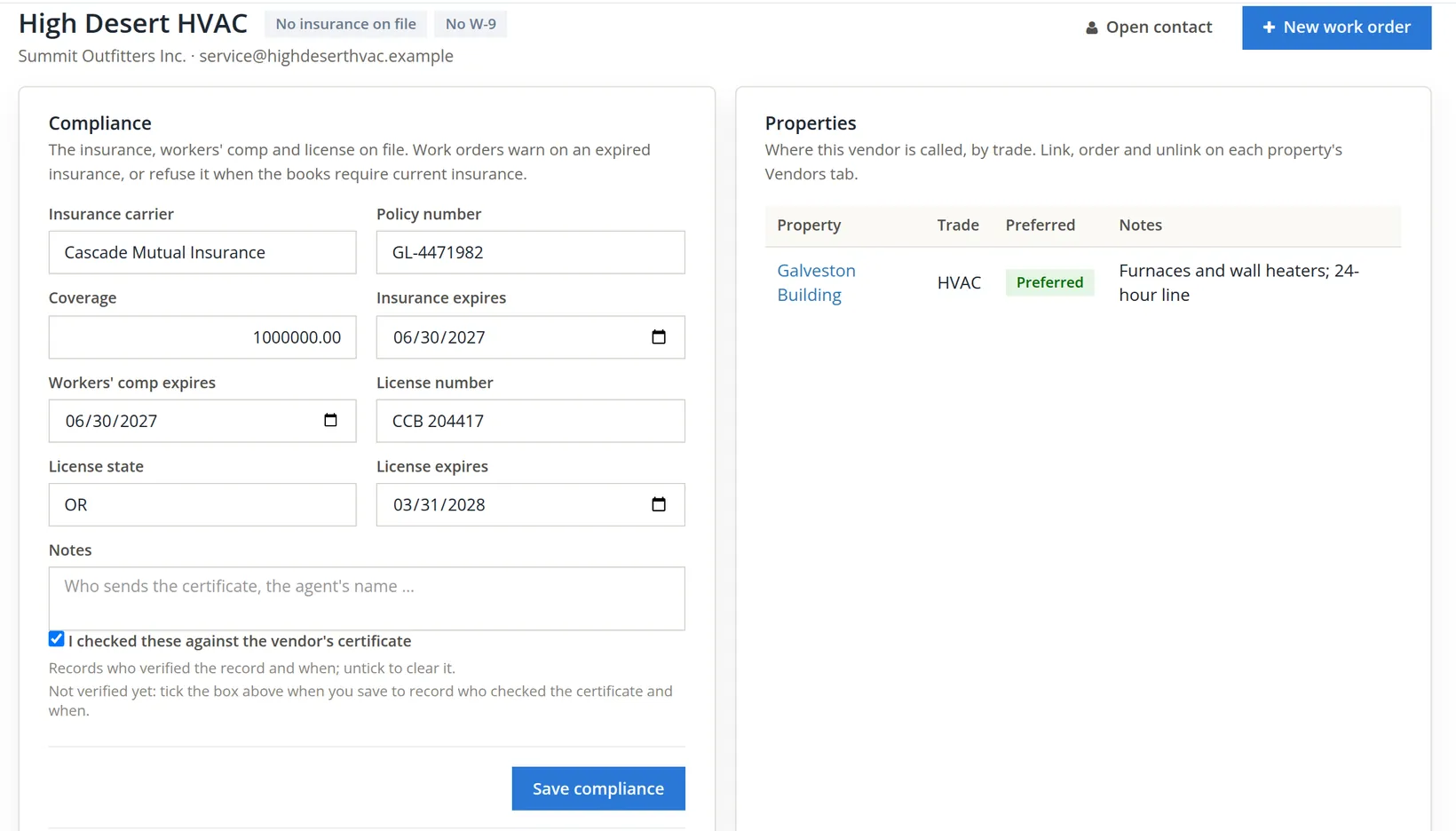
The vendor page has a Compliance card: insurance carrier, policy number, coverage, expiry dates for insurance and workers' compensation, and the license. Copy them from the certificate the vendor e-mails you, tick I checked these against the vendor's certificate and Save compliance. The page answers "Compliance saved. Insured to 06/30/2027.", the chips beside the vendor's name turn green, and the note under the box changes from Not verified yet to Verified on and the date.
- 2
File the certificate itself: Add the certificate
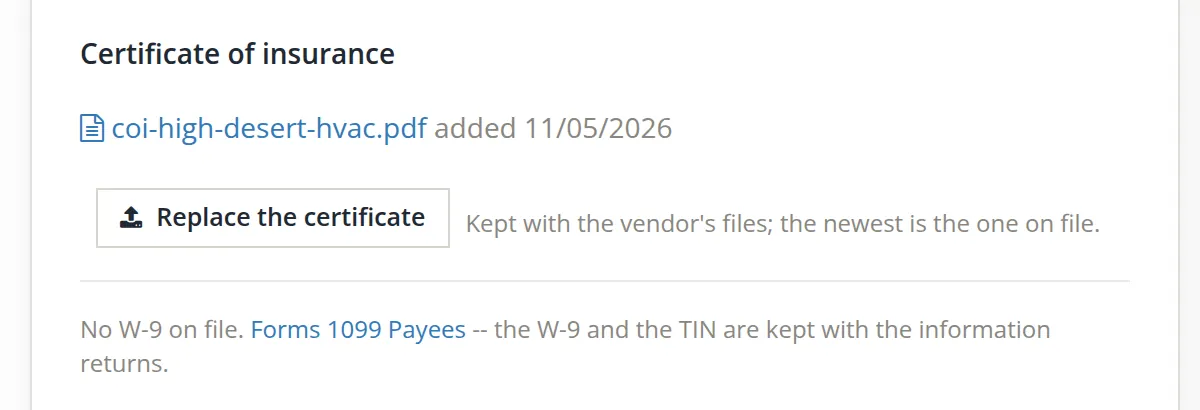
The Compliance card records the facts; the Certificate of insurance card below it keeps the PDF with the vendor's files. Choose the file the vendor sent and click Add the certificate. The page answers "coi-high-desert-hvac.pdf was added as the certificate of insurance." The button now reads Replace the certificate: when next year's certificate arrives, add it the same way, and the newest file is the one on file.2
- 3
Link the vendor to the property
On the property's Vendors tab (Properties and people → Properties, the property, Vendors), Link a vendor: High Desert HVAC, trade HVAC, Preferred. From now on an HVAC work order on the Galveston Building offers it first, marked (preferred). The tab carries the same compliance chips as the vendor page and a link to the certificate, so whoever calls the vendor sees at a glance that the paperwork is current.
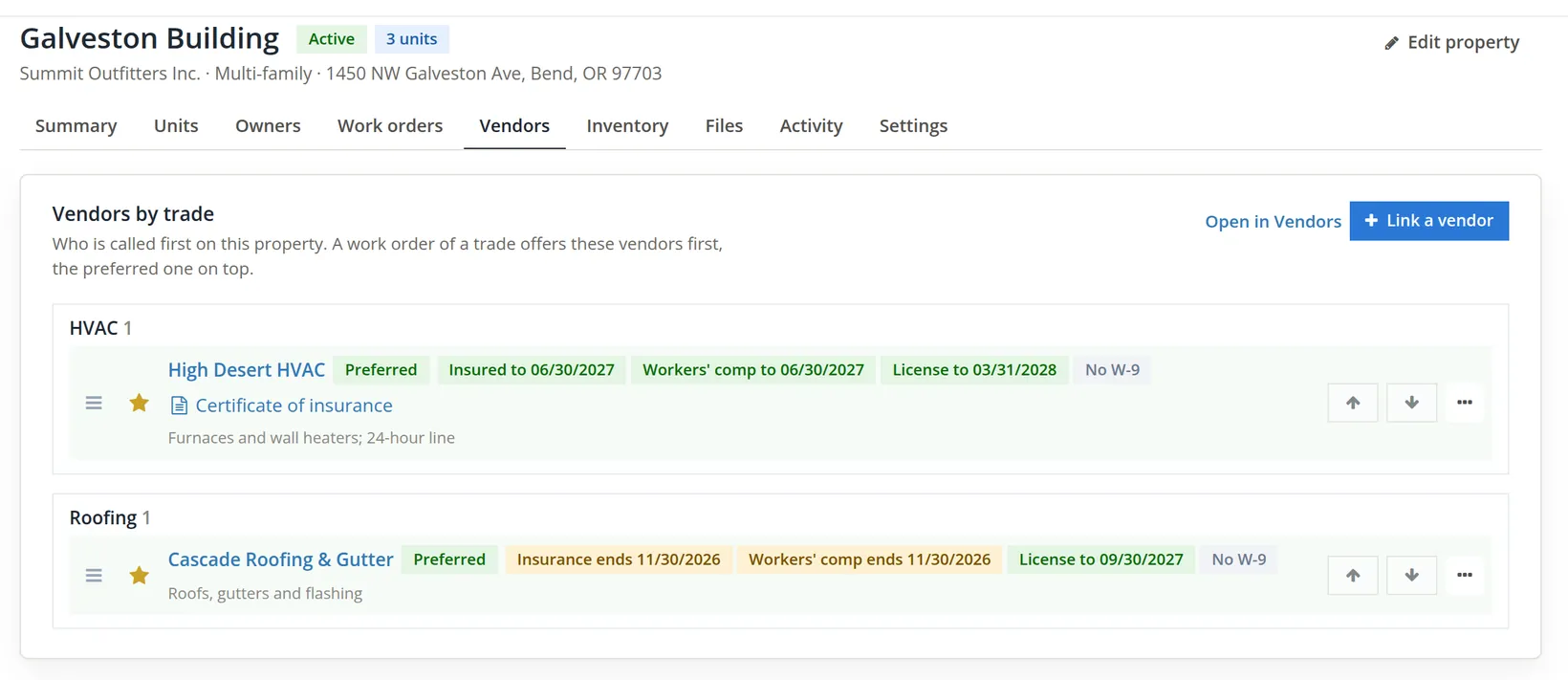
Ask the vendor's agent to name your company as certificate holder, so the insurer tells you if the policy is cancelled. The Vendors list (Maintenance → Vendors) does the rest: its chips Expiring, Expired and Missing insurance are the monthly check, and the Vendor Compliance Report link at the top of the page prints the same list (Chapter 13.17).
Work it through, and bill it
- 1
Schedule, then Start, then Done
Each click moves the stepper one place: "WO-0001 is scheduled.", "WO-0001 is in progress." Done asks for the completion date, in a Completed on box beside the button, which may not be after today. The technician replaced the thermostat and the high-limit switch and had heat back by 4:40 pm. The page answers "WO-0001 is done. Match the vendor's bill next."
- 2
Create the vendor's bill from the work order
The Bill card offers two ways. Match, one button per open bill of the vendor, attaches a bill already entered; Create the bill makes a new one from the lines. While the vendor has open bills, Create the bill is a folded heading under the list: click it to open its form (it opens by itself when the vendor has none). The form asks for the bill date (11/01/2026), the due date (12/01/2026), the account and a memo. The account defaults to "The property's repairs account (Expenses:Galveston Building:Repairs)".
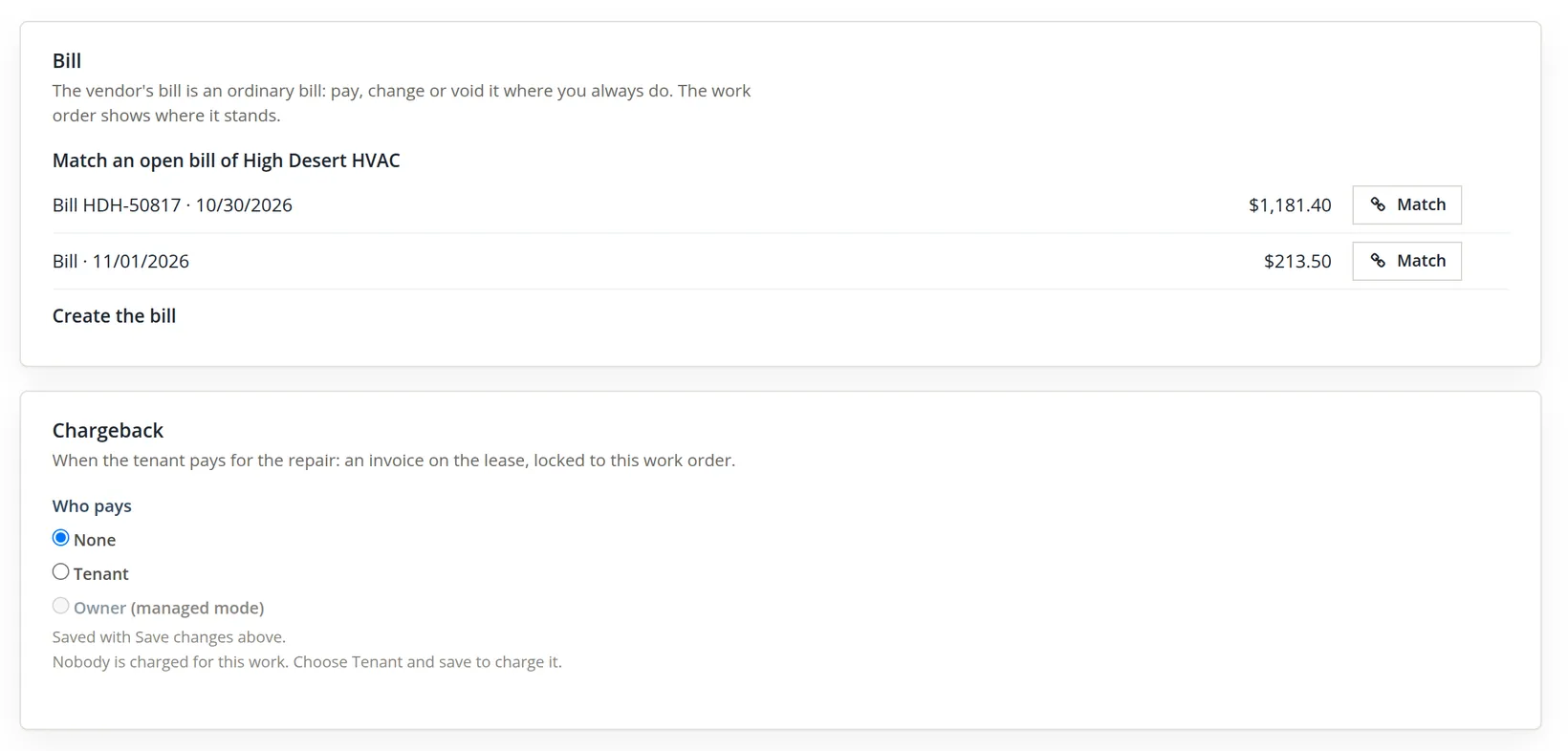
The card lists every open bill of the vendor, whatever it was for, and a bill already made from another work order too. HDH-50817 is the store's October rooftop service, $1,181.40; matching it would charge the store's maintenance to the apartment building and mark the store's bill as this repair. When the vendor has not sent the bill for this job yet, create it from the lines, then type the vendor's invoice number in the bill editor when the paper arrives: a bill created here has no number.
| The bill from WO-0001 | Debit | Credit |
|---|---|---|
| Expenses:Galveston Building:Repairs | $213.50 | |
| Accounts Payable (High Desert HVAC) | $213.50 |
The cost lands on the building, not on the store: that is the point of the property's own expense accounts (Chapter 13.1).
Charge tenant-caused damage back to the tenant
Most repairs are the landlord's cost: things wear out. Some are not. When the tenant, their guests or their pets cause the damage, the lease usually lets the landlord recover the cost.3 The work order handles both halves: the vendor's bill (what the building pays) and the chargeback (what the tenant pays back), from the same lines.
On November 5 Riley Chen reported a water stain on the bedroom closet ceiling of 2A. Cascade Roofing & Gutter, a roofer Summit had just linked to the building as its preferred Roofing vendor, found the cause. (Its chip reads Insurance ends 11/30/2026, so it already shows under Expiring on the Vendors list, and it has no certificate on file yet: the agent has promised the renewal certificate before November 30.) The cause: a satellite dish mount bolted through the roof above 2A, which the lease forbids without written consent. The crew removed the mount and patched the roof that afternoon.
- 1
Open the work order on the tenant's lease, and work it to Done
As in Procedure A: unit 2A, Riley's lease, requested by Riley, priority High, trade Roofing, vendor Cascade Roofing & Gutter, permission to enter Granted. Write the cause in the notes in plain words, because the tenant may ask why they are paying. Lines: labor Remove dish mount, seal and patch the roof $180.00 and parts Membrane patch, sealant and flashing $95.00, total $275.00. The order opened as WO-0004; Schedule, Start and Done (completed 11/05/2026) followed.
- 2
Create the vendor's bill
The Bill card said "Cascade Roofing & Gutter has no open bill. Create it below." Create the bill, dated 11/05/2026, due 12/05/2026, on the property's repairs account: "Bill of $275.00 is created for Cascade Roofing & Gutter."
- 3
Choose Tenant under Who pays, then Save changes
The choice is saved with the work order ("Saved with Save changes above.").4 Once saved, the Chargeback card opens a small invoice form. It names the lease the invoice goes to: Riley's is the only one running on the completion day, so the card simply says Charged to lease 2A / Riley Chen (active).5 Then come the invoice date (today or earlier), a memo (Repair: WO-0004 Roof leak into the Unit 2A bedroom closet), and every line of the work order, each with a tick box and a Markup % left at 0, and the invoice total, $275.00. Untick a line the tenant should not pay for; type a percent only if the lease provides for an administrative charge. Summit charges the cost only. Post the chargeback stands at the foot of the form; until the work is done it is greyed, with the note "The tenant is charged once the work is done."
- 4
Post the chargeback, then Close
The page answers "Invoice 1249 of $275.00 is posted to the lease. It is on the lease ledger and changes only from there." The Chargeback card now shows Invoice 1249, the chip Locked to this work order, the amount, and an Open in lease button in its head. Close finishes the order: "WO-0004 is closed. Its Today row is done."
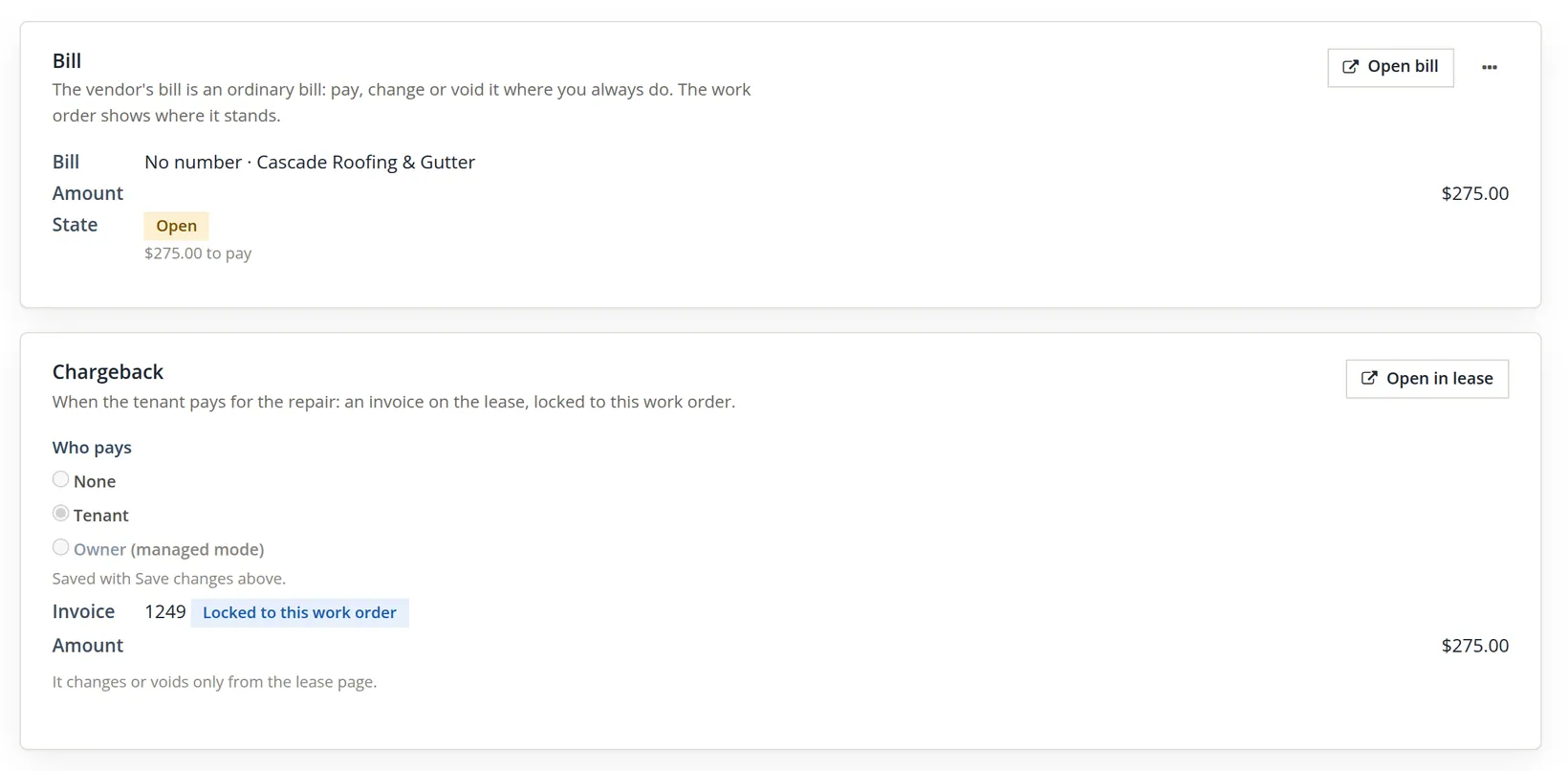
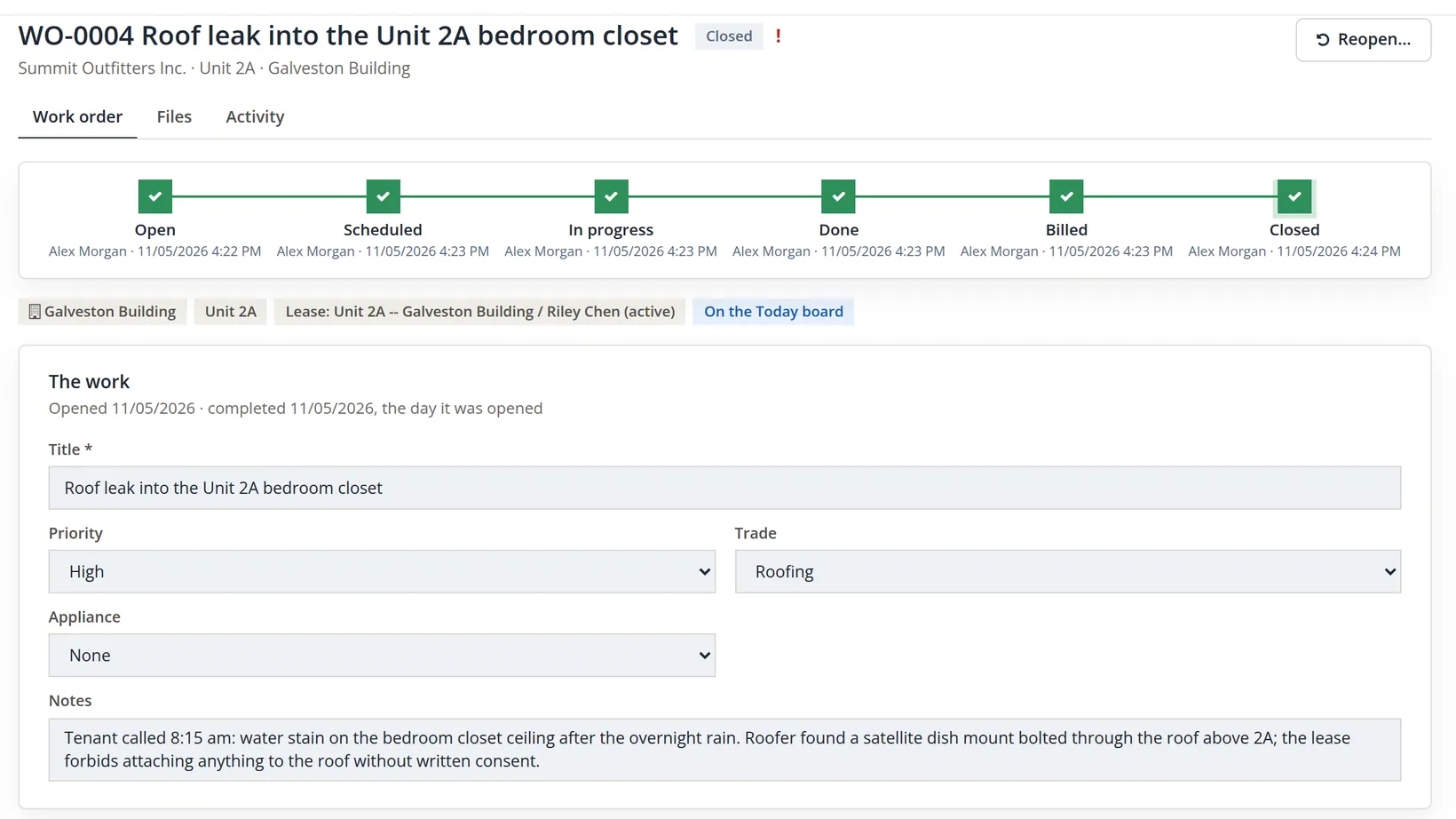
Two entries came out of one work order. Follow the money:
| Entry | Account | Debit | Credit |
|---|---|---|---|
| Bill from WO-0004 | Expenses:Galveston Building:Repairs | $275.00 | |
| Accounts Payable (Cascade Roofing & Gutter) | $275.00 | ||
| Invoice 1249 (chargeback) | Accounts Receivable (Riley Chen, lease 2A) | $275.00 | |
| Revenue:Galveston Building:Tenant Reimbursements | $275.00 |
The building's repairs account still shows the full $275.00, and its Tenant Reimbursements account shows $275.00 recovered, so the net cost to the building is $275.00 − $275.00 = $0.00 once Riley pays. Keeping the two gross, rather than netting the bill, is deliberate: the repairs line tells you what the building really costs to keep up, and the reimbursements line tells you how much of that tenants caused. On Riley's lease ledger the invoice reads Chargeback, with a link back to WO-0004, and the balance due is $275.00.
The invoice is locked to the work order and the lease. The work order's card says "It changes or voids only from the lease page", and the invoice editor offers Void in the lease in place of Void, but in the November 2026 build that link only opens the lease's Financials tab, and the tab has no void action for the chargeback: its ledger row has no actions. A posted chargeback therefore cannot be voided from the screens, so check the lease, the ticked lines, the markups and the date before you click Post the chargeback. What the lease can do is forgive it: Give a credit on the lease's Financials tab (Chapter 13.5, Procedure E) applies a credit to the open chargeback. The invoice still stands, and Tenant Reimbursements keeps its $275.00; the credit lands in the property's own concessions account, Revenue:Galveston Building:Rent Concessions, instead, so the building's net cost is $0.00 only when the tenant pays, and the forgiven part shows as a concession. While the invoice stands, the work order also keeps the lease, unit and property it was charged on: an edit that would move it elsewhere is refused.
Make large bills wait for a second person
The person who orders a repair, enters the bill and pays it should not be the same person every time; that is the oldest control in bookkeeping. A bill approval rule puts a second person between entering a bill and paying it: a bill at or above the rule's limit is marked waiting for approval, and no payment can be saved against it until someone else approves it. The rule never changes the ledger; it is a flag on the bill.
Rules come in two sizes, and the most specific one wins:
| Rule for | Covers |
|---|---|
| These books | Every property without its own rule, and every bill on no property's accounts (the store's bills too). |
| One property | Bills whose lines use that property's accounts. A property rule switched off exempts the property. |
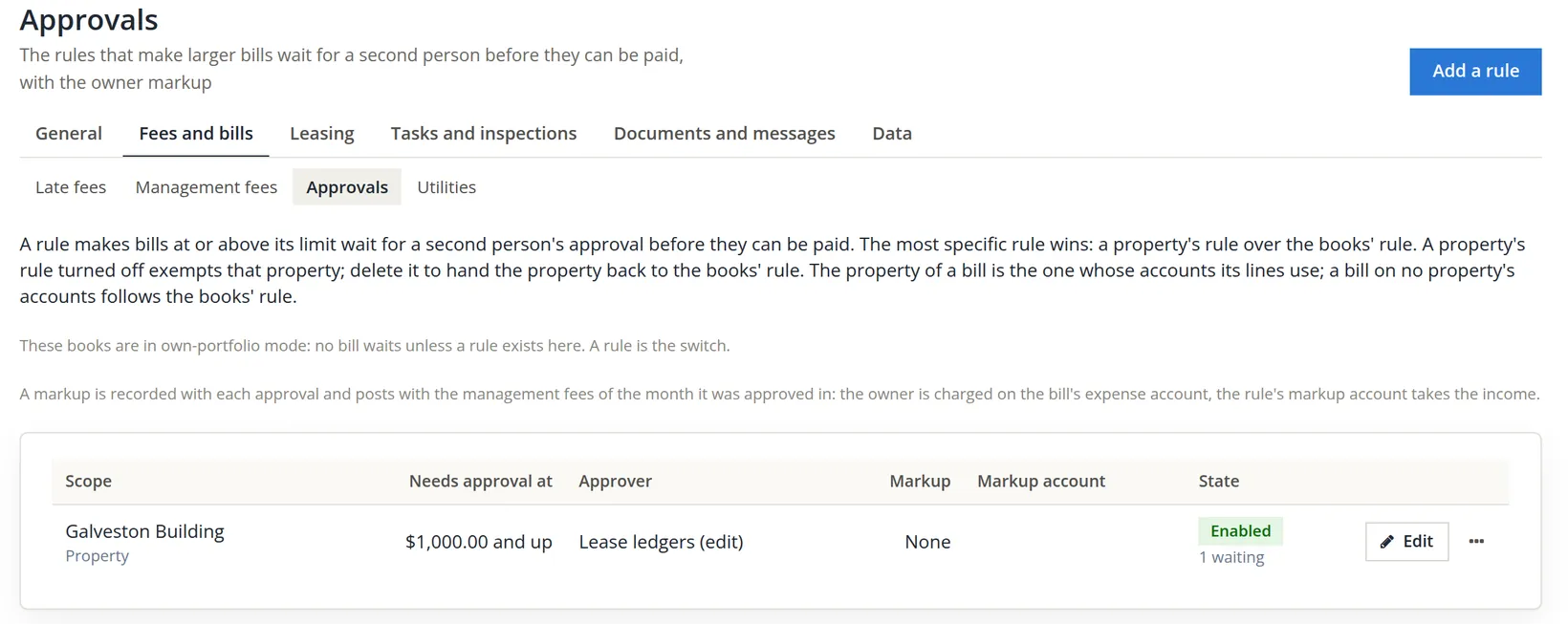
Summit runs its own building (own-portfolio mode), so no bill waits until a rule exists: "A rule is the switch." The owner wants every Galveston Building bill of $1,000.00 or more checked, and nothing else held up, so the rule is for the building alone.
- 1
Settings → Property Management → Fees and bills → Approvals → Add a rule
Choose For: One property; Needs approval at: 1000.00 ("A bill at or above this total waits. 0 makes every bill wait."); Who approves: Lease ledgers (edit), which means anyone holding the edit right on lease ledgers, "except the person who entered the bill." Leave the owner markup empty; it matters only for managed properties.6 Keep Enabled ticked and click Add the rule, at the right of the form's foot beside Cancel.
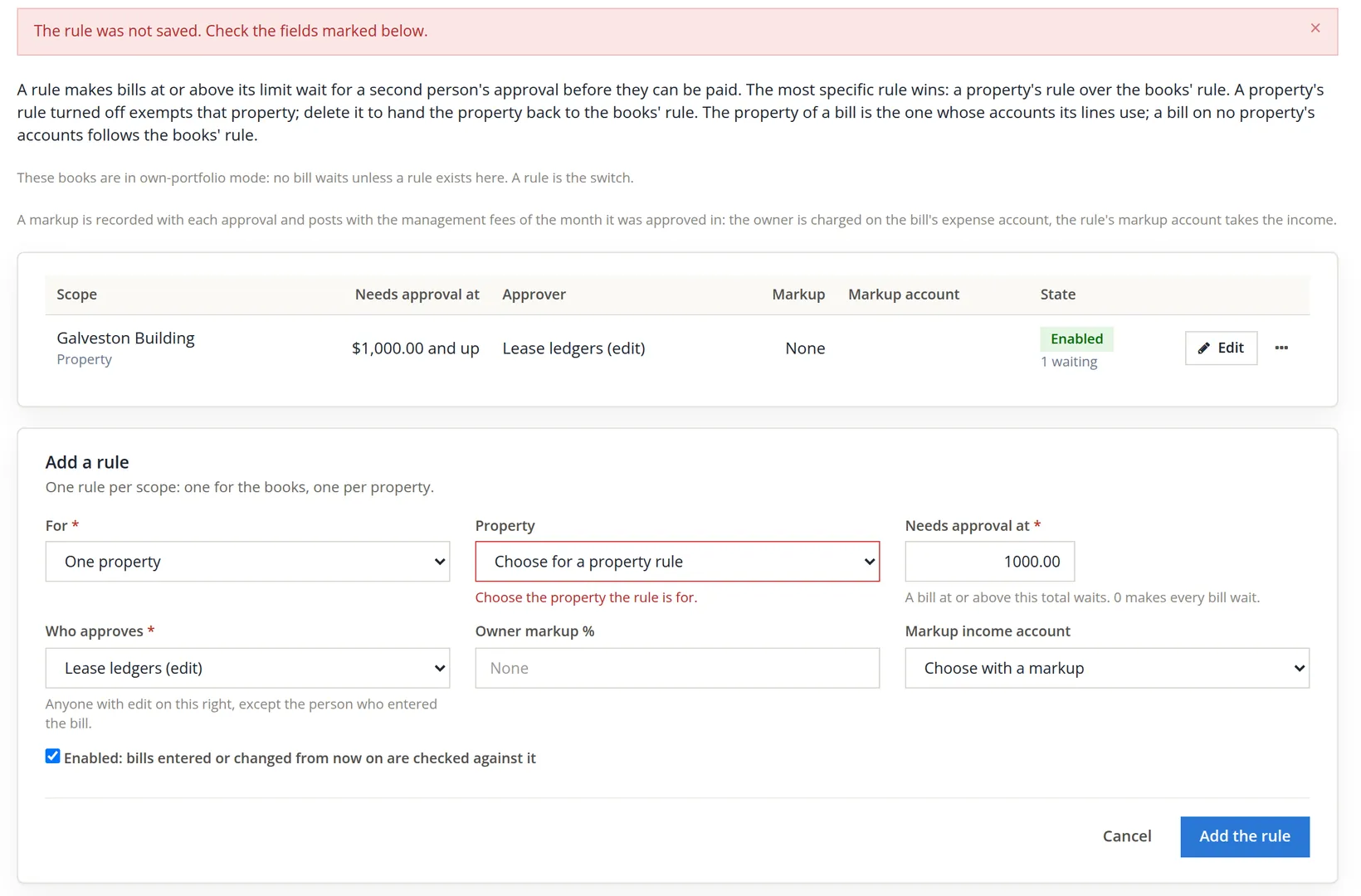
The form refused the rule because a property rule needs its property. The opposite slip would have been worse and silent: leaving For on its default, These books, would have held every bill of $1,000.00 or more in the company, the store's inventory bills included. Read the For field twice.
- 2
Choose the property and add the rule again
Property: Galveston Building, then Add the rule: "Rule added. Bills entered or changed from now on are checked against it." Bills already entered are not touched until someone changes them.
- 3
Enter the large bill as usual
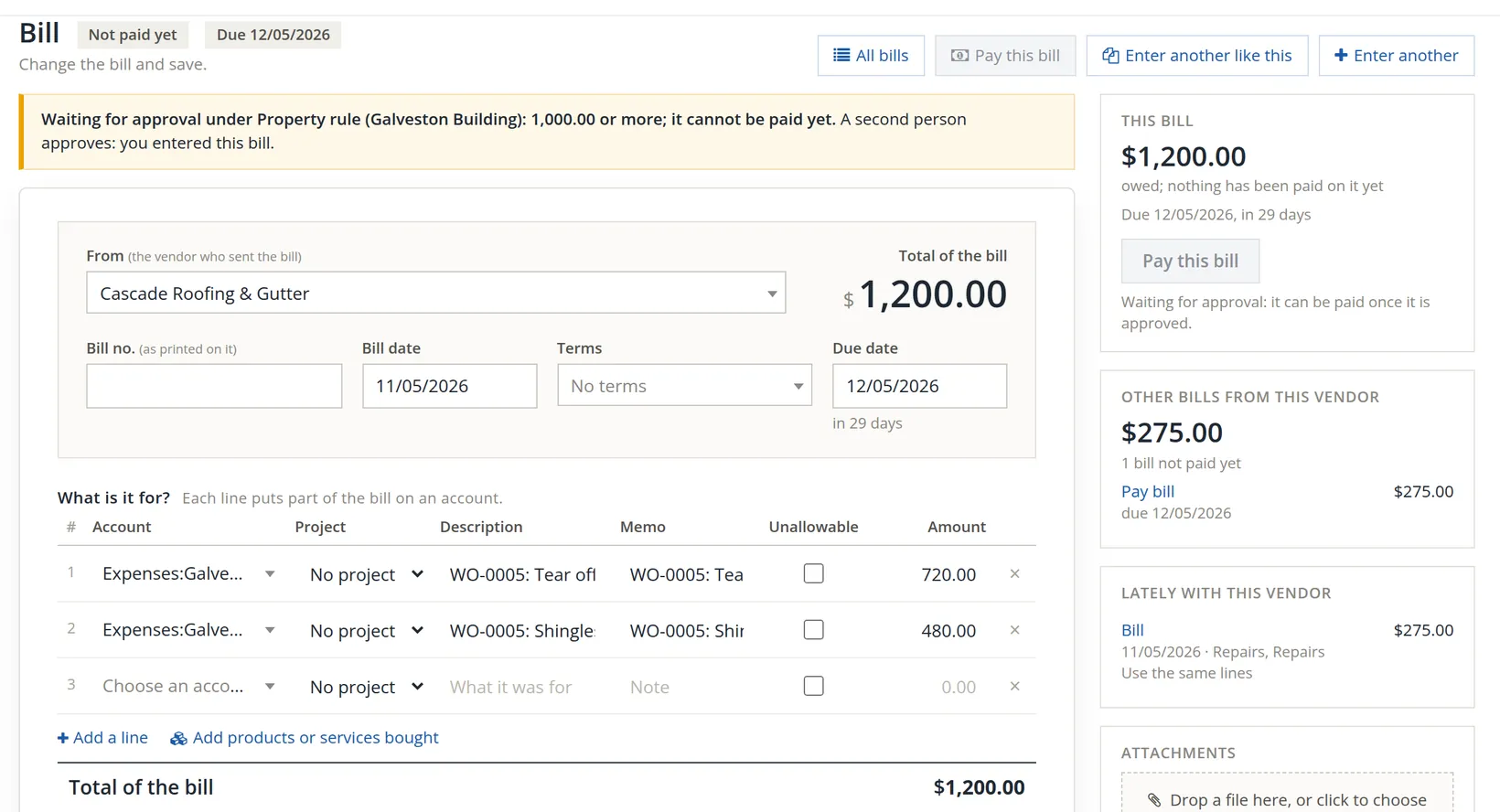
The roofer's second job became WO-0005, Replace worn shingles over the rear stair, on the whole building (no unit, no lease, nobody to charge back): labor $720.00 and materials $480.00, total $720.00 + $480.00 = $1,200.00. The crew finished it the same afternoon, and Create the bill made the bill: "Bill of $1,200.00 is created for Cascade Roofing & Gutter." Its lines use Expenses:Galveston Building:Repairs, so the bill belongs to the building, and $1,200.00 is at or above $1,000.00: it waits. (WO-0004's $275.00 bill is under the limit and was payable at once.)
The work order's Bill card says so: its State reads Waiting for approval, "$1,200.00 to pay once it is approved (Approvals)", and the word Approvals links to the queue of step 5.
- 4
Try to pay it, and see the refusal
Open the bill (Open bill on the work order). A yellow banner names the rule and says the bill cannot be paid yet. Both Pay this bill buttons are greyed: the one in the header and the one in the This bill side card, which adds "Waiting for approval: it can be paid once it is approved." A payment tried another way is refused with "This bill is waiting for approval: it cannot be paid yet.", and the message stays on the page until you close it. Combined Bill Payments leaves the bill out, the Expenses list will not pay it from its row, and the books refuse a payment however it is attempted.
- 5
The approver works the queue: Money → Approvals
The page lists "Bills waiting for a second person, and the decisions made" in three tabs, Pending, Approved and Rejected, with filters for property, vendor and bill date. Each row shows the rule that caught the bill and who entered it, and ends in Approve and a ··· menu with Open bill (and, for an approver who did not enter the bill, Reject…). The approver opens the bill, checks it against the work order and the roofer's invoice, and clicks Approve, which opens a box for an optional note, or picks Reject… from the ··· menu and gives a reason, which the person who entered it sees on the bill. Ticking several rows brings up Approve selected… and Reject selected… to decide them at once.
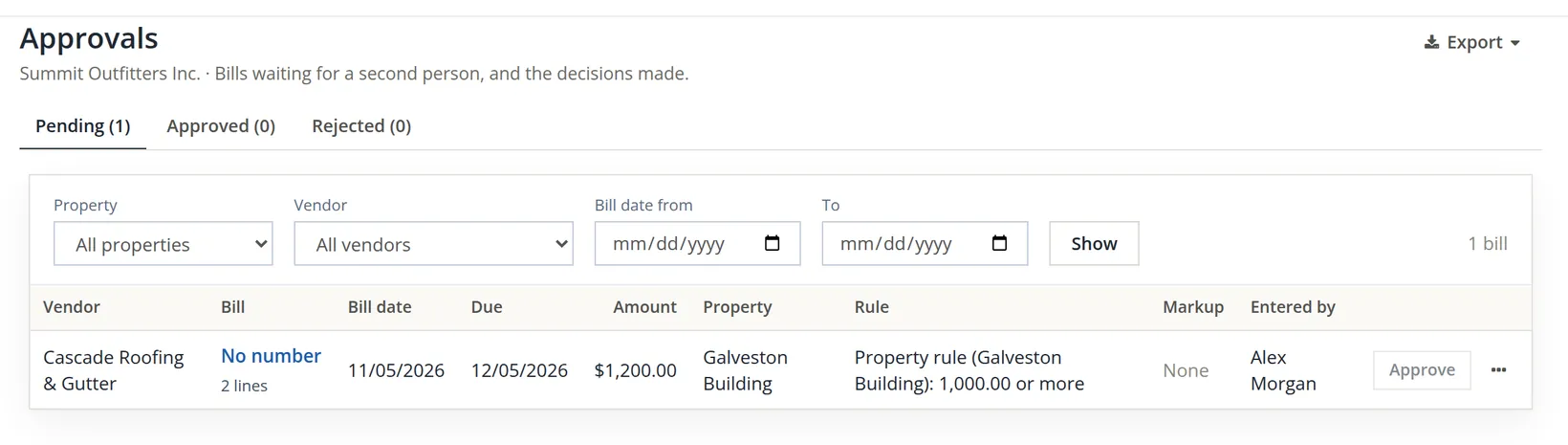
Alex entered the bill, so Alex cannot approve it, however many rights Alex holds: nobody who entered the bill or changed it while it waits may decide it; the server checks this again when a decision is posted. In Summit the bill stays in Pending until a second member with edit on lease ledgers approves it. Once approved, the bill pays like any other (Chapter 3.3); if anyone later changes its total or lines, it goes back to waiting.
A limit that catches every plumber's visit trains the approver to click without reading. Pick the amount above which a mistake would really hurt (for example, about a month's rent of the building) and let the small bills flow. The Approvals page has an Export for the record of who approved what.
Inspections and entry notices
The drive-by inspection that found the sagging gutter (and opened WO-0002), the periodic inspection of 2B, and the notice of entry the tenant must get first are now covered in Chapter 13.9, together with meters and unit equipment. A poor item on an inspection opens a work order exactly like the ones in this chapter.
Maintenance hygiene
- [x] Every vendor on a work order has current insurance on its Compliance card.
- [x] Permission to enter is recorded before a vendor goes into an occupied unit.
- [x] Work order lines match the vendor's quote; the bill is created from them or the right bill is matched.
- [x] Each vendor's current certificate of insurance is filed on its vendor page; nothing shows under Expired, and every vendor under Expiring has its renewal certificate on the way.
- [x] Chargeback chosen only when the tenant caused the damage, with the cause written in the work order's notes.
- [x] The approval rule's scope is the one you meant (one property, or the whole books) and its limit is set where a mistake would hurt.
- [x] The Approvals page's Pending tab is empty before each payment run, or every bill on it has an approver lined up.
Check your understanding
1. A new work order warns "No insurance on file". Will the work order still save?
Answer
Yes, it only warns, unless the books require current vendor insurance; then the vendor is refused. Either way, record the vendor's insurance on its Compliance card.
2. The Bill card offers a $1,181.40 open bill of the same vendor. When should you match it?
Answer
Only if that bill is for this job. Otherwise create the bill from the work order's lines.
3. Which account does a bill created from WO-0001 debit, and for how much?
Answer
Expenses:Galveston Building:Repairs, $213.50 ($145.00 labor + $68.50 parts).
4. After WO-0004's chargeback is paid, what has the roof patch cost the Galveston Building, and why do the books still show $275.00 of repairs?
Answer
Nothing, net: $275.00 of repairs less $275.00 of tenant reimbursements is $0.00. The two are kept gross so the repairs account shows the real upkeep and the reimbursements account shows what tenants caused.
5. A Galveston Building rule holds bills of 1,000.00 or more. Which of these wait: the $275.00 roof patch bill, the $1,200.00 shingle bill, and a $1,500.00 bill for the store's inventory?
Answer
Only the $1,200.00 shingle bill. The $275.00 bill is under the limit; the store's bill is on no property's accounts, so it follows the books' rule, and there is none.
6. You entered a bill that waits for approval, and you hold every right in the books. Can you approve it?
Answer
No. Whoever entered the bill, or changed it while it waited, never decides it; a second person with edit on the rule's approver right must approve it.
Notes
- A closed work order does not show its earlier states again (reopening one keeps its bill linked), so the pictures of the open, done and billed order in Procedures A and B were retaken in November 2026 on WO-0007, a copy of WO-0001 entered the same way. That is why the pictures show WO-0007, stamps of 11/06/2026, and, on the Bill card, WO-0001's own $213.50 bill as a second open bill. Everything else on the copy (lines, vendor, dates, the warning) is as it was on WO-0001. ↑
- Since November 2026 the certificate upload works on the vendor page; the first edition of this chapter could not show it. A certificate whose file is later deleted reads "The certificate file was deleted -- add it again." ↑
- Whether and how much a tenant can be charged for damage depends on the lease and on state law, which also separates damage from normal wear and tear. This chapter is not legal advice. ↑
- In the November 2026 build, Save changes on the work order page also clears Requested by, because the page has no box to send it back; that is why WO-0004 shows no Requested by chip. Choose the requester on the New work order form and note it in the notes as well. ↑
- The chargeback can go to any lease of the unit that ran on the completion day or ended within 90 days before it; with more than one, the card asks you to choose. A work order on the whole building, with no unit and no lease, has nobody to charge. ↑
- On a managed property (Chapter 13.11) the rule's owner markup is recorded with each approval and posts with that month's management fees, charging the owner a percentage of the bill. In own-portfolio books nothing is posted. ↑