
Chapter 13.2
Importing a rental portfolio
A building you buy comes with people already living in it. This chapter brings a seller's rent roll into the books in one sitting: the property, its units, the tenants, the running leases, a parking charge and the money owed, paid ahead and held as deposits on the day of the import. Every file is checked first by a dry run, one refused row is corrected, and the result is checked on the rent roll and the Deposits page.
When you finish this chapter you will be able to:
- Explain the six import types and why they must be imported in order.
- Fill an import template from a seller's rent roll.
- Read a dry run, download its error file and correct a refused row.
- Choose the as-of day and the opening balance account for opening balances.
- Check what a commit made: the leases, their move-in gates, the ledger entries and the deposits.
What the importer does
Entering a building by hand means one property form, a unit grid, a contact per tenant, a lease wizard per lease and an opening entry per balance. For one house that is fine. For a fourplex it is an afternoon, and for forty units it is a week. The importer does the same work from six spreadsheets, and it does it with the same rules as the hand-entry screens: a row the lease wizard would refuse, the importer refuses too.
Open Settings → Property Management → Data → Import: the Data tab of the module's settings has two sub-tabs, Import and Custom fields, and the Settings sub-menu has an Import entry that goes straight there. The page shows one card per import type, numbered in the order you must use them, because each step needs the one before it: units need their property, leases need their unit and their tenant, charges and balances need their lease.1
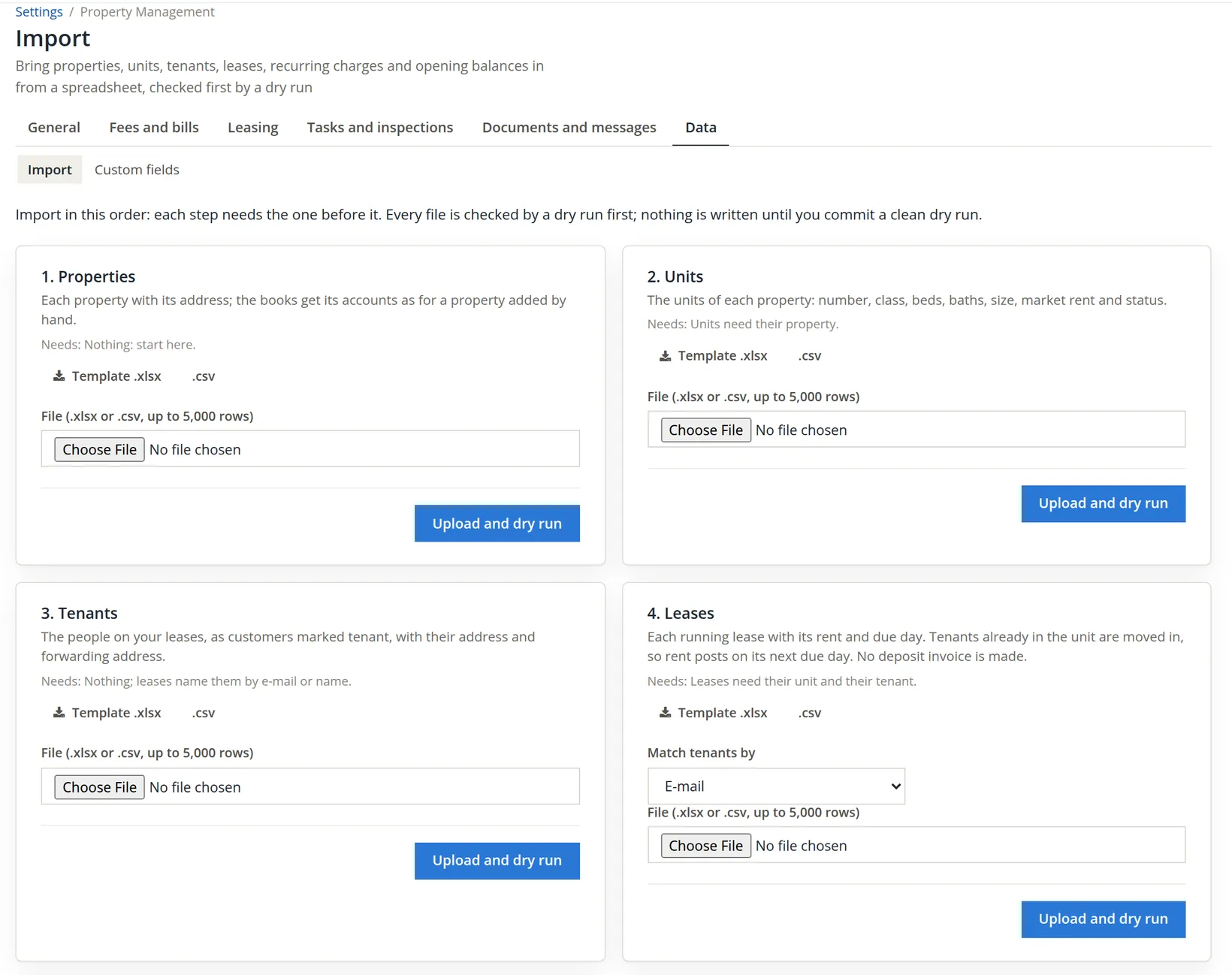
| Card | What one row makes | Needs |
|---|---|---|
| 1. Properties | A property with its address, and its chart accounts, as for a property added by hand | Nothing |
| 2. Units | A unit: number, class, beds, baths, size, market rent, status | Its property |
| 3. Tenants | A customer marked tenant, with address and forwarding address | Nothing |
| 4. Leases | A running lease with its rent and due day; the tenant is moved in. No deposit invoice is made | Its unit and its tenant |
| 5. Recurring charges | A repeating charge of a lease: parking, pet rent, storage | Its lease (unit and start day) |
| 6. Opening balances | Per lease: one opening invoice, one credit and one deposit entry, as of a chosen day | Its lease |
Each upload is a dry run first. The importer reads every row, checks it with the target screen's own rules, looks up what the row names (the property by name, the unit by property and number, the tenant by e-mail or name, the account by number or name) and marks the row OK, Failed with the reasons, or Already there. Nothing is written but the record of the run itself. Only a dry run with no failed row can be committed, and only within 24 hours.2 A committed import has no undo: corrections are ordinary voids and reversals, as for any entry.
From the seller's rent roll to six files
Start with the source. The seller's rent roll for Riverside, as of November 5, reads:
| Unit | Size | Market rent | Tenant | Lease |
|---|---|---|---|---|
| 1 | 2 bd, 1 ba, 860 sq ft | $1,350.00 | Priya Raman | Fixed, 01/01/2026 to 12/31/2026 |
| 2 | 2 bd, 1 ba, 860 sq ft | $1,350.00 | Marcus Bell | Fixed, 07/01/2025 to 06/30/2027 |
| 3 | 1 bd, 1 ba, 640 sq ft | $1,250.00 | Noah Brandt | Month to month since 03/01/2024 |
| 4 | 2 bd, 1.5 ba, 920 sq ft | $1,400.00 | Vacant | |
| Unit | Monthly rent | Deposit held | Owes | Paid ahead |
|---|---|---|---|---|
| 1 Priya Raman | $1,325.00 | $1,325.00 | -- | $1,325.00 |
| 2 Marcus Bell | $1,350.00 | $1,350.00 | -- | -- |
| 3 Noah Brandt | $1,195.00 + parking $50.00 | $1,100.00 | $1,195.00 | -- |
| Totals | $3,870.00 + $50.00 | $3,775.00 | $1,195.00 | $1,325.00 |
Rent is due on the 1st. Noah has not paid November. Priya paid December's rent early. The seller's roll also says, for every lease, next due: 12/01/2026 for Priya and Marcus, and 11/01/2026 for Noah, because the November rent is still open. Remember that last figure.
Download each template from its card. The .xlsx has two sheets: Template, a header row and one example row, and Instructions, which lists every column, whether it is required, an example and what it takes. Delete the example row, keep the header row as it is, and add your own rows. Summit copied the rent roll into the six templates and saved each as a .csv file:
| File | Rows | What Summit typed |
|---|---|---|
| riverside-properties.csv | 1 | name Riverside Fourplex, type 2 (Multi-family), addr1, city Bend, state_code OR, zip 97703 |
| riverside-units.csv | 4 | units 1 to 4: class residential, beds, baths, sq_ft, market_rent_amount, status occupied (4: vacant) |
| riverside-tenants.csv | 3 | first and last name, e-mail (priya.raman@example.com and so on), phone, address in the building |
| riverside-leases.csv | 3 | unit, primary_tenant_email, type (fixed or at_will), start_on, due_day 1, rent_amount, rent_next_due_on, end_on, deposit_required_amount, signature_status signed |
| riverside-recurring-charges.csv | 1 | unit 3, lease_start_on 2024-03-01, kind parking, account Revenue:Riverside Fourplex:Late & Other Tenant Fees, 50.00, monthly, next_due_on 2026-12-01, memo Carport 3 |
| riverside-opening-balances.csv | 3 | unit, lease_start_on, balance_due_amount, prepaid_amount, deposit_held_amount |
Dates are YYYY-MM-DD or MM/DD/YYYY and amounts are plain numbers (1325.00) with no currency sign. Columns may come in any order, but an extra column is refused, so delete the seller's own columns (lease notes, phone extensions) before you upload. A column named cf:<field name> fills a custom field of the record (Chapter 13.1).
Import the property, the units and the tenants
- 1
On card 1, choose riverside-properties.csv and click Upload and dry run
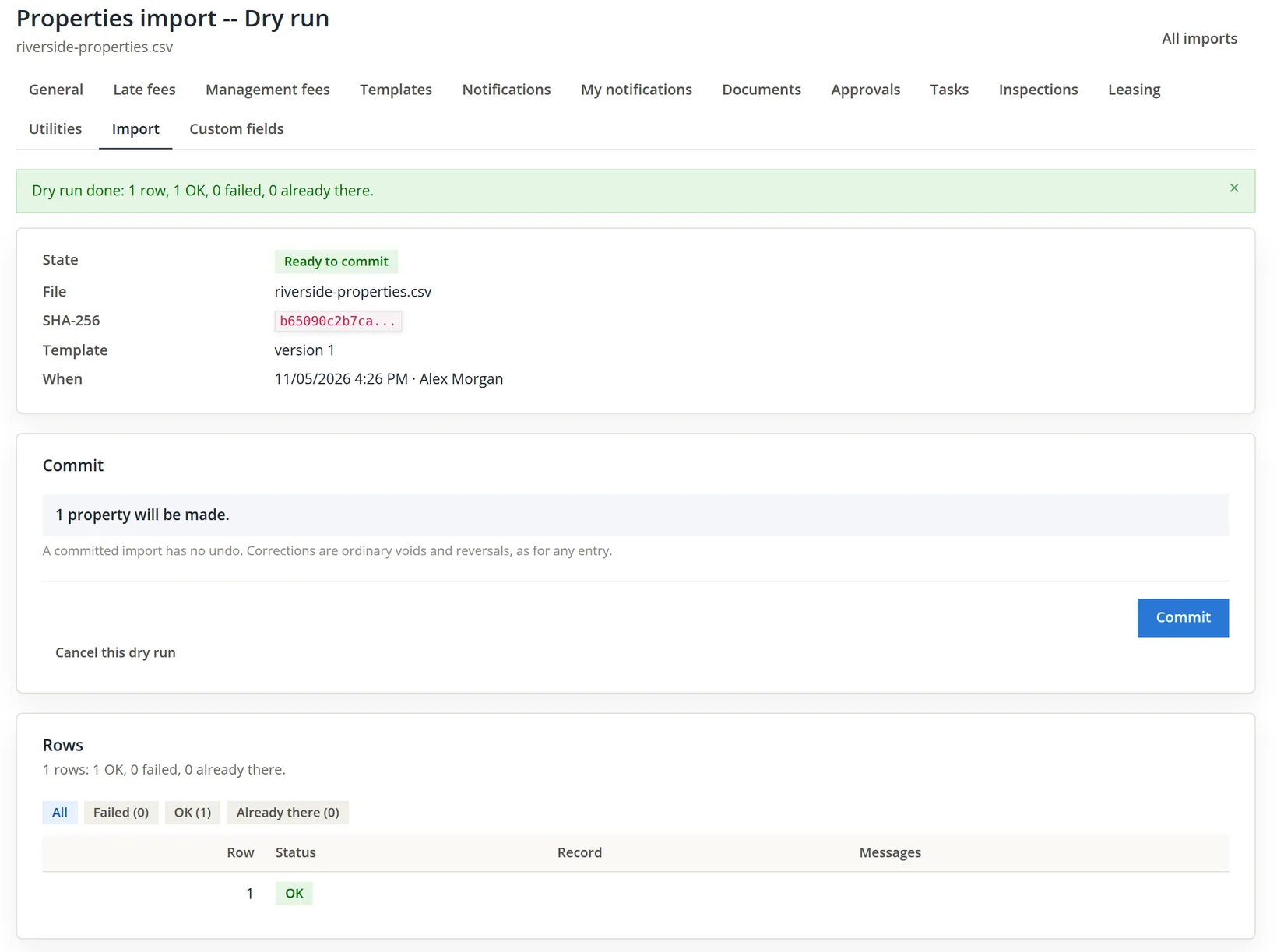
The upload opens the run's own page. Read it top to bottom before you commit.
- 2
Click Commit and wait for Done
The commit runs in the background. The page reads "Committing: n of n rows" and refreshes itself every few seconds; you may leave it. The property is made with its chart accounts, exactly as Chapter 13.1 makes them by hand: Revenue:Riverside Fourplex:Rents (45310), Late & Other Tenant Fees (45320), Liabilities:Security Deposits Held:Riverside Fourplex (22530) and the rest.
- 3
Back on the Import tab, do the same for units (card 2) and tenants (card 3)
The units dry run answers "4 units will be made", the tenants dry run three rows OK. Commit each. Tenants become ordinary customers marked tenant (Chapter 2.6); a contact already in the books with the same e-mail is the same person and is not made twice.
Leases find their tenant by e-mail unless you choose Full name. Matching by name is risky in books that already hold many customers and vendors: two different people can share a name, and the lease would go to whichever contact the importer finds. Give every tenant an e-mail address in the file, even a placeholder you replace later, and keep matching by e-mail.
Import the leases, and correct the refused row
A lease row names its unit, its primary tenant, the type, the first day, the due day, the rent in force and the next rent due date. A lease that started before today is saved and moved in at once, so that rent simply posts on its next due day. That is why the next due date matters so much.
- 1
On card 4, leave Match tenants by at E-mail, choose riverside-leases.csv and upload it
The dry run comes back red. Right after the upload a banner reads "Dry run done: 3 rows, 2 OK, 1 failed, 0 already there."; the same count stays in the Rows card when you come back to the run later.
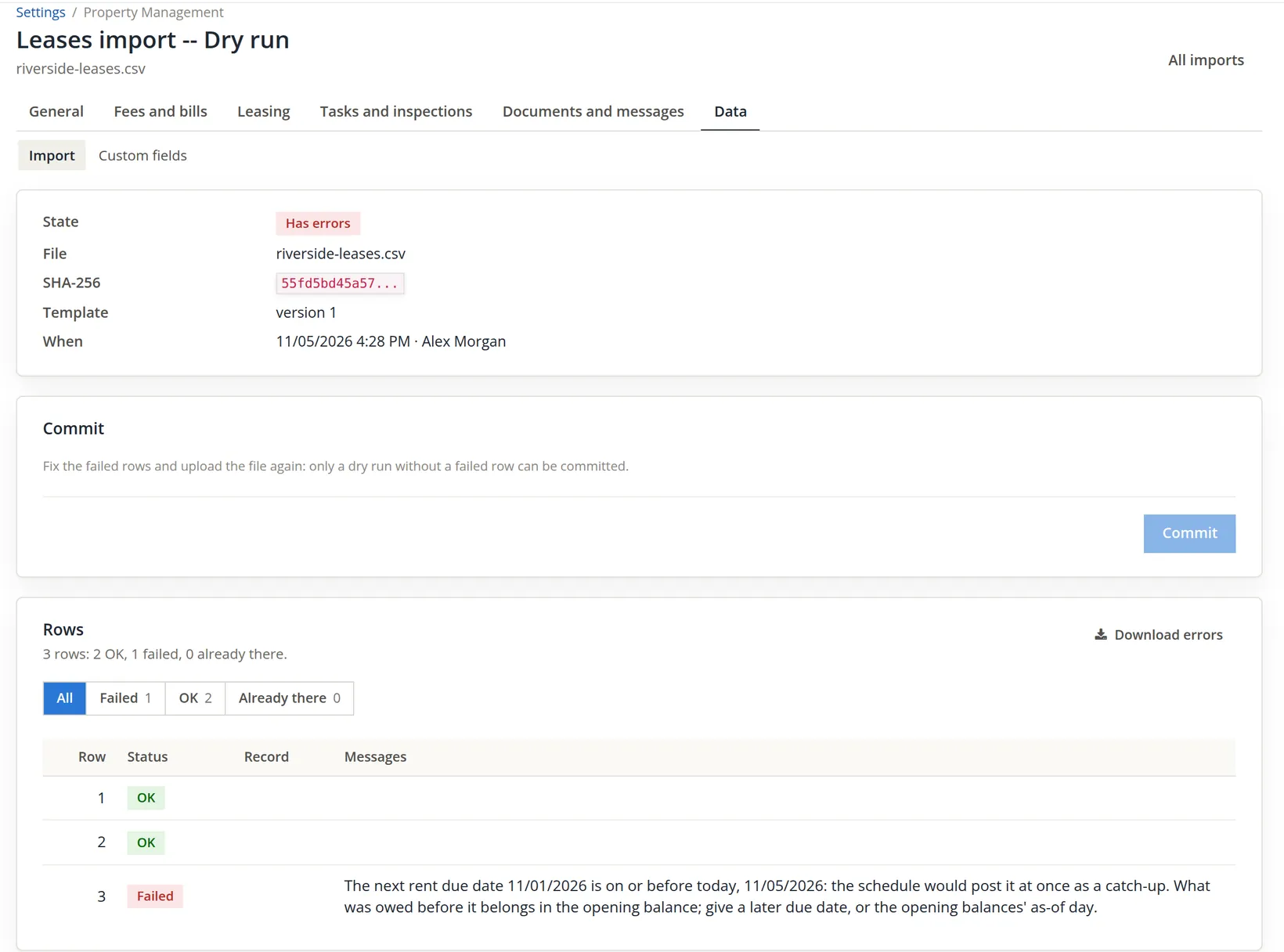
The message reads: "The next rent due date 11/01/2026 is on or before today, 11/05/2026: the schedule would post it at once as a catch-up. What was owed before it belongs in the opening balance; give a later due date, or the opening balances' as-of day."
Think about what would have happened without the check. A lease's rent schedule posts every due date from its next due date onward, the backlog included (Chapter 14.1). With 11/01/2026, the schedule would post November's $1,195.00 the moment the lease existed. Procedure D brings in the same $1,195.00 as Noah's opening balance. Noah would owe November twice: $2,390.00 on a $1,195.00 debt. The seller's "next due" was right for the seller's ledger, where November was already billed; in Summit's books November is history, and history belongs in the opening balance.
- 2
Download the errors and read them
The file, leases-errors-b8ab7697.csv, holds the failed rows only, with their original columns and two more: row (the row's number among the data rows, not counting the header) and errors.
| Column | Value in the error file |
|---|---|
| property_name, unit_no | Riverside Fourplex, 3 |
| primary_tenant_email | noah.brandt@example.com |
| type, start_on, due_day | at_will, 2024-03-01, 1 |
| rent_amount, rent_next_due_on | 1195.00, 2026-11-01 |
| deposit_required_amount, signature_status | 1100.00, signed |
| row | 3 |
| errors | The next rent due date 11/01/2026 is on or before today, 11/05/2026: the schedule would post it at once as a catch-up. What was owed before it belongs in the opening balance; give a later due date, or the opening balances' as-of day. |
The file is one header row and one data row; it is shown here turned on its side. The empty columns (primary_tenant_name, end_on, cosigner_email) are left out.
- 3
Correct the source file, not the error file
In riverside-leases.csv change Noah's rent_next_due_on to 2026-12-01 and save it as riverside-leases-fixed.csv. Correct the whole file rather than uploading the error file alone: the two good rows have not been written yet either, because nothing is written until a commit.
- 4
Upload it from the run page's Upload a fixed file card
The card at the bottom of the failed run takes the same kind of file and checks it with a new dry run. (Its Options card, Dry run again, re-checks the same file with other options, which does not help when the file itself is wrong.) The new dry run reads 3 rows, 3 OK, and its summary says "3 leases will be made, all 3 activated at once." That is three leases, each moved in at once because each started before today.
- 5
Commit
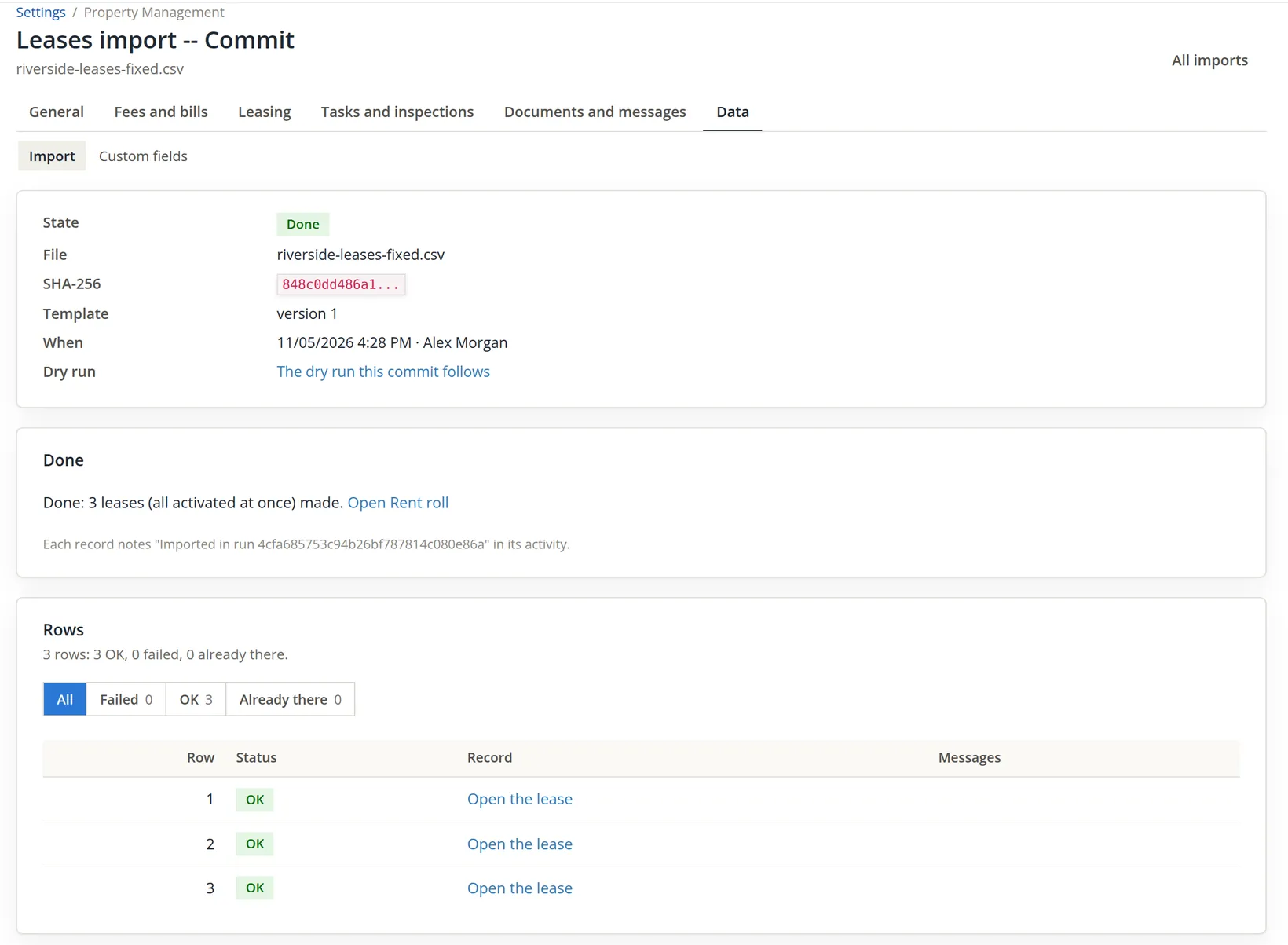
The page reads "Done: 3 leases (all activated at once) made."
A file with two leases for the same unit is refused ("import one lease per unit at a time"), and so is a lease that overlaps one already in the books. If the seller's roll shows a renewal that starts next month, import the running lease now and enter the renewal on the lease afterwards (Chapter 13.7).
Import the parking charge
Rent comes with the lease; anything else that repeats is a recurring charge. Noah rents carport 3 for $50.00 a month. The row finds its lease by the unit and the lease's start day, takes the income account by number or full name, and needs a next due date after today, for the same reason as the rent.
- 1
On card 5, upload riverside-recurring-charges.csv
The dry run answers "1 recurring charge will be made."
- 2
Commit
Noah's lease now carries a second schedule, Parking 50.00 monthly, next due 12/01/2026, shown on its Charges tab. From December 1 the lease's monthly charges are $1,195.00 + $50.00 = $1,245.00.
Import the opening balances
The leases know their future. The opening balances bring in their past, as one figure each on one day: what the tenant owed, what the tenant had paid ahead, and the deposit held. Each non-zero amount becomes one entry:
| Column | Becomes | Riverside |
|---|---|---|
| balance_due_amount | One invoice dated the as-of day, its line on the opening balance account | Unit 3: $1,195.00 |
| prepaid_amount | One customer credit on the tenant's account, to be used on an invoice by hand | Unit 1: $1,325.00 |
| deposit_held_amount | One journal entry from the opening balance account to the property's deposit liability, and its deposit ledger row | Units 1, 2, 3: $1,325.00 + $1,350.00 + $1,100.00 = $3,775.00 |
- 1
On card 6, set Balances as of to 11/05/2026
The day may be today at the latest, and not inside closed books. Rent due after this day posts as usual. The leases and recurring charges cards have no as-of field: their next due dates must be after today, whichever as-of day you choose here, and anything that fell due before today belongs in the opening balances. In this story the two days are the same.
- 2
Choose the Opening balance account
The list holds the equity accounts first, then the income accounts. Summit's bookkeeper was tempted by Revenue:Riverside Fourplex:Rents, since Noah's $1,195.00 is November rent. The card objects at once.
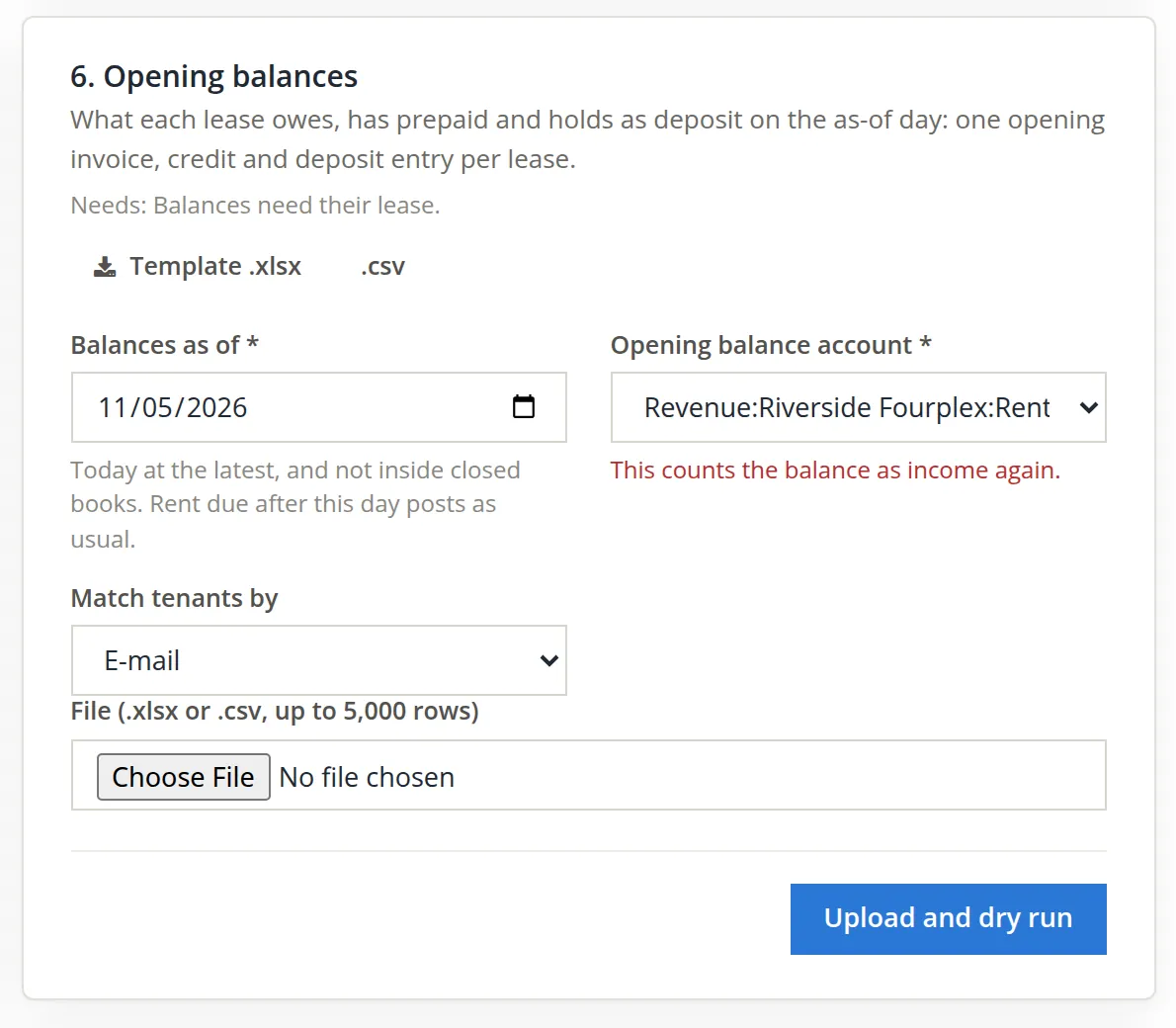
The warning is written for the usual case, moving books from older software, where the old system already counted the rent as income. Here there is a second reason to refuse: one account serves all three columns, and the three deposits would be debited to Rents too, turning $3,775.00 of money held for tenants into negative rent. Summit chose the default, Equity:Opening Balances, and leaves the allocation of the purchase to its accountant.3
- 3
Upload riverside-opening-balances.csv and read the summary
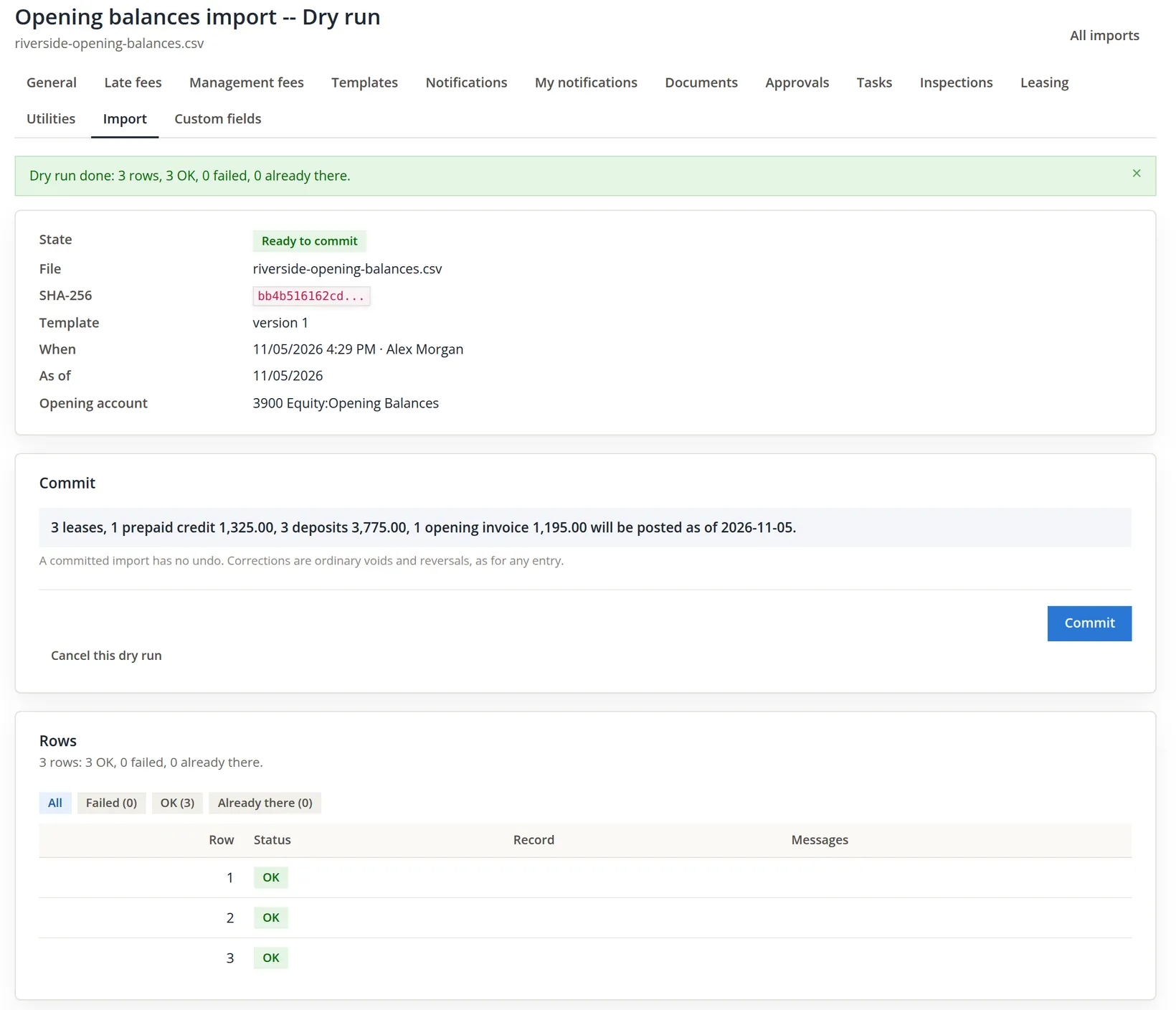
Compare the summary with the seller's totals before you commit: $1,195.00 owed, $1,325.00 paid ahead, $3,775.00 held. All three agree.
- 4
Commit
The page reads "Done: 1 prepaid credit, 3 deposits, 1 opening invoice posted on 3 leases." Noah's opening invoice is number 1250 (numbers are shared with every other invoice of the books, so yours will differ), Priya's credit is OB-CAE706, and the three deposit journals are entries 201, 202 and 203.
A second opening balances run for the same lease answers Already there, and the dry run refuses a lease whose schedules already posted a charge on or before the as-of day ("its opening balance is in the books already"). If you got a figure wrong, correct the entry itself: void the invoice, or adjust the credit or the deposit on the lease.
Check what the commit posted
An import is only as good as its entries. Open Accounts → Chart of Accounts, search for Opening Balances and click its name to open its register (Chapter 4.2). Read the lines dated November 5.
| Entry | Debit | Credit | Amount |
|---|---|---|---|
| Invoice 1250, Noah's opening balance | Accounts Receivable | Equity:Opening Balances | $1,195.00 |
| Credit OB-CAE706, Priya's prepaid rent | Equity:Opening Balances | Liabilities:Customer Credits | $1,325.00 |
| Journal entries 201, 202, 203, the deposits held | Equity:Opening Balances | Liabilities:Security Deposits Held:Riverside Fourplex | $3,775.00 |
Every line sits where the card promised: the opening balance account takes the other side of the invoice, the credit and the deposits. The prepaid amount in particular is money the seller collected before Summit owned the building, so it is not Summit's expense; the credit is posted from Equity:Opening Balances to the tenant's credit on the Customer Credits liability, which is what Summit owes Priya in rent.4 The importer cannot judge the figures themselves, because nothing is wrong with any row; only reading the entries against the seller's roll does that.
- 1
Note the credit for the first invoice
The credit itself stays where it is: $1,325.00 on Priya's customer account. Nothing applies it to rent by itself, so put a reminder in the December rent day: when the December rent invoice posts on 12/01/2026, use the credit on it (Chapter 2.5, Procedure B). Otherwise the tenant is billed for a month they already paid.
The import's effect on the opening balance account is easy to state:
| Equity:Opening Balances | Debit | Credit |
|---|---|---|
| Deposits held (201-203) | $3,775.00 | |
| Prepaid rent (credit OB-CAE706) | $1,325.00 | |
| Noah's November rent (invoice 1250) | $1,195.00 | |
| Net | $3,905.00 |
$3,775.00 + $1,325.00 − $1,195.00 = $3,905.00. That debit is not an error; it is a clearing balance that waits for the purchase entry, the one that books the closing statement of the sale.
The result
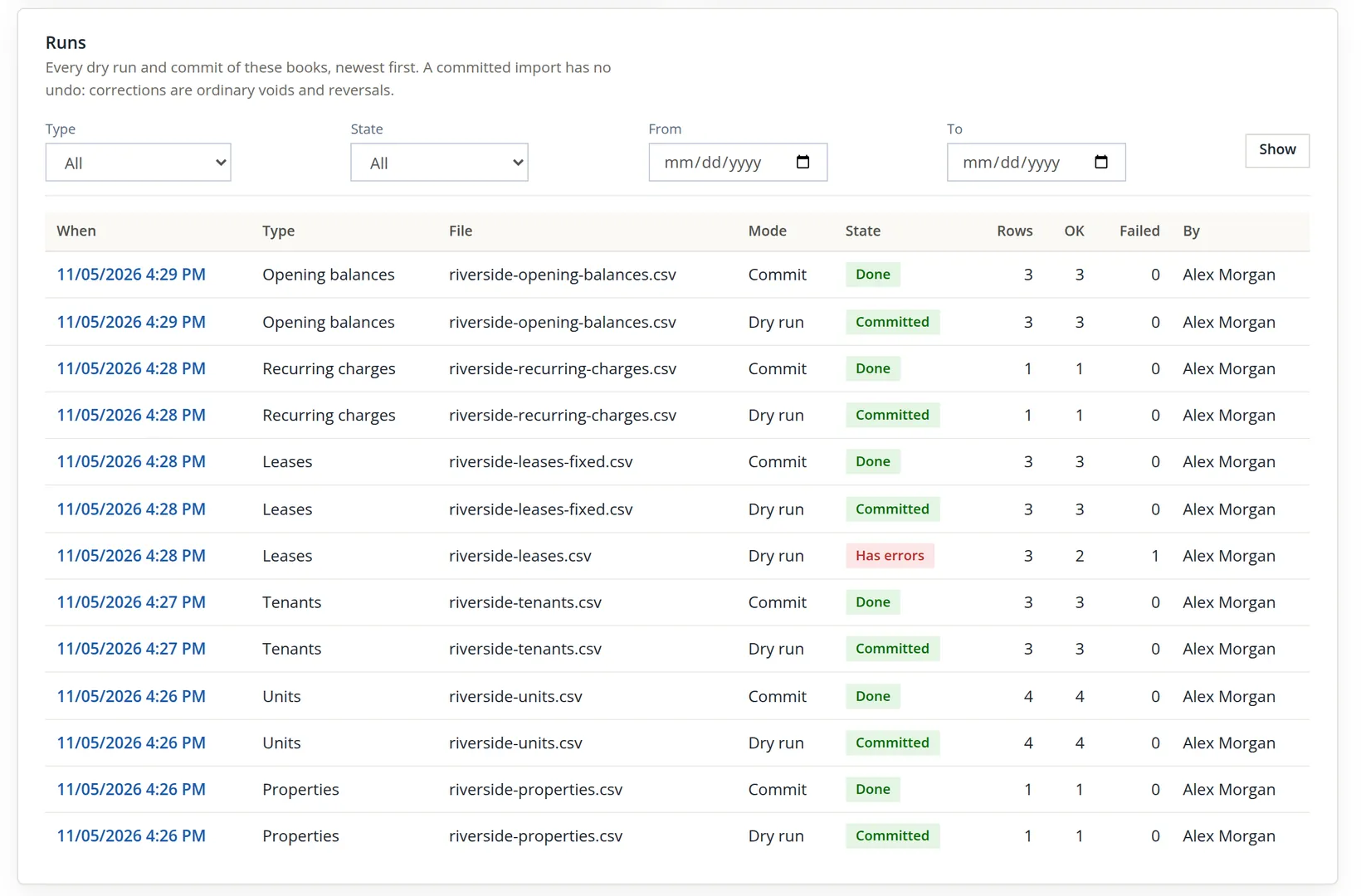
The Runs card at the bottom of the Import tab keeps every dry run and commit of the books, newest first. It is the audit trail of the import.
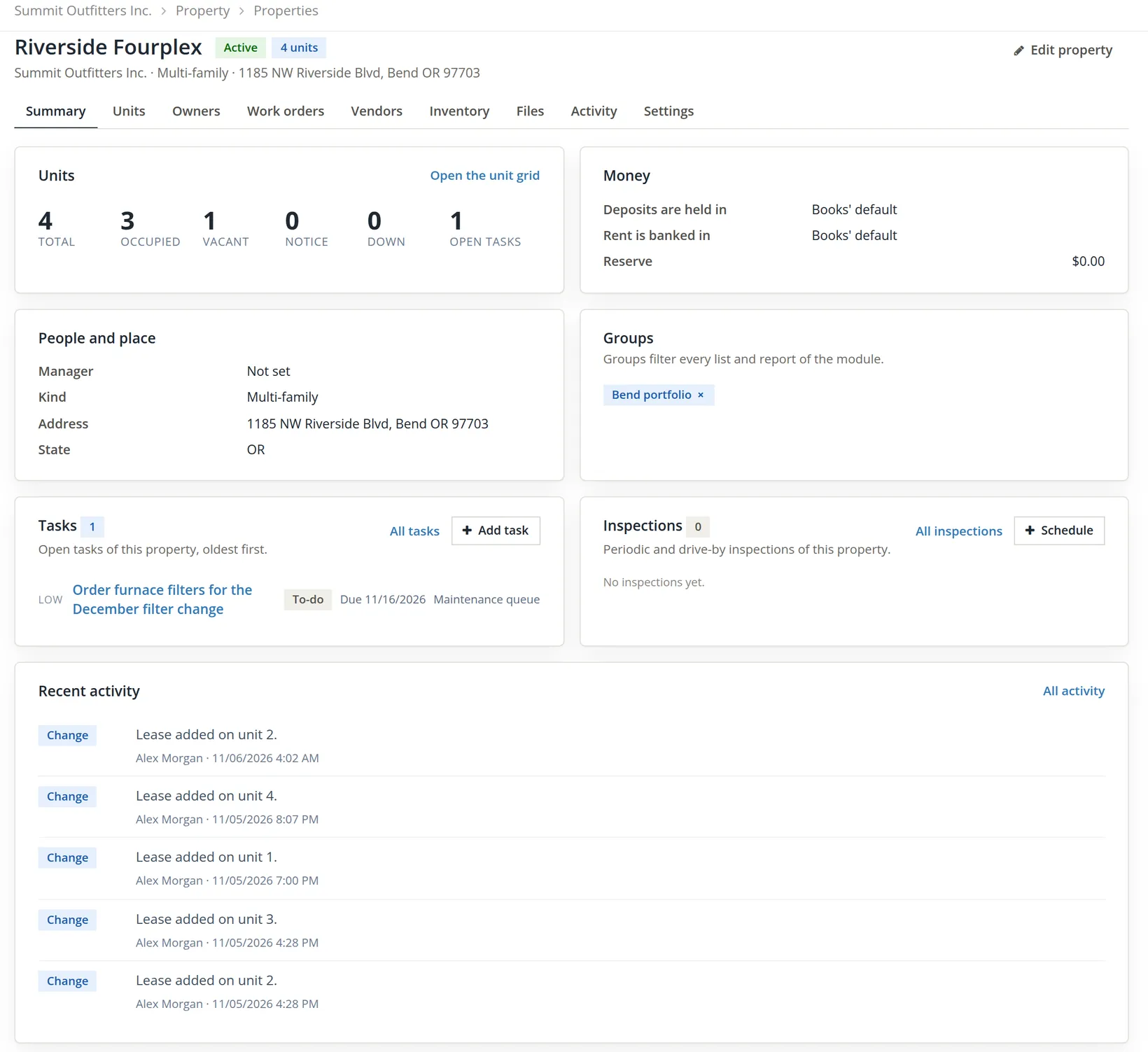
Next, open Property Management → Properties and people → Properties → Riverside Fourplex.
Then Money → Rent roll, with the property filter set to Riverside Fourplex. On the day of the import it lists the three imported leases: Priya Raman (unit 1), Marcus Bell (unit 2) and Noah Brandt (unit 3), every one next due 12/01/2026.
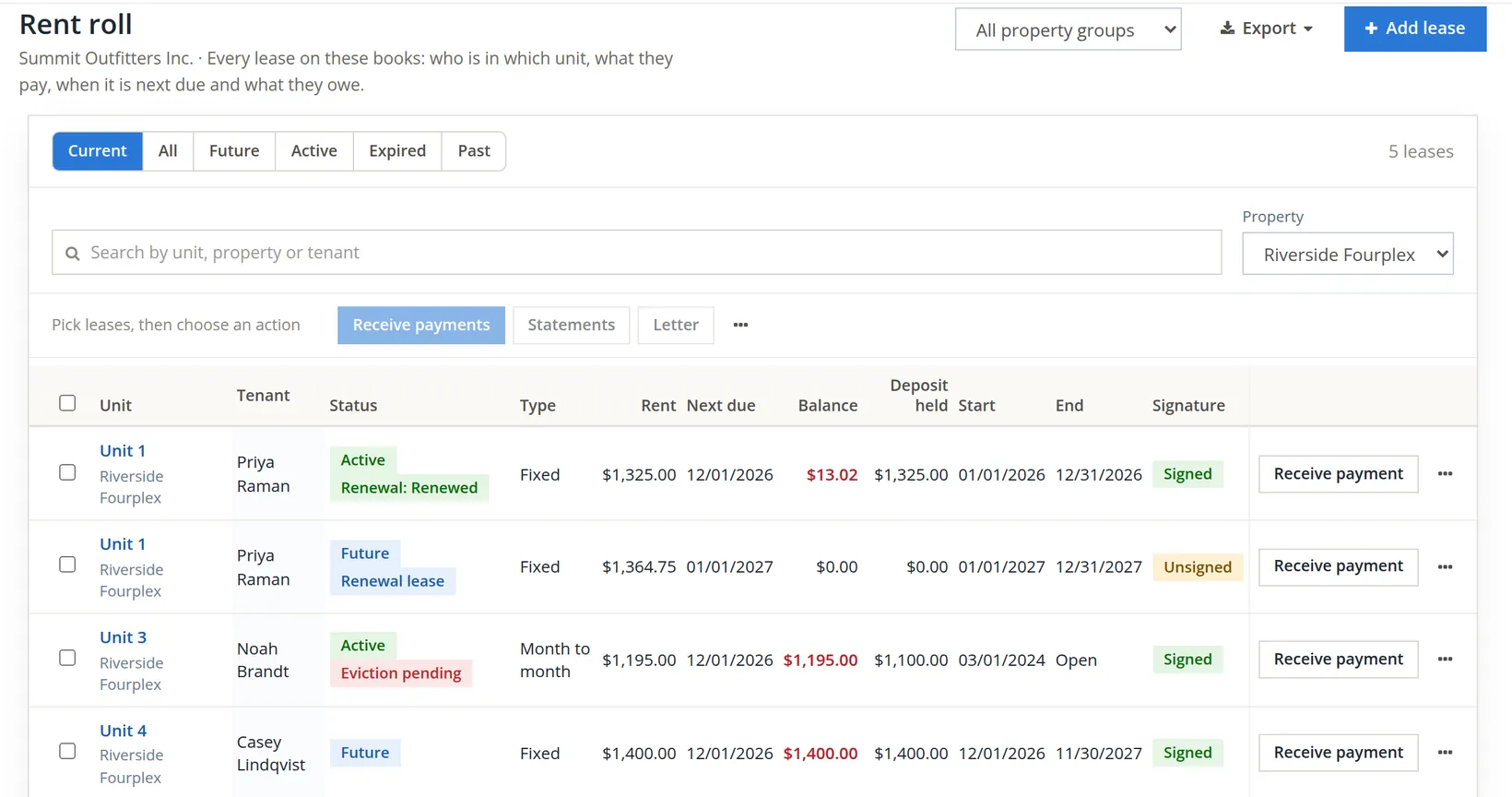
On the day of the import Priya's balance read $0.00, not −$1,325.00 (the $13.02 in the picture comes from the later chapters). The imported prepaid amount is a customer credit, and nothing applies it by itself: December's rent will post as a full $1,325.00 invoice on December 1, and the credit stays on the tenant's account until someone uses it on that invoice (Chapter 2.5, Procedure B). Until then the tenant's account shows December both paid ahead and billed.5 Open Noah's lease and its Move-in tab to see how an imported lease became active without passing every move-in gate of Chapter 13.4 by hand.
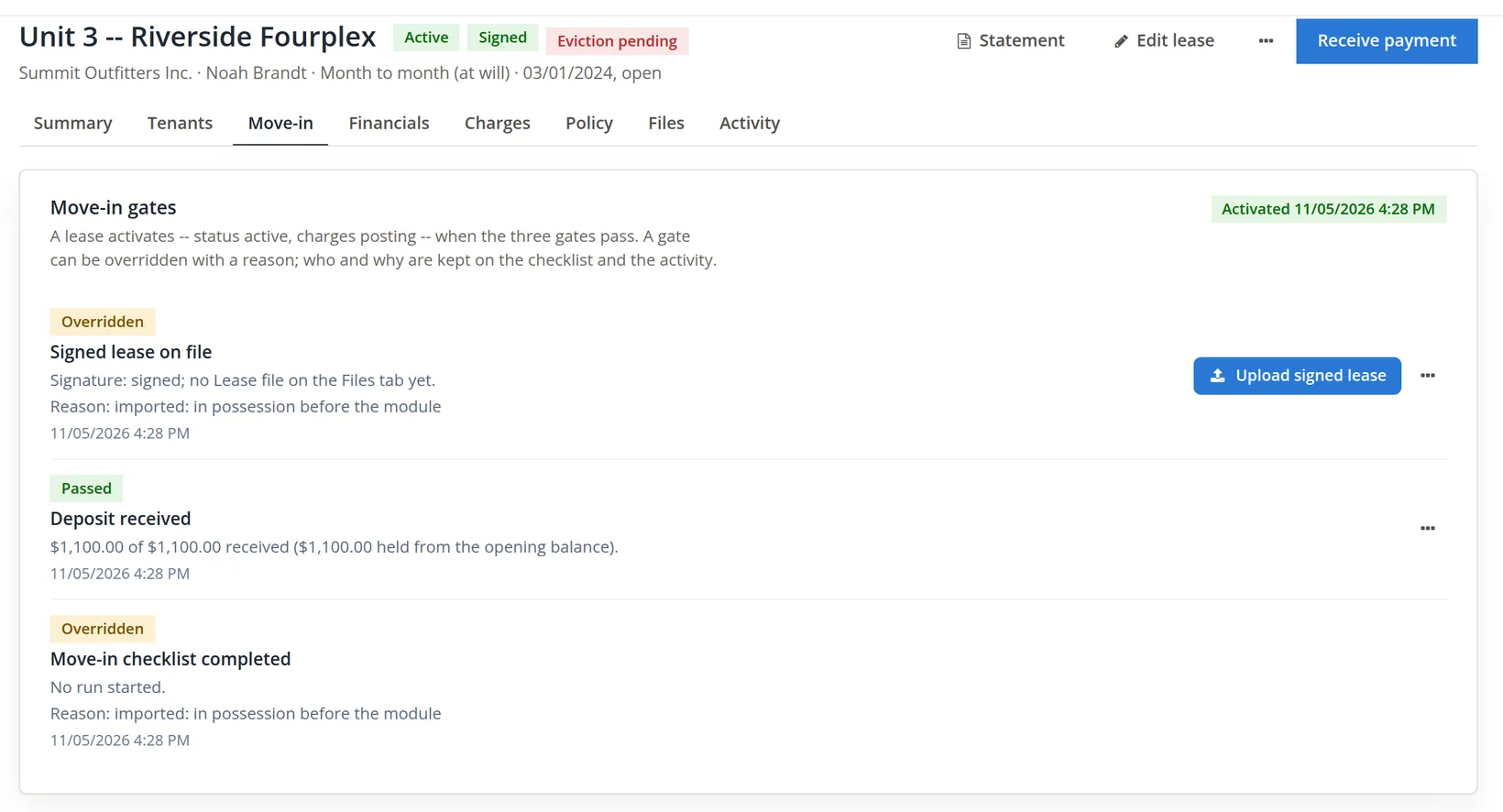
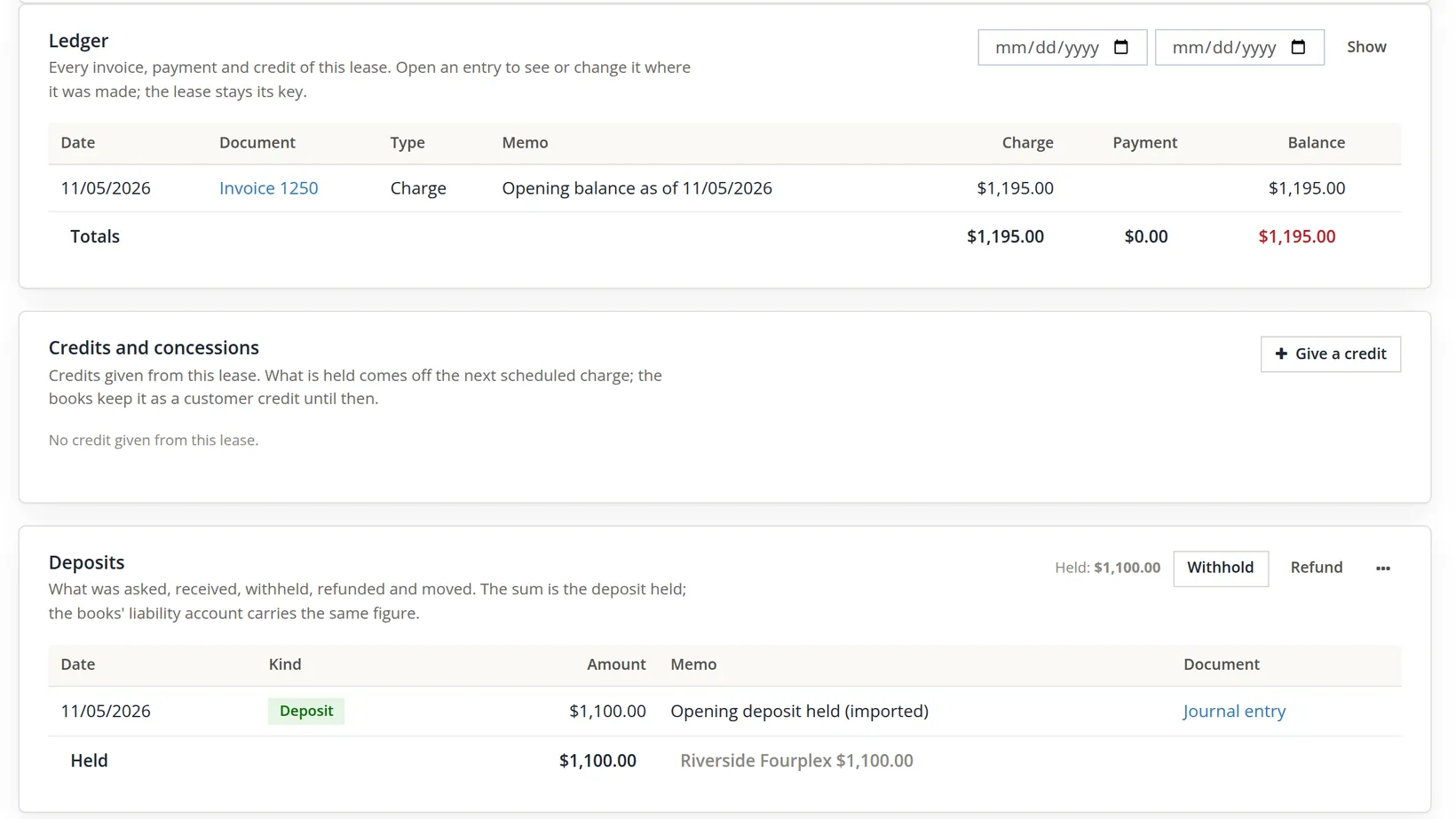
The Financials tab shows the money side of the same lease. Above the ledger it also carries the lease's holds, late fees and collections cards (Chapters 13.5 and 13.6), and between the ledger and the deposits a Credits and concessions card for credits given from the lease itself; for an imported lease it starts empty, because the imported prepaid credit belongs to the tenant's account, not to the lease's concessions.
Last, Money → Deposits compares the deposits the leases hold with the bank they sit in.
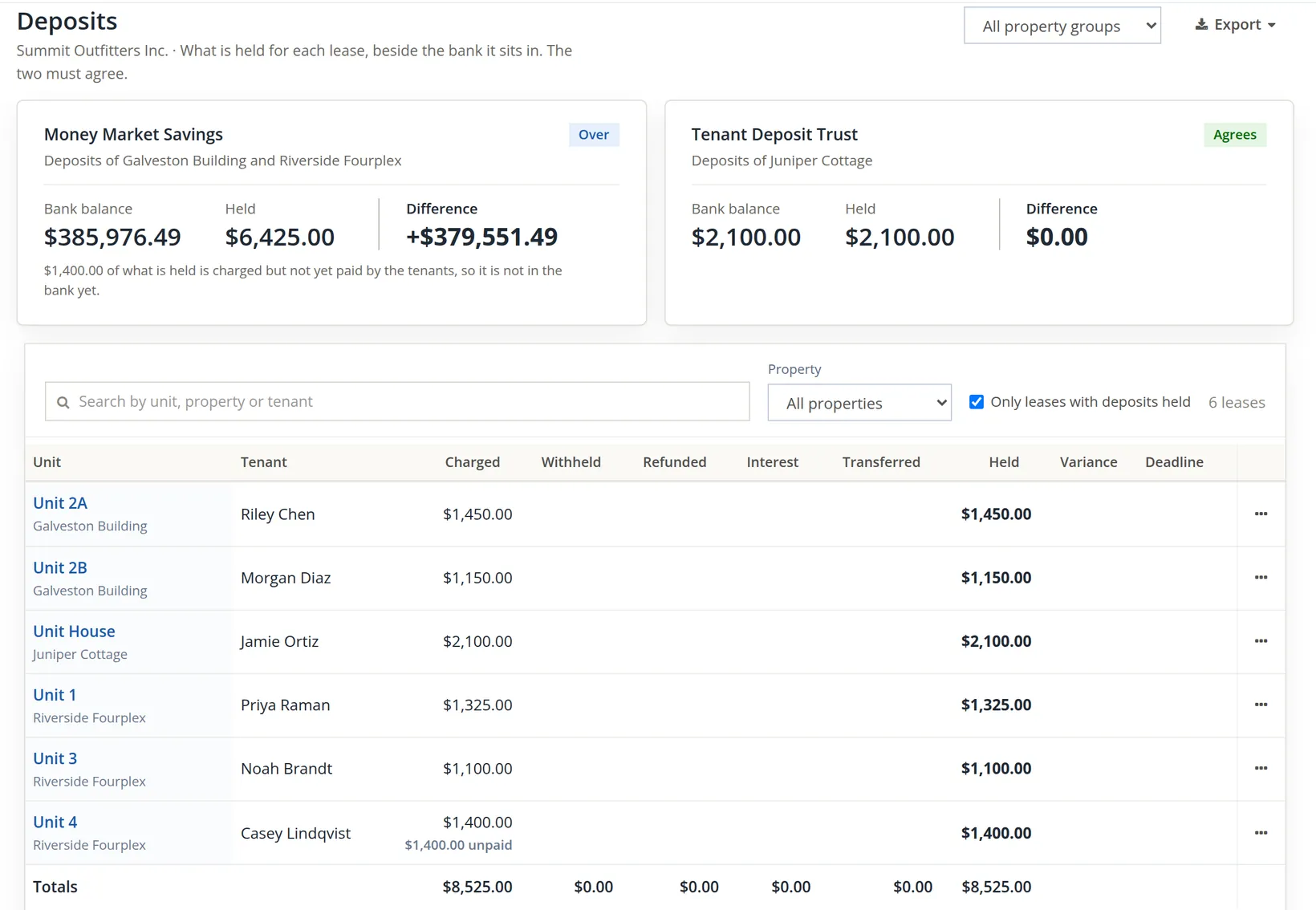
The arithmetic on the day of the import: Galveston's $2,600.00 + Riverside's $3,775.00 = $6,375.00 held. The bank balance did not move, $387,151.49, because the import records what is owed to tenants, not the cash. So the difference fell by exactly the new deposits: $384,551.49 − $3,775.00 = $380,776.49. Chapter 13.5 explains why this bank always reads Over: it also holds the store's savings.
The picture, taken later, reads differently because later chapters moved deposits: Marcus Bell's $1,350.00 was settled at his move-out (Chapter 13.7), and Casey Lindqvist's $1,400.00 for unit 4 was charged (Chapter 13.4). Held is now $2,600.00 + $1,325.00 + $1,100.00 + $1,400.00 = $6,425.00. Casey's deposit is charged but not yet paid, and the card says so in a line of its own: that $1,400.00 counts as held but is not in the bank yet.
When a building is sold, the seller hands over the tenants' deposits, in cash or as a credit on the closing statement. Either way the money must end up where the books say deposits are held. With a dedicated deposit account, this page would now show a shortfall of $3,775.00 until that money is recorded there (Chapter 4.6 for a deposit, Chapter 4.7 for a transfer between banks), which is exactly the reminder you want.
Importing a portfolio
- [x] The seller's rent roll totals written down before you start: rent, deposits, owed, prepaid.
- [x] Every tenant has an e-mail in the file; leases matched by e-mail.
- [x] Every next due date (rent and recurring charges) after today (and after the as-of day); what was owed before it in the opening balances.
- [x] Imported in order: properties, units, tenants, leases, recurring charges, opening balances; each dry run read before its commit.
- [x] Failed rows corrected in the source file and re-uploaded with Upload a fixed file.
- [x] Opening balance account is an equity account; the dry run summary matches the seller's totals.
- [x] The entries read in the registers: invoice, credit and deposits each against the opening balance account.
- [x] Rent roll, move-in gates, lease ledgers and Deposits page checked.
- [x] A reminder set to use each imported prepaid credit on the tenant's first invoice (Chapter 2.5), so the rent is not collected twice.
Check your understanding
1. Why can the leases file not be imported before the tenants file?
Answer
Each lease row names its primary tenant, and the dry run looks that tenant up in the books. Until the tenants are committed, the row fails with "The tenant ... is not in the books: import the tenants first."
2. Noah's lease was refused with a next due date of 11/01/2026. What would have gone wrong if it had been accepted?
Answer
The rent schedule would have posted November's $1,195.00 at once as a catch-up, and the opening balance would have brought in the same $1,195.00 again: November owed twice. The fix is a next due date of 12/01/2026, with November in the opening balance.
3. Two rows of the first leases file were OK. Were those two leases in the books after the failed dry run?
Answer
No. A dry run writes nothing but its own run record, and a dry run with a failed row cannot be committed. All three leases were made by the commit of the corrected file.
4. Why is an income account a poor choice of opening balance account for this import?
Answer
One account takes the other side of all three columns. The deposits held would be debited to that income account, and in books converted from older software the balance due would count as income a second time.
5. The Deposits page "Held" rose by $3,775.00 but the bank balance did not. Is money missing?
Answer
Not necessarily. The import records the deposits owed to the tenants; the seller's deposit money is recorded separately, as cash into the deposit bank or through the purchase entry.
6. After the commit, Priya's $1,325.00 prepaid credit sits on her customer account. What still has to be done by hand, and why?
Answer
The credit must be used on the December rent invoice when it posts on 12/01/2026 (Chapter 2.5, Procedure B). Nothing applies an imported customer credit by itself, so without that step the tenant would be billed for a month they already paid.
Notes
- The Units list (Properties and people → Units) has an Import button that opens this tab at card 2. Owners and owner opening balances for managed properties (Chapter 13.11) have templates in the module's programming interface but no card on this tab; enter them by hand. ↑
- The commit sends the kept original of the dry run's file again and is refused unless a clean dry run of the same file, type, template version and options ran in the last 24 hours. A file is read up to 5,000 rows; for an .xlsx file only the first sheet is read. Importing the same file twice is harmless: rows already in the books are reported as Already there. ↑
- How a purchase is booked (allocation of the price between land, building and the tenant items on the closing statement) is a question for your accountant. This chapter is not tax or accounting advice. Noah's November rent, for example, belongs to Summit, which owned the building on November 1, so the accountant may move it from the opening account to Rents when the purchase is booked. ↑
- Imports committed before this fix reached the books (6 November 2026 on the hosted service) posted the prepaid amount against the books' Customer Credits expense account instead of the opening balance account. Summit's own books, imported before that day, carry a one-line journal entry (entry 204) that moves the $1,325.00 from Expenses:Customer Credits to Equity:Opening Balances; books imported in that period need the same entry. Credits given by hand on a customer's account (Chapter 2.5) still post against the expense account, as before. ↑
- The module knows two kinds of money paid ahead. A prepayment is a payment received on a lease that is larger than what is open; the lease policy applies it to the next charge when that charge posts, and the Prepayments Held report (Chapter 13.15) lists it. The importer makes a customer credit instead, the same object as Chapter 2.5, so the report listed no lease on the day of this chapter and the ledger shows the credit as "$1,325.00 (credit)" while its running balance stays $0.00. ↑