
Chapter 13.6
Collections, notices and payment plans
Rent that is not paid becomes a case: who owes, what they were told, when the warning runs out, and what was agreed. This chapter follows one evening at Summit's Galveston Building. Morgan Diaz still owes November's rent; Summit approves its notice templates, serves a notice to pay rent or quit by hand, has one service method refused, and agrees a two-payment plan that pauses late fees. On the Riverside Fourplex, a second unpaid lease shows what an eviction case records, and what it does not do.
When you finish this chapter you will be able to:
- Read the Collections page and say what puts a lease on it.
- Explain why a notice needs an approved template, and approve one.
- Make a notice to pay rent or quit and explain why its demand is frozen.
- Record how a notice was served and work out the day it expires.
- Agree a payment plan and explain what its hold pauses.
- Open an eviction case and describe each stage it records.
- Take back a late fee with Waive with a credit, and say where the credit shows.
- Read the books' notification rules without switching sending on.
How collections works
Collections is the part of the module that deals with rent that stays unpaid after the late fee. It keeps four kinds of record, each tied to the lease:
- A notice is a numbered document that tells the tenant what is owed and by when. Its demand is computed once, when it is made, and is never changed afterwards: the notice is frozen.
- A service record says when, how and by whom the notice reached the tenant. The notice's expiry day is counted from it, and it produces a certificate of service, a numbered document of its own.
- A hold pauses late fees and new notices on a lease. A payment plan is a hold with installments.
- An eviction case records the stages of a court process: the books only record them; nothing is filed by the software.
A notice moves through states, and the daily run moves some of them for you:
| State | Meaning | How it gets there |
|---|---|---|
| Draft | Made and printed, not yet served. | Make the notice |
| Served | Delivered; the expiry day is set. | Record service |
| Cured | A pay or quit notice whose demanded invoices are all paid. | The daily run, dated the day of the last payment |
| Expired | The expiry day passed without a cure. | The daily run |
| Superseded | Replaced by a new notice of the same kind from today's balance. | Re-notice |
| Void | Withdrawn; it stays in the register with its reason. | Void |
Only a pay or quit notice can be cured by payment, because its demand is the money owed. A notice to cure a lease violation, a non-renewal or a rent change is not answered by paying; it expires on its day or is closed by a person.
The Collections page
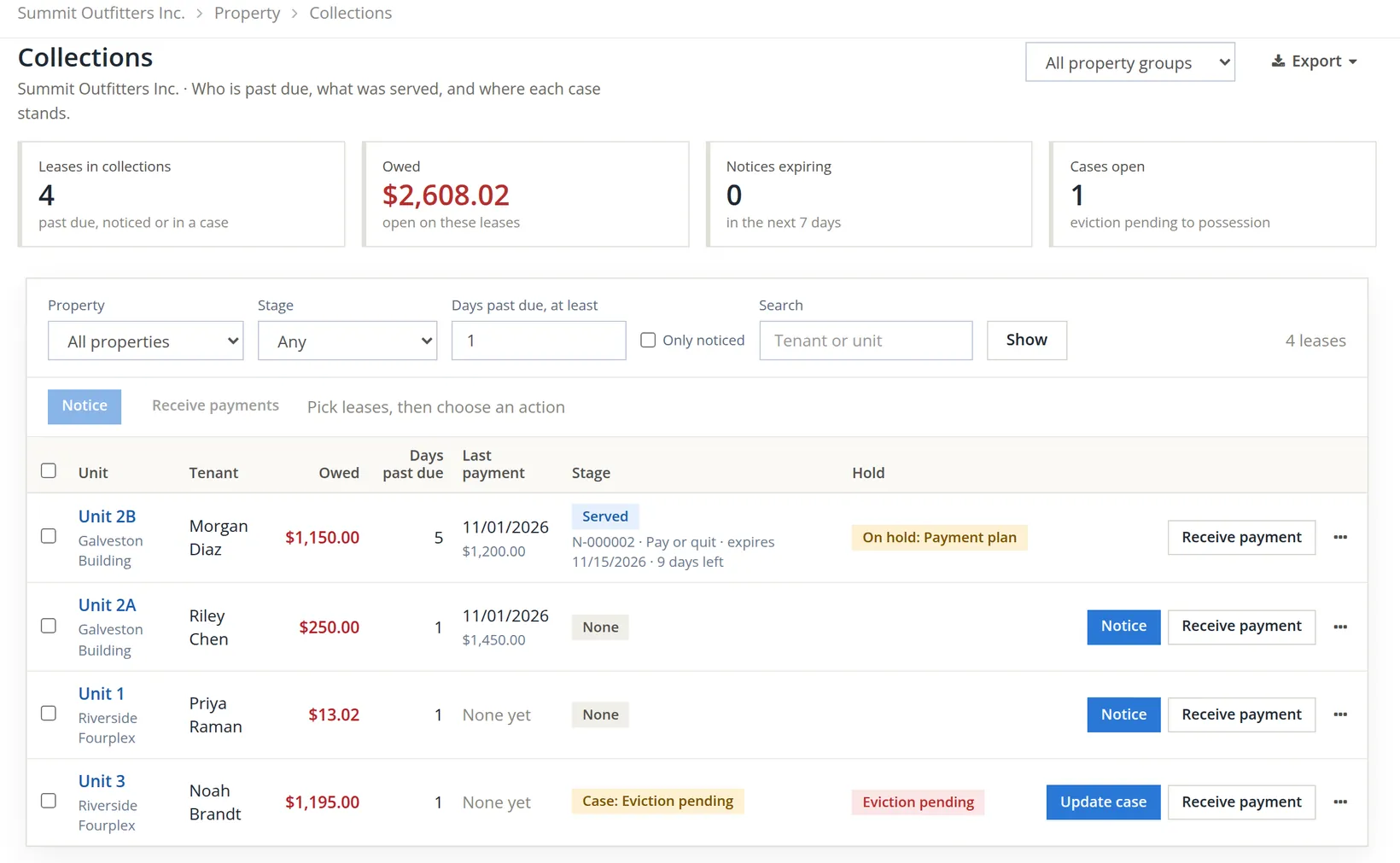
Money → Collections answers three questions: "Who is past due, what was served, and where each case stands." A lease is listed when it is past due, has a notice in force, or has an open case. On the evening of November 5, before this chapter's work began, one lease qualified: Morgan's, past due with nothing served. The pictures were taken a day later, on the evening of November 6, when other chapters had added two leases in that same state. The Stage filter set to No notice shows them: what a lease looks like before collections starts.
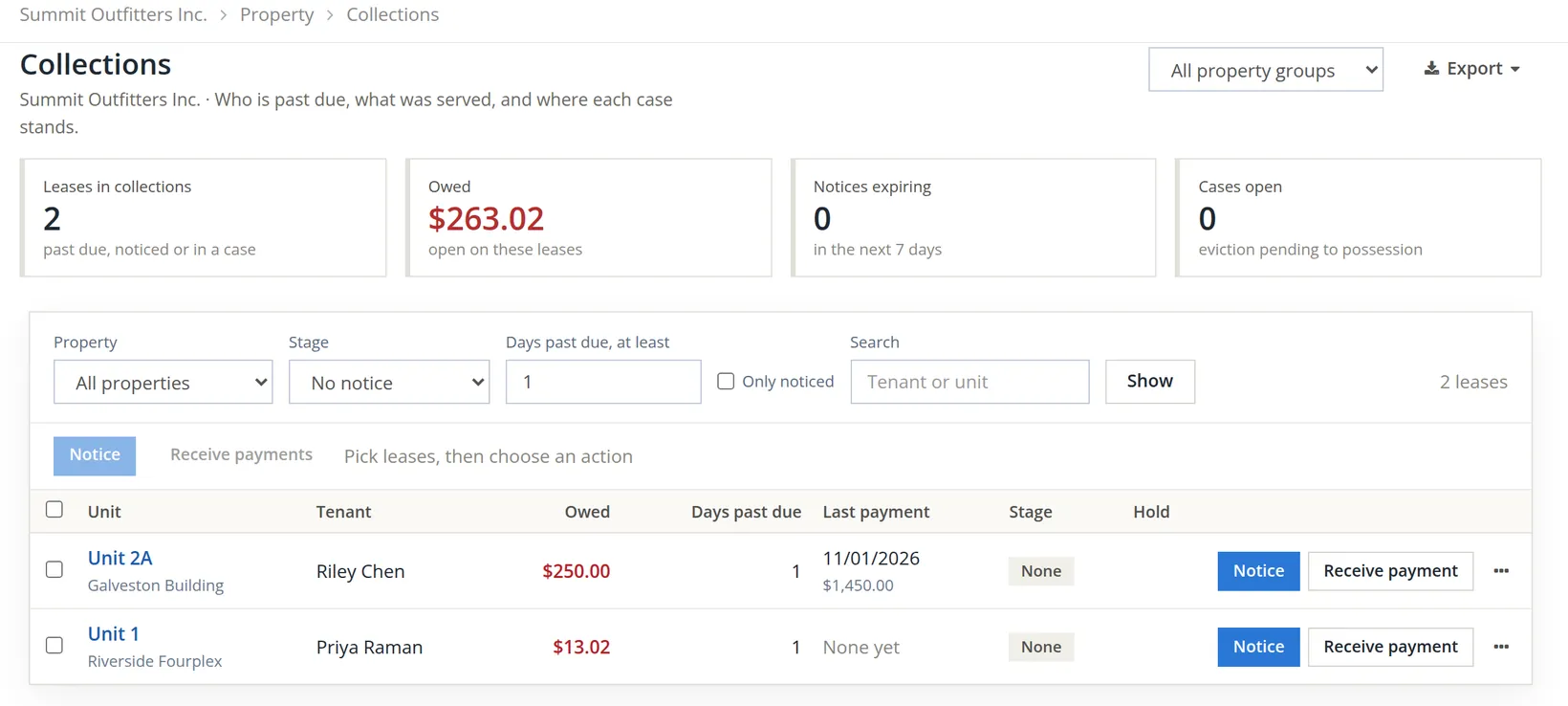
"Days past due" is the calendar since the due date, not the late-fee clock. On November 5 Morgan was 4 days past due, still inside the four grace days, so no second fee yet. Noah was not listed that evening: the opening balance is dated November 5, the day of the import, so the books counted Noah as owing only from that day. A day later Noah is 1 day past due and listed like any other lease.1
Run the day's late fees first
Before acting on a lease, look at what the late-fee run proposes for it today (Chapter 13.5 explains the policy and the review). The module works out late fees once a day (the daily run; Summit's batches show it at 9:20 PM), and anyone with the right can compute the day's batch earlier. This chapter picks up the story with the 11/05 batch.
- 1
Open Money → Late fees and click Compute today's fees
The page answered "Computed for 11/05/2026: nothing past grace, no fees to post." The batch of 11/05/2026 reads Posted, 0 lines, and the empty-state panel says "No lease had an eligible balance past its grace days on 11/05/2026." The Batches table now shows that day as Posted by System 11/05/2026 9:20 PM: the daily run computed the empty day again that night.
- 2
Read the empty batch correctly
Morgan's rent was due 11/01. With four grace days it becomes late on the fifth day, so the nightly run of November 6 would propose the $50.00 fee. An empty batch is not reviewed; it closes itself at once, which is why it reads System even though a person asked for it.2
A batch can never be dated before one that exists. The list now runs 11/05, 11/04, 11/02 and 11/01; the run for 11/03 was missed and can never be made. Run the day's fees on the day.
Approve the notice templates
A notice is a document, and documents are made only from an approved template version. The module ships a system set with each template's first version still a draft: the books decide what their notices say. Chapter 13.9 met this rule as a refusal on its notice of entry; Summit approves what collections needs before it starts.3
| Template | Group | Why this chapter needs it |
|---|---|---|
| Notice to pay rent or quit | Notices | The default template of a Pay or quit notice. |
| Certificate of service | Other documents | Recording service makes a certificate from it; without it the service is refused. |
| Late fee notice | Notices | The e-mail of the Late fee notice rule (Section 6), and a notice template of its own. |
| Payment plan agreement | Other documents | The written plan for the tenant to sign. |
| Payment plan installment due | Letters | The reminder e-mail of the Payment plan installment due rule. |
- 1
Open Settings → Property Management → Documents and messages → Templates and click Copy on the template's row
A system template cannot be edited. The copy belongs to the books, and from then on the module uses the books' approved copy in place of the system version. The copy opens in the editor with draft v1. (Preview is in the row's More menu.)
- 2
Read the wording, change it if you must, then click Approve v1
The browser asks "Approve v1? Documents made from now on render from it." (The Approve button on the Templates list does the same and names the template in its question.) After OK the page answers "Version 1 is approved: documents made from now on render from it." Summit repeated the two steps for the other four templates.
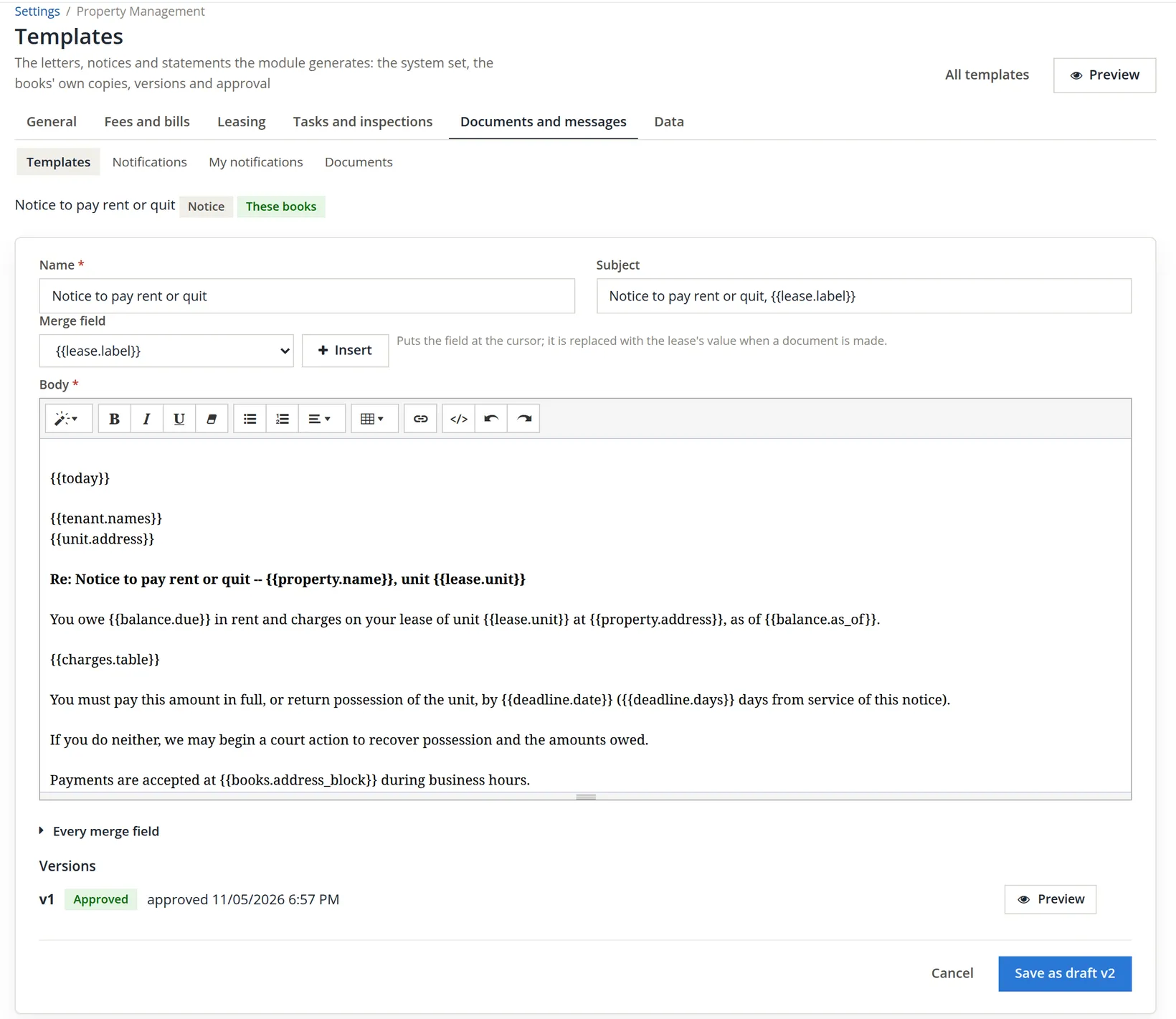
The template page says it: "The wording is the module's own plain text with merge fields; nothing legal is quoted." A notice to pay rent or quit must follow your state's law, sometimes your city's, including its wording and its notice period. Have your copy reviewed before you approve it; a later change is a new version, and notices already made keep the version that printed them.
Make the notice
Open Morgan's lease, then Financials. The Collections card sits below the Late fees card. Click Notice in the card's head, beside Open case (the Notice button on the Collections row opens the same dialog).
- 1
Choose the kind, the template and what is demanded
The kinds are Pay or quit, Cure or quit, Non-renewal, Rent change and Other. The Template list holds approved notice templates only. It opens on The default for the kind, which for a pay or quit is the books' approved Notice to pay rent or quit; the same copy is also listed by name, after the late fee notice and the notice of entry. Under Demand, Rent only counts the rent invoices; All charges counts every charge except the security deposit, which is never demanded.
- 2
Read the demand table and the summary, then click Make the notice
The table lists the invoices the demand is made of, with what is open on each as of the day in As of (today or earlier). Leave Deadline date empty to let the notice days set it. If the chosen basis demands nothing, the summary says so before you click: "Nothing to demand on this basis: the books refuse a pay or quit of 0."
Morgan's lease has been on a payment plan since that evening, and a lease on hold refuses new notices (Procedure E). The dialog and the printed notice below were therefore taken a day later on Noah Brandt's lease, Riverside unit 3 (Section 4). Noah's balance came in at import as a plain charge, so Rent only finds $0.00 there and Summit chose All charges.
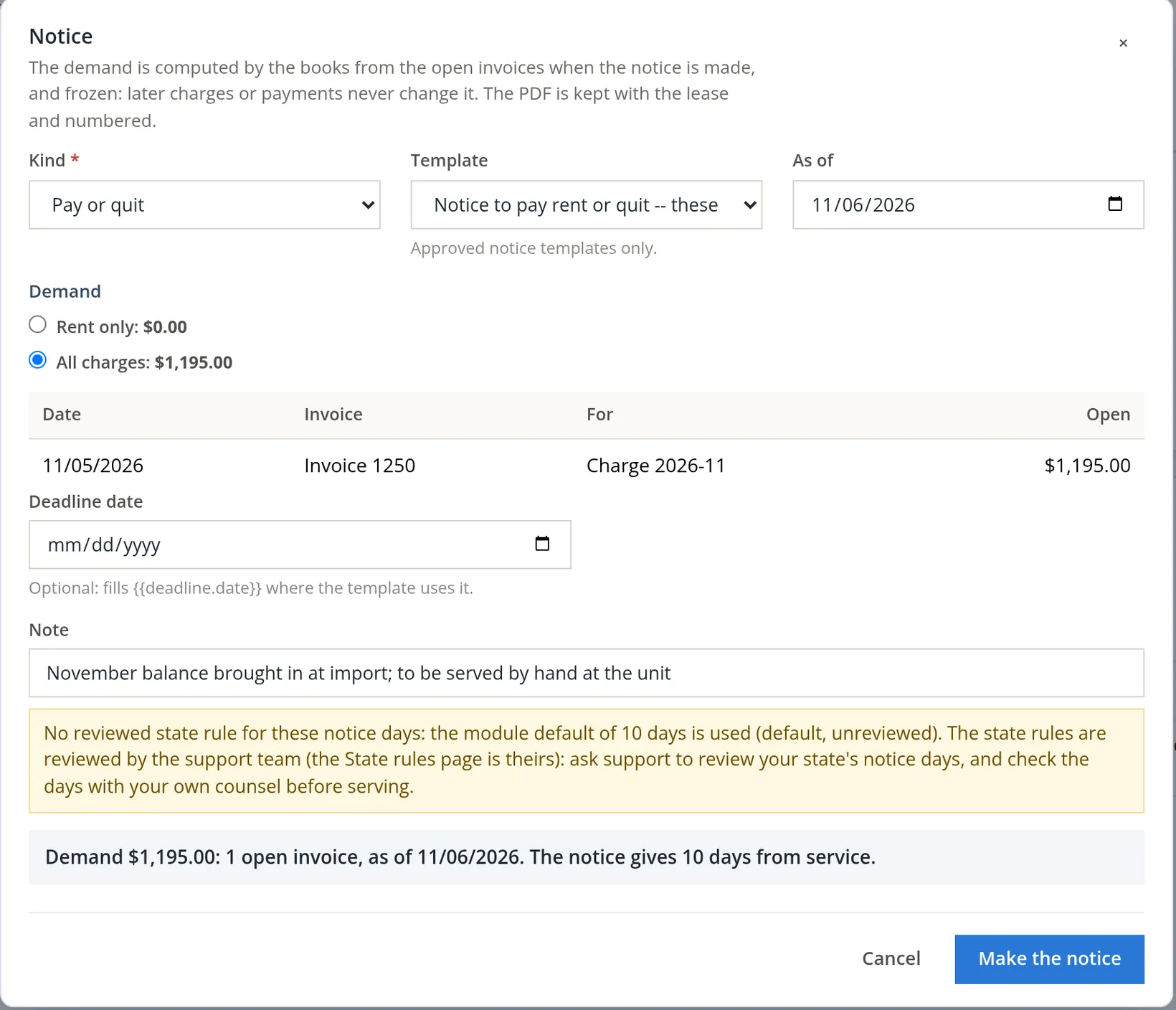
For Morgan, on November 5, with Rent only ($1,150.00, invoice 1244, November's rent) and the books' copy, the page answered "Notice N-000002 made: $1,150.00 demanded. The notice days are the module default (default, unreviewed). Print it, serve it, then record the service." The notice sits on the card as a Draft with a Download link to its PDF.4
"Frozen" means exactly this: if Morgan pays $500.00 tomorrow, notice N-000002 still says $1,150.00, because that is what it said when it was served. The books never rewrite a document a tenant has received. If the balance changes in a way the notice must reflect, you make a new one (Re-notice, Section 3).
One notice of a kind may be in force on a lease at a time. A second pay or quit while N-000002 is draft or served is refused: "Notice N-000002 of this kind is still draft on the lease: re-notice it (or void it) instead of making a second one." A draft is voided; a served or expired notice is re-noticed.
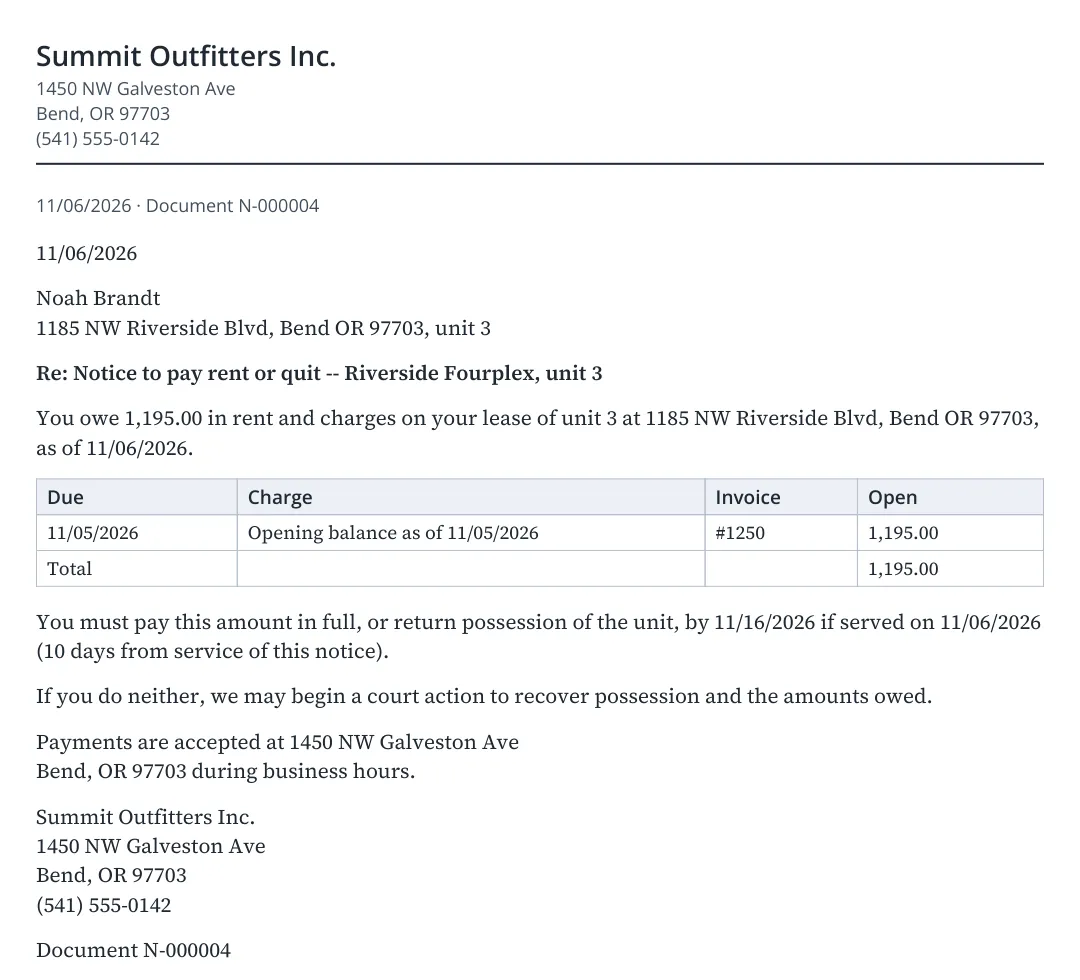
When the notice days set the deadline, the PDF prints it together with the service day it assumes, the day the notice is made: Morgan's notice reads 11/15/2026 if served on 11/05/2026. The books' expiry is counted from the day the notice is actually served, plus any days the method adds. They agree here because Summit served it the same day by hand. If the notice is mailed, or served later, the books' expiry moves and the service record, its banner and the lease's Activity say so; the paper the tenant holds still names the assumed day. Serve on the day you make it, or type the correct day in Deadline date before you make it: a typed date prints as typed.
Serve the notice and record the service
Summit's manager printed N-000002 and handed it to Morgan at the unit that evening. Back at the desk, they clicked Record service, the first button on a draft notice's row.
- 1
Fill in Served on, Method and Added days
The method suggests its own added days: first-class or certified mail add 3; personal delivery, substitute service and posting add none. Served by may stay empty when you served it yourself; type the name of a staff member or a process server otherwise. Evidence, shown when the lease has files, picks a file of the lease by its name, such as a photo of a posted notice or a mail receipt uploaded on the Files tab.
The manager, thinking of the tenant portal as a written record that Morgan could see, first chose Tenant portal. The books refused. The picture shows the same refusal on the example notice N-000004 of the day after; it wrote nothing.
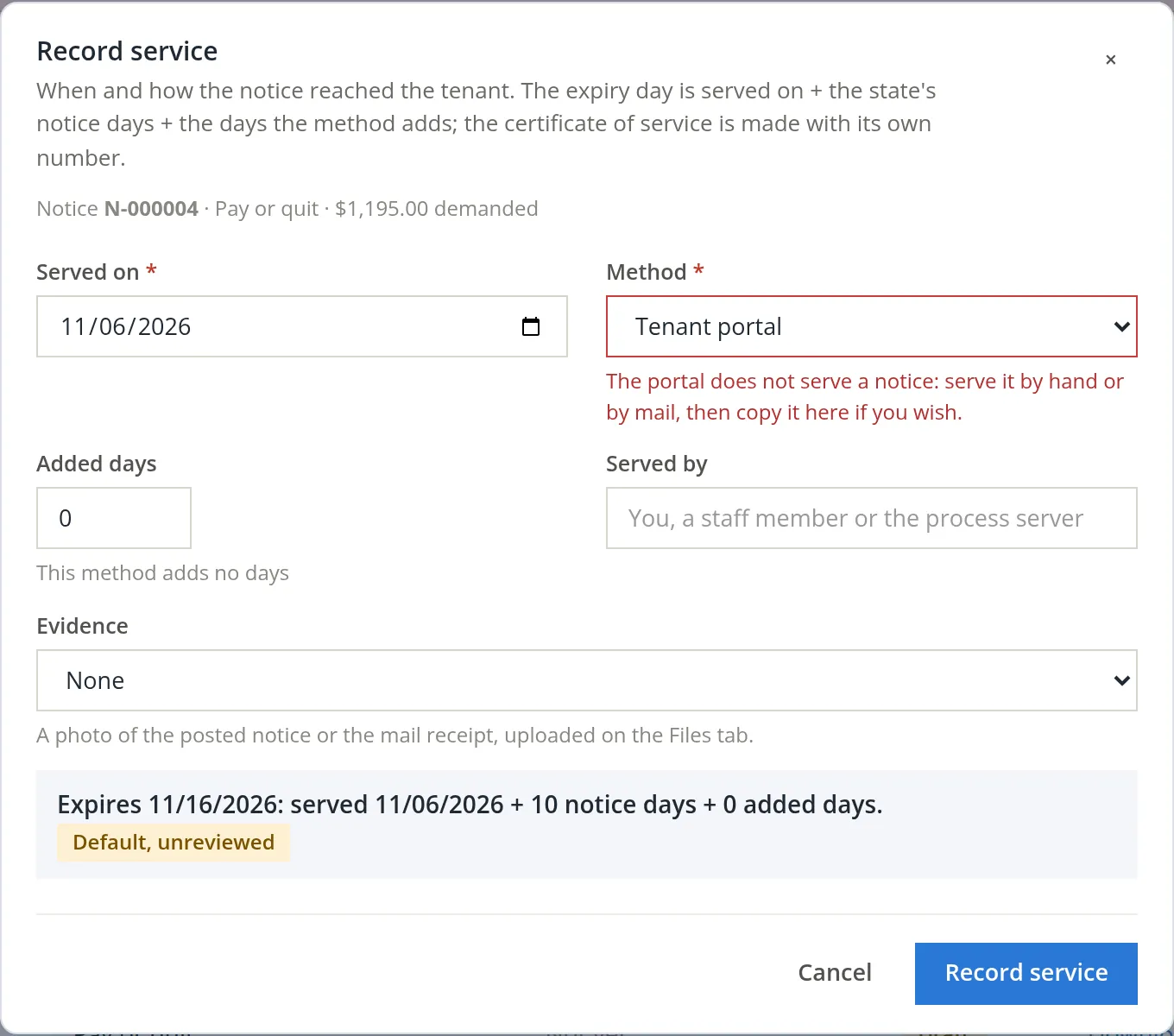
The banner read "The service was not recorded. Check the fields marked below." The rule is sound: a message on a portal proves that a page was shown, not that a person was served, so the module never accepts it as service.5 The paper was in fact handed over, so the record should say so.
- 2
Choose Personal delivery, keep 0 added days, and click Record service
The page answered "Service recorded: N-000002 expires 11/15/2026. The notice days are the module default (default, unreviewed). The certificate of service is N-000003."
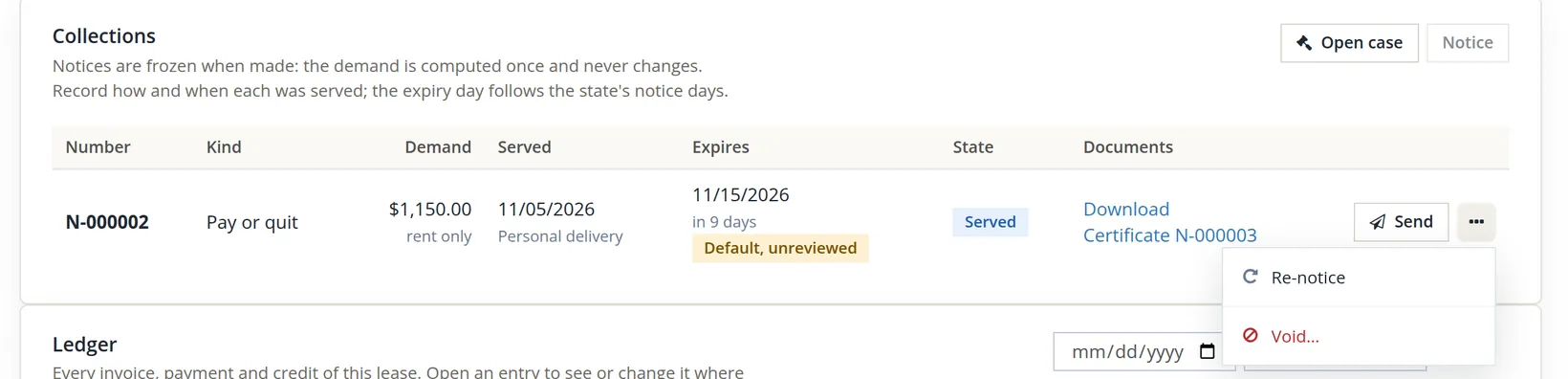
The certificate reads: "I, Alex Morgan, served notice N-000002 (Pay or quit) on Morgan Diaz at 1450 NW Galveston Ave, Bend, OR 97703, unit 2B on 11/05/2026 by personal delivery." with a line for a signature. Print it, have the person who served the notice sign it, and attach the signed copy on the lease's Files tab. The lease's Activity tab now holds the whole history: notice made, certificate generated, notice served with its expiry.
The 10 days are the module's default, used because no reviewed rule for Oregon's nonpayment notice is switched on in these books. Oregon's real notice periods for unpaid rent depend on when the notice is given and how it is delivered. The yellow warning says who can fix it: the state rules are reviewed by the support team, so ask support to review your state's notice days (staff who keep the rules see a link to the State rules page instead). Until a reviewed rule is in place, check the period with your own counsel and type the correct day in Deadline date.6
Expiry, cure and re-notice
Once a notice is served you do not have to watch the calendar: each night the module checks every served notice and puts reminders on the Today board for the manager (Chapter 13.10).
| When | What the daily run does |
|---|---|
| Every demanded invoice of a served pay or quit is paid | The notice turns Cured, dated the day of the last payment, and the lease's Activity says so. |
| 3 days before the expiry, and after it | A Today item, "Notice N-000002 expires 11/15/2026 (...): file, renew or close", high priority on and after the day. Staff also hear it on the bell. |
| The expiry passes with a demanded charge open | The notice turns Expired. |
| A new charge posts after service (for Morgan, December's rent on 12/01) | The row gains the chip New charges since service: re-notice, and Today asks for a re-notice. While a hold runs (Morgan's plan) the re-notice is refused like any notice; the hold must end first. |
| A lease is 30 or more days past due with no notice, case or hold | A Today item, "Start collections: ... owes ..., N days past due". |
Re-notice makes a new notice of the same kind from today's balance and marks the old one Superseded; the new one is a draft to be served and recorded like the first. Void withdraws a draft or served notice with a reason, which is kept with it. Both are in the notice row's More menu (Void... asks for the reason and has its own Void it button). Send, the row's button, opens the notice's document page to record a delivery; on a draft it records the service at the same time (Chapter 13.13).
Agree a payment plan
Morgan came to the office later that evening. They could not pay $1,150.00 at once, but could pay half on Monday, November 9, and half on Friday, November 13. Summit agreed, and chose the second date on purpose: it falls before the notice expires on 11/15, so a plan that is kept pays the demand in full and cures the notice before it runs out.
The order matters. A plan places a hold, and while a hold runs no notice can be made on the lease. Serve the notice first, then agree the plan.
- 1
On the Holds card at the top of Financials, click Payment plan
The dialog shows what is open on the lease and fills in the total. Write in Agreed who agreed what, when and how; the text is kept on the plan's hold.
- 2
Enter the installments, read the summary, then click Start plan
Type each due day and amount, or let Split evenly divide the total by a number of installments, every week, two weeks or month from a first due day. A plan holds up to 12 installments. Start plan stays greyed out until the installments add up to the total; the summary line says how much is over or short.
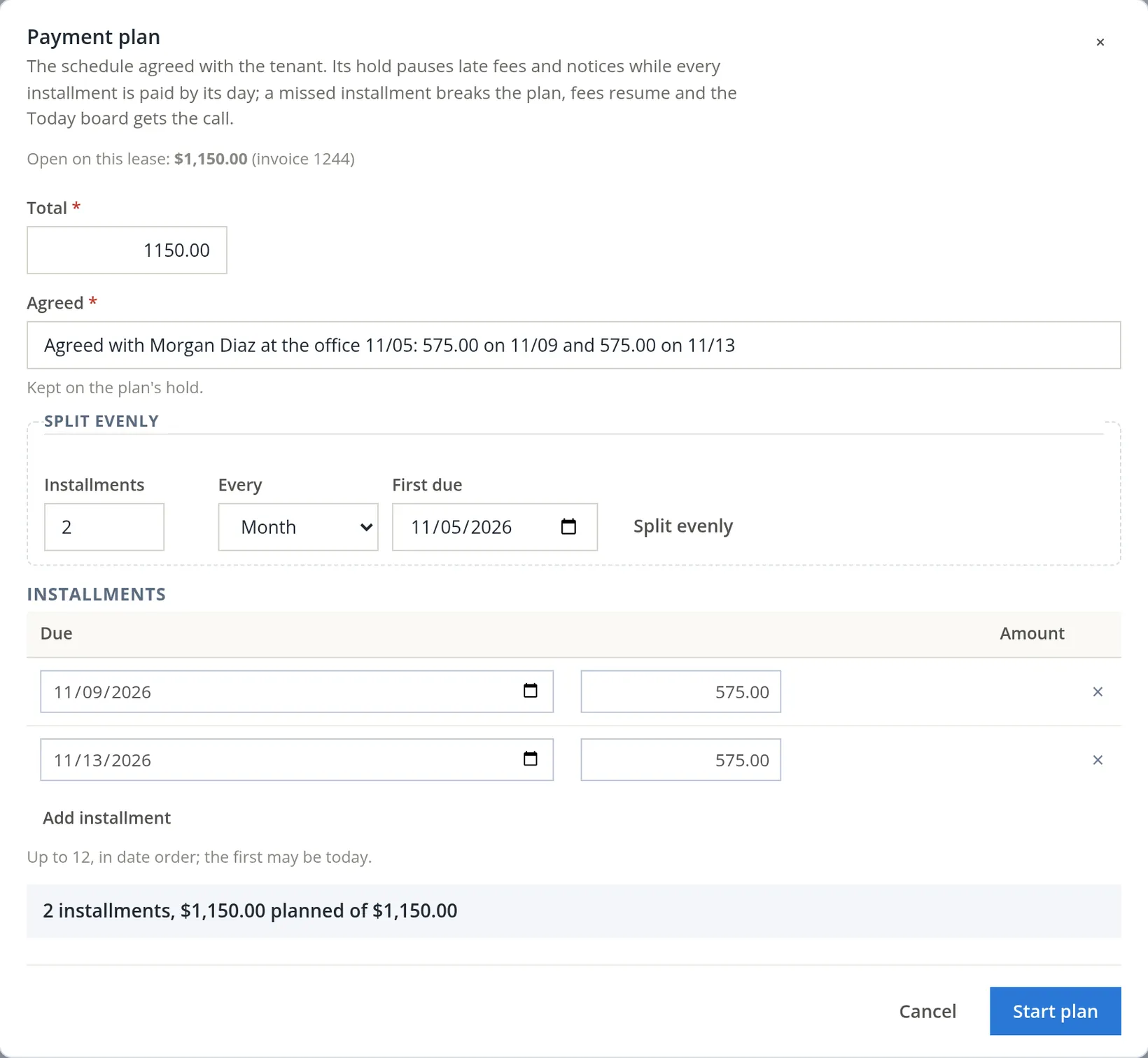
The page answered "Payment plan started: 2 installments, the first due 11/09/2026. Late fees and notices pause while it is kept."
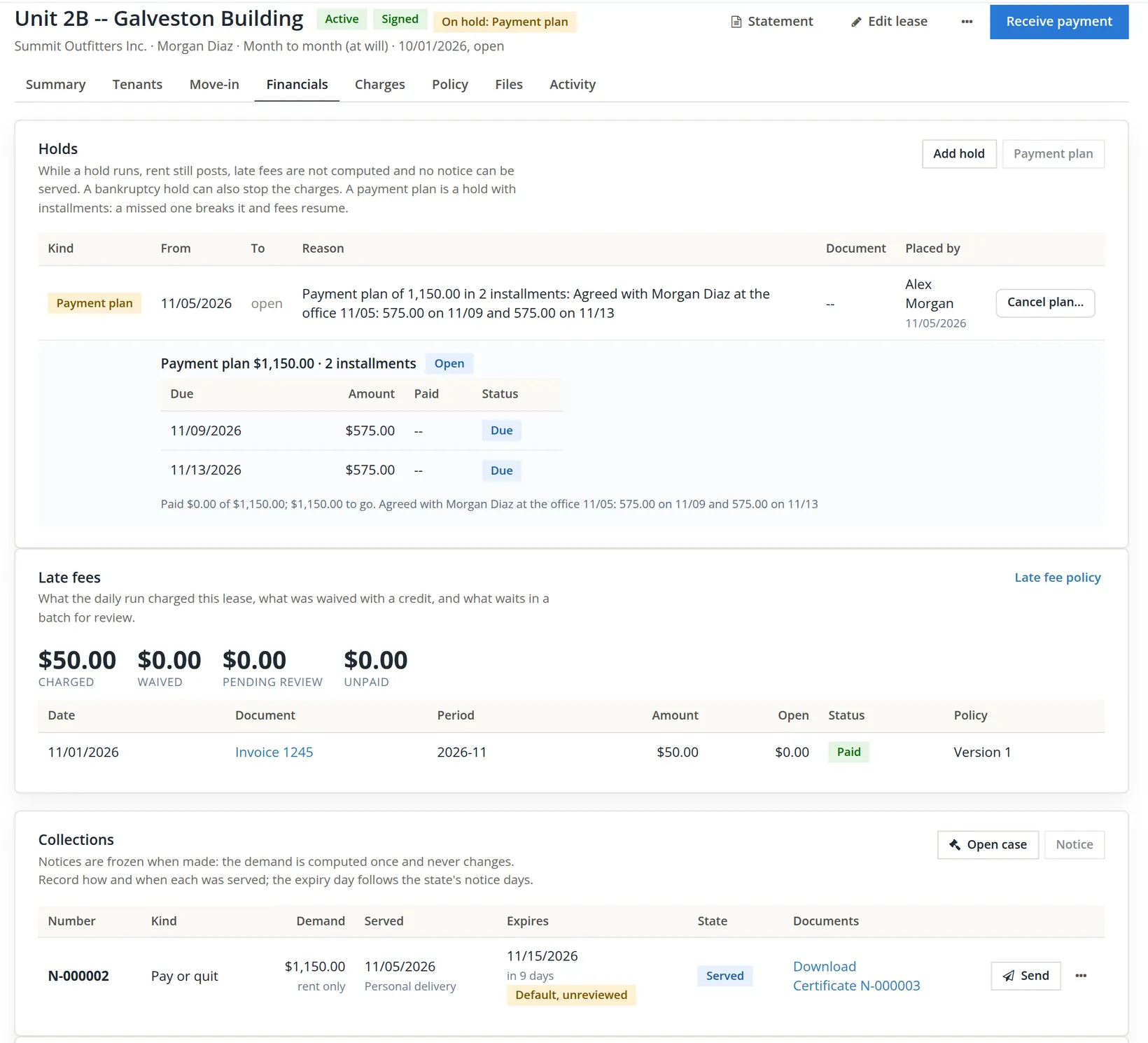
What the hold does, and what it does not:
- Late fees pause. The late-fee run skips a lease on hold, so the nightly run of November 6 will not propose Morgan's $50.00.
- New notices are refused. The served notice N-000002 is untouched: it is still served, still expires 11/15, and is cured by payment as usual.
- Rent keeps posting. December's rent will post on 12/01 as normal.
- Tenant e-mails stop, except those that report a fact (a returned payment, a refund, a request update) and the plan's own Payment plan installment due reminder, which looks past the plan's hold (Section 6).
Each night the plan is checked against the lease's payments since the plan started, oldest installment first. An installment covered is marked paid. One not covered after its due day is marked missed and the plan is broken: the hold ends, fees and notices resume, and Today asks the bookkeeper to call. When every installment is covered the plan is kept and its hold ends too. Morgan's payments are received the usual way (Chapter 13.5); the plan needs nothing else.
The Payment plan agreement template approved in Procedure B prints the balance, a table of installments and two signature lines. Have the tenant sign it, and attach the signed copy to the lease's Files tab.
A payment plan is one of six kinds of hold. The others are placed by hand with Add hold, with a start day, an optional end day and a reason:
| Kind | Typical use |
|---|---|
| Payment plan | Made only by the plan; ends when the plan is kept, broken or cancelled. |
| Bankruptcy | The tenant filed; may also stop rent posting ("Stop posting rent while the hold runs (the automatic stay)"). |
| Deceased | The tenant died; the estate is dealt with first. |
| Military service (SCRA) | Protections for a tenant on active duty. |
| Dispute | The charge is contested and under review. |
| Legal hold | Counsel asked that nothing be done. |
The eviction case
Noah Brandt owes $1,195.00 on Riverside unit 3, and Summit's owner wants the lease tracked as a possible eviction while they decide. An eviction case is the books' record of such a matter. It never contacts a court, files a paper or changes a charge; it records what people did and what the court decided.
- 1
On Noah's lease, Financials → Collections card, click Open case
The dialog warns: "The lease is marked eviction pending: bulk payments, letters, statements and refunds leave it out, and a payment below the balance follows the state's partial-payment rule until the case is closed." The only stage offered was Eviction pending; Notice served is offered only when a pay or quit has been served on the lease. Summit left Attorney on None yet and wrote in Notes: "November rent of 1,195.00 unpaid (invoice 1250). Case opened to track; nothing filed."
- 2
Click Open case
The page answered "Case opened at Eviction pending: the lease is marked eviction pending. Bulk payments, letters, statements and refunds now leave it out." and opened the case page.
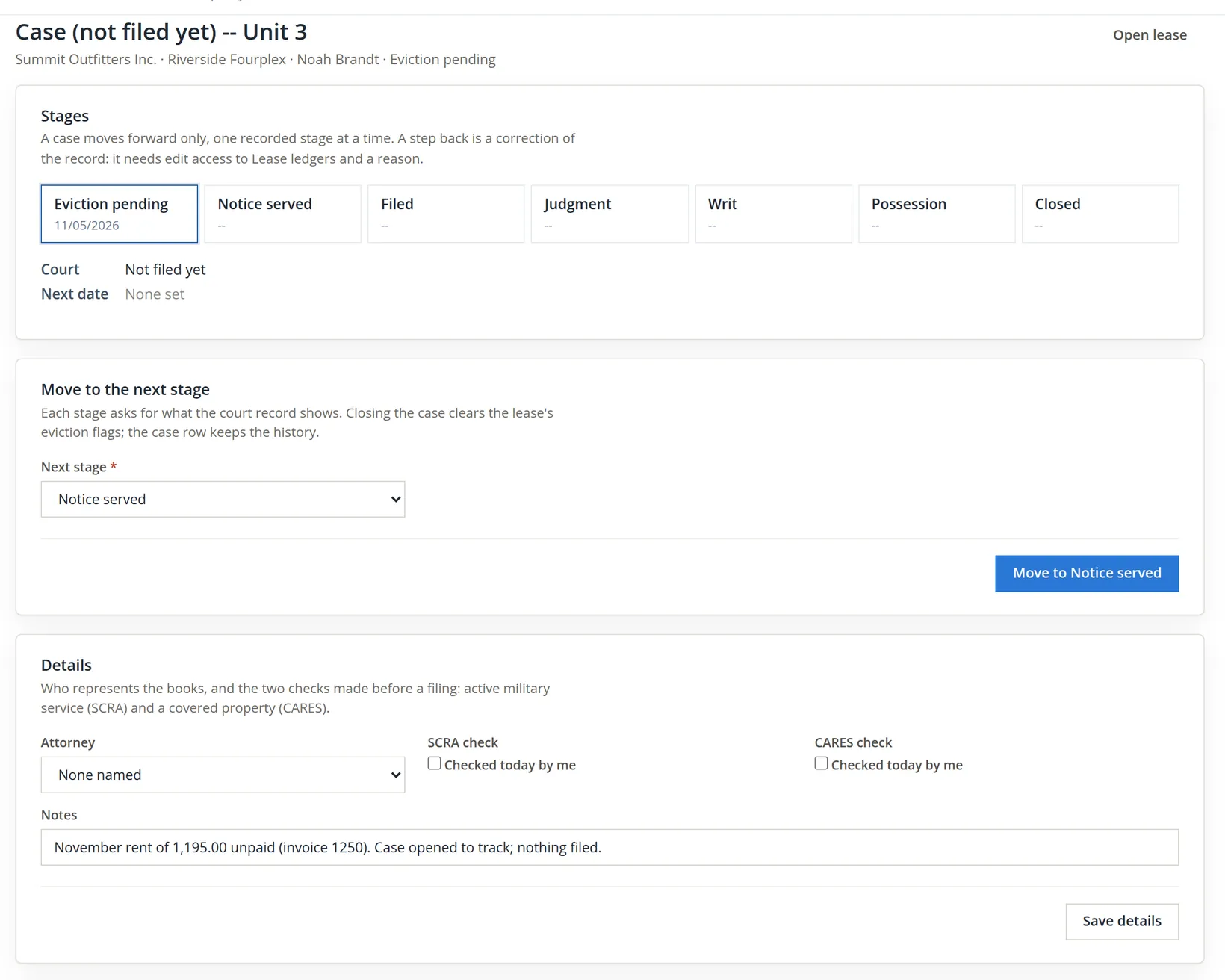
A case moves forward one recorded stage at a time, or straight to Closed from any stage. Each stage asks for what the court record shows:
| Stage | What it records | Required to move there |
|---|---|---|
| Eviction pending | The lease is being considered for eviction. | Opening the case |
| Notice served | A pay or quit was served. Recording its service moves an open case here on its own. | -- |
| Filed | The landlord's complaint was filed with the court. | The court, the case number, the day filed |
| Judgment | The court decided. | The day of judgment, the judgment amount |
| Writ | The court issued the order to return possession. | The day of the writ |
| Possession | The unit came back. The page links to the guided move-out (Chapter 13.7). | The day of possession |
| Closed | The matter ended; the lease's eviction flags clear. | The day closed and the outcome: paid, vacated, judgment satisfied, dismissed, settled or other |
A day entered for a stage must be today or earlier. A step back is a correction of the record: Reopen a stage needs edit access to Lease ledgers and a reason of at least 10 characters, and the later stage's record stays in the audit log. Every court date goes under Hearings, and Today reminds the manager a week before each one. Before a filing, tick the SCRA check (whether the tenant is in active military service) and the CARES check (whether the property is covered by the federal CARES Act notice rule); each keeps the day and who checked it.
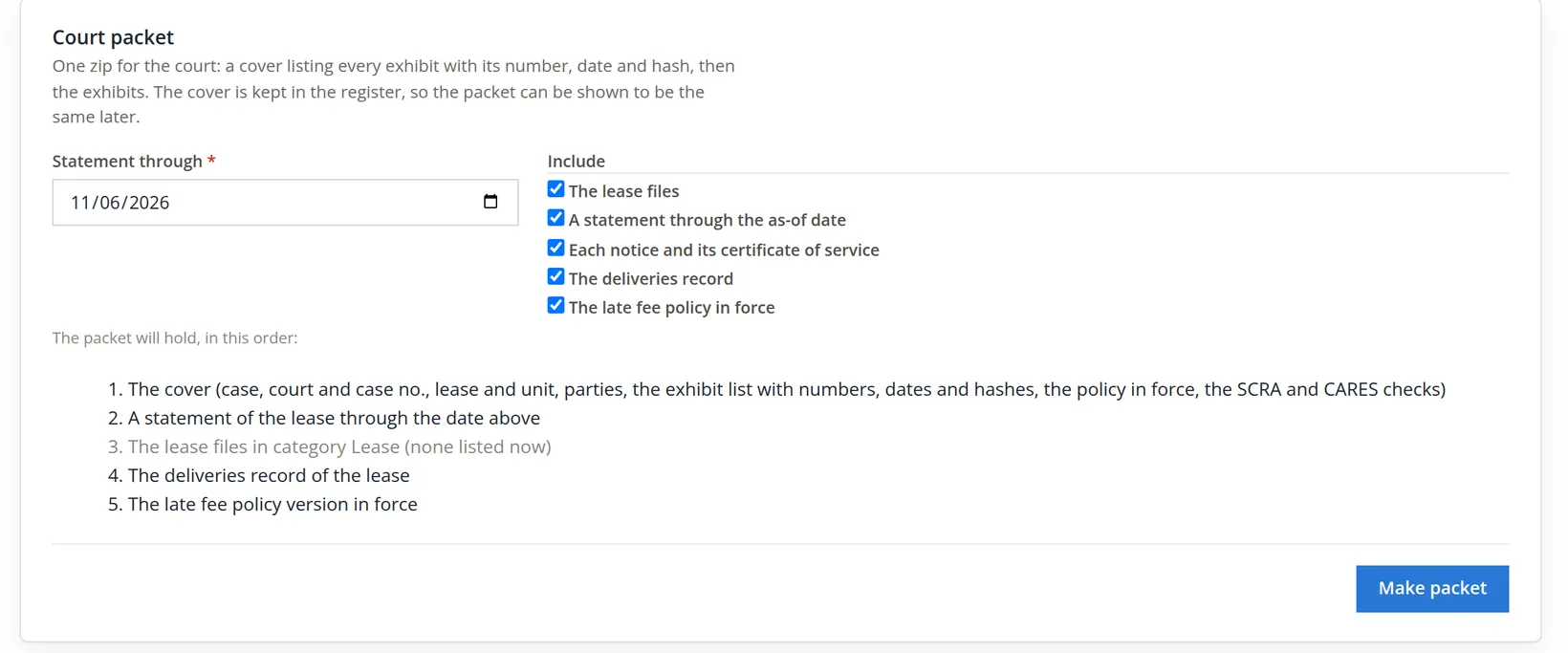
The packet is one zip for the court: a cover, a statement of the lease, the lease files, each notice with its certificate of service, the deliveries record and the late-fee policy in force. The cover is kept in the register, so the packet can be shown later to be the one that was handed over. Summit did not make one: nothing is going to court, and the cover and the statement each need an approved template (Court packet cover and Tenant statement) that these books have not approved.7
Eviction is a court process with strict rules on notices, timing and conduct, and the rules differ by state and city. Use the case page to keep the record straight; take the legal steps with your attorney. This chapter is not legal advice.
End of the day
Back on Money → Collections, both leases are listed, each with its stage and hold. The picture was taken on the evening of November 6, so it also shows the two leases of Section 2 and counts one more day on every row.
| Lease | Owed | Notice | Hold or case |
|---|---|---|---|
| Galveston 2B, Morgan Diaz | $1,150.00 (invoice 1244) | N-000002, served 11/05, expires 11/15; certificate N-000003 | Payment plan: $575.00 on 11/09, $575.00 on 11/13 |
| Riverside 3, Noah Brandt | $1,195.00 (invoice 1250) | None served (N-000004, the example of Procedure C, void) | Case, eviction pending, not filed |
| This chapter's two leases | $1,150.00 + $1,195.00 = $2,345.00 | ||
| Galveston 2A, Riley Chen; Riverside 1, Priya Raman | $250.00 + $13.02 = $263.02 (Chapters 13.5 and 13.9) | None | None |
| Collections on 11/06 | $2,345.00 + $263.02 = $2,608.02 |
Note what Collections did not do: it posted nothing. No fee, credit or payment was written by this chapter; the balances are what Chapter 13.5 left. Collections works on top of the ledger, never inside it.
Notification rules: Settings → Property Management → Documents and messages → Notifications
The module can e-mail tenants, owners, vendors and staff when things happen: a rent reminder, a late fee posted, an installment coming due. The Notifications tab holds the books' master switch and the rules. Summit only reads it in this chapter.
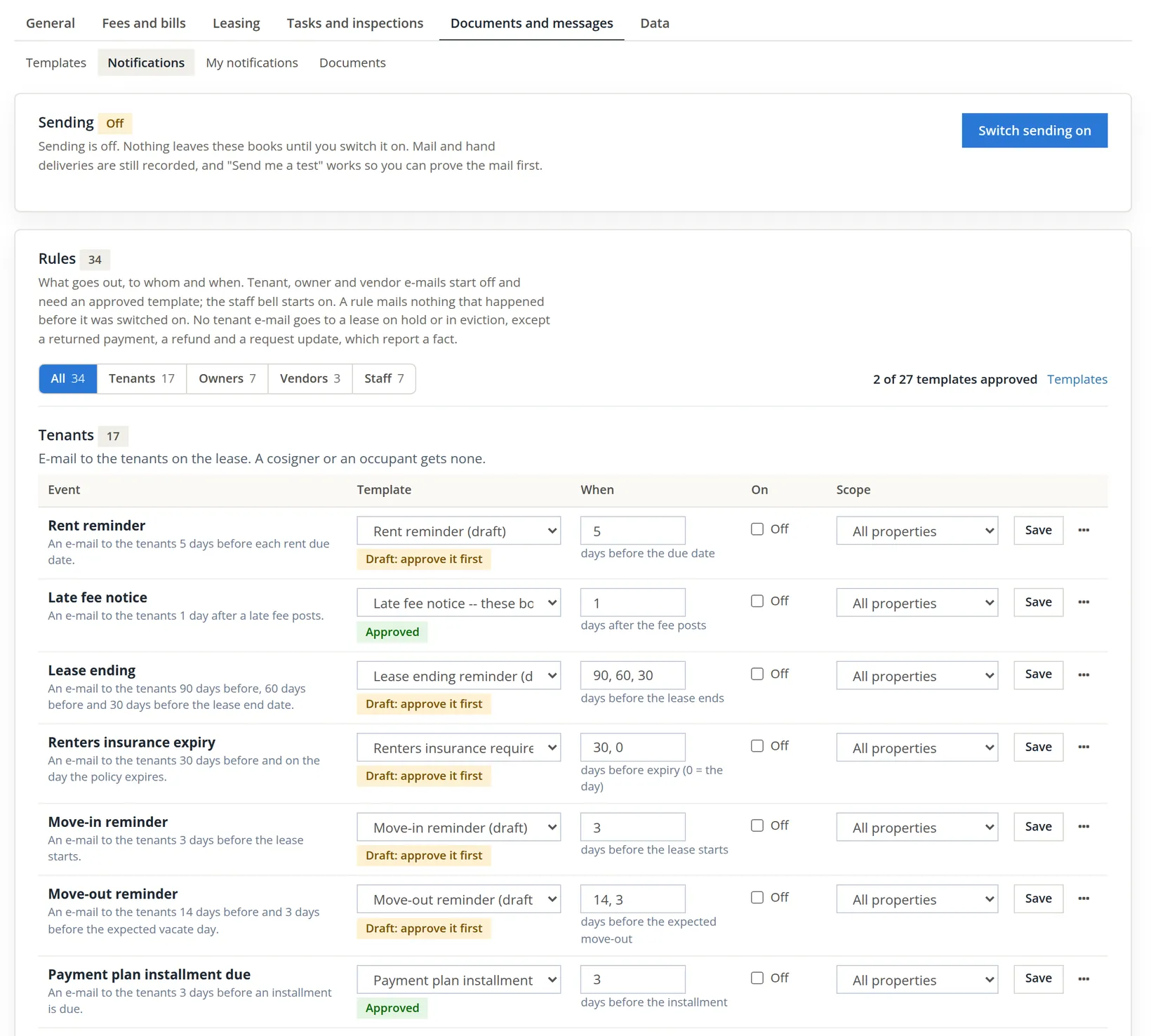
Three switches must all be on before a tenant gets an e-mail: the books' sending switch, the rule's On box, and an approved template for the rule. Each row also has its timing (for the late fee notice, days after the fee posts), its scope (all properties or one) and its own Save. Send me a test mails the rule to you, even while sending is off, so you can prove the mail before switching on. The page's own rules are worth reading closely:
- "A rule mails nothing that happened before it was switched on."
- "No tenant e-mail goes to a lease on hold or in eviction, except a returned payment, a refund and a request update, which report a fact." With sending on, Morgan (on the plan's hold) would get no rent reminder or late fee notice, but would get the installment reminder, which is sent past the plan's own hold; Noah (in eviction) would get only those three kinds of fact.
- Mail and hand deliveries are recorded whether sending is on or off; staff bells start on.
The switch affects every property and every rule that is on. Approve and test the templates first, decide which rules to turn on, and only then switch sending on. Summit's stays off.
Taking back a late fee, and other credits
Collections sometimes ends with a gesture: the tenant pays the rent, and the manager forgives the late fee. A posted late fee is a lease charge and is changed only from the lease (Chapter 13.5). On the lease's Financials tab, the Late fees card shows a Remove late fees button whenever an unpaid late fee exists, and the lease header's More menu then holds the same action as Remove late fees.... It opens a list of the unpaid fee invoices to pick, a required Reason, and two buttons.
| Button | When it is allowed | What it writes |
|---|---|---|
| Delete fees | Only when every picked fee is unpaid, was never sent to the tenant, and is dated in the current period. | Each fee is voided with your reason. Nothing is sent to the tenant. |
| Waive with a credit | Any unpaid late fee. | A customer credit for the fee's open amount, dated today, reference "Late fee #n", memo "Late fee #n waived: your reason", applied against the fee invoice, which then reads paid. The fee stays on the books. |
The waiver keeps the history: the fee was charged and then forgiven, and both facts remain. The credit is an ordinary customer credit (Chapter 2.5), marked as the lease's late-fee waiver and kept in the books' default customer-credit accounts (Chapter 15.3). It shows in four places:
- the Late fees card: the WAIVED total goes up by the amount, and the fee's status reads waived;
- the lease ledger, as a credit line against the fee;
- the lease's Activity tab: "Late fee #n of amount waived with a credit: reason";
- the Credits Issued report (Chapter 13.15), with the reason.
The Waive decision in the day's batch review (Chapter 13.5) writes the same credit at the moment the fee is posted. Summit had nothing to waive tonight: Morgan's only late fee, invoice 1245, was paid on November 1, and the plan's hold keeps a new one from being proposed.
Delete a fee that should never have been charged, such as one computed on a payment you had not yet entered. Waive a fee that was rightly charged but is being forgiven. If the tenant has seen it, waive it.
Not every credit is a late fee. A move-in special, goodwill after a broken boiler, or a rent reduction agreed for a month is a credit or concession, and it has its own action: Give a credit, on the Credits and concessions card at the foot of the lease's Financials tab and as Give a credit... in the lease header's More menu. It asks for an Amount, a Date (today or earlier), a Kind and a Reason kept with the credit (not shown to the tenant), and applies the credit to an open charge of the lease now, or holds it and takes it off the next scheduled charge (rent or a recurring charge). The card says where the line is drawn: "A late fee is waived from Remove late fees instead; a charge made in error is voided." Each credit is a customer credit of the tenant, booked from the property's Rent Concessions income account; the card lists every credit with its state, and the Credits Issued report (Chapter 13.15) lists it with the late-fee waivers. Chapter 13.5 walks through one. Summit gave none in this chapter.
A delinquent lease
- [x] The day's late-fee batch run and read before acting on the lease.
- [x] The notice templates your notices use copied, reviewed for your state and approved, including the certificate of service.
- [x] The notice made from the right basis (rent only or all charges), with the demand table checked.
- [x] The notice served the day it was made, by hand or by mail, never by portal; the service recorded with its method and added days.
- [x] The expiry day checked against your state's notice period; "Default, unreviewed" never accepted without a look.
- [x] The certificate signed and attached to the lease's Files.
- [x] Any payment plan agreed after the notice, written down, and timed to cure the notice before it expires.
- [x] An eviction case opened only as a record; every stage entered from the court's own papers.
- [x] A forgiven late fee waived with a credit and a reason, not deleted.
- [x] Notification sending left as the owner decided.
Check your understanding
1. Rent was due 11/01 with four grace days. On 11/05 the late-fee batch has no lines. Is something wrong?
Answer
No. On 11/05 the rent is four days late, still inside grace. The first fee would be proposed by the run of 11/06, unless a hold pauses the lease.
2. Why did Summit approve the Certificate of service template, which nobody sends to the tenant?
Answer
Recording service makes a certificate from it. Without an approved version the service itself is refused.
3. Notice N-000002 demands $1,150.00. Morgan pays $575.00 on 11/09. What does the notice say now?
Answer
Still $1,150.00. A notice is frozen when made. It turns cured only when all the invoices it demanded are paid.
4. A pay or quit is made and mailed first-class on 11/05, with 10 notice days. When does it expire, and what deadline does the PDF print?
Answer
It expires 11/05 + 10 + 3 = 11/18. The PDF prints "11/15/2026 if served on 11/05/2026", counted from the day it was made; the service record and the lease's Activity state the books' expiry, 11/18. That is why a mailed notice should carry a typed deadline date, which prints as typed.
5. Why was "Tenant portal" refused as a service method?
Answer
A portal message is not legal service. The notice must be served by hand or by mail; a copy may also be put on the portal.
6. Why must the notice be served before the payment plan is agreed?
Answer
The plan places a hold, and no notice can be made while a hold runs ("No notice while the lease is on hold (payment plan): end the hold first.").
7. Morgan pays nothing on 11/09. What happens on the next nightly run?
Answer
The first installment is marked missed, the plan is broken, the hold ends, late fees and notices resume, and Today asks the bookkeeper to call. The notice still expires 11/15.
8. An open case at Eviction pending offers only Notice served and Closed as next stages. Why not Filed?
Answer
A case moves forward one recorded stage at a time (or straight to Closed). Filing follows service of the notice.
9. A tenant paid the rent late and the manager forgives the $50.00 late fee, which was printed on last month's statement. Delete or waive?
Answer
Waive with a credit. The fee was sent to the tenant, so it cannot be deleted; the waiver keeps the charge and its forgiveness on the record.
Notes
- The imported opening balance is a plain charge, not a rent invoice. For Noah the Notice dialog offers Rent only: $0.00 and All charges: $1,195.00. On Rent only the summary warns before you click ("Nothing to demand on this basis: the books refuse a pay or quit of 0."), and a click would be refused with "Nothing is owed on the lease as of 11/05/2026 (rent only): there is no demand to make." Use All charges for a balance brought in at import. ↑
- An empty batch keeps no line, decision or fee, so it does not block anything: when the run or a person computes the same day again, the empty batch is computed afresh. A batch with lines is never computed twice; a second click opens it. ↑
- The refusal names the template: "Template "Notice to pay rent or quit" has no approved version (copy the system template to these books, review it and approve it, or ask staff to approve the system version)." Chapter 13.9 shows it on the notice of entry. Other chapters approve the templates they use, such as the renewal offer and the deposit itemization in Chapter 13.7. ↑
- Notices and certificates share one numbered register with the N- prefix. N-000001 is the notice of entry from Chapter 13.9; the pay or quit is N-000002 and its certificate N-000003; N-000004 is the example made and voided for Procedure C's pictures. Each document keeps a hash of its file, so a later copy can be shown to be the same. ↑
- The list of methods still offers Email and Tenant portal so that a notice can be copied that way; only the portal is refused outright. Whether e-mail is valid service depends on your state and on what the tenant agreed in writing. ↑
- Notice periods for unpaid rent, the days added for mailing, and the required wording are set by state law, and some cities add rules of their own. The module's state rules come with it and are switched on per state after review. This chapter is not legal advice. ↑
- The court packet's cover renders from the Court packet cover template, and its statement from the Tenant statement template. Approve both before the first packet is needed; Chapter 13.15 shows the Collections report, which lists notices and cases. ↑