
Chapter 13.11
Managed properties and owners
Managing a property for someone else changes whose money it is. This chapter sets up a managed property with trust bank accounts, shows the software refusing to put trust money in the wrong bank, records the owner's first contribution, and walks through the owner's page: the ledger, the Draw button and the rule that keeps it shut until the first month is reconciled, the 1099 tab, the portal card and the Owner Balances Report.
When you finish this chapter you will be able to:
- Explain trust accounting and why a managed property needs its own banks.
- Add an owner and make a property managed from a statement period.
- Receive rent into the trust bank and record an owner contribution.
- Find your way around the owner's page: Summary, Properties, Financials, 1099, Files and Activity.
- Read the owner ledger and the "available for payment" figure, and explain why the first draw waits for the first month's trust reconciliation.
- Check every owner's balance at once on the Owner Balances Report.
Whose money is it?
When Summit rents out its own building (Chapters 13.1 to 13.10), the rent is Summit's income. When it rents out Dana's house, the rent belongs to Dana; Summit only holds it. Money held for someone else is trust money. It must be kept apart from the business's own money, accounted for to the owner, and paid out only to the owner or for the owner's bills.1
BizBooks360 handles this by making a property managed. A managed property:
- banks rent in an operating trust bank and deposits in a separate deposit trust bank;
- has owners whose shares add up to 100%, for each statement period;
- gets an Owner Funds Held account, a liability: what the books owe the owners;
- produces an owner statement and a figure available for payment, the most that may be paid out to the owner.
The books can stay in Own portfolio mode: one property can be switched to managed on its own Settings tab, which is what Summit does.
Banks, owner and property
- 1
Add the two trust bank accounts
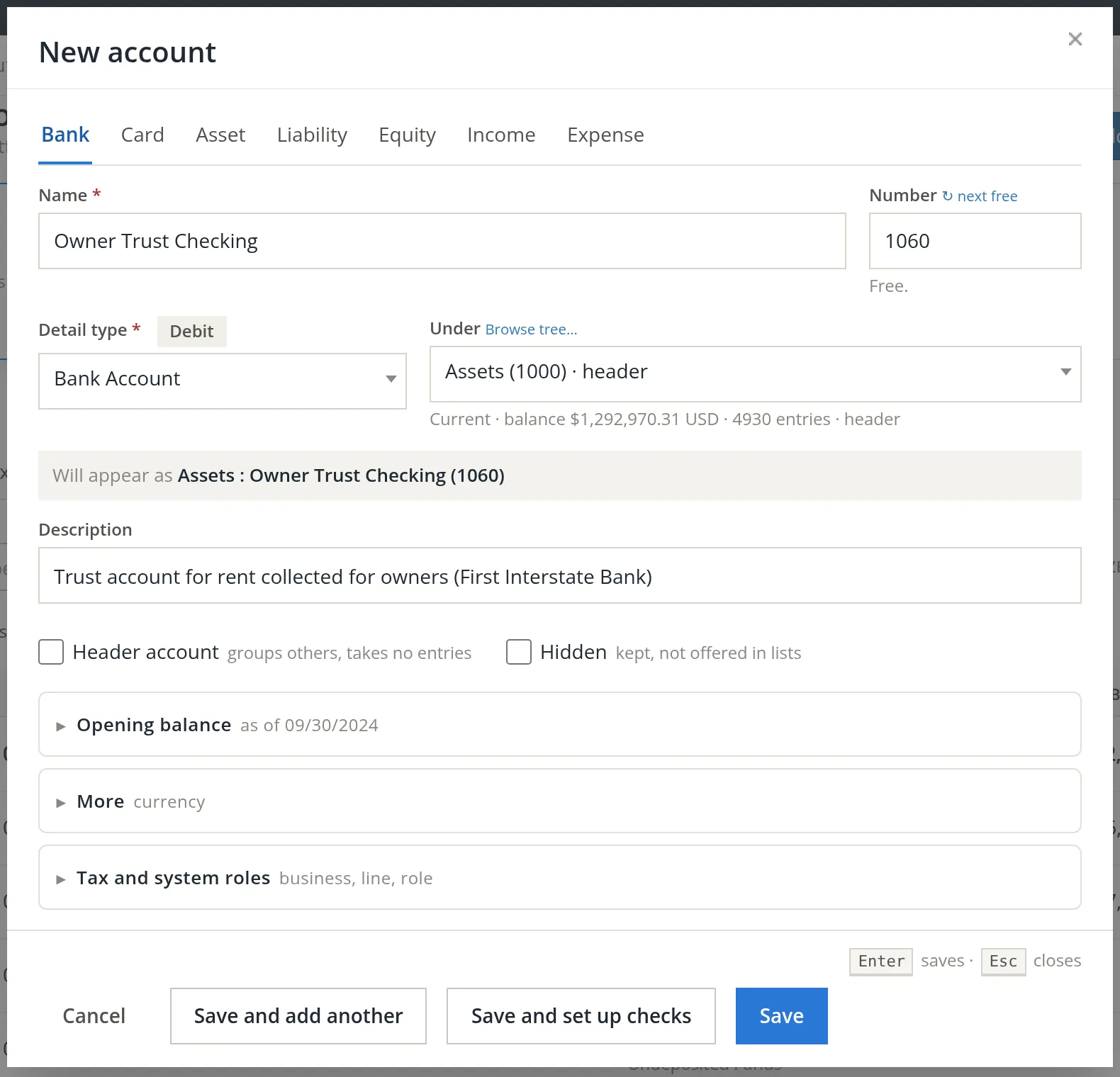
Accounts → Chart of Accounts → Add account, Bank tab. Summit adds Owner Trust Checking (1060) and Tenant Deposit Trust (1070), both under Assets, detail type Bank Account. Each matches a real bank account opened as a trust account.
- 2
Add the owner: Properties and people → Owners → Add owner
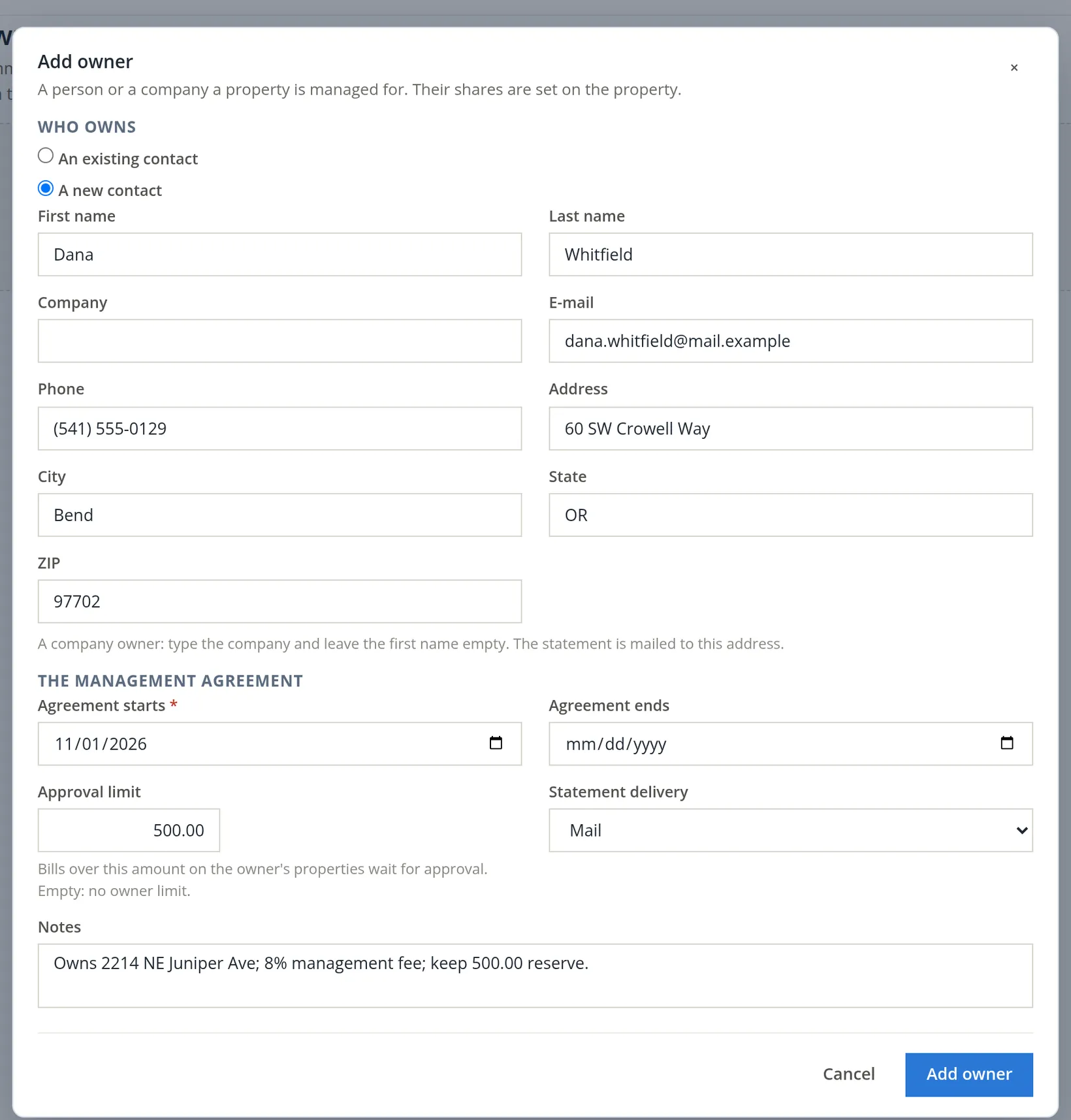
The Owners page lists "the people and companies a managed property is run for, with their shares"; Add owner opens a dialog on it. Choose an existing contact or A new contact. Fill in the address: "The statement is mailed to this address." Then the management agreement: the start date, an approval limit (bills above it on the owner's properties wait for the owner's approval) and how statements go out. Leaving the name empty is refused with "Type the owner's name, or the company for a company owner."
- 3
Add the property and its unit
As in Chapter 13.1: Juniper Cottage, kind Single-family home, reserve $500.00; one unit, House, 3 bedrooms, 2 baths, 1,400 sq ft, market rent $2,100.00. The property was added with 21 accounts.
- 4
On the property's Settings tab, fill in the Managed for owners card
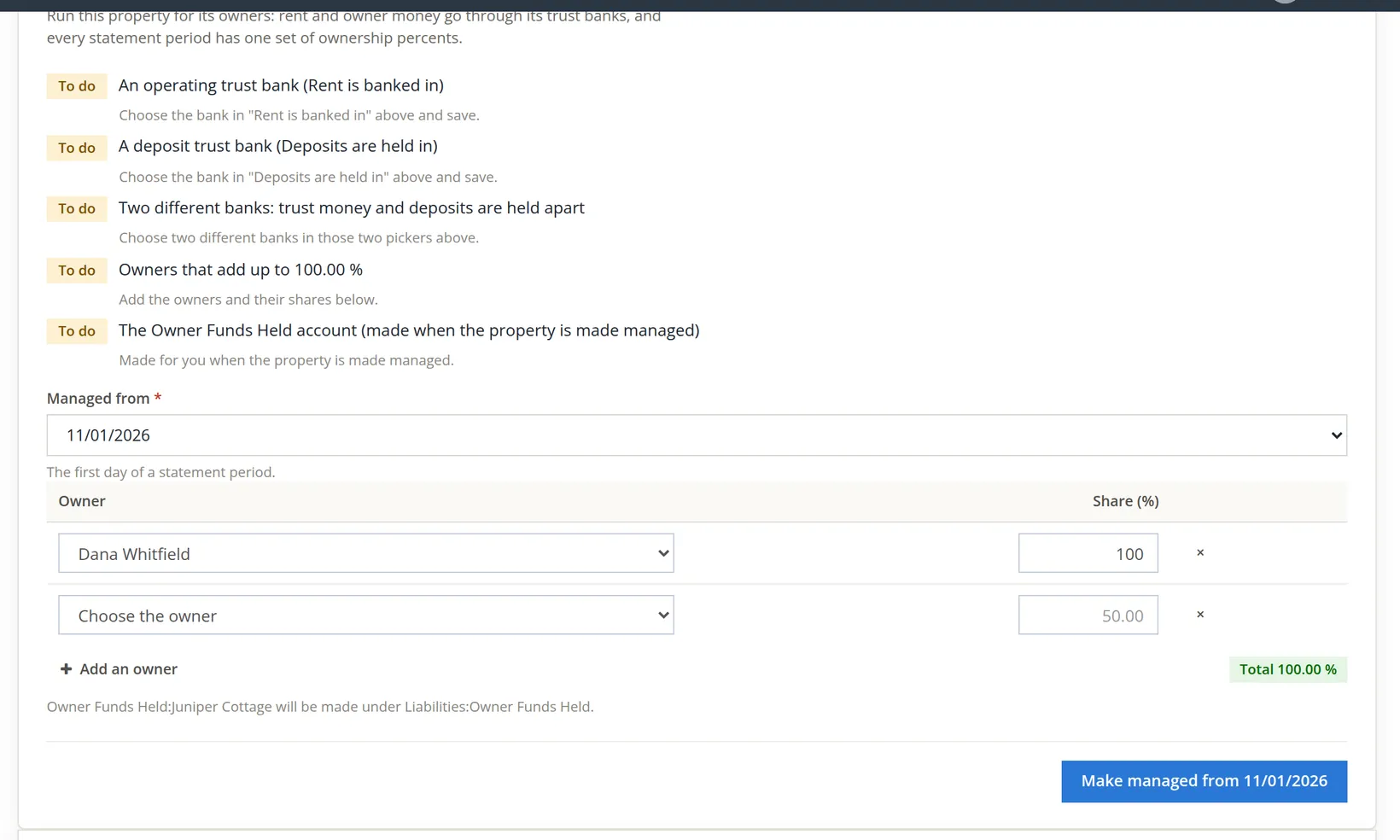
Choose the first statement period it is managed from, add each owner with a share, check the total reads 100.00%, and click Make managed from 11/01/2026.

The mistake: the store's banks
Look again at the set-up list in the managed-card figure. All five items read To do: the property's own Rent is banked in and Deposits are held in fields were still blank. The bookkeeper clicked Make managed anyway, before choosing the trust banks, and the save went through. With its own fields blank, the property inherited the books' defaults, Operating Checking for rent and Money Market Savings for deposits; those are two different banks, so the checks run on the save were satisfied. They are also the store's accounts: Dana's rent would have landed in Summit's own checking account.
On review the bookkeeper set the property's Rent is banked in to Owner Trust Checking and Deposits are held in to Tenant Deposit Trust, and saved. The property's Money card now reads those two accounts.
The set-up list checks that there are two different banks; it cannot know which of your accounts are trust accounts. Set both bank pickers on the property's Settings tab first, then fill in the managed card.
The software did catch the next slip. Jamie Ortiz's deposit check arrived, and the bookkeeper used the lease's Receive payment, as in Chapter 13.5. Its form has a Deposit to picker: "Undeposited Funds until a bank deposit takes it, or straight into a bank. A managed property's payments go into its operating trust bank." For a managed property the picker opens on the operating trust bank, Owner Trust Checking. Out of habit from Summit's own building, the bookkeeper changed it to Operating Checking and clicked Receive.
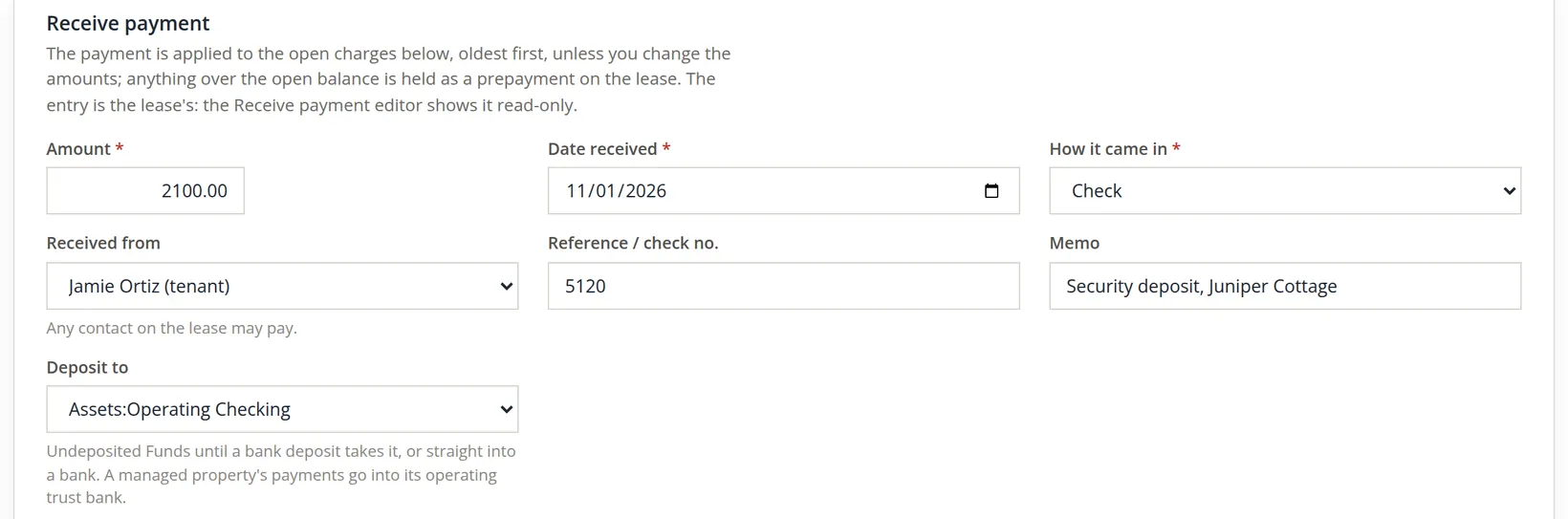
The receipt was refused, and nothing was posted: "The property is managed for its owners: a payment goes into its operating trust bank (Owner Trust Checking), or into its deposit trust bank (Tenant Deposit Trust) when it pays deposits only, not into Operating Checking." The guard checks every payment of a managed property that goes straight into a bank. Two banks pass: the operating trust bank, always, and the deposit trust bank when the payment pays deposit charges and nothing else. For an owned property the store's banks are fine; for a managed one the guard refuses them rather than let trust money into the store's bank.2
- 1
Choose the trust bank
There are two ways. On the lease's own form, set Deposit to to Tenant Deposit Trust: here the deposit is the only open charge, so the payment pays the deposit invoice only and the deposit trust bank is accepted. (The form pays the oldest charges first; if the payment would also cover rent, or leave money over as a prepayment, the deposit trust bank is refused.) Or use the combined payments page (Chapter 2.4), which is what Summit did: from Properties and people → Tenants, the tenant's Receive payment opens it, and it has Where the money went. The deposit, check 5120, goes to Tenant Deposit Trust; November's rent, check 5121, to Owner Trust Checking. With How it came in set to Check, type the number in Check no.; Reference beside it is for anything else (a remittance number, a note). Summit typed 5120 into Reference, as the figure shows, so the payment carries it as a reference rather than as a check number.
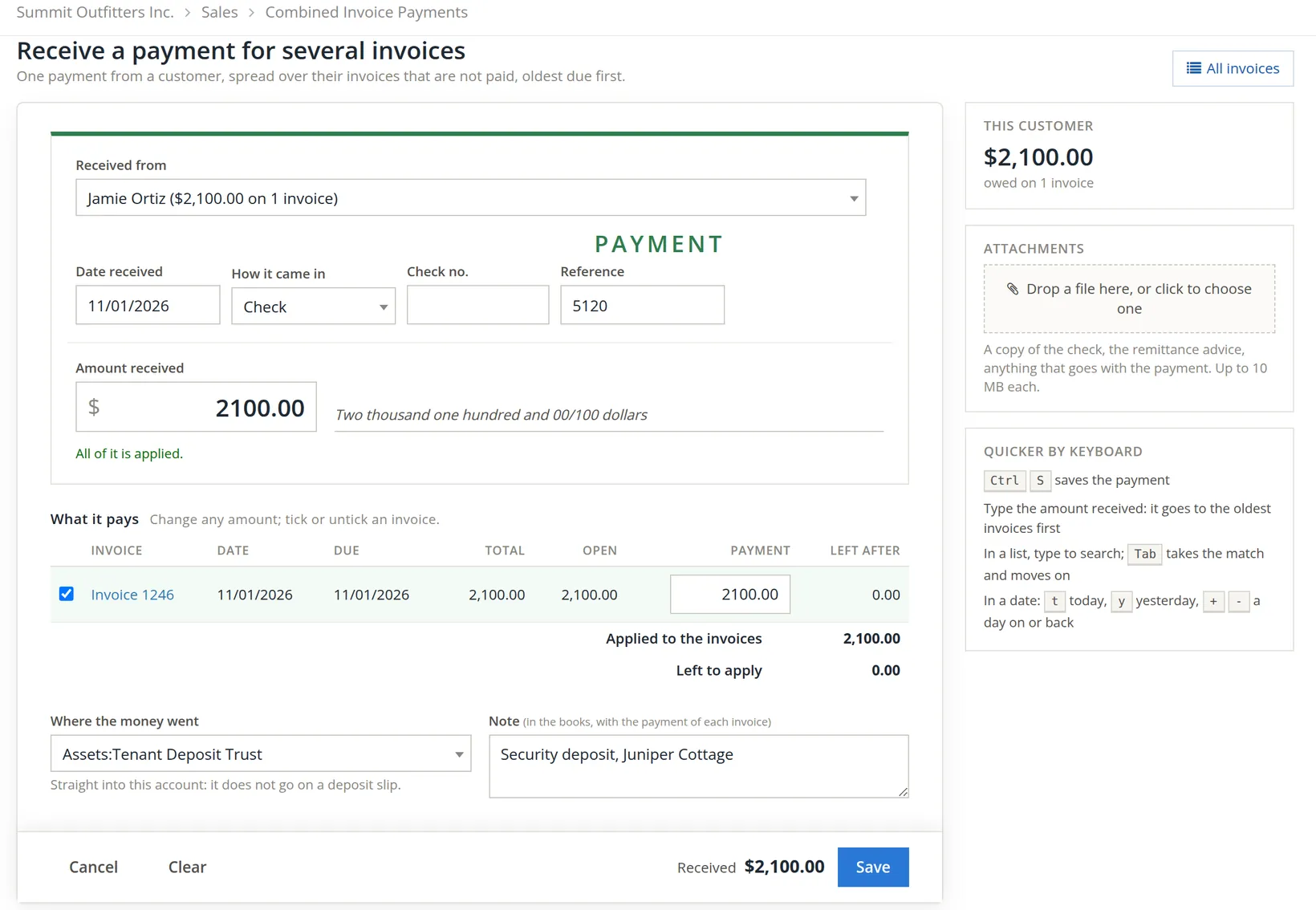
The lease's Deposit to opens on the operating trust bank for every payment, deposits included, and the guard accepts it there. A security deposit taken with the picker left alone lands in Owner Trust Checking, mixed with the owner's rent. For a deposit, choose the deposit trust bank yourself.
With the deposit received, the lease was activated with two gate overrides (Chapter 13.4), and the schedule posted November's rent, invoice 1247, $2,100.00.
The owner's page
Everything Summit knows about Dana as an owner sits on one page: Properties and people → Owners, then the owner's name. The Owners list itself shows each owner's properties and shares, the agreement, the approval limit, how statements go out, the status and any flags. The owner's page opens on Summary. Its header carries the status chip beside the name and, at the right, All owners (back to the list), Edit owner and a More button (...) with the rarer actions: Make inactive..., which asks for a reason, and Invite to the portal... while the owner has no portal access.
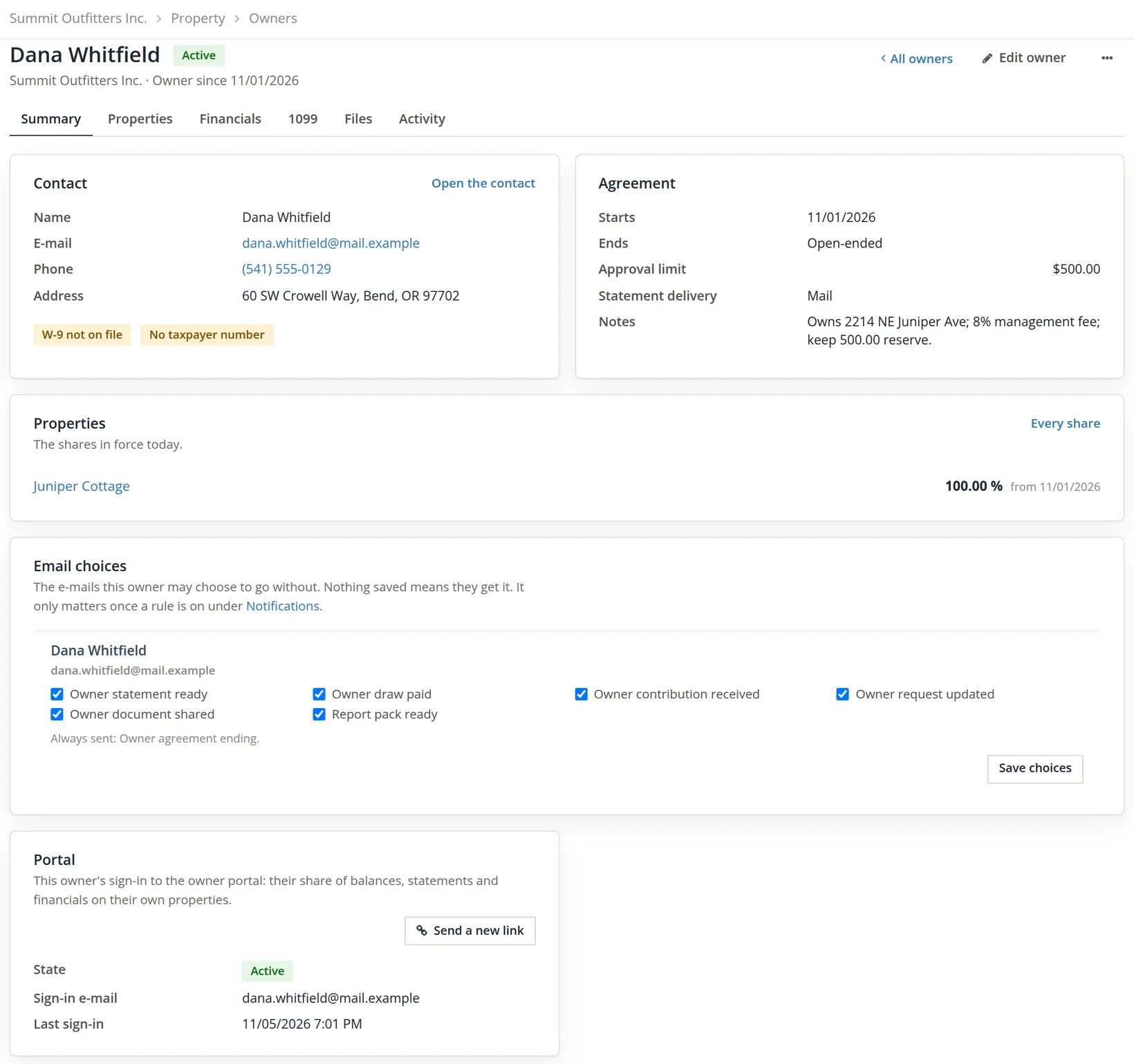
| Tab | What it holds | Dana today |
|---|---|---|
| Summary | Contact, Agreement, the shares in force today, Email choices, Portal | Agreement from 11/01/2026, open-ended, limit $500.00, statements by mail |
| Properties | "Every share the owner holds or held, newest first. A share changes on the first day of a statement period." | Juniper Cottage, 100.00%, from 11/01/2026, In force |
| Financials | The owner-money buttons, Balances today, Available for payment, the owner ledger (Procedure B) | Balance $2,600.00, Not reconciled |
| 1099 | Tax facts, W-9, EFT details for draws, and the rents collected for the owner in a tax year (Section 4) | $2,100.00 collected, not flagged |
| Files | "Leases, inspections, notices, statements, insurance, photos: everything kept with this owner." Files up to 20 MB, each with a category | No files yet |
| Activity | "What happened and what was said, newest first." Notes, calls, e-mails and visits you add, beside the module's own lines | Owner added, the contribution, statement ST-000001 (all 11/01/2026); since Chapter 13.13 also Portal invitation handed over and Portal invitation accepted (11/05/2026) |
Email choices lists the six e-mails an owner may go without (statement ready, draw paid, contribution received, request updated, document shared, report pack ready); "Nothing saved means they get it. It only matters once a rule is on under Notifications." Untick one and click Save choices. The agreement-ending notice is always sent.
The Portal card is the owner's sign-in to the owner portal: "their share of balances, statements and financials on their own properties." Before Summit opened its portal, Dana's card read No access yet, with the note "The portal is off for these books: nobody can sign in. Turn it on on the Portal card.", and the More menu's Invite to the portal... led to Communication → Portal access. In the figure it reads Active, with Dana's sign-in e-mail, the last sign-in (11/05/2026 7:01 PM) and Send a new link, for a lost link or a forgotten password: Summit switched the portal on and invited Dana in Chapter 13.13, which also shows what Dana sees. Once an owner has access, Invite to the portal... leaves the More menu.
Owner money: contributions, the ledger and draws
Open the Financials tab. Above the figures sit the tools for the owner's own money: Statement, Draw, the blue Record contribution, and a More button (...) with Opening balance... and Adjustment... in it.3
- 1
Record Dana's reserve: Record contribution
Property, date, amount, method and check number. Dana's check 2207 for $500.00 funds the reserve. The page answers "Contribution of $500.00 recorded for Juniper Cottage. The owner balance is $500.00." In the books it is a debit to Owner Trust Checking and a credit to Owner Funds Held:Juniper Cottage.
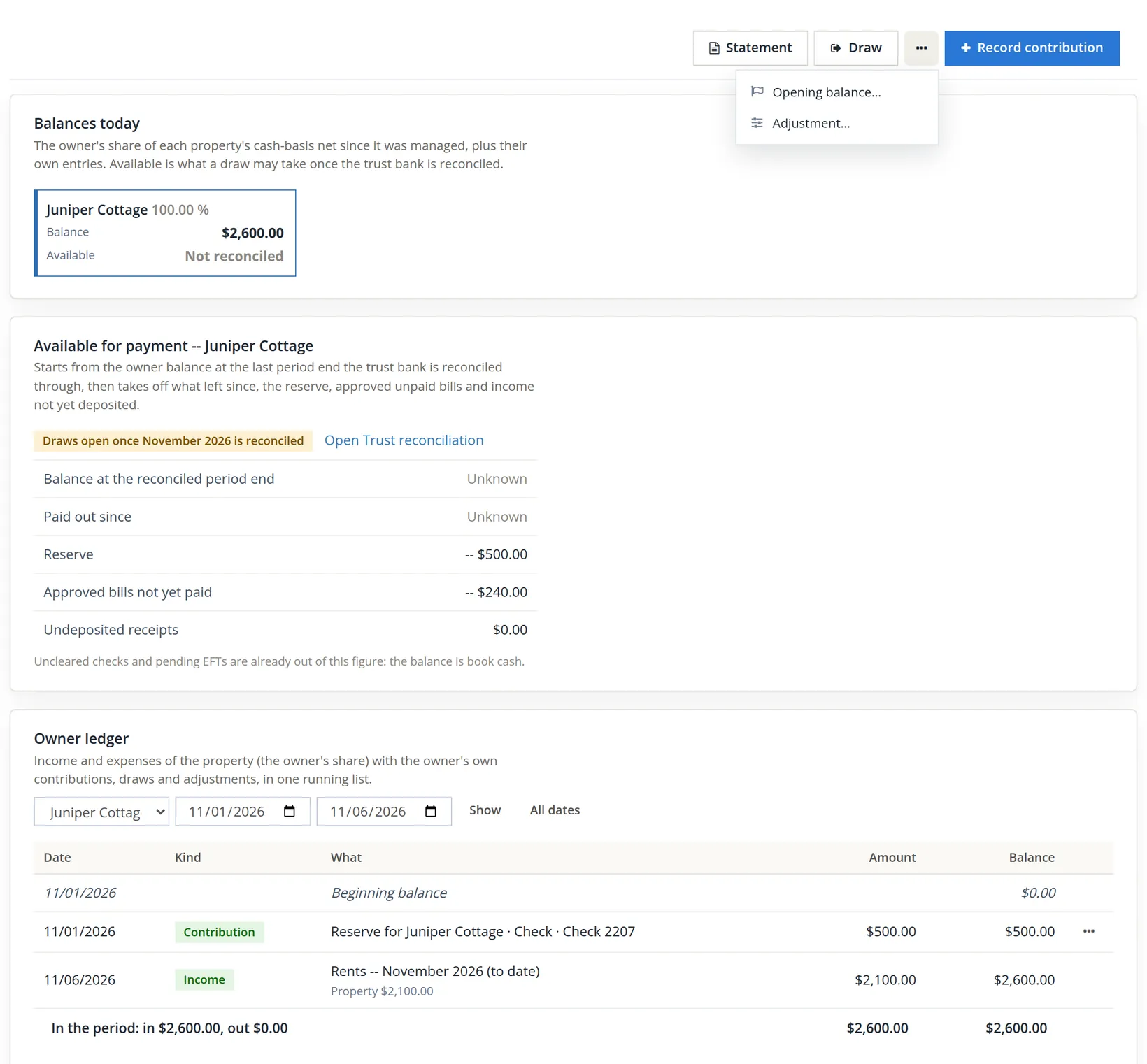
| Owner ledger, Juniper Cottage | Amount | Balance |
|---|---|---|
| Beginning balance 11/01/2026 | $0.00 | |
| Contribution, check 2207 | $500.00 | $500.00 |
| Income, rents November 2026 (to date) | $2,100.00 | $2,600.00 |
Available for payment starts from the owner balance at the last period end the trust bank is reconciled through, then subtracts what has left since, the reserve ($500.00), approved bills not yet paid ($240.00, the storm window) and income not yet deposited. No period end is reconciled yet, so the first two lines read Unknown and Available reads Not reconciled. The chip above them says when that changes.
Why is the storm window not in the ledger? The ledger is on the cash basis, "the owner's share of each property's cash-basis net since it was managed". The $240.00 bill from Bend Glass & Door (work order WO-0003) is entered but not paid (no approval rule covers Juniper, so it needs none, and the page counts it among the approved bills), so it is not yet an expense to Dana; it already reduces what is available. When Summit pays the bill from Owner Trust Checking, it will appear in the ledger.
- 2
Dana asks for money: Draw
On November 5 Dana phones and asks for whatever is left after the reserve and the window: $2,600.00 − $500.00 − $240.00 = $1,860.00. The Draw dialog "pays the owner out of the trust": property, date (today or earlier, not before the first managed day), amount, method Check or EFT, Queue for printing ("Queued, the check waits in the bank's Print checks list and gets its number there.") and a memo. It always pays from the property's operating trust bank. The bookkeeper typed 1860.00, kept the check queued, and clicked Post the draw.
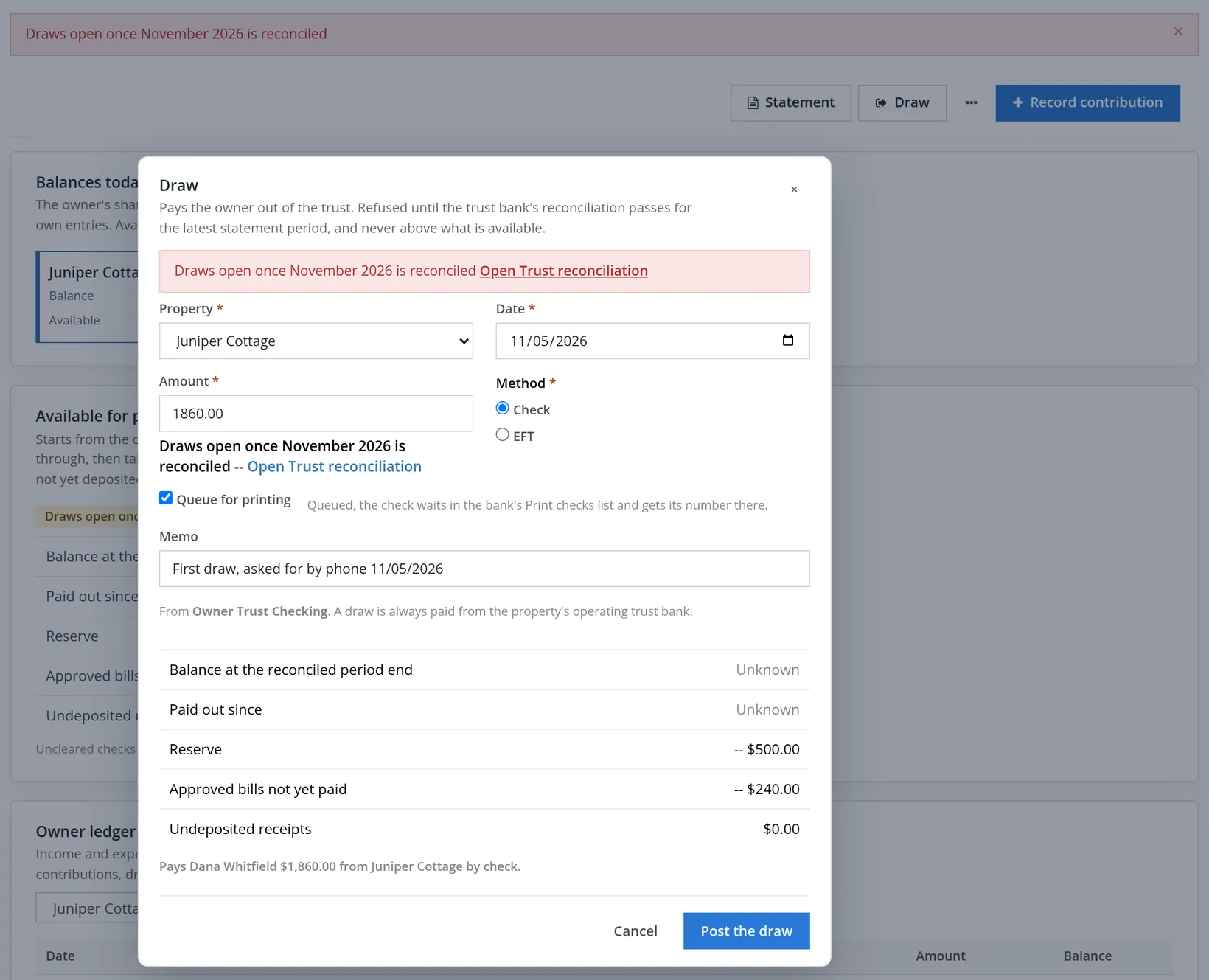
The dialog warned before the click, under the amount, and the server refused after it. The rule is simple: a draw is allowed only when the trust bank's reconciliation passes for the latest ended statement period, and never above what is available. For a draw dated in November the latest ended period is October, and Juniper Cottage was not managed in October, so no October figure can vouch for Dana's money. The first period that can is November itself, 11/01 to 11/30/2026, and a period can be reconciled only after it ends. There is no override.
The link proves the point. Open Trust reconciliation goes to Month-end → Trust reconciliation, whose Statement period list starts at the first period a trust bank holds managed money. For Summit it holds a single entry, 11/01/2026 -- 11/30/2026 (November 2026, not over yet), and each trust bank's card says "November 2026 is not over yet: it is reconciled from 12/01/2026." No earlier month is offered, because none can vouch for Dana's money.
| Date | When Dana's first draw can be paid |
|---|---|
| 11/05/2026 | Draw refused: "Draws open once November 2026 is reconciled". |
| 11/30/2026 | Juniper Cottage's first statement period ends. |
| On or after 12/01/2026 | Reconcile Owner Trust Checking to the November bank statement (Chapter 4.4); then compute and sign November on the Trust reconciliation page (Chapter 13.12). |
| After that | Post the draw, dated after 11/30/2026 (a draw inside a reconciled period would change signed figures and is refused), for no more than the Available figure, which by then will also reflect November's management fee. |
In a property's first managed month, the first draw always follows the first month-end. Put it in the welcome letter: "Your first payment follows our reconciliation of November, in early December." It saves the November 5 phone call.
- 3
A statement between month-ends: Statement
The owner's own Statement button makes one owner's statement outside the monthly run. The dialog opens on A statement period, which offers ended periods only. Before the first one ends, the list reads No statement period has ended yet, with the hint "The first statement period, November 2026, ends 11/30/2026: its statement is made from 12/01/2026. A custom range up to today can be made now.", and Make the statement stays grey. Choose A custom range for anything else. On 11/01 Dana wanted to see the first day, so Summit chose 11/01/2026 to 11/01/2026, posted through 11/01/2026, added a message and clicked Make the statement. "Posted through" is the cut-off for entries; it may not be before the end of the range. The page answered "Statement ST-000001 for 11/01/2026 to 11/01/2026 is ready. Download or Send.", and the Activity tab recorded it.
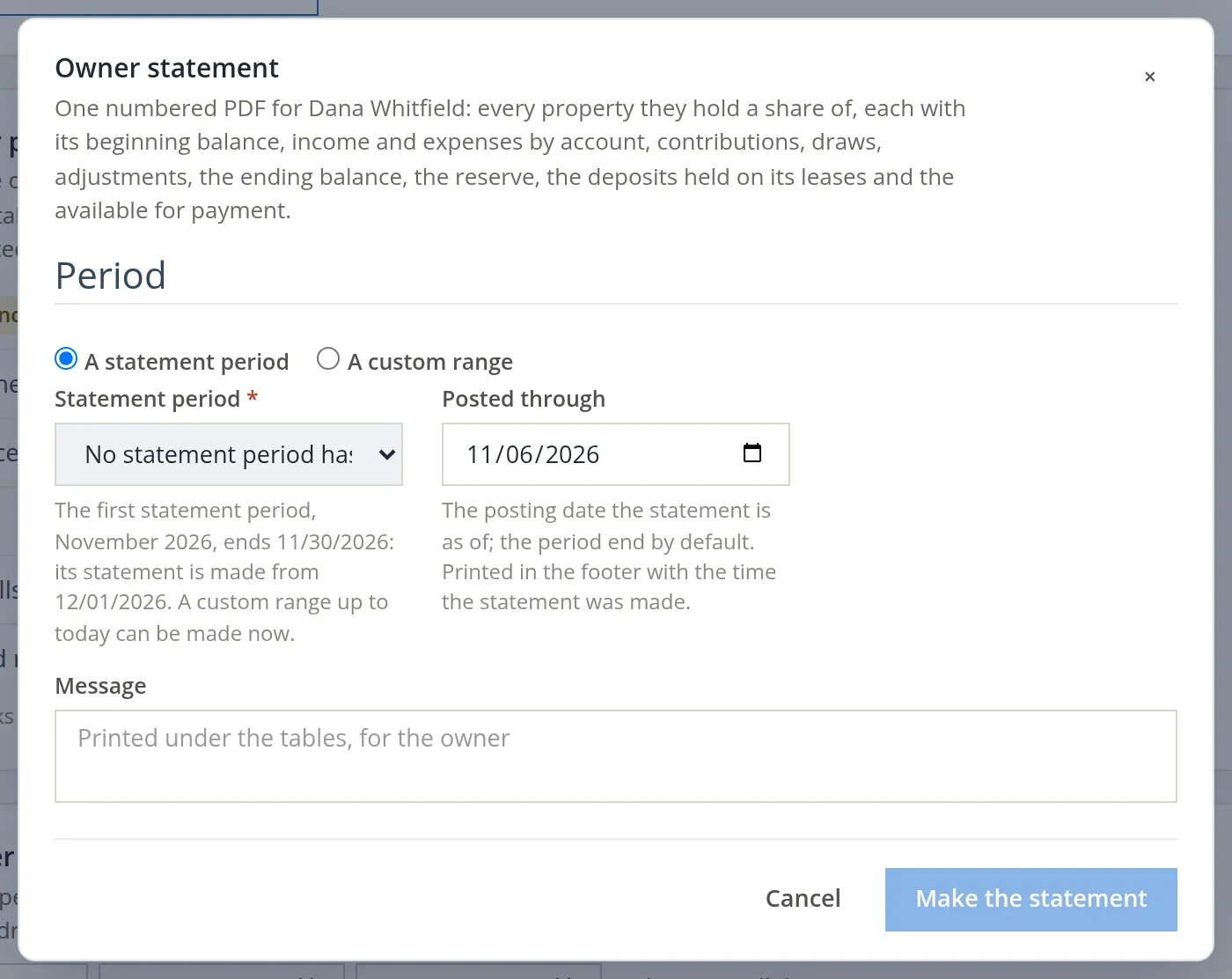
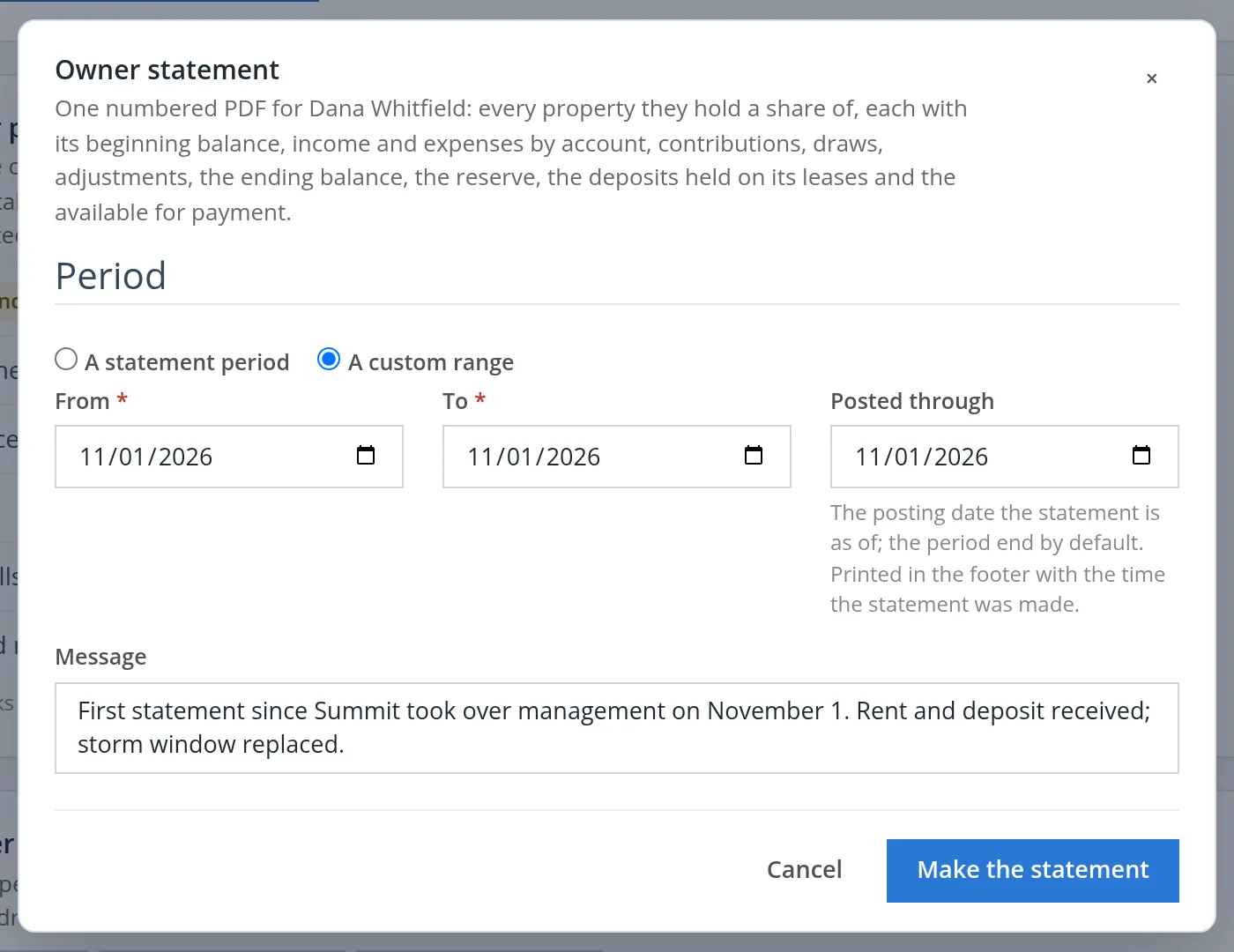
Reading a statement line by line, making the month's statements for every owner at once from Month-end → Owner statements, paying owners and sending the statements are the subject of Chapter 13.12.
Everything an owner is told rests on the trust bank agreeing with the bank statement. It takes two steps after each period end: the ordinary bank reconciliation of Owner Trust Checking and Tenant Deposit Trust (Chapter 4.4), then Month-end → Trust reconciliation, where "every trust bank's statement, book balance and what it owes owners and tenants must agree to the cent": Compute, then Sign (Chapter 13.12). Only then do the "available" figure and the Draw button open.
The 1099 tab: rents collected as the owner's agent
A manager who collects rent for an owner generally reports the gross rents to the owner at year end. The tab says how BizBooks360 treats it: "Gross rents the management company collected for the owner in TY2026, by property and ownership period. Reported as the agent on 1099-MISC box 1 (Rents)."4
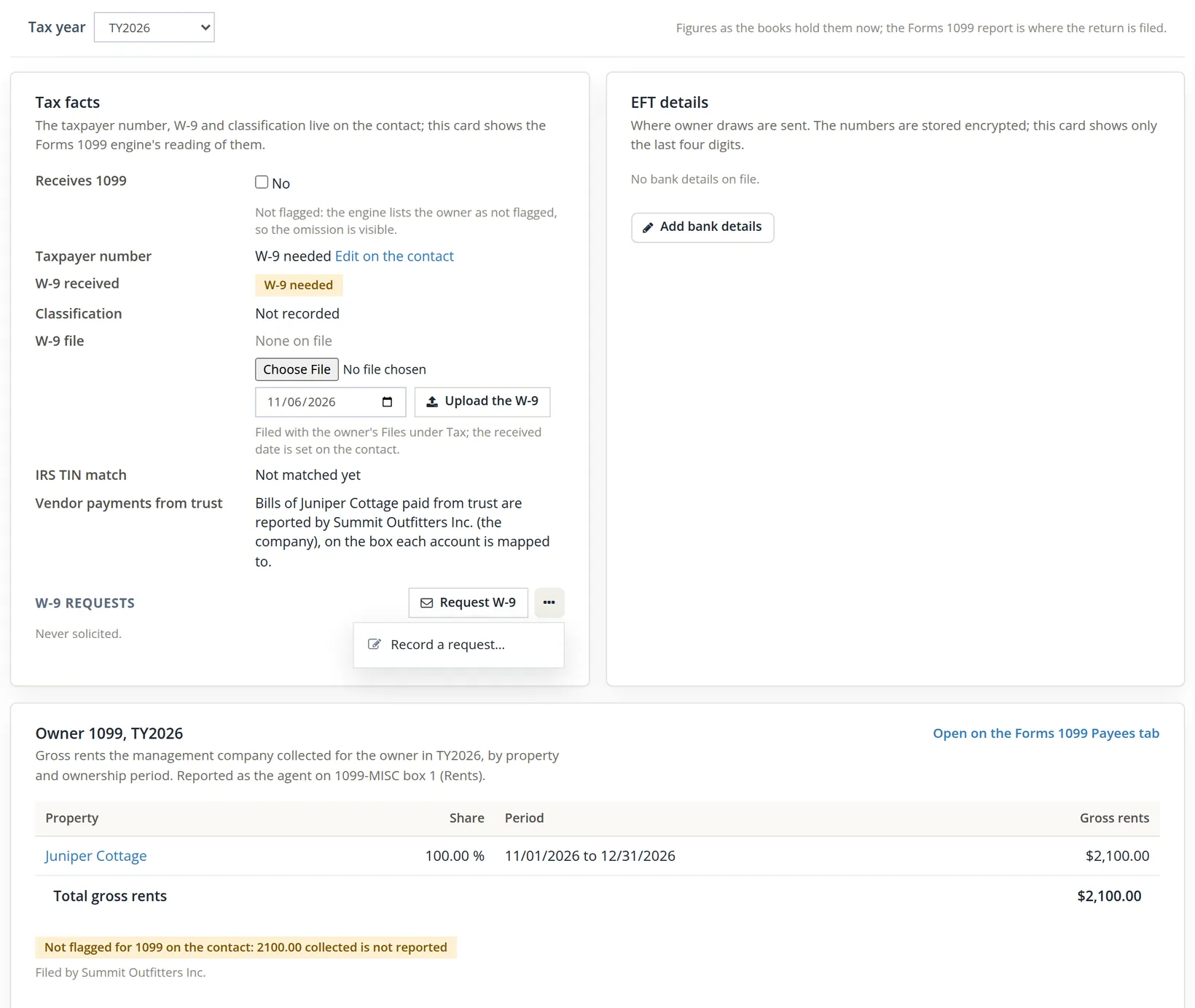
Read the tab top to bottom. Tax facts shows the Forms 1099 engine's reading of Dana's contact: not flagged, no taxpayer number, no W-9, classification not recorded, no IRS TIN match. Bills of Juniper Cottage paid from trust are reported by Summit Outfitters Inc., "on the box each account is mapped to", as for any vendor. W-9 requests reads "Never solicited": nobody has asked Dana yet. Request W-9 sends the request by e-mail ("W-9 requested by e-mail."); Record a request..., in the More menu beside it, logs one made by mail, by telephone or in person. Either way the tab stops reading "Never solicited". EFT details, the card beside Tax facts, holds the owner's bank details for draws by EFT (Add bank details), stored encrypted and shown only by the last four digits. At the bottom, Owner 1099, TY2026 counts Juniper Cottage at 100.00% for 11/01/2026 to 12/31/2026: $2,100.00 so far.
The yellow warning is the point of the tab. Until Dana's contact is flagged for 1099, the $2,100.00 is not reported. The fix starts with the W-9: Summit's next step is Request W-9. When the form comes back, the rest is on the contact (Edit on the contact, Chapter 9.1): tick Receives a 1099 ("payments to them are reported to the IRS") and type the taxpayer number from the W-9; then upload the W-9 here. The Forms 1099 report (Chapter 6.9) then lists Dana on its Payees tab. Summit has not sent the request yet in this chapter.
The Files tab (where an uploaded W-9 is kept) and the Activity tab complete the page; both are described in the table in Section 3.
Every owner at once: the Owner Balances Report
The Financials tab answers for one owner. For all of them, use Reports → Property management → Owners and trust → Owner Balances Report: "As of a date, per owner and property: the share, the owner balance, the reserve share, the approved unpaid bills, the undeposited income and what is available for payment -- or not reconciled." It is a cash-basis report. It runs in the shared report viewer (Chapter 6.1), with the PDF, Excel and CSV exports.
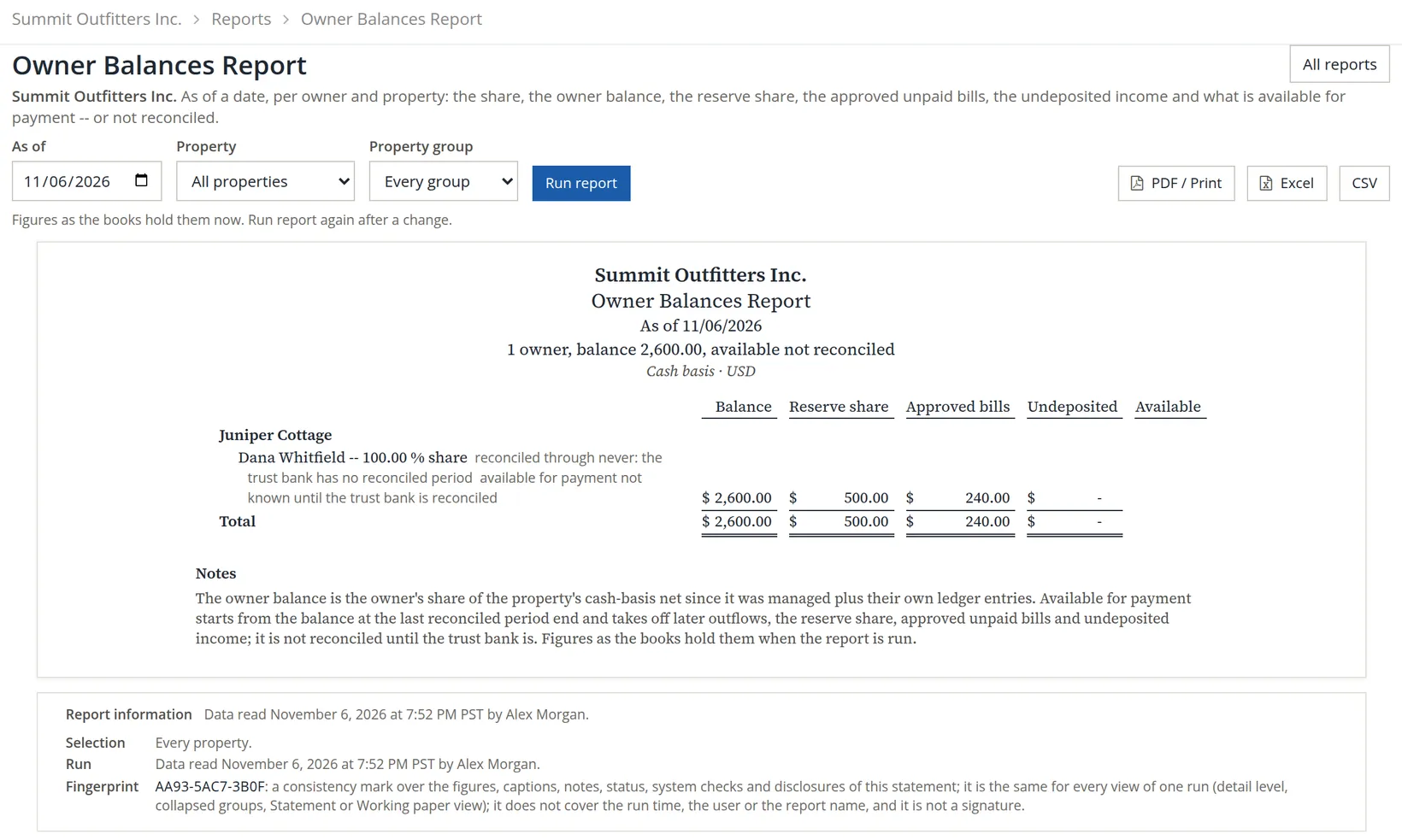
The row repeats Dana's Financials tab: balance $2,600.00, reserve share $500.00, approved bills $240.00, nothing undeposited, and no Available figure. With more owners the report becomes the month-end check before anyone is paid: every row should show an Available amount, and none should sit below its reserve. The other owner and trust reports (Owner Statement Report, Management Fee Income Report, Fee and Draw Register, Trust Reconciliation Report, Close Checklist Report and Owner 1099 Worksheet) are Chapter 13.16.
After the month: fees, statements and Schedule E
What remains of the owner cycle happens after a statement period ends, so for Juniper Cottage it starts on 12/01/2026.
- Management fee. Month-end → Management fees computes each managed property's fee on the income collected in a month from the books' fee policy, posts it, and pays it out of trust into the company bank. Summit's 8% of Dana's November rent is $2,100.00 × 8% = $168.00, but only once the policy is set: today Settings → Property Management → Management fees reads "No policy yet", so nothing would compute (Chapter 13.12 sets it first).5
- Trust reconciliation, owner statements, paying owners and the month-end close. The rest of the Month-end group: Chapter 13.12, which follows Juniper Cottage's November.
- Income by property for the tax return. The Schedule E worksheet, Reports → Taxes → Rental Properties, with the owner and trust reports: Chapter 13.16.
Setting up and running a managed property
- [x] The property's rent and deposit banks are the trust accounts, not the company's.
- [x] The owner is added with the agreement, the approval limit and the statement delivery.
- [x] The owners' shares add up to 100.00% from the first managed period.
- [x] Every receipt went into a trust bank (the guard refuses the others).
- [x] The owner's contributions are recorded on the owner's Financials tab.
- [x] The owner's W-9 is requested (Request W-9 or Record a request), and the contact is ticked Receives a 1099 once it arrives.
- [x] The owner knows the first draw follows the first month's trust reconciliation.
- [x] The Owner Balances Report is checked before anyone is paid; draws go through the Draw button.
Check your understanding
1. Why does a managed property need two trust banks?
Answer
Rent collected for the owner and tenants' security deposits are both trust money, but they belong to different people: the owner and the tenants. Keeping them in separate banks keeps each tie-out clean.
2. A rent payment for a managed property is refused "not into Operating Checking". What do you do?
Answer
Choose the property's operating trust bank in Deposit to on the lease's Receive payment, or the deposit trust bank for a payment of deposits only. On the combined Receive payments page the same choice is under "Where the money went".
3. Dana's balance is $2,600.00. Can Summit pay Dana $2,600.00 today?
Answer
No. Today no draw at all is allowed: "Draws open once November 2026 is reconciled". After November is reconciled (on or after 12/01/2026), the reserve ($500.00) and the approved unpaid bill ($240.00) are still held back: at most $2,600.00 − $500.00 − $240.00 = $1,860.00 on today's figures, less anything that leaves the trust before then, such as November's management fee.
4. The $240.00 repair is in the books. Why is it not in Dana's ledger?
Answer
The ledger is on the cash basis and the bill is not paid yet. It already reduces the Available figure as an approved unpaid bill.
5. Would computing October's trust reconciliation open Dana's draw?
Answer
No, and the Trust reconciliation page does not even offer October. Juniper Cottage was managed from 11/01/2026, so October says nothing about Dana's money. The first period that can open a draw is November, listed as "not over yet", and it can be reconciled only from 12/01/2026.
6. Dana's 1099 tab warns "2100.00 collected is not reported". What does it mean and what do you do?
Answer
Dana's contact is not flagged for 1099, so the rents Summit collected as agent would be left off the Forms 1099. Request Dana's W-9; when it arrives, tick Receives a 1099 on the contact and enter the taxpayer number, and upload the W-9 on the 1099 tab.
Notes
- Most states regulate trust accounts held by property managers, often through the real-estate licensing agency, and some require a license to manage property for others. This manual is not legal advice. ↑
- The guard checks only payments that go straight into a bank. A payment of a managed property put in Undeposited Funds is not refused; the bank deposit that later takes it must then go to the trust bank. ↑
- Since November 2026 the owner's Financials tab has a Draw button, and the software itself refuses a draw until the trust reconciliation passes for the latest statement period. The previous edition left that check to the bookkeeper. ↑
- Who must file, the thresholds and the boxes are set by the IRS and change from year to year; the wording quoted is the software's. This manual is not tax advice: ask your preparer. ↑
- The 8% is Summit's agreement with Dana, written in the owner's notes; the software does not read the notes. The fee policy that the Management fees page computes from is kept under Settings → Property Management → Management fees (Chapter 13.12). ↑