
Chapter 6.9
Forms 1099-NEC and 1099-MISC
How to turn the year's payments to contractors, landlords and other non-employees into Forms 1099: give each expense account its 1099 box, check the payees and their tax IDs, print or e-mail the recipient copies, and prepare the files for the IRS.
When you finish this chapter you will be able to:
- Say which payments go on Form 1099-NEC, which on Form 1099-MISC, and which on neither.
- Map expense accounts to 1099 boxes, and clear the Tax Report's 1099 warnings that way.
- Read the 1099 report, including the difference between payments made and posting date.
- Find and fix a payee problem: a missing name, tax ID or W-9.
- Print the recipient copies, mark them mailed, and prepare the IRS filing.
What the forms are for
A business that pays someone who is not an employee reports those payments to the IRS and to the person paid. Wages go on Form W-2 through payroll. Most other payments for a trade or business go on one of two information returns:
| Form | Typical payments | Reported at (as the app's catalog shows) |
|---|---|---|
| 1099-NEC, box 1 (box 1a from TY2026) | Nonemployee compensation: contractors, guides, accountants, lawyers' fees for services | $600 for TY2025; $2,000 for TY2026 |
| 1099-MISC, box 1 | Rents paid for property used in the business | $600 for TY2025; $2,000 for TY2026 |
| 1099-MISC, box 2 | Royalties | $10 |
| 1099-MISC, box 10 | Gross proceeds paid to an attorney (a settlement, for example) | $600 |
Three rules shape everything the report does.2
- Only flagged payees count. A contact is included only when Receives a 1099 is ticked on it (Chapter 3.5).
- Payments made, not bills entered. A payment counts in the year it was paid. A bill entered in December and paid in January belongs to January's year.
- Card and platform payments are left out. A payment by credit card, PayPal, Venmo, Stripe or Square is reported by the processor on Form 1099-K. The report still shows it, in its own column, so the payee's total ties to the books.
One report, five tabs
Reports → Taxes → 1099 Issuance opens the page called Forms 1099-NEC and 1099-MISC. On the All reports page it is listed as 1099 NEC/MISC. The page has five tabs, and the year's work moves from left to right except for the box mapping, which comes first.
| Tab | What it is for |
|---|---|
| Report | The statement: every payee and box, the totals, the exceptions and the reconciliation to the ledger. Exports to PDF, Excel and Google Sheets. |
| Payees | Every 1099 payee with their TIN, W-9 class, amounts and status, and actions such as Request W-9, Exclude and Report anyway. |
| Box mapping | Each account and its 1099 box, by tax year. |
| Recipient copies | Printing, e-mailing and marking the copies furnished, with a log of each. |
| E-file | Deadlines, the IRIS and FIRE files for the IRS, and Form 8809 for an extension. |
The starting point: payees with no box
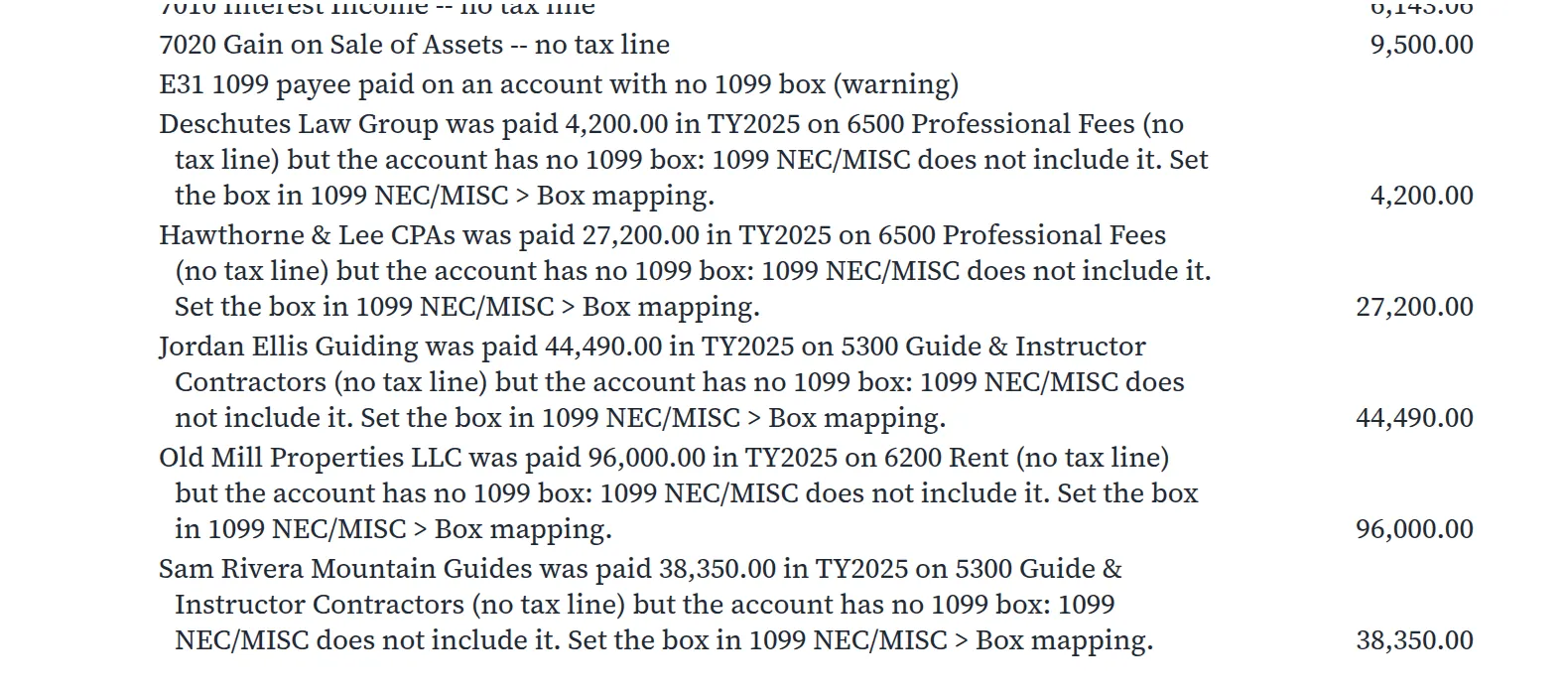
The first Tax Report run for 2025 showed five warnings. Here they are. They are what any book shows while its 1099 boxes are not set; these pictures were taken before Summit's boxes were set, which is why the finished report in Chapter 6.8, run later, shows none. Each one names a payee marked "Receives a 1099", the amount paid and the account it was paid on, and says that the account has no 1099 box, so the 1099 report does not include it.
 Box mapping" loading="lazy">
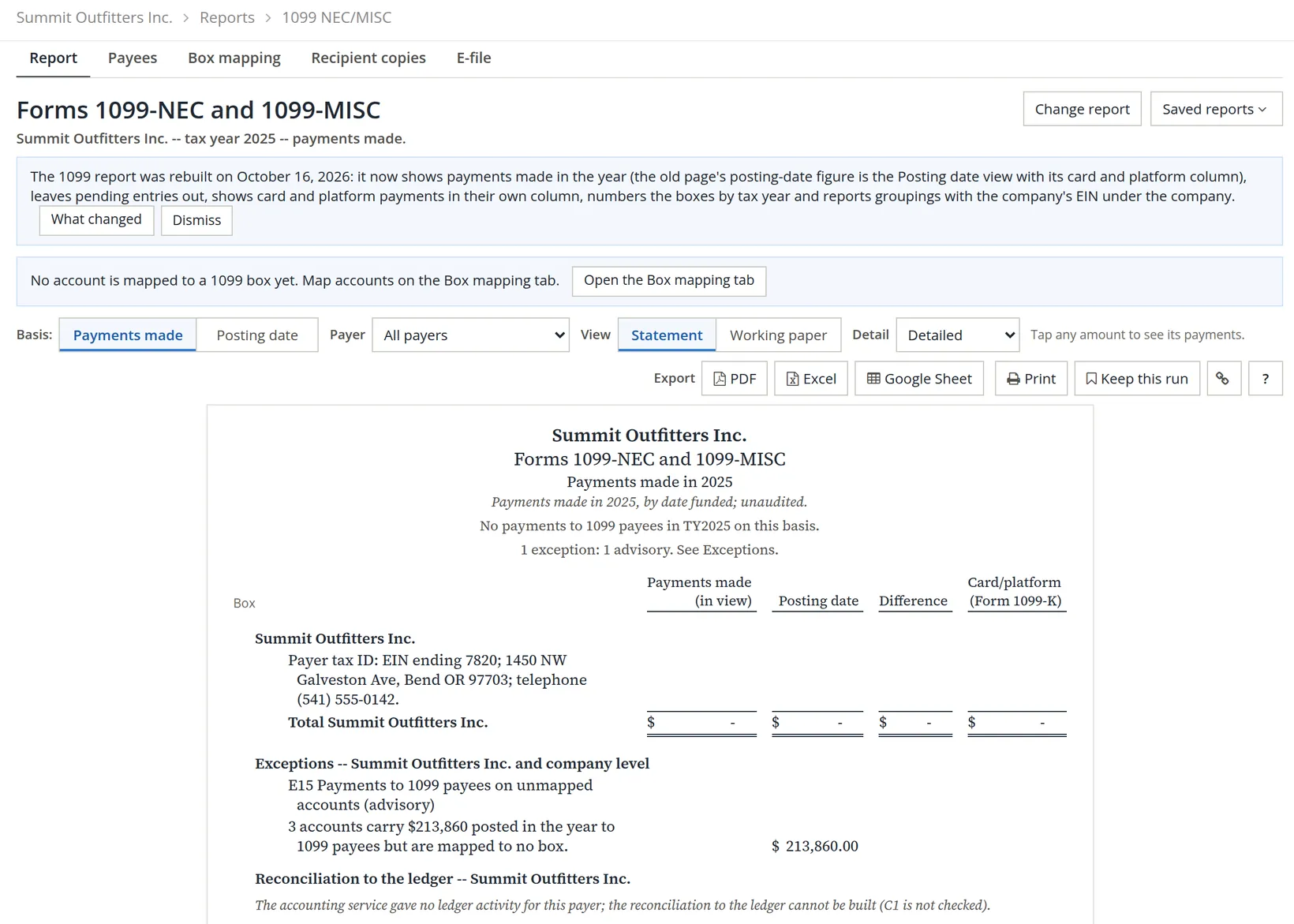
The 1099 report says the same thing from its side. With nothing mapped, the statement is empty, and exception E15 adds up what is missing: $86,460.00 on Guide & Instructor Contractors, plus $96,000.00 on Rent, plus $31,400.00 on Professional Fees, which is $213,860.00.
Give each account its 1099 box
The box belongs to the account, not to the payee. That is deliberate: a landlord paid on Rent gets a 1099-MISC box 1, and if the same landlord is also paid for a repair job on Repairs & Maintenance, that payment lands wherever that account is mapped. Map the account once and every payee paid on it is placed correctly.
- 1
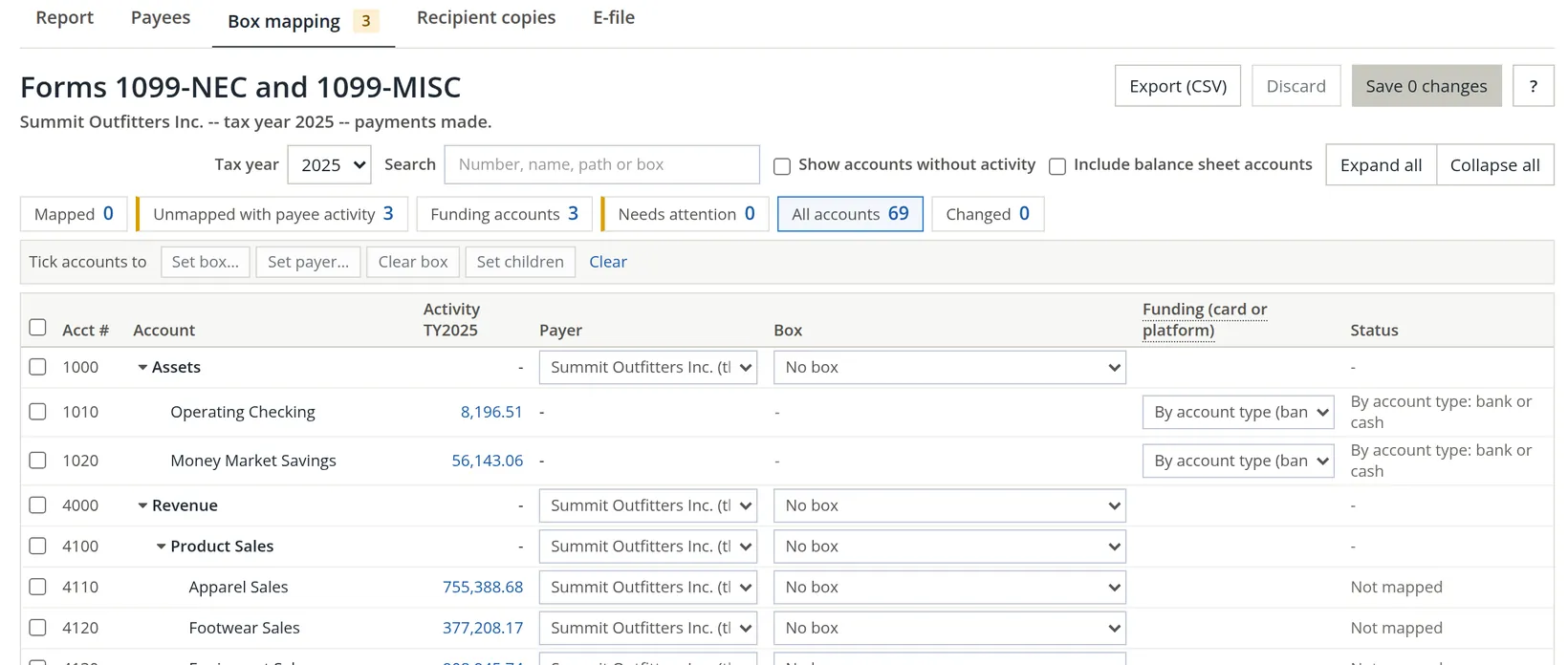
Open the Box mapping tab and choose the tax year
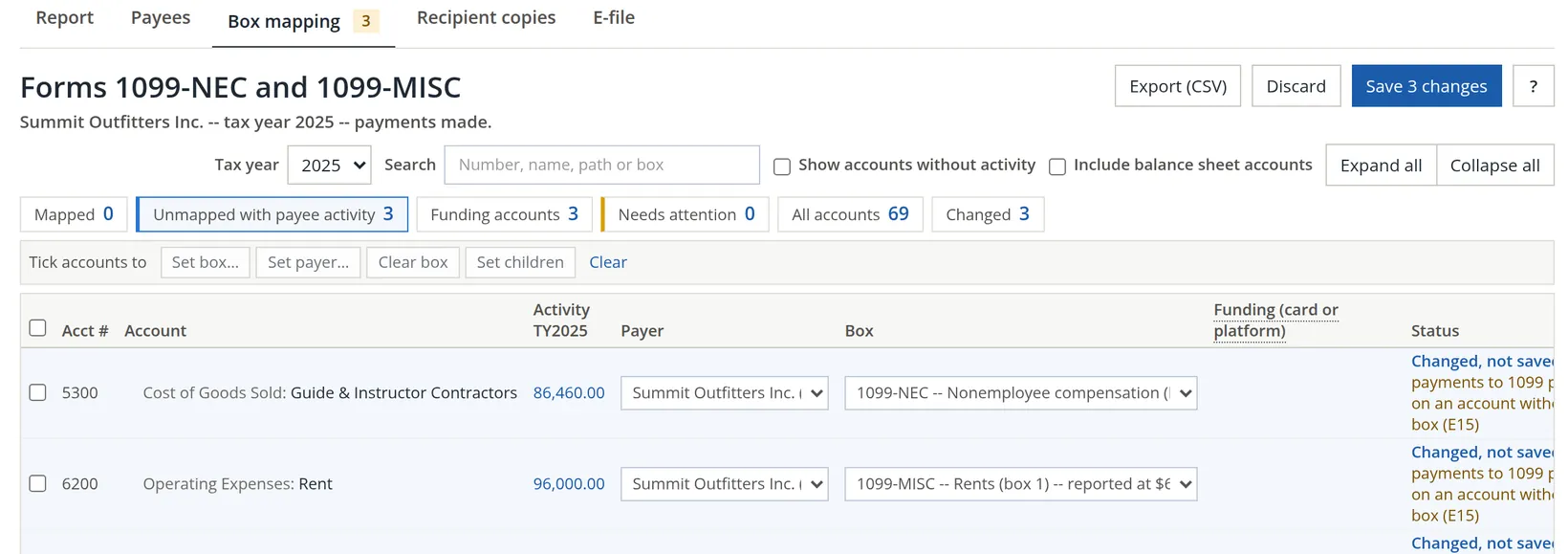
The badge on the tab counts the accounts that need a box. The counters above the list are filters: click one to see only those accounts.
- 2
Click Unmapped with payee activity
The list shrinks to the three accounts: 5300 Guide & Instructor Contractors, 6200 Rent and 6500 Professional Fees.
- 3
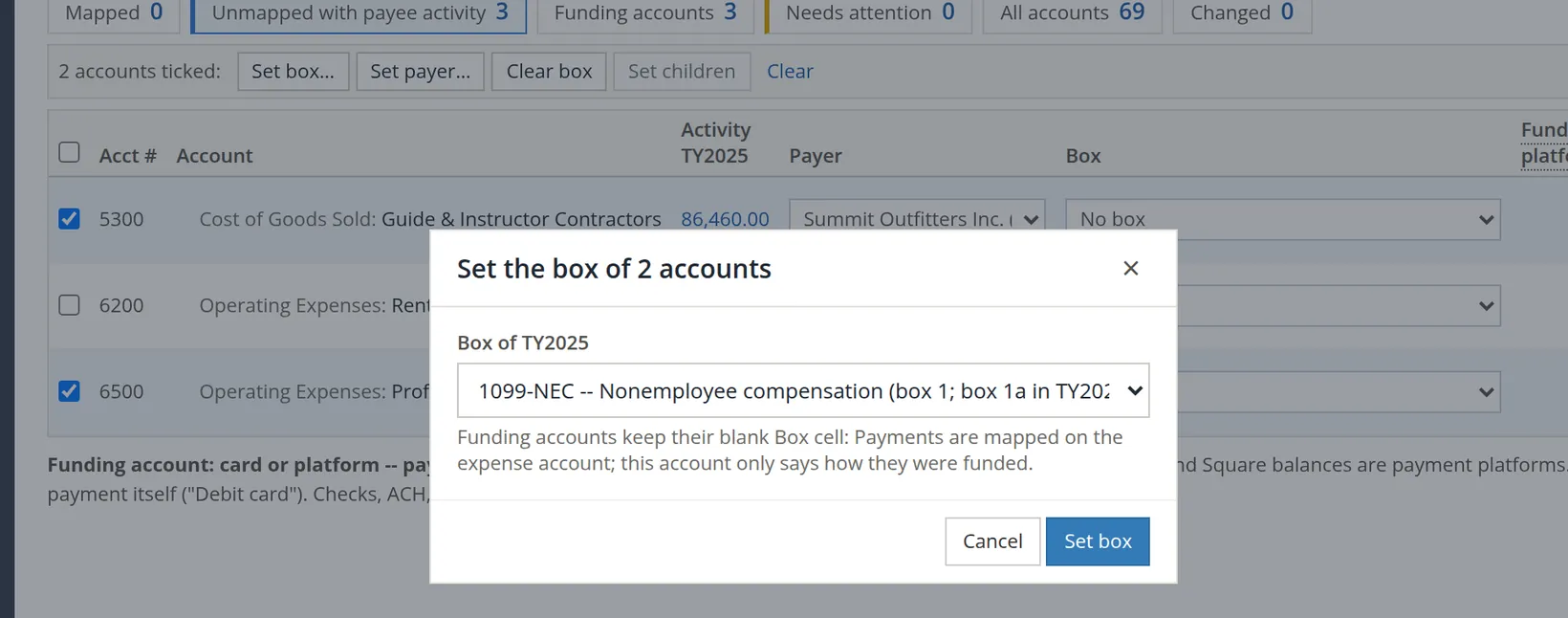
Tick the accounts that share a box, then Set box…
The guides and the professional firms are paid for services, so both accounts take 1099-NEC box 1. Each choice in the list states its threshold for the year you are mapping.
- 4
For a single account, use its own Box list
On 6200 Rent, open the Box list in the row and choose 1099-MISC -- Rents (box 1). Nothing is saved yet: each row reads Changed, not saved.
- 5
Click Save 3 changes, read the list, add a note, Save
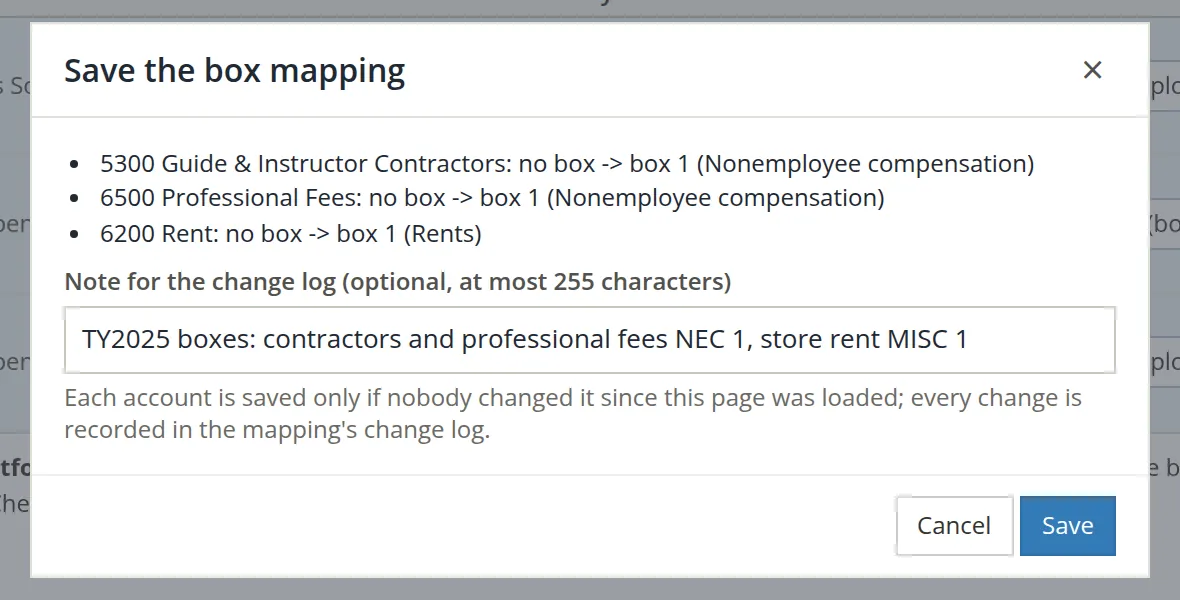
The dialog lists every account, old box to new. The note goes into the mapping's change log, so the next person can see why the boxes are what they are.
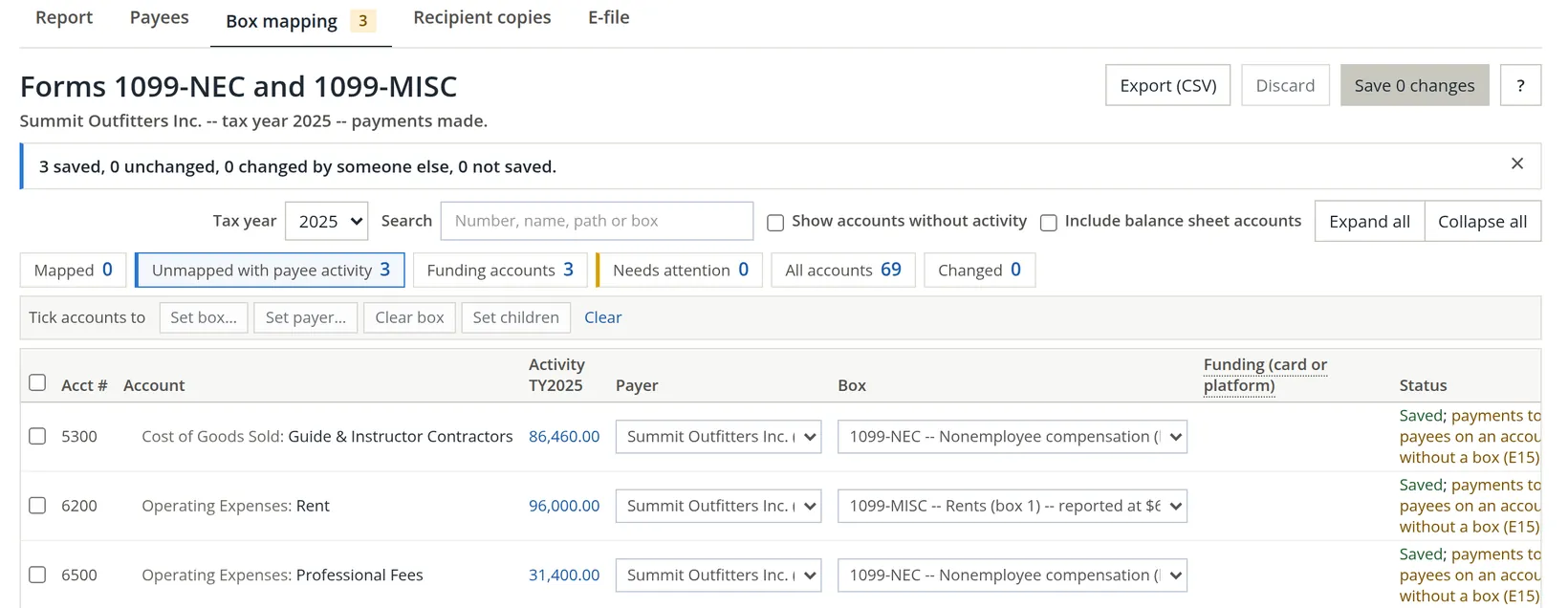
A mapping carries forward. When we switched the tab to 2026 the three accounts were already mapped. The box numbers move with the IRS forms (box 1 became box 1a on the 2026 1099-NEC), and the app renumbers them for you; you only map the accounts you add.
Each account is saved only if nobody changed it after you opened the page. If the result says an account was changed by someone else, reload the tab and look before you map it again.
Read the report
Back on the Report tab the statement is full: four Forms 1099-NEC and one Form 1099-MISC. The first column is what the forms will say. The next two explain how that differs from the books.
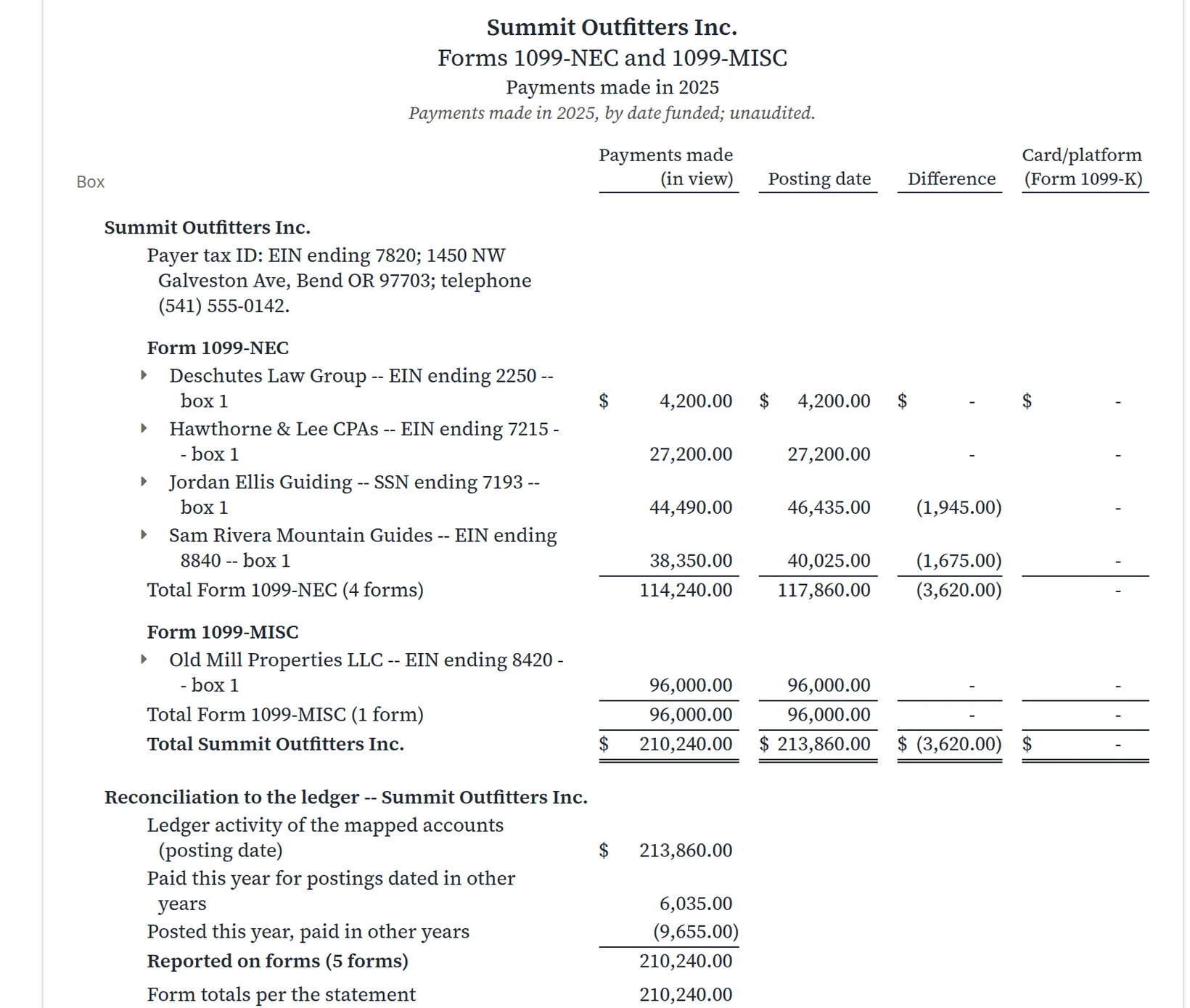
Why is Jordan Ellis Guiding $1,945 lower on the forms than in the books? The books record a bill on the day it is entered (its posting date). The forms count a payment on the day it is paid. Some of the guide's 2025 bills were paid in January 2026, and a few late-2024 bills were paid in 2025. The reconciliation adds it up for the whole company:
| Line | Amount |
|---|---|
| Ledger activity of the mapped accounts (posting date) | 213,860.00 |
| Add: paid this year for postings dated in other years | 6,035.00 |
| Less: posted this year, paid in other years | (9,655.00) |
| Reported on forms (5 forms) | 210,240.00 |
213,860.00 + 6,035.00 − 9,655.00 = 210,240.00, the total of the statement. The difference column says the same: (1,945.00) for Jordan Ellis Guiding plus (1,675.00) for Sam Rivera Mountain Guides is (3,620.00), and 213,860.00 − 3,620.00 = 210,240.00.
The Tax Report closes the loop. Its 1099 cross-check now lists the five payees, $210,240.00 in total, and names each account with its box. The five E31 warnings are gone.
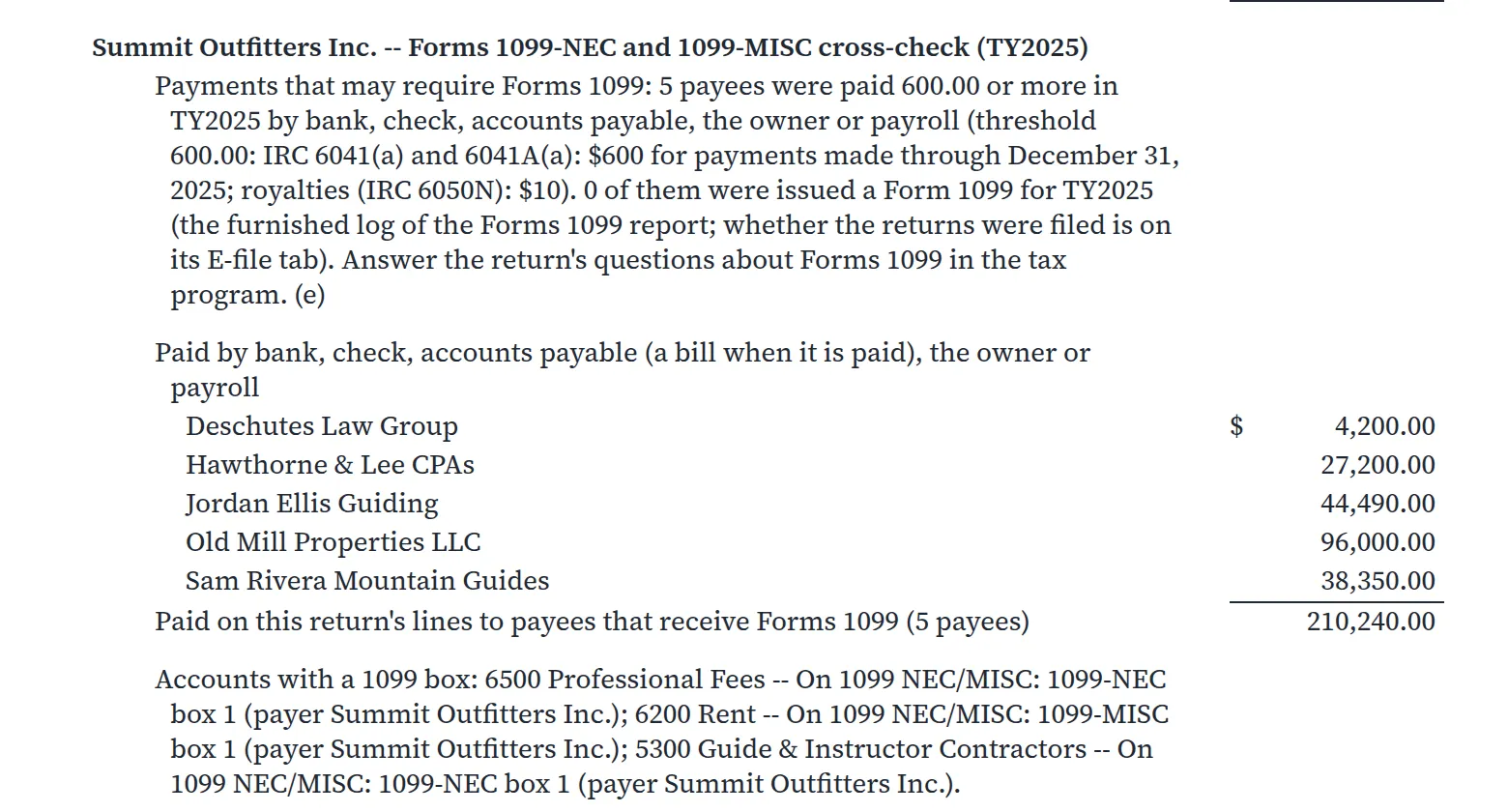
Every amount in the statement opens the payments behind it. When a payee's total looks wrong, that is the quickest way to find the bill that was paid by card, or the check dated in the wrong year.
Check the payees and fix what they need
A form is only as good as the name and TIN on it. The Payees tab lists every 1099 payee of the year, and its Show only chips are a to-do list: no tax ID, W-9 needed, IRS no match, not furnished, and so on. Work each chip down to zero.
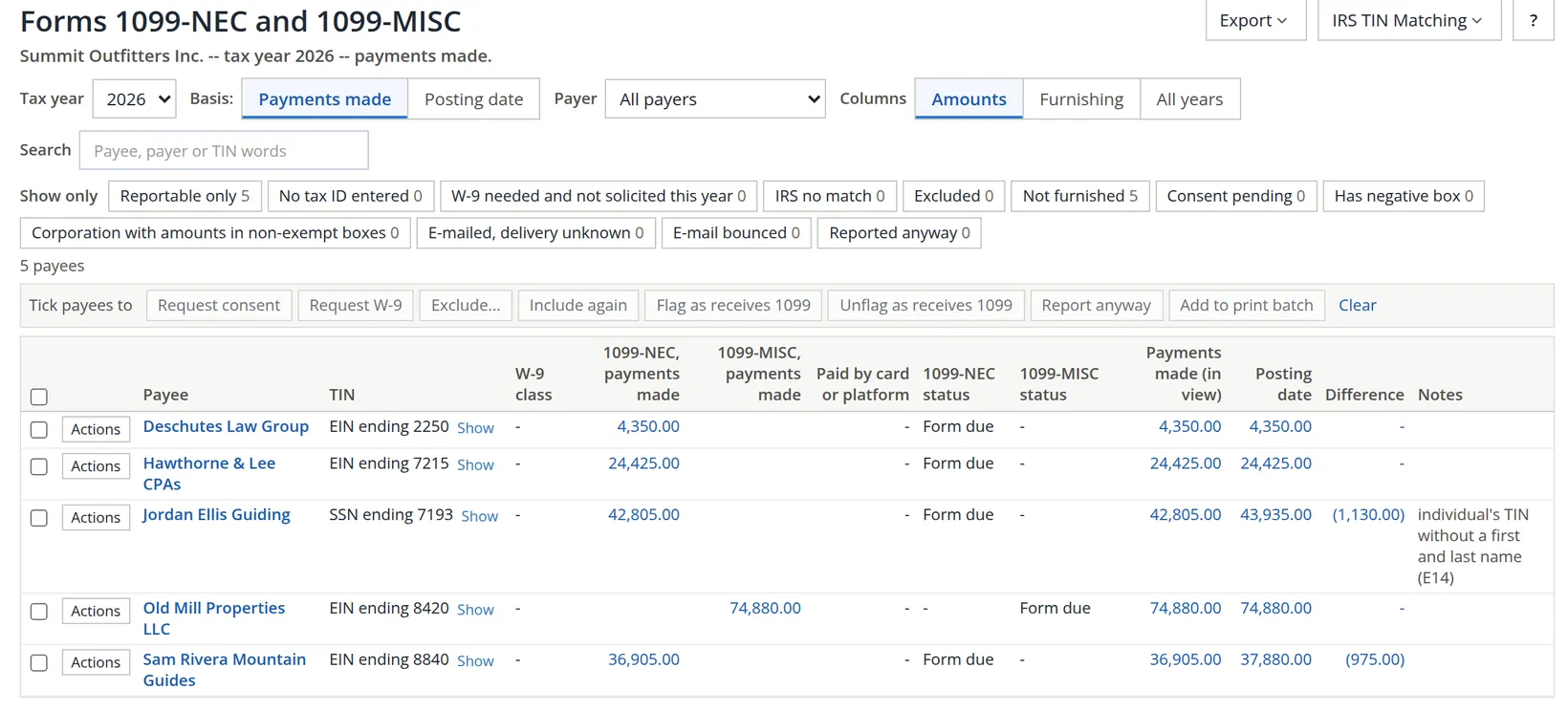
Your screen may also differ from this picture in other ways. The list grows as the year goes on (Summit's 2026 list now holds more payees than these five). When the books have more than one payer, a Payer column appears between the payee and the TIN: Summit's books now also hold Galveston Building LLC, so its Payees tab shows the column. And the Payees tab carries a count when payees need a W-9, as the other tabs count what needs doing on them.
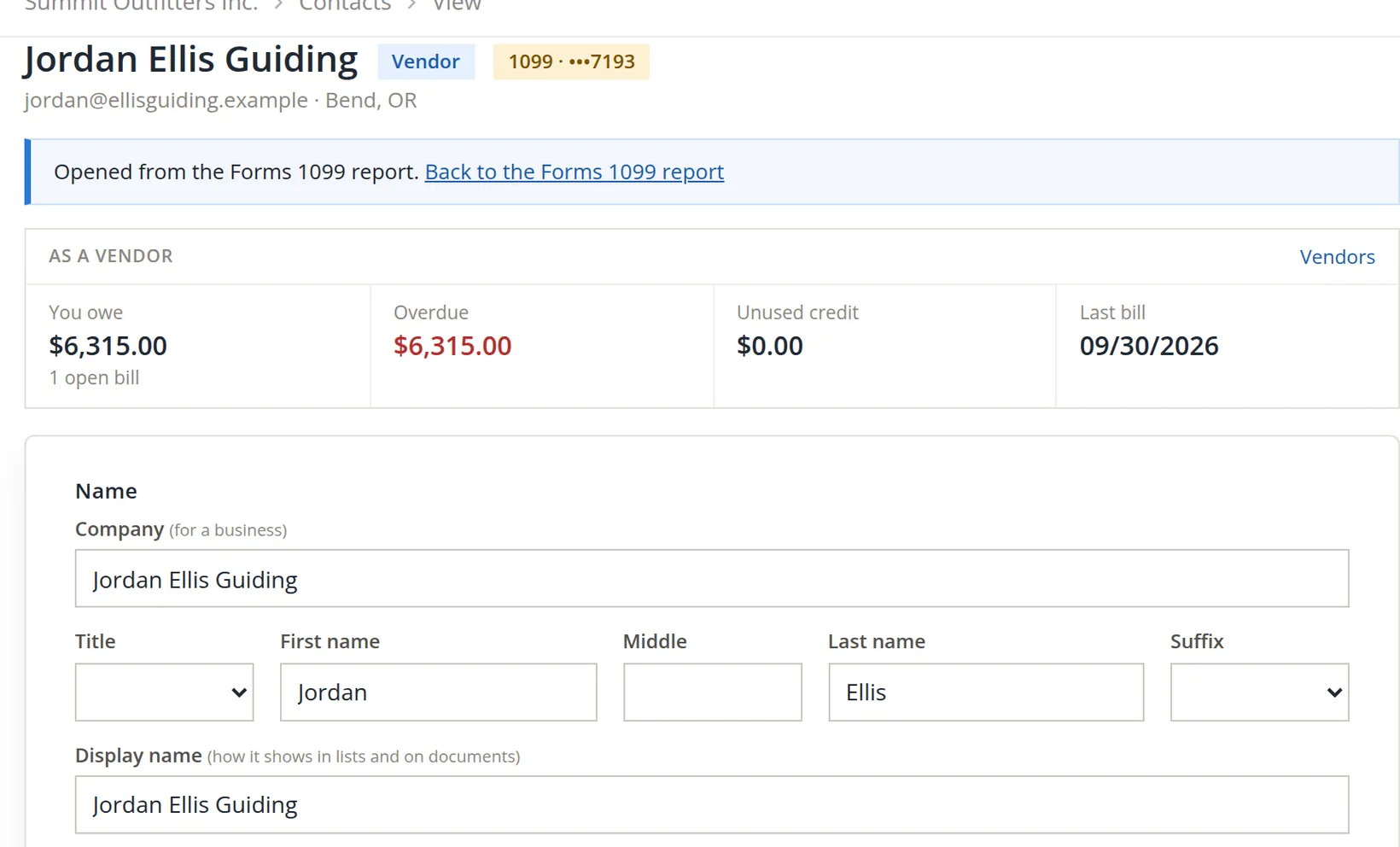
The mistake the report caught. Jordan Ellis Guiding is a sole proprietor who gave an SSN. A form filed under an SSN must carry the person's own first and last name, but the contact held only the business name. The report flagged it as E14, Individual's TIN without a first and last name, and said it would otherwise be filed and printed under the business name.3
- 1
Click the payee's name to open the contact
The contact opens with a note, Opened from the Forms 1099 report, and a link back.
- 2
Enter the first and last name, then Save changes
Keep the business in Company and as the display name. The forms and the IRS files then carry the person's name.
- 3
Record the W-9 in the Forms 1099 panel, then Save the 1099 details
Lower on the same page, enter the date the W-9 arrived, pick the file if you uploaded it, and choose the classification from its line 3. This panel has its own save button; Save changes above does not save it.
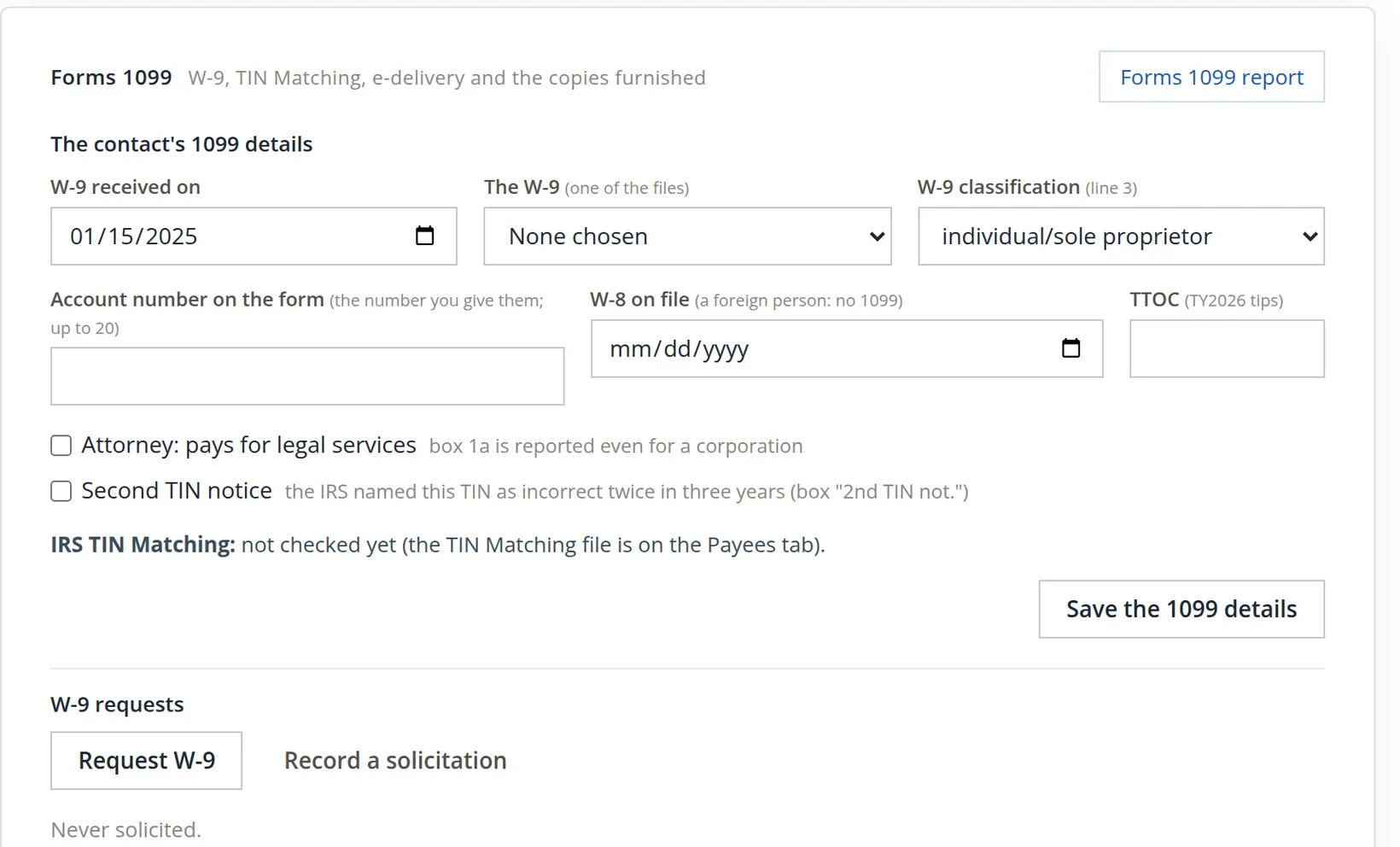
Back in the report, E14 is gone, the Payees tab shows the W-9 class, and the recipient list adds a line under the payee: Prints and files as: Jordan Ellis.
Payments to a corporation are generally exempt from Form 1099-NEC, with exceptions such as attorneys' fees and medical payments. The W-9 classification tells the report which payees are corporations; the chip Corporation with amounts in non-exempt boxes lists the ones to look at.
A change to a vendor's tax ID, remit-to address, check name, payment method or 1099 flag is recorded with its before and after values.4 When the books use approvals, the contact page then says, for example, "Changed Nov 4 by A. Name: waiting for review.", a second person reviews the change on the Vendor changes tab of Approvals, and payments to the vendor wait while a tax ID or remit-to change is unreviewed. Summit does not use approvals, so the pictures show no such line.
Furnish the recipient copies
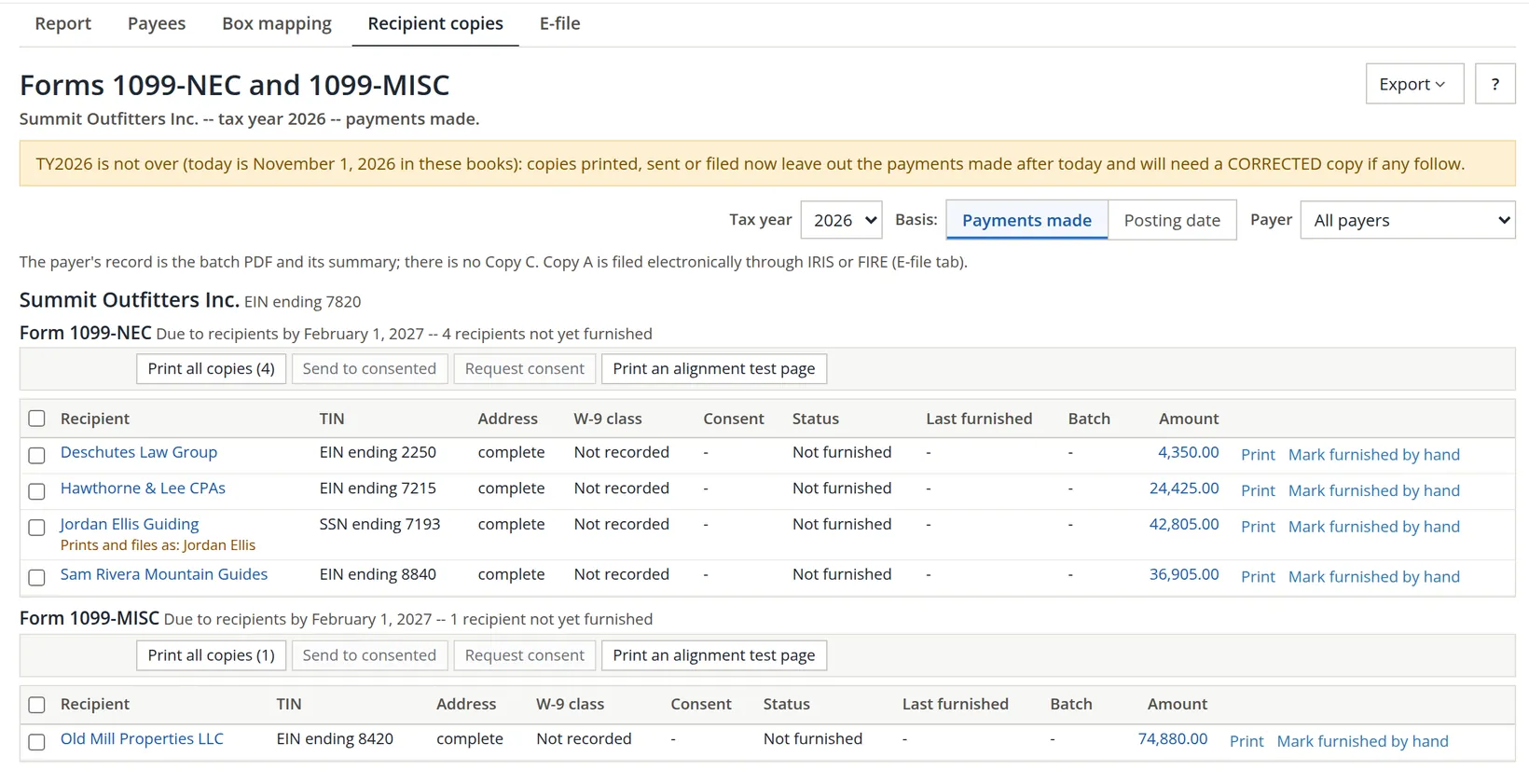
Each payee must receive Copy B by the deadline on the tab (February 1, 2027 for tax year 2026). The Recipient copies tab lists the recipients form by form with their status, and keeps a log of every copy printed, e-mailed or handed over.
- 1
Click Print on a recipient, or Print all copies
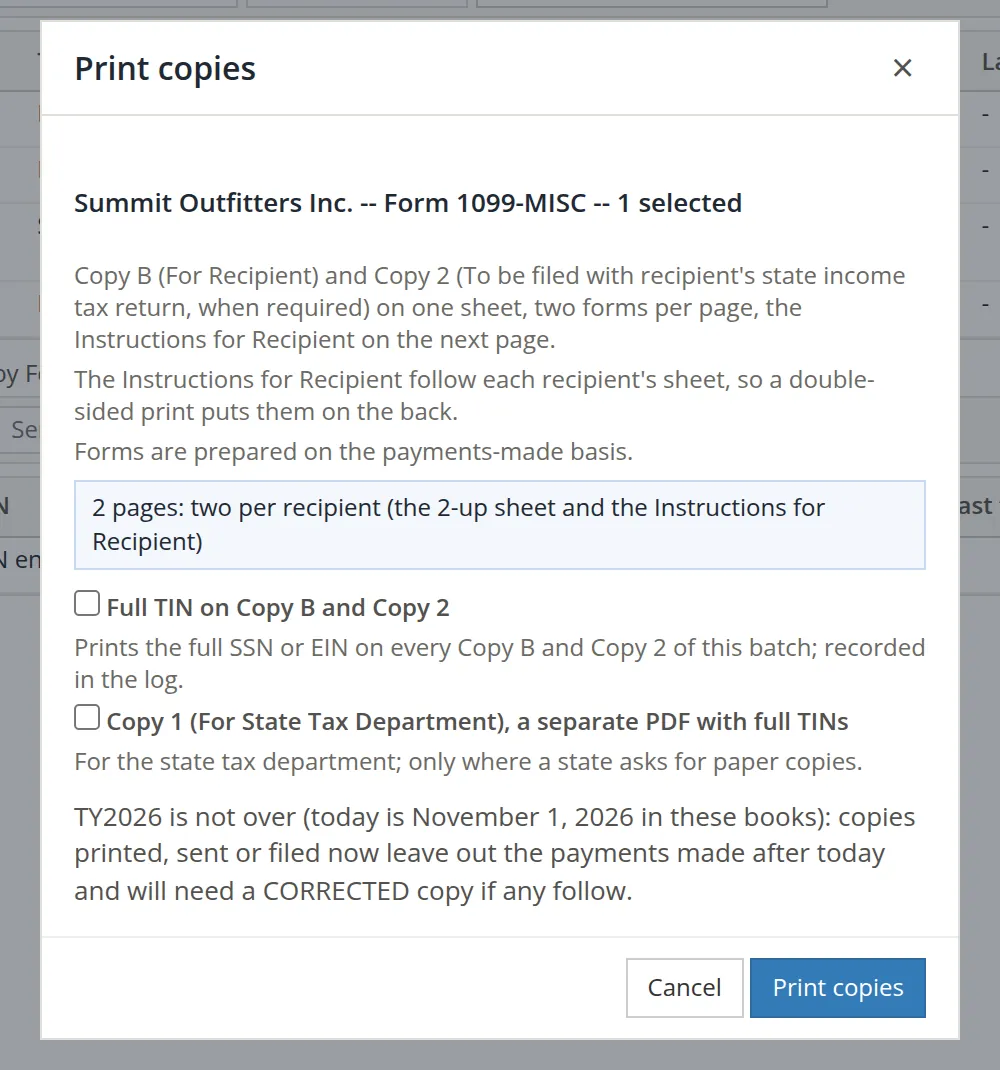
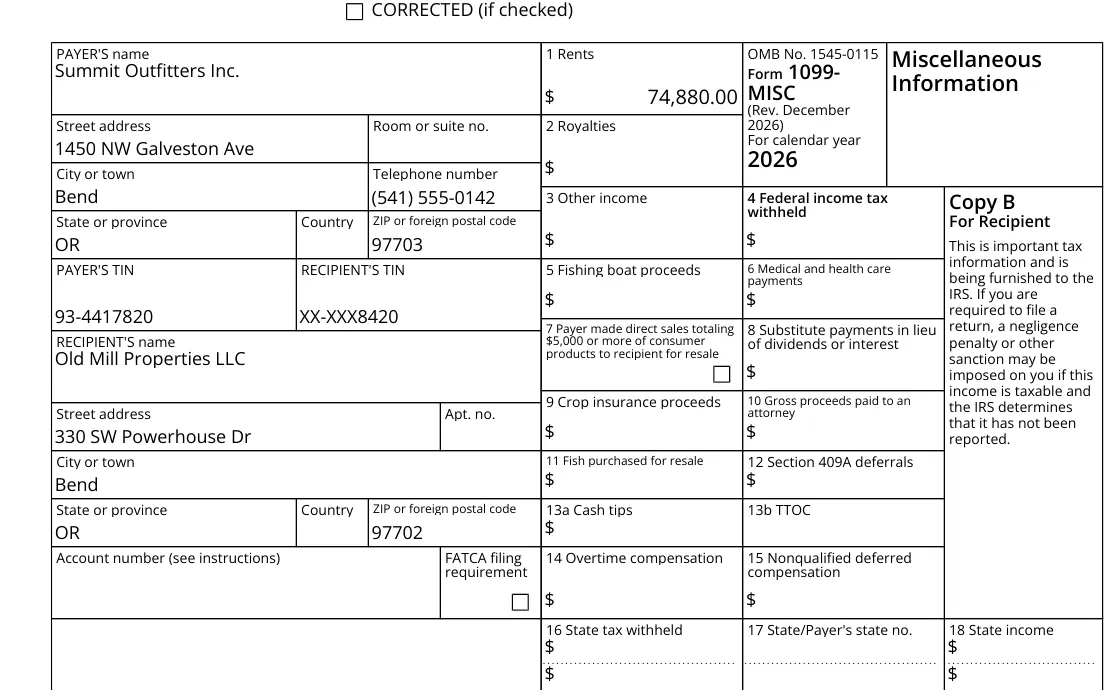
We printed the landlord's 1099-MISC. The dialog says what the batch will hold: Copy B and Copy 2 on one sheet, the Instructions for Recipient on the next page, and the page count.
- 2
Download the Mailing PDF and print it double-sided
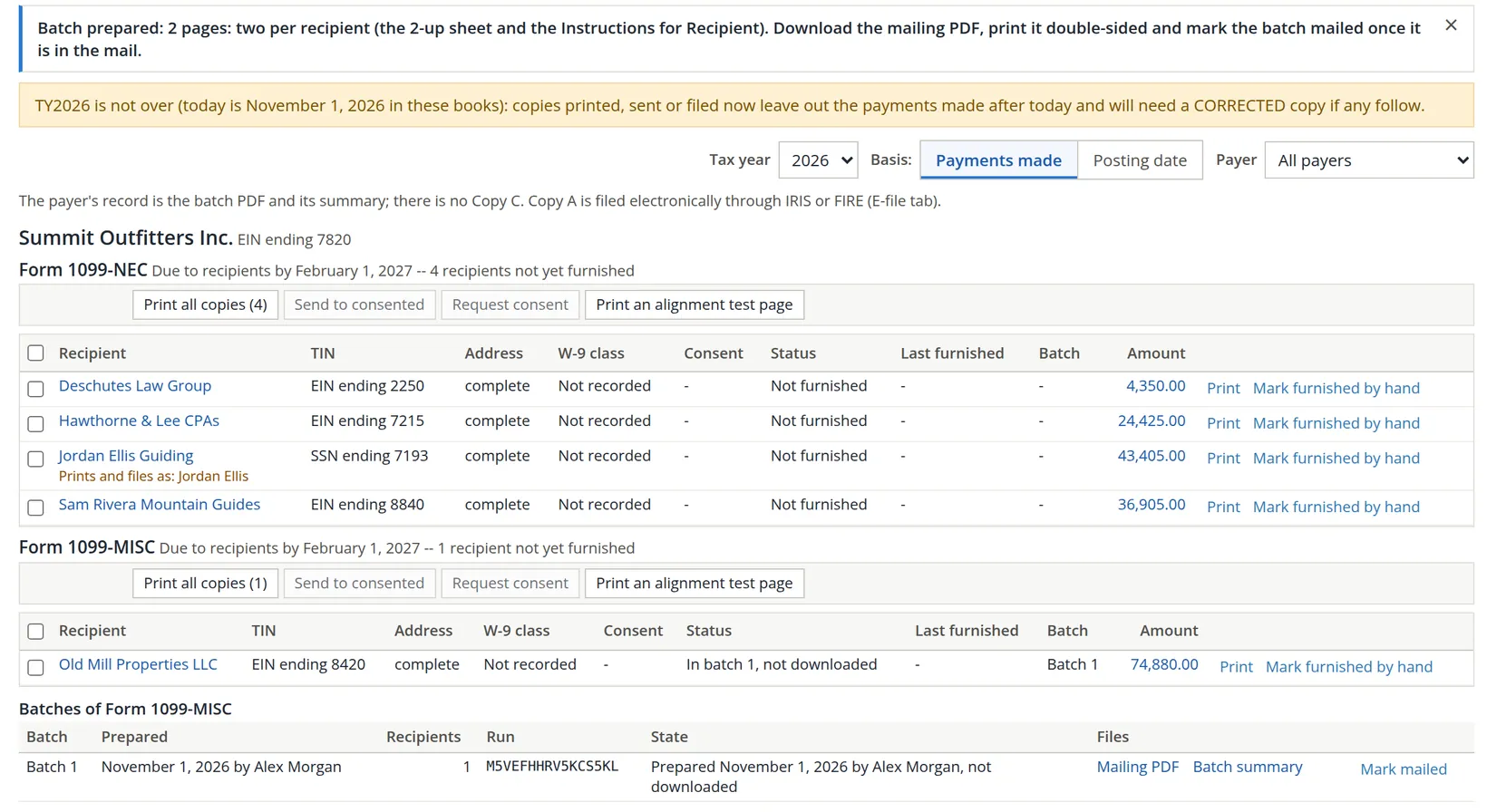
The batch appears under the form with two files: the mailing PDF and a batch summary marked do not mail, which is your record.
- 3
When the envelopes are in the mail, click Mark mailed
Until then the recipient reads In batch 1, not downloaded or not mailed, and still counts as not furnished.
Sending copies by e-mail
A recipient may receive the form by e-mail only after agreeing to it. Request consent e-mails the ticked recipients a link to give that consent; once a recipient has consented, Send to consented e-mails them a link to their copy, with the PDF attached only if you choose.5 Both buttons need an e-mail address for the company. Summit has none, which is why they are greyed out above; the hover text reads Add an e-mail address to Summit Outfitters Inc. in Settings before requesting consent or sending copies (Chapter 15.1).
A copy handed over in person or sent some other way is recorded with Mark furnished by hand, with the date and how.
Consent can be collected at any time, and the forms cannot go out until January. Ask in November, and January becomes one click for every consented payee and one print run for the rest.
Tax year 2025 was furnished from the 1099 page that came before this one, which kept no record. Its recipients read Furnished outside this log; printing a 2025 copy now asks whether it is a CORRECTED copy or an original never furnished, and sending or marking by hand is off for that year.
Prepare the IRS filing
The IRS receives Copy A electronically. The E-file tab starts with the year's deadlines and offers two routes: IRIS, the IRS Information Returns Intake System, and the older FIRE system.
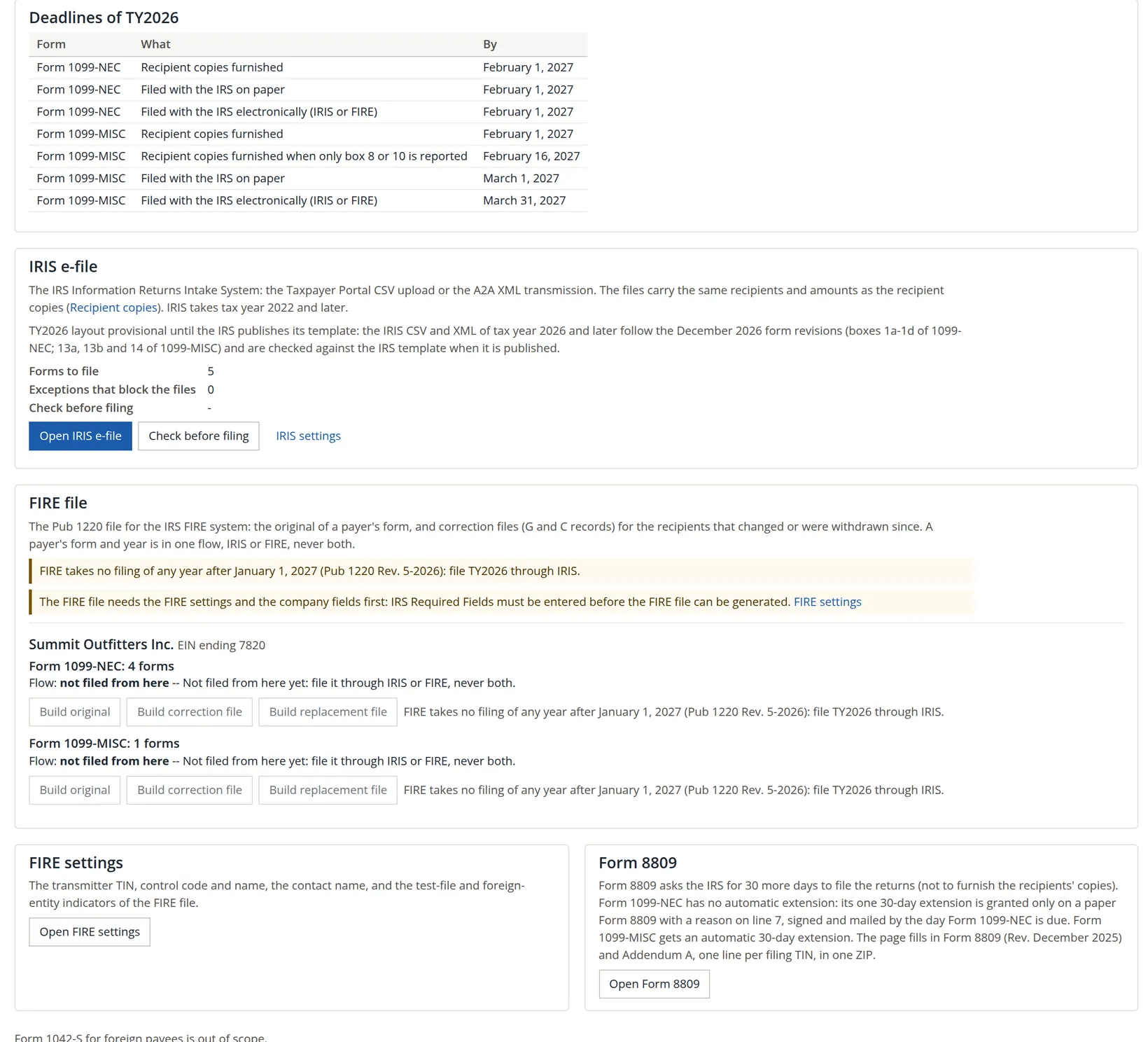
- 1
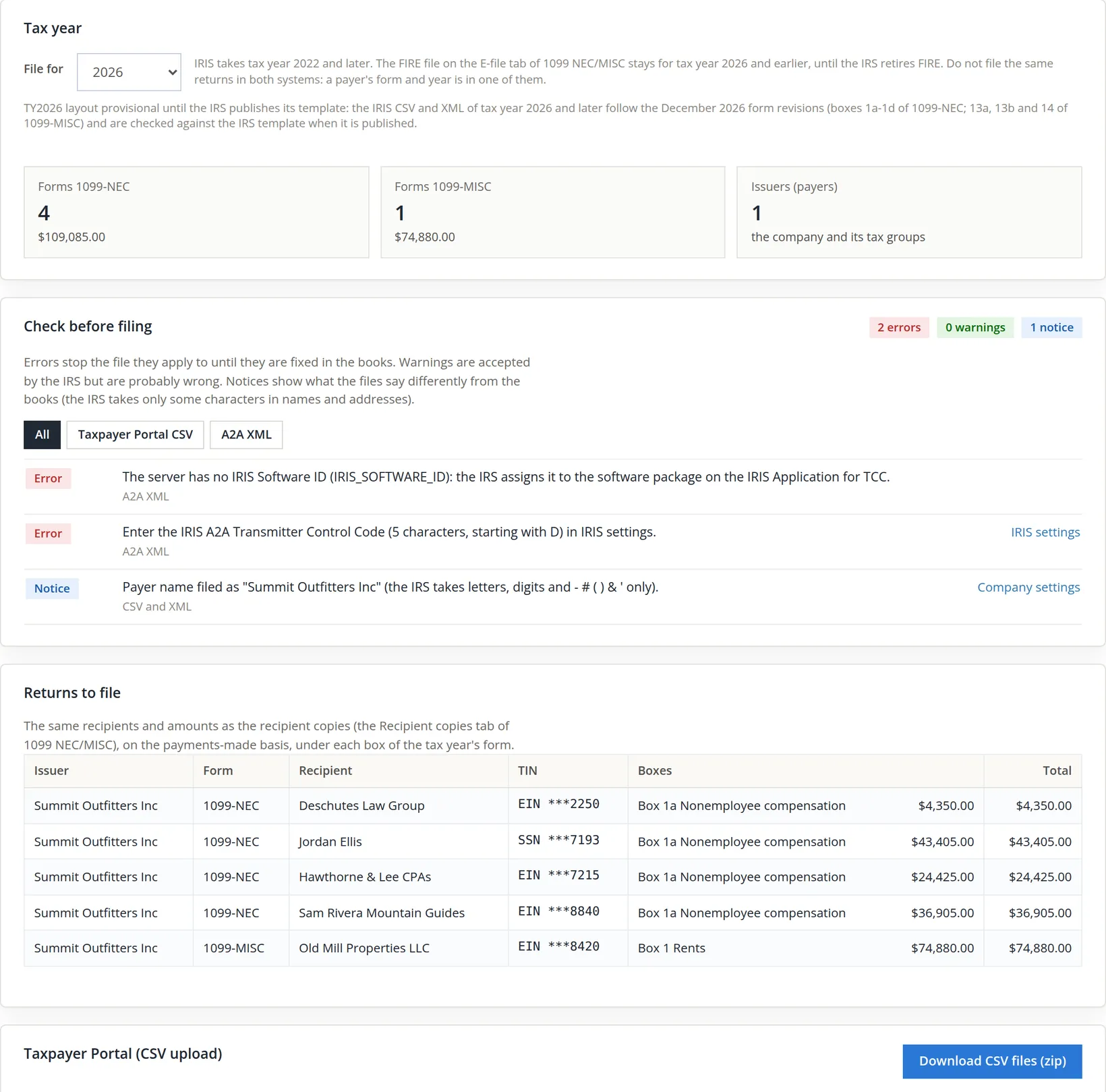
Open IRIS e-file and read Check before filing
Errors stop a file until they are fixed in the books; warnings and notices are for you to read. Summit's notice says the payer name will be filed as "Summit Outfitters Inc" because the IRS does not accept a period.
- 2
Compare Returns to file with the recipient copies
They must agree: same recipients, same boxes, same amounts.
- 3
Choose the route
Download CSV files (zip) gives one file per form in the IRS template, for upload in the IRIS Taxpayer Portal. The A2A XML transmission needs a Transmitter Control Code and an IRIS software ID; Summit has neither, so the two errors stay and the CSV route is the one to use.6
File a payer's form for a year through IRIS or FIRE, never both. The tab shows each form's route on its Flow line, and corrections go through the same route.
The January routine
- [x] Every contractor, landlord and professional you pay is marked "Receives a 1099", with a W-9 on file.
- [x] The Box mapping badge is gone and the Tax Report shows no E31 warnings.
- [x] The report's reconciliation ties, and every difference between the two bases makes sense.
- [x] Each Payees chip that signals a problem shows 0: no tax ID, W-9 needed, IRS no match, E14.
- [x] Copies are mailed (and marked mailed) or e-mailed to consenting recipients by the due date.
- [x] Check before filing shows no errors for the route you use, and the returns match the copies.
- [x] The filing is submitted and its receipt kept.
Check your understanding
1. The Tax Report warns that a 1099 payee was paid on an account with no 1099 box. Where do you fix it?
Answer
On the Box mapping tab of the 1099 report: give the account its box and save. The warning clears on the next run of the Tax Report.
2. The landlord is paid $8,000 a month by check and $1,000 once by credit card. What appears in 1099-MISC box 1?
Answer
Only the check payments. The card payment is shown in the Card/platform column and is reported by the card processor on Form 1099-K.
3. The books show $46,435 paid to a guide in 2025, the form shows $44,490. Which is right?
Answer
The form. The books count bills by posting date; the form counts payments in the year they were made. The $1,945 difference is bills paid in another year, and the reconciliation lists it.
4. Why is Request consent greyed out?
Answer
The company has no e-mail address in Settings. E-mail delivery needs one, and it needs each recipient's consent first.
Notes
- The practice user is a member of Summit Outfitters Inc. The mapping change log, the batch and the full-TIN log record the user's display name, Alex Morgan. Tax year 2026 is still open in these pictures (they were taken on November 1, 2026), so its amounts are year-to-date. ↑
- The thresholds and box choices in this chapter are the ones the app's catalog shows. They illustrate how the page works and are not tax advice. Whether a payment is reportable can depend on facts the books do not hold; confirm with your tax preparer. ↑
- The exception text: "an SSN with no first and last name on the contact; filed and printed under the business name." ↑
- Since November 2026. With approvals on, Approvals gains the Vendor changes tab; a 1099 flag set from the Payees tab is recorded the same way. ↑
- The consent and delivery rules follow IRS Publication 1179. The e-mail never carries a TIN or an amount; it links to a page where the recipient sees the copy. A recipient may withdraw consent, and the tab records that too. ↑
- The FIRE route needs the transmitter settings and the company's IRS required fields, and the page notes that FIRE takes no filing after January 1, 2027. Nothing was transmitted to the IRS while this chapter was written. ↑