Chapter 6.7

The Transaction Journal and Audit History

Two reports for checking the books: the Transaction Journal lists every entry with all its debits and credits; the Audit History records who did what, when, with the evidence kept at the time.

Level Intermediate Time about 10 minutes to read You need Chapter 6.1 Edition November 2026 (revised 6 November 2026)
Learning objectives

When you finish this chapter you will be able to:

  1. List every entry in a period, with all its lines, for review or for an accountant.
  2. Find who added, changed, merged or deleted something, and when.
  3. Open the recorded evidence of an event.
REPORT 1

The Transaction Journal

Reports → Transaction Journal.
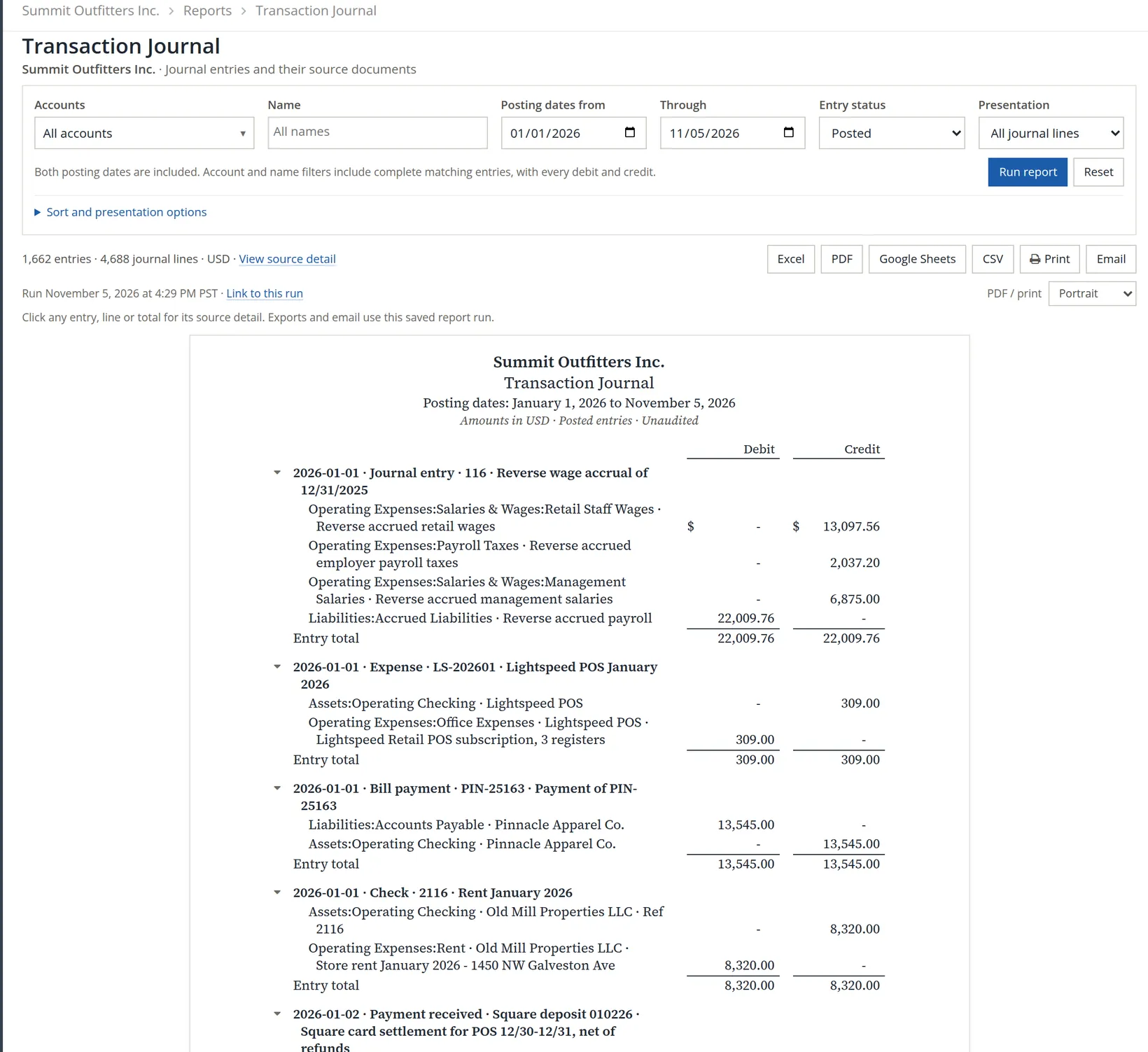
Transaction Journal for January 1 to November 5, 2026: filters for accounts, name, posting dates, entry status Posted, presentation All journal lines; Run report; 1,662 entries, 4,688 journal lines; each entry with its date, kind, number and description, every debit and credit line, and an entry total
Figure 1. The journal. 1 accounts. 2 a name (customer or vendor). 3 4 posting dates. 5 posted, pending or both. 6 sorting and presentation. 7 each entry with every line and a total.

Filters on an account or a name bring back whole entries, both sides, so you see where the money came from and went. Entry summary shows one line per entry. Exports include CSV, and Email sends the run to someone directly. The PDF and Excel exports also name, for each entry, who entered it and when, who last changed it, who approved it, and its status.1

Pro tip: month-end review in ten minutes

Run the journal for last month with presentation Entry summary and read it through once, looking at the large entries first. Most posting errors that matter are big enough to stand out.

REPORT 2

Audit History

Reports → Audit History lists recorded events: invoices and bills added, paid or deleted; checks, expenses and vendor credits added, changed or deleted; accounts edited; entries merged; rules added; users signing in to the company. Dates are when the event happened, not the posting date of the entry.

  1. 1

    Choose dates and users

    Today fills both dates. Leave them blank for all history.2

  2. 2

    Choose the event types 1

    Untick All log types and tick the ones you care about; otherwise routine events such as company selections fill the list.

  3. 3

    Run, then open the evidence 3

    Each event 2 links to its source and to Recorded snapshot or Recorded before / after: the values saved at the time. For a deleted document (an invoice, check, expense or vendor credit) the snapshot shows the document's own recorded fields as they were when it was deleted, under Recorded fields; its lines are not kept for every kind of document, and the source reads unavailable because the document is gone.
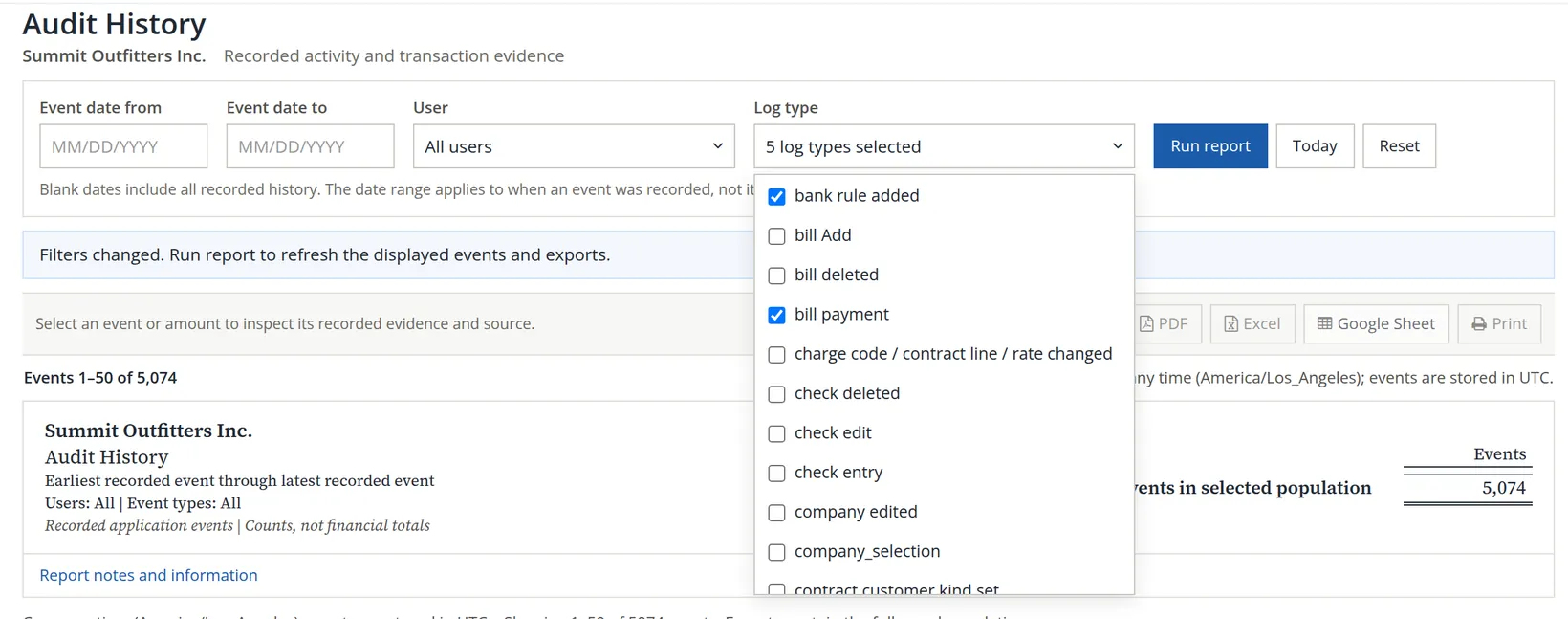
The Log type filter opened with tick boxes for each kind of event, scrolled so that bank rule added and bill payment show ticked, with bill Add, bill deleted, charge code / contract line / rate changed, check deleted, check edit, check entry, company edited, company_selection and contract customer kind set left unticked around them; the box reads 5 log types selected; behind it a notice says Filters changed, run report to refresh the displayed events and exports
Figure 2. Choosing event types. The list is long and scrolls, so only two of the five ticked types show here: bank rule added and bill payment. Between them sit kinds such as bill deleted and check deleted, which a deleted document leaves. The report behind the list has not been run again yet, as its notice says. The list holds only the kinds of event these books have recorded.
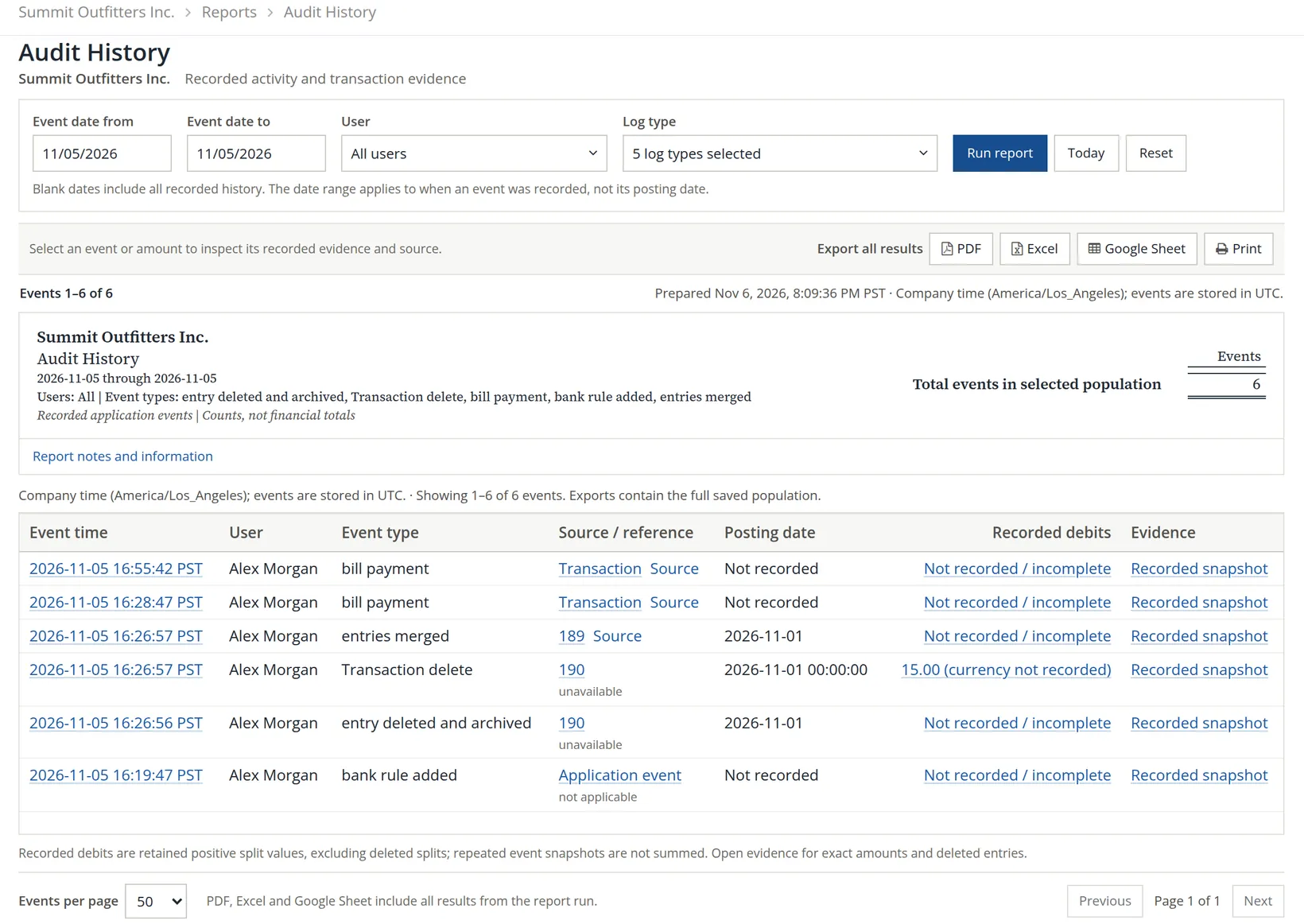
Audit History for November 5, 2026, filtered to 5 event types: 6 events by Alex Morgan, newest first: two bill payments, entries merged (entry 189, posting date 2026-11-01), Transaction delete and entry deleted and archived (entry 190, 15.00), and bank rule added; each with event time, user, event type, source, posting date, recorded debits and a Recorded snapshot link to the evidence
Figure 3. November 5, 2026, five event types, six events: 1 the filter. 2 each event, newest first: two bill payments, the merge with the deletion it caused (two lines, Transaction delete and entry deleted and archived, for the removed entry 190), and the bank rule. 3 the evidence link.
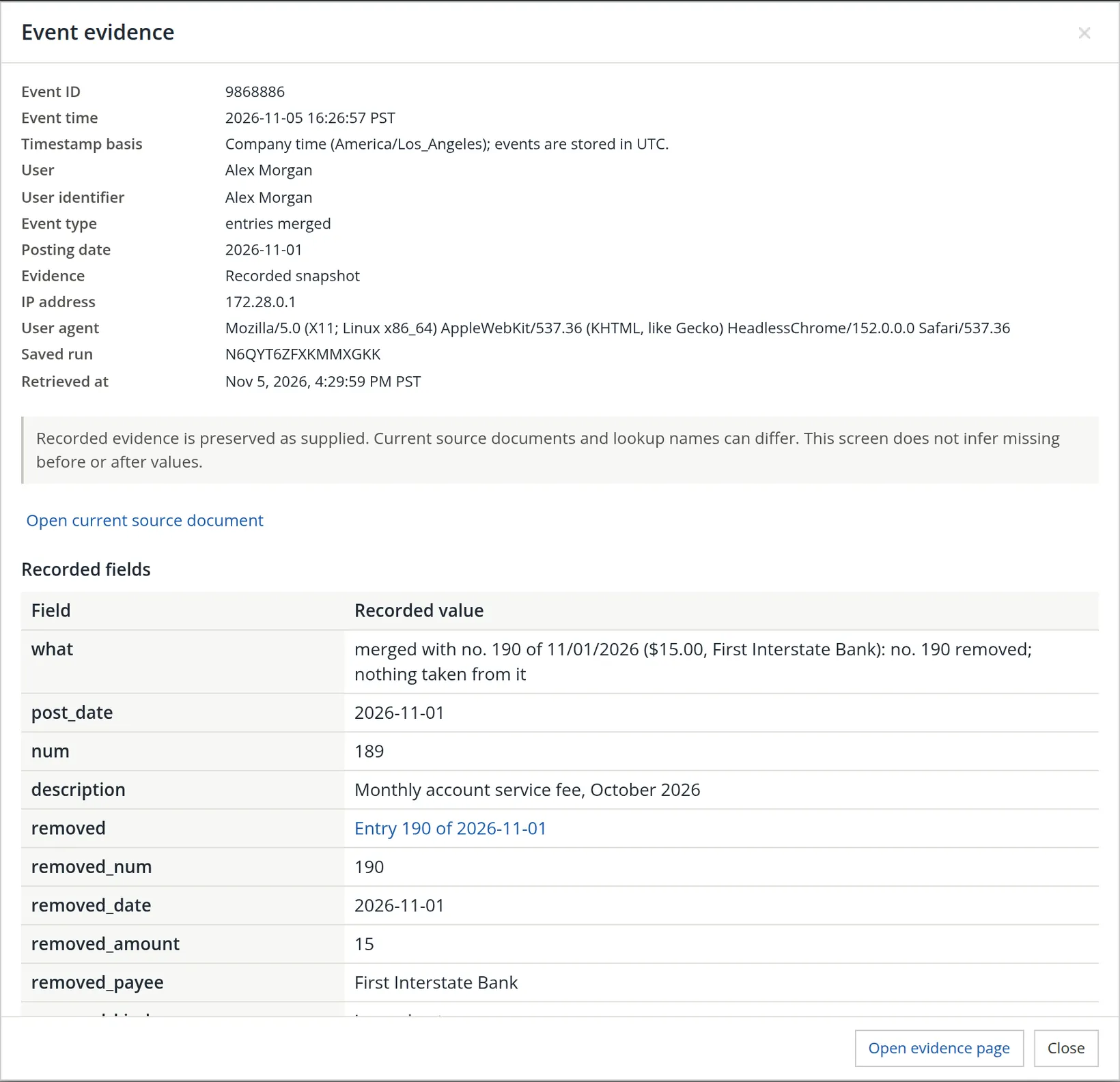
Event evidence for entries merged: event ID 9868886, time 2026-11-05 16:26:57 PST, user Alex Morgan, type entries merged, posting date 2026-11-01, IP address, browser, saved run; the note that recorded evidence is preserved as supplied; Open current source document; recorded fields: merged with no. 190 of 11/01/2026 ($15.00, First Interstate Bank): no. 190 removed, nothing taken from it; number 189, Monthly account service fee, October 2026; removed entry 190 of 2026-11-01, amount 15, payee First Interstate Bank; Open evidence page and Close
Figure 4. The evidence for the merge in Chapter 5.6: which entry was kept (189), which removed (190, with a link to it), its amount and payee. The removed entry is not lost: the evidence links to it, and the list above shows it was deleted and archived (the separate entry deleted and archived line).
Evidence is as recorded

As the evidence screen says, it is preserved as supplied: today's documents and names may differ, and nothing missing is guessed. That is what makes it trustworthy for an auditor.

SECTION 3

Check your understanding

1. An accountant asks for every entry touching Rent last year, both sides. Which report?

Answer

The Transaction Journal, filtered on the Rent account for last year.

2. A bank fee entry disappeared. How do you find out what happened?

Answer

Audit History, filtered to entries merged and deletions, then open the evidence.

Notes

  1. Since November 2026. The screen shows the same journal as before; the people columns appear in the exported files. ↑
  2. Since November 2026 a backup carries the books' audit history. When the books hold history loaded from a restored backup, a History box appears at the left of the filters, with These books' history and Imported from a backup. Imported events are shown as the backup held them, with an Origin label, and cannot be changed. Summit's books have none, so the box does not appear in these pictures. ↑

Volume 6: Reports

  1. 6.1Finding and running reports
  2. 6.2Profit and Loss and the Income Statement
  3. 6.3The Balance Sheet
  4. 6.4The Statement of Cash Flows
  5. 6.5The Trial Balance
  6. 6.6Receivables reports
  7. 6.7Transaction Journal and Audit History
  8. 6.8The Tax Report
  9. 6.9Forms 1099-NEC and 1099-MISC
  10. 6.10Other reports

All volumes and chapters