
Chapter 6.10
Other Reports
A map of the whole Reports menu, the report forms that sit behind the "Also as" links (month by month, and one period against another), and the bank reconciliation reports kept under Bookkeeping and audit.
When you finish this chapter you will be able to:
- Find any report by its group, or by typing part of its name.
- Say which chapter of this manual covers each report.
- Read a Profit and Loss by month and spot seasonality.
- Set up a comparison of two periods and read the increase or decrease.
- Open, print and if necessary undo a past bank reconciliation.
A map of the Reports menu
Open Reports → All reports. Reports are grouped by the question they answer, twelve groups in Summit, and each card says in one line what it shows. In the left menu, under Reports, each group is a row that folds open, with a count of its reports. Two search boxes find a report by name or by a word of its description: one at the top right of the page and one under Reports in the left menu. The menu's box names each match's group, and for Timekeeping and Property management, which are divided into subgroups, the subgroup as well.
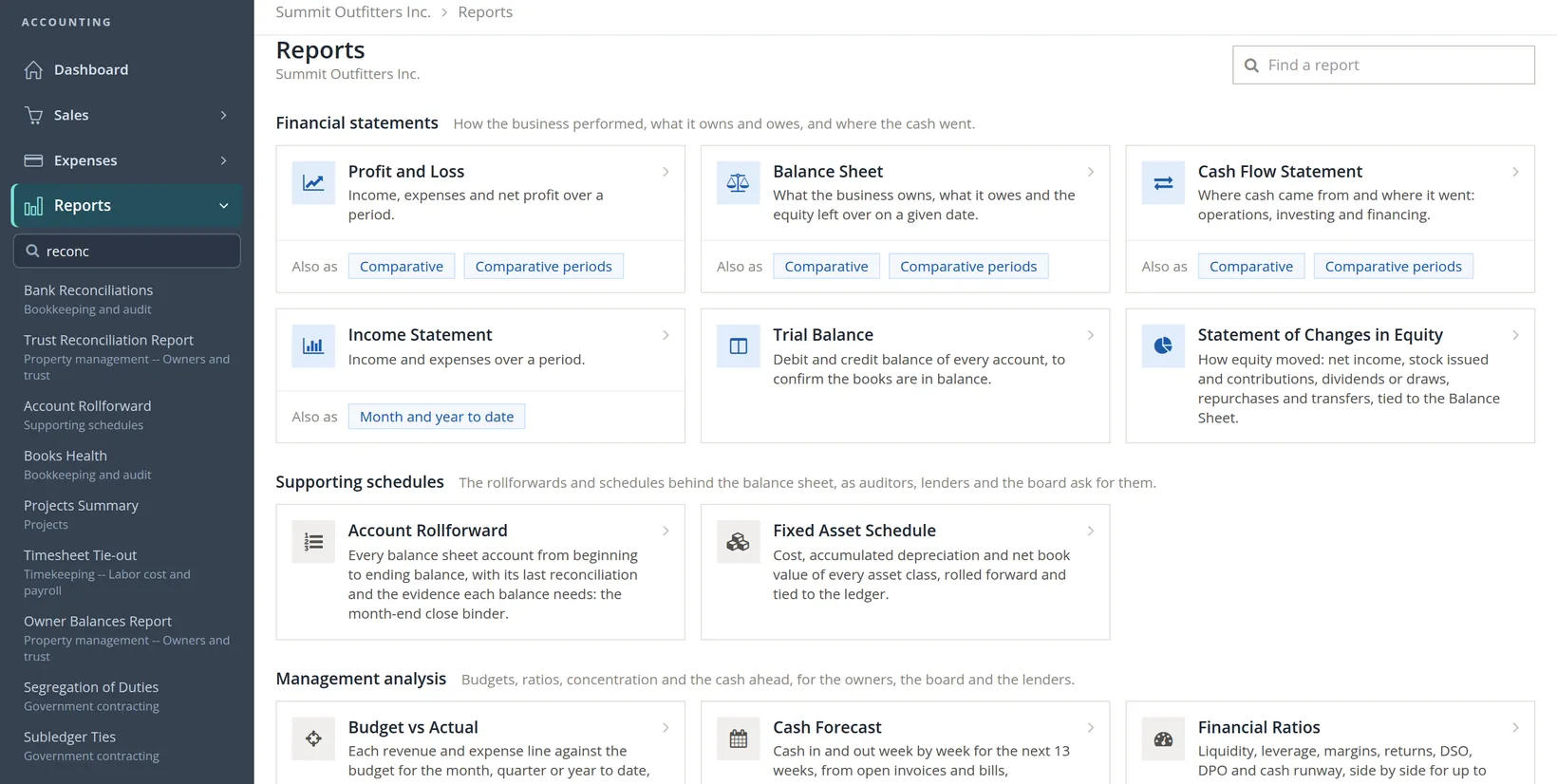
Most reports have a chapter of their own. Use this table as the index.
| Group | Reports | Chapter |
|---|---|---|
| Financial statements | Profit and Loss, Income Statement | 6.2 |
| Balance Sheet | 6.3 | |
| Cash Flow Statement | 6.4 | |
| Trial Balance | 6.5 | |
| Statement of Changes in Equity | 6.1 | |
| Supporting schedules | Account Rollforward, Fixed Asset Schedule | 6.1 |
| Management analysis | Budget vs Actual, Cash Forecast, Financial Ratios | 6.1 |
| Customers and receivables | Aged Receivables, Account Statement, Transaction List by Customer | 6.6 |
| Sales Analysis | 6.1 | |
| Vendors and payables | Aged Payables, Vendor Spend Analysis | 6.1 |
| Bookkeeping and audit | Transaction Journal, Audit History | 6.7 |
| Bank Reconciliations | this chapter | |
| General Ledger, Books Health | 6.1 | |
| Projects | Project Status Report, Project Funding and Billing Summary, Projects Summary, Project Transactions | 7.3 |
| Taxes | Tax Report; 1099 NEC/MISC (1099 Issuance in the menu) | 6.8; 6.9 |
| Rental Properties (books with rental property) | 13.16 | |
| Foreign Accounts | 6.1 | |
| Payroll | Payroll Register, Employee Earnings, Hours Worked, Payroll Deductions, Payroll Tax Liability, Form 941 Worksheet, W-2 Summary, Employer Payroll Totals | 11.4 |
| Timekeeping | Timesheet, Labor Distribution, Timesheet Tie-out and 16 more, in four subgroups: Timesheets and hours; Labor cost and payroll; Projects and billing; Controls and audit | 12.4 |
| Property management (when the module is on) | 31 cards in six subgroups: Leasing and occupancy; Tenant charges and payments; Notices and compliance; Owners and trust; Report packets; Maintenance and vendors | 13.14 to 13.18 |
| Government contracting (books kept for government contracts) | SF 1408 Readiness, Cost Accounting Structure, Unallowable Costs, Direct and Indirect Consistency, Segregation of Duties, Subledger Ties | 6.1 |
This chapter covers what is left: the Also as forms of the financial statements, and the Bank Reconciliations report.2
The Profit and Loss by month
A year's Profit and Loss tells you how the year went. It hides when. The Comparative link under Profit and Loss opens the same statement with one column per month, from the start of the fiscal year to the last month-end, and a Total column.
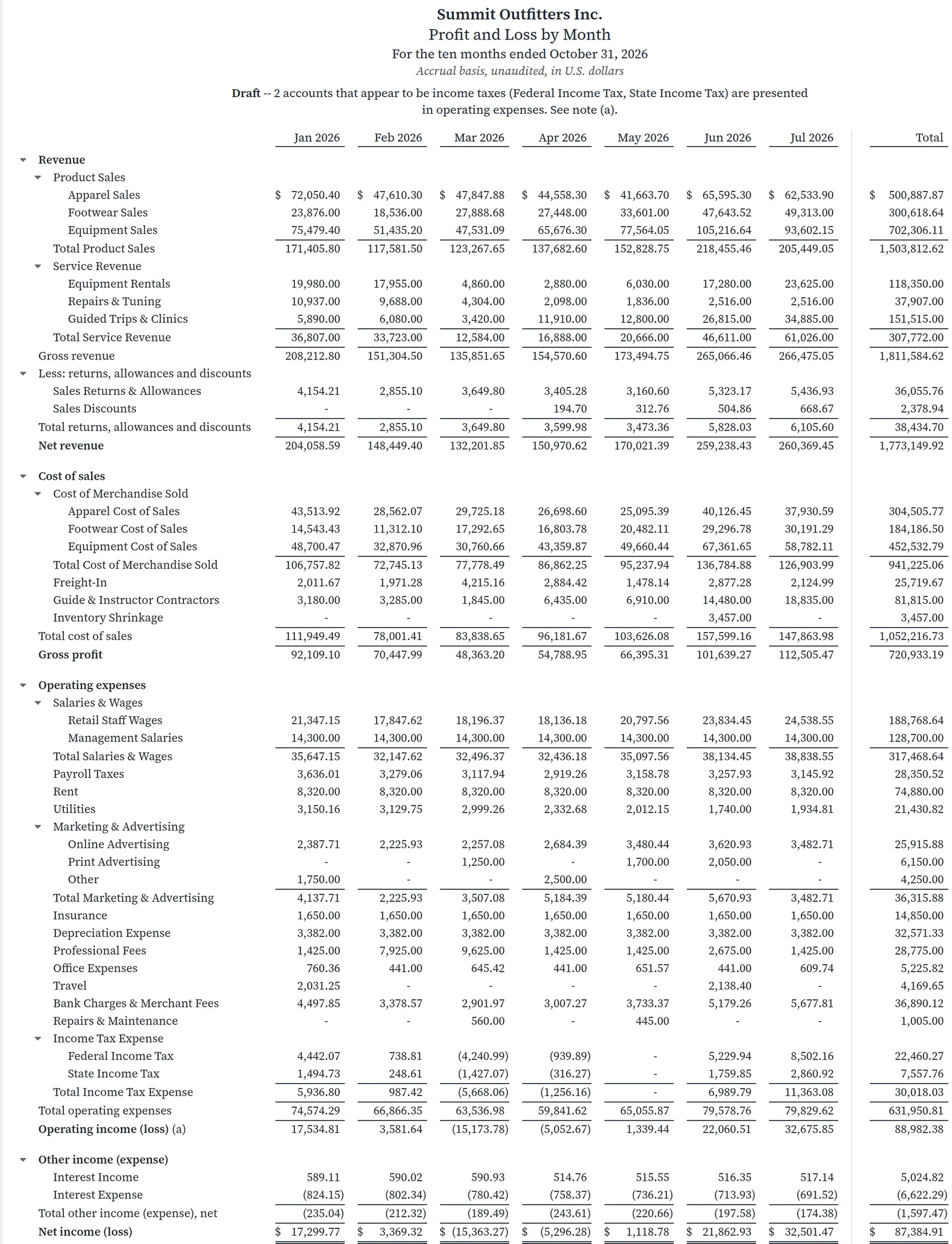
Reading it. Summit has two seasons. Rentals peak in winter (January $19,980.00, February $17,955.00) and fall to $2,880.00 in April, the shoulder month between snow and river. Guided trips peak in summer. Salaries ($14,300.00 of management salaries every month), rent ($8,320.00) and insurance ($1,650.00) do not move with the seasons, so March, with net revenue of only $132,201.85, ran at a loss. An owner who sees this plans cash for the spring and books staff holidays for March, not July.
Twelve months and a total do not fit across most screens; at the width of this picture the months after July are off to the side of the statement. Excel or Google Sheet gives the whole grid, ready for a chart.
Comparing two periods
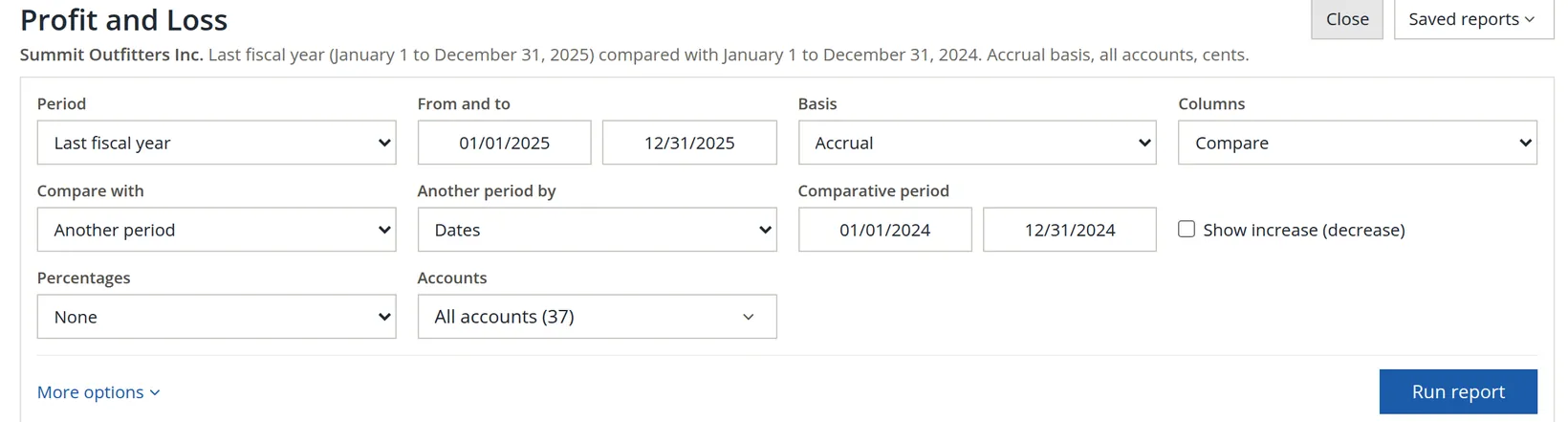
Comparative periods opens a statement with two columns. It starts with sensible defaults: last fiscal year against the year before for the Profit and Loss; the last month-end against the last fiscal year-end for the Balance Sheet. Change them under Change report.
- 1
Click Change report
The panel holds the period, basis and columns, and for Compare the second period.
- 2
Choose what to compare with, tick Show increase (decrease) if you want the change, and Run report
Compare with offers the same period last year, the prior period or another period of your choosing.
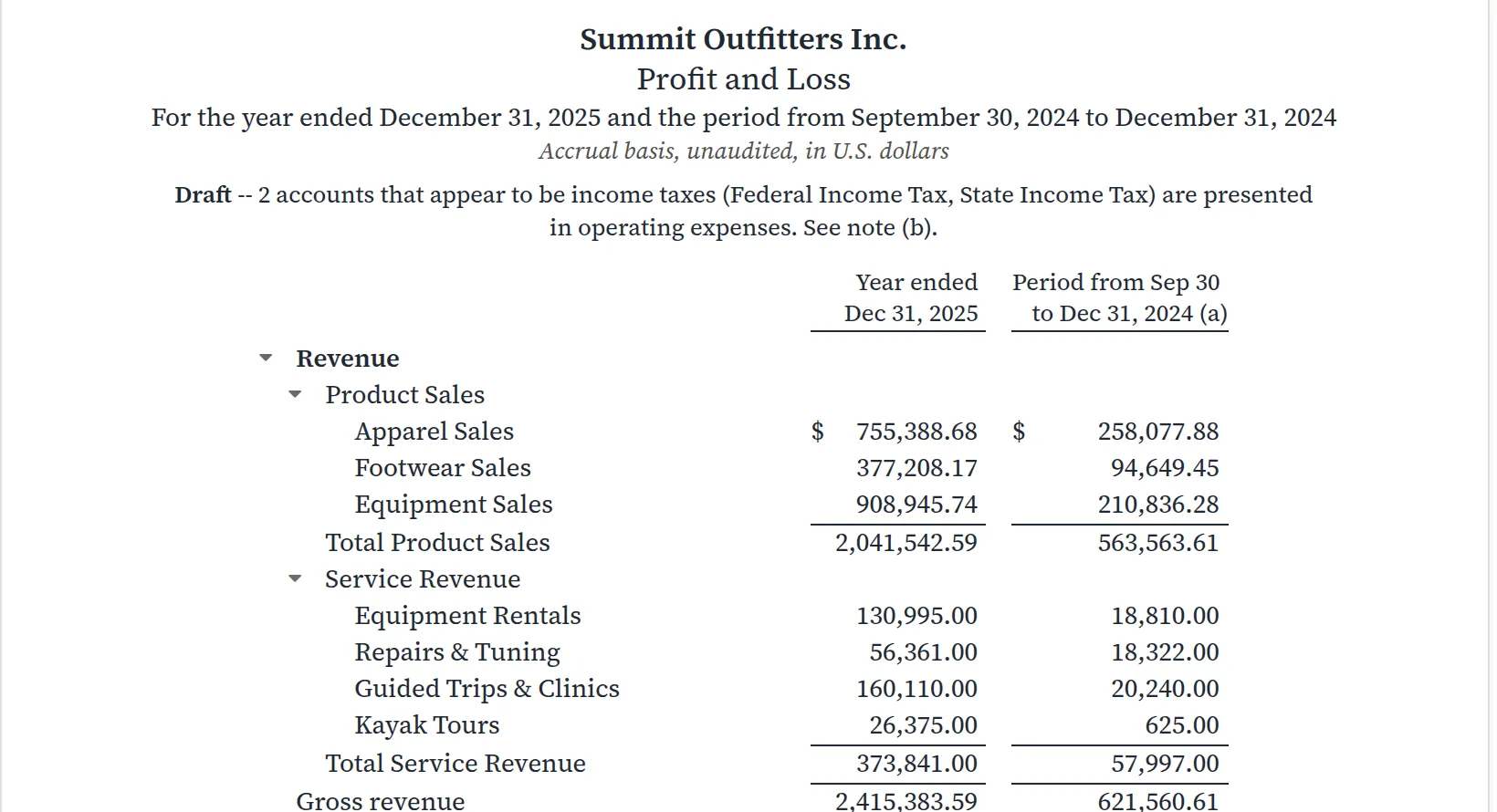
A trap the report catches. We asked for all of 2024, but Summit's books begin on September 30, 2024. The report does not pretend otherwise: the second column is headed Period from Sep 30 to Dec 31, 2024 and carries note (a). Equipment Rentals of $130,995.00 in 2025 against $18,810.00 is a year against one quarter, not a sevenfold rise.
On the Balance Sheet the comparison answers a different question: what changed between two dates. The default compares the last month-end with the last fiscal year-end, with the increase or decrease in dollars and percent.
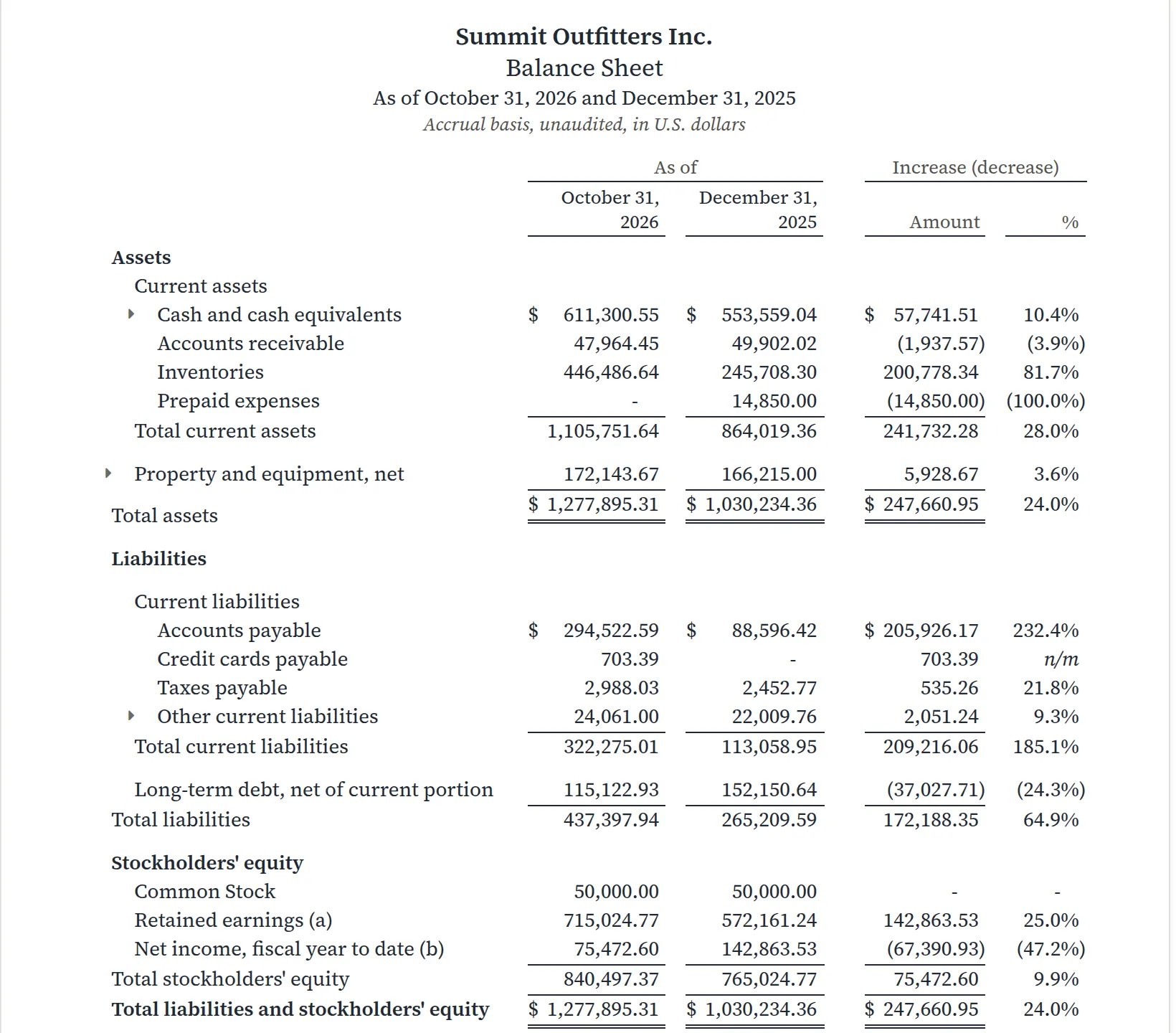
Reading it. The two largest changes belong together. Inventories rose by 446,486.64 − 245,708.30 = $200,778.34, and accounts payable by 294,522.59 − 88,596.42 = $205,926.17. Summit stocked up for the winter season and has not yet paid for it. The percentage on payables looks alarming, 205,926.17 ÷ 88,596.42 = 232.4%, but the dollars tell the story: the bills are the other half of the new stock. The question for the owner is whether the winter's sales will come in before those bills fall due, which is what the Aged Receivables and the cash forecast are for.
A change from a small base produces a large percentage. Read the dollar column first and use the percentage to rank changes of similar size.
Bank reconciliation reports
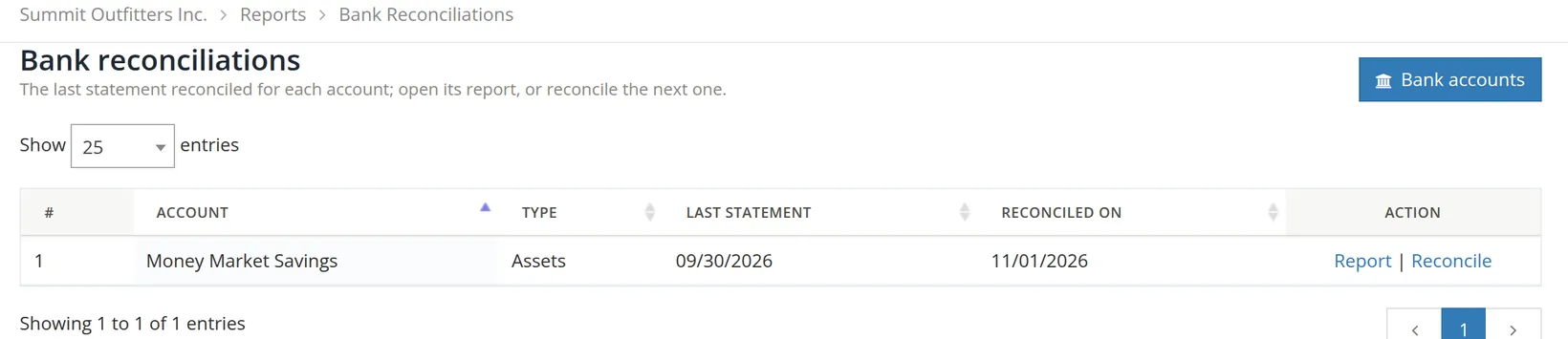
Every reconciliation you finish (Chapter 4.4) leaves a report behind. Reports → Bookkeeping and audit → Bank Reconciliations opens the list: one row per account, showing the last statement reconciled and the day it was done. Before any account is reconciled the page says so and tells you where to start.
- 1
Click Report
The report opens on the last statement. The Statement ending list at the top reaches the earlier ones.
- 2
Check the arithmetic, then Print it for the year-end file
Your accountant or auditor will ask for each account's reconciliation at year-end.
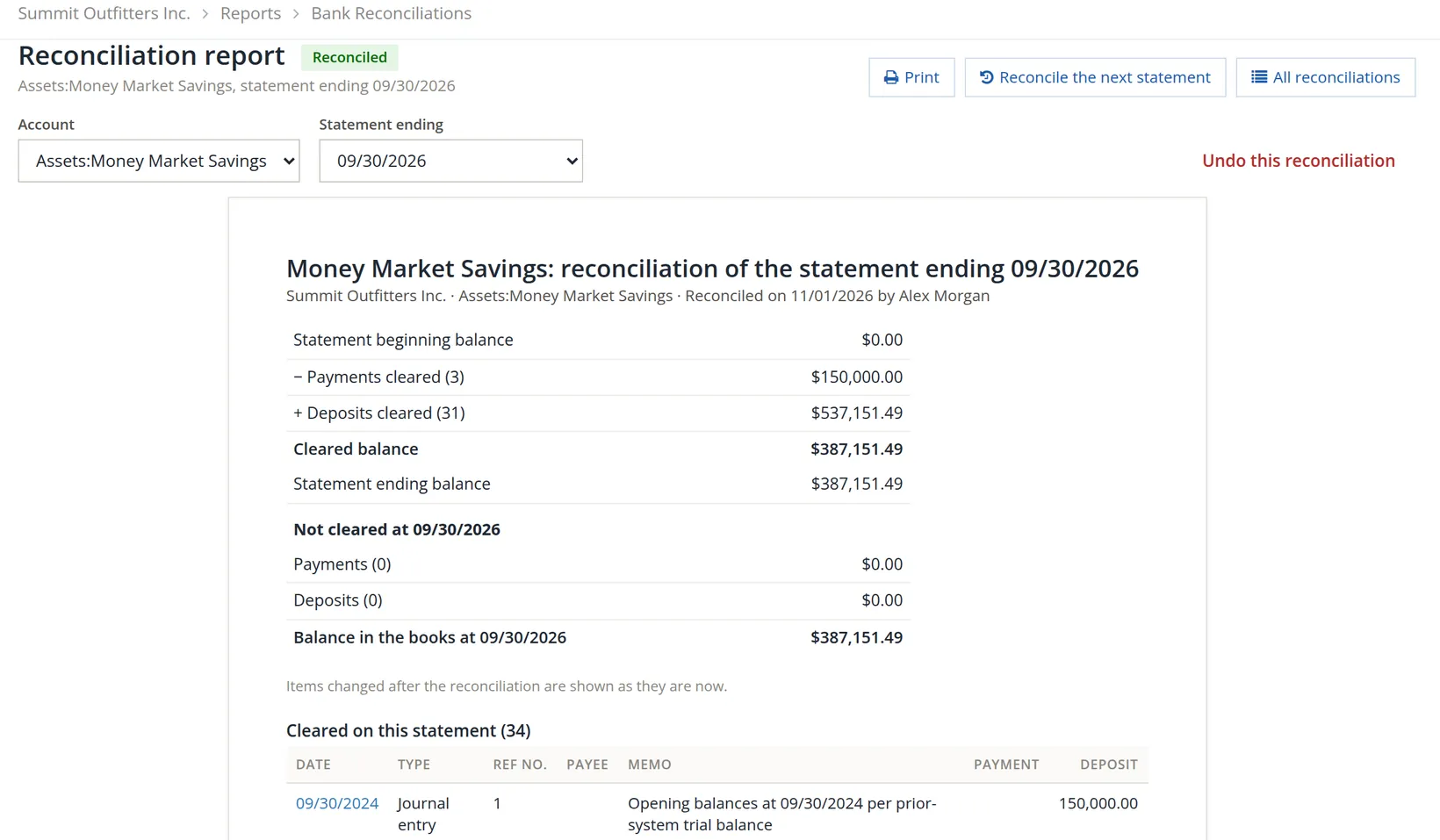
Reading it. The beginning balance of a first statement is $0.00. The bank's figures follow: 0.00 − 150,000.00 (three transfers of $50,000 to Operating Checking) + 537,151.49 (31 deposits: the opening balance, sweeps and monthly interest) = $387,151.49, which equals the statement's ending balance. Nothing was left uncleared, so the balance in the books on September 30 is the same figure. When items are outstanding, such as a deposit in transit, the section Not cleared lists them, and the books' balance differs from the bank's by exactly their total.
Undo this reconciliation takes the statement back, so its entries are no longer reconciled. Use it only to correct a reconciliation finished in error, and then reconcile the statement again at once; the note under the summary reminds you that entries changed afterwards are shown as they are now, not as they were.3
A month-end reading list
- [x] Profit and Loss by month: does this month look like the same month last year?
- [x] Balance Sheet against the last year-end: can you explain each large change in dollars?
- [x] Any comparison with a short period is read with its note, not as growth.
- [x] Bank Reconciliations: every bank and card account shows last month's statement.
- [x] Reconciliation reports for the year are printed or exported for the year-end file.
Check your understanding
1. Where do you find past bank reconciliation reports?
Answer
Reports → Bookkeeping and audit → Bank Reconciliations; or type reconc in Find a report.
2. Which form of the Profit and Loss shows that March lost money?
Answer
The Comparative form, the Profit and Loss by Month.
3. Equipment Rentals are $130,995.00 in 2025 and $18,810.00 in the comparison column. Why is that not a sevenfold increase?
Answer
The comparison column covers only September 30 to December 31, 2024, because the books begin then; its note (a) says so.
4. Accounts payable rose 232.4%. What should you look at before worrying?
Answer
The dollars, and what moved with them: here inventories rose by about the same amount, so the payables are unpaid stock bought for the season.
Notes
- The practice user, Alex Morgan, is a member of Summit Outfitters Inc. and reconciled Money Market Savings for this chapter, which is why the report names that user. Figures elsewhere in the book may differ slightly from these pictures as later chapters add entries. ↑
- The property management reports are covered with that module in Chapters 13.14 to 13.18; the Rental Properties report, under Taxes, in Chapter 13.16. The reports marked 6.1 in the table have no chapter of their own yet; Chapter 6.1 gives each a line, and the controls of Chapter 6.1 work on them. The Property management and Government contracting groups appear only in books that use them; in other books Unallowable Costs and Direct and Indirect Consistency sit under Projects, and Subledger Ties and Segregation of Duties under Bookkeeping and audit. A group named Other reports appears only in books where some report has no group of its own. ↑
- An entry ticked in a finished reconciliation is locked in the register. Undoing the reconciliation is the supported way to change one; see Chapter 4.4. ↑