
Chapter 4.4
Reconciling a Bank Account
How to prove, line by line, that the books agree with the bank statement: tick what the bank shows, add what the books are missing, and finish when the difference is zero.
When you finish this chapter you will be able to:
- Explain what a reconciliation proves, and why it matters.
- Start a reconciliation with the statement's date and ending balance.
- Tick cleared items, and add bank charges or interest the books lack.
- Find a difference that will not go to zero.
- Finish, read the report, and undo if you must.
Contents
What a reconciliation proves
The bank keeps its own record of your account. Each month its statement ends with a balance. A reconciliation proves that
beginning balance − payments cleared + deposits cleared = statement ending balance
using only entries from your books. When the difference is $0.00, every item on the statement is in the books, and anything in the books but not on the statement is genuinely still on its way (a check not yet cashed, a deposit made on the 30th).
Reconcile each account within a week of its statement arriving. A missing $40 is easy to find in one month of entries, and nearly impossible in twelve. Card accounts deserve the same: their statements catch charges you did not make.
Start
Click Reconcile beside the account on the Banking page, or in its register.
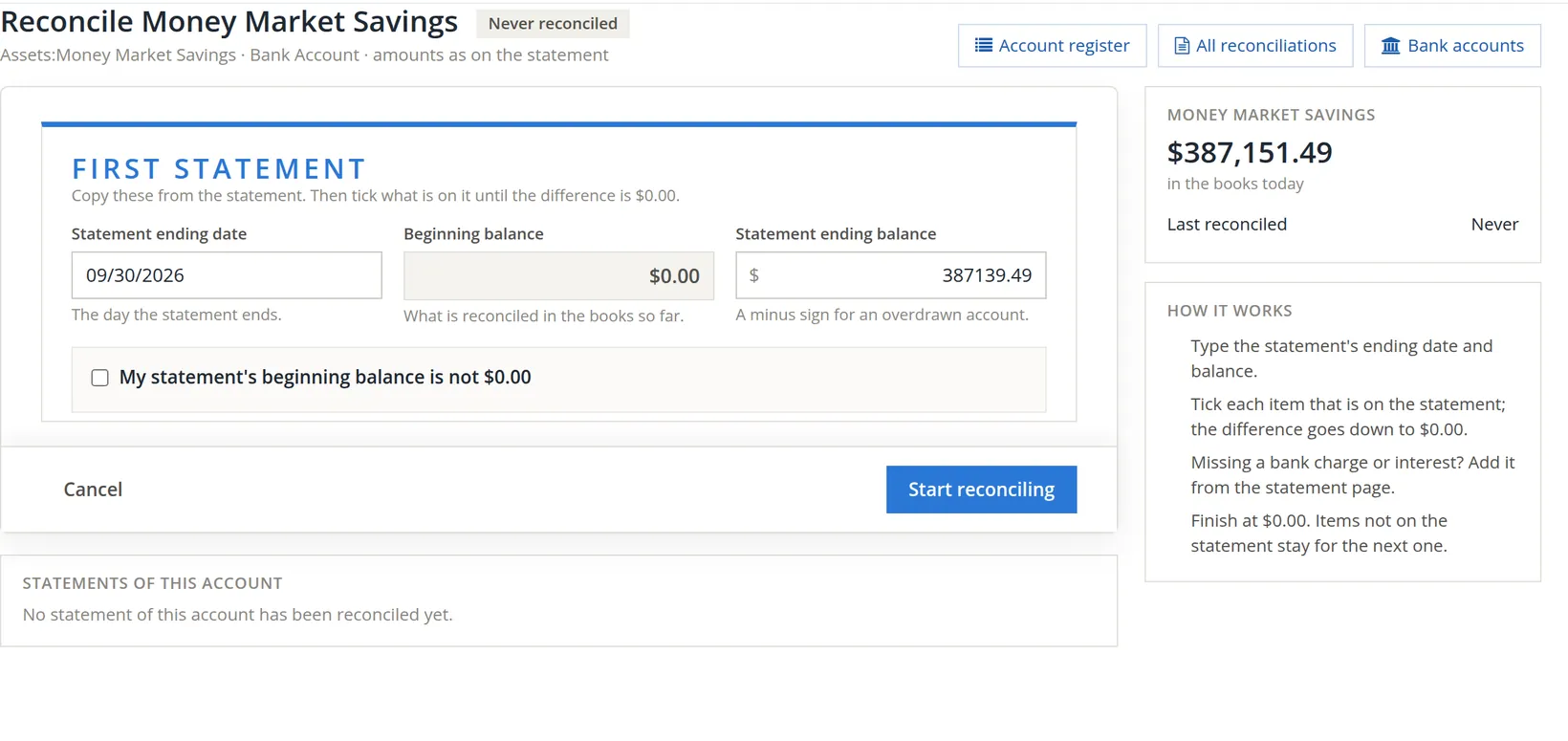
- 1
Type the statement ending date 1
- 2
Check the beginning balance 2
It is "what is reconciled in the books so far": the ending balance of the last reconciliation, or $0.00 for a first one. It should equal the beginning balance printed on the statement.2
- 3
Type the statement ending balance 3
Exactly as printed. A minus sign only for an overdrawn account.
- 4
Click Start reconciling 5
Tick My statement's beginning balance is not $0.00 4 only if the bank's starting figure differs from the one shown, and you are certain why.
Tick, add, balance
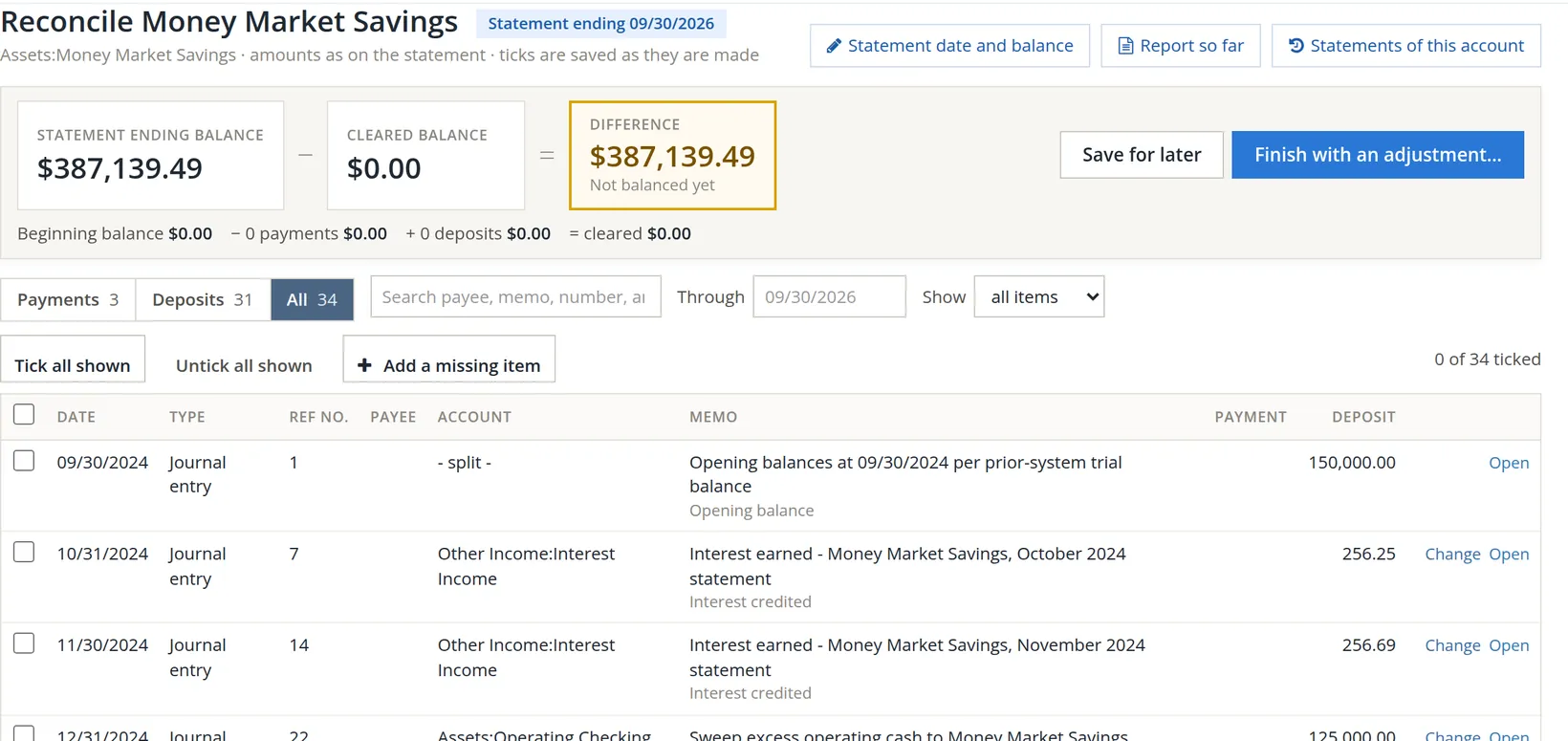
Across the top: the statement ending balance 1, minus the cleared balance 2, gives the difference 3. Below them, the beginning balance, payments and deposits ticked so far. The list shows every entry not yet reconciled up to the statement date 7, split into Payments and Deposits tabs 6, like the two sections of most statements.
- 1
Tick each item that is on the statement 9
Work down the statement, ticking the matching entry. Each tick is saved at once, so you can stop and come back (Save for later 4). If every entry shown is on the statement, Tick all shown does it in one click.
- 2
Add what the books are missing with Add a missing item 8
Bank charges, interest and fees usually appear first on the statement. Enter them here without leaving the page.
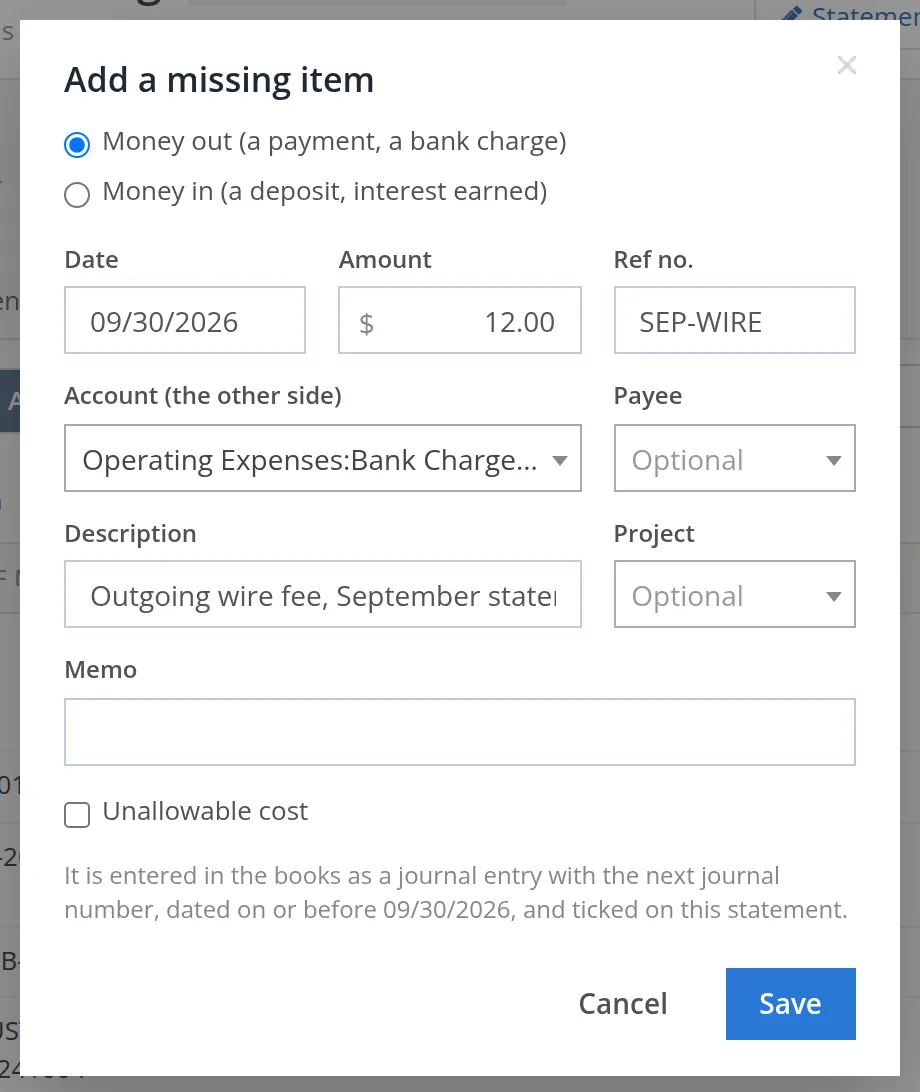
The item is entered in the books as a journal entry dated on or before the statement date, and ticked on this statement. A wrong amount on an entry already in the books? Use Change beside it.
Choose a Project 7 when the item is a cost of one project. Two more things appear when the books keep projects or unallowable-cost flags: a Contract line picker beside the project, shown once you choose a project that has contract lines, and the Unallowable cost box. Tick Unallowable cost 8 for a cost that may not be billed to a government contract; the dialog then asks Why it is unallowable (10 characters or more) and, optionally, the FAR principle. A bank's wire fee is ordinary overhead, so Summit leaves the project empty and the box clear.
- 3
Watch the difference reach $0.00
The box turns green and says Ready to finish 1. The button changes from Finish with an adjustment… to Finish 2.
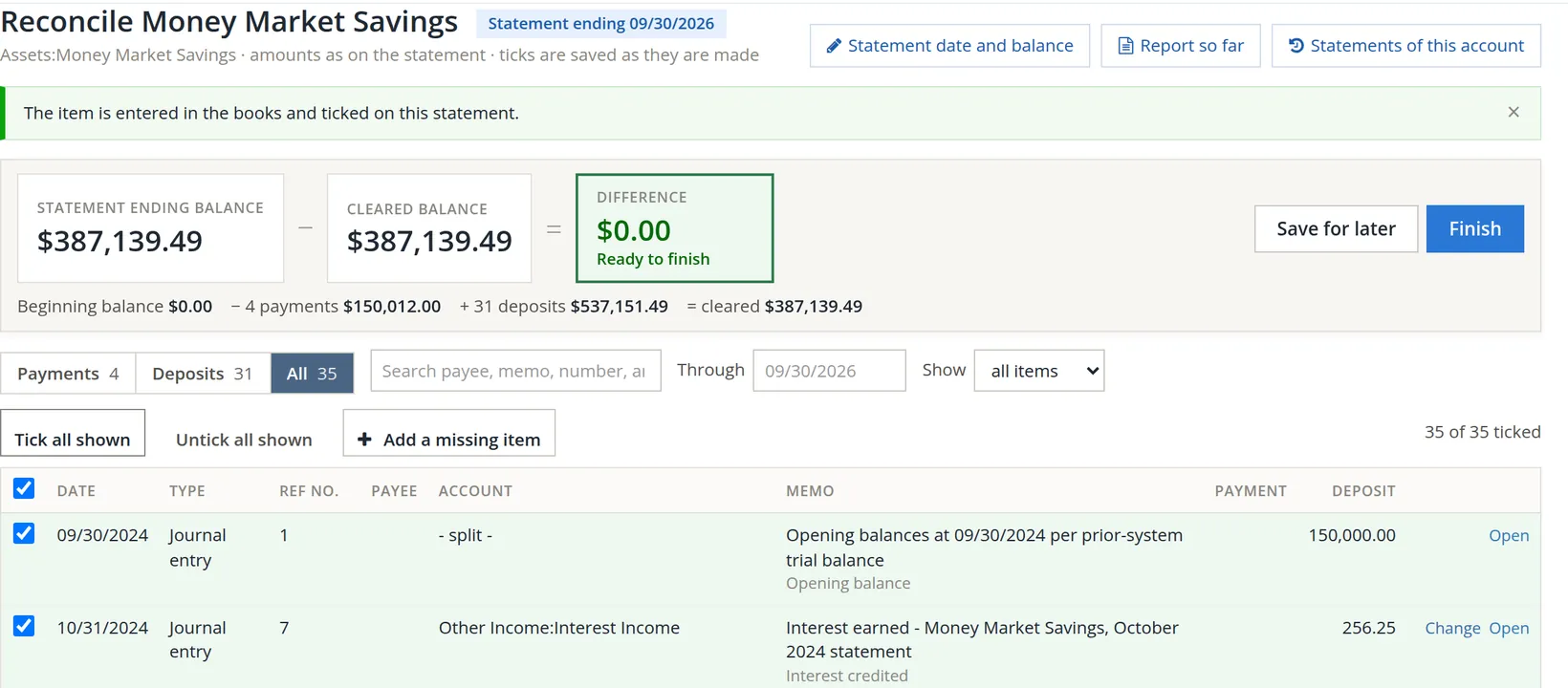
Finish
- 1
Click Finish
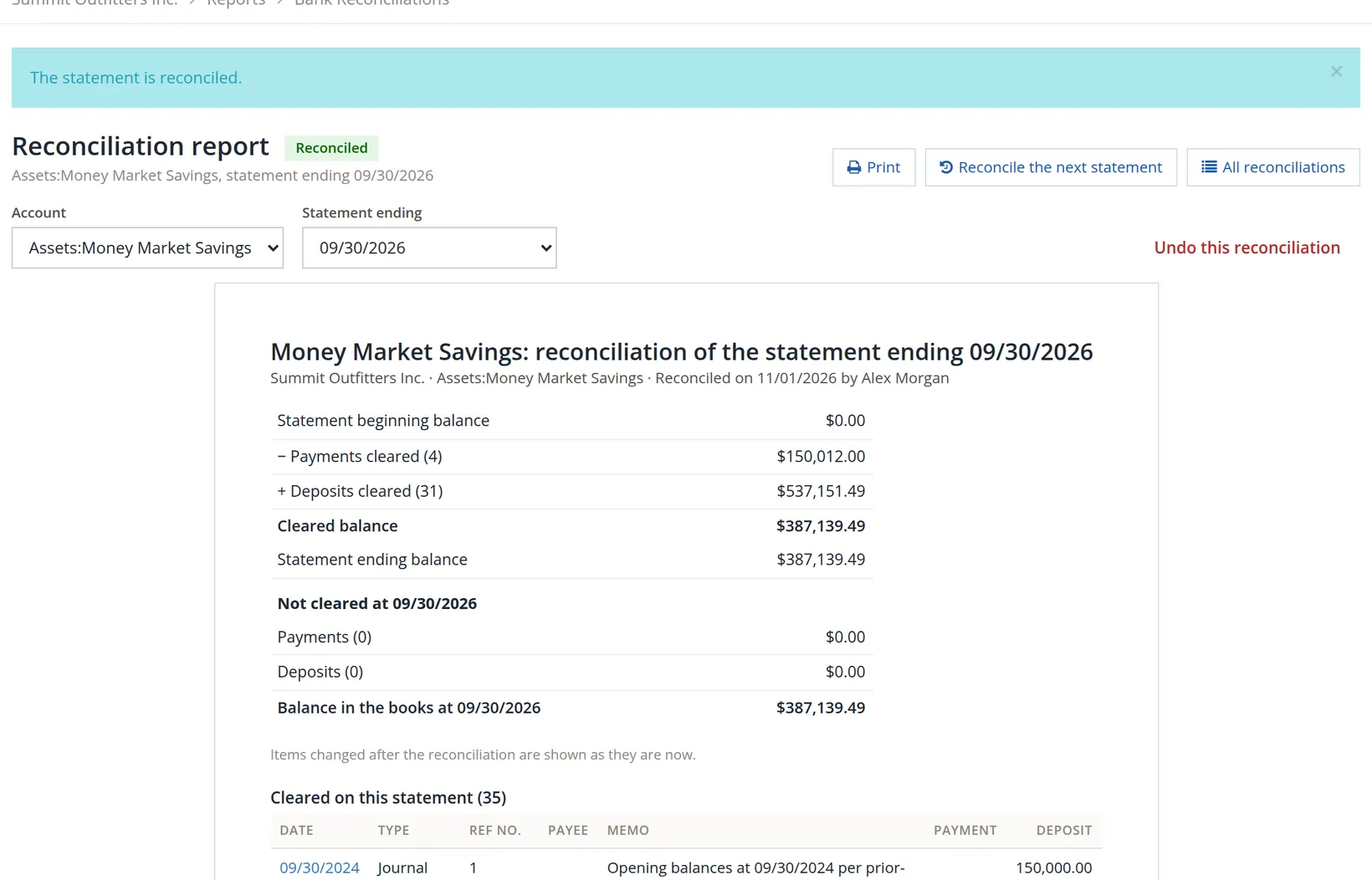
The reconciliation report opens: the arithmetic of the statement, anything still outstanding, and every item cleared.
- 2
Print or save the report 3
Keep it with the statement. Auditors and lenders ask for both.
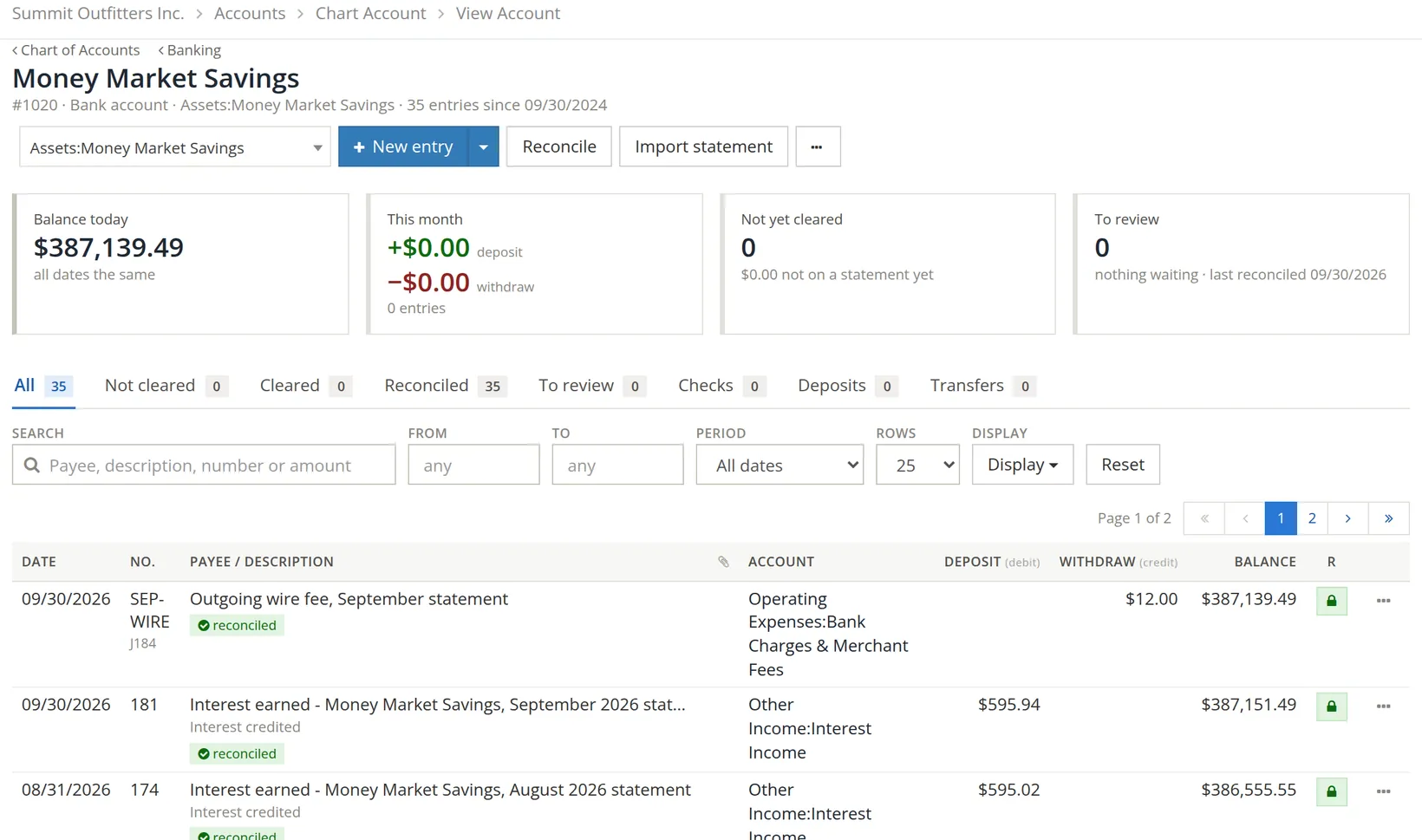
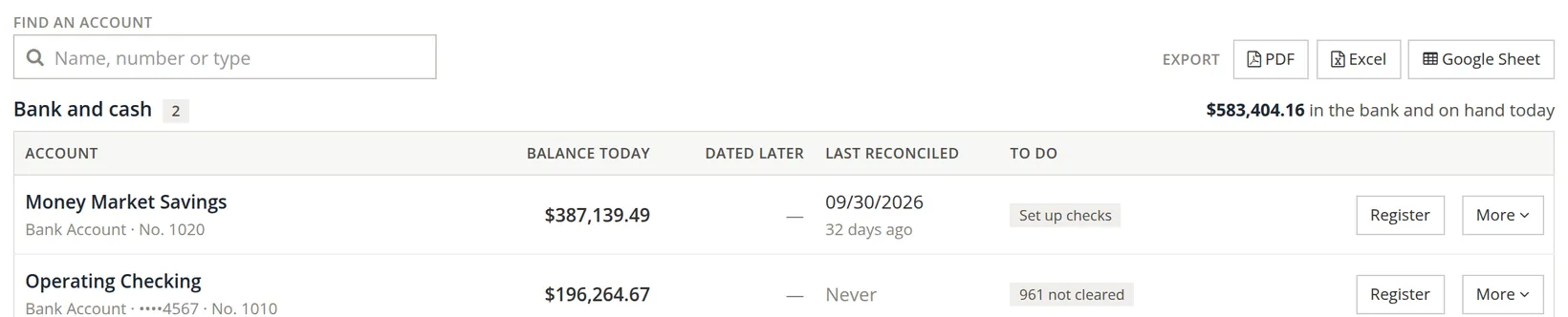
Back in the register, every cleared entry now carries a lock and a reconciled tag, and the Banking page shows the date it was last reconciled.
Some companies want a second person to check each reconciliation. When Settings → Approvals has Bank reconciliations need a second person's sign-off turned on, a finished statement waits under Accounts → Approvals until someone other than the person who reconciled it signs it off. The report and the account's list of statements then read, for example, "Reviewed by A. Lee on Nov 2, 2026", or "Not reviewed". Summit leaves the rule off.
Changing a reconciled entry changes a balance the bank has confirmed, and the next reconciliation will not start where the bank does. If one must change, undo the reconciliation, fix it, and reconcile again.
When the difference will not go to zero
| If the difference is… | Look for |
|---|---|
| The amount of one item | An item ticked that is not on the statement, or one on the statement not ticked or not entered. |
| Twice an item | A deposit entered as a payment, or the reverse. |
| Divisible by 9 | Two digits swapped: 54.10 typed as 45.10 (difference 9.00). |
| A round amount like 100 or 1,000 | A slip in one digit. |
| The same from month to month | A wrong beginning balance: an earlier reconciliation was forced or a reconciled entry was changed. |
Only when you have looked and cannot find it, and the amount is small, use Finish with an adjustment…. It posts the difference to an adjustment account so you can carry on, but it does not explain it.
Check your understanding
1. Statement ending balance $387,139.49; books $387,151.49; a $12.00 fee is on the statement but not in the books. What do you do?
Answer
Add it with Add a missing item, as money out to Bank Charges.
2. A check you wrote on September 29 is not on the September statement. Do you tick it?
Answer
No. It stays outstanding and will clear on the October statement.
3. The difference is $27.00. What kind of error is likely?
Answer
27 is divisible by 9: look for two digits swapped.