
Chapter 7.1
Setting Up and Running a Project
A project is a job you can hold to account: what it was sold for, how much of that is funded, what it has cost, what it has billed and what is left. This chapter follows one real contract through a funding change: a new contract line, the modification that funds it, a bill line and an expense line charged to it, and the check that caught a half-finished modification.
When you finish this chapter you will be able to:
- Choose the right kind of project and fill in its contract or award details, including who holds the award.
- Divide a contract into contract lines and explain why line 0001 becomes a summary.
- Fund a contract line by modification, and keep the contract's own funded amount in step with it.
- Charge bill and expense lines to a project and a contract line, one line at a time.
- Read the project page: its strip of figures, its Overview and its Transactions tab.
- Say what each government-contract card on the Contract tab is for, and whether your contract needs it.
- Map accounts to cost elements, read the preview, confirm the map, and find the other company-wide settings in Project setup.
What a project is, and where it lives
The ordinary reports answer questions about the whole company: did we make money this year, who owes us, what do we owe. A project narrows the same ledger to one job. Every bill line, expense line or invoice line that names the project counts toward it, and nothing else does. The project then adds what the ledger alone does not know: what the customer has agreed to pay, how much of that is funded, how the work is divided, and when it must be done.
Why bother? Because a company can be profitable overall while one job quietly loses money, and the general ledger will not tell you which. A project shows it while there is still time to act: before the funds run out, before the period of performance ends, before the last invoice goes out at a loss.
BizBooks360 offers five kinds of project. Pick the kind first, because it decides what else the form asks for.
| Kind | Use it for | Owner |
|---|---|---|
| Contract | A government award or any agreement with contract lines, a value and a funded amount | A customer |
| Commercial job | An ordinary customer job you want to track (an event, a fit-out, a custom order) | A customer |
| B&P | Bid and proposal effort: the cost of winning work | Internal (the books' own) |
| IR&D | Independent research and development | Internal |
| Internal | Any other effort of the company's own | Internal |
Everything sits in the sidebar under Projects: the register of projects, three reports (Chapter 7.3), the customer's Project Funding and Billing Summary, and Project setup, where the company-wide settings live (Section 4).
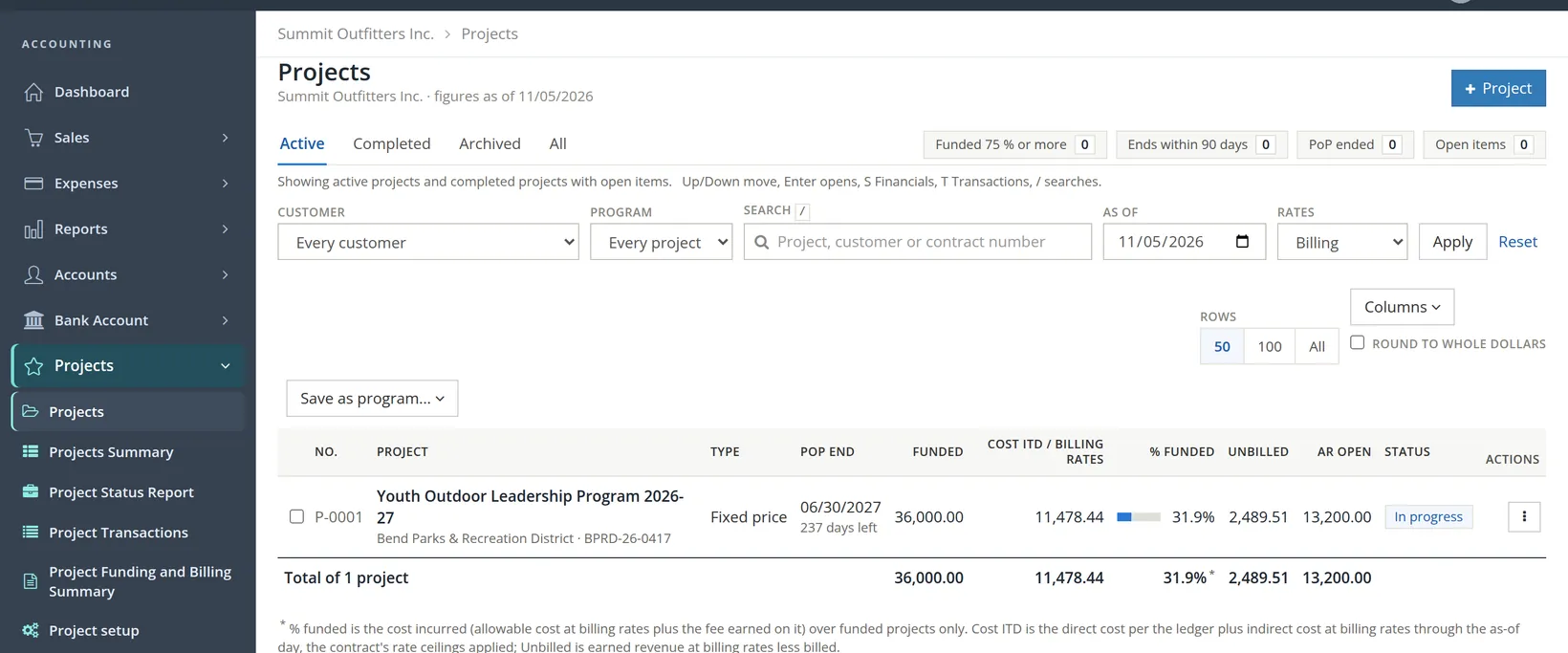
The register shows one row per project: its type, the end of its period of performance with the days left, the funded amount, the cost incurred so far (Cost ITD, inception to date) at billing rates, the share of funding used (% funded),1 what is earned but not yet billed, and what the customer still owes. Every figure is a link into the project page. A program is simply a saved list of projects, such as all the work for one agency; choose it in the Program filter to see only those rows. The keyboard works too: Up and Down move between rows, Enter opens one, S opens its Financials tab and T its Transactions tab.
Create the project
Summit's award reads: contract BPRD-26-0417, fixed price, total value $48,000.00, of which the district funded $30,000.00 for this school year; work from November 1, 2026 to June 30, 2027. This is how P-0001 was opened.
- 1
Open the form
Projects → Projects → + Project. The same form opens from Edit on the project page later, so nothing you type now is final.
- 2
Choose the kind, then the number and name
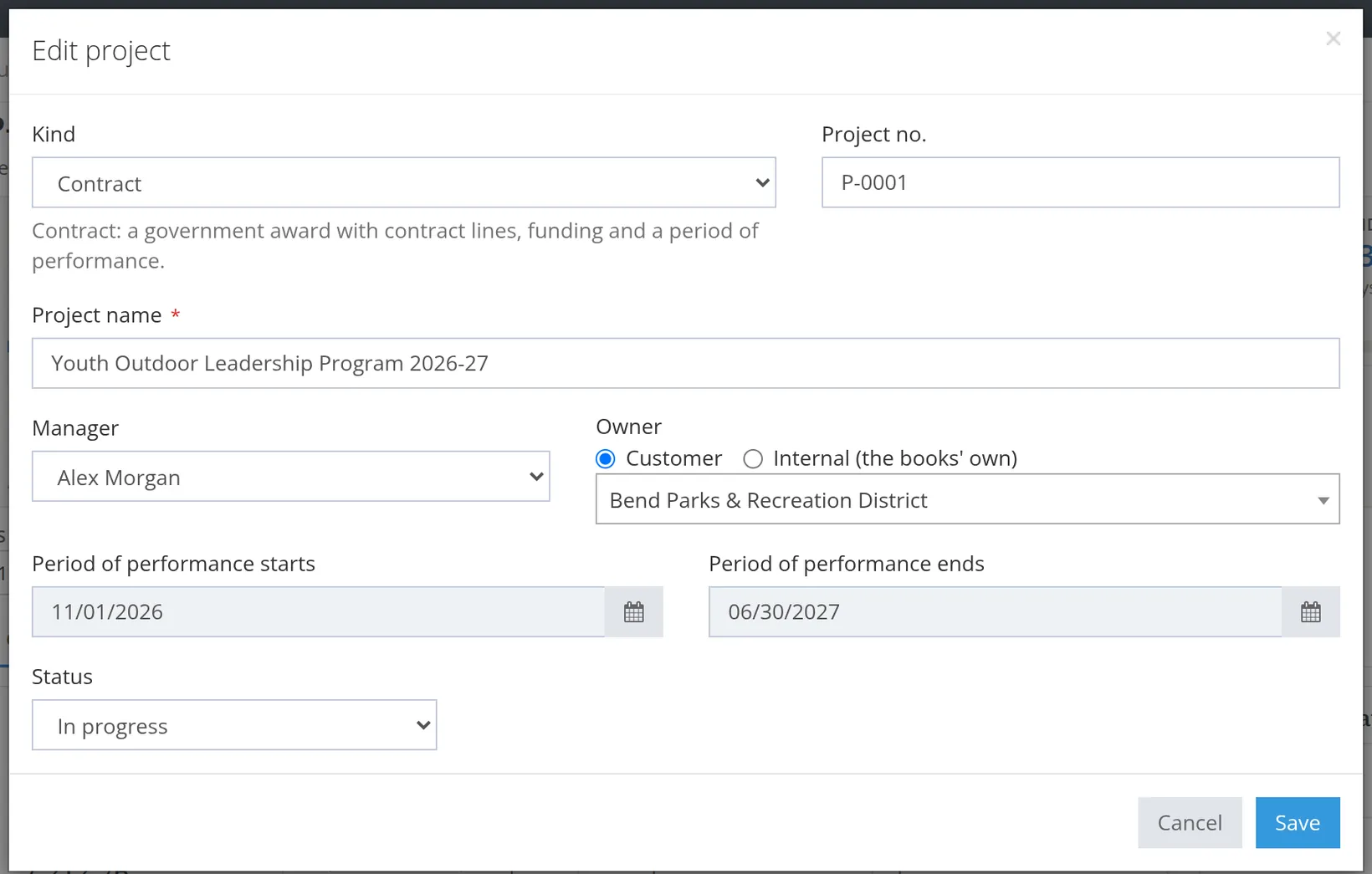
Choose Contract. The form opens on Commercial job, and the hint under Kind follows your choice; for a Contract it reads Contract: a government award with contract lines, funding and a period of performance. The Project no. is suggested (P-0001 here); keep it unless your company numbers jobs its own way. Give the project a name a stranger would understand: Youth Outdoor Leadership Program 2026-27. The name must not repeat one already used for the same customer (capitals do not make it different), and the project number must be new in the books.
- 3
Manager, owner and dates
Pick the Manager from the company's members. Leave Owner on Customer and choose Bend Parks & Recreation District. For a Contract the two date boxes are labeled Period of performance starts and ends; for other kinds they are plain start and end dates. Leave Status on In progress.
- 4
Fill in the contract or award details
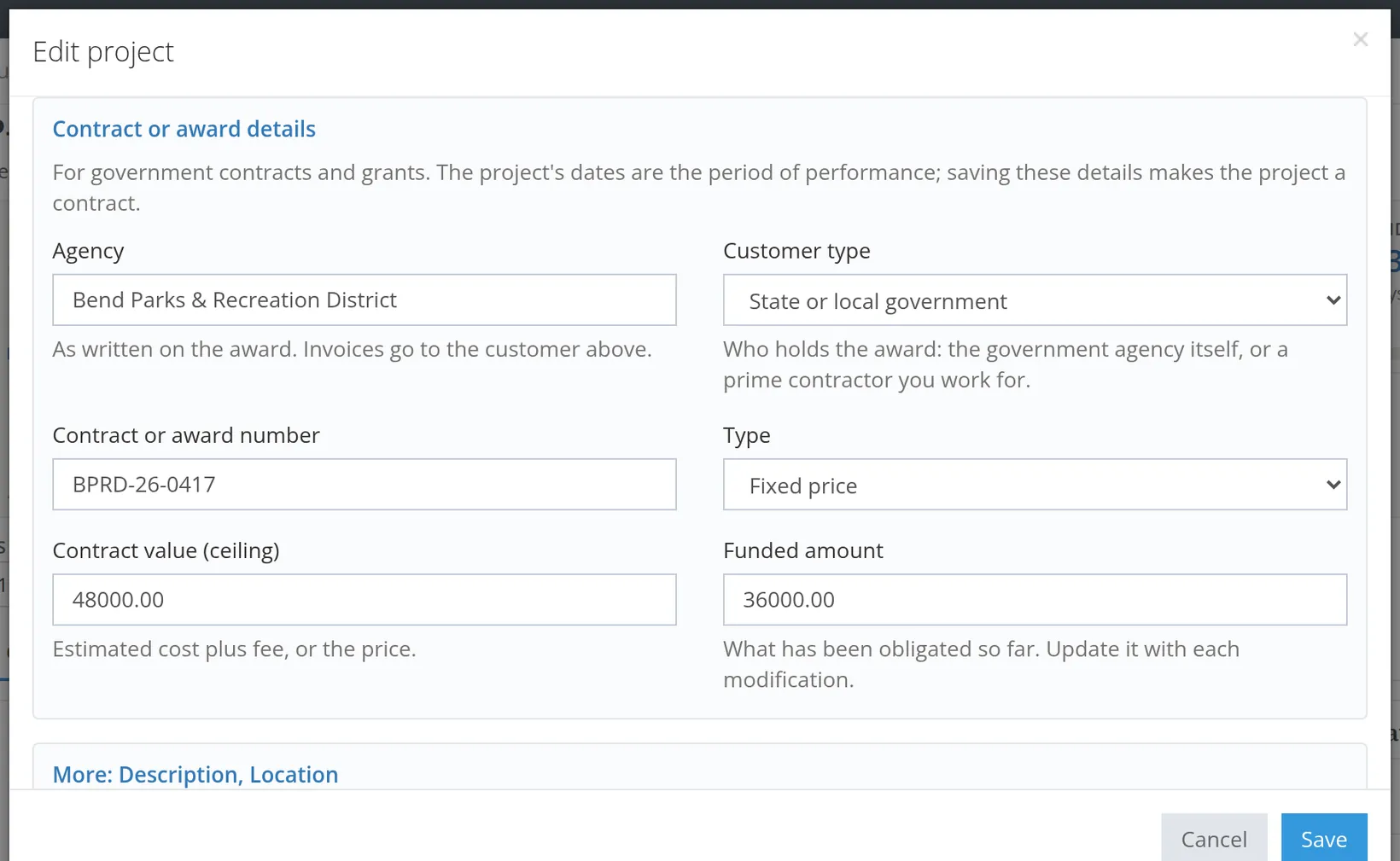
Below the status, open Contract or award details. Enter the Agency as written on the award (invoices still go to the customer chosen above). Set Customer type to say who holds the award: Federal government, Federal subcontract (a prime contractor holds the federal contract and you work for it), State or local government or Commercial. A parks district is State or local government. Then the Contract or award number, the Type (Fixed price), the Contract value (ceiling) 48,000.00 and the Funded amount 30,000.00. The same part of the form appears again, reopened, in Figure 7.
- 5
Add a description and location, then Save
Under More: Description, Location write one sentence of scope. It is what a new manager reads first. Click Save. The project appears in the register.
Enter both, even when they are equal today. The register's % funded column and the strip's Funds left figure are measured against funded, not value, because funded is the money you can actually bill. When the customer adds funding later, you record it twice, on purpose: as a modification on the contract line, and in the contract's funded amount. Procedure C shows both, and what happens when one half is forgotten.
Divide the contract into lines
The moment a project gains contract details, BizBooks360 creates line 0001 Whole contract. A one-line contract can stay that way. Summit's award has priced pieces, so P-0001 was given a line for each: 0002 Loaner equipment kits, 18,000.00, and 0003 Guided field days, 12,000.00. On November 5 the district signs modification P00001: four winter snowshoe outings at $1,500.00 a day, 4 × $1,500.00 = $6,000.00, paid from the $18,000.00 of contract value that was not yet funded. That needs a fourth line.
- 1
Open the Contract tab and click + Add line
On the project page choose the Contract tab. The top card repeats the agency, customer type, number, type, value, funding and period of performance; the Contract lines card is further down, with + Add line at its top right.
- 2
Number, title, kind and pricing type
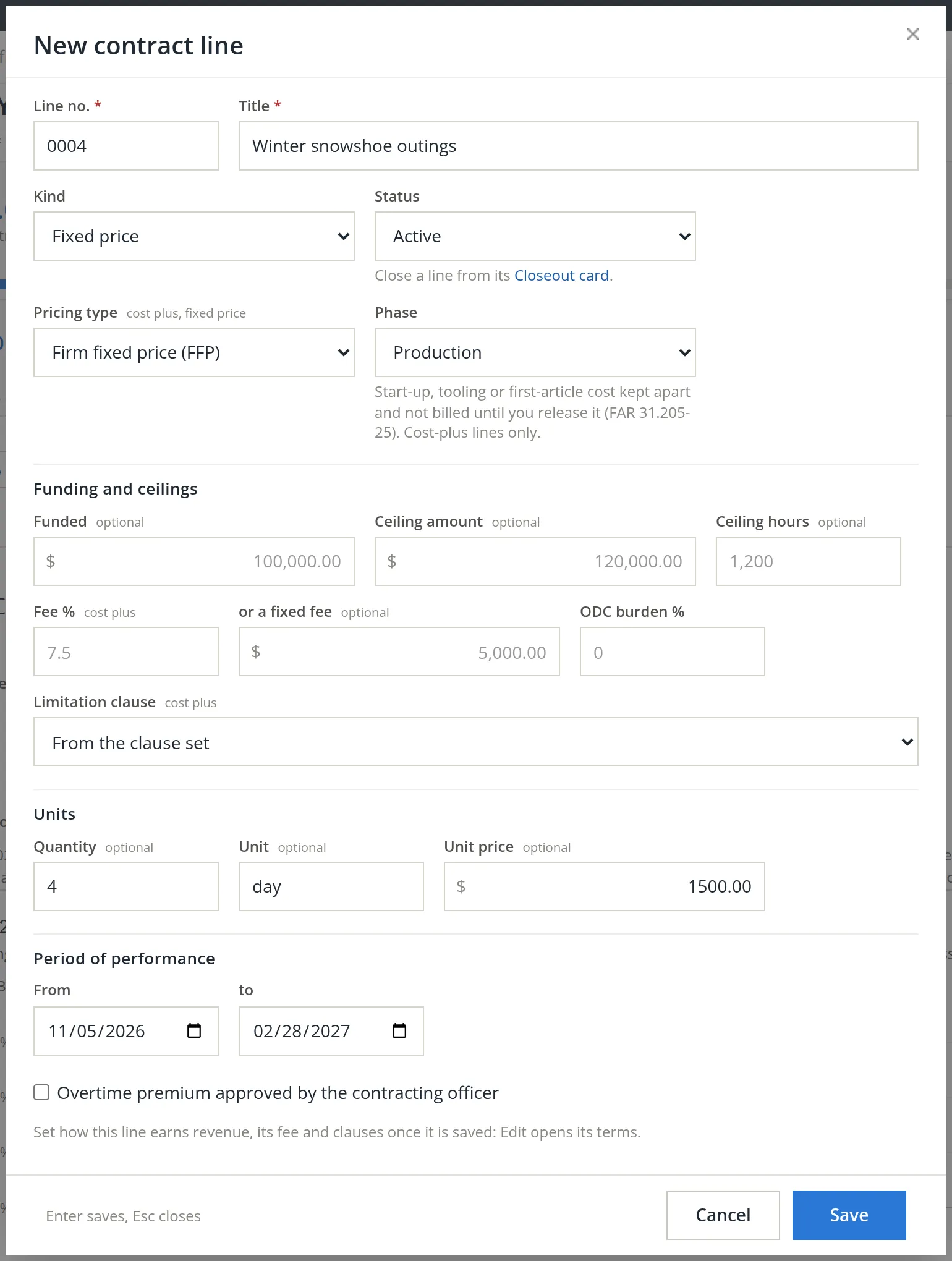
Type 0004 and Winter snowshoe outings. Keep the kind Fixed price and set Pricing type to Firm fixed price (FFP). Leave Status on Active and Phase on Production.2
- 3
Leave the funding empty
The Funded box is optional, and here it stays empty: the money arrives by modification in Procedure C, so the line's funding history starts with the signed document. The ceiling, fee, ODC burden and limitation clause boxes are for cost-plus and time-and-materials lines; leave them empty too. The grey figures inside the empty boxes are examples, not entries.
- 4
Units and dates, then Save
Under Units enter quantity 4, unit day, unit price 1500.00. The line's own period of performance is November 5, 2026 to February 28, 2027. Click Save; the page answers Saved line 0004.
Once a contract has other lines, line 0001 becomes a summary. Its funding is no longer typed in; it is the sum of the others. Nothing new may be charged to it either: the money forms stop offering it, as Procedure D shows.3
Fund the line by modification
A funded line's funding changes only by modification. Open an existing line's Edit dialog and you will find Funded greyed out beside an Add modification button and the words Record funding changes with Add modification. The ceiling and a fixed fee are locked the same way.4 The reason is evidence: each change of funding is kept with its number, date and signed document, so anyone can rebuild how the line reached today's figure.
- 1
Open the line's funding history
On the Contract tab, click Funding history in line 0004's row. A panel opens under the row: No funding recorded on line 0004 yet. Click + Add modification.
- 2
Describe the modification
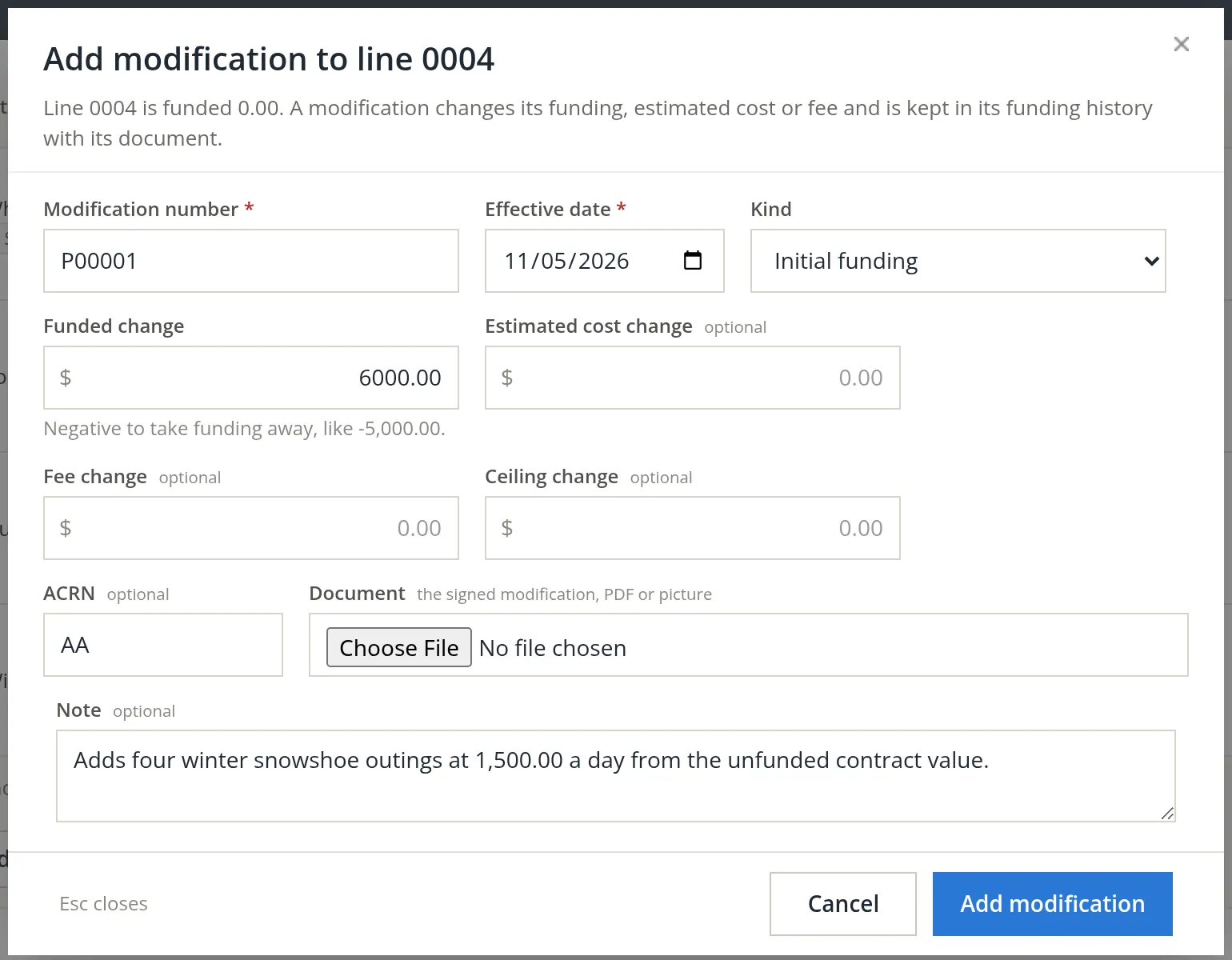
Enter the Modification number as printed on the document (P00001) and its Effective date, 11/05/2026. Choose the Kind: Initial funding for a line's first money, Increment to add, Decrement or Deobligation to take away. Type the Funded change, 6,000.00 (a negative amount takes funding away). Estimated cost, fee and ceiling changes are for cost-type lines; leave them at zero. If the award names an ACRN, enter it (AA here).5 Attach the signed modification under Document and add a one-line note.
- 3
Click Add modification
The page answers Added modification P00001 to line 0004.
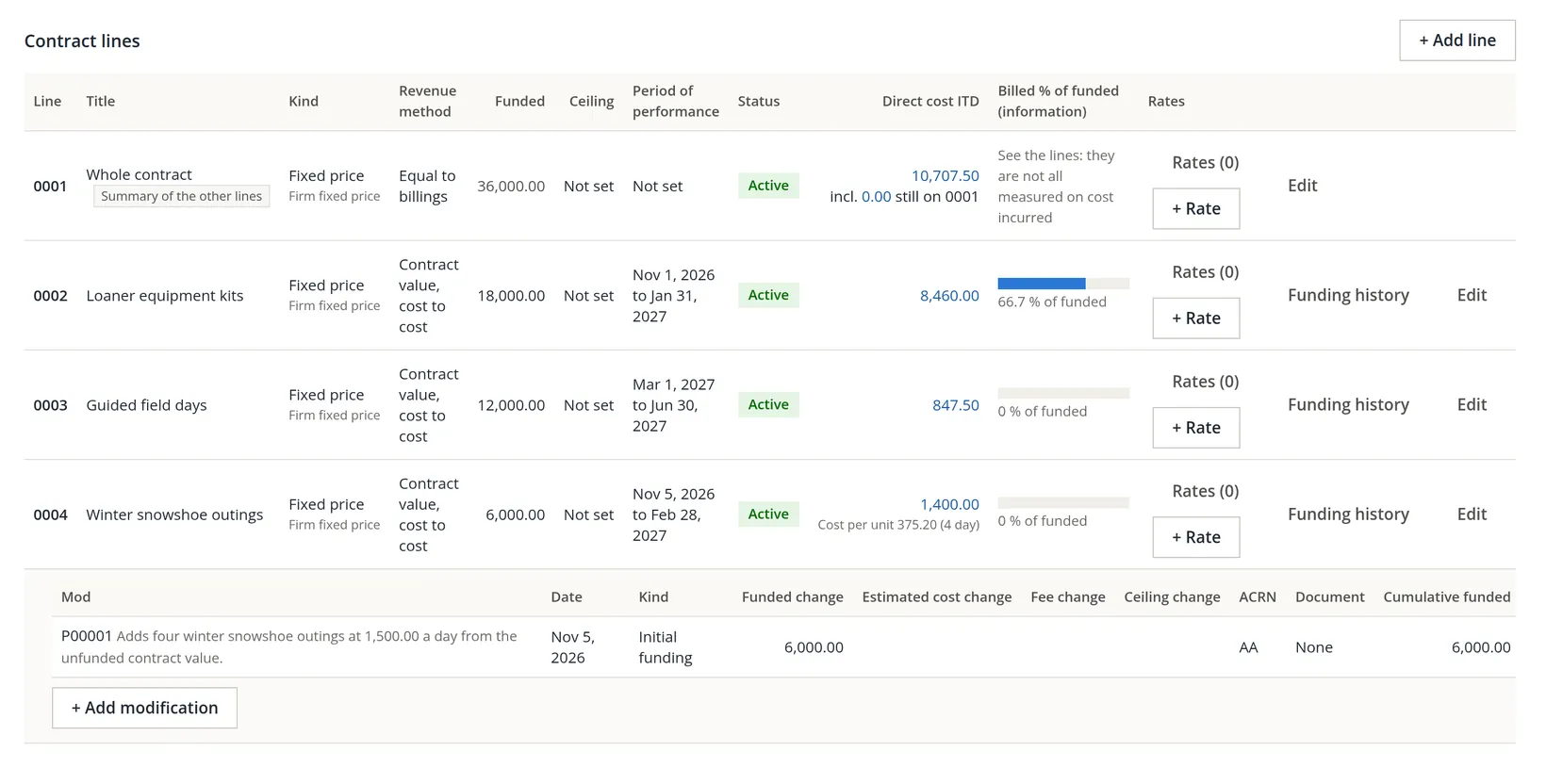
A modification has two halves
Summit's bookkeeper stopped there and opened the project's Overview. The headline still read Funded 30,000.00, and the first item under Needs your attention was marked Check failed: The contract says 30,000.00 is funded but its lines record 36,000.00. Raise the contract's funded amount to 36,000.00 in Edit details, or correct a contract line's funding. Further down, in Checks of this run, the check Contract funded agrees with its contract lines showed Failed.
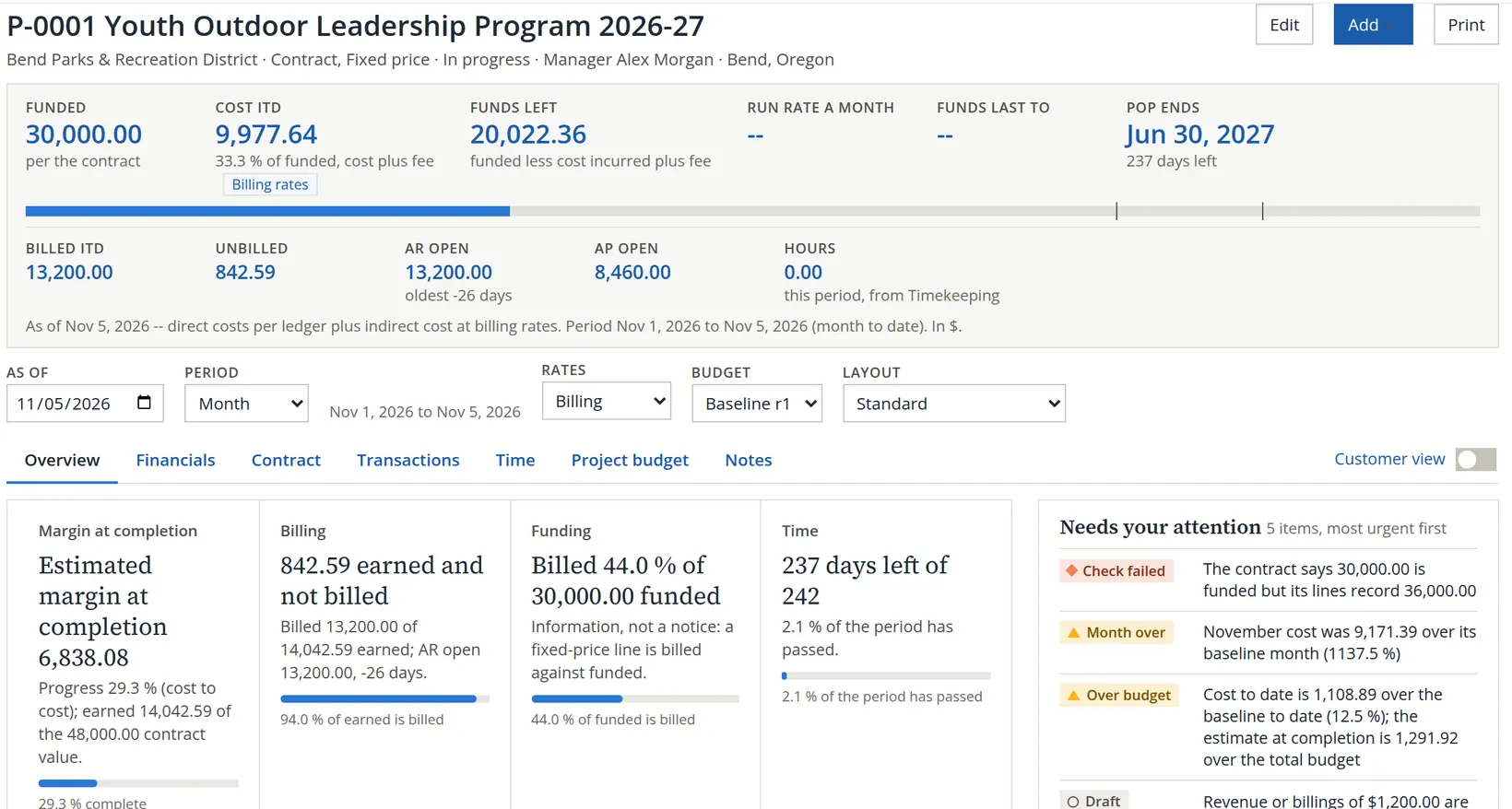
Why did the strip ignore the new line? Because the contract's own Funded amount, typed in Procedure A, is the master figure. The lines are added up only when the contract's box is empty.6 The modification raised the lines to 36,000.00; the contract still said 30,000.00. The check exists for exactly this gap.
- 4
Raise the contract's funded amount
Click Edit at the top of the project page (or Edit details on the Contract tab), scroll to Contract or award details, change Funded amount to 36,000.00 and click Save. Leave the contract value at 48,000.00: the modification funded part of the existing value, it did not raise it.
Back on the Overview, the strip reads Funded 36,000.00 and the check reads Contract funded agrees with its contract lines. Agrees at 36,000.00. The attention item is gone.
A modification that adds funding is two entries: the modification on the contract line (with its document), and the contract's funded amount. The Contract tab's Funding history button at the top prints every line's modifications on one page, which is the easiest way to check the two agree before a month-end.
Charge costs to the project, line by line
A project has no cost of its own until documents name it. Each line of a bill, check, expense or vendor credit now has its own Project column, so one document can serve the store and a project at once. There are two ways in. From the project page, the Add button opens a form with the project already filled in as the Default project for new lines, and brings you back to the project when you save:
| Group in the Add menu | Entries |
|---|---|
| Money in | Invoice, Receive payment (a further entry, Bill from time and cost, appears on projects billed from Timekeeping) |
| Money out | Bill, Expense, Check, Vendor credit |
| Time and notes | Time entry (for people who keep time in these books),7 Note |
Or start from the ordinary form (Chapters 3.1 and 3.2) and pick the project on each line that belongs to it. Summit's bill needed the second way, because only one of its two lines is for the district.
- 1
Enter the vendor's bill, one project line and one store line
Expenses → Enter a bill. Alpine Sports Wholesale invoiced bill ASW-60388, dated 11/05/2026, Net 30: 20 pairs of youth snowshoes at $55.00 for the outings (20 × $55.00 = $1,100.00) on Equipment Cost of Sales, and a $180.00 display rack for the shop on Office Expenses, a total of $1,280.00. On line 1 choose Youth Outdoor Leadership Program 2026-27 in the Project column; leave line 2 on No project. As soon as line 1 has a project with contract lines, the Contract line column offers 0002, 0003 and 0004, never the summary 0001. The bookkeeper clicked Save before picking one.
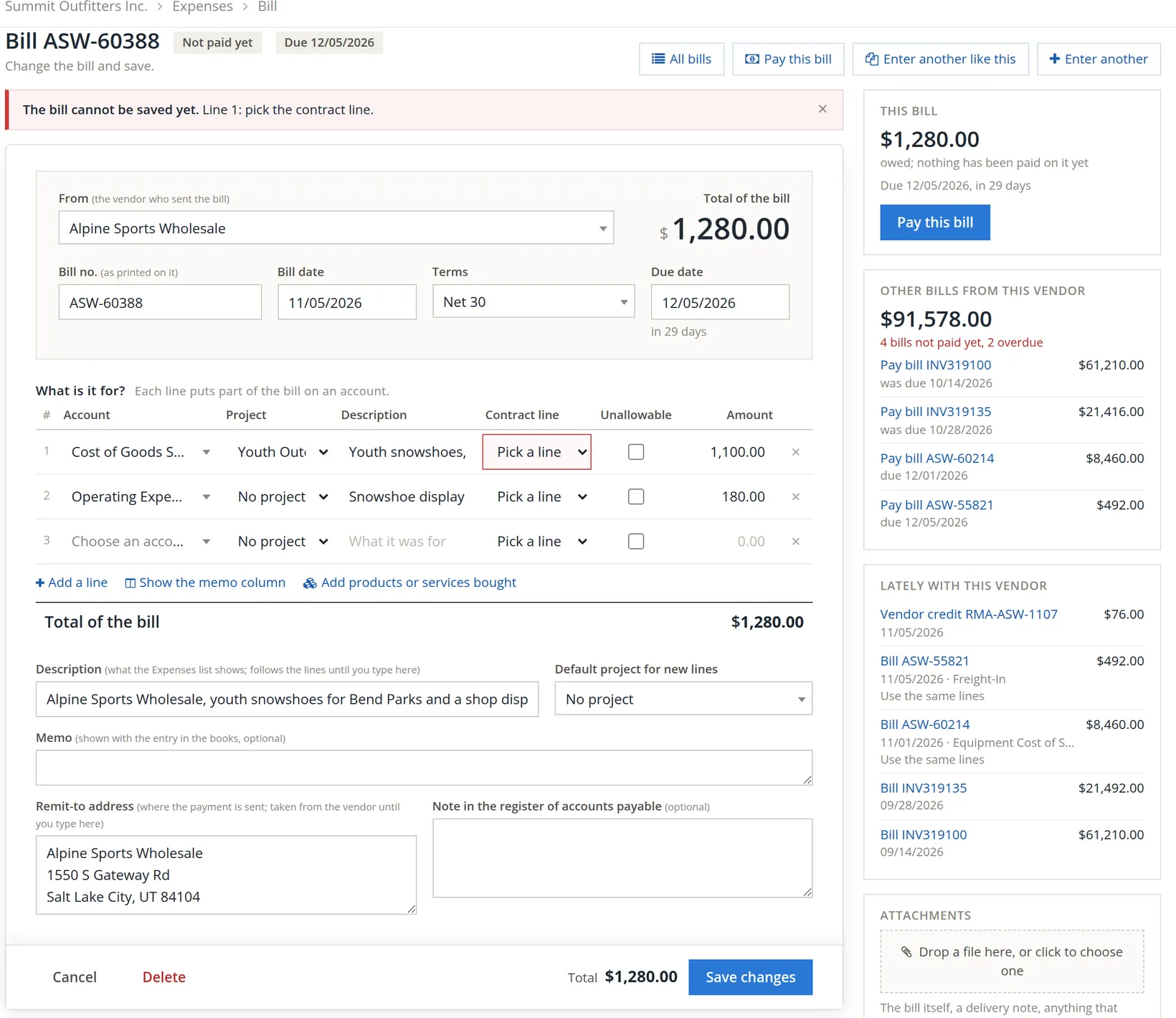
With the Project and Contract line columns added the line table is crowded, so it keeps the description, the contract line and the amount readable and cuts the rest: "Cost of Goods S..." is Cost of Goods Sold:Cost of Merchandise Sold:Equipment Cost of Sales, "Operating Expe..." is Operating Expenses:Office Expenses, and "Youth Out" is Youth Outdoor Leadership Program 2026-27. On a narrower window the table scrolls sideways in its own box. The rail on the right 9 sums up the bill and the vendor: what is owed on this bill, with Pay this bill, the vendor's other open bills and the latest documents with them. Figure 10 shows the saved snowshoe line in full on the project's Transactions tab.
The rule behind the refusal: on a contract with several lines, a line on a direct-cost account must say which contract line it is for. A cost left on the whole contract cannot be measured against any line's funding, so the form refuses it, and the server refuses it again if the form is bypassed. Anything that still reaches line 0001 another way, such as a line saved before the project had other lines, is listed on the Contract tab in the card Lines still on CLIN 0001, with a link to each document; on P-0001 it reads No ledger line sits on CLIN 0001. The card lists direct cost lines only; revenue and billings left on line 0001 appear instead as an item under Needs your attention (Procedure E).
- 2
Pick the contract line and save
On line 1 choose 0004 Winter snowshoe outings and click Save. The page answers The bill ASW-60388 from Alpine Sports Wholesale for $1,280.00 was saved.
- 3
Record the guide's scouting day from the project page
On P-0001 click Add → Expense. The project is already the default for new lines. Summit paid Jordan Ellis Guiding $300.00 from Operating Checking for one day of snowshoe route scouting, on Guide & Instructor Contractors, contract line 0004 Winter snowshoe outings. Save, and you are back on the project page.
A line that has no project of its own takes the Default project for new lines; with a default chosen, the line's own list offers Default project and other projects, but not No project. So when a bill is partly for the store, keep the default on No project and pick the project on the lines that belong to it, as Summit did. If you change the default after typing lines, the form asks whether to change the project on those lines too.
What if line 1 had been left on No project? Equipment Cost of Sales is a direct-cost account in Summit's books (Section 2), and Summit's setting Direct cost lines need a project is on Warn, so the form would have asked before saving. A company can make it Refuse or turn it Off in Project setup (Section 4). The display rack on Office Expenses, an overhead account, is never asked about.
Cost elements, and where the indirect cost comes from
Every account in the books is mapped to one cost element, the row of the project statement it lands on. That is where the short tags on the Transactions tab come from: MAT for materials and equipment, SUB for subcontracts and consultants, REV for revenue.
| Element | What it holds |
|---|---|
| Revenue | Income accounts |
| Direct labor | Wages of people working on the job |
| Subcontracts and consultants | Outside firms and contractors doing part of the work |
| Materials and equipment | Goods bought for the job, with freight on them |
| Travel | Travel for the job |
| Other direct costs | Anything else charged straight to the job |
| Unallowable labor / non-labor | Costs the customer will not pay; shown apart and never billed |
| Provision for contract losses, Applied indirect cost | Two entries for month-end postings: the provision for an expected loss, and indirect cost applied at billing rates (Section 4, Billing and revenue) |
| Indirect / not on projects | Overhead and anything that never counts as a project's direct cost |
Summit's map was set and confirmed when P-0001 began: 5130 Equipment Cost of Sales and 5200 Freight-In are Materials and equipment, 5300 Guide & Instructor Contractors is Subcontracts and consultants. Procedure F shows how the map is changed, previewed and confirmed.
A project's Cost ITD is its direct cost plus a share of overhead, applied through the rates kept in Accounts → Account Pools (Chapter 5.4). Summit has one: the Store overhead rate, its Store overhead pool (rent, utilities, insurance, office expenses) over its cost-of-sales base, with a provisional rate of 7.20% for fiscal year 2026. Projects use the billing rate set unless you choose otherwise: a year's final rate, else its provisional rate, else the measured rate. So, on November 5:
| Figure | Arithmetic | Amount |
|---|---|---|
| Direct cost | 8,460.00 on 0002 + 847.50 on 0003 + 1,400.00 on 0004 | 10,707.50 |
| Indirect cost | 10,707.50 × 7.20% | 770.94 |
| Cost ITD | 10,707.50 + 770.94 | 11,478.44 |
| Funds left | 36,000.00 − 11,478.44 (no fee on a fixed-price line) | 24,521.56 |
| % of funded | 11,478.44 ÷ 36,000.00 | 31.9% |
The display rack shows the other side of the same rule. Its 180.00 on Office Expenses joins the Store overhead pool, while the snowshoes and the scouting day join the base, so the rate measured so far this year moves (7.276% on November 5); the billing figure does not, because the year's provisional 7.20% comes first. The Contract tab says so in a sentence under its rates exhibit, and the year-end rate settlement takes up the difference.
Read the project page
Open the project from the register. The page has three layers: the strip of headline figures, the context bar (As of, Period, Rates, Budget, Layout) that every tab obeys, and seven tabs, which the keys 1 to 7 also open. A Customer view switch at the right of the tabs shows the page as the customer's own summary would.
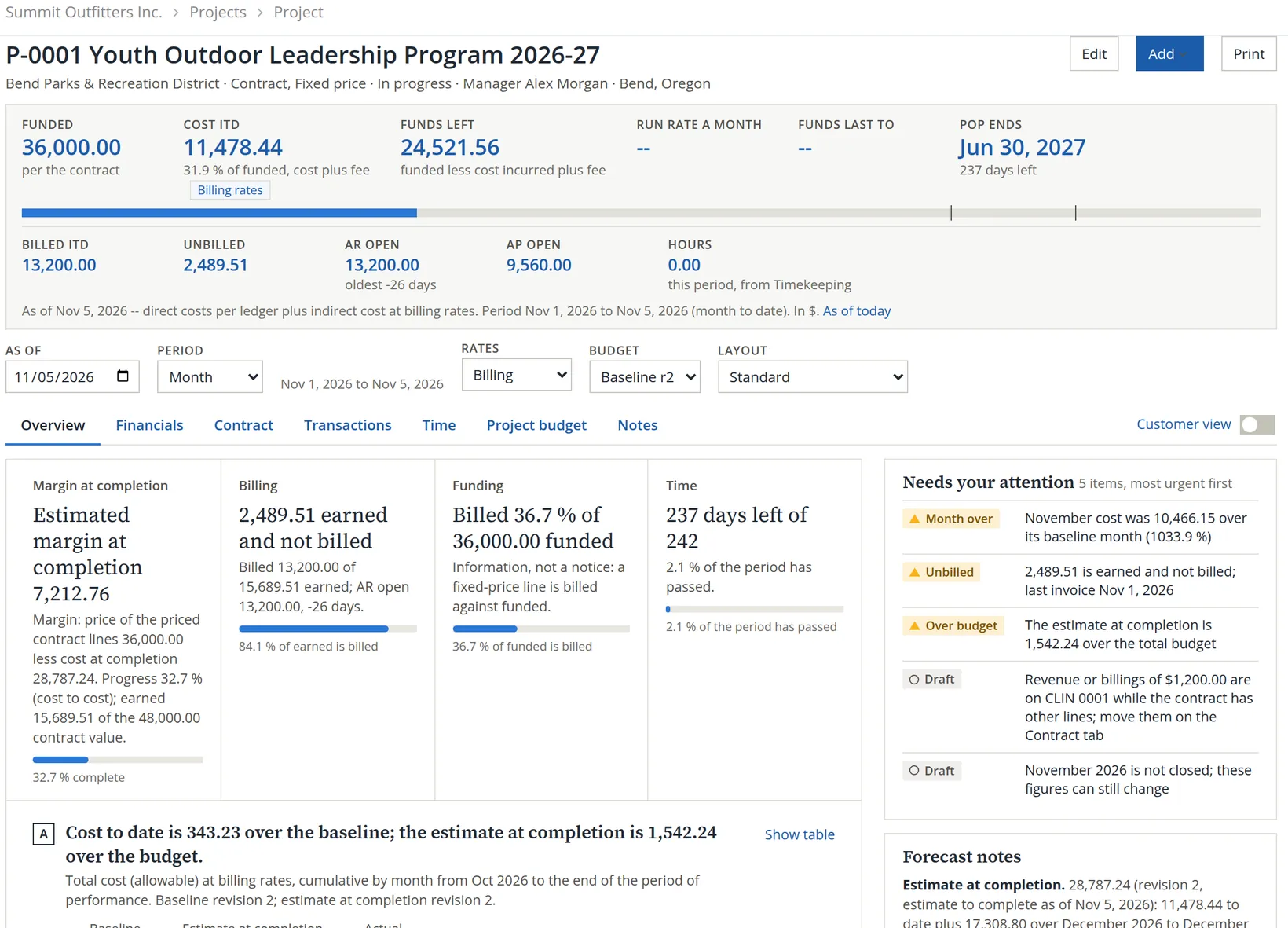
The four cards answer four plain questions: will the job make money (margin at completion, from the budget of Chapter 7.2, with a sentence under the figure that states its basis: the price of the priced contract lines less the cost at completion), is the earned work billed, how much of the funding has been used, and how much of the time. Below them, lettered charts compare the cost to date with the budget, and the right-hand column lists what needs attention, short forecast notes and the Checks of this run that met you in the catch above. On P-0001 one Draft item says that $1,200.00 of revenue or billings sits on CLIN 0001: an invoice that names the project without a contract line. It is the same summary-line rule applied to income, and it is cleared by opening the invoice and choosing a line.
| Tab | What it shows |
|---|---|
| Overview | The four cards, the charts, the attention items and the checks run on the figures |
| Financials | The Project Status Report for this project (Chapter 7.3) |
| Contract | The contract details, the indirect rates by year, the contract lines with their funding history, rate ceilings, and the government-contract cards of Section 3 |
| Transactions | Every ledger line of the project, and its open invoices and bills |
| Time | Hours from Timekeeping (Volume 12) |
| Project budget | The baseline and the estimate at completion (Chapter 7.2) |
| Notes | Dated notes about the project |
Every blue figure is a link to the place that explains it. On the Contract tab, line 0004's direct cost of 1,400.00 opens the Transactions tab already filtered to that line's direct costs.
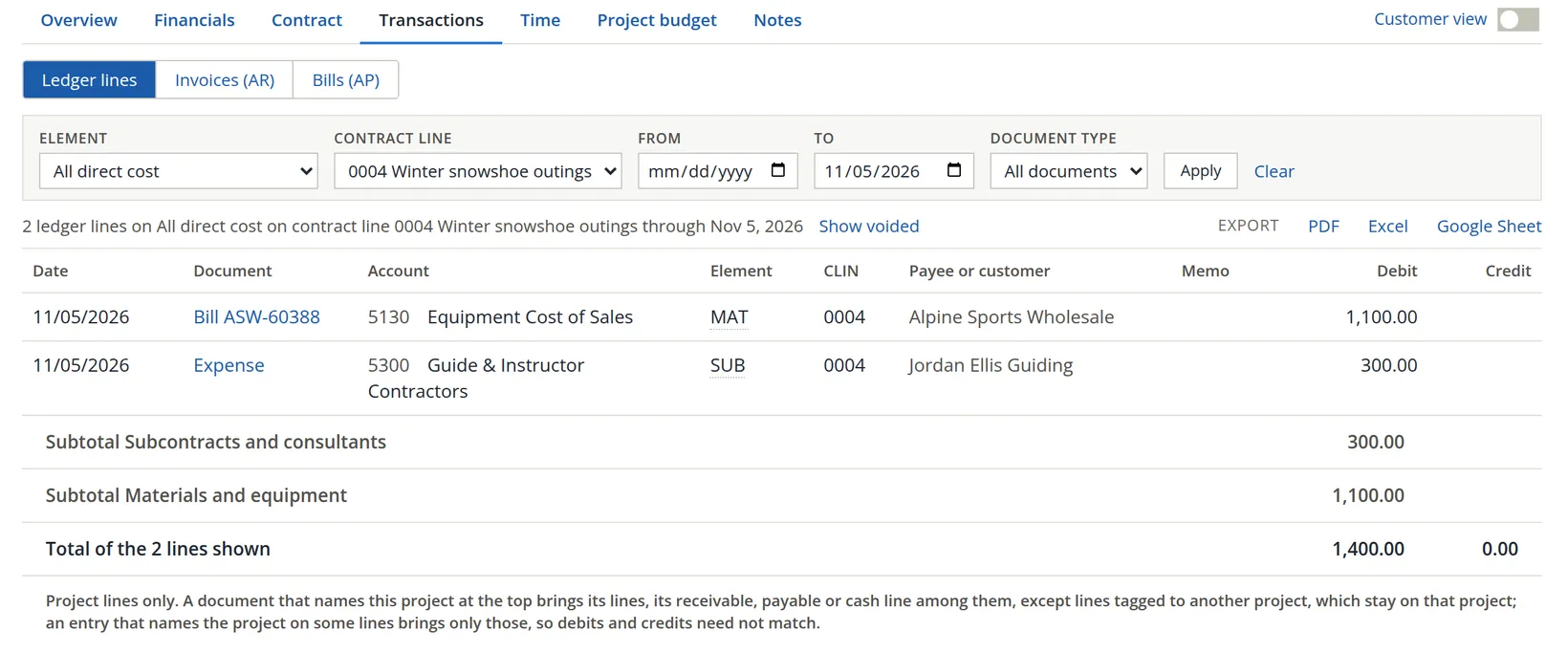
Reading the list. Two lines from two documents: the bill's snowshoes, 1,100.00 tagged MAT, and the expense's scouting day, 300.00 tagged SUB. The subtotals group them by element, 300.00 + 1,100.00 = 1,400.00, which is the figure on the Contract tab. The credit column is 0.00 because only cost lines pass the element filter; the other side of each entry (the payable, the cash) is not a cost. The last line of the page states which lines a document brings to the project: a document that names the project at the top brings all its lines, its receivable, payable or cash line among them (except lines tagged to another project), while an entry that names the project on some lines brings only those, so debits and credits need not match. Choose Clear to see all the project's lines, with a subtotal per element and the revenue and receivable lines of its invoices.
A line counts on a project if the line itself names it; otherwise if its document names it at the top. Account Pools, the project pages and every project report use the same rule, so a line can never count on two projects. The same order decides the contract line: the line's own choice first, then the charge code's (Timekeeping), then line 0001.12
Map your accounts to cost elements
The cost-element map (Section 2) decides whether a project line counts as the project's direct cost at all. BizBooks360 suggests a map the first time it is needed, and the suggestion is cautious: an account that serves the whole business, such as a retailer's cost of sales, starts on Indirect / not on projects. Until someone changes it, every project line on that account stays out of the project's totals.
The symptom. A project has bills, AP open shows what is owed on them, and yet Cost ITD reads 0.00. The Financials tab explains it in one highlighted row: Project lines on indirect accounts (in the pools, not in totals), with the amount the map is keeping out. Summit met exactly this on November 1, when P-0001's first kit bill of 8,460.00 showed a Cost ITD of zero. The cure is the map, and it is done once for the whole company, not once per project.
- 1
Open the map
Projects → Project setup opens the Cost elements tab. With Show on Used on projects you see only the accounts that already carry a project line, with their inception-to-date amounts; Type switches between expense and income accounts. The chips count accounts still Unmapped and accounts Changed from suggested, and filter the rows when clicked.
- 2
Choose each account's element
Pick the element in each row's Element list. The row is outlined as a change, and the counter beside Save says how many changes are waiting. To change many rows at once, tick them and use Set element for selected. The Source column says whether a row is suggested or chosen, and under a chosen row it keeps what was suggested.
- 3
Save, and read the preview before it writes
Save does not write at once. It opens Before saving, which names every project whose direct cost will move and by how much, and the totals by element. Read it, then click Save these changes, or Cancel to keep the map as it is.
- 4
Confirm the map
When the map is right, click Confirm this map. The page then names who confirmed it and when, and the Changes card keeps who moved which account, from what, to what. A confirmed map tells your colleagues that someone with the Project Settings right has looked it over; a later change shows in the Changes card and in the map version that each stored report run records.
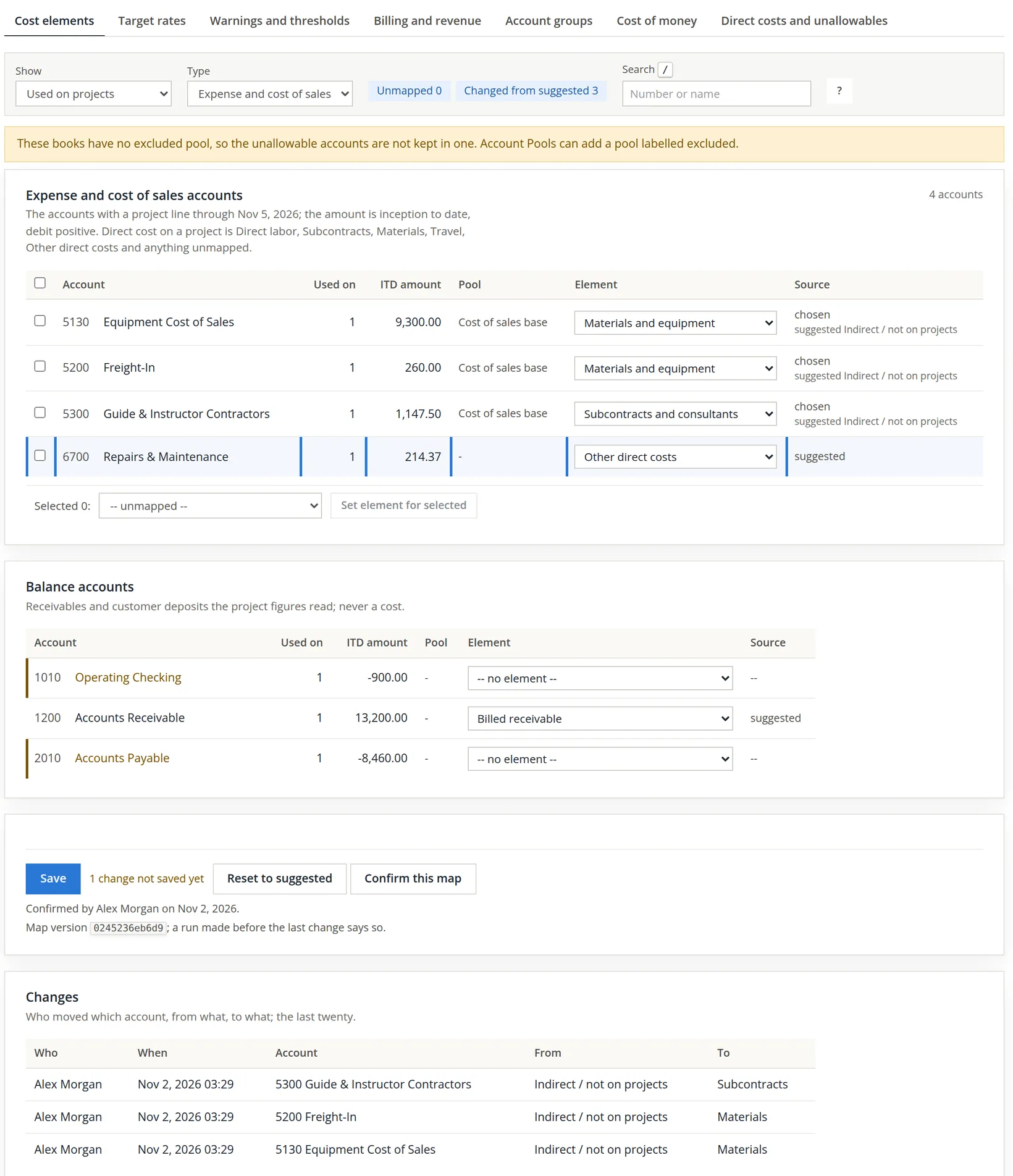
Summit's map is already confirmed, so the picture shows a question rather than a repair. Journal entry 194 put a 214.37 repair on the project, on 6700 Repairs & Maintenance, an overhead account. The accountant wondered whether repairs should count as the job's direct cost, set the row to Other direct costs and clicked Save to see the effect.
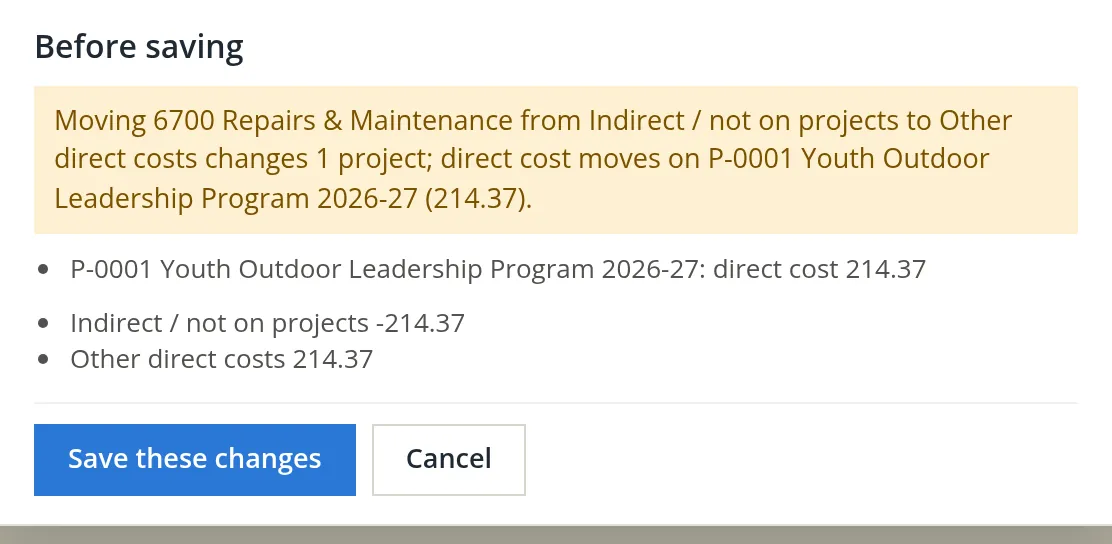
An account's element applies to every project in the books, past and present, which is why the preview names every project that moves. If one job's freight is direct and another's is overhead, use separate accounts rather than changing the map back and forth.
The rest of the Contract tab: government-contract cards
Below the contract lines, the Contract tab carries a row of cards built for government contracts. Most of them matter for federal cost-type work, where the customer pays your costs by voucher and audits them. Summit's fixed-price contract with a parks district needs few of them, but a first-time reader should know what each is for, so that the day a federal award arrives, nothing on the page is a stranger.
| Card | What it is for | Summit |
|---|---|---|
| Indirect rate ceilings | The most of each indirect rate the contract allows, per year or per line; the excess is shown as not claimable. A change needs a reason, kept in the log. | None: the books' rates apply in full |
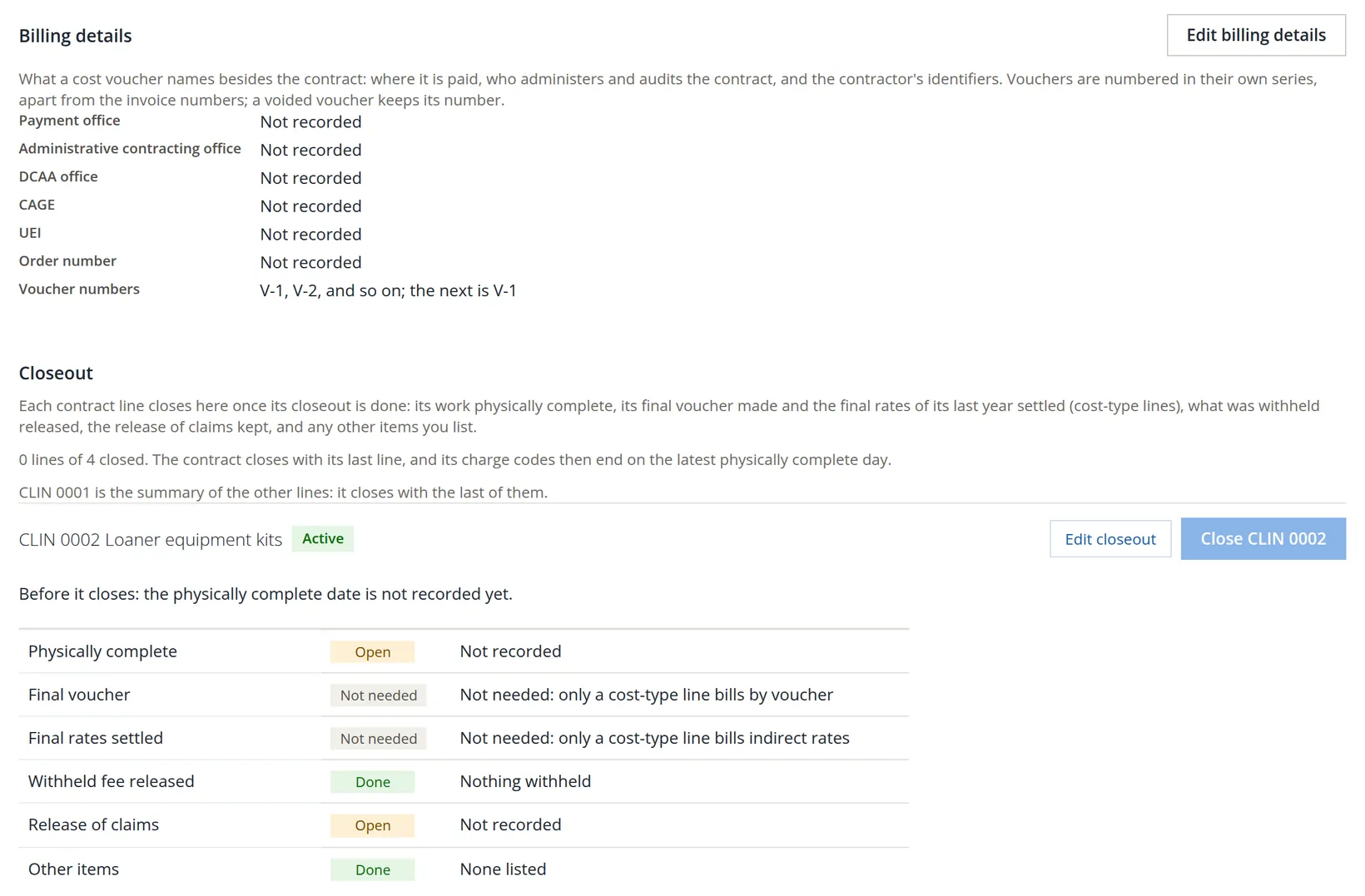
| Billing details | What a cost voucher names besides the contract: payment office, administrative contracting office, DCAA office, CAGE and UEI codes, order number, and the voucher number series (V-1, V-2, ...). | Not needed (no vouchers) |
| Closeout | A checklist per contract line: physically complete, final voucher, final rates settled, withheld fee released, release of claims, other items. A line closes from here; the contract closes with its last line. | Used at the end: 0 lines of 4 closed |
| Commitments | Purchase orders and subcontracts agreed but not yet billed, and expense claims submitted but not approved. The funding schedule counts them as committed money. | Useful when kits are ordered ahead |
| Funding notices | Notices sent to the contracting officer as a line nears its funding or ceiling, with a draft letter at 75%, 85% or 100%, 60 or 30 days before. The system drafts the letter; you send it. | Rarely, on a fixed-price line |
| Progress payments | For a fixed-price line paid as cost is incurred, before delivery: terms, then numbered requests in the format of Standard Form 1443. | Off on every line |
| Stakeholders | The people on the customer's side and yours, for reference. | None yet |
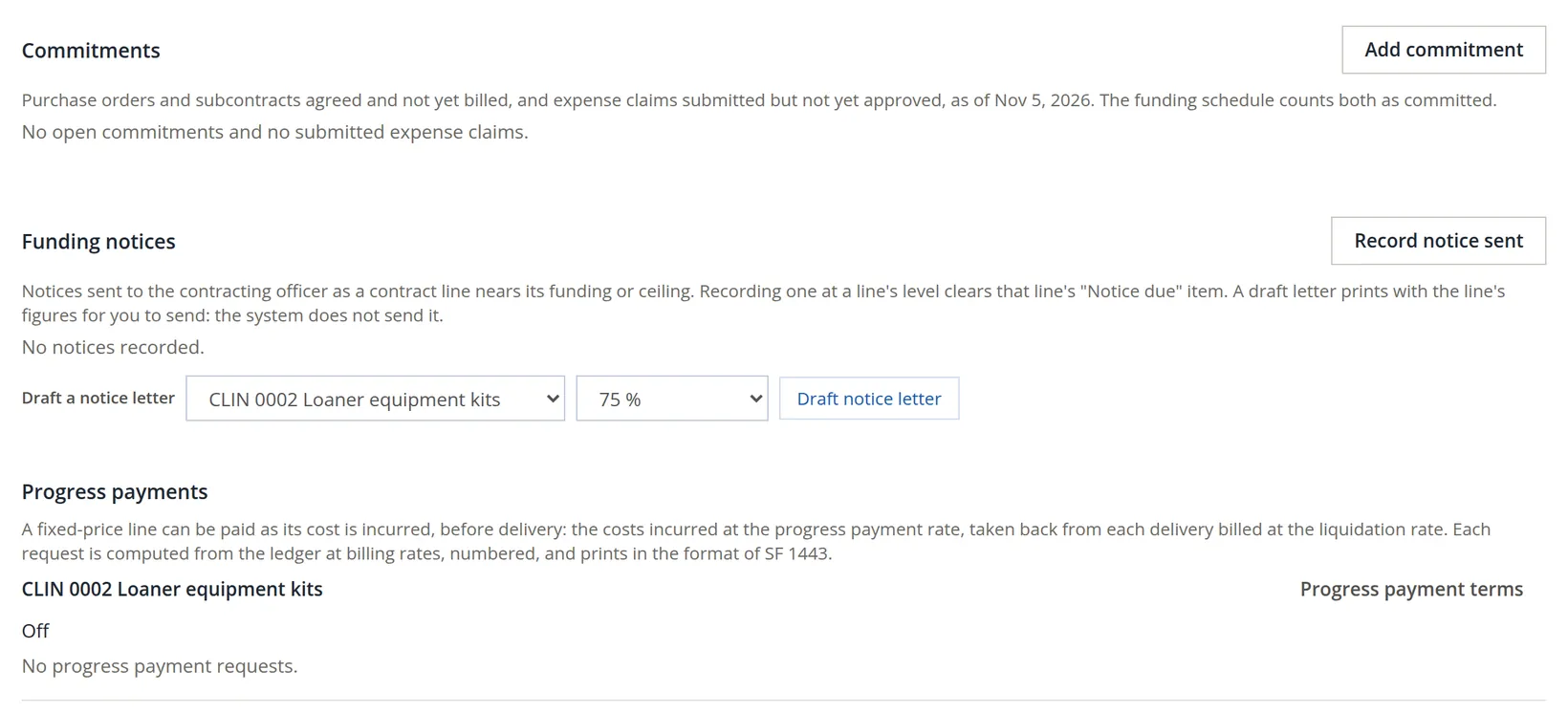
None of these cards changes the ledger by itself. They record what the contract requires and what you have done about it, and several of them feed the attention list: a notice that falls due, for example, appears under Needs your attention until you record it as sent. The clauses and percentages behind them come from the contract itself; read yours before relying on a default.14
Project setup: seven pages of company-wide settings
Projects → Project setup opens a strip of seven tabs. Each applies to every project in the books, and each needs the Project Settings right. You will not need all of them on the first day; this table says when you will.
| Tab | What it holds | When you need it |
|---|---|---|
| Cost elements | The account-to-element map of Section 2, its change log and the confirmation (Procedure F) | Before the first project's first month-end |
| Target rates | The indirect rates budgets are priced at, by fiscal year | When you build a budget (Chapter 7.2) |
| Warnings and thresholds | When a variance, an unpaid subcontract bill, a pay cap, an old receivable or old unbilled revenue is listed; the limits of Needs your attention | When the attention list is too quiet or too noisy |
| Billing and revenue | When a cost voucher takes a bill line; whether the status report may post month-end revenue entries, loss provisions and applied indirect cost | Cost-type contracts; month-end entries |
| Account groups | The accounts each kind of project may be charged to, with a warning or a refusal outside them | When charges to the wrong account must be stopped (Summit has none, so any account may be charged) |
| Cost of money | The Treasury cost-of-money rate by fiscal year, and whether statements show it | Federal incurred-cost claims |
| Direct costs and unallowables | Direct cost lines need a project (Refuse, Warn or Off), screening for likely unallowable costs, compensation above the cap, default unallowable accounts | Day one: decide Refuse or Warn (Summit: Warn) |
Status: pausing, completing, archiving
The three-dot Actions menu on a register row holds the status verbs: Pause (or Resume), Complete, Archive (or Restore) and Delete. Pause, Resume, Archive and Restore apply at once and offer an Undo; Complete asks first when anything is still open. Delete is offered only for a project nothing uses: on P-0001 it is greyed out with the reason, Used by 2 invoices, 3 bills, 8 tagged lines, 3 contract lines, and a link Archive instead.
The register shows active projects plus completed projects that still have open items, and the Open items chip counts those. Complete a job when the work is done. Archive it only when its invoices are paid and its bills are settled, so that nothing open hides behind the Archived tab.
Before the first month-end
- [x] The project's kind, customer, customer type, value, funded amount and period of performance match the award.
- [x] Each priced piece of work has its own contract line, with its dates and, once funded, its modifications.
- [x] Every modification is recorded on its line with the signed document, and the contract's funded amount matches the lines.
- [x] Checks of this run on the Overview shows no failed check.
- [x] Every direct cost line names its project and contract line; the Contract tab says No ledger line sits on CLIN 0001, and no attention item reports revenue or billings on CLIN 0001.
- [x] Cost ITD is not zero when the project has bills (Procedure F), the cost-element map is confirmed, and Direct cost lines need a project is set to Refuse or Warn.
- [x] Indirect rates exist, or you know why the statement says they do not.
Check your understanding
1. The Overview says The contract says 30,000.00 is funded but its lines record 36,000.00. What happened, and what fixes it?
Answer
A modification added 6,000.00 to a contract line, but the contract's own funded amount, which the strip uses first, was not raised. Edit the project and set the Funded amount to 36,000.00; the check then agrees.
2. Why is 0001 missing from the Contract line list on a bill, and what happens if you leave a direct-cost line on Pick a line?
Answer
Line 0001 has become a summary of the other lines: its funding is their sum, and nothing new may be charged to it. A direct-cost line with no contract line is refused: Line 1: pick the contract line.
3. Direct cost is $10,707.50 and the billing rate is 7.20%. What is Cost ITD, and how much of $36,000.00 funding is left?
Answer
10,707.50 × 7.20% = 770.94 of overhead; Cost ITD 11,478.44; funds left 36,000.00 − 11,478.44 = 24,521.56.
4. A vendor's bill has one line for a project and one for the store. How do you enter it?
Answer
Keep Default project for new lines on No project, pick the project (and its contract line) in the Project column of the project line only, and leave the store line on No project.
5. You hold a federal cost-plus contract and a line is close to 75% of its funding. Where do you prepare the notice to the contracting officer?
Answer
On the Contract tab, in the Funding notices card: draft the letter for that line at the 75% level, send it, then click Record notice sent.
6. A new project shows $8,460.00 of accounts payable and a Cost ITD of zero. What is the most likely cause, and where do you fix it?
Answer
The accounts on the bill are mapped to Indirect / not on projects; the Financials tab lists them as project lines on indirect accounts. Change their elements in Project setup → Cost elements, read the preview, save, and confirm the map (Procedure F).
Notes
- The register's own footnote: "% funded is the cost incurred (allowable cost at billing rates plus the fee earned on it) over funded projects only." ↑
- Phase applies to cost-plus lines: start-up, tooling or first-article cost on a Preproduction line is kept apart and not billed until you release it (FAR 31.205-25). The overtime tick records that the contracting officer approved an overtime premium on the line. ↑
- The app's own wording: "CLIN 0001 is the summary of the other lines, so nothing new is charged to it." A line with ledger lines charged to it cannot be deleted; its Edit dialog says it "is closed rather than deleted". ↑
- Since November 2026 the funding, ceiling and fixed fee of an existing contract line change only by modification. A new line still takes a funded amount in its first dialog; a line created that way shows its first funding as "Funding before modification history". ↑
- ACRN, the accounting classification reference number, is a short code, usually two characters (the box takes up to 8 letters or digits), that federal contracts use to say which appropriation pays for a line. A state or local award usually has none; the box is optional. ↑
- When the contract's Funded amount is filled in, the strip says "per the contract"; when it is empty, the strip shows the sum of the contract lines and says "sum of the contract lines". The check compares the two whenever both exist. ↑
- Time entry is offered to people who keep time in these books. For anyone else the menu says "Ask a manager to add you to the people who keep time in these books". Volume 12 covers timekeeping. ↑
- The picture was retaken after the bill was saved, by reopening it and clearing line 1's contract line, which is why its heading reads "Bill ASW-60388" and its button "Save changes". A new bill reads "Enter a bill" and refuses the same way. ↑
- A line flagged unallowable is shown apart from allowable cost and is never billed or claimed. Which costs are unallowable depends on your contract; for federal contracts see FAR Part 31. This is not legal advice. ↑
- The strip says "oldest -26 days" under AR open. The figure counts days past due, and the open invoices are not due for another 26 days, so the number is negative. Read it as "due in 26 days". ↑
- AP open counts the open part of each bill that belongs to the project: the whole bill when the project is named at the top and no line says otherwise, else the share of the bill's lines that name the project. Bill ASW-60214 is 8,460.00, all of it P-0001's. Bill ASW-60388 is 1,280.00 but only its 1,100.00 snowshoe line is this project's, so AP open is 8,460.00 + 1,100.00 = 9,560.00. The project's Bills (AP) view lists that bill as "this project's lines of 1,280.00". ↑
- For a contract line the order is: the line's own choice when it belongs to the project; else the contract line of its charge code (Timekeeping); else the project's whole-contract line 0001; else none, shown as "Project level". ↑
- Balance accounts are never a cost, but they can carry a role the project figures read: Billed receivable, Unbilled receivable, Customer deposits and deferred revenue and Retainage and withheld fee on asset accounts, Accrued contract losses on liability accounts. Summit's 1200 Accounts Receivable carries the suggested Billed receivable role, and no Summit account has the Unbilled receivable role. That role is needed before the status report can post a month-end unbilled revenue entry ("Map an unbilled receivables account in Settings > Projects > Cost elements first"); Chapter 7.3 shows where. ↑
- The cards follow common federal practice: cost vouchers under FAR 52.216-7, the Limitation of Funds and Limitation of Cost clauses (FAR 52.232-22 and 52.232-20) for funding notices, progress payments under FAR 52.232-16 requested on Standard Form 1443, and contract closeout under FAR 4.804. The levels and day counts the app offers are defaults; your contract's clauses decide. This is not legal advice. ↑