
Chapter 7.3
Project Reports
Five views of the same project ledger: the register of every project, the Project Status Report of one, the Projects Summary that ties every project back to the income statement, the Project Transactions listing, and the funding and billing summary you can hand to the customer.
When you finish this chapter you will be able to:
- Choose the right project report for the question you are asked.
- Run the Project Status Report and read its cost, budget, revenue, billing and funding blocks.
- Explain pre-contract costs, earned revenue, unbilled amounts and contract assets.
- Open the detail behind any figure and prove that it agrees.
- Reconcile all projects to the income statement with the Projects Summary.
- List a project's ledger lines and prepare the customer's copy.
Which report answers which question
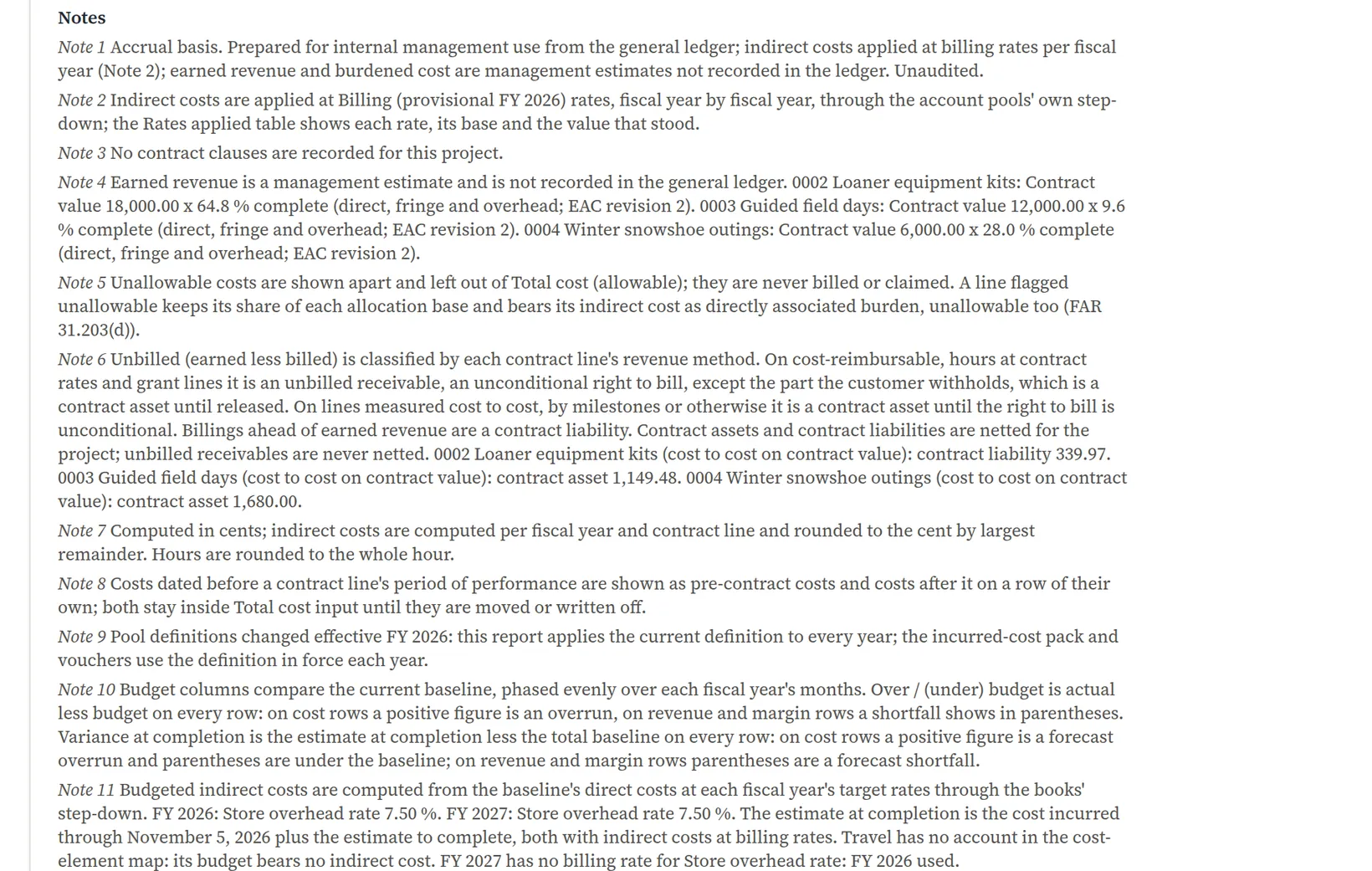
| Question | Report | Where |
|---|---|---|
| How is every job doing at a glance? | The Projects register | Projects → Projects |
| Everything about one job: cost, budget, revenue, billing, funding | Project Status Report | Projects → Project Status Report, or the project's Financials tab |
| Do all jobs together tie to the income statement? | Projects Summary | Projects → Projects Summary |
| Which ledger lines make up a job? | Project Transactions | Projects → Project Transactions |
| What can I show the customer? | Project Funding and Billing Summary | Projects → Project Funding and Billing Summary |
Every project report reads the ledger with the same rule (Chapter 7.1): a line counts on a project if the line itself names it, otherwise if its document names it at the top, never on two at once. Voided transactions, entries not yet approved and closing entries count nothing. Indirect cost is applied at the rate set you choose, Billing unless you pick Actual, Provisional or Target.
The register
The project list is a report in its own right. Each row shows a project's figures as of the day in As of, at the rates in Rates; click Apply after changing either. Customer and Program narrow the rows: tick the projects that belong together and Save as program... keeps them as a named program for next time. Columns hides or shows columns, Round to whole dollars drops the cents, and the keyboard works too: Up and Down move, Enter opens, S opens the Financials tab, T the Transactions tab, / searches.
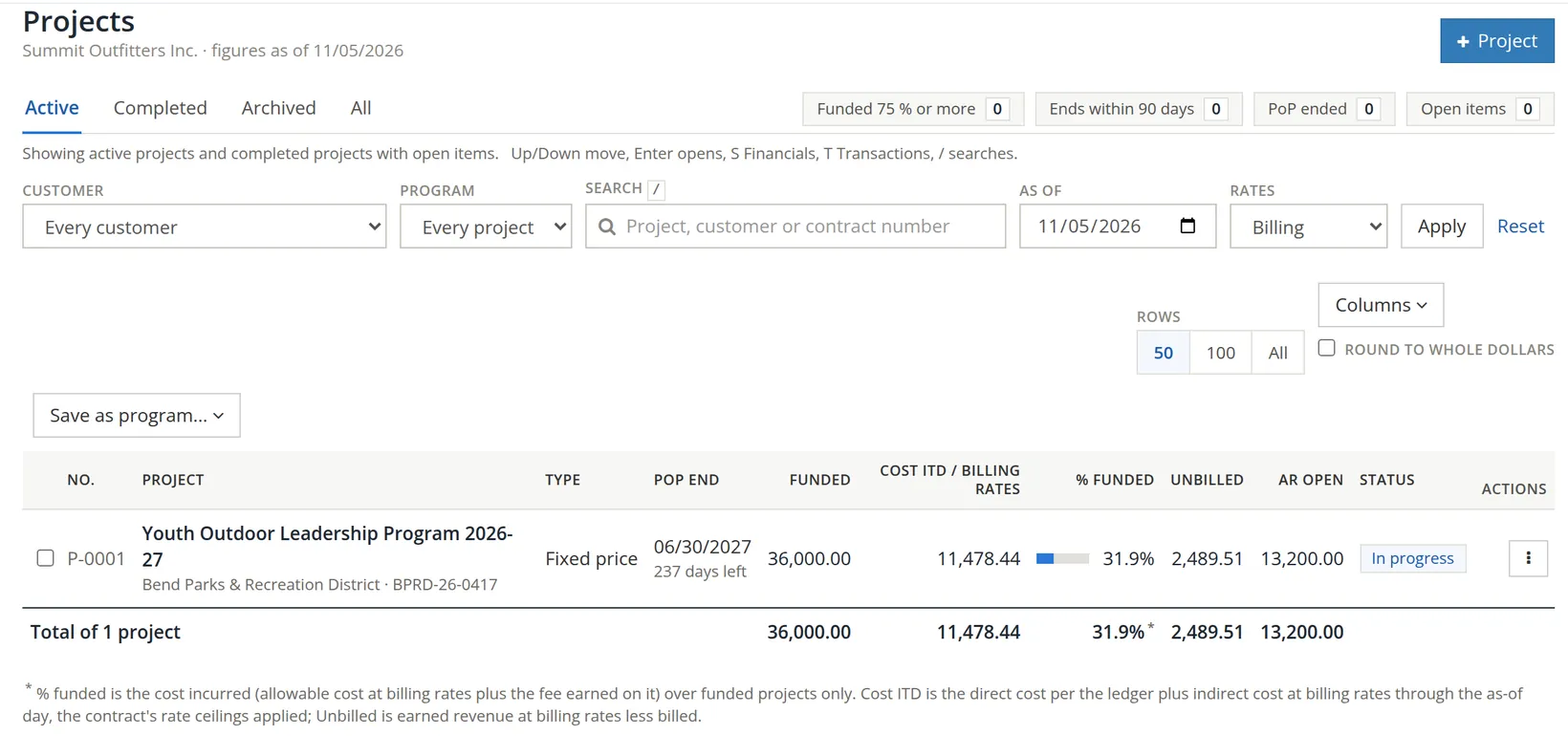
Run the Project Status Report
- 1
Choose the project and the day
Projects → Project Status Report. Choose the project. As of starts at the last month-end (10/31/2026 here); Summit's contract began November 1, so change it to 11/05/2026, the day Chapter 7.2 left off.
- 2
Period, rates and layout
Period sets the first column: Month, Quarter, Fiscal year or Custom. Rates picks the rate set. Layout is Standard (period, fiscal year to date, inception to date), By fiscal year, or Monthly (working view), a column per month for working on screen (a portrait PDF prints only the standard columns). Click Run report.
The same statement appears on the project page's Financials tab, where it follows the context bar instead. The statement is wider than the page: its row captions stay put while the amounts scroll sideways, so Total budget, Hours to date and % of cost sit to the right of the three columns you first see.
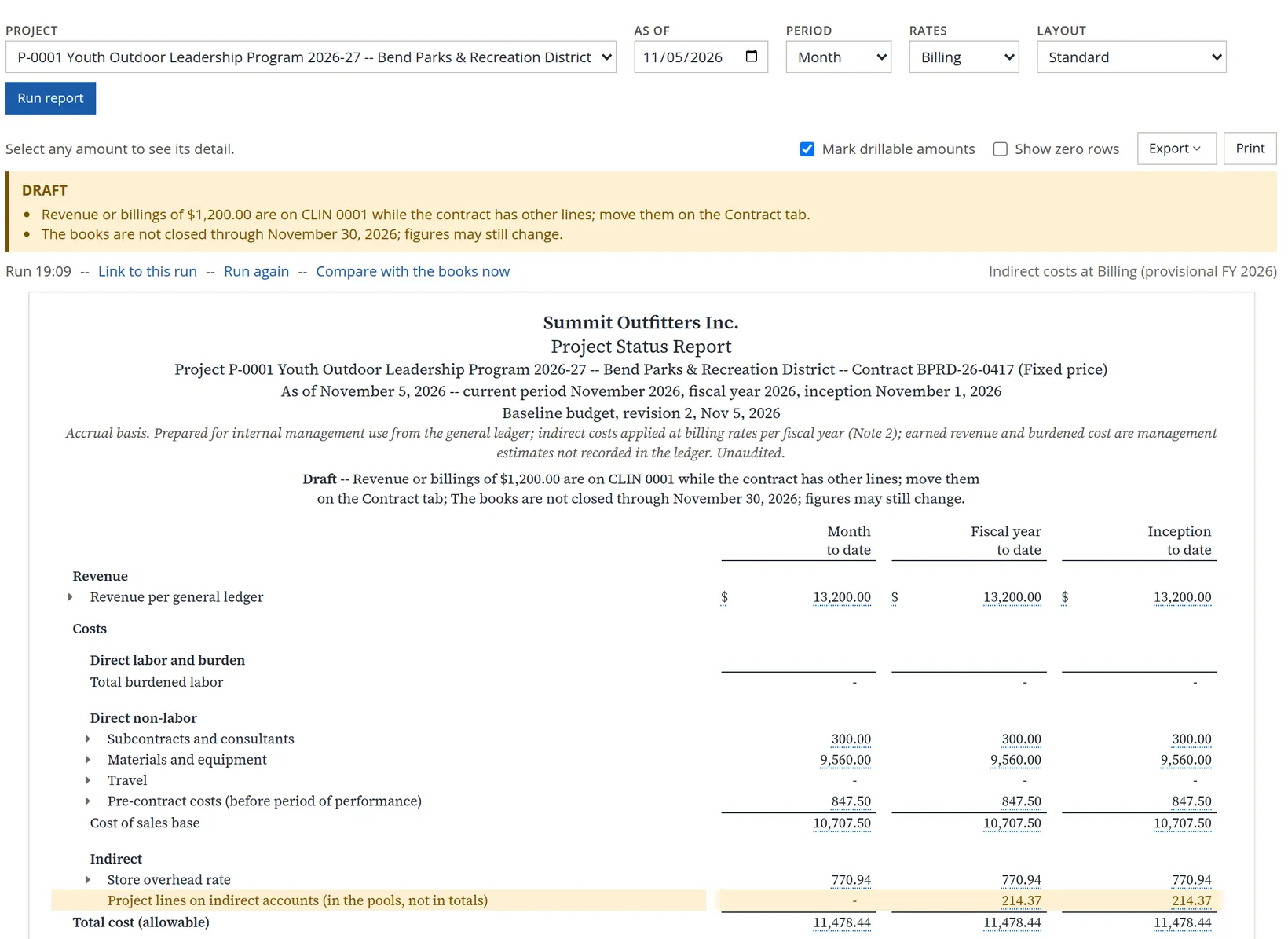
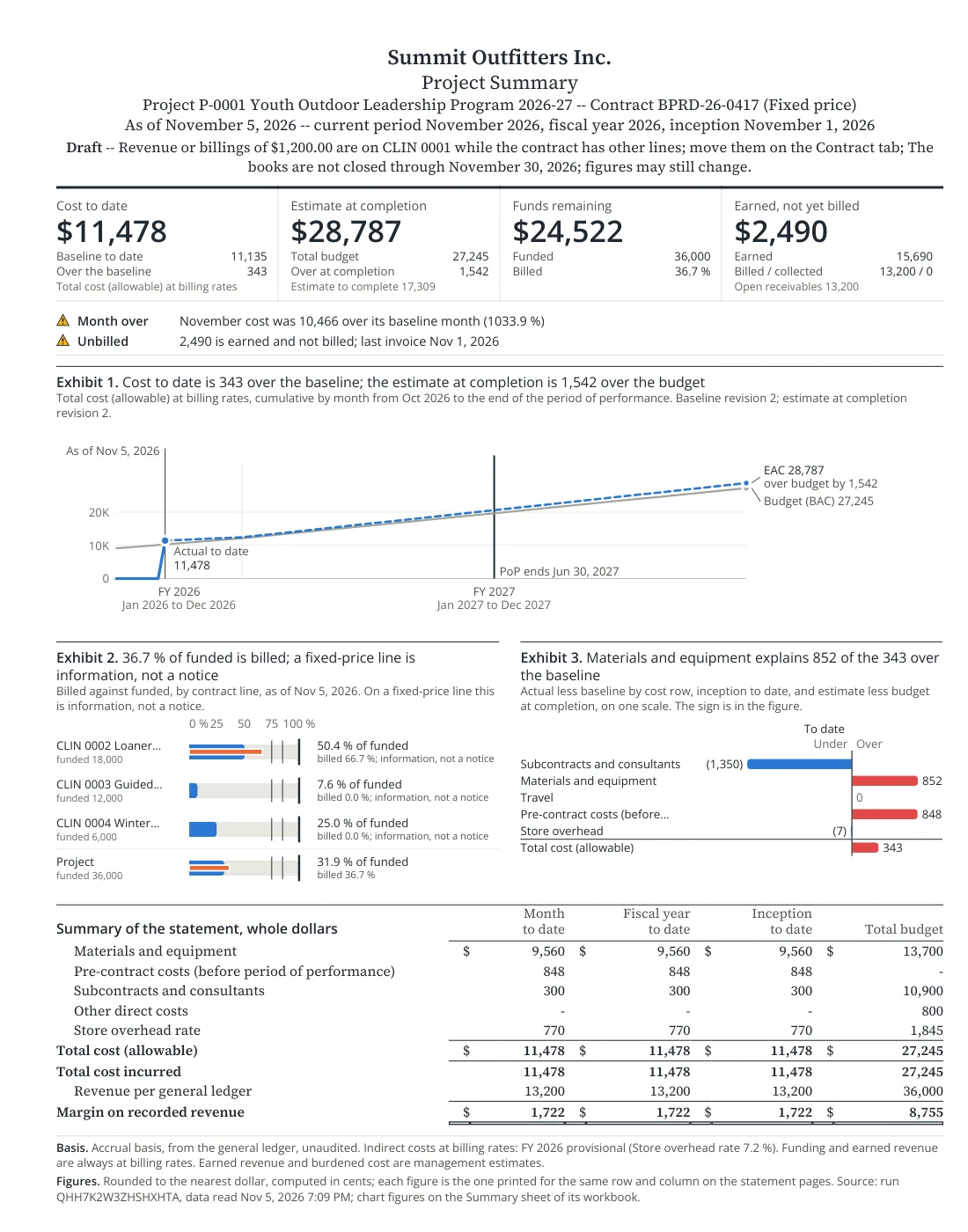
Reading the cost block. Revenue per general ledger is the two invoices: 13,200.00. Below it the costs are grouped as the cost-element map says: subcontracts 300.00, materials 9,560.00, a row called Pre-contract costs (before period of performance) of 847.50, the cost of sales base 10,707.50, the Store overhead rate 770.94, and Total cost (allowable) 11,478.44. Margin on recorded revenue is 13,200.00 − 11,478.44 = 1,721.56. Scrolled to the right, the % of cost column puts each row over total cost: 13,200.00 ÷ 11,478.44 = 115.0%.
Where did the guide costs go? Only line 0004's scouting day, 300.00, sits on the Subcontracts row. The 600.00 scouting expense of November 1 and the 247.50 guide check of November 5 (check 2254, Chapter 4.5) were charged to line 0003, whose period of performance starts March 1, 2027. A cost dated before its line's period of performance is shown on its own row, still inside total cost, until it is moved or written off.1 The report has caught something real: 847.50 of guide work was done four months before the field-day work the district agreed to pay for. Summit's manager should either get the district's written agreement that it is a cost of line 0003, or treat it as Summit's own cost.
The shaded row. One 214.37 journal line on 6700 Repairs & Maintenance, dated October 9, names the project. The cost-element map puts that account in Indirect / not on projects: it is never a direct cost of a job (Chapter 7.1, Procedure F). Summit's pools do not hold it either, so nothing of it reaches P-0001 through a rate. The statement shows the line for information and leaves it out of every total, so a reader sees it without its being counted as project cost. If such a line is really a cost of the job, the account belongs on a direct element; if not, the tag on the journal line is simply noise.
The Draft notice lists its reasons. Here there are two: November is not closed, and $1,200.00 of revenue sits on line 0001 while the contract has other lines (Chapter 7.1). A missing rate, an unconfirmed map or entries waiting for approval are other reasons. Do not send a Draft statement to anyone outside the company.
The budget comparison
Because P-0001 has a current baseline and EAC (Chapter 7.2), the statement adds a Budget comparison. Its columns are inception to date, the budget to the same day and over / (under) budget; scrolled to the right come the EAC, the ETC and the variance at completion.
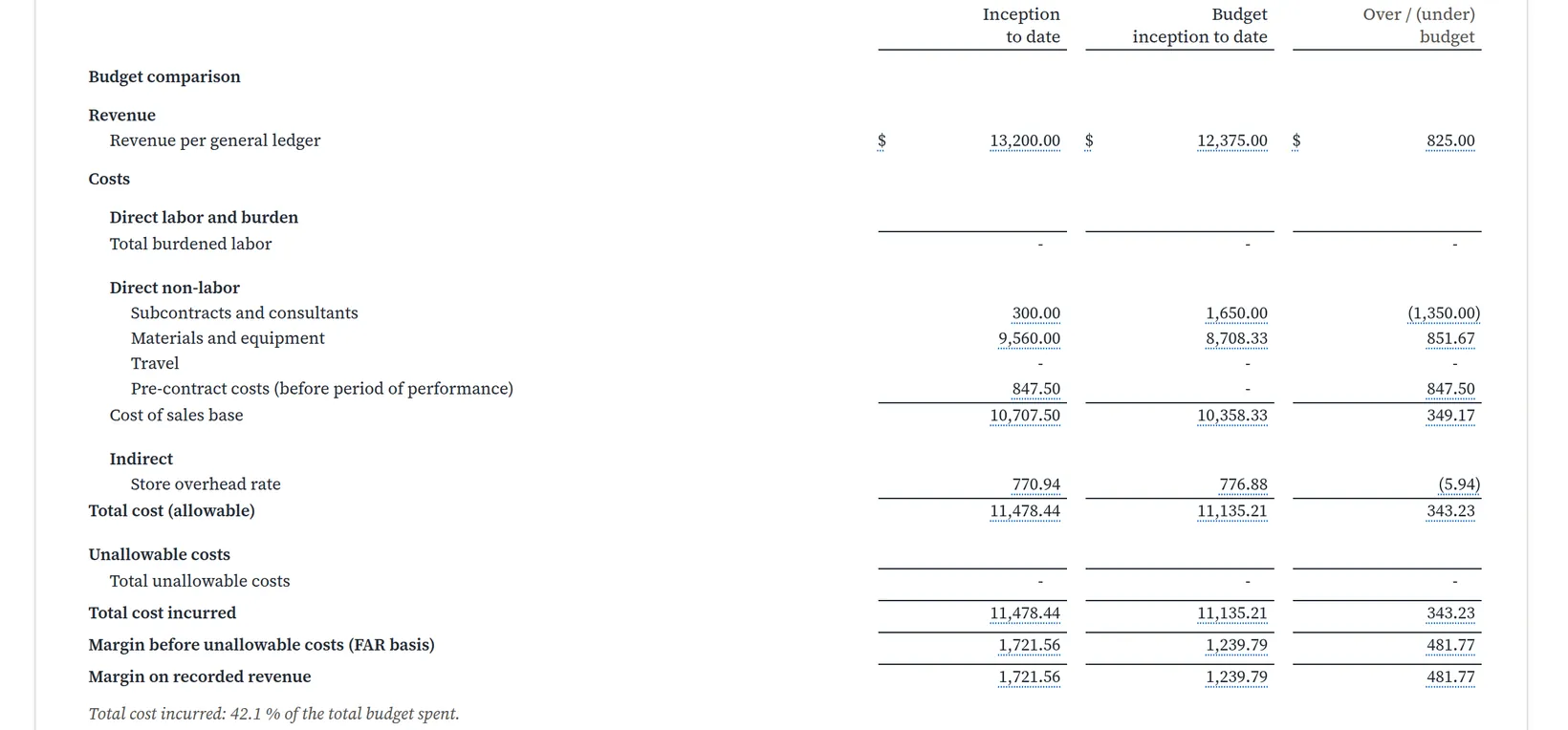
Check the arithmetic. Baseline revision 2's FY 2026 cost of 12,147.50 is spread evenly over the year, so by November eleven twelfths are "due": 12,147.50 × 11 ÷ 12 = 11,135.21. Actual 11,478.44 − 11,135.21 = 343.23 over. Revenue works the same way: 13,500.00 × 11 ÷ 12 = 12,375.00 budgeted, 825.00 ahead. As Chapter 7.2 warned, an even spread over a year the job did not start in makes the to-date columns rough. The columns to the right do not depend on it: EAC 28,787.24, ETC 17,308.80, and a variance at completion of 1,542.24, the overrun Chapter 7.2 explained.
One more figure there needs a word. The EAC column's margin, 8,412.76, is 1,200.00 higher than the estimated margin at completion of 7,212.76 in the revenue block below. The first uses revenue per the ledger, which includes the 1,200.00 invoice on line 0001; the second uses the lines' transaction prices. The statement says so in a line under the revenue block.
Earned revenue, billing and the unbilled entry
Revenue in the ledger is what was invoiced. Revenue earned is what the work done so far entitles Summit to, under each line's revenue method. Since Chapter 7.2 all three lines earn by cost to cost: line 0002 is 64.8% complete, so 18,000.00 × 64.8%; line 0003 is 9.6% complete, so 12,000.00 × 9.6%; line 0004 is 28.0% complete, so 6,000.00 × 28.0% = 1,680.00. With the 1,200.00 on line 0001, which earns what is billed, they have earned 15,689.51.
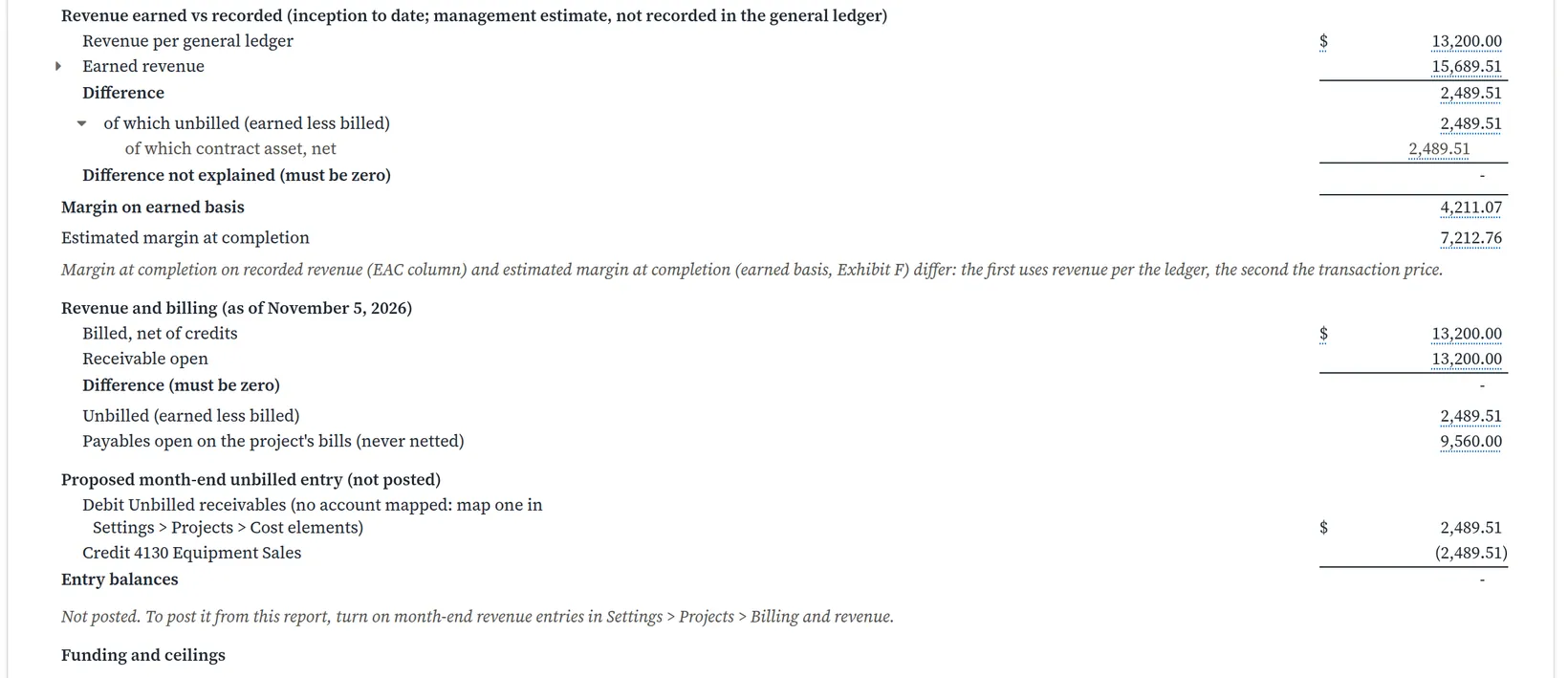
Contract asset or contract liability? Per line, earned less billed is either an asset (work done, not yet billed) or a liability (billed ahead of the work). Note 6 gives the split: line 0002 billed 12,000.00, more than it has earned, a contract liability of 339.97; line 0003 has earned 1,149.48 and line 0004 1,680.00 without billing, contract assets. Netted for the project: 1,149.48 + 1,680.00 − 339.97 = 2,489.51.3
Margin on earned basis is earned less cost: 15,689.51 − 11,478.44 = 4,211.07. It is the better measure of how the job is going, because invoices follow deliveries, not effort.
The proposed entry. To put earned revenue into the books, the report proposes a month-end entry: debit Unbilled receivables 2,489.51, credit 4130 Equipment Sales 2,489.51. It is not posted, for two reasons the report names. Summit has no account with the Unbilled receivable role; an accountant would add one and give it that role among the balance accounts of the cost-element map (Chapter 7.1, Procedure F). And posting from the report is off until someone turns on month-end revenue entries in Project setup → Billing and revenue. Until then the entry can be made by hand as a journal entry (Chapter 5.2). Summit has done neither in this chapter.
Funding and ceilings follows, line by line: for 0002, funded 18,000.00, cost incurred 9,069.12 (8,460.00 + 7.20% overhead), billed 12,000.00, funds remaining 18,000.00 − 9,069.12 = 8,930.88. For 0004, 6,000.00 − 1,500.80 = 4,499.20. For the project, 36,000.00 − 11,478.44 = 24,521.56.
Open the detail behind a figure
- 1
Click the amount
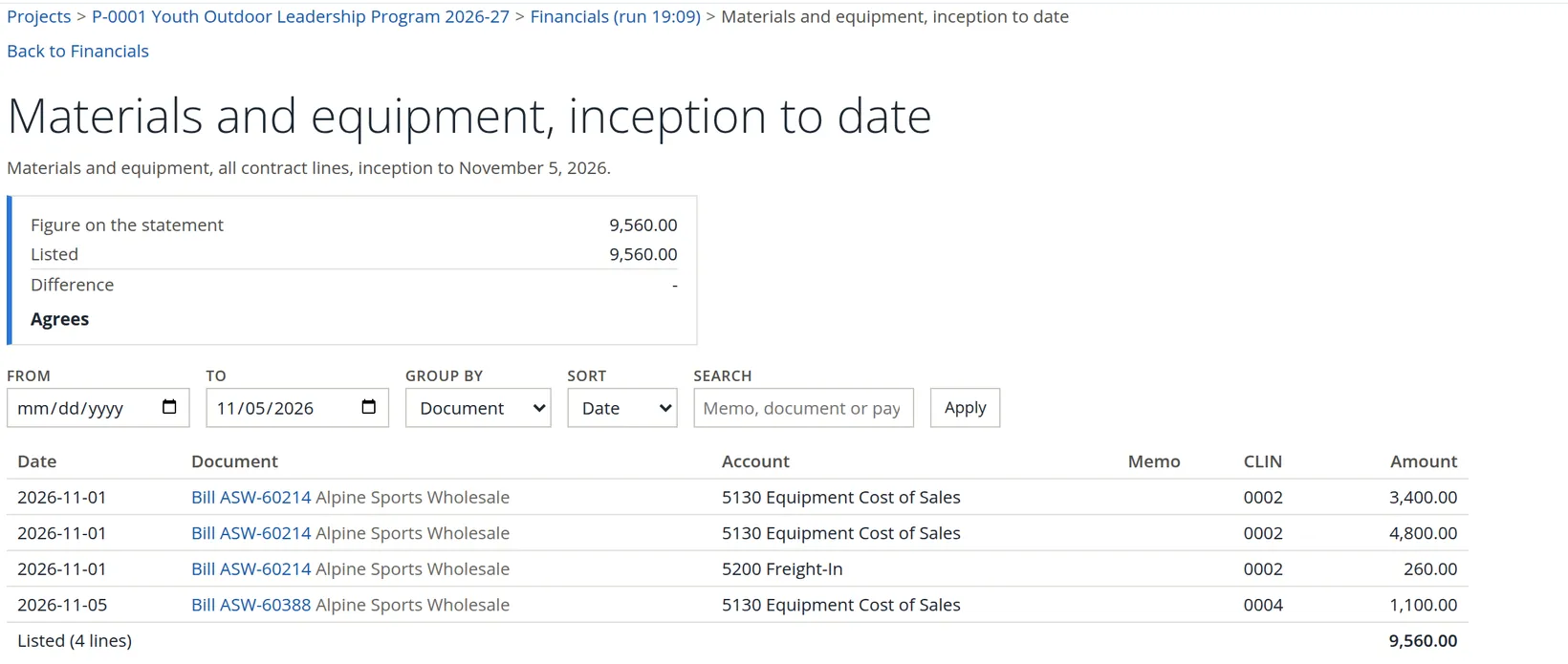
With Mark drillable amounts on, every figure you can open is underlined. Click 9,560.00 in the Materials and equipment row, inception to date.
- 2
Group the lines and check the tie-out
The detail page compares the figure stored in the run with the lines it finds in the books now, and says Agrees when they match. If someone has changed a document since the run, it shows the difference. Set Group by to Document (or month, charge code, CLIN, account or person) and click Apply.
Every statement is kept as a run with a code. Link to this run gives a link that reopens exactly those figures, even after the books change. Compare with the books now shows what has moved since. Use it before a meeting where last week's report will be quoted.
Export: PDF, summary, Excel and Google Sheet
Export offers PDF (the whole statement), Project summary (PDF), Excel, Google Sheet and, under For the customer, Funding and billing summary...; Print sits beside it. Each export is made from the stored run, so it shows exactly what was on screen. Summit's PDF came out at eight pages. Its first page is a one-page summary for a manager in a hurry.
The Projects Summary
One line per project, plus a reconciliation that proves the project figures come from the same books as the income statement. Projects → Projects Summary. The report opens on the last month-end with Period on Fiscal year; set As of to 11/05/2026, choose Month in Period, leave Program on Every project (or choose a saved program), and Run report. The Rates choice moves only the cost column. Unbilled, AR open, the margin and the funding measure are always at billing rates. Unlike the status statement, the summary fits a window 1,440 pixels wide: its column headings wrap so that all seven columns show at once, Funded, Cost ITD and Billed, then Unbilled, AR open, the margin and the period. On a narrower window it scrolls sideways, and its block headings stay in sight at the left edge.
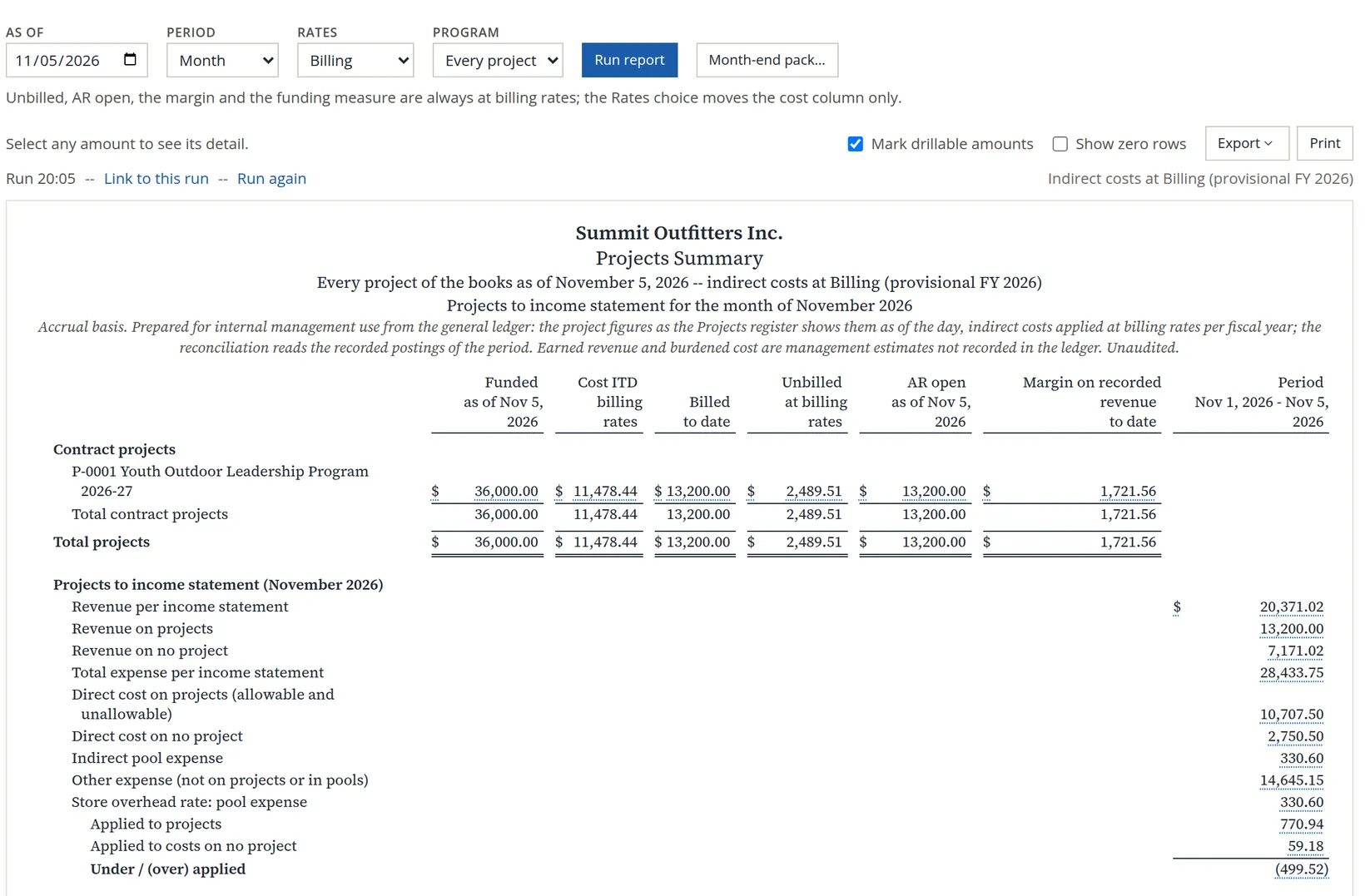
Reading the reconciliation. November's income statement so far shows revenue of 20,371.02: 13,200.00 on projects and 7,171.02 on no project. Expense is 28,433.75: 10,707.50 of direct cost on P-0001, 2,750.50 of direct cost on no project, 330.60 of indirect pool expense and 14,645.15 of other expense that is neither. The Store overhead rate applied 770.94 to the project and 59.18 to cost-of-sales lines on no project, 830.12 in all, while its pool had cost only 330.60 by the fifth of the month: 330.60 − 830.12 = (499.52), over-applied. At actual rates this line is always zero. At billing rates it shows how far the billing rate is from the month's reality, and it shrinks as the month's rent and utilities post.
The month-end pack. Month-end pack... opens a page that gathers the month's saved runs into one package: the Projects Summary first, then each project's statement from its run of record, then, if you tick it, the customer statements. Build PDF makes one PDF; Build workbooks (zip) makes a zip of Excel workbooks. It is for the end of a closed month, so Summit will use it in December, not today.
Project Transactions
A filtered, footed list of a project's ledger lines, made to be exported. Projects → Project Transactions; choose the project, then filter and click Apply. Summit's auditor asked for every direct cost, so the element is set to All direct cost. The lines come grouped by element, each group with its subtotal.
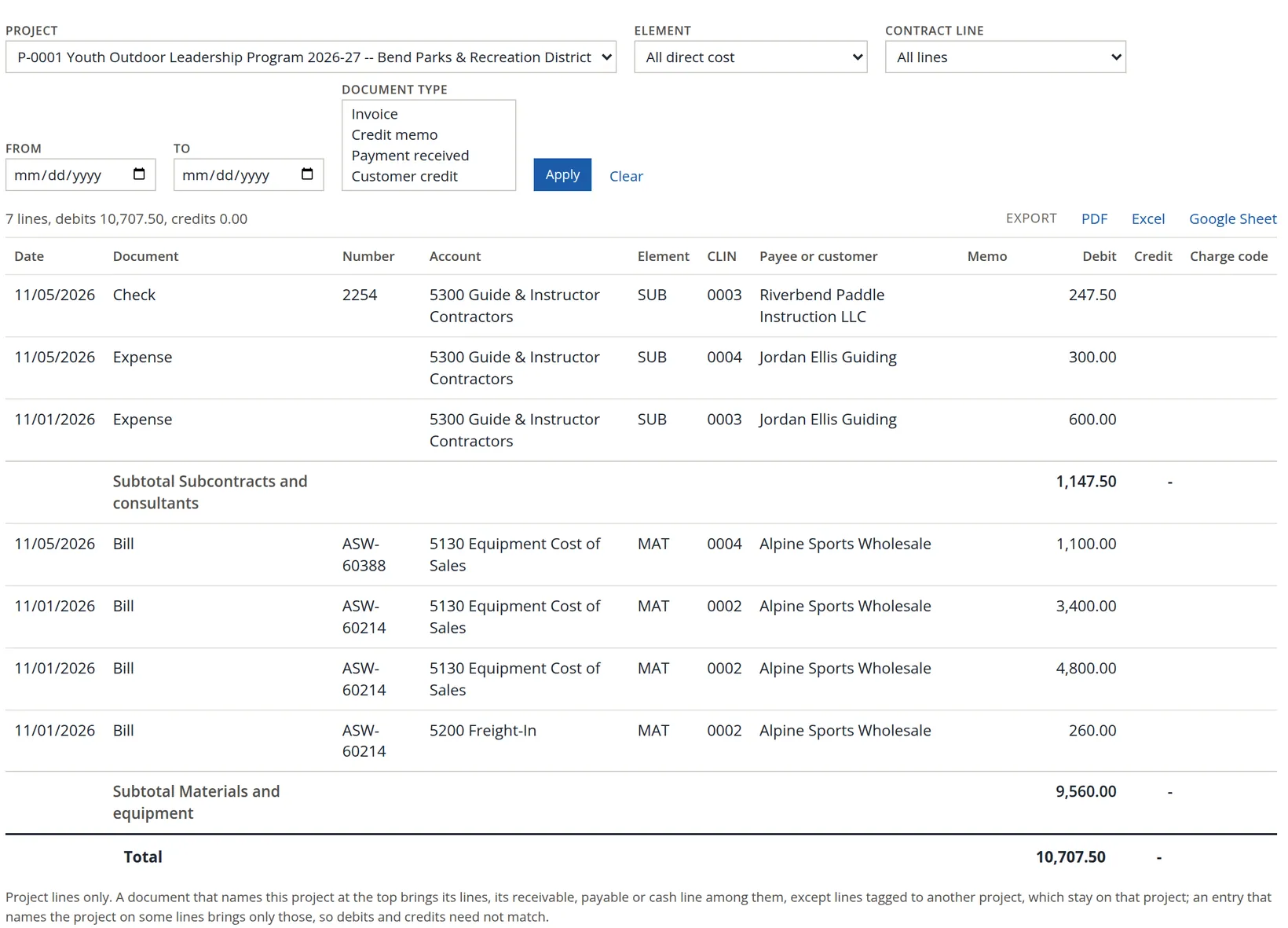
The 10,707.50 is the cost of sales base of the status report, line for line: the 847.50 of pre-contract guide costs is still subcontract cost here, because this list groups by element, not by period of performance. Leave the element on All elements to add the revenue, receivable and payable lines and the memo line on the overhead account, each element with its own subtotal. The element list also offers the balance elements (Billed, Accounts receivable, Unbilled, Contract liability, Labor clearing) and Indirect (not on projects); the contract-line list offers Project level (no contract line).
Compared with the project page's Transactions tab (Chapter 7.1), this report adds the document number and charge code columns and is built for export. Both use the same lines.
The customer's copy
The district's program officer asks where the money stands. The Project Status Report shows Summit's costs and margins, which a customer should not see. The Project Funding and Billing Summary shows only what the customer already knows: the contract, funding, billings, payments and open invoices.
- 1
Preview it
Projects → Project Funding and Billing Summary. Choose the project, set As of to 11/05/2026 and click Preview.
- 2
Read every line, then download and send
Read it through as the customer would, then Download PDF or Download Excel and send it with your covering note.
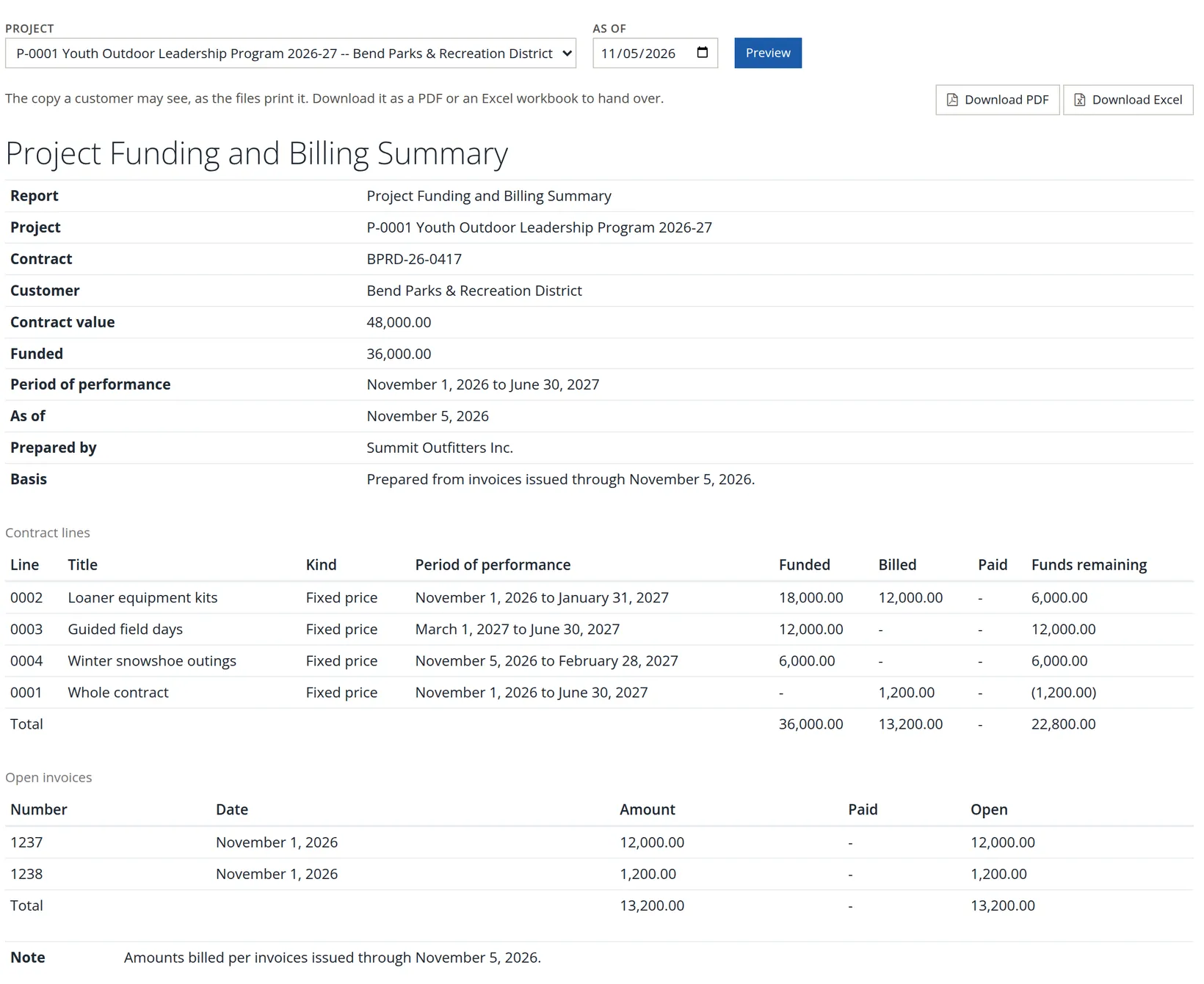
Summit's reading caught one thing before the copy went out. The last contract line, 0001 Whole contract, shows 1,200.00 billed against no funding, and its funds remaining are negative. That 1,200.00 is invoice 1238, made out to Cascade Mountain School, not to the district, yet it names P-0001. This is the same invoice the Draft notice and the Overview point at (Chapter 7.1). Before sending, open invoice 1238 and correct its project; the copy then lists only the district's invoice 1237, and the 0001 row goes away.
Note the difference in "funds remaining". The customer's copy measures it as funded less billed (22,800.00 left on the project as a whole, today), because that is all the customer can see. The status report measures it as funded less cost incurred (24,521.56), which is what Summit manages by.
Month-end project review
- [x] The register has been read at month-end with the right as-of day; the watch chips are zero or understood.
- [x] Each project's status report has no Draft reasons other than the open month.
- [x] Pre-contract costs are agreed with the customer or moved off the contract.
- [x] Earned and billed are compared; any unbilled entry has been decided.
- [x] The Projects Summary's reconciliation was read, and over- or under-applied overhead is understood.
- [x] The month-end pack is built from the month's saved runs once the month is closed.
- [x] The customer's copy, not the status report, is what goes to the customer, and every invoice on it is that customer's.
Check your understanding
1. Why does 847.50 of guide cost appear as "pre-contract costs" and not under subcontracts?
Answer
It was dated November 1 and November 5, 2026, before line 0003's period of performance begins on March 1, 2027.
2. Line 0002 earned less than it billed, while lines 0003 and 0004 earned 1,149.48 and 1,680.00 without billing. What does the project show?
Answer
A contract liability of 339.97 on 0002 and contract assets of 1,149.48 and 1,680.00, netted to a contract asset of 2,489.51.
3. The baseline's FY 2026 cost is 12,147.50. What is the budget to date in November, and why might it mislead?
Answer
12,147.50 × 11/12 = 11,135.21. The year is spread evenly over twelve months though the job began in November.
4. Which report do you send to the customer, and what do you check first?
Answer
The Project Funding and Billing Summary. It shows funding, billing and payments only; the status report shows the company's costs and margins. Check that every open invoice on it belongs to that customer.
5. The Projects Summary shows under / (over) applied overhead of (499.52) on November 5. Is something wrong?
Answer
No. At billing rates the pools have applied 830.12 while only 330.60 of the month's overhead has posted; the gap shrinks as the month's overhead bills post, and at actual rates it is zero.
Notes
- The statement's Note 8: "Costs dated before a contract line's period of performance are shown as pre-contract costs and costs after it on a row of their own; both stay inside Total cost input until they are moved or written off." Whether pre-contract costs are recoverable depends on the contract; for government work see FAR 31.205-32. This is not legal advice. ↑
- Payables open is 9,560.00: the unpaid bill ASW-60214, 8,460.00, and the project's share of the unpaid bill ASW-60388. That bill names the project only on its 1,100.00 snowshoe line, and a bill that names the project on some lines counts only those lines' share: 8,460.00 + 1,100.00 = 9,560.00. ↑
- The statement's Note 6 explains the classification: on lines measured cost to cost, by milestones or otherwise, unbilled is a contract asset until the right to bill is unconditional; billings ahead of earned revenue are a contract liability; contract assets and liabilities are netted for the project, unbilled receivables never. The terms follow ASC 606. Your accountant decides what is recorded; this is not accounting advice. ↑