
Chapter 7.2
Project Budgets and Estimates at Completion
A baseline says what the job was supposed to cost. An estimate at completion says what it will cost now that you know more. This chapter sets target rates, reads the baseline entered by contract line and fiscal year, revises it for a line the customer added, refreshes the estimate at completion from the actuals, and fixes a setting that kept the new line out of the margin at completion.
When you finish this chapter you will be able to:
- Explain the difference between a baseline and an estimate at completion (EAC).
- Set target rates, and say why a budget's overhead uses them.
- Enter, save and make current a budget revision for each contract line, and revise it when the scope changes.
- Build an EAC from actual cost to date plus an estimate to complete.
- Read the over-budget warnings, including one that a fiscal-year budget makes misleading.
- Set a fixed-price line's terms so that the margin at completion includes it.
Two versions of the plan
A project budget in BizBooks360 has two versions. Each is a numbered list of revisions; at any time a version has at most one draft and exactly one current revision once you have made one current.
| Version | Question it answers | When it changes |
|---|---|---|
| Baseline | What did we plan to earn and spend? | Rarely: when the customer changes the scope or funding |
| Estimate at completion (EAC) | What will the whole job cost by the time it is finished? | Often: every month or whenever prices or plans move |
Comparing the two tells you whether a job is drifting, and comparing the EAC with the price tells you what margin is left. The arithmetic is simple:
EAC = cost incurred to date (actual) + ETC, the estimate to complete
Estimated margin at completion = contract price − EAC
Both versions are entered by contract line and by fiscal year, one row per cost element (direct labor, subcontracts, materials, travel, other direct costs and the two unallowable rows) plus revenue. You never type overhead. BizBooks360 computes it from target rates.
Set the target rates
A budget's overhead is planned at the rate you expect, not at whatever this month's books happen to measure. That expected rate is the target rate. Summit's store overhead runs about 7.2% of cost of sales this year; management chose to plan at 7.50% for both years of the contract, to leave a margin of safety.
- 1
Open Target rates
Projects → Project setup, then the Target rates tab, the second of seven (Chapter 7.1, Section 4). One row per indirect rate in the books' step-down, one column per fiscal year. Earlier and Later move the five-year window.
- 2
Type the percents and save
Enter 7.50 for FY 2026 and FY 2027 and click Save. Summit did this on November 2, before its first budget. Leave the other years blank. A blank cell uses that year's billing rate, and a year after the last one set uses the latest earlier year, so the budget is never left without a rate.
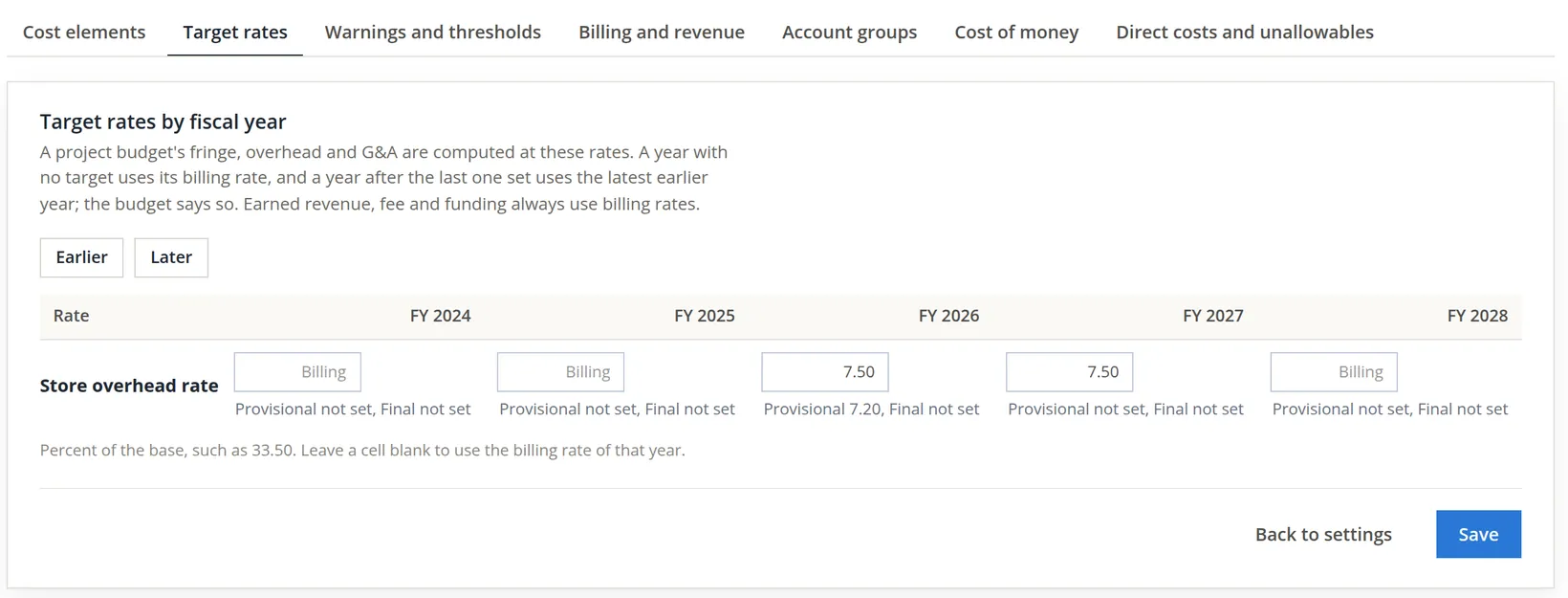
Target rates are used for a budget's burden only. Earned revenue, fee and funding are always measured at billing rates. That is why, later in this chapter, the same EAC shows slightly different totals on the budget tab and on the reports.
Enter the baseline, and revise it when the scope changes
Summit priced the award like this. Line 0002: 60 kits, 40 delivered in November (FY 2026) and 20 in January (FY 2027), at a planned cost of $210.00 a kit, so materials of 40 × 210 = 8,400.00 and 20 × 210 = 4,200.00. Line 0003: $600.00 of scouting in FY 2026, then eight guided days at $800.00 = 6,400.00 and $800.00 of van travel in FY 2027. Revenue follows the deliveries.
On November 2 those figures became baseline revision 1. On a project with no baseline the Project budget tab shows only a Start a draft button and the words This project has no baseline budget yet; one click opens draft revision 1, and the cells are filled in line by line exactly as steps 1 to 4 below show for line 0004. Revision 1 was made current with the note Baseline as awarded: 60 kits and eight field days.
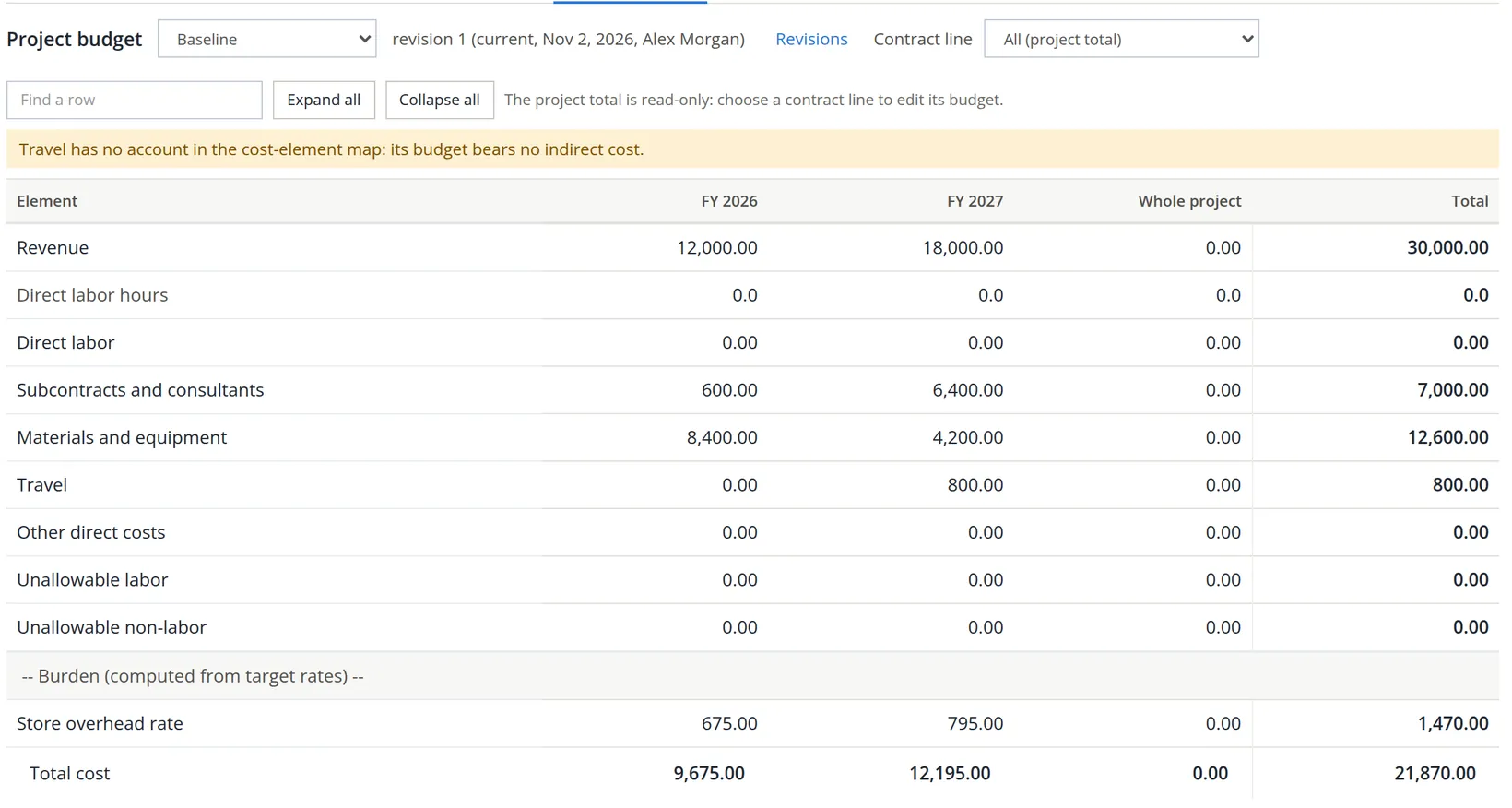
Reading the project total. Revenue is 12,000.00 + 18,000.00 = 30,000.00, the full funded amount of the two lines. Direct cost is 7,000.00 + 12,600.00 + 800.00 = 20,400.00. But the overhead is not 7.50% of 20,400.00 = 1,530.00. It is 1,470.00. A yellow note says why: Travel has no account in the cost-element map: its budget bears no indirect cost.
The overhead follows the books' own pools. Summit's Cost of sales base pool holds Equipment Cost of Sales, Freight-In and Guide & Instructor Contractors, so materials and subcontracts carry overhead and travel does not: (8,400.00 + 600.00) × 7.50% = 675.00 in FY 2026 and (4,200.00 + 6,400.00) × 7.50% = 795.00 in FY 2027, together 1,470.00. That matches how Summit's actual overhead is measured, so Summit leaves it. A company that wants travel burdened maps a travel account to the Travel element (Chapter 7.1, Procedure F) and puts it in the base pool. The planned margin of revision 1 was 30,000.00 − 21,870.00 = 8,130.00.
Why revise? A baseline changes rarely, but a change of scope is exactly such a time. On November 5 modification P00001 added line 0004, four winter snowshoe outings at $1,500.00 a day (Chapter 7.1, Procedures B and C). Revision 1 knows nothing about it, so every comparison with the baseline would treat the outings' cost as an overrun. Summit priced the new line this way: 20 pairs of youth snowshoes for 1,100.00, bought in November; one day of route scouting at 300.00 and one outing in December at 900.00, so 1,200.00 of subcontracts in FY 2026; three outings in January and February at 900.00 = 2,700.00 in FY 2027. Revenue: one outing, 1,500.00, in FY 2026 and three, 4,500.00, in FY 2027.
- 1
Choose the contract line
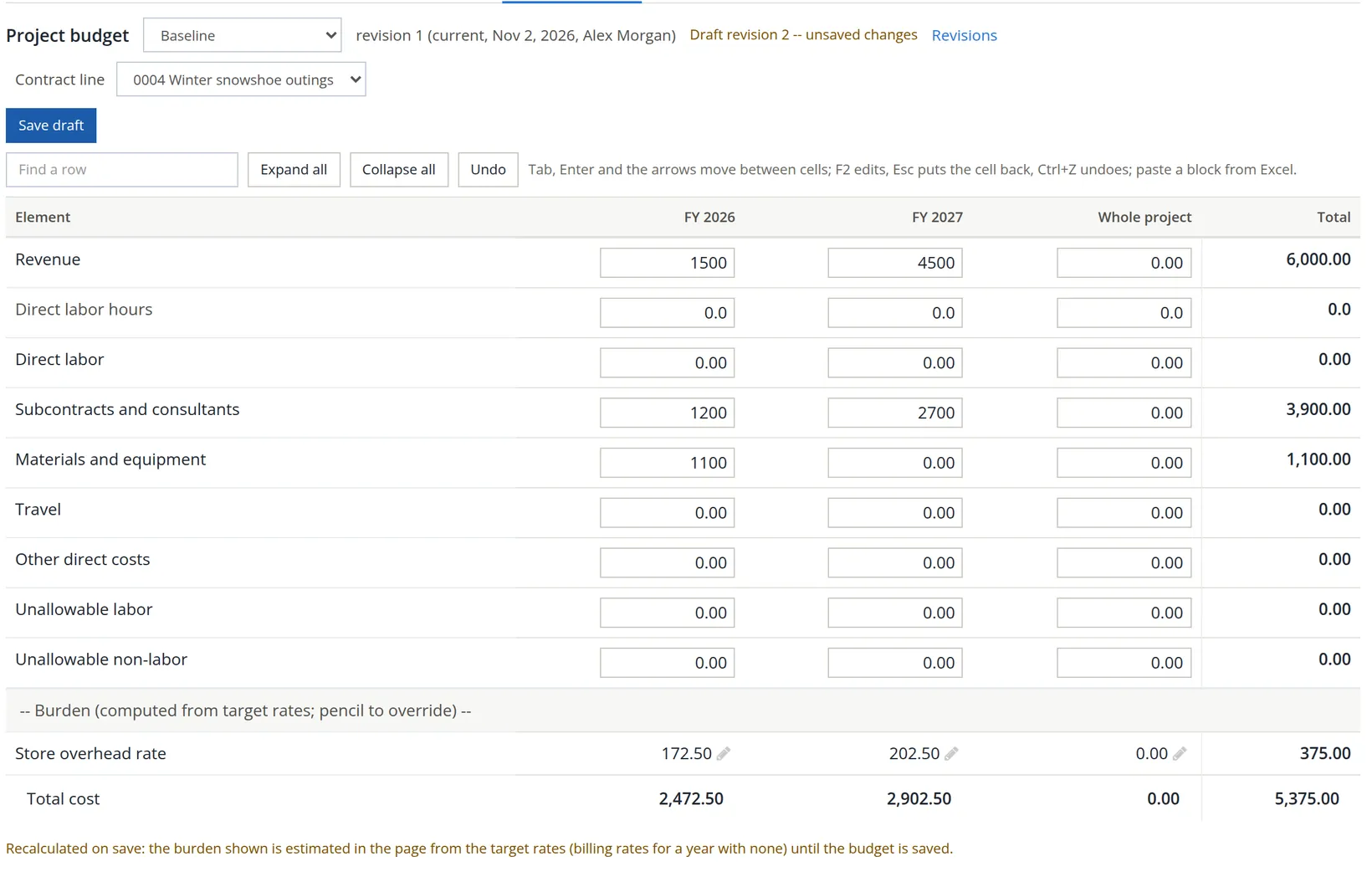
On the project page, open the Project budget tab with Version on Baseline. In Contract line choose 0004 Winter snowshoe outings; the cells become inputs and a Save draft button appears. Typing on top of the current revision does not change it: the first save writes a new draft, revision 2, and revision 1 stays current until you replace it.
- 2
Type the figures
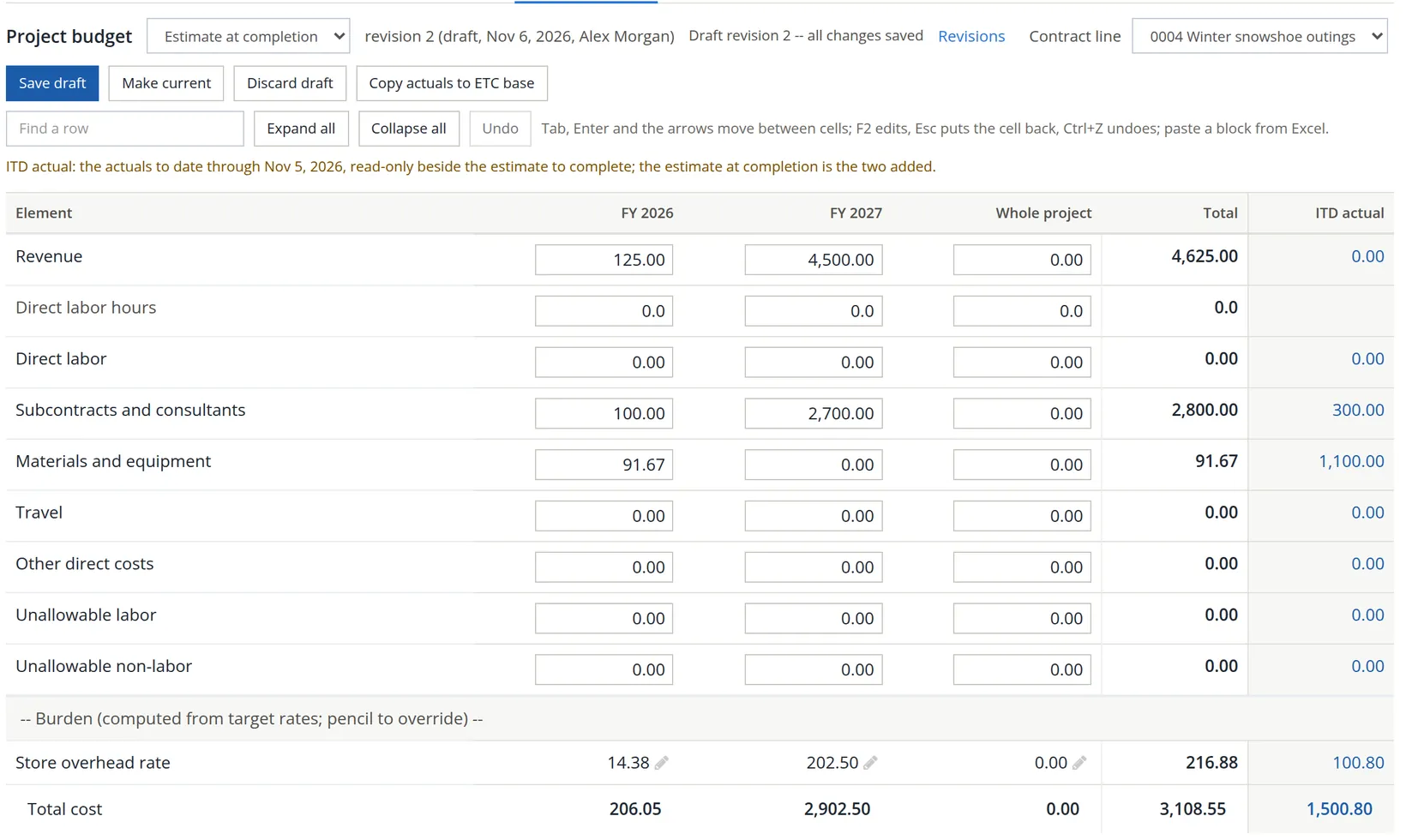
Revenue 1,500 and 4,500; Subcontracts and consultants 1,200 and 2,700; Materials and equipment 1,100 in FY 2026. The grid behaves like a spreadsheet: Tab, Enter and the arrow keys move between cells, F2 edits, Esc puts a cell back, Ctrl+Z undoes, and you can paste a block straight from Excel. Totals update as you type, and the status line turns to Draft revision 2 -- unsaved changes. The burden row follows too: (1,100.00 + 1,200.00) × 7.50% = 172.50 in FY 2026 and 2,700.00 × 7.50% = 202.50 in FY 2027.1
- 3
Save the draft
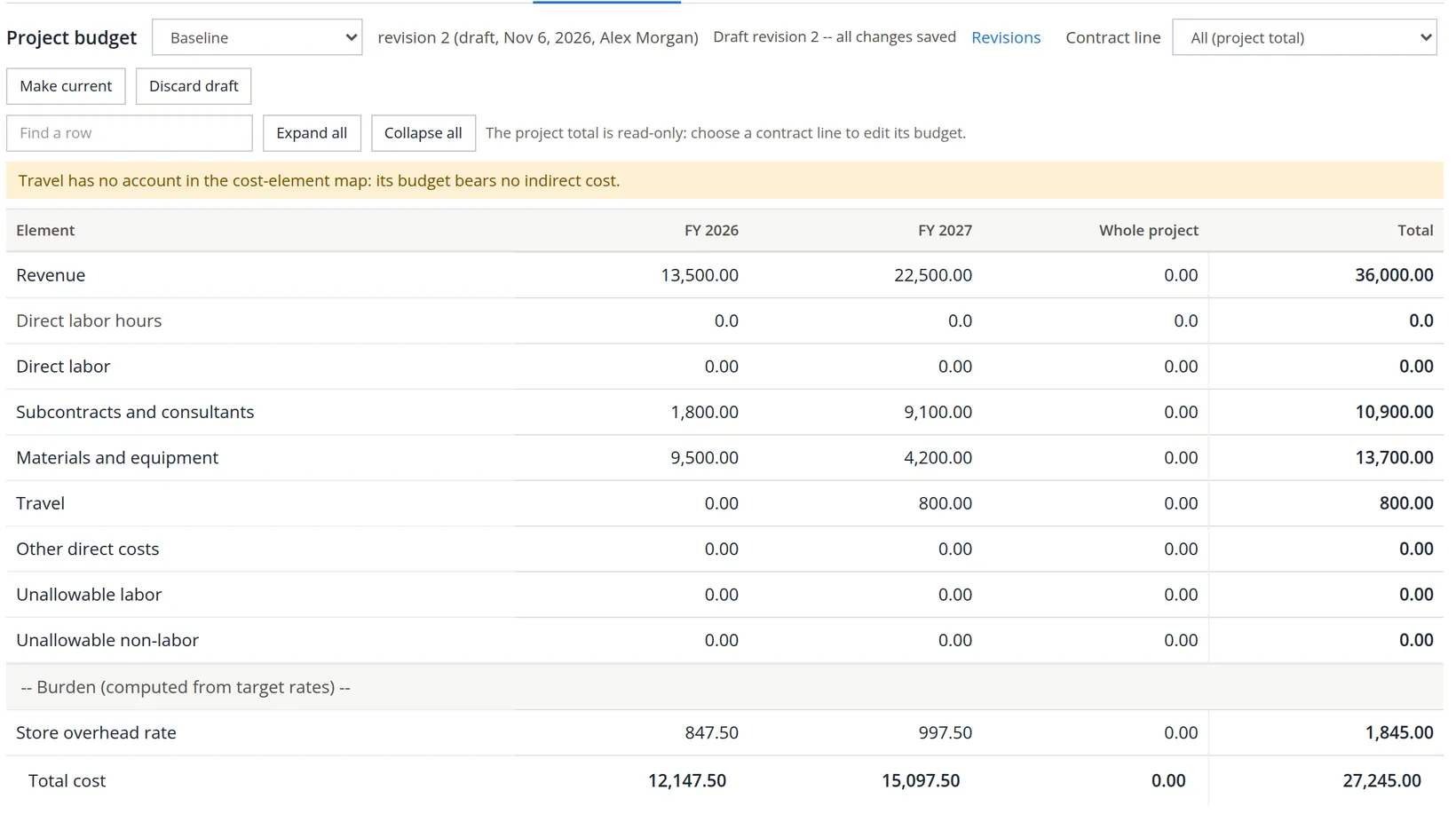
Click Save draft (or Ctrl+S). The page reloads with the server's figures, the same 375.00 of burden here, and the status reads Draft revision 2 -- all changes saved. Make current and Discard draft appear. Each contract line is saved on its own; lines 0002 and 0003 are carried into the draft unchanged.
Reading the new project total. Switch the contract line back to All (project total). Revenue is now 13,500.00 + 22,500.00 = 36,000.00, the funded amount after the modification. The overhead still leaves travel out: (600.00 + 8,400.00 + 1,200.00 + 1,100.00) = 11,300.00 × 7.50% = 847.50 in FY 2026 and (6,400.00 + 4,200.00 + 2,700.00) = 13,300.00 × 7.50% = 997.50 in FY 2027, together 1,845.00.
- 4
Make it current
Click Make current. The dialog lists the change by element against the revision it replaces, and takes an optional note. Type Modification P00001: line 0004, four winter snowshoe outings and click Confirm. (A draft with no budget line cannot be made current: the button is then greyed out and says Add at least one budget line before making this revision current.)
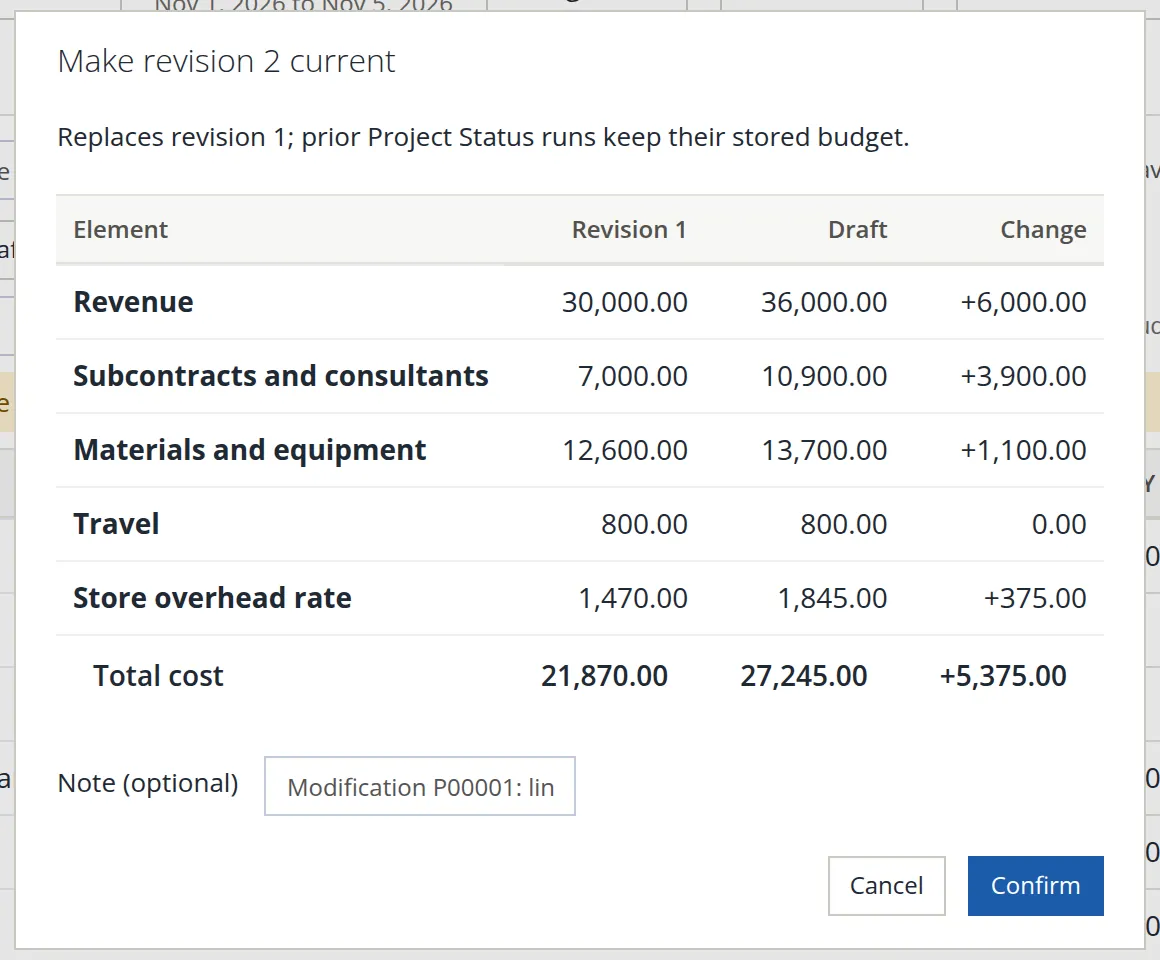
The planned margin is now 36,000.00 − 27,245.00 = 8,755.00. It rose by 8,755.00 − 8,130.00 = 625.00, which is line 0004's own planned margin: 6,000.00 − 5,375.00.
A draft is private work in progress. The Overview, the Financials tab and the reports use the current revision. The context bar's Budget box names the current revision of each version, Baseline r2 after this step, with None to leave the budget out. The Revisions menu opens any earlier revision read-only; Discard draft throws a draft away.
Refresh the estimate at completion
The first estimate was made on November 2, the afternoon the baseline went current. Summit's buyer had learned that Alpine Sports Wholesale was raising its sleeping bag price: the last 20 kits would cost about $230.00 each, not $210.00, and the guide company had raised its day rate to $900.00. EAC revision 1 therefore held, for FY 2027, materials of 20 × 230 = 4,600.00 on line 0002 and subcontracts of 8 × 900 = 7,200.00 plus 800.00 of travel on line 0003: 12,600.00 of direct cost and 885.00 of overhead, an estimate to complete of 13,485.00.
Three days later that estimate is out of date twice over: line 0004 is not in it, and 1,766.12 more cost has been booked (the snowshoe bill, the scouting expense, and a further 247.50 guide check on line 0003, with their overhead). Time to refresh it.
- 1
Copy actuals to ETC base
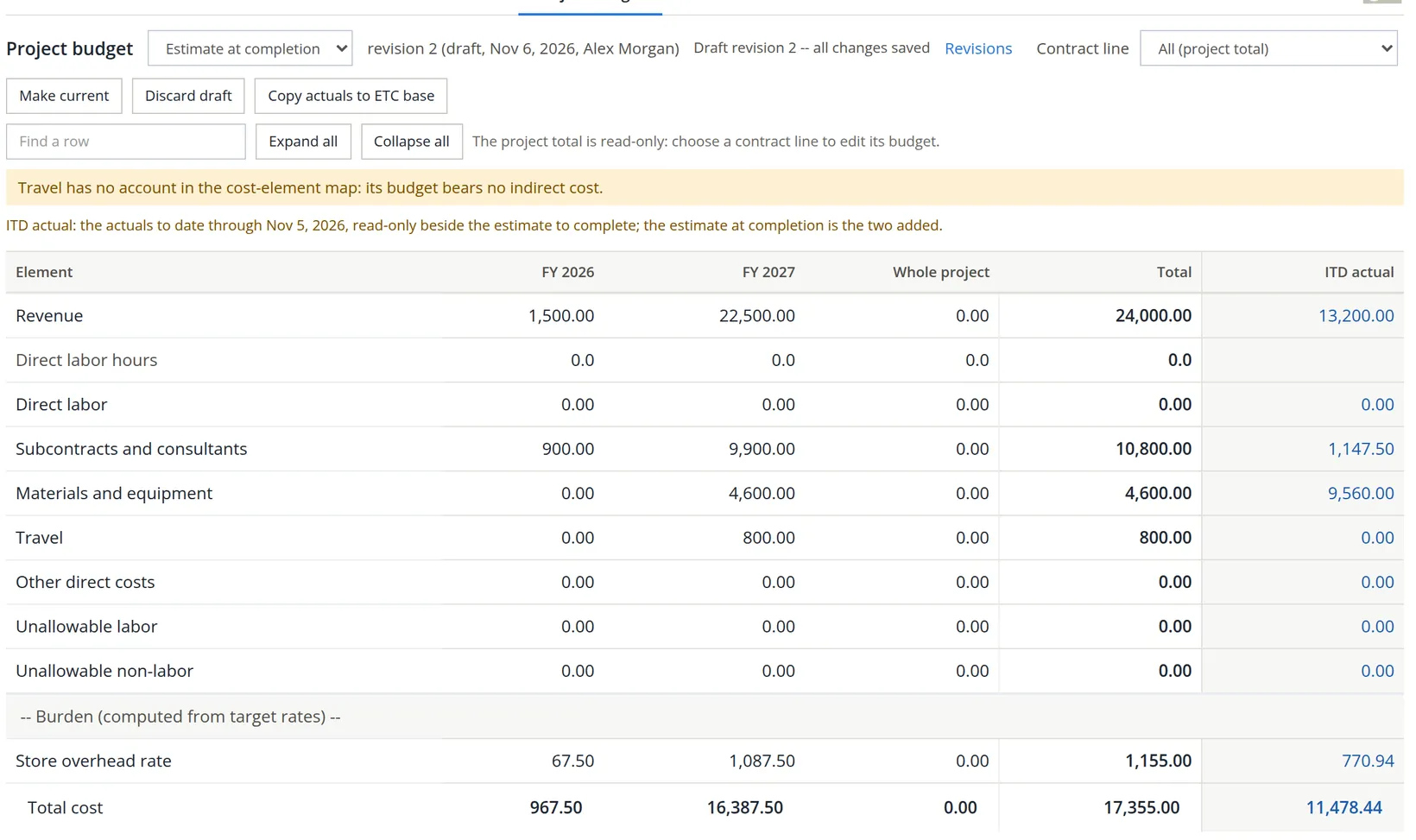
On the Project budget tab set Version to Estimate at completion and click Copy actuals to ETC base. BizBooks360 opens draft revision 2 of the estimate as of the context bar's day, November 5. (If a draft already exists, it asks first, because the draft is replaced.) A read-only ITD actual column shows the cost to date, and the estimate-to-complete cells are seeded from the current baseline's remaining months.
- 2
Replace the seed with your estimate
The seed is a starting point, not an estimate. On line 0004 the snowshoes are bought, so FY 2026 materials become 0; the December outing is 900 of subcontracts and 1,500 of revenue; FY 2027 keeps 4,500 and 2,700. Save the draft. On line 0002, FY 2026 is 0 and FY 2027 is revenue 6,000 and materials 4,600; on line 0003, FY 2026 is 0 and FY 2027 is revenue 12,000, subcontracts 7,200 and travel 800, as in revision 1. Save after each line.
- 3
Check the total and make it current
On All (project total) the estimate to complete is 10,800.00 + 4,600.00 + 800.00 = 16,200.00 of direct cost plus 1,155.00 of overhead ((10,800.00 + 4,600.00) × 7.50%), so 17,355.00. Click Make current; the dialog shows +3,870.00 against revision 1, all of it line 0004 (3,600.00 × 1.075). Add the note Nov 5 estimate: line 0004 added; kit and guide prices as in revision 1, and Confirm.
| Baseline revision 2 | EAC on the budget tab (target rates) | EAC on the statement (billing rates) | |
|---|---|---|---|
| Cost to date | (none) | 11,478.44 | 11,478.44 |
| Direct cost still to come | (none) | 16,200.00 | 16,200.00 |
| Overhead on it | (none) | 1,155.00 (7.50%) | 1,108.80 (7.20%) |
| Total cost | 27,245.00 | 28,833.44 | 28,787.24 |
The Overview and the reports show the EAC at billing rates, the same rates that measure revenue,2 so they say 28,787.24: 28,787.24 − 27,245.00 = 1,542.24 over the budget. Line 0004 is not the cause; at billing rates its estimate is 5,360.00, just under its 5,375.00 baseline. The overrun is revision 1's 1,291.92 on the kits and guide days, plus the 247.50 guide check with its overhead (265.32), less 15.00 on line 0004.
Why line 0004 is missing from the margin
Open the Overview. Needs your attention lists five items: Month over and Over budget, the 1,542.24 above; then a third warning, Not priced: CLIN 0004 Winter snowshoe outings has cost and no price; the margin at completion leaves it out; then two Draft items (the invoice on line 0001 of Chapter 7.1, and November not yet closed). The first card reads Estimated margin at completion 6,572.76. Summit's manager checks it in their head: the price is 36,000.00 and the EAC 28,787.24, so the margin should be 7,212.76. The card is 640.00 short, and it says why in the sentence under the figure, which states its basis: Margin: price of the priced contract lines 30,000.00 less cost at completion 23,427.24. The price it uses is 30,000.00, not 36,000.00, and the Not priced item names the line that is missing. Clicking the item opens the Contract tab, where the fix is made.
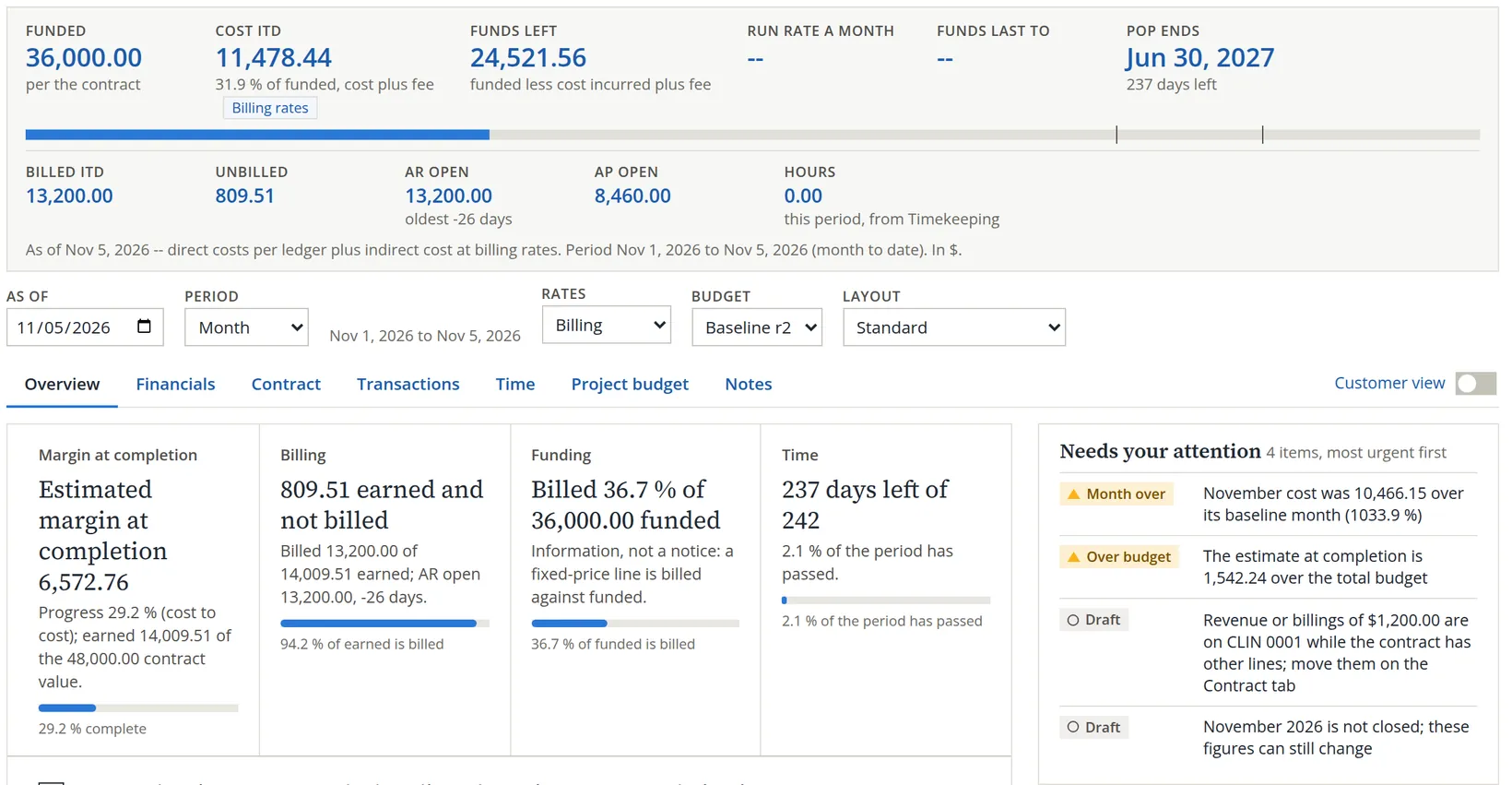
The month-over warning first. A baseline entered by fiscal year is spread evenly over that year's twelve months. FY 2026's 12,147.50 therefore becomes 1,012.29 a month, January through December, although the contract started on November 1. November's actual 11,478.44 is 11,478.44 − 1,012.29 = 10,466.15 over that month. For a job that starts mid-year, read the first year's monthly variance with this in mind; the inception-to-date and at-completion figures are not affected.
Now the missing 640.00. The margin at completion is the contract price less the EAC, and the price is added up line by line from each line's revenue method. Lines 0002 and 0003 were switched to earn by cost to cost on November 2, with transaction prices of 18,000.00 and 12,000.00, when the first EAC was made. A new fixed-price line starts as Equal to billings (Chapter 7.1), a method that gives no price to compare an estimate with, so the test leaves line 0004 out, together with its cost:3 30,000.00 − (28,787.24 − 5,360.00) = 30,000.00 − 23,427.24 = 6,572.76. The 640.00 is line 0004's own margin, 6,000.00 − 5,360.00. The same method also keeps the line from earning anything until it is invoiced; the Financials tab's Note 4 says so in a line: 0004 Winter snowshoe outings: Earned equals billed.
A fixed-price line with an estimate should earn by cost to cost: the share of the price earned equals the share of the estimated cost already spent.
- 1
Open the line's terms
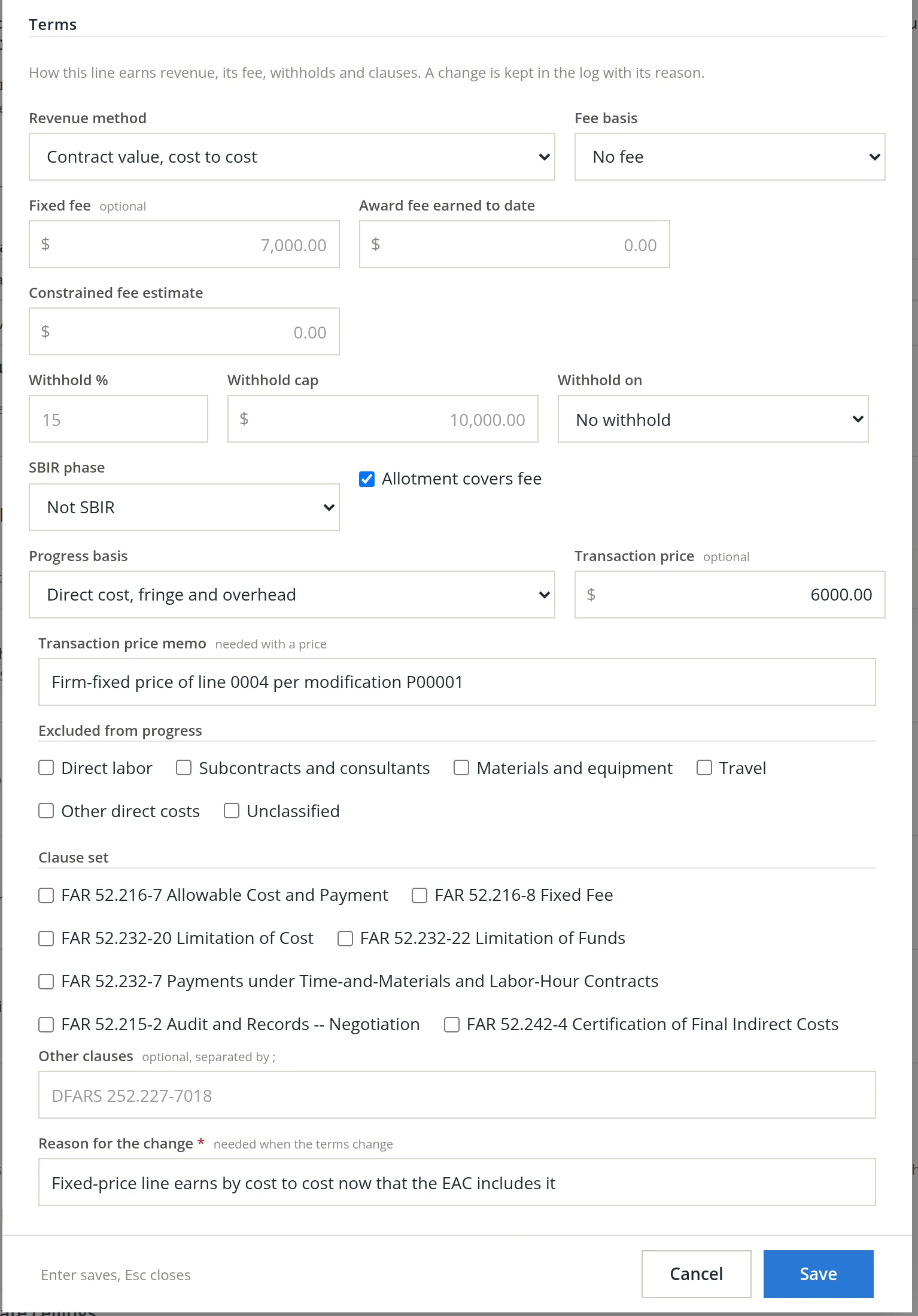
Contract tab → Edit on line 0004. The dialog has the line's pricing type, phase, funding, units and dates (Chapter 7.1, Procedure B), and below the period of performance a Terms section. The funding cannot be changed here: Funded is greyed out beside Add modification (Chapter 7.1, Procedure C). Terms can.
- 2
Choose cost to cost and give the price
Set Revenue method to Contract value, cost to cost. The Progress basis and Transaction price boxes appear. Keep the basis on Direct cost, fringe and overhead. Enter the transaction price, 6000.00, and its required memo, Firm-fixed price of line 0004 per modification P00001. Leave the Excluded from progress boxes clear; they leave an element out of the progress measure, for example materials bought up front. The Clause set check boxes record which FAR clauses the line carries; a parks district contract has none of them.
- 3
Give a reason and save
A change of terms is kept in the log with its reason, which is required. Type Fixed-price line earns by cost to cost now that the EAC includes it and click Save.
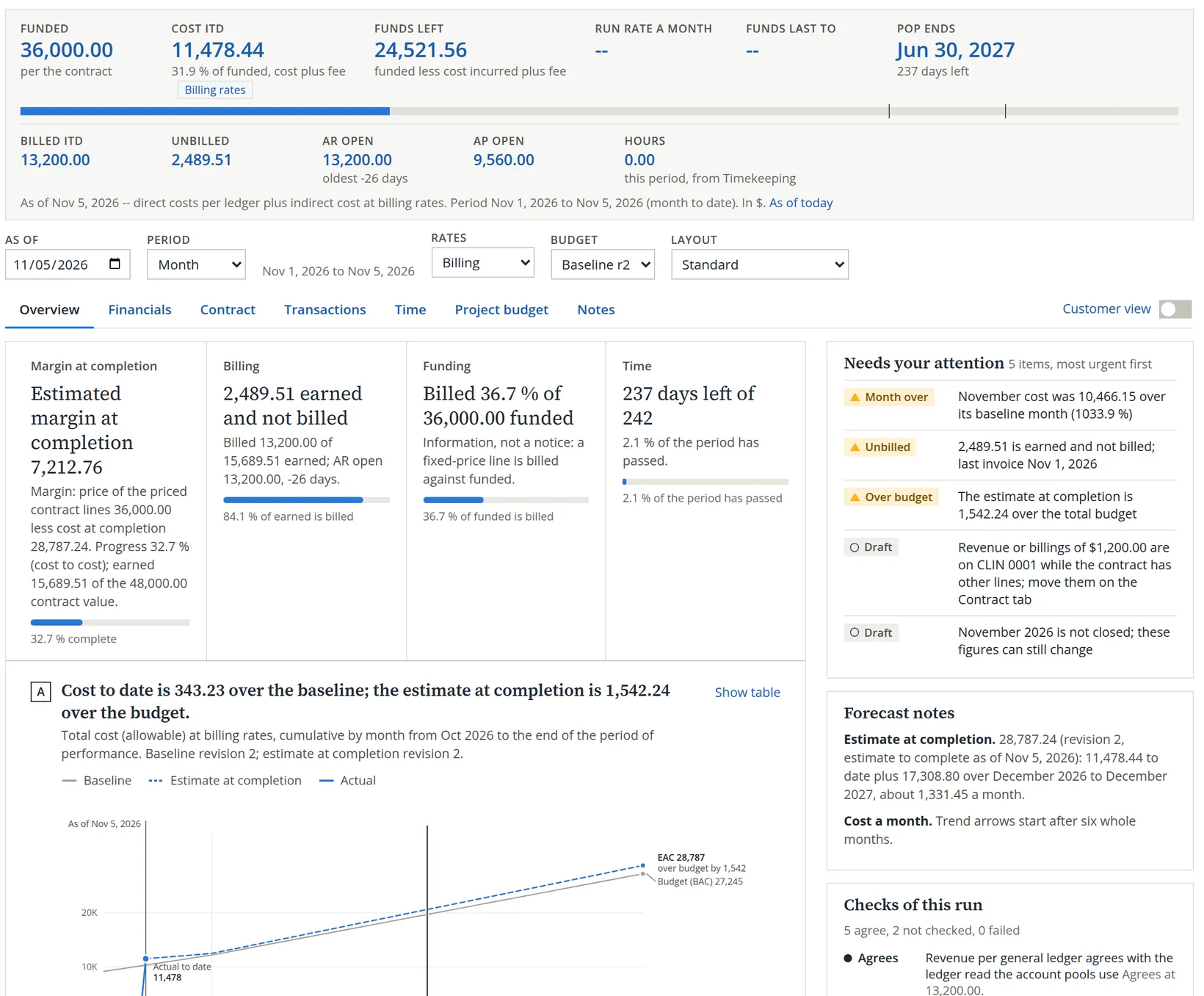
Reading the result. The job is still profitable: 7,212.76 at completion, down from the 8,755.00 planned. The difference is exactly the overrun: 8,755.00 − 7,212.76 = 1,542.24. Line 0004 now earns by progress: 1,500.80 spent of an estimated 5,360.00 is 28.0%, so it has earned 6,000.00 × 28.0% = 1,680.00 although nothing is invoiced yet. Line 0002 is 64.8% complete and line 0003 9.6% (Note 4 of the Project Status Report shows all three). With the 1,200.00 invoice on line 0001 (Chapter 7.1), the project has earned 15,689.51 against 13,200.00 billed, so 2,489.51 is earned but not yet billed. Chapter 7.3 reads those figures in the reports. One caution when reading the card itself: its first sentence names the margin's basis, the 36,000.00 of priced lines less the 28,787.24 cost at completion, but its progress percent and the words of the 48,000.00 contract value measure earned revenue against the contract's ceiling value, 15,689.51 ÷ 48,000.00 = 32.7%. Two bases sit in one card; read each against its own figure.
Use Copy actuals to ETC base again after each month closes, and whenever a modification adds work. It starts a new draft from the latest actuals, and the Make current dialog shows exactly what moved against the last estimate. The revision history then tells the story of the job.
A budget you can trust
- [x] Target rates are set for every fiscal year the job spans.
- [x] Each contract line has its own baseline, and the project total equals the funded or priced amount.
- [x] A line added by modification is in a new baseline revision and in the EAC, with a note naming the modification.
- [x] Any yellow note on the grid (an element with no account, a year with no rate) has been read and accepted or fixed.
- [x] The baseline is current, with a note saying what it represents.
- [x] The EAC's estimate to complete was reviewed cell by cell, not left as the seed.
- [x] Every fixed-price line with an EAC earns by cost to cost with a transaction price, so the margin at completion includes it.
Check your understanding
1. Why does a budget use target rates while earned revenue uses billing rates?
Answer
A budget plans with the rate you expect for the year; revenue, fee and funding must be measured with the rates you actually bill at.
2. Revision 2 budgets FY 2027 materials of 4,200.00 and subcontracts of 6,400.00 + 2,700.00 at a 7.50% target rate, plus 800.00 of travel that no account maps. What is the burden?
Answer
(4,200.00 + 9,100.00) × 7.50% = 997.50. Travel bears none.
3. Cost to date is 11,478.44 and the estimate to complete at billing rates is 17,308.80. Every line is priced, for 36,000.00 in all. What is the estimated margin at completion?
Answer
EAC 28,787.24; margin 36,000.00 − 28,787.24 = 7,212.76.
4. The card's margin at completion is smaller than the price less the EAC. What do you check?
Answer
The contract lines' revenue method. A line on Equal to billings is not priced, so the test leaves it and its cost out. Switch fixed-price lines to cost to cost with a transaction price.
5. The customer adds a line by modification. Why revise the baseline rather than only the EAC?
Answer
The baseline is the plan the job is measured against. Without the new line in it, every dollar spent on that line shows as an overrun and the planned margin leaves out the line's price.
Notes
- Since November 2026 the page estimates the burden while you type, even on a brand-new draft, on the base the server names for each rate, from the target rates (billing rates for a year with none). Earlier the estimate showed 0.00 until the first save. The server's figures, shown after the save, are the ones that count. ↑
- The Project Status Report's Note 11 says it in the app's words: the estimate at completion is the cost incurred plus the estimate to complete, both with indirect costs at billing rates. FY 2027 has no billing rate of its own yet, so FY 2026's is used. ↑
- The loss test prices cost-plus lines from their fee terms, lines on a loaded labor rate method from their ceiling, else their funding, and cost-to-cost lines from their transaction price. Equal to billings, milestones and as-recorded lines are not priced: such a line is left out with its cost, while cost on the whole-contract line still counts. When no line at all is priced, the test's own message is "No contract line is priced; loss test not performed". Which revenue method fits a contract is an accounting judgment (ASC 606 for most companies); confirm it with your accountant. This is not accounting advice. ↑