
Chapter 5.4
Account Pools and Rates
How to group accounts into pools (direct labor, overhead, general and administrative) and measure rates between them, the figures behind indirect-cost rates on government contracts and behind any cost-of-doing-business analysis.
When you finish this chapter you will be able to:
- Explain what a pool and a rate are, and who needs them.
- Build a pool from accounts, with or without their sub-accounts.
- Create a rate between two pools and read its measured value.
- Say from which fiscal year a change applies, and why, and read the log of those changes.
- Read the rates by fiscal year and the forward pricing rates.
Pools and rates
A pool is a named list of accounts whose total you want for a period. A rate divides one pool's total by another's, as a percentage:
Store overhead $41,570.84 ÷ Direct labor $192,113.60 = 21.64%
For every dollar of shop wages so far this year, Summit spent about 22 cents keeping the store open. Government contractors use the same idea for fringe, overhead and G&A rates: the pools feed the incurred-cost pack and each contract's costs on its project page (Volume 7).
Make a pool
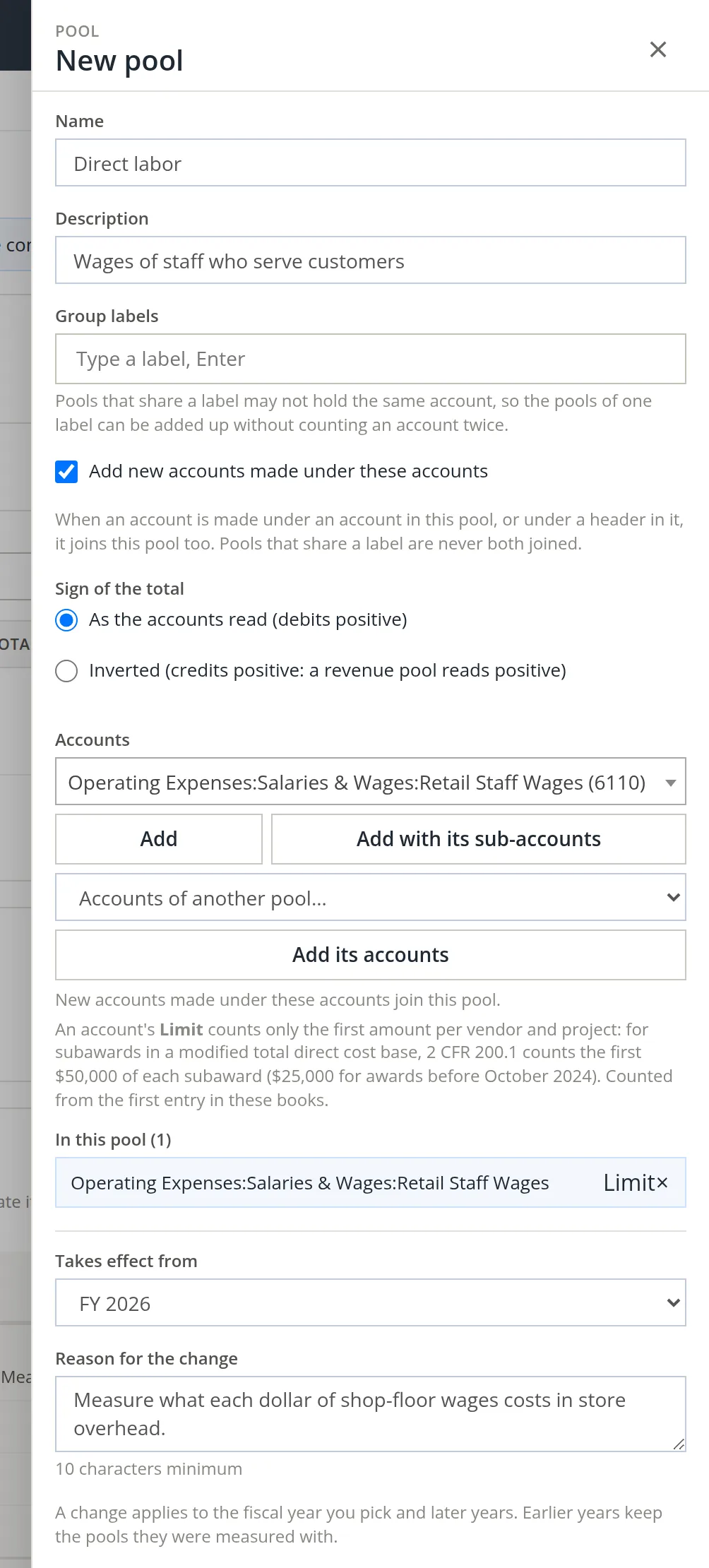
Settings → Accounting → Account pools, then + Pool. A panel opens on the right. The + Pool and + Rate buttons show only to people whose "Account Pools" permission lets them make pools; anyone else reads the page without them.1
- 1
Name and describe it 1
- 2
Add accounts 2
Choose an account and click Add, or Add with its sub-accounts for a whole branch. Accounts of another pool copies another pool's list.
- 3
Decide on new accounts 3 and sign
Tick Add new accounts made under these accounts so the pool keeps up as the chart grows. Choose Inverted only for a revenue pool, so it reads positive.
- 4
Optionally, a group label 4
Pools that share a label cannot hold the same account, so pools of one label can be added up without counting anything twice.
- 5
Choose the year it takes effect from 5, say why 6, and save
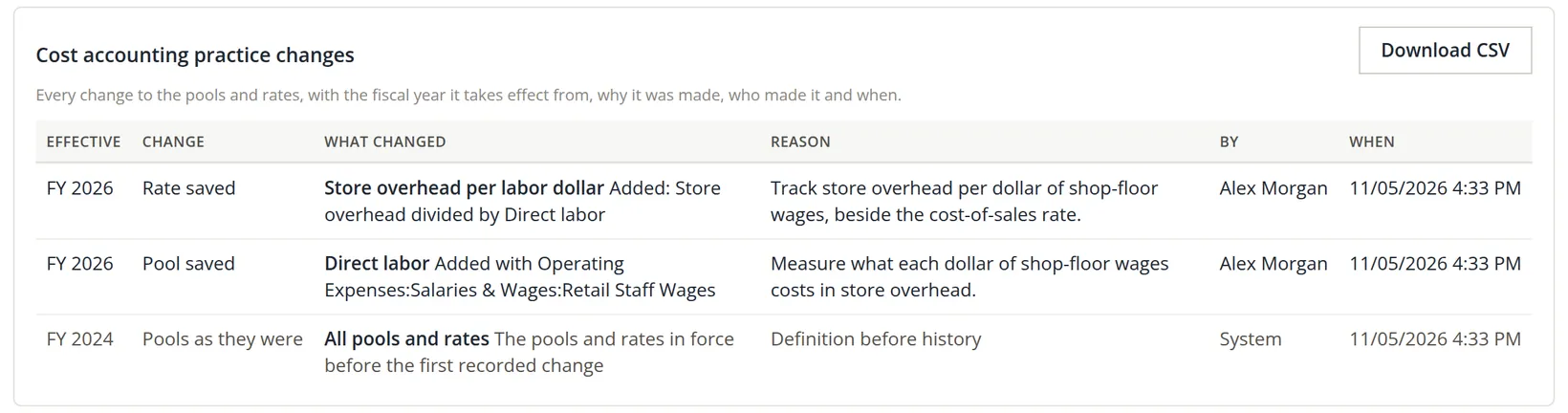
Every change to a pool or rate is a change of cost accounting practice, so BizBooks360 asks two questions before it saves. Takes effect from is the first fiscal year the change applies to; later years follow, and earlier years keep the pools they were measured with. Reason for the change needs at least 10 characters; a shorter one is refused with "Say why the pools change (at least 10 characters)." Summit picks FY 2026 and writes "Measure what each dollar of shop-floor wages costs in store overhead." The page answers: Pool "Direct labor" added from FY 2026.2
Make a rate
- 1
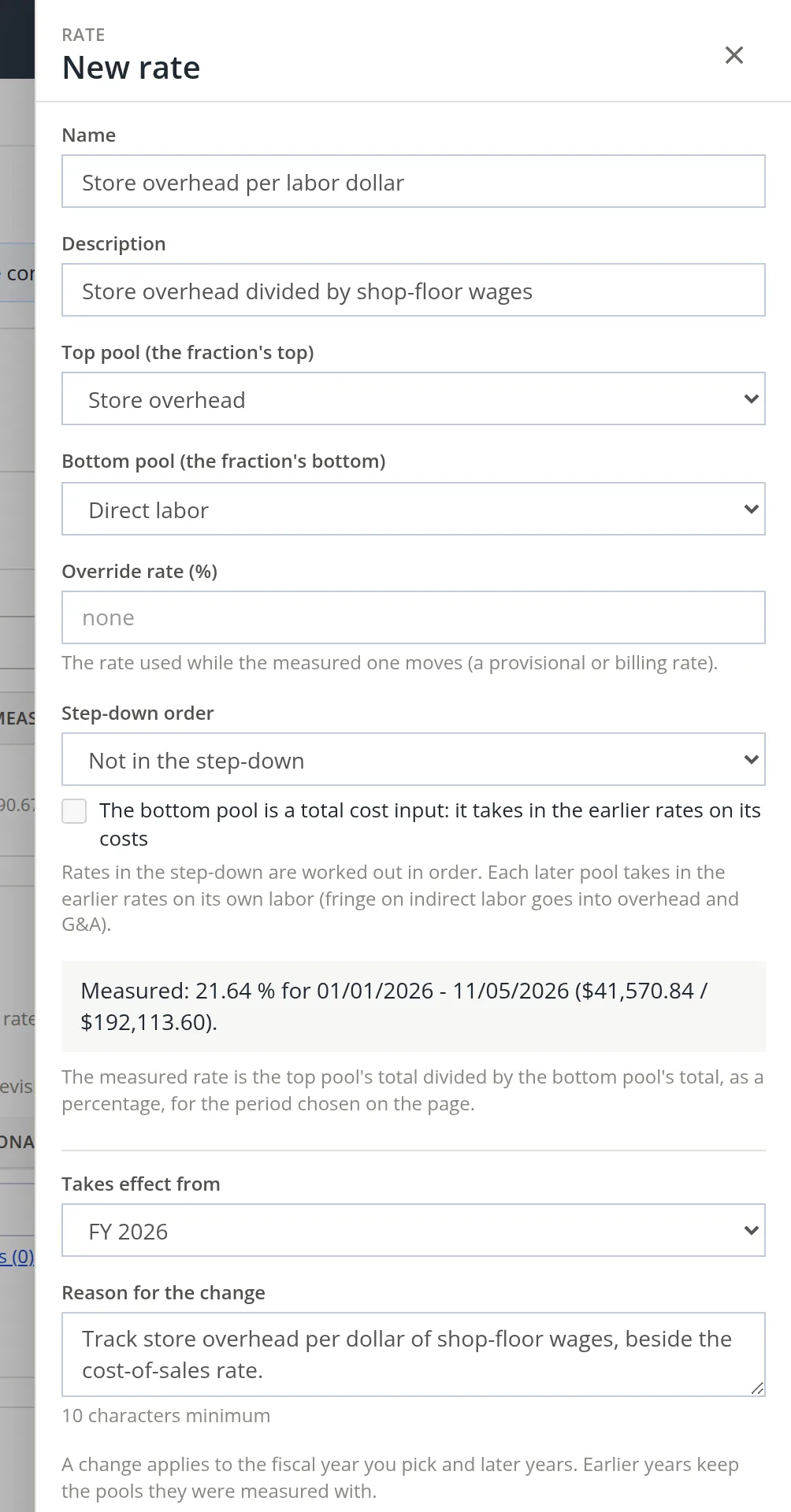
Click + Rate, name it, and choose the top 1 and bottom 2 pools
The panel shows the measured rate 4 as soon as both pools are chosen, for the period chosen on the page: Summit's "Store overhead per labor dollar" measures 21.64%.
- 2
Optionally, an override rate and a step-down order 3
The override is used while the measured rate moves around (a billing or provisional rate). Step-down order is Not in the step-down or a place from 1 to 9. Rates in a step-down are worked out in order, fringe first, then overhead, then G&A, and each later pool takes in the earlier rates on its own labor. Tick The bottom pool is a total cost input when the bottom pool should also take in the earlier rates on its costs.
- 3
The year it takes effect from 5 and the reason 6, then save
As for a pool (Procedure A, step 5). Deleting a pool or a rate asks the same two questions.
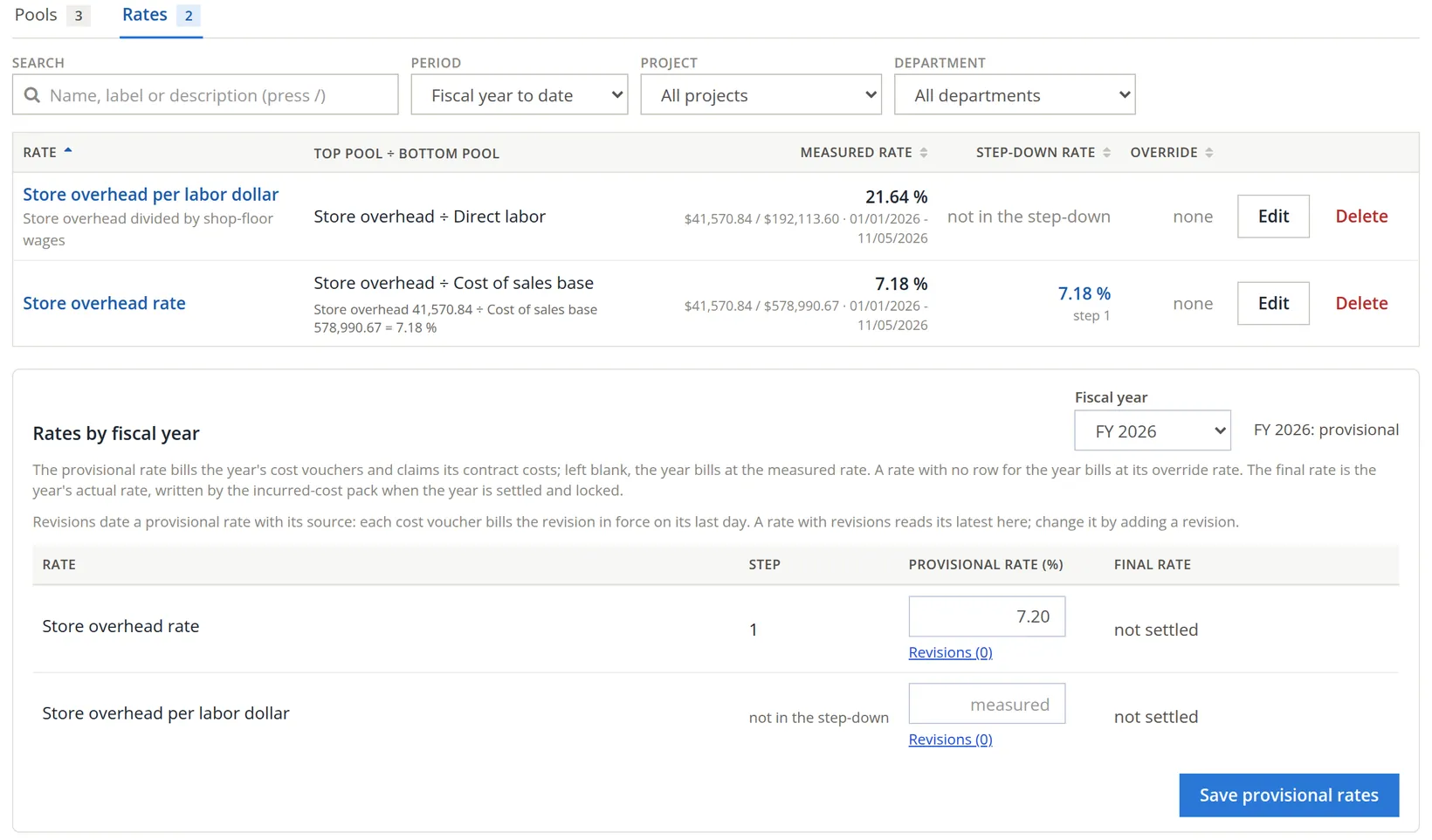
Only rates in the step-down are applied to project costs. Summit keeps its new rate out of the step-down, so its contracts go on carrying store overhead at the existing "Store overhead rate" (step 1). Put a rate into the step-down only when you mean the projects to carry it.
Reading the page
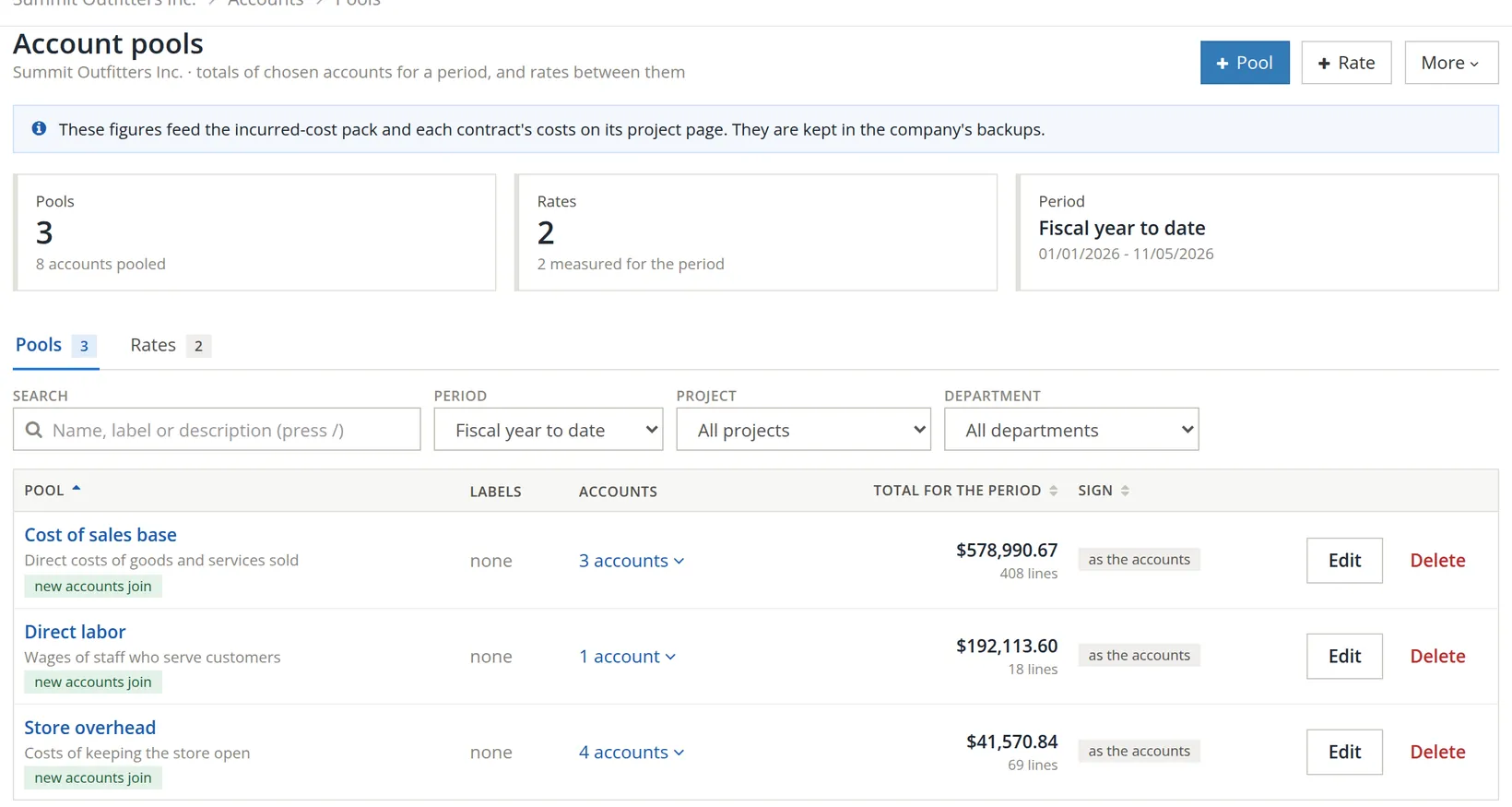
Choose the period 1, and optionally a project 2 or department 3, at the top. The Pools tab shows each pool's total and how many lines make it up; click the number of accounts 4 to list them. The Rates tab shows each rate's measured value, its place in the step-down and any override.
Cost accounting practice changes
Below the tables, every change to the pools and rates is kept: the fiscal year it takes effect from, what changed, the reason given, who made it and when. The first change ever saved also records the pools and rates as they were before it. Download CSV gives the list to an auditor.
Forward pricing rates
The last section sets out each rate by fiscal year: the actual rate (the final rate of a settled year, otherwise measured from the books), the provisional rate it bills at, the target rate budgets use, and the rate proposed for forward pricing with what the proposal is based on. Edit proposed rates fills in the proposals. Proposed rates are never billed.
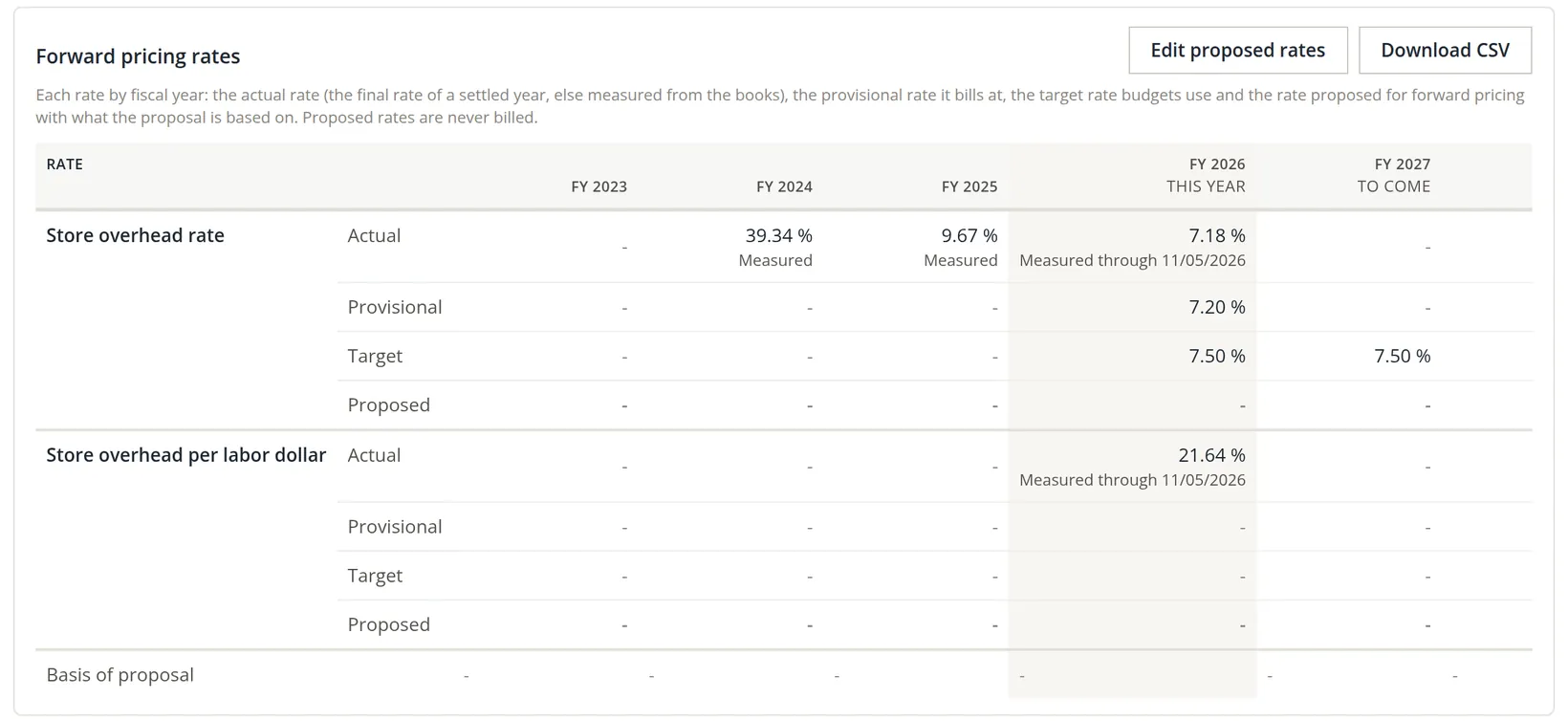
A rate that climbs month after month means overhead is growing faster than the work it supports. It is the earliest warning that prices need to rise.
Check your understanding
1. Overhead is $30,000 and direct labor $120,000. What is the overhead rate?
Answer
25%.
2. Why tick "Add new accounts made under these accounts"?
Answer
So an account added later under a pooled header joins the pool without anyone remembering to add it.
3. A pool change saved "from FY 2026": what happens to the FY 2025 rate?
Answer
Nothing. Earlier years keep the pools they were measured with; the change applies to FY 2026 and later.
Notes
- Without that permission the two lower sections, Cost accounting practice changes and Forward pricing rates, say "You do not have permission to open Account Pools in these books." The pictures in this chapter were taken with the permission given. ↑
- The list of years starts after the last year settled or locked by the incurred-cost pack, and never before the latest change already recorded; it ends with next fiscal year. Since November 2026 every pool or rate change asks for this year and a reason. ↑