
Chapter 5.1
The Chart of Accounts
How the list of accounts is organised, how to read balances in it, how to add, hide, move and retire accounts, and how to keep the chart tidy as the business grows.
When you finish this chapter you will be able to:
- Name the five kinds of account and say which reports they feed.
- Read the chart: numbers, tree, tags, balances.
- Add an account with the right parent and detail type.
- Hide, move or delete accounts safely, and fix what "Needs attention" flags.
Contents
The five kinds of account
| Kind | What it holds | Report | Normal balance | Summit's numbers |
|---|---|---|---|---|
| Assets | What the business owns | Balance Sheet | Debit | 1000s |
| Liabilities | What it owes | Balance Sheet | Credit | 2000s |
| Equity | The owners' stake | Balance Sheet | Credit | 3000s |
| Revenue (income) | What it earns | Profit and Loss | Credit | 4000s, 7000s |
| Expenses | What it costs to earn it | Profit and Loss | Debit | 5000s, 6000s, 8000s, 9000s |
Cost of Goods Sold, Other Income, Other Expenses and Income Tax Expense are groups within revenue and expenses that the Profit and Loss shows in their own sections.
Reading the chart
Accounts → Chart of Accounts.
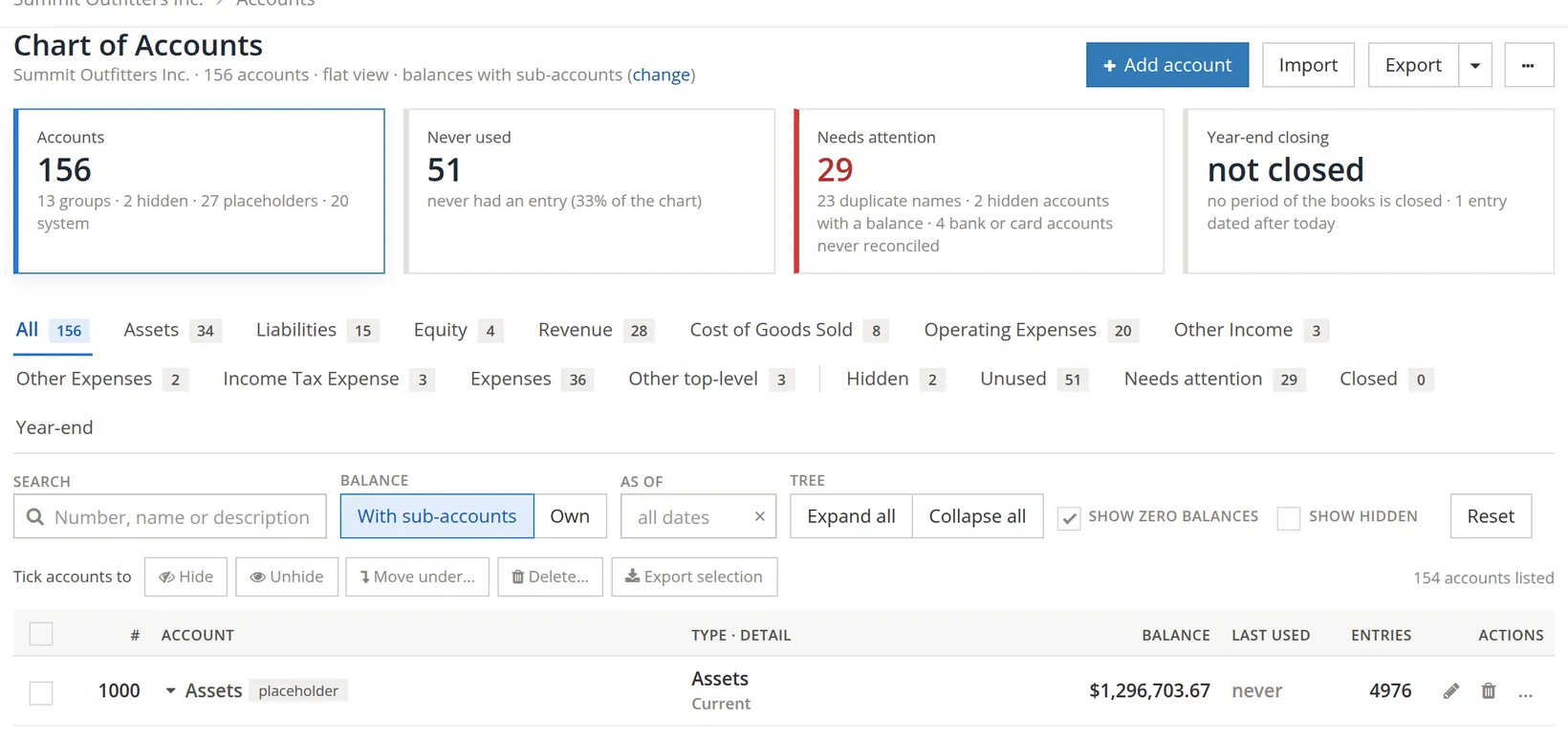
| Part | What it does |
|---|---|
| 1–4 Cards | How many accounts; how many never used; how many need attention; whether the year has been closed, and whether any entry is dated after today. |
| 5 Tabs | One per kind of account, plus Hidden, Unused, Needs attention and Closed. |
| 6 Search | By number, name or description. |
| 7 Balance | With sub-accounts totals each parent with its children; Own shows only what was posted to it. |
| 8 As of | Balances on any past date. |
| 9 Batch buttons | Hide, unhide, move, delete or export the ticked accounts. |
| 10 Row icons | Edit, delete, and more. Click a name to open its register (Chapter 4.2). |
Tags beside a name say what it is: placeholder, bank, card, system, hidden, contra, same name.
Add an account
Click + Add account. The dialog is the one used for bank accounts (Chapter 4.1), with tabs for every kind: Bank, Card, Asset, Liability, Equity, Income, Expense.
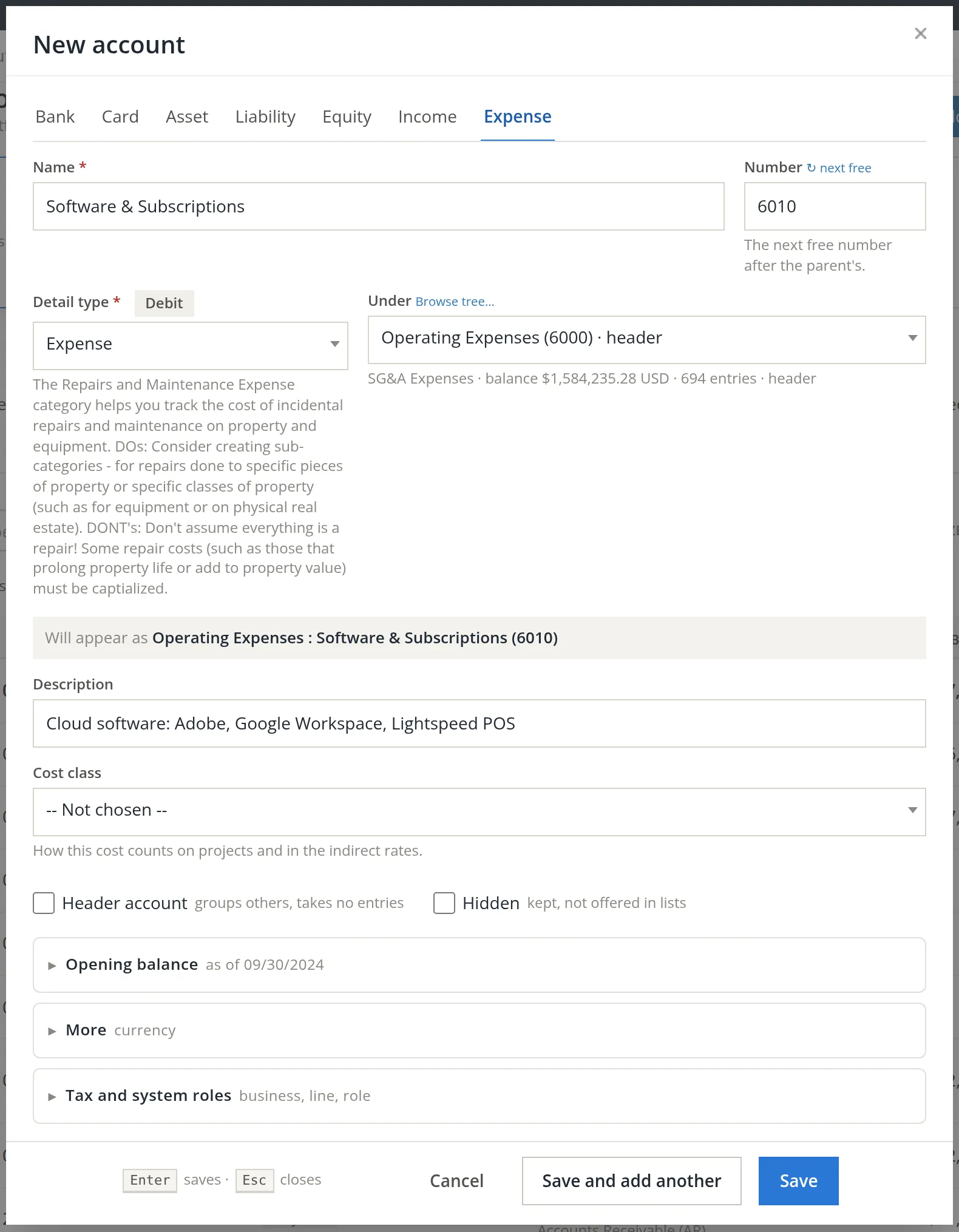
- 1
Choose the parent first 4
Choosing Operating Expenses sets the kind, a suitable detail type 3 and the next free number 2. Browse tree… shows the whole chart if you are unsure where it belongs.
- 2
Name it 1
Plain words your tax preparer would recognise. The grey line shows the full name it will have.
- 3
Check the detail type 3 and read its help 5
The help explains what belongs in that kind of account.1
- 4
Describe it 6
The description shows under the name in the chart, and helps others choose the right account. Leave Opening balance empty for an expense account.
- 5
Set the cost class if it applies 7, and save
Cost class says how the account's costs count on projects and in the indirect rates (Chapter 5.4): one of five direct cost elements (direct labor, subcontracts and consultants, materials and equipment, travel, other direct costs), Indirect (pools), or Unallowable labor or non-labor. The box appears only for an expense account that takes entries, and only when the books keep a cost-element map for their projects (Summit does) or have government contract controls on. It is optional, and required while those controls are on.2 Summit is not a government contractor, so it leaves the box at -- Not chosen --.
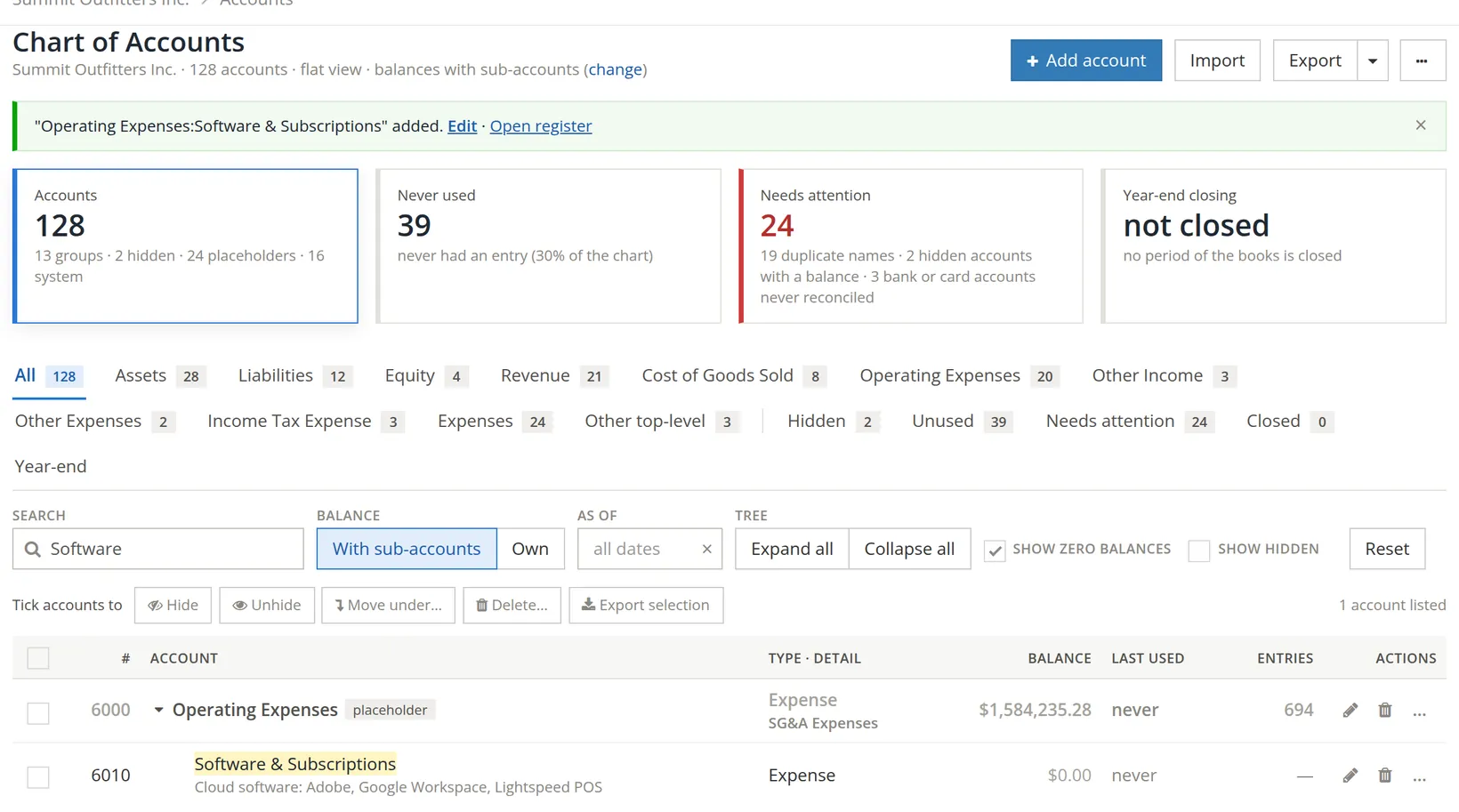
Add an account when you will want its total on a report, or your tax return needs it. For detail inside an account (which client, which store), use projects, departments or the description instead. A chart of 60 accounts is easier to keep right than one of 300.
Hiding, moving, deleting
| You want to… | Do this |
|---|---|
| Stop using an account that has history | Tick it and click Hide. It leaves the lists but keeps its entries and appears on reports. |
| Put an account under another parent | Tick it and click Move under… |
| Remove an account added by mistake | Delete… It shows what the deletion would affect before doing anything. When the account has entries, a Reason (optional) box records why, for the log; with government contract controls on, the reason is required. If any of those entries fall in closed books, the delete also asks for a reason and your password. |
| Rename or renumber an account | Click its pencil icon in the chart and change the name or number. |
Accounts tagged system are posted to by BizBooks360 itself: Accounts Receivable, Accounts Payable, Undeposited Funds and others. Rename them if you wish, but do not hide or delete them.
Needs attention
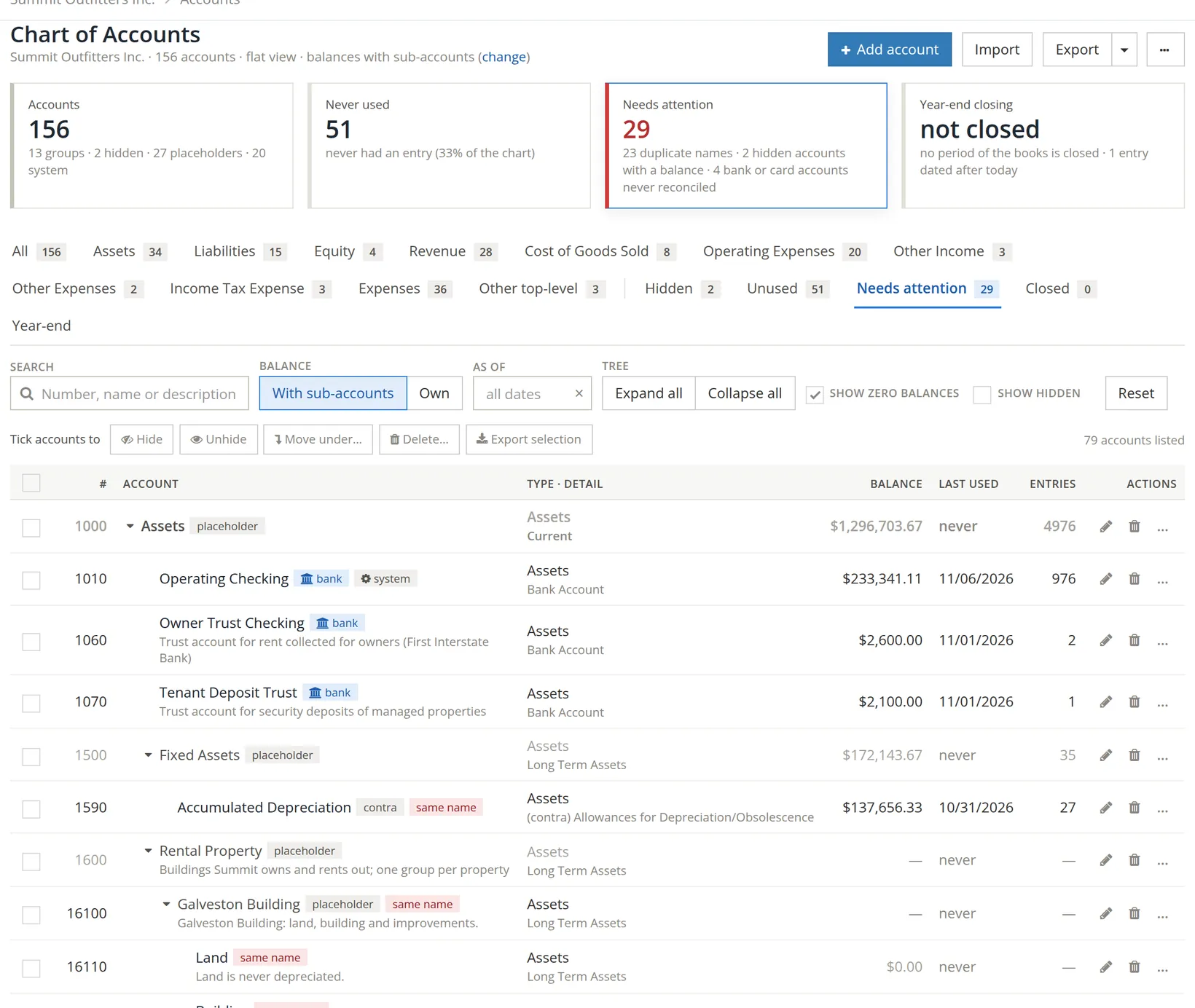
The Needs attention tab lists accounts worth a look: two accounts with the same name, hidden accounts that still hold a balance, and bank or card accounts never reconciled. Summit's card counts 29 such findings: 23 names used by more than one account, 2 hidden accounts that still hold a balance (Kayak Tours and Radio Advertising), and 4 bank or card accounts never reconciled (Operating Checking, Owner Trust Checking, Tenant Deposit Trust and the Business Visa card). The tab lists every account involved, 79 with their parents. Work through them at each month-end.
Most of Summit's same-name findings are deliberate. Each rental property has its own Land, Building, Rents, Repairs and so on, and the parent tells them apart (Galveston Building:Rents, Juniper Cottage:Rents, Riverside Fourplex:Rents). Rename a same-name account only when someone could pick the wrong one from a list.
Check your understanding
1. On which report does Software & Subscriptions appear?
Answer
The Profit and Loss, under Operating Expenses.
2. An old account has two years of entries and is no longer used. Delete or hide?
Answer
Hide. Its history stays on the reports for those years.
3. What is the difference between "With sub-accounts" and "Own"?
Answer
With sub-accounts adds the children into each parent's balance; Own shows only entries posted directly to that account.
Notes
- In this edition the help shown for the general "Expense" detail type describes repairs and maintenance, as in the picture. The account itself is unaffected. ↑
- A name that the cost principles of FAR 31.205 list as unallowable (entertainment, alcohol, donations, advertising and the like) pre-selects Unallowable non-labor, and the hint says so. Change it if this account is not one of those. Not legal advice. ↑