
Chapter 6.8
The Tax Report
How to turn a year of bookkeeping into the line-by-line figures a tax return needs: assign each account a tax line once, let the report check the work, and hand your preparer a clean, tied-out lead schedule.
When you finish this chapter you will be able to:
- Explain what a lead schedule is and why it is not a tax return.
- Assign accounts to tax-form lines one at a time and many at once.
- Read the report's exceptions and correct a mapping error.
- Tie net income per books to taxable income with the reconciliation.
- Export the report for your tax preparer.
What the Tax Report is
Your books are organised by accounts: Apparel Sales, Rent, Online Advertising. A tax return is organised by lines: line 1a Gross receipts, line 16 Rents, line 22 Advertising. The Tax Report is the bridge. You tell it, once, which line each account belongs on; it then adds up the year's activity line by line and shows the accounts behind every figure.
Accountants call this a lead schedule: the summary page a preparer works from, with every number traceable to the ledger. It is not the return itself. Depreciation for tax, carryovers, credits and elections are finished in the tax program.2
| Entity type (Settings → Company) | Return the report follows |
|---|---|
| Sole proprietor | Schedule C (Form 1040) |
| Partnership or multi-member LLC | Form 1065 |
| S corporation | Form 1120-S |
| C corporation | Form 1120 (Summit Outfitters) |
| Trust or estate | Form 1041 |
The first look: a Draft
Reports → Taxes → Tax Report. Before any account is mapped, the report knows the year's totals but not where they go, so every form line shows a dash and everything falls into No tax line.
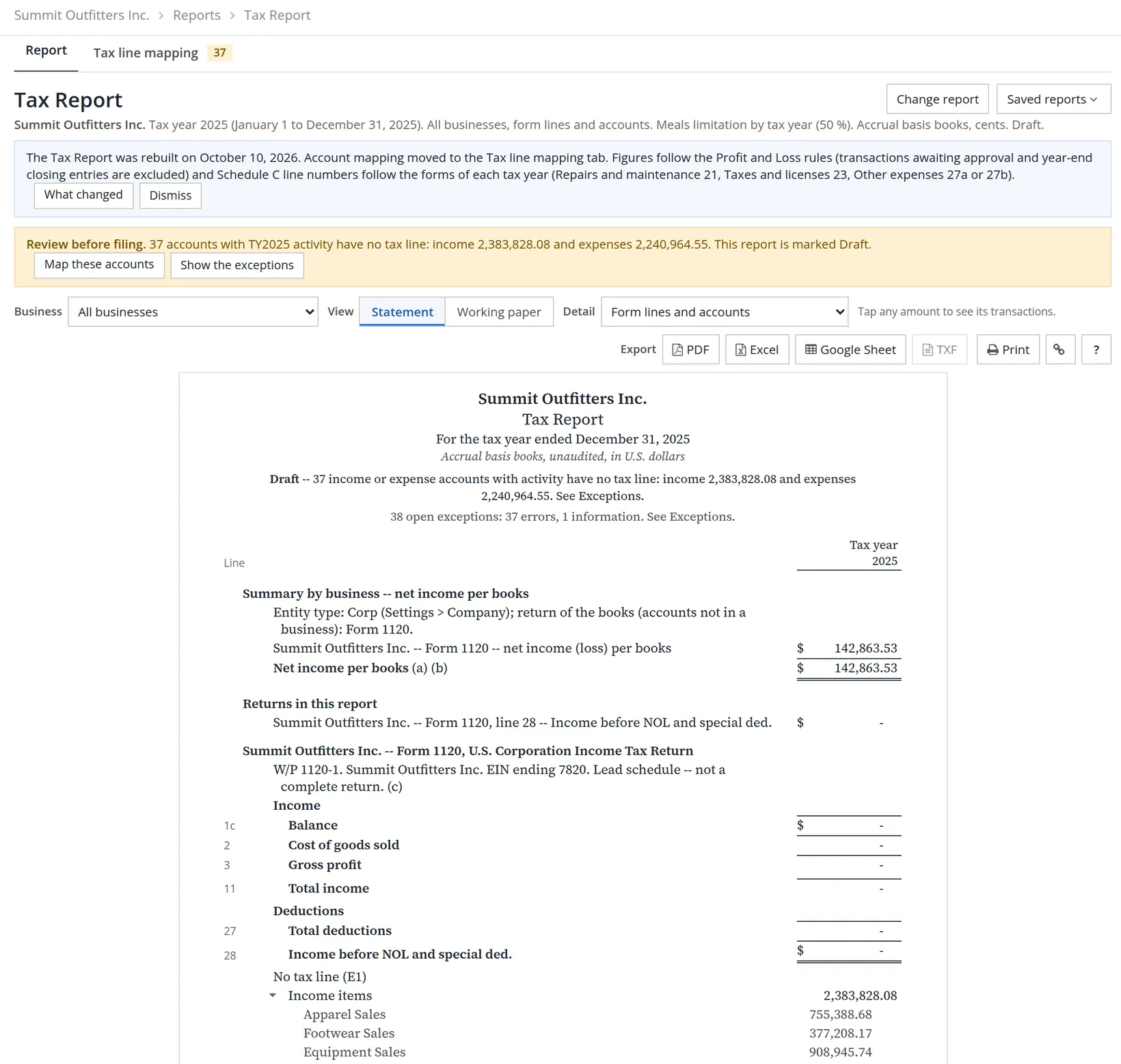
A mapping stays with the account. Next year the report opens already mapped; you only place the accounts you added during the year. The badge on the tab tells you how many there are.
Map the accounts to tax lines
Open the Tax line mapping tab. It lists every income and expense account with activity in the year, with its business, its tax line and a status.
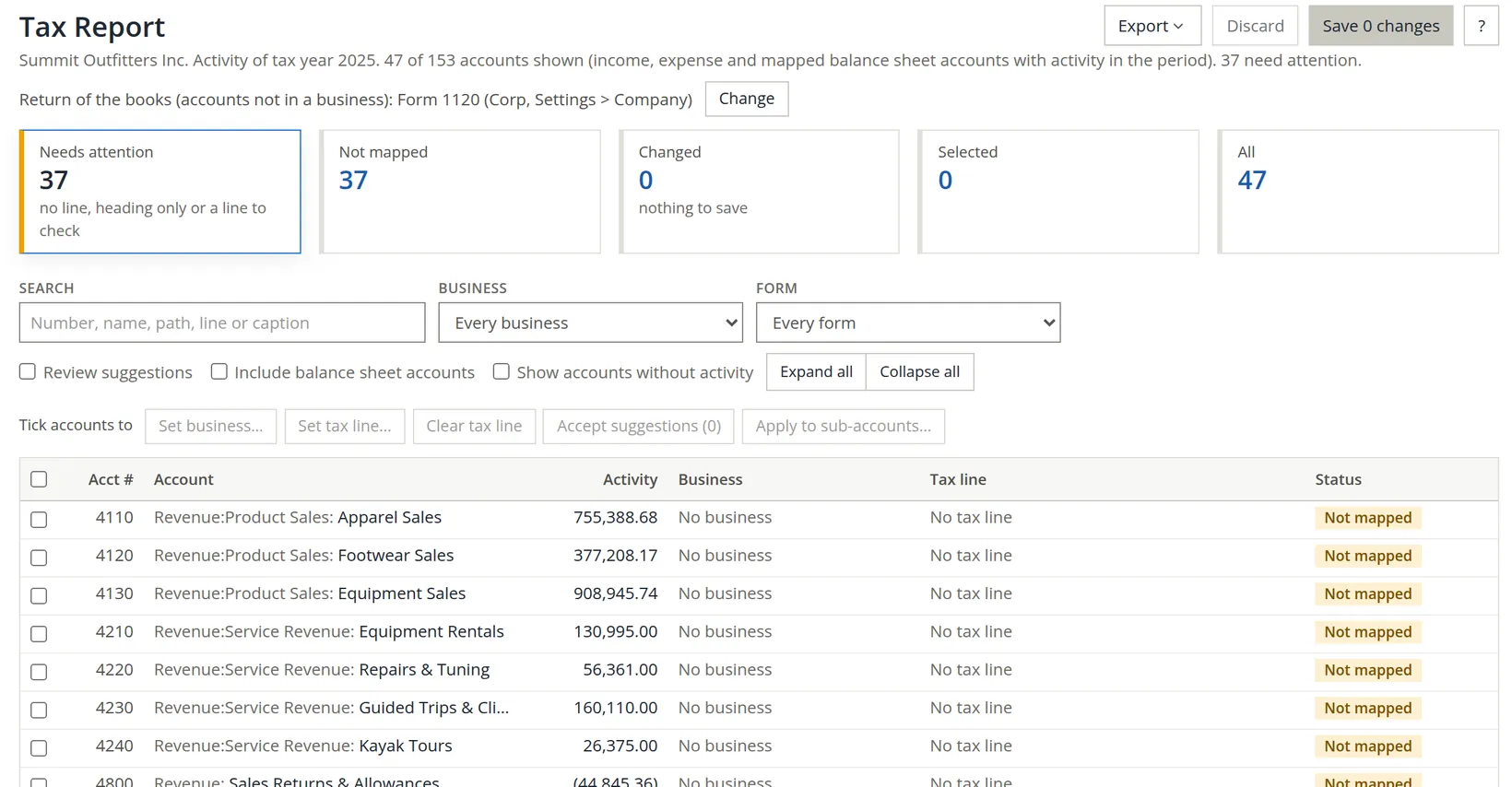
- 1
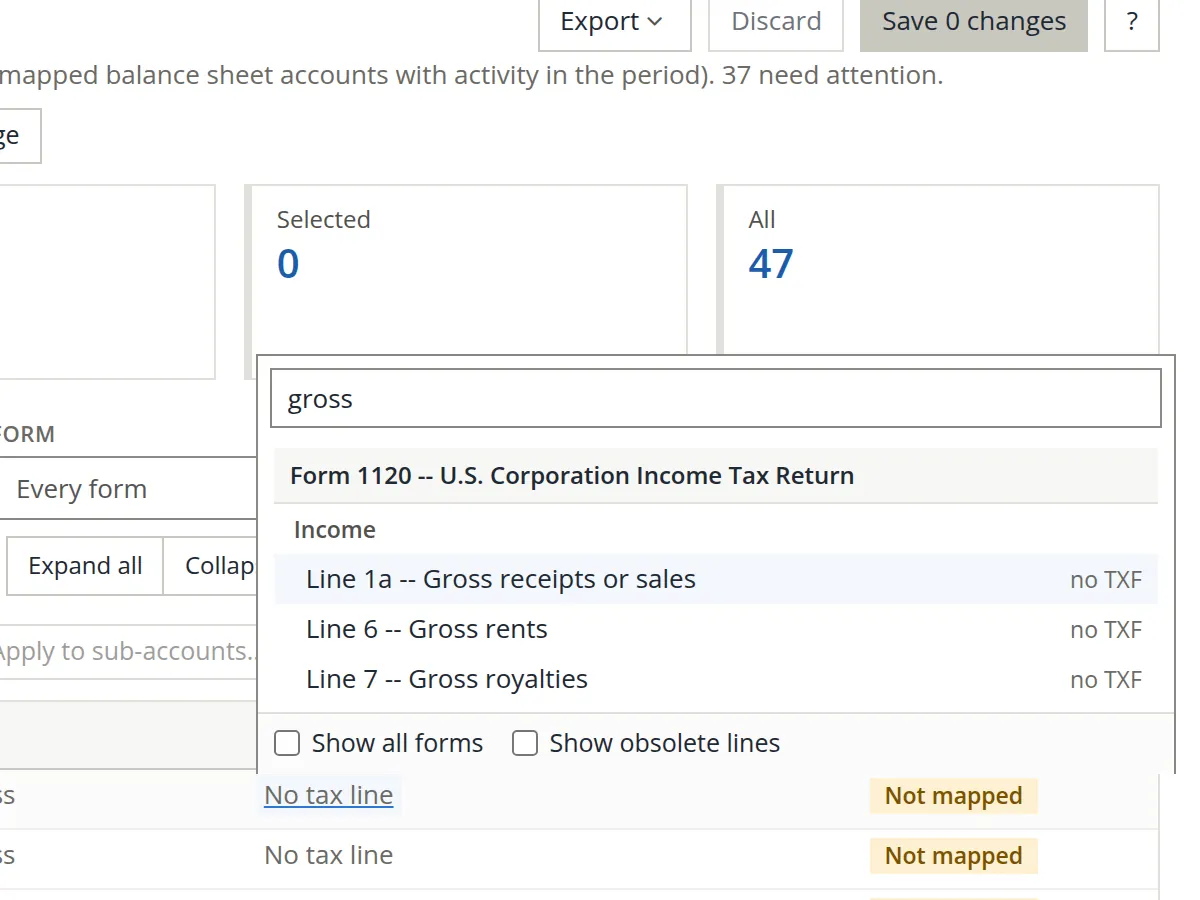
Map one account: click its No tax line link
A picker opens with a search box. Type a word (gross, rent, meals) or a line number (22, c 24b), then click the line.
- 2
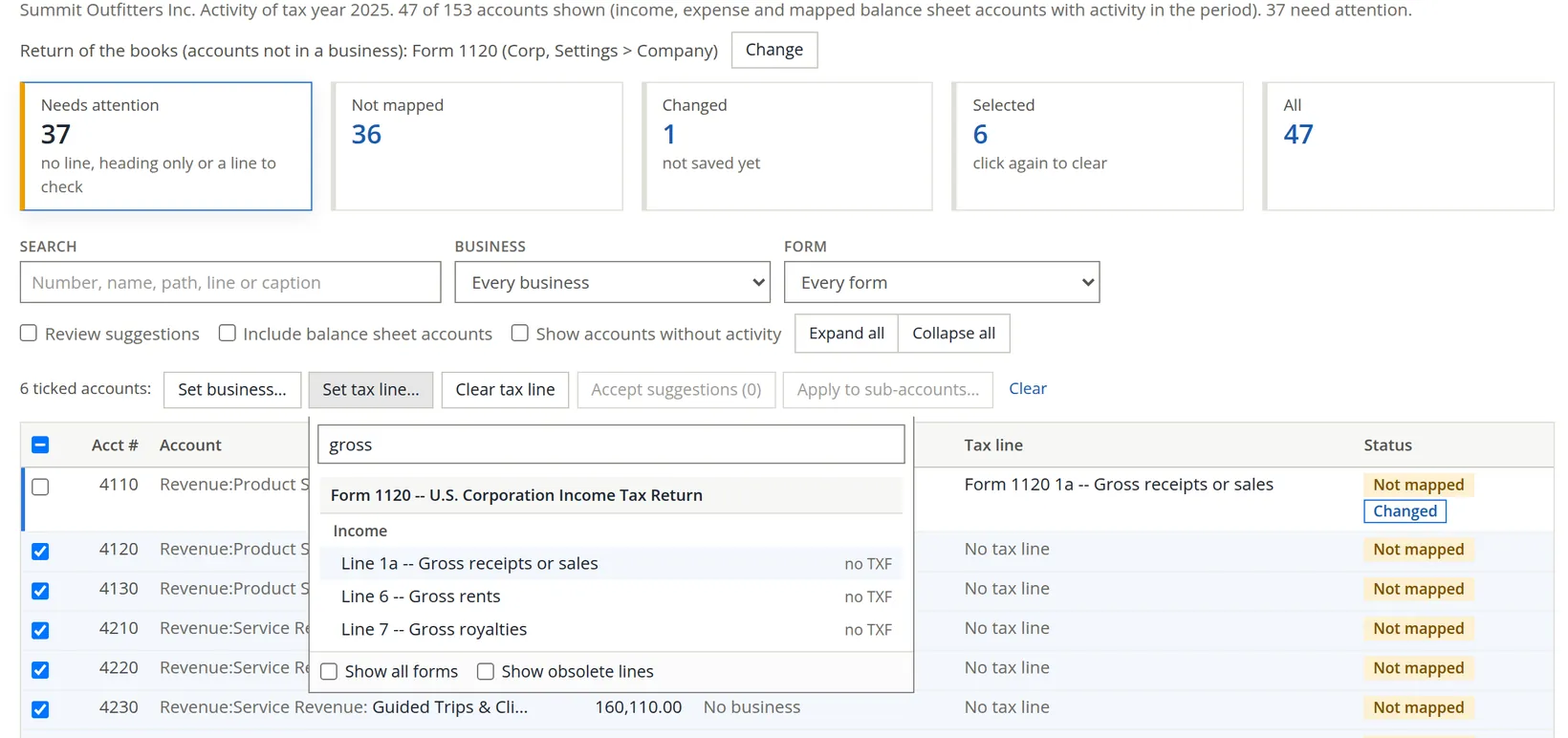
Map many accounts at once: tick, then Set tax line…
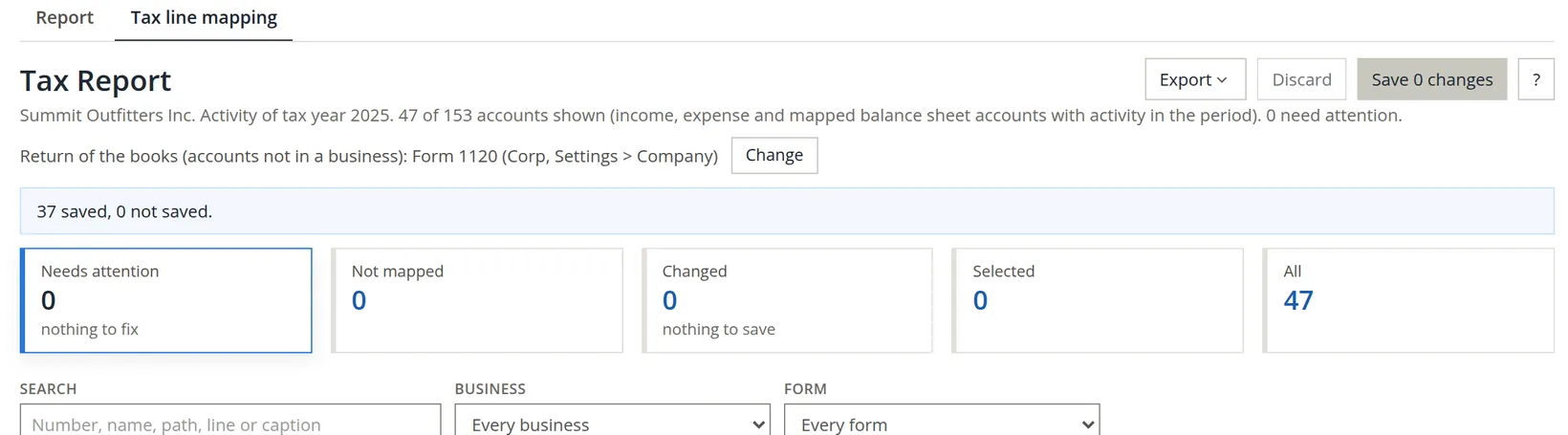
Tick every account that belongs on the same line, here the six other sales accounts, click Set tax line… and pick the line once. Nothing is saved yet: the Changed card counts what is waiting.
- 3
Work down the list
For Summit Outfitters the 37 accounts took fifteen groups. Use the table as a model, and confirm the choices with your preparer.2
| Accounts | Line |
|---|---|
| Sales and service revenue (4110 to 4240) | 1120 line 1a, Gross receipts or sales |
| Returns, allowances and discounts (4800, 4850) | 1120 line 1b, Returns and allowances |
| Cost of sales, freight-in, contract guides, shrinkage (5110 to 5400) | 1125-A line 8, Cost of goods sold, book total (we first put 5200 and 5300 on line 5; Procedure B shows the fix) |
| Management salaries (6120) | 1120 line 12, Compensation of officers |
| Retail staff wages (6110) | 1120 line 13, Salaries and wages |
| Repairs (6700) / Bad debts (6800) / Rent (6200) | 1120 lines 14 / 15 / 16 |
| Payroll taxes (6150), state income tax (9020) | 1120 line 17, Taxes and licenses3 |
| Interest expense (8010) | 1120 line 18, Interest |
| Depreciation (6450) | 1120 line 20, Depreciation4 |
| Advertising (6300 to 6330) | 1120 line 22, Advertising |
| Utilities, insurance, professional fees, office, travel, bank fees | 1120 line 26, Other deductions |
| Interest income (7010) / Gain on sale of assets (7020) | 1120 line 5 / line 9 (Form 4797) |
| Federal income tax (9010) | Book only: Federal income tax (nondeductible)5 |
- 4
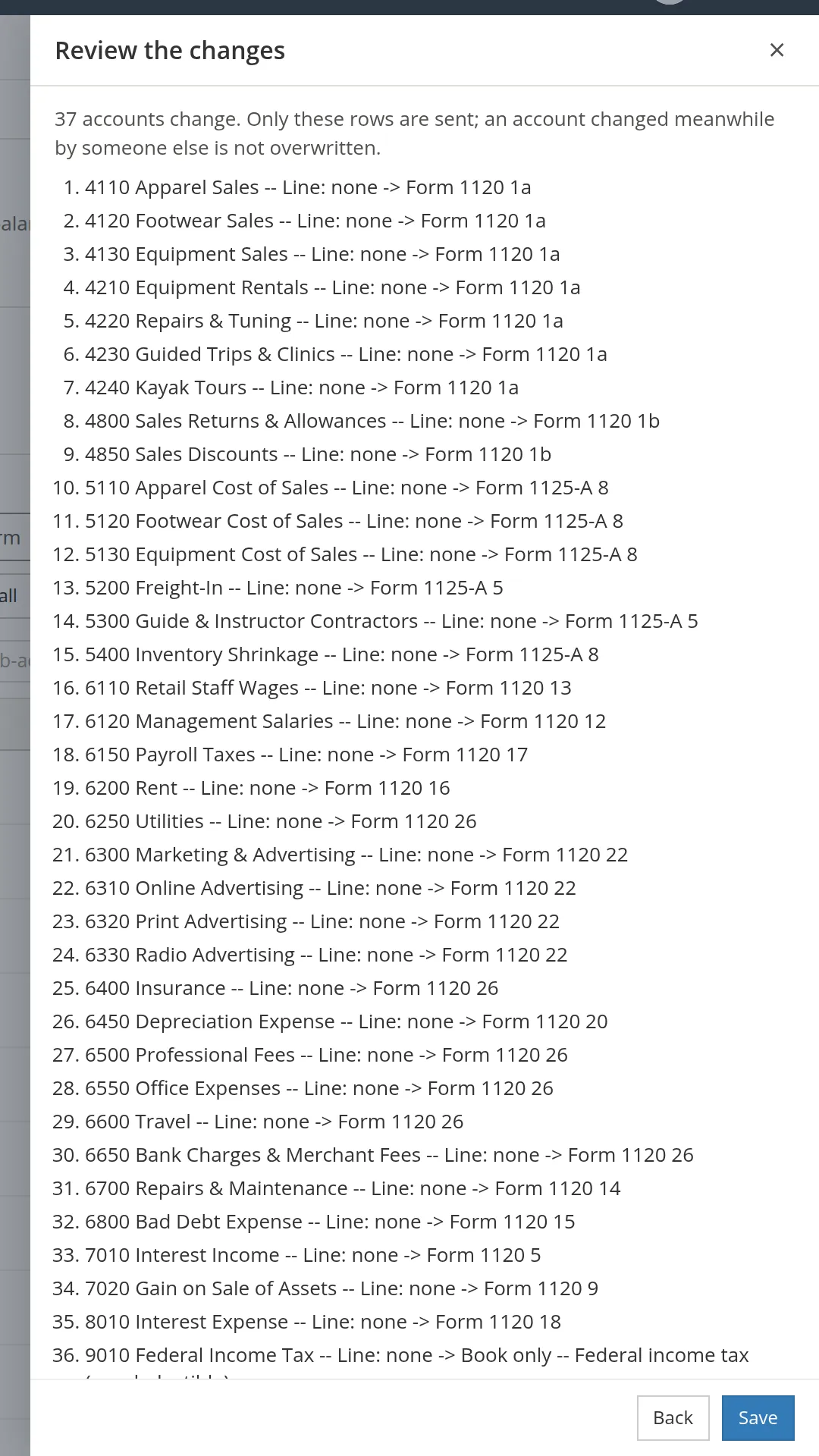
Click Save 37 changes, review, then Save
A panel lists every change, old line to new line. Read it once: it is the cheapest place to catch a slip. Only the listed rows are sent, so an account someone else changed meanwhile is not overwritten.
An account never borrows its parent's line: each sub-account needs its own.6 Tick the parent and use Apply to sub-accounts… to place a whole branch, such as all four advertising accounts, in one move.
Every mapping change is logged with who made it and when. A change made after the year's return was filed is listed in the exceptions, because it may call for an amended return.7
Read the exceptions and fix what they find
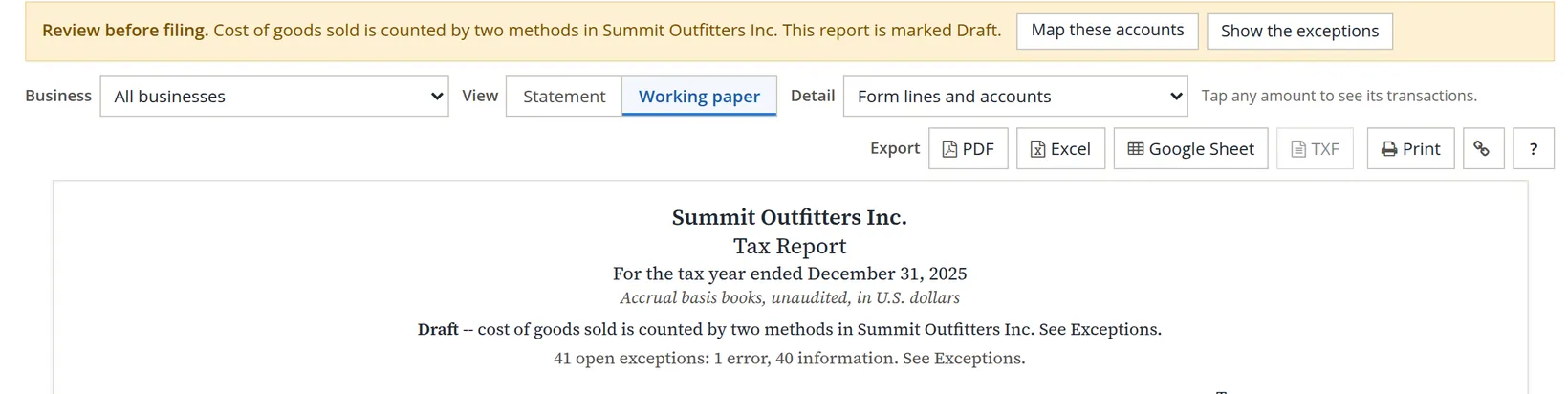
Back on the Report tab, the report checks itself. Each finding is an error (the figures are wrong until it is fixed), a warning (look before filing) or information (something the preparer finishes). An error keeps the report marked Draft.
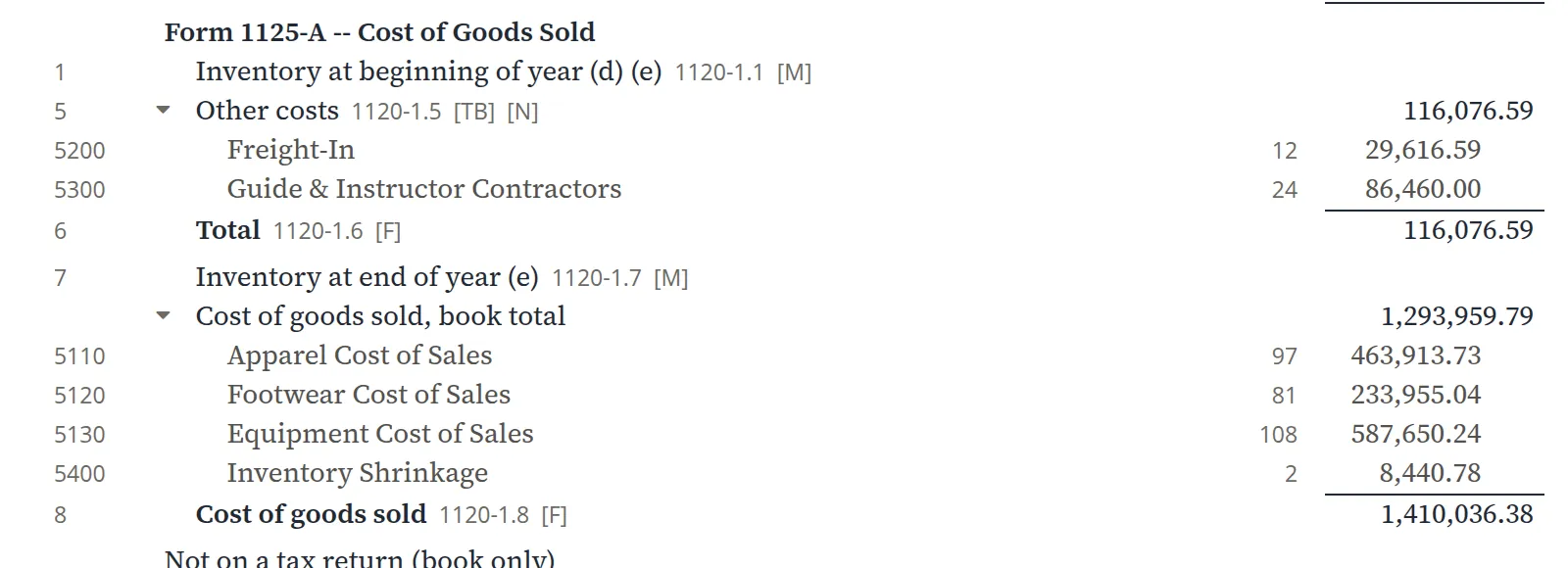
Our first save produced exactly one error, a common one. We had put freight-in and the contract guides on Form 1125-A line 5, Other costs, and the other cost accounts on line 8, Cost of goods sold, book total. Those are two different ways of computing cost of goods sold, and mixing them counts cost twice.8
- 1
On the mapping tab, click All and search 1125-A
The search box matches account numbers, names, form lines and captions.
- 2
Tick 5200 and 5300, Set tax line… → line 8, Save
Summit keeps perpetual inventory (Chapter 2.7), so all of its costs belong on the book total.
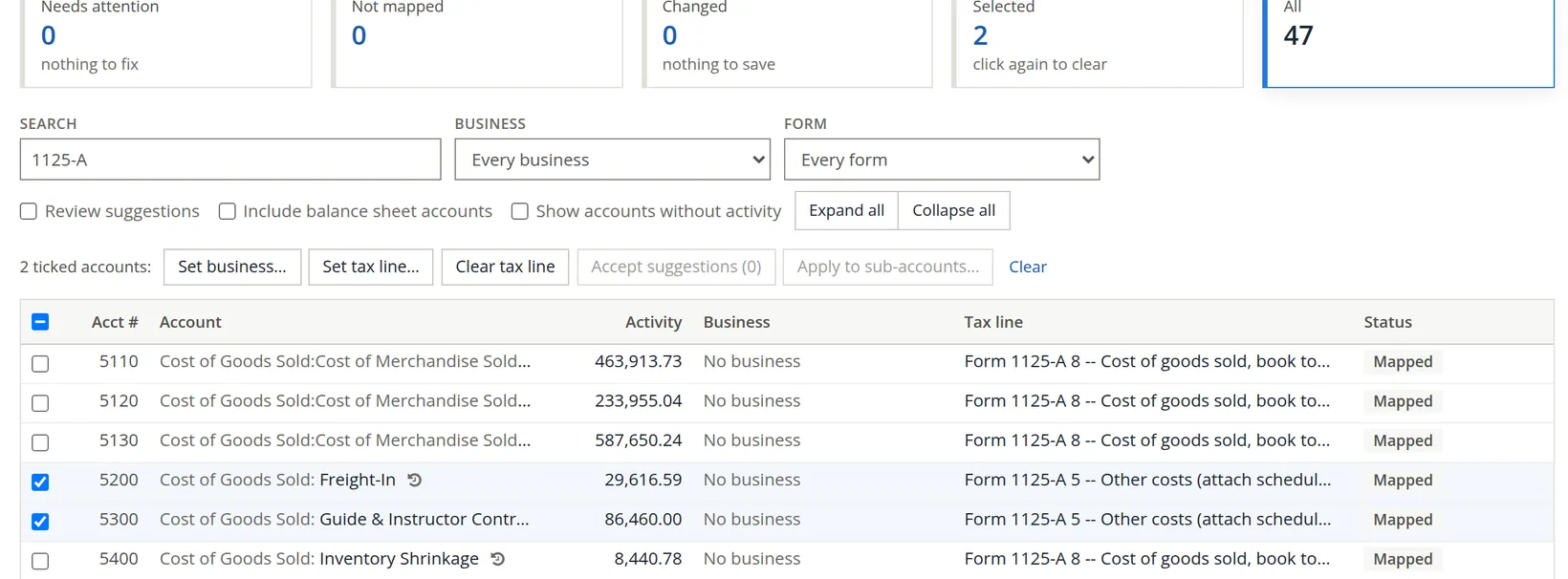
After the fix, the error is gone and the Draft mark with it. What remains is 42 information items and no warnings. The information items are lines the preparer completes, such as tax depreciation, and the mapping-change log. In books whose 1099 boxes are not set yet you would also see warnings E31: payees who get Forms 1099 were paid on accounts with no 1099 box. Chapter 6.9 shows them and their cure; Summit's boxes are already set, so none appear here.
Read the finished report
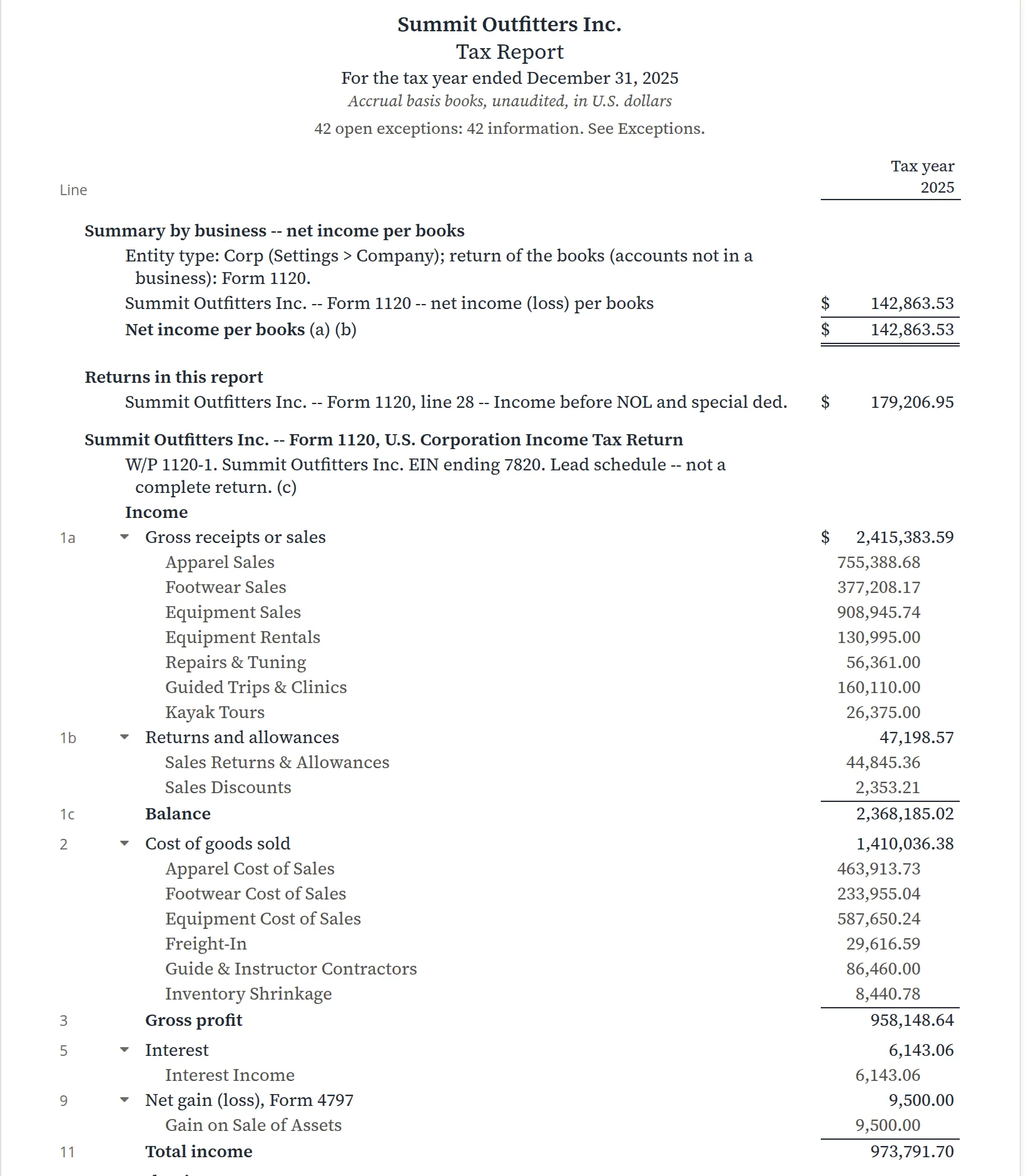
Why do the two totals differ? Below the form the report reconciles them. The $36,343.42 of federal income tax was an expense in the books but is not deductible, so it is added back: 142,863.53 + 36,343.42 = 179,206.95.
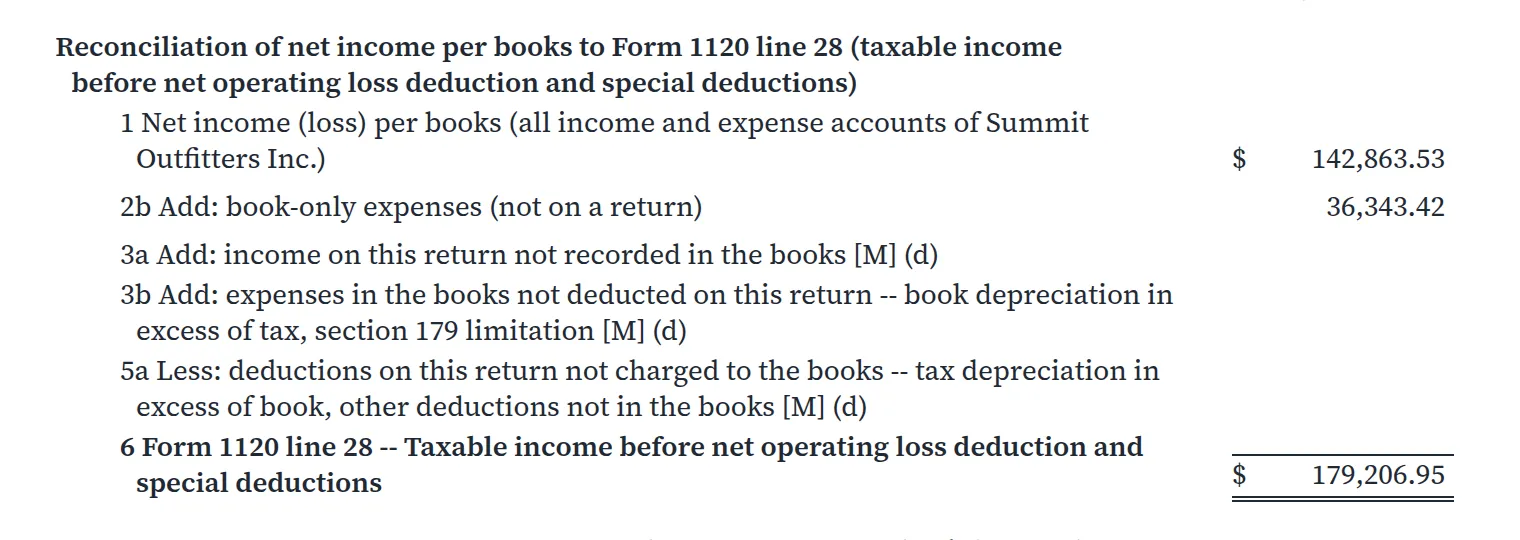
Tick marks in the Working paper view
| Mark | Meaning |
|---|---|
| [TB] | Agrees to the trial balance |
| [F] | Footed: the lines add up |
| [X] | Agrees to the reconciliation and the index |
| [C] | Computed by the report by the rule stated |
| [M] | Preparer input needed in the tax program |
| [N] | No TXF code: type the figure into the tax program by hand |
| [!] | An exception: see Exceptions |
The Working paper view also shows each account's number, the count of documents behind it and a working-paper reference (W/P 1120-1.22 is line 22 of the Form 1120 schedule). Click any amount to see its transactions.
Send it to your preparer
- 1
Choose the view and detail
Most preparers want Working paper with Form lines and accounts.
- 2
Export
PDF for reading and filing; Excel or Google Sheet for a preparer who works in a spreadsheet; Print. TXF loads the figures into consumer tax software; it covers only the Form 1040 family.9
- 3
Save the settings for next year
Saved reports keeps the view, detail and business so next year's run is one click.
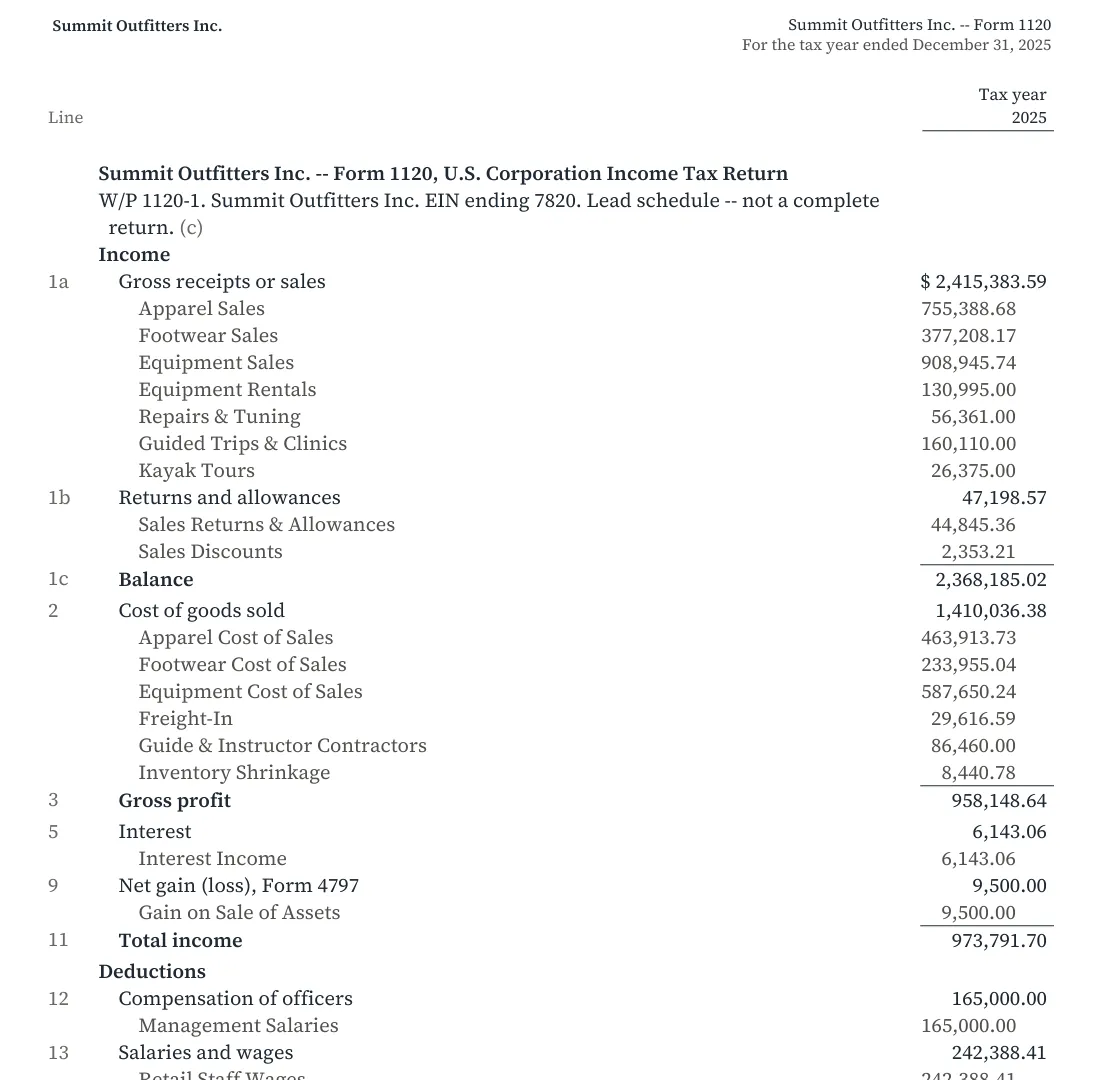
Close the year (Chapter 15.5), run the Trial Balance (6.5), then open the Tax Report. Clear the Needs attention card to zero, read every warning, and export. A report with no Draft mark and a reconciliation that ties is a report your preparer can trust.
Before you hand it over
- [x] The entity type in Settings → Company is right, so the right return is used.
- [x] Needs attention shows 0 on the mapping tab.
- [x] The report has no Draft mark.
- [x] Net income per books agrees with the Profit and Loss for the same year.
- [x] Every warning has been read; any 1099 warnings are settled in Chapter 6.9.
- [x] The PDF or workbook has gone to the preparer, with any [M] items noted.
Check your understanding
1. Is the Tax Report a tax return?
Answer
No. It is a lead schedule: book figures arranged by return line, for a preparer to finish in the tax program.
2. You tick eight advertising accounts. What is the fastest way to put them all on line 22?
Answer
Set tax line… on the ticked accounts, pick line 22 once, then save.
3. The report says cost of goods sold is counted by two methods. What happened?
Answer
Some cost accounts are on Form 1125-A lines 1 to 7 (periodic) and others on line 8, the book total (perpetual). Put them all on one method.
4. Net income per books is $142,863.53 but line 28 is $179,206.95. Where is the difference explained?
Answer
In the reconciliation: the federal income tax expense, book-only, is added back.
Notes
- The practice user is a member of Summit Outfitters Inc. and may map accounts there. The mapping log records the user's display name, Alex Morgan, with each change. ↑
- The line choices in this chapter illustrate how the report works. They are not tax advice. Which line an item belongs on can turn on facts the books do not hold, so confirm them with your tax preparer. ↑
- On Form 1120, state and local income taxes are deductible as taxes; federal income tax is not. ↑
- The report shows book depreciation. Tax depreciation, including section 179 and bonus depreciation, comes from Form 4562 in the tax program; the line is marked [M]. ↑
- A corporation cannot deduct its own federal income tax. Mapping the account to Book only keeps it off the return and adds it back in the reconciliation. Leaving it unmapped would leave an exception open instead. ↑
- The report's note (b): "An account without its own line is listed as an exception and never takes its parent's line." ↑
- These appear as information item E22, for example "4110 Apparel Sales -- changed November 5, 2026 by Alex Morgan (Tax line mapping): ... A change after filing may require an amended return." ↑
- Form 1125-A builds cost of goods sold from opening inventory, purchases, labor and other costs less closing inventory (lines 1 to 7), the periodic method. A business with perpetual inventory already has the answer in its cost-of-sales accounts and uses the book total. Use one or the other. ↑
- TXF (Tax Exchange Format) is read by consumer tax programs for individual returns. For a corporation such as Summit the button is greyed out; the hover text gives the reason. ↑