
Chapter 15.5
Closing the books
Why a period is closed, what the closing entries do to revenue, expenses and retained earnings, and how to review, post and lock a month-end close. With the labor check, the lock in action, and the safe way to re-open a period.
When you finish this chapter you will be able to:
- Explain what a closing entry is and why revenue and expense accounts start each period at zero.
- Trace a period's net income from income summary into retained earnings, with the arithmetic.
- Review and post a close, and answer the labor check when the books use Timekeeping.
- Recognise the lock on a closed period and what it takes to change an entry inside it.
- Re-open the latest period with a reason, decide whether to delete its closing entries, and read the close history.
What closing does
Revenue and expense accounts measure one period. The Profit and Loss for October should show October's sales, not October's plus September's. Balance sheet accounts, by contrast, carry on from period to period: the cash at the end of October is the cash at the start of November.
Closing does two things at once. First, it posts closing entries, dated on the last day of the period, that bring every revenue and expense account back to zero and move the difference, the period's net income, into retained earnings on the balance sheet. Second, it locks every entry dated on or before that day, so the figures you reported cannot drift afterwards.
BizBooks360 builds the closing entries in four steps, each one a balanced journal entry:
| Step | Entry | Effect |
|---|---|---|
| 1 Revenue | Debit each revenue account; credit income summary | Revenue accounts at zero |
| 2 Expenses | Debit income summary; credit each expense account | Expense accounts at zero |
| 3 Net income | Debit income summary; credit retained earnings (the reverse for a loss) | Income summary at zero; profit in retained earnings |
| 4 Dividends | Debit retained earnings; credit dividends or draws | Only when a dividend or draw was declared |
Books with partners whose shares are set in Settings → Owners and profit shares get a fifth step that splits the profit between the partners' capital accounts.
Open Close books and check the set-up
- 1
Settings → Closing and books → Close books
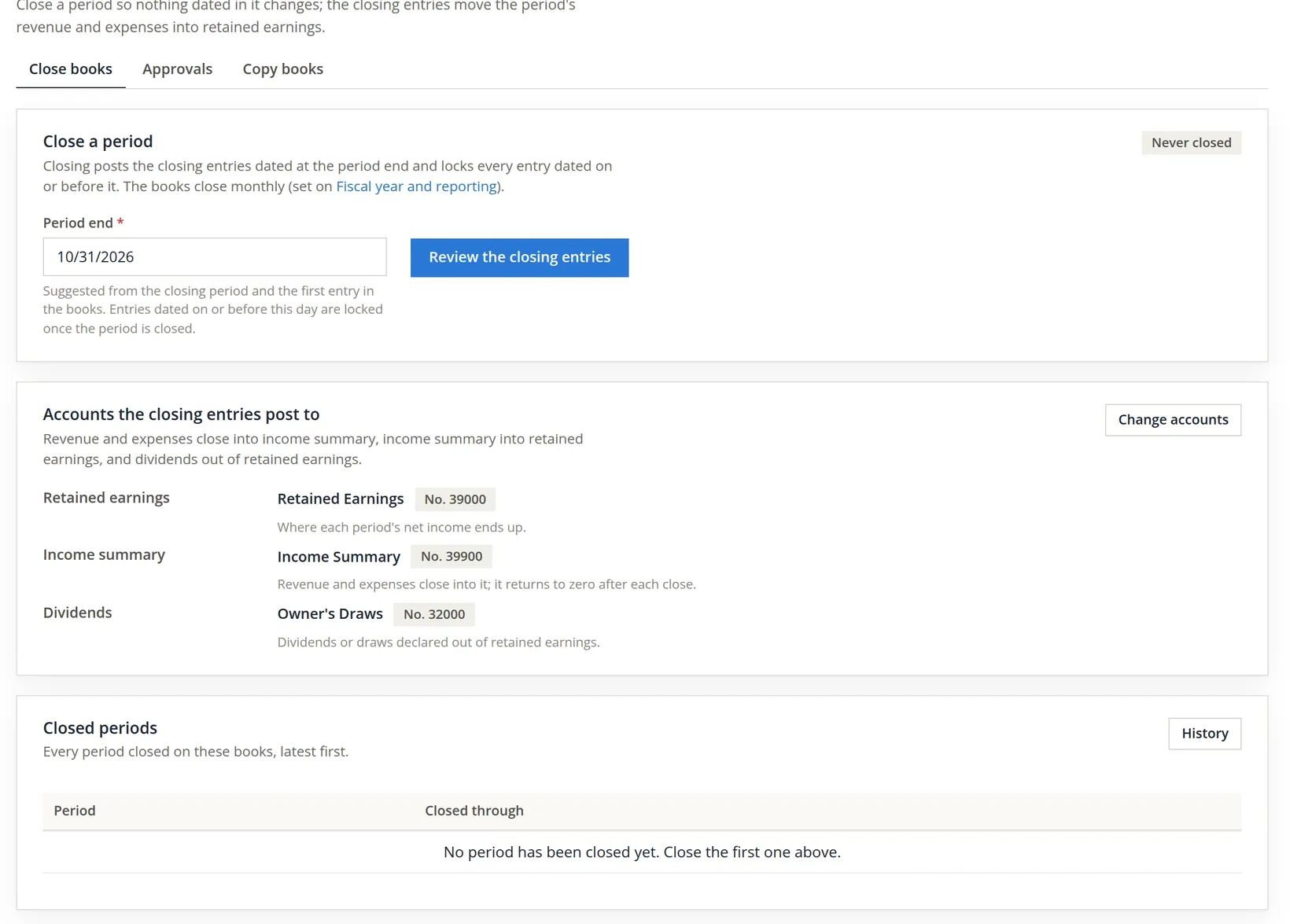
Read the card from the top before you touch anything: it states how often the books close and which accounts the entries will use. The page has two neighbours on its tab bar: Approvals and Copy books (Chapter 15.6). Approvals holds four second-person rules that only the owner changes: journal entries (each from an amount you set), checks and bill payments (a check cannot be printed until it is approved), changes to a vendor's remit-to address, tax ID and similar details, and the sign-off of each finished bank reconciliation. Whatever waits under these rules is listed for the approvers under Accounts → Approvals.
- 2
Confirm the closing accounts
For a sole proprietor, as here, "dividends" means the owner's draws. A corporation would point it at a Dividends account. If an account shows Not set, the close creates the default account the first time it runs.
- 3
Review the closing entries
- 4
Leave 10/31/2026 in Period end and click Review the closing entries
Nothing is posted yet. The page lays out the four entries one step at a time. Each amount box can be changed if an account should close for a different figure, but in a normal close you change nothing: the amounts are the account balances through the period end. The close checks the figures before it posts anything: a revenue or expense account must close to zero, so an amount changed by mistake stops the close with a line such as The closing entries do not close "Shop Labor": the period ending 10/31/2026 holds 1,956.00 there. Review the closing entries again. Nothing is posted, and the close date on the page stays as it was.
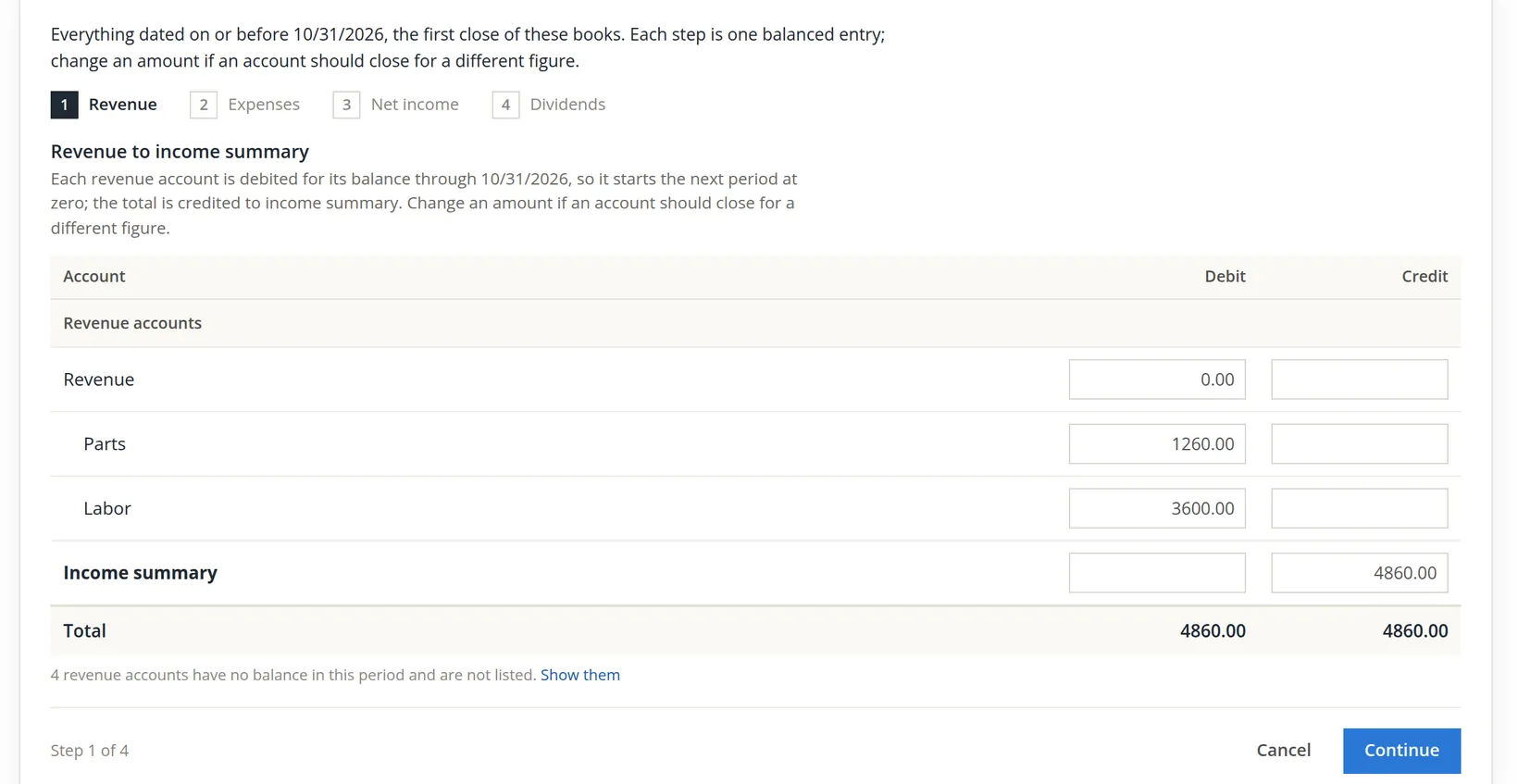
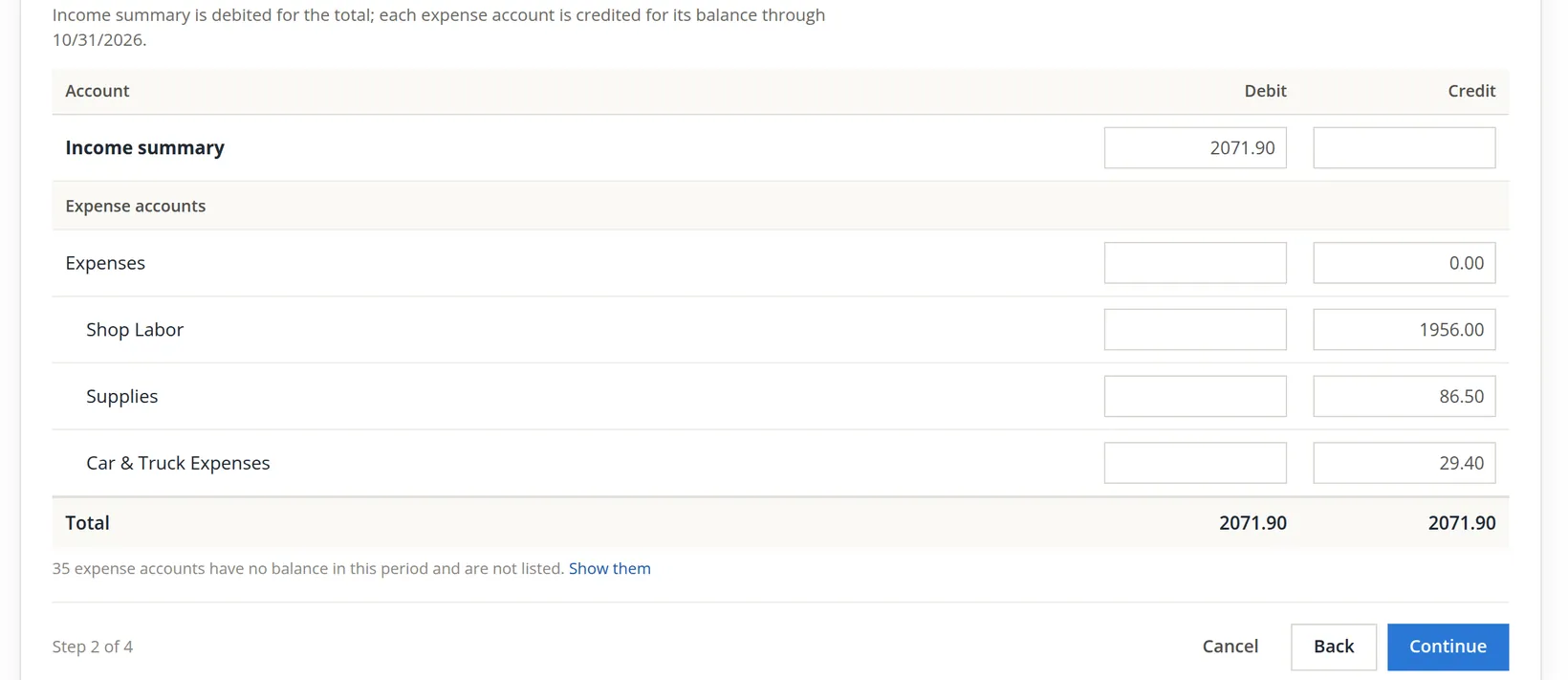
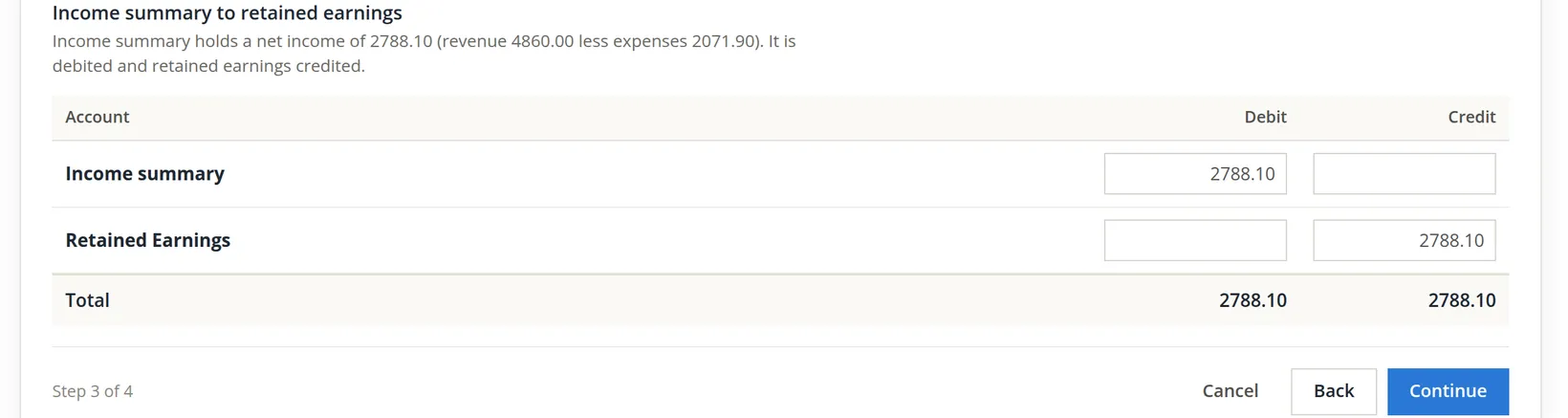
Reading this example. Income summary is credited $4,860.00 in step 1 and debited $2,071.90 in step 2, leaving a credit balance of $4,860.00 − $2,071.90 = $2,788.10. That credit is the month's net income. Step 3 debits income summary by exactly that amount, so it returns to zero, and credits retained earnings, so the profit now sits in equity.2 Had expenses been larger than revenue, step 3 would run the other way and reduce retained earnings.
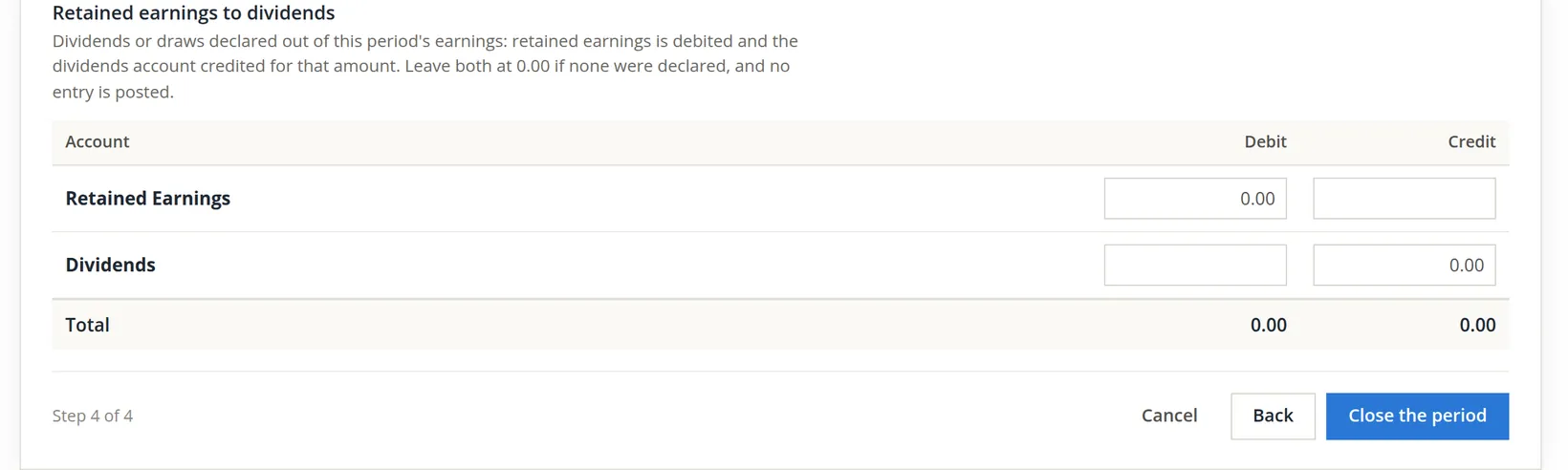
Step 4 is for a dividend or draw declared at the close. Draws the owner already took during the month were posted when they were paid; entering them again here would count them twice.
Post the close
- 5
Click Close the period and read the question
The window sums up the close in one sentence and says how many entries it will post.
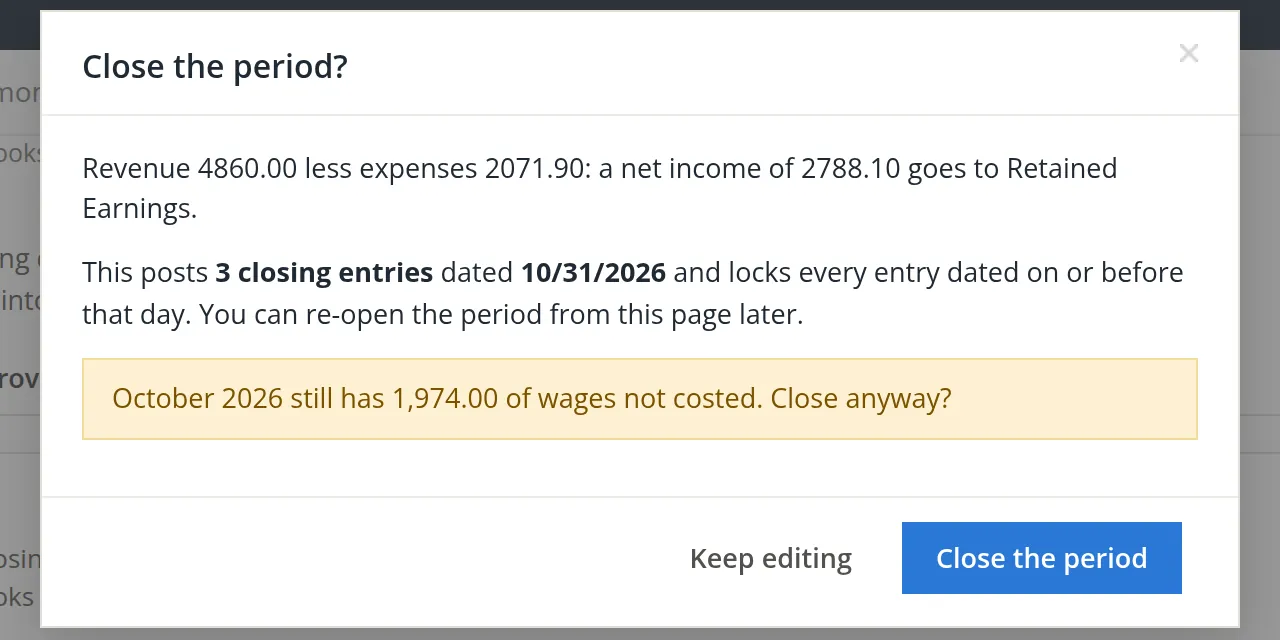
Closing with labor cost outstanding
Books that cost labor through Timekeeping are checked before anything is posted. The repair shop's October timesheets were approved, but the wages had not been moved to the labor accounts by Timekeeping → Labor costing. Closing October now would lock a month whose labor cost is incomplete. The owner clicked Close the period, and the close stopped with a second window.
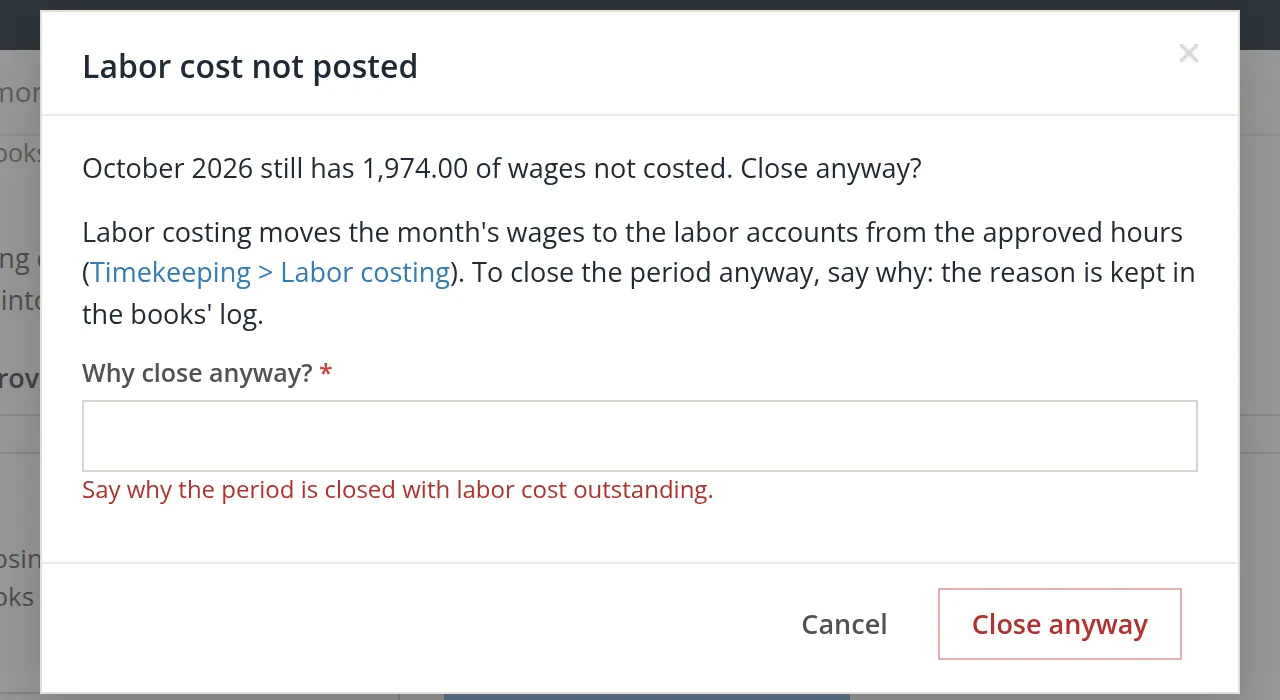
There are two correct answers. The better one is Cancel, post the labor cost (Chapter 12.2), and close again. The other is to close anyway with a reason, which is kept in the books' log and becomes the close's note in the close history. In the month-end practice copy the owner wrote: Practice close. October shop wages are costed when the November 6 pay run is posted in the real books. The red line stays under the box until Close anyway is clicked again; then the close went through. A refused try changes nothing: the Period end box still holds 10/31/2026, and the dates the page suggests and locks are those of the close that stands.
- 6
Answer the labor check, or cancel and post the labor
Keep the reason factual and short (up to 255 characters): an auditor may read it a year from now.
The lock in action
A day later a late shop ticket turned up: a $45.00 brake job paid in cash on October 15. The owner started a journal entry dated 10/15/2026.
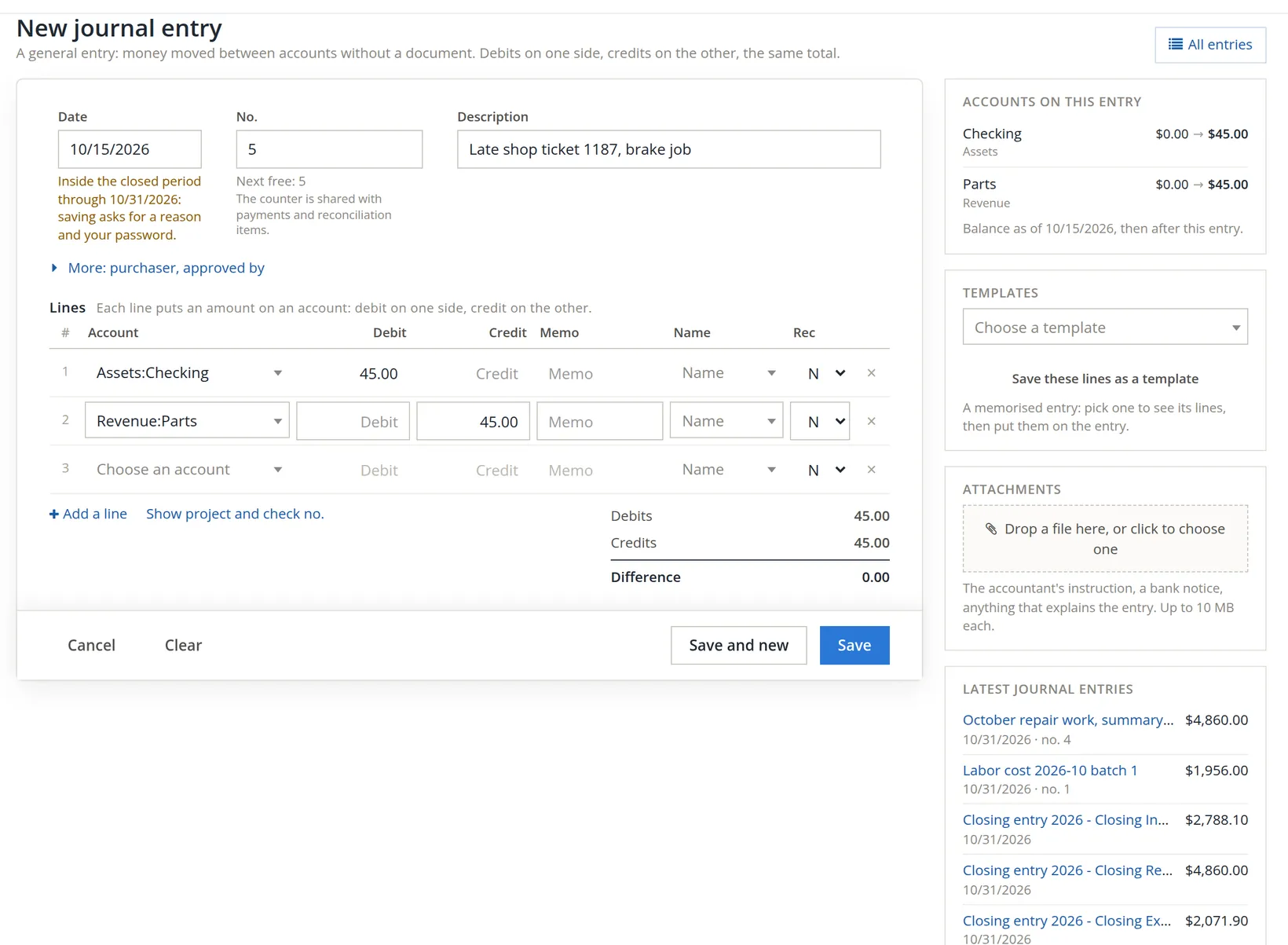
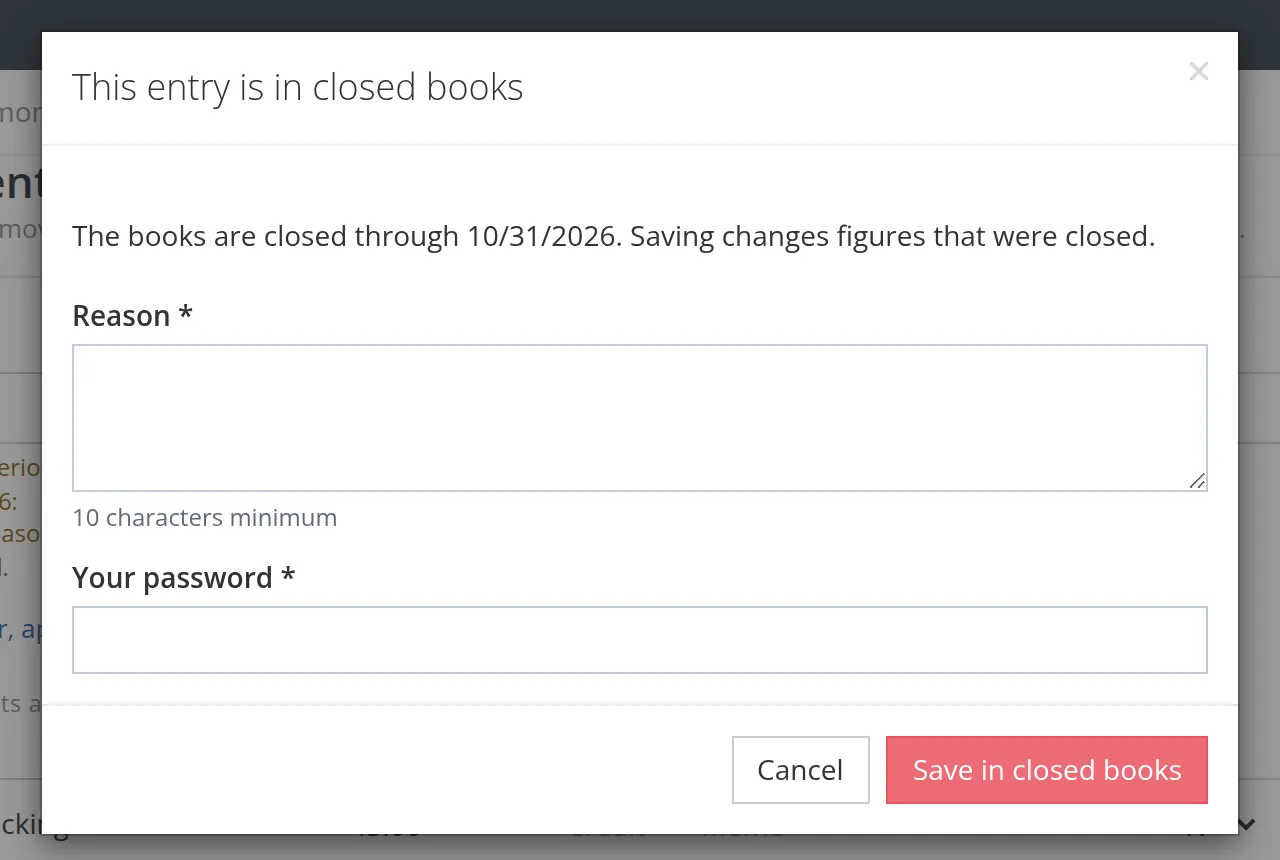
The lock is a speed bump, not a wall: someone who knows the password can still save. That is deliberate, because real books need late corrections. But the speed bump leaves a trace. The reason, the person and the time go into the books' log (Audit History, Chapter 6.7), and the server itself refuses any change dated in closed books that does not carry the one-time token this window obtains, so no other route slips past the question.3 The same window guards deleting and voiding such an entry, and changes made from an account register; its title and button then name the action: the title reads Voiding in closed books or Deleting in closed books, and the button Void in closed books or Delete in closed books. But a change inside a closed month changes figures you have already reported, so the better habit is to date the late ticket in the open month (November) with a memo that names the October job, unless the amount is material.
Save the entry with a reason and your password, then close the period again so the closing entries include it. The journal form offers this after such a save. Otherwise revenue or expense balances are left in the closed month that the closing entries did not move.
Re-open a period
Re-open only for a correction too large to post in the open month. Only the latest closed period can be re-opened, and only by someone with delete rights on Close Books.
- 1
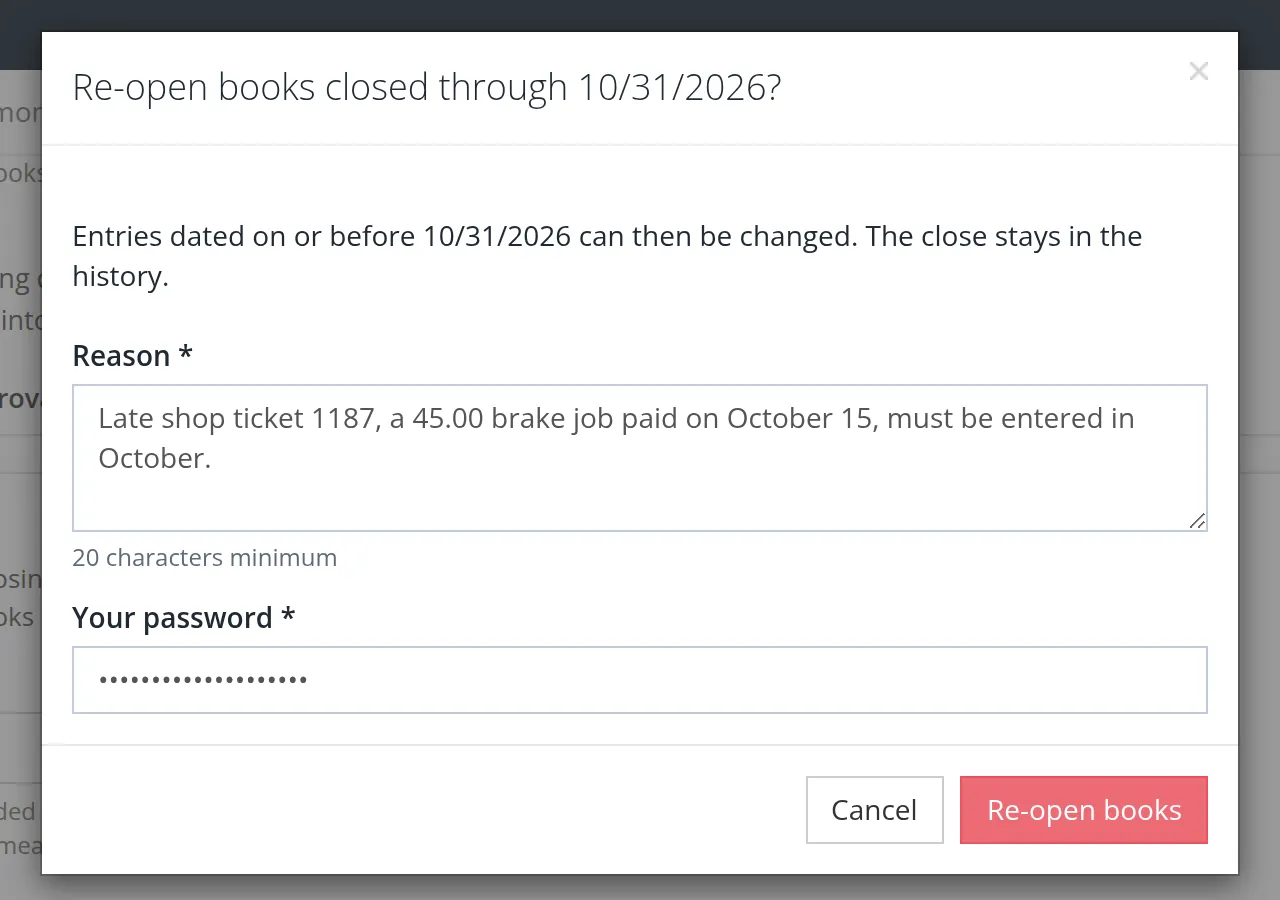
Click Re-open the period…, say why, and enter your password
One window does it all. Its title names the period, Re-open books closed through 10/31/2026? Write the reason in plain words, at least 20 characters: the counter under the box turns red while it is shorter ("20 characters minimum, 11 so far"). Then type your own sign-in password and click Re-open books. In books that use Projects with settled indirect rates, the window adds a warning when the dates lie in a settled year, for example These dates are in fiscal year 2026, whose indirect rates are settled and locked. Re-opening does not unlock the rates. The re-open is still allowed, and the audit trail names the rate year. The owner wrote: Late shop ticket 1187, a 45.00 brake job paid on October 15, must be entered in October.
- 2
Decide what happens to the closing entries
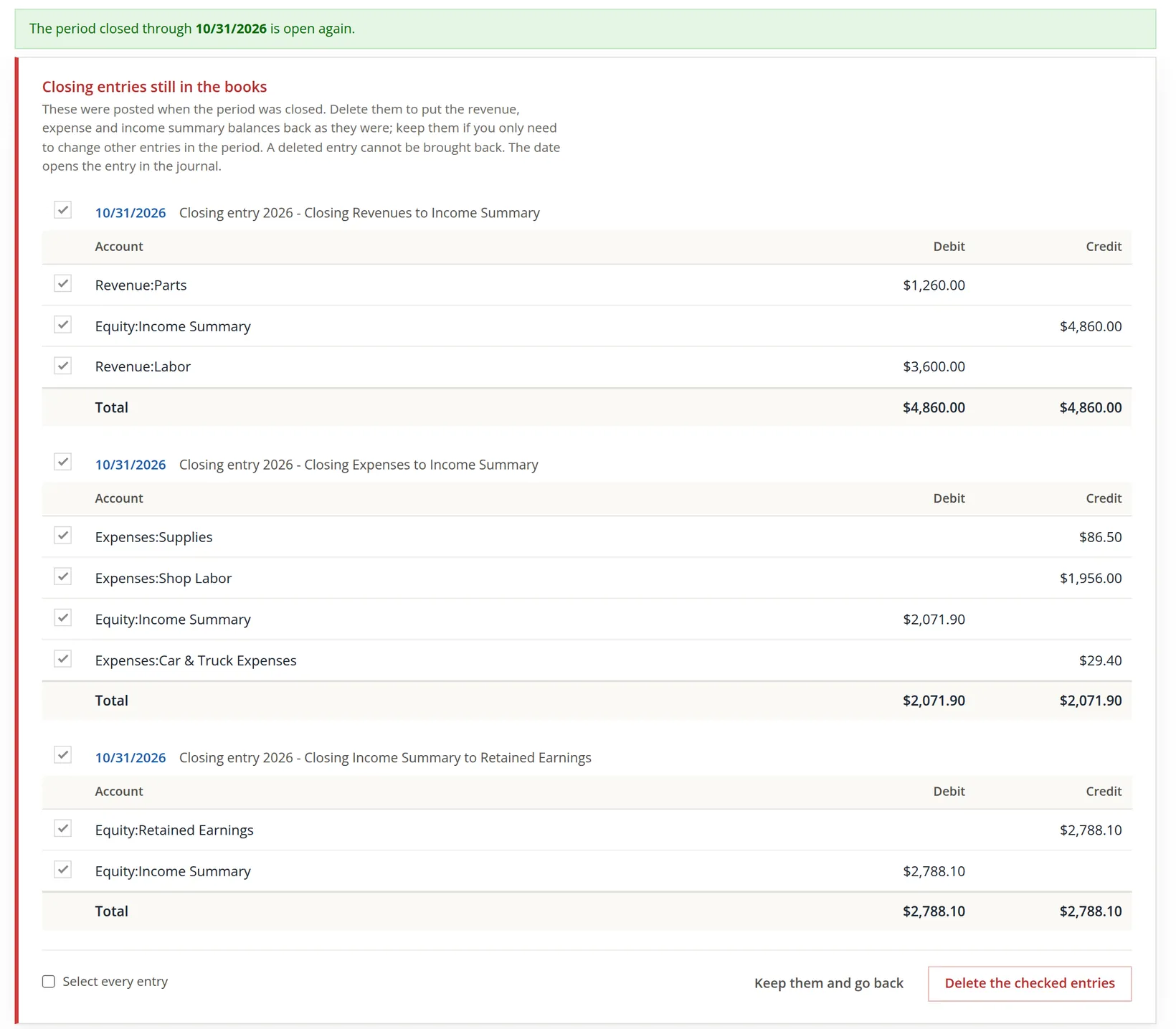
Re-opening removes the close date at once. The closing entries stay in the books until you delete them on the next page, which lists them line by line.
| Your correction | Do this |
|---|---|
| Changes revenue or expenses of the period | Delete the closing entries, correct, then close again: the new closing entries use the corrected balances. |
| Touches only balance sheet accounts | Keep the closing entries, correct, then close again. |
The confirm window says so: the checked entries are removed, and their revenue, expense and income summary balances come back. Print the closing entries first if you may need to show what they were.
- 3
Correct, close again, and read the history
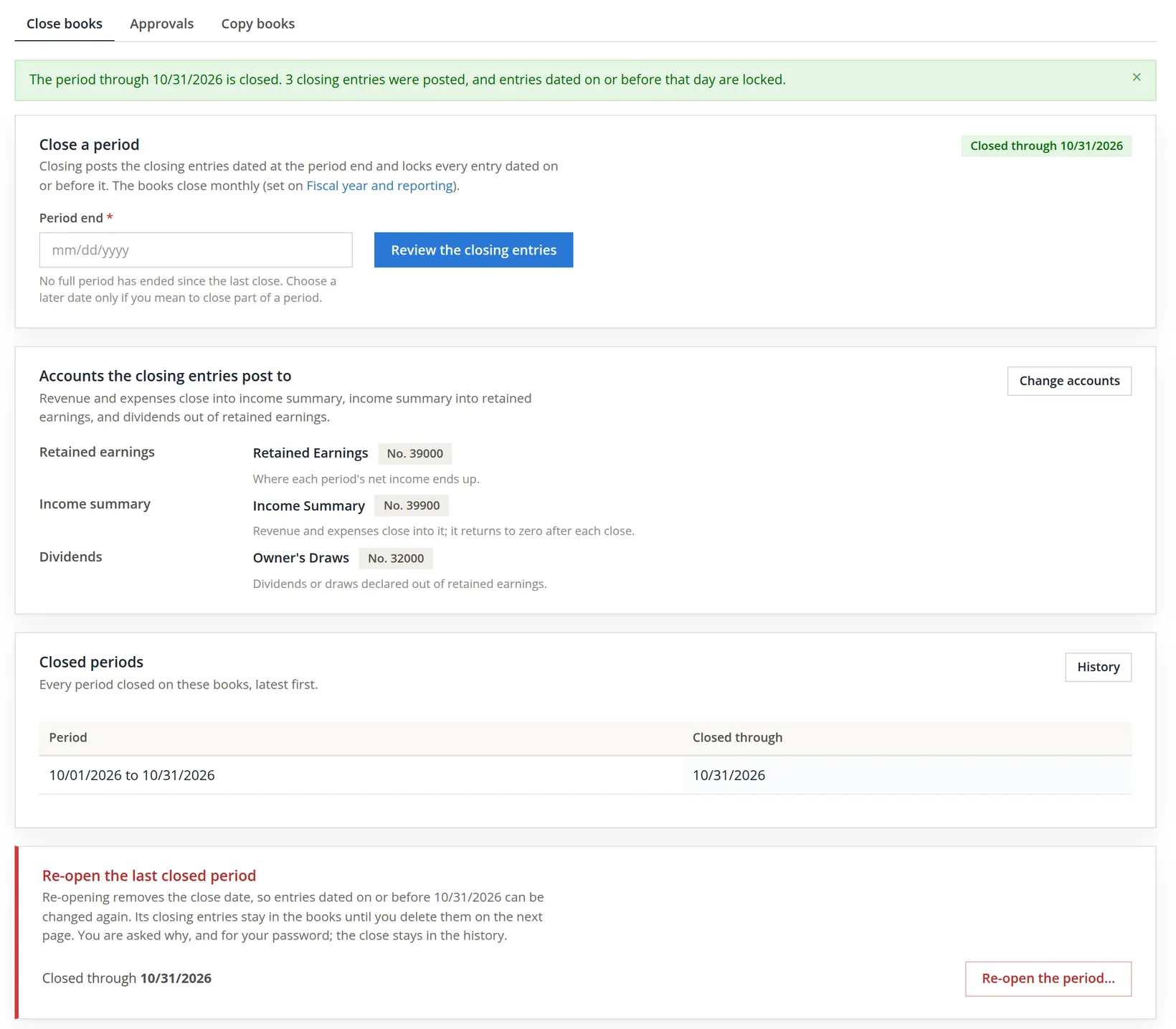
After the correction, close the period again exactly as in the first procedure. Back on Close books, while the period is open again, the chip reads Not closed (re-opened), not Never closed, and the Closed periods card says that no period is closed now and points to History: the record of the earlier close is not lost, it moves to the history. Never closed means no close was ever made. History on the Closed periods card opens Close history, "every close and re-open of these books, with who did it, when and why".
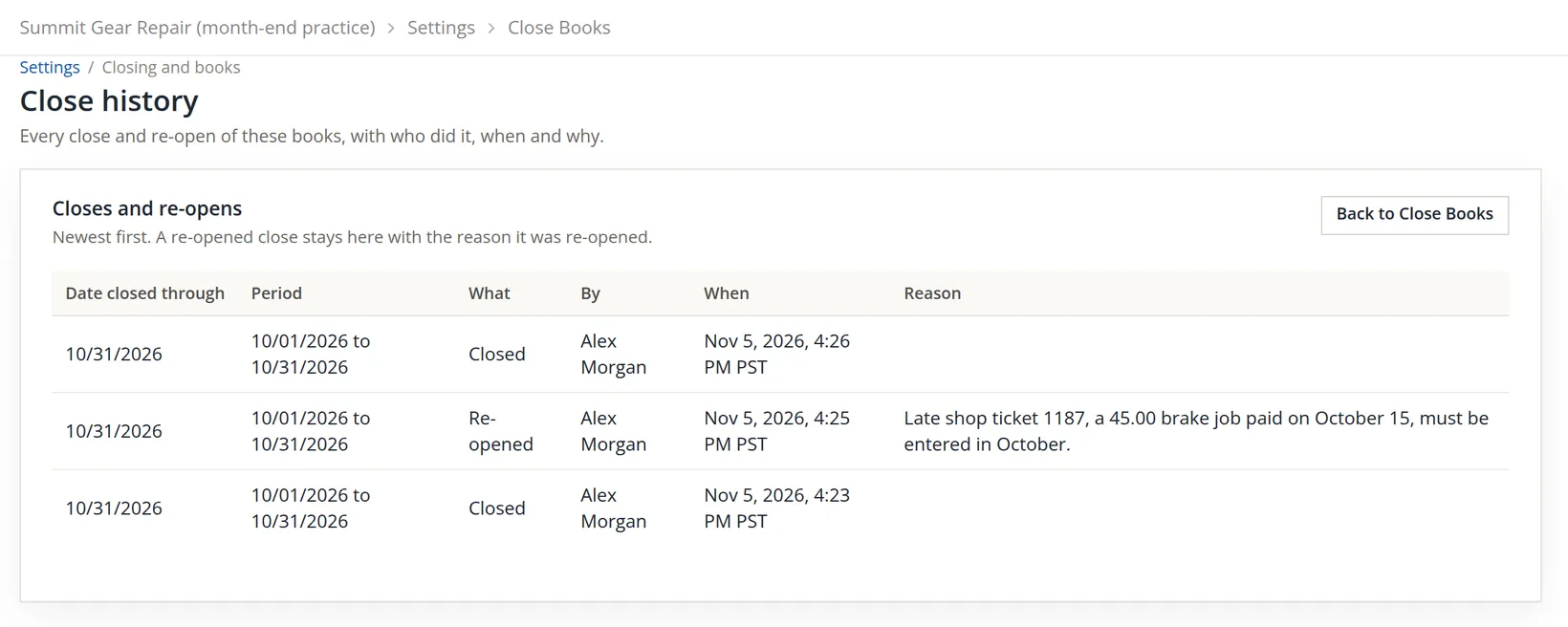
The Reason column holds the reasons for re-opening. A close made over the labor check shows its reason there too, on the close's own row, as Closed with labor cost outstanding: followed by the words typed; the books' log keeps it as well.4 A close made before November 2026 shows Not recorded under By and When, because those facts were not kept then.
Who may do what
The Close Books permission (Chapter 15.7) splits the work:
| Right | Allows |
|---|---|
| View | Open the page and read it |
| Create | Close a period |
| Delete | Re-open a period and delete its closing entries |
| Edit | Change the closing accounts |
A common split: the bookkeeper may close; only the owner or the outside accountant may re-open. The server checks the same rights on every close, re-open and change of accounts. A person without them is told so, for example "You can view Close Books but not close a period. The owner of these books, or someone they allow to create in Close Books, can. Nothing was changed." The rules on the Approvals tab are a separate permission, and only the owner changes them.
Month-end close
- [x] All documents for the month entered; bank and card accounts reconciled.
- [x] Depreciation, payroll and Timekeeping labor posted.
- [x] Profit and Loss and Trial Balance printed for the month.
- [x] The period end is the last day of the month.
- [x] Step 3 net income equals the Profit and Loss.
- [x] Step 4 left at 0.00 unless a dividend or draw is declared now.
- [x] Any labor check answered by posting the labor, or with a clear reason.
- [x] Closed periods shows the month; the chip reads Closed through the right day.
Check your understanding
1. Revenue for a month is $10,000 and expenses $11,500. What does step 3 post?
Answer
A net loss of $1,500: retained earnings is debited $1,500 and income summary credited $1,500.
2. Why is income summary zero after every close?
Answer
It is credited with revenue and debited with expenses, and step 3 moves the difference to retained earnings, so nothing is left in it.
3. After the close, can anyone change an October entry?
Answer
Yes, but saving asks for a reason and the user's password, and the reason is kept in the books' log. The period should then be closed again.
4. The labor check stops your close. What are your two options?
Answer
Cancel and post the labor cost in Timekeeping, then close; or close anyway and give a reason, which is kept in the log and shown as the Reason of that close in the close history.
5. You re-open October to fix a wrong account on a sale. Do you keep or delete the closing entries?
Answer
Delete them: the correction changes revenue balances, so the closing entries must be rebuilt from the corrected figures when you close again.
Notes
- A close locks a month for everyone who works in the books, so it is rehearsed in a copy. The repair shop's real books, Summit Gear Repair, were not closed. The re-open pictures in the last procedure were taken on the same copy, when October was re-opened once and its closing entries deleted; October was then closed again exactly as shown here, which is the state the copy is left in and the three rows of the close history. (The first edition of this chapter used the copy named Summit Gear Repair (practice copy), which stays closed through October for Chapter 14.3.) ↑
- The review steps and the question window show amounts without thousands separators (4860.00) while the rest of the page uses them ($4,860.00). The figures are the same. ↑
- Since November 2026 a change inside a closed period asks for a reason as well as the password, and the ledger refuses a change dated in closed books unless it comes with a one-time token, which the window obtains when the password is right. Recurring entries and approvals that fall in closed books are held rather than posted (Chapter 14.1). ↑
- The three rows in the figure were made before November 6, 2026, when the labor reason was kept in the log only, so their Closed rows show an empty Reason. A close made over the labor check today shows it. ↑