
Chapter 12.3
Leave and expense claims
The two things employees ask their employer for besides pay: time off, and money back for what they spent on the job. How BizBooks360 keeps leave balances in a ledger, how a request is decided and posted to the timesheet, and how a monthly expense claim becomes a bill the business pays.
When you finish this chapter you will be able to:
- Write a leave policy: what accrues, how fast, up to what cap, and what carries over.
- Set a person's opening balance and read the Leave balances page.
- Request leave, and as a manager approve or deny it with a note.
- Set the mileage rate, the receipt rule and the account of each expense category.
- Build a monthly expense claim with mileage and receipt lines, and satisfy the receipt rule.
- Approve a claim and find the bill it becomes.
Leave is a balance, kept in a ledger
A vacation balance works like a bank account measured in hours. Hours come in as the person accrues them; hours go out when leave is taken. BizBooks360 keeps every movement as a row in a leave ledger, the book of record of each balance, so any figure can be traced back to its rows.
| Movement | What causes it |
|---|---|
| Accrual | The policy, written into the ledger when the accrual runs (Run accrual now) |
| Opening balance | Hours a person already had when the books started keeping leave |
| Adjustment | A manager's correction, plus or minus, with a reason |
| Reservation | An approved request for days still to come |
| Use | The leave hours posted onto the timesheet |
A new book has three leave kinds that keep a balance: Vacation (VAC), Sick (SICK) and Floating holiday (FLOAT). Jury duty / bereavement is leave without a balance, typed on the timesheet. None accrues anything until a policy says how.
Write a leave policy
The task. The shop wants two weeks of paid vacation a year for everyone: 80 hours over 26 two-week periods is about 3.08 hours a period. Nobody may hold more than 120 hours, and at the year end up to 40 hours carry over.
- 1
Open the policies
Settings → Timekeeping → Time types and leave policies → + New policy.
- 2
Fill in the policy and press Add policy
The answer: Added the policy Shop vacation.
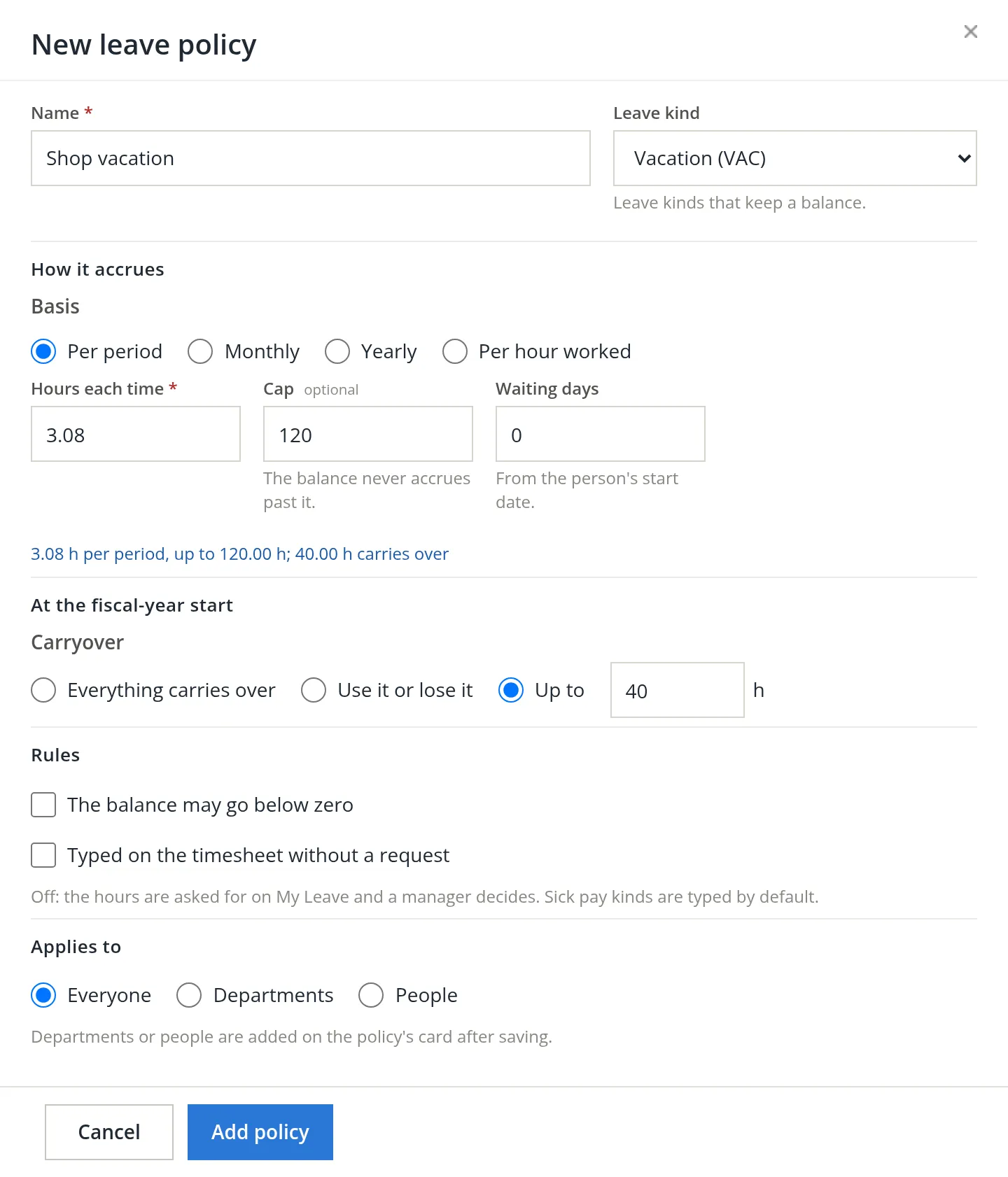
A person's own policy wins over their department's, which wins over the one for everyone; each person has one policy per kind. Write the everyone policy first, then the exceptions.
Opening balances and the balances page
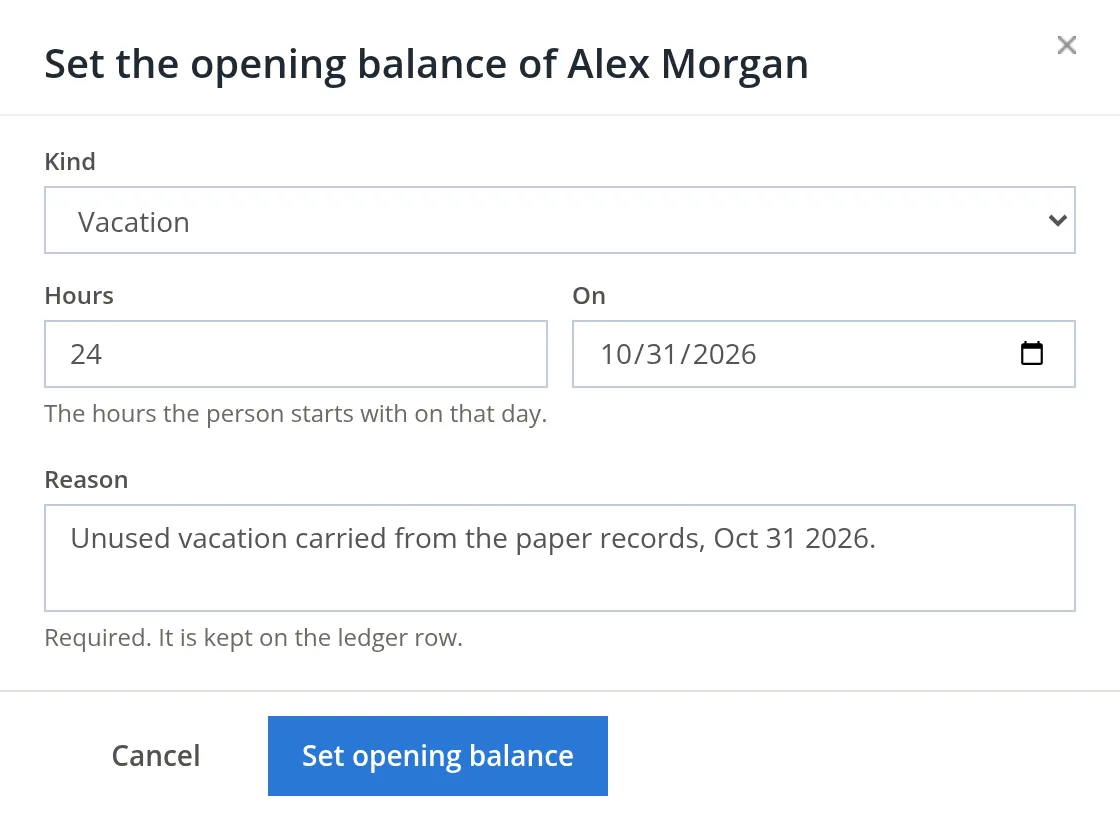
Alex had 24 hours of vacation left over from the paper records. That figure enters the ledger once, as an opening balance.
- 1
Run the accrual
Timekeeping → Leave → Run accrual now, and confirm. It writes only what the policies say is due as of today. The policy was one day old, so nothing was due yet and both balances stayed at 0.00.
- 2
Set the opening balance
On Alex's row, Set opening balance.... It offers only the kinds whose ledger has no row yet for the person. Kind Vacation, hours 24, on 10/31/2026, and a reason, which is required. The answer: Opening balance of Alex Morgan's Vacation set at 24.00 h.
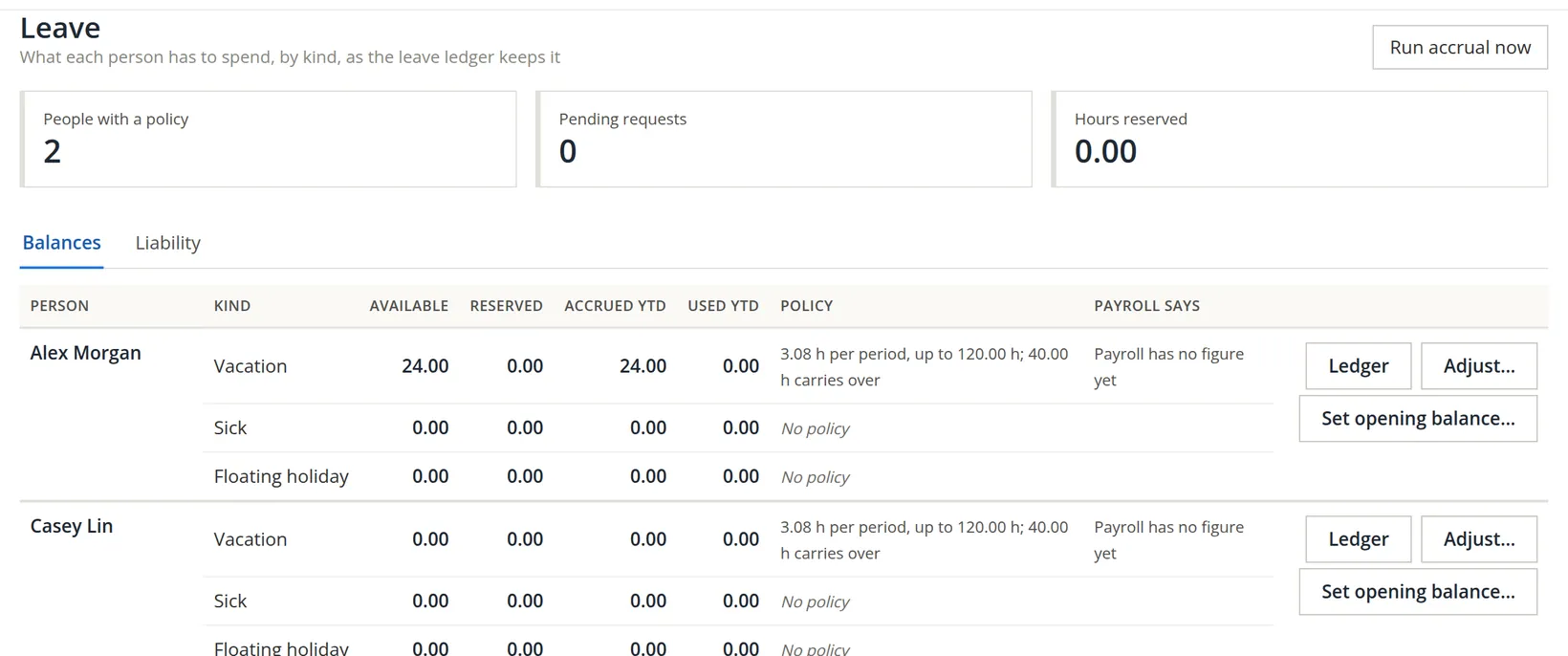
The Payroll says column compares the ledger with the payroll's own figure. For a person with no paycheck it reads Payroll has no figure yet, as for both people in the picture, which was taken before the Payroll module was switched on. Since Casey's first paycheck (Chapter 11.2), Casey's row reads Payroll says 0.00 h (as of the last paycheck); Alex, who is not paid through payroll, still has no figure.
Request leave, and a request that asks too much
Alex wanted the whole week of November 9 off for a fishing trip.
- 1
Open the request
Timekeeping → My Leave → Request leave (the same button sits under the leave balance in My Time).
- 2
Choose the kind, the days and the hours
The dialog counts as you type: work days only, times the hours per day, against the balance.
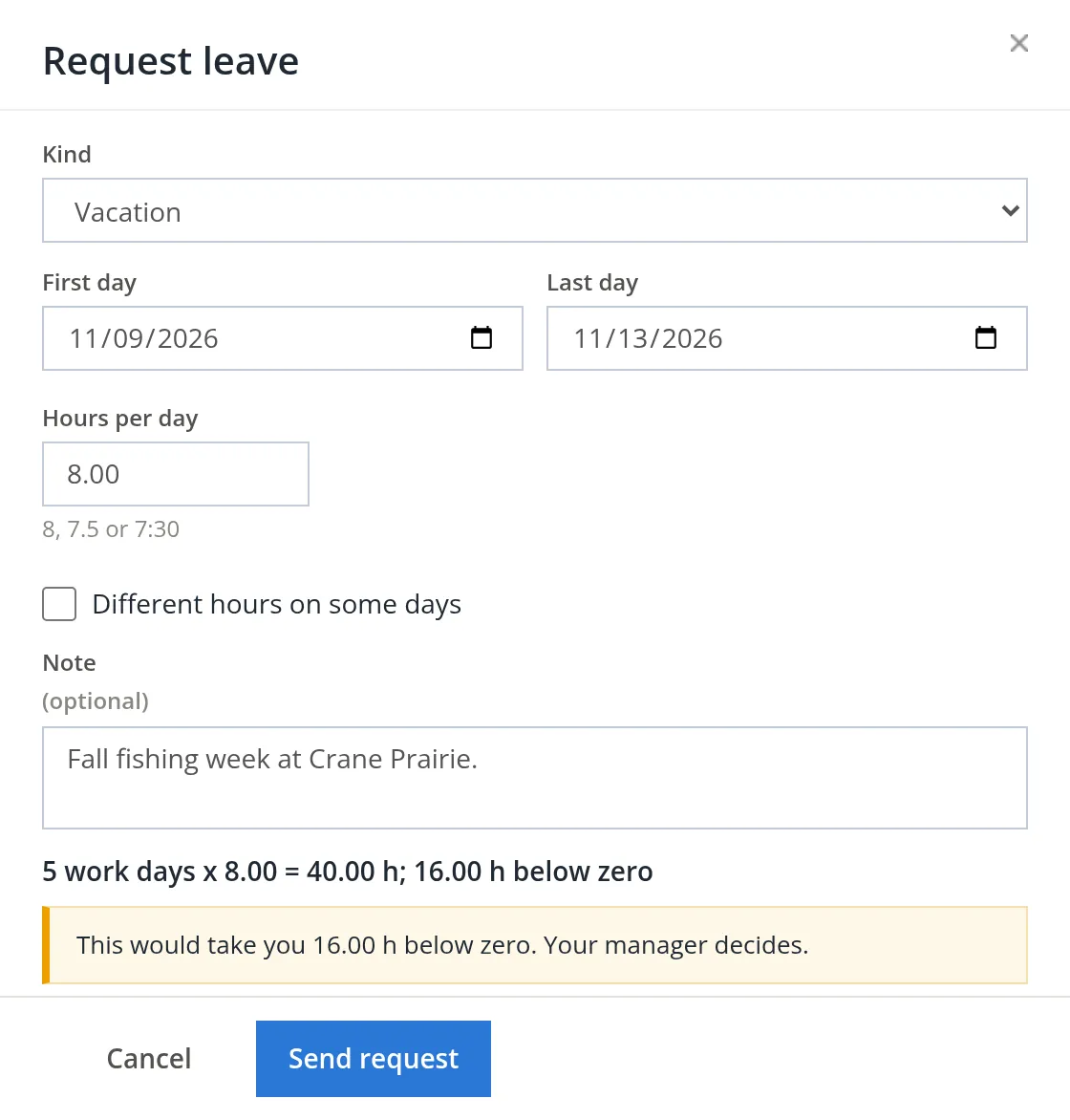
The arithmetic. 5 days × 8 hours = 40 hours requested; 40 − 24 available = 16 hours short. The dialog warned but did not refuse: the decision belongs to the manager. Alex sent it anyway to see what happens, and the answer was Request sent for approval.
Decide a request
Requests wait on Timekeeping → Review, on the Leave tab, for the person's manager or anyone with Leave Management rights.
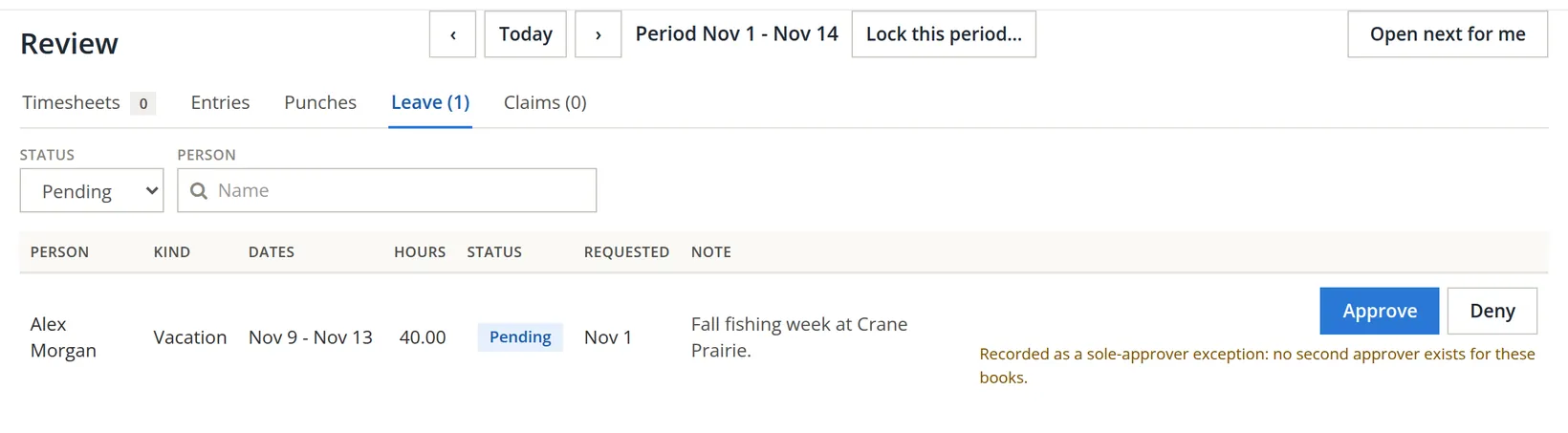
- 1
Deny, saying why
A denial needs a note, which the person reads word for word. Alex wrote what to ask for instead.
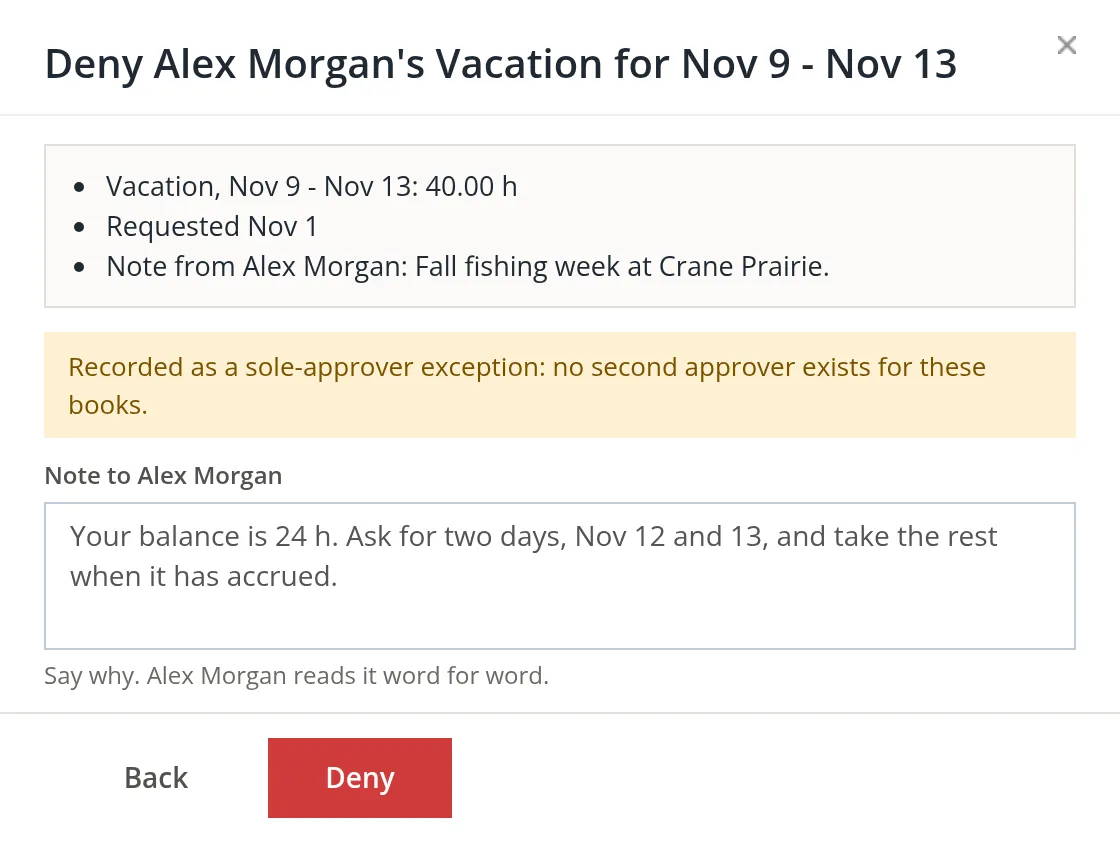
- 2
Request what the balance allows
Alex sent a new request for Thursday and Friday, Nov 12 - Nov 13: 2 work days x 8.00 = 16.00 h; 8.00 h will remain.
- 3
Approve
On the Leave tab, Approve. The dialog says what approval does, and the note is optional.
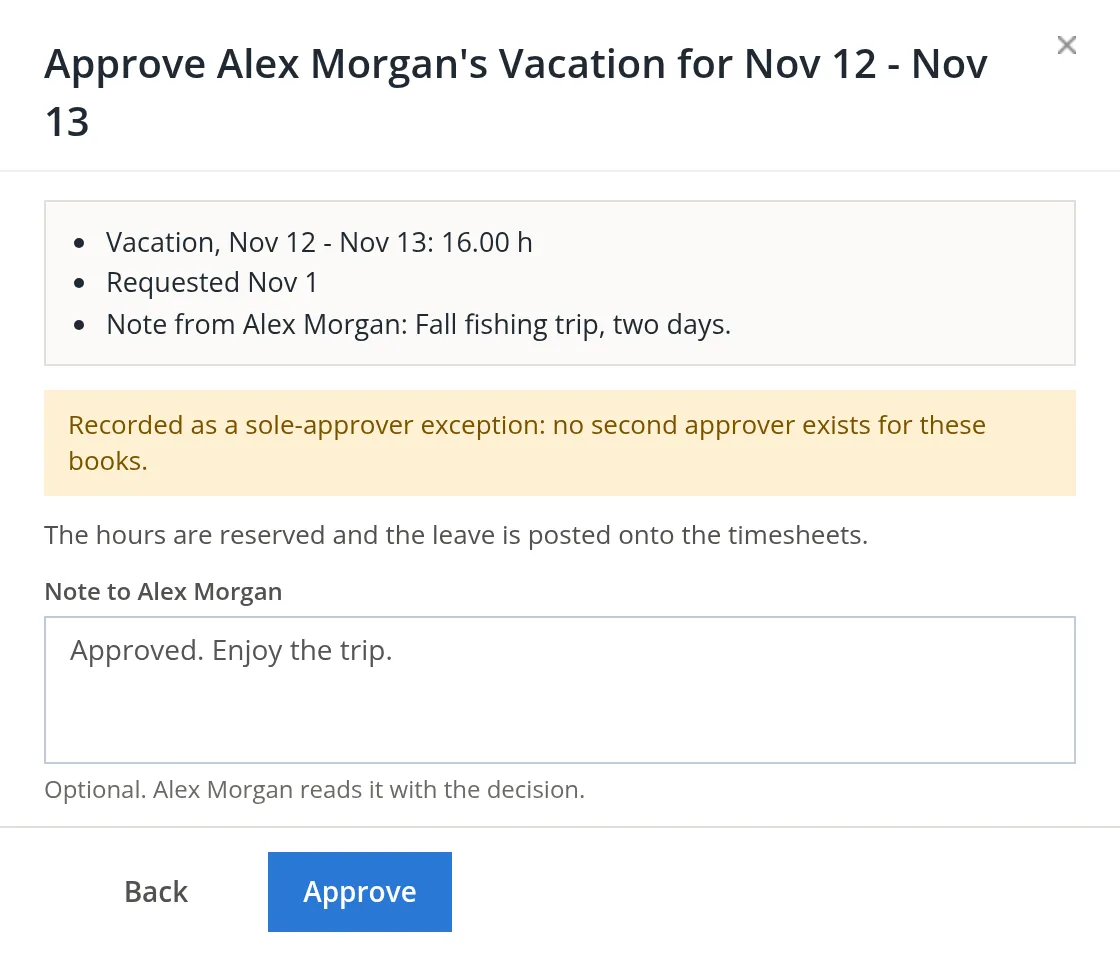
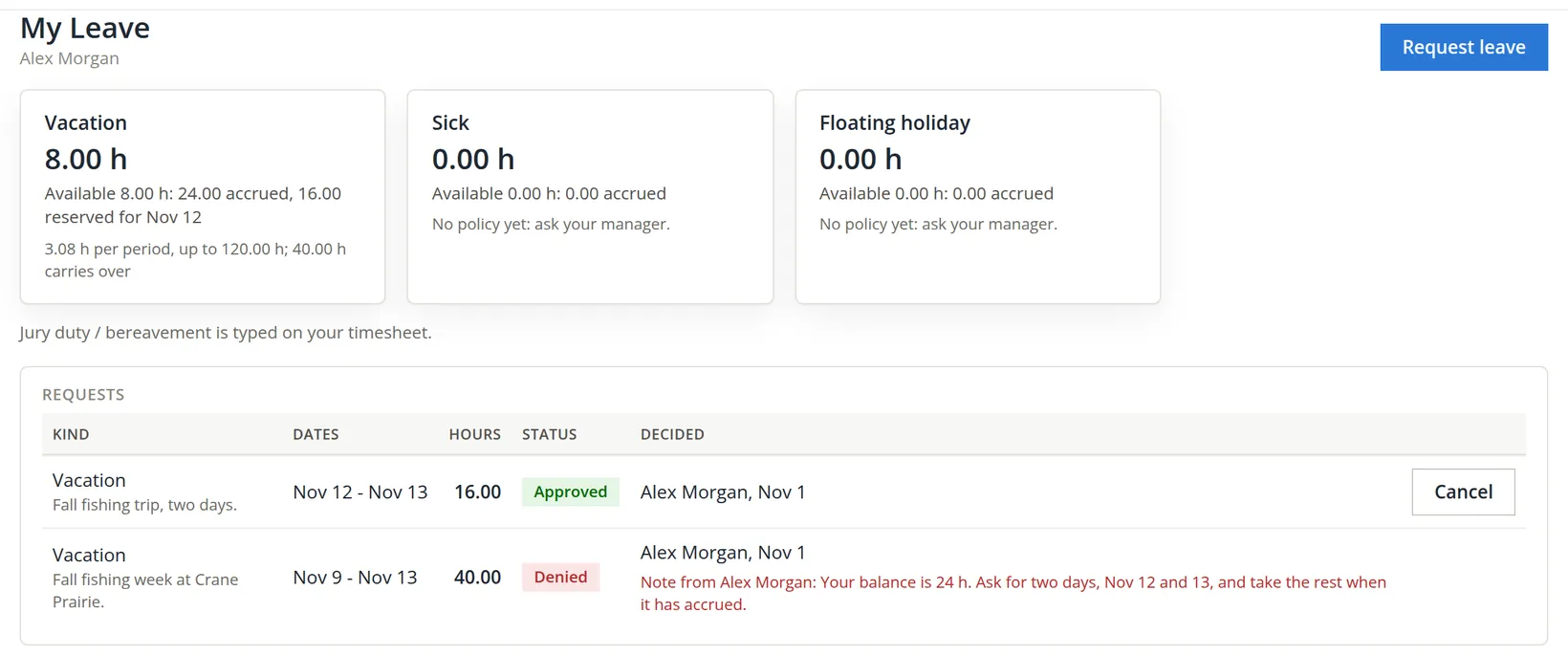
Approval also wrote two VACATION entries of 8.00 hours onto Alex's timesheet for Nov 1 - Nov 14, on Nov 12 and Nov 13, each logged as Leave posted. Alex does not type them; they count as the entry for those work days.
Expense claims: one claim a month
When an employee pays for something the business uses (a parts run in their own car, a box of supplies on their own card), the business owes them the money back. Each person keeps one claim a month in Timekeeping → My Expenses. Lines are of three kinds:
| Line | Amount | Proof |
|---|---|---|
| Receipt | As paid | The receipt, when over the books' limit or always for some categories |
| Mileage | Miles × the rate in force on the day it is typed | From and to, and the business purpose |
| Per diem | Lodging at actual cost up to the locality's rate; meals and incidentals a day, 75% on the first and last day | Lodging always needs its receipt |
Every line names a category, which decides the account it is booked to, and a business purpose, which is required. When the claim is approved it becomes a bill to the employee, paid with the other bills.
Set the rates and accounts
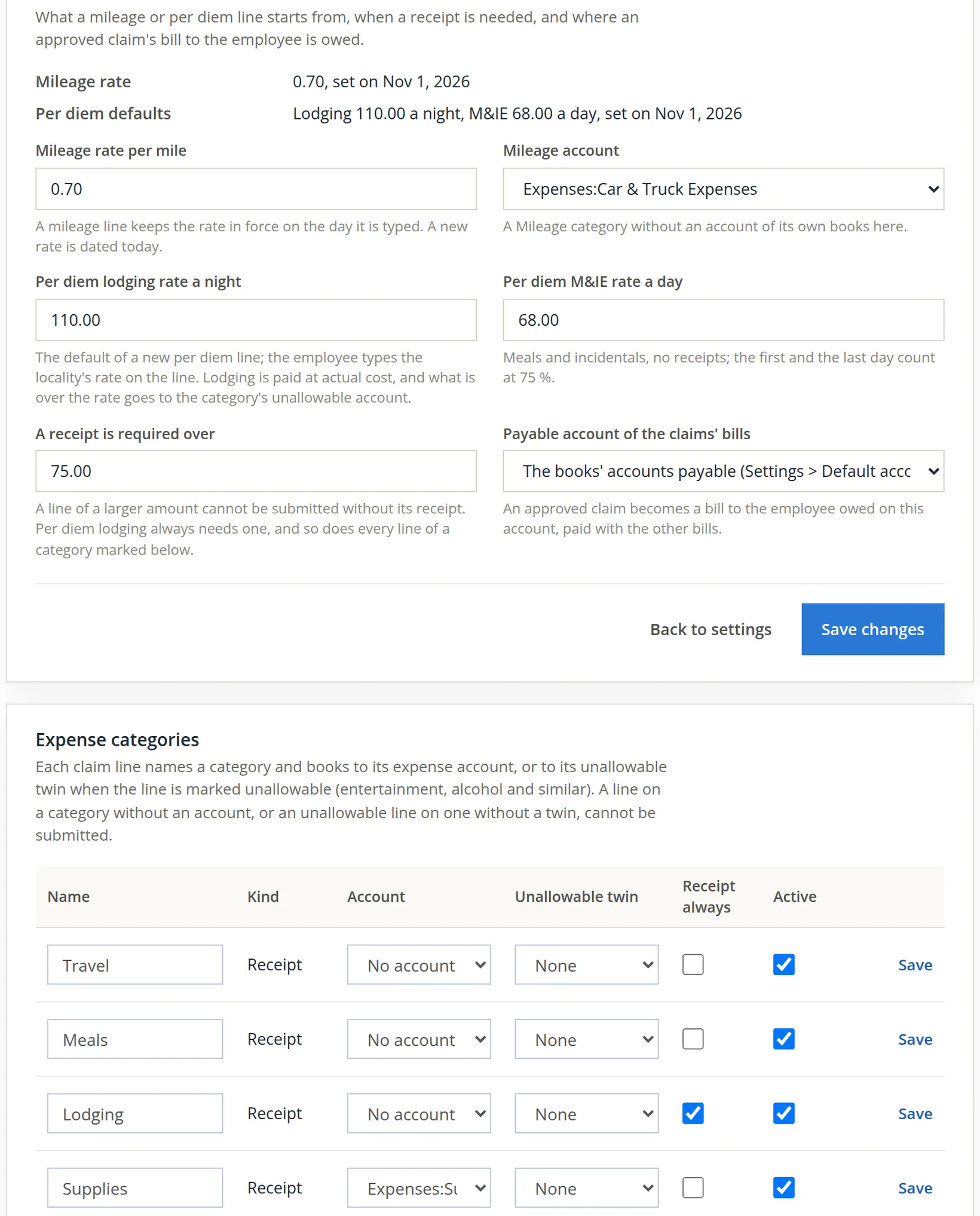
Settings → Timekeeping → Expense claims. A new book starts with a mileage rate of 0.70 a mile, per diem defaults, a $75.00 receipt limit, and seven categories with no accounts. A line on a category without an account cannot be submitted, so give every category you use an account. Alex set the mileage account to Car & Truck Expenses and the Supplies category to Supplies.
Build and submit a claim
The task. On October 27 Alex drove to Bend Parts Supply and back, 42 miles in their own truck, and paid $86.50 on their personal card for zipper sliders, seam tape and buckles.
- 1
Start the month's claim
My Expenses, choose October 2026 in Month, and start the claim. It opens as Claim 1, Draft.
- 2
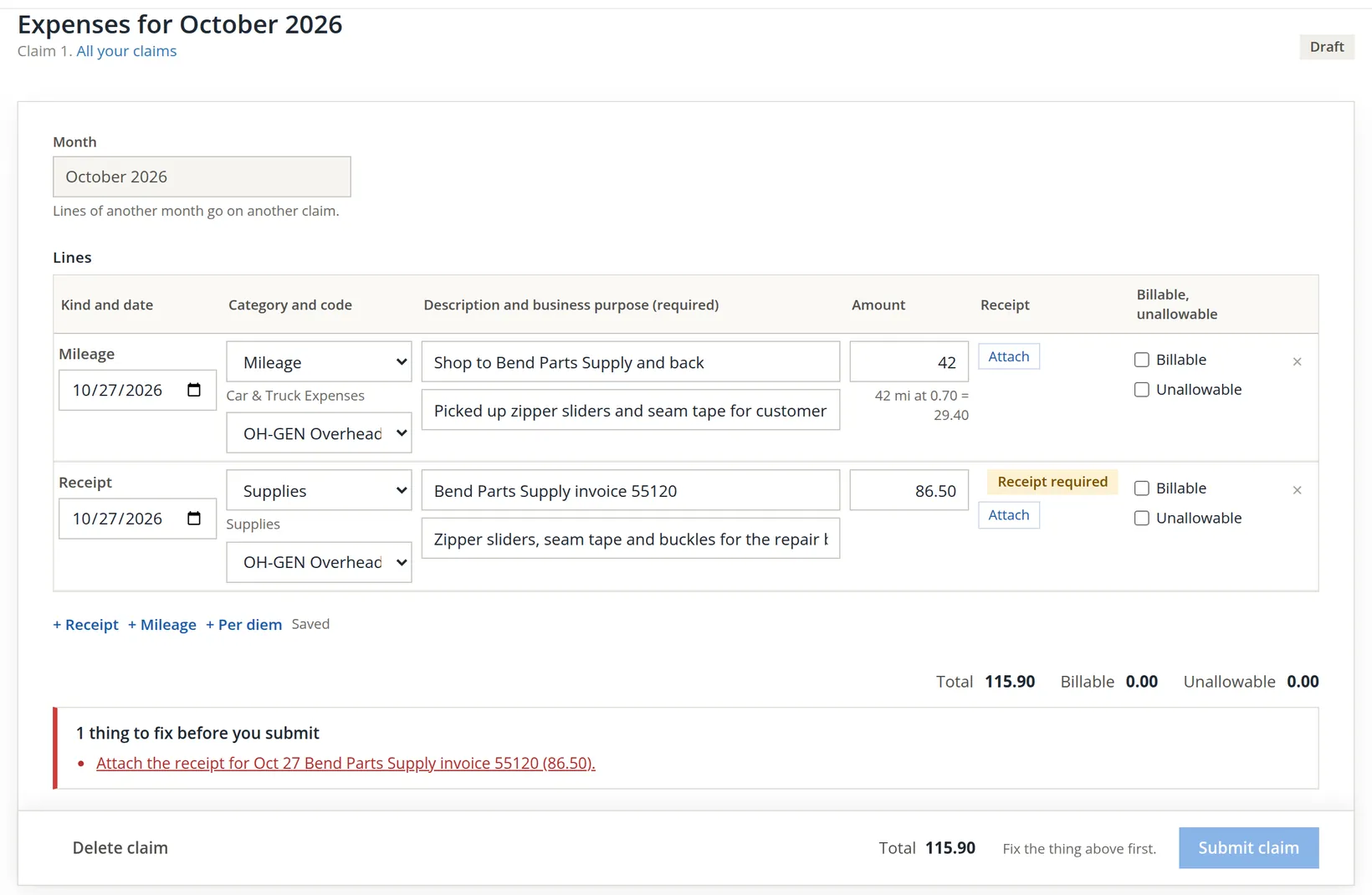
Add the lines
+ Mileage: the date, category Mileage, charge code OH-GEN, from and to, the purpose, and 42 miles. + Receipt: the date, category Supplies, the vendor and invoice number, the purpose, and 86.50. Each line is saved as you leave it.
- 3
Attach the receipt
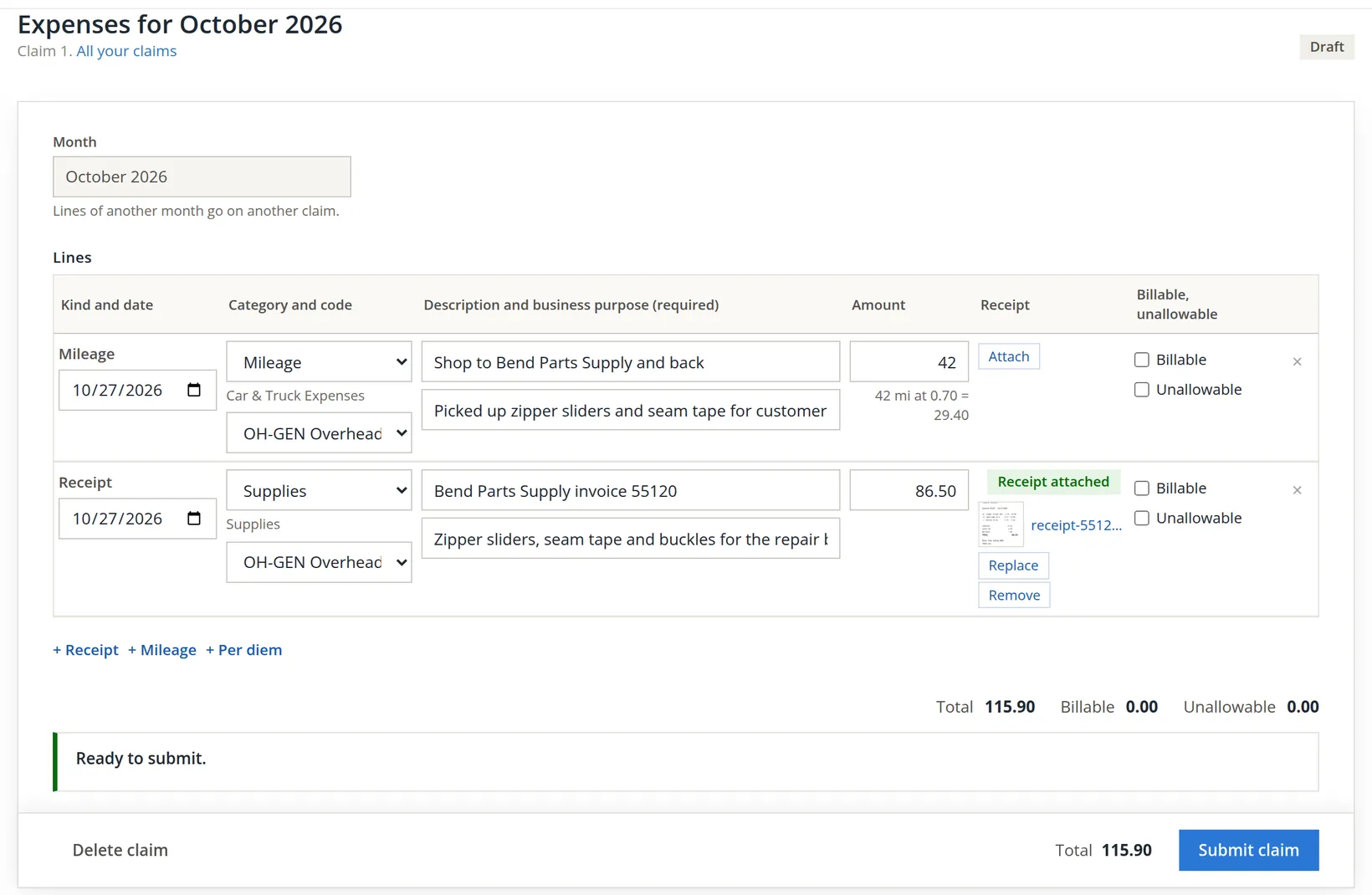
Press Attach on the receipt line. A drop zone opens: Drop the receipt here, or click to choose a file. Alex dropped a photo of the receipt.2
- 4
Submit
Press Submit claim. The claim turns Submitted: Claim sent. When it is approved it becomes a bill to you.
The arithmetic. 42 × 0.70 = 29.40; 29.40 + 86.50 = 115.90.
Approve the claim and pay the bill
- 1
Open the claim
Timekeeping → Expense claims lists the claims of the people you review, by status, month and person (Start a claim for someone is there too). Open shows each line with the account it books to and the receipt.
- 2
Approve
Approve claim opens a short dialog with an optional note and, for the owner's own claim, the line Recorded as a sole-approver exception. Return for correction... sends it back with what to fix instead.
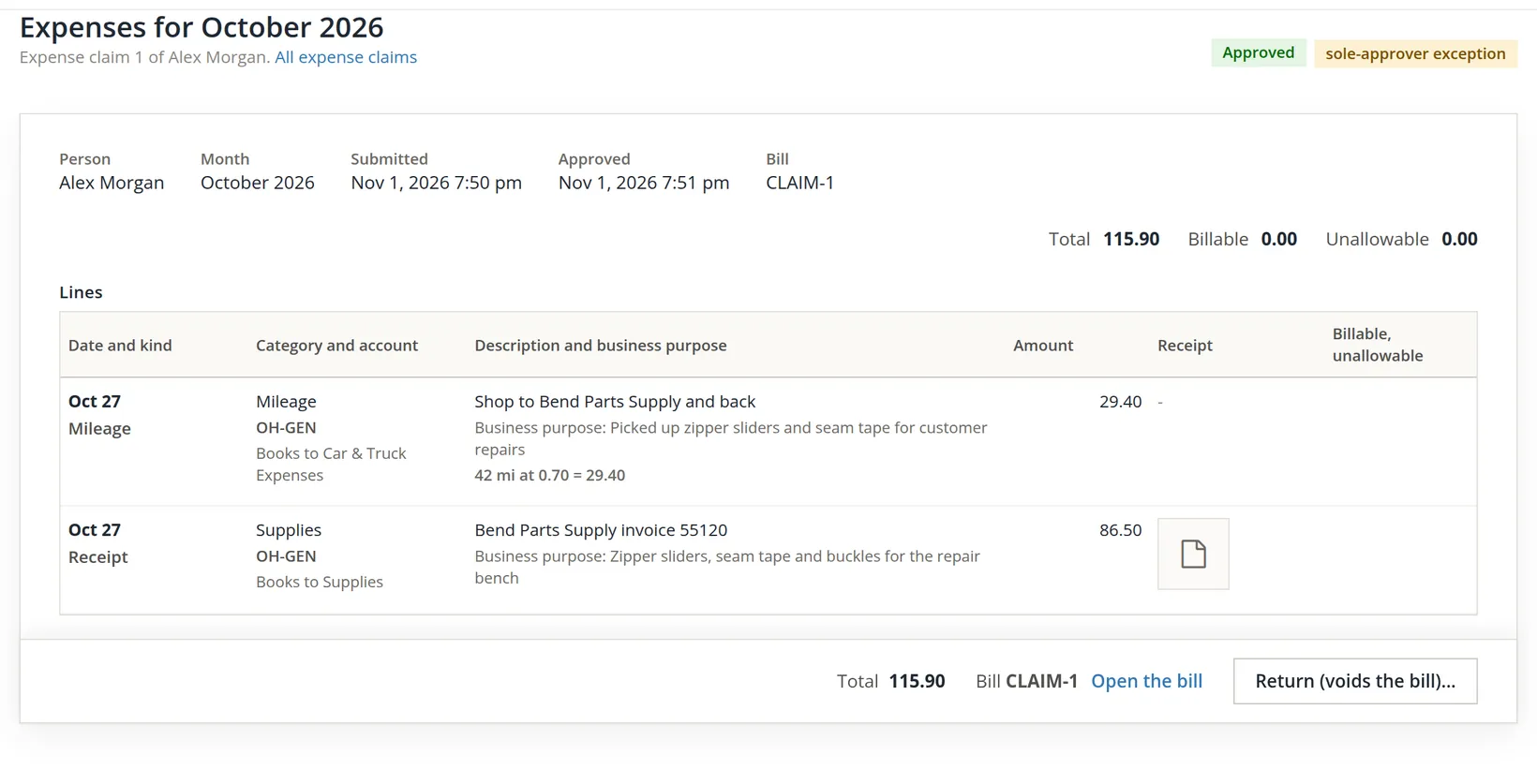
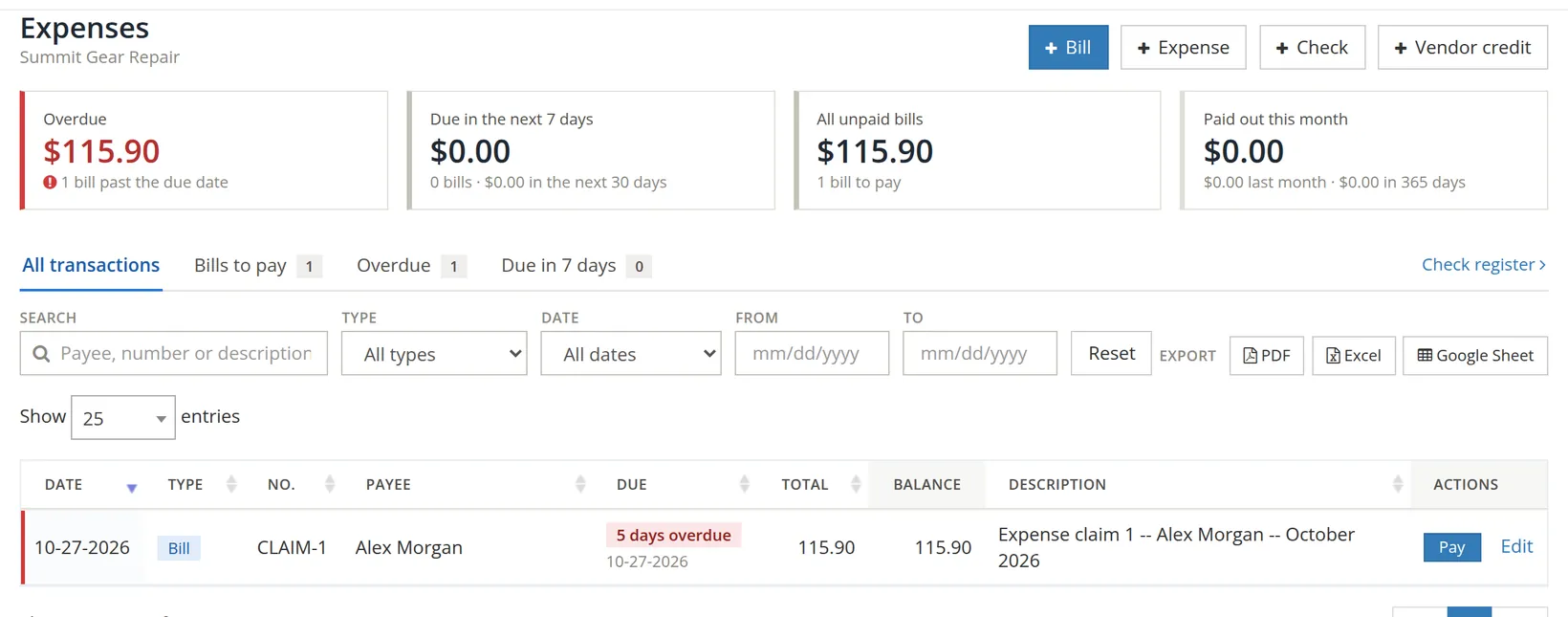
The bill takes the date of the claim's expenses, October 27, as both its date and its due date, so on November 1 it already shows as five days overdue. Nothing is wrong with the figures; pay it with the next bill run (Chapter 3.3) and the warning clears.3
The bill books 29.40 to Car & Truck Expenses and 86.50 to Supplies, with 115.90 owed in accounts payable to Alex until paid.
Leave and claims, each month
- [x] Every balance-keeping leave kind has a policy that covers everyone it should.
- [x] Opening balances are entered once, with a reason.
- [x] Pending leave requests are decided; every denial carries a note.
- [x] Every expense category in use has an account.
- [x] Each claim line has a business purpose, and a receipt where the rule asks for one.
- [x] Approved claims' bills are paid with the bill run.
Check your understanding
1. Alex had 24 hours available and asked for 40. Did the books refuse the request?
Answer
No. The dialog warned that it would go 16 hours below zero and said the manager decides. The manager denied it with a note.
2. After the 16-hour request was approved, why did My Leave show 8.00 hours and not 24.00?
Answer
Approval reserves the hours: 24.00 accrued − 16.00 reserved = 8.00 available.
3. Why could Alex not submit the claim at first?
Answer
The $86.50 receipt line was over the $75.00 receipt limit and had no receipt attached.
4. A mileage rate changes on December 1. What rate does a line typed on November 20 keep?
Answer
The rate in force on the day it was typed, 0.70.
5. What does an approved claim become, and where is it paid?
Answer
A bill to the employee, owed on the payable account set in the settings, and paid from Expenses with the other bills.
Notes
- The pictures come from Summit Gear Repair, which the practice user owns; in Summit Outfitters Inc. the practice user is a member and cannot add people to Timekeeping or change its settings. All names, places and figures are made up. ↑
- The receipt in the sample is a made-up image prepared for this manual. On a phone, the claim page can also take the picture with the camera. ↑
- Observed in the November 2026 edition: the claim's bill is dated and due on the date of its expenses. If your business reimburses on a schedule, change the due date on the bill (Edit) or simply pay it in the next run. ↑