
Chapter 11.2
Running payroll
A pay run takes the hours of one pay period, works each paycheck out, waits for your review, posts to the ledger when you approve it, and prints the checks. This chapter runs Summit Gear Repair's first payroll from start to finish, including three problems the software caught on the way, and ends where the timesheets meet the paychecks.
When you finish this chapter you will be able to:
- Start the pay run that is due and type hours, including overtime, on a row.
- Read a row's flags and fix what blocks a paycheck.
- Follow a paycheck from gross pay to net pay and check the arithmetic.
- Review and approve a pay run, and say what approval posts to the ledger.
- Print the checks, answer the printing question, and find the paycheck afterwards.
- Compare the paycheck with the approved timesheet in the Timesheet Tie-out.
The life of a pay run
A pay run moves through four states. While it is a draft, you type hours and every row is worked out again as you type; nothing is in the books. In review locks the rows so the figures you check are the figures you approve. Approved posts each paycheck to the ledger. Printed means each check has a number; from then on a paycheck is changed by opening it, never by reopening the run.
| State | What you can do | In the books |
|---|---|---|
| Draft | Type hours, change rates and dates on a row, add or remove people | Nothing |
| In review | Read the totals; go back to editing, or approve | Nothing |
| Approved | Print the checks; reopen while no check has a number | One entry per paycheck |
| Printed | Open a paycheck to void or reprint it | Plus one entry per check |
Start the run and type the hours
- 1
Open the overview
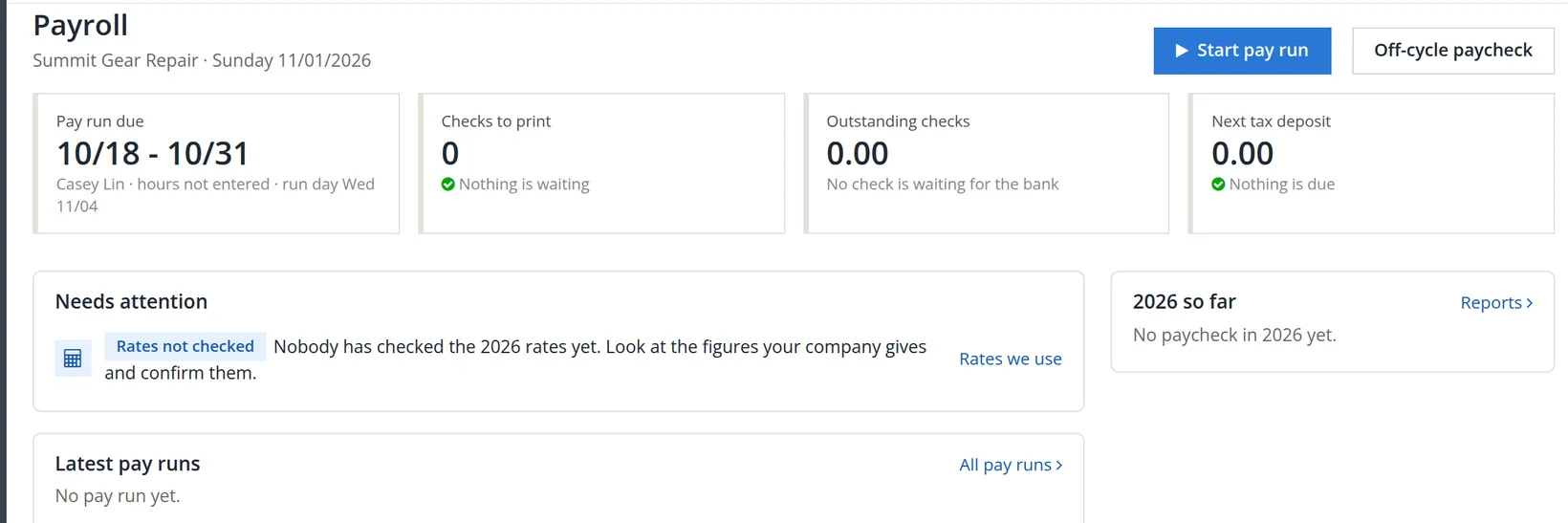
Payroll → Overview shows the run that is due: 10/18 - 10/31, Casey Lin, hours not entered, run day Wed 11/04. Press Start pay run. (Off-cycle paycheck is for a single extra check outside the schedule.)
- 2
Check the run's dates
The draft opens with the period, the check date and the bank account from the schedule: 10/18/2026 to 10/31/2026, check date 11/06/2026, Checking. Each row keeps these unless you change its own.
- 3
Type the hours
Click Casey's Hours box and type 80. Hours can be typed as 56.25 or 56:15; Enter moves to the next row. The hours were typed from Casey's approved timesheet.2
Three problems, caught and fixed
The row did not work out. A red flag appeared under it instead of figures. This is the software doing its job: it will not invent a number it does not have.
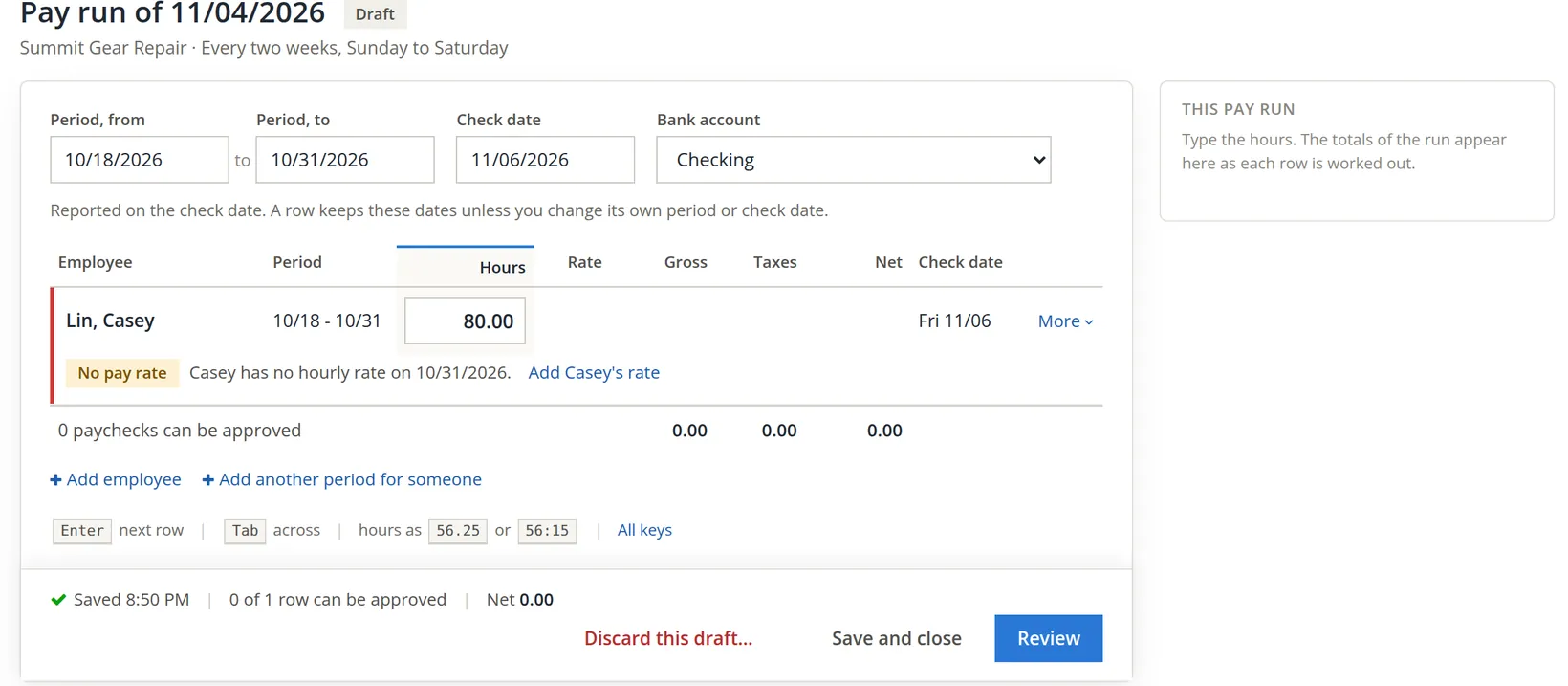
Problem 1: no rate on the last day of the period. A paycheck uses the rate in force on the last day of its pay period. Casey's rate was recorded from 11/01/2026, the first period Add employee offered (Chapter 11.1), so on October 31 there was none. Two fixes work. The lasting one is on Casey's page: in the Rates card, Add a rate of 24.00 from 10/18/2026, the hire date (Chapter 11.1, Step 7), and the row is worked out with it. The other types the rate on this one paycheck, with a reason. We used the second, shown below, and left the rate on record as Add employee made it.3
- 1
Open the row's panel
Press More at the end of the row. Pay for this paycheck lists one line per kind of hour.
- 2
Type the rate on the line, and say why
In the Regular line's Rate type 24.00. The panel asks Why this rate for this paycheck?; we wrote Hire-date rate: Casey's rate on record starts 11/01/2026. The rate applies to this paycheck only.
- 3
Add the overtime line
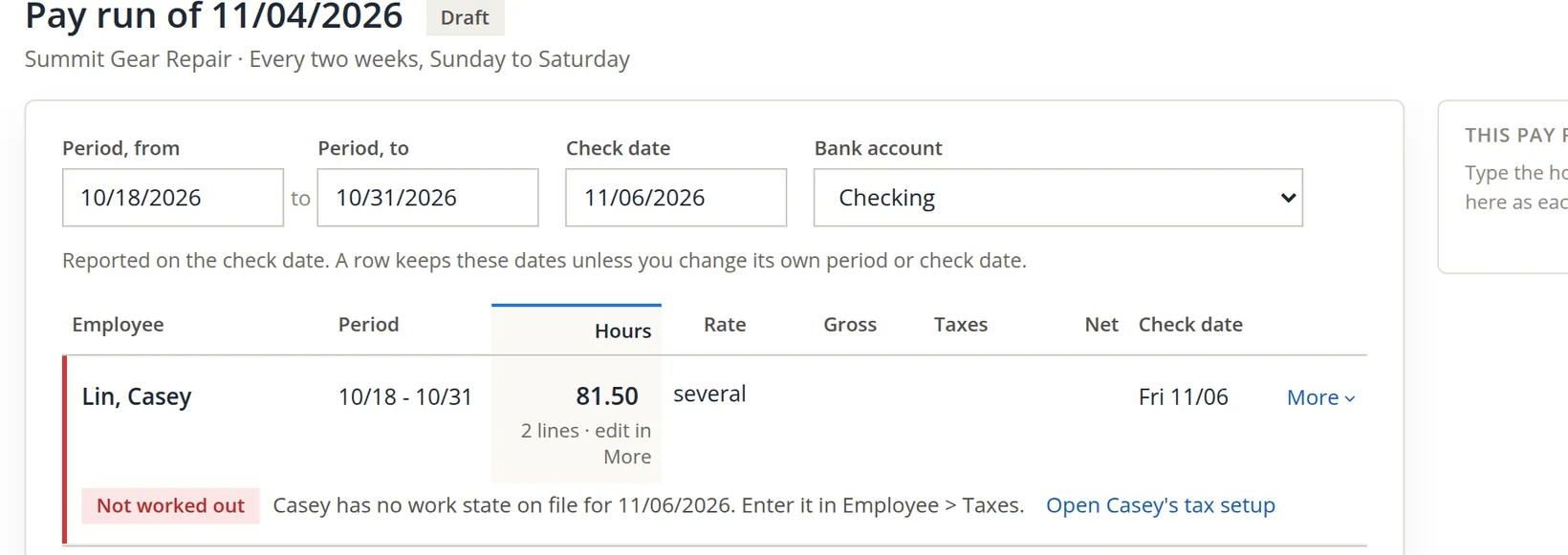
Add a line, choose Overtime, type 1.50 hours at 36.00 with its own reason. The row now reads 81.50 hours in two lines.
 Taxes. Open Casey's tax setup" loading="lazy">
Problem 2: no work state on the check date. State tax follows where the employee works on the check date. The Taxes tab showed Works in Oregon, but no dated location line stood behind it. On Casey's Taxes tab, Change from a date opens Where Casey works and lives: from 10/18/2026, works in Oregon, lives in Oregon, unemployment paid to Oregon. Save, and the row is worked out again.
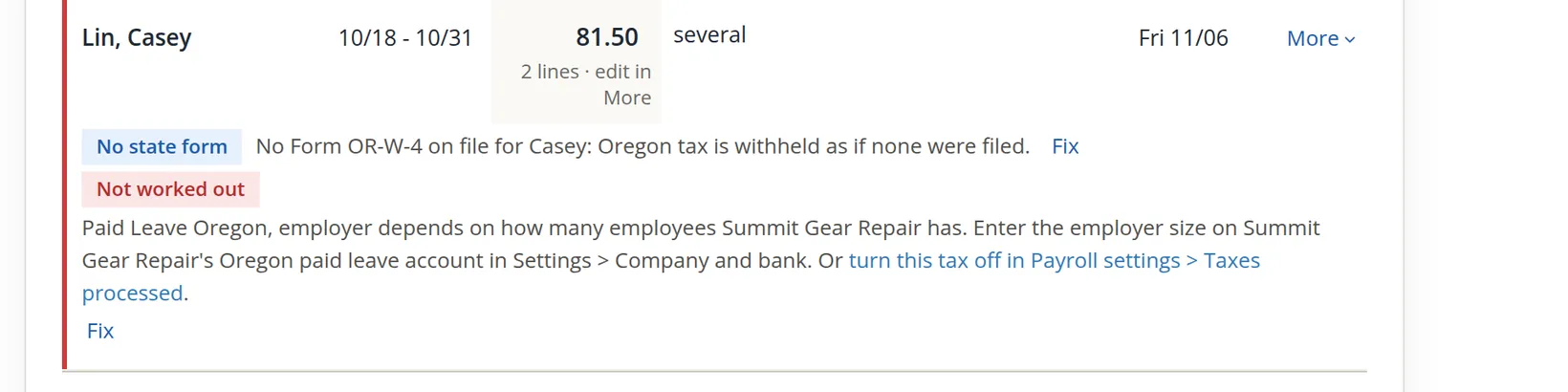
Problem 3: the employer's size. Paid Leave Oregon charges the employer a share only when it has 25 or more employees. BizBooks360 cannot count that for you, so it asks. Fix leads to Company and bank; in the Oregon unemployment account's Change dialog, the Employer size box takes the size the state's notice gives. We typed under_25, the wording the Oregon rate tables use, and saved.4 The paycheck now shows Paid Leave Oregon, employer: an employer of this size pays none: 0.00.
The warning that stays. Casey has not handed in an Oregon withholding statement (Form OR-W-4). Without one, Oregon tax is withheld at 8% of wages. That is legal and safe for the employer, so it is a warning, not a block. Ask the employee for the form; until then the paycheck goes through as it is.
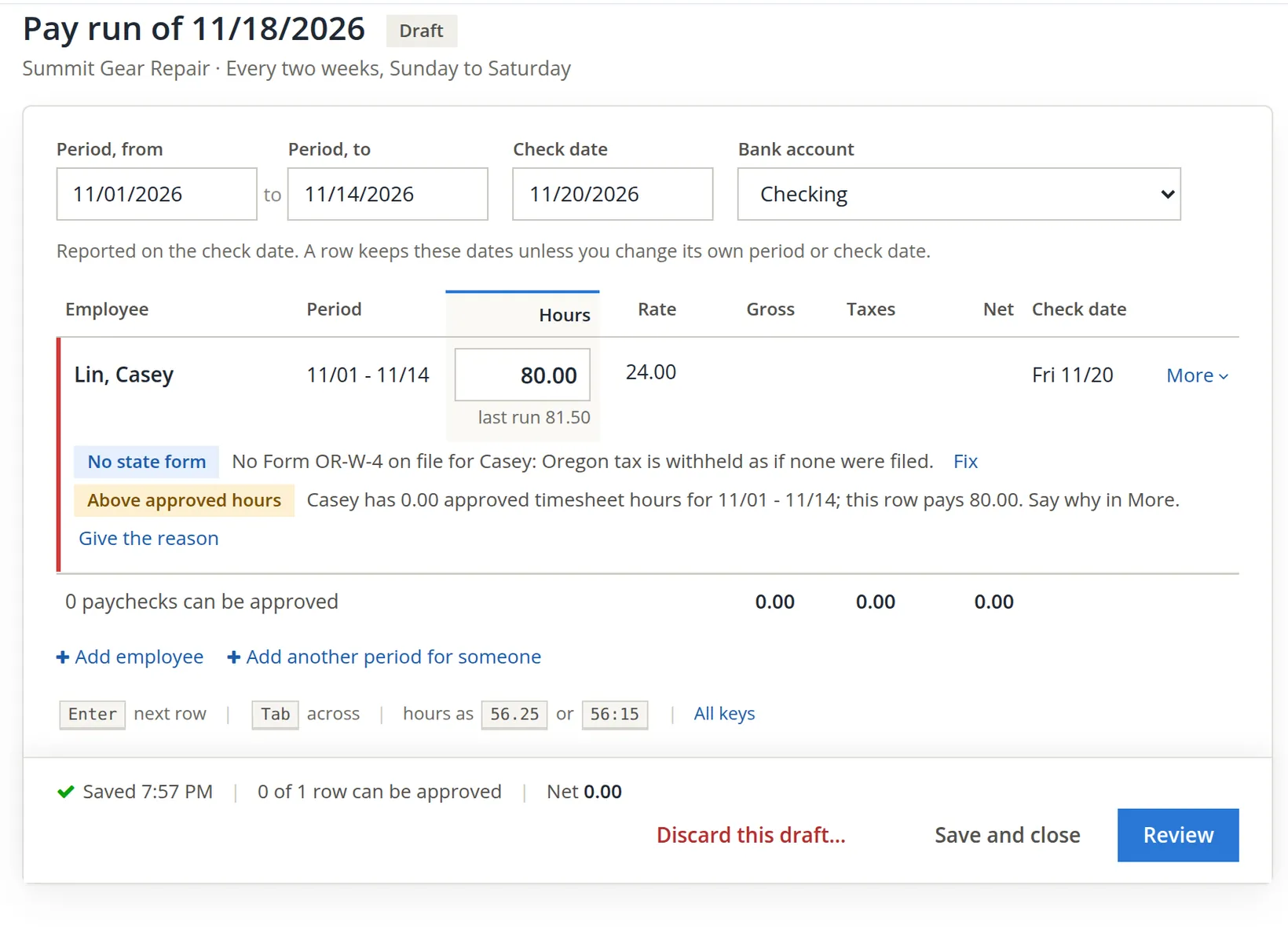
A newer check: hours above the approved timesheets. Where Timekeeping is on and an hourly employee keeps time there, a row that pays more hours than that person's approved timesheet hours for the period is blocked until you either pay the approved hours or say why. The two pictures below come from drafts of the next pay run, 11/01 to 11/14 with check date 11/20/2026, typed with the same hours as the first paycheck and discarded afterwards. Casey has no timesheet for November at all, so no approved hours have been handed to payroll for that period, and the block reads 0.00.
Payroll counts only the approved hours Timekeeping has handed to it. Timekeeping hands them over when a timesheet is approved while the person is on payroll, and also when a person who already has approved timesheets is added to payroll; that hand-over feeds only the days from the first period to pay chosen on Add employee onward, and none in periods already paid. Casey's October timesheet was approved early on November 2, before payroll was switched on later that morning, and Casey was added with the first period to pay 11/01 (Chapter 11.1), so nothing was handed over for October either.2 A first pay run made the same way today would therefore meet the same block with 0.00, although the Timesheet Tie-out, which reads the timesheets themselves, shows 81.50 approved hours for October (Section 6).
- 4
Give the reason, or use the approved hours
If the timesheet is wrong or not yet approved, the better fix is in Timekeeping: approve the timesheet, and the approved hours reach payroll. If the approved hours are above zero and are the right figure, press the Use button (for example Use 81.50). If the hours on the row are right, press Give the reason; for Casey, with 0.00 approved hours, it is the only choice. The panel's box Why these hours are above the approved timesheet hours needs at least 10 characters. We wrote Hours from Casey's signed paper timesheet; the online timesheet for this period is not approved yet. The block becomes a note, Pays 81.50 against 0.00 approved hours, followed by the reason, which stays with the paycheck.
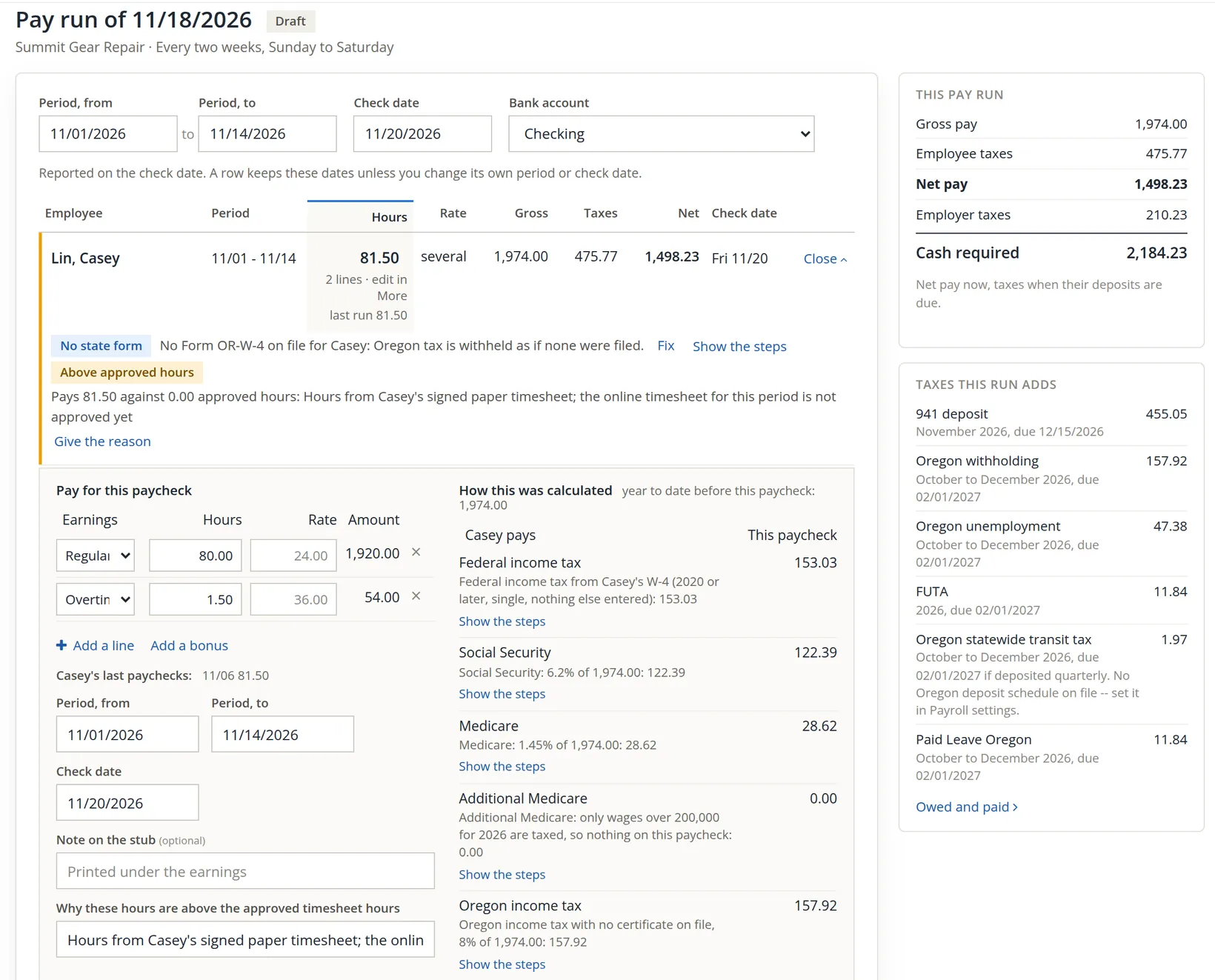
The Timesheet Tie-out lists every paycheck paid above its approved hours, with the reason, under Hours paid above approved (Section 6).
Reading the paycheck
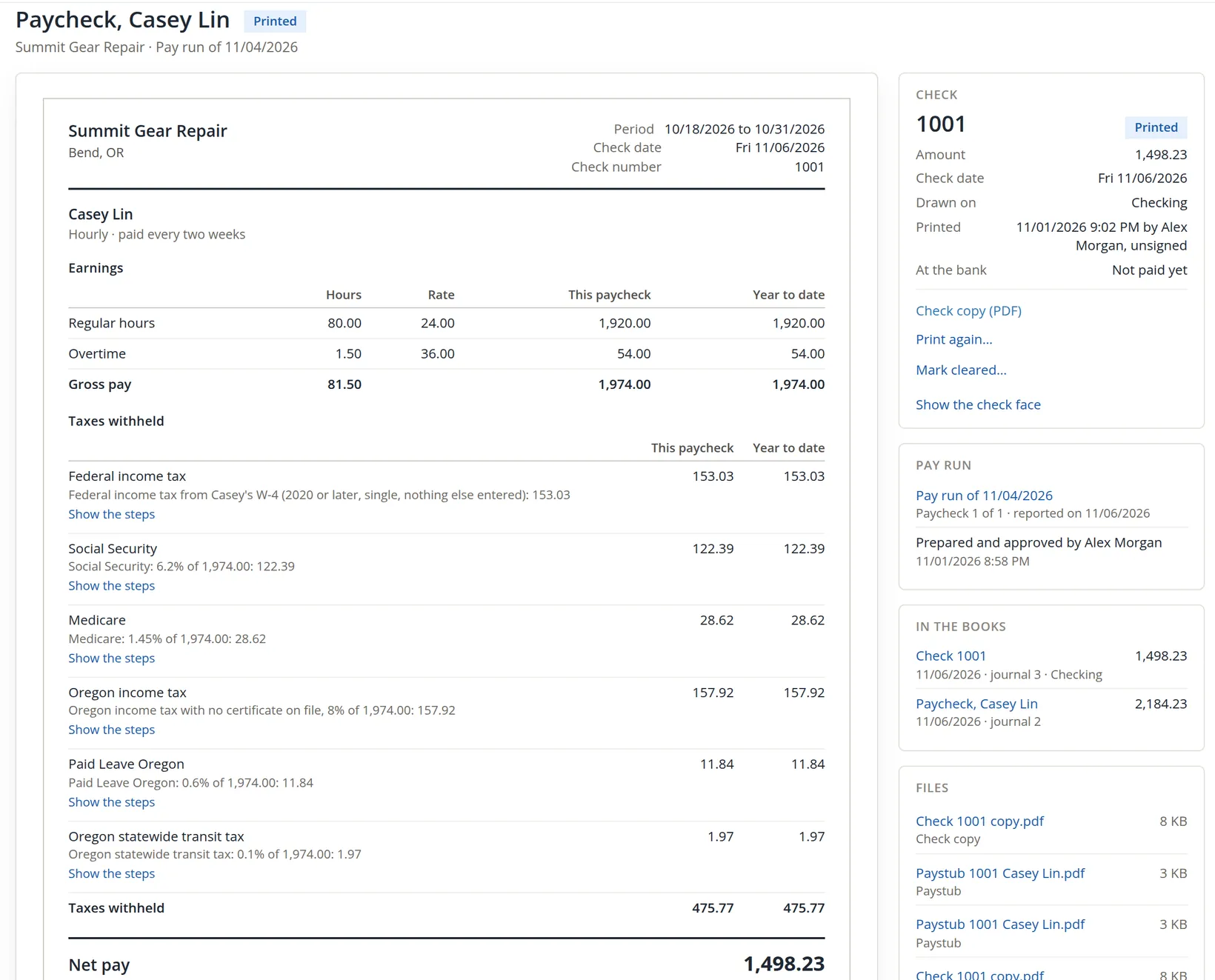
With the blocks gone, the panel shows every line of the paycheck and how each tax was worked out. Show the steps under a tax opens its calculation.
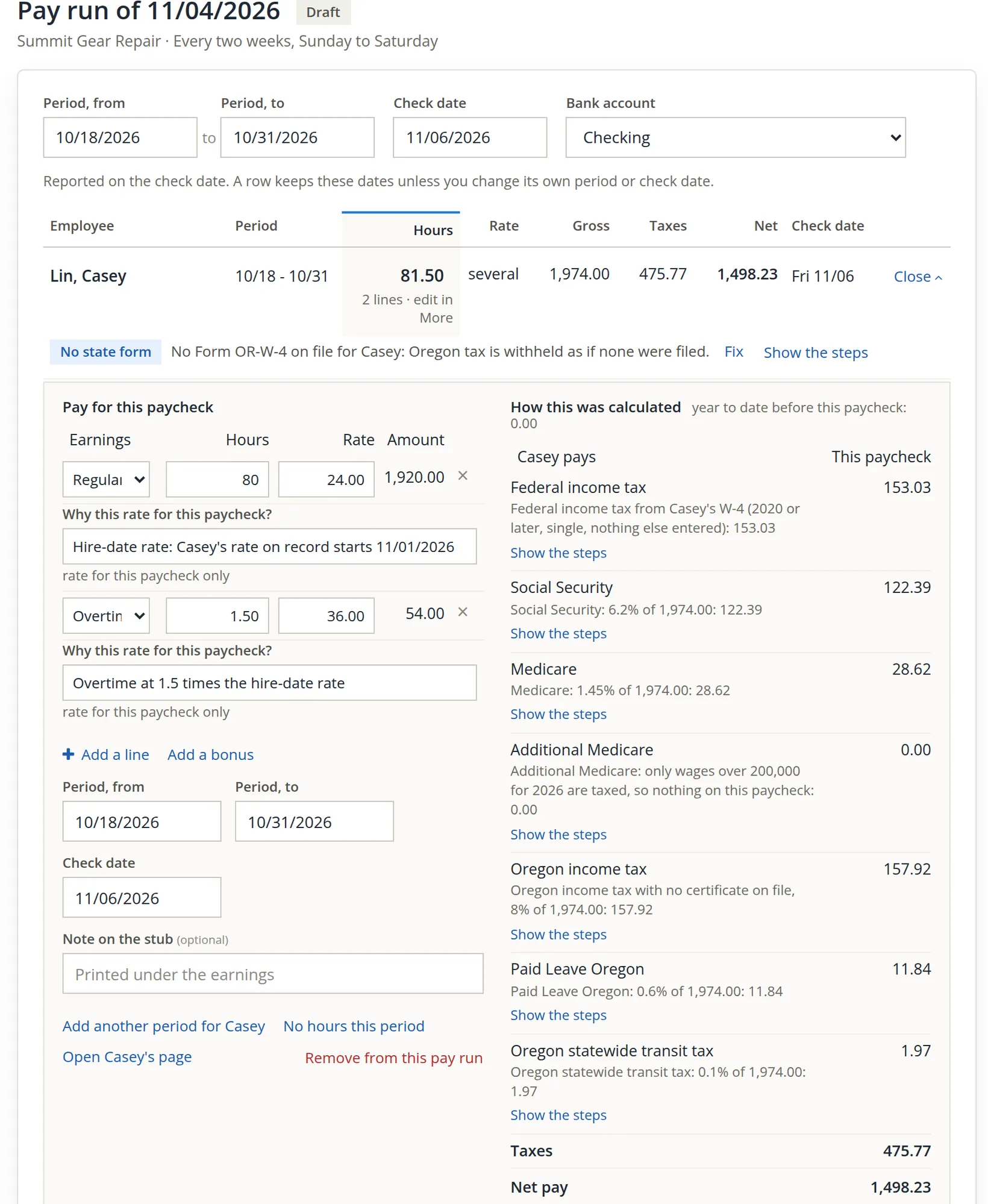
| Line | Working | Amount |
|---|---|---|
| Regular | 80.00 h × 24.00 | 1,920.00 |
| Overtime | 1.50 h × 36.00 | 54.00 |
| Gross pay | 1,974.00 | |
| Federal income tax | W-4, single, nothing else entered | 153.03 |
| Social Security | 6.2% × 1,974.00 | 122.39 |
| Medicare | 1.45% × 1,974.00 | 28.62 |
| Oregon income tax | 8% × 1,974.00 | 157.92 |
| Paid Leave Oregon | 0.6% × 1,974.00 | 11.84 |
| Oregon statewide transit tax | 0.1% × 1,974.00 | 1.97 |
| Taxes withheld | 475.77 | |
| Net pay | 1,974.00 − 475.77 | 1,498.23 |
The employer pays its own taxes on top: Social Security 122.39, Medicare 28.62, federal unemployment 0.6% = 11.84, and Oregon unemployment 2.4% = 47.38, a total of 210.23. So the run needs 1,498.23 + 210.23 = 2,184.23 in cash: the net pay now, the taxes at their deposit dates. The 941 deposit gathers federal income tax and both halves of Social Security and Medicare: 153.03 + 244.78 + 57.24 = 455.05, due 12/15/2026.
Review and approve
- 1
Press Review
The run turns In review and its rows are locked. Before you approve lists what is ready and anything to know: here, that checks come from Checking and get their numbers when printed, and that the run is reported in the fourth quarter.
- 2
Approve
Press Approve 1 paycheck. The run becomes Approved, To print and names who prepared and approved it, and when. Reopen pay run stays possible until a check has a number.
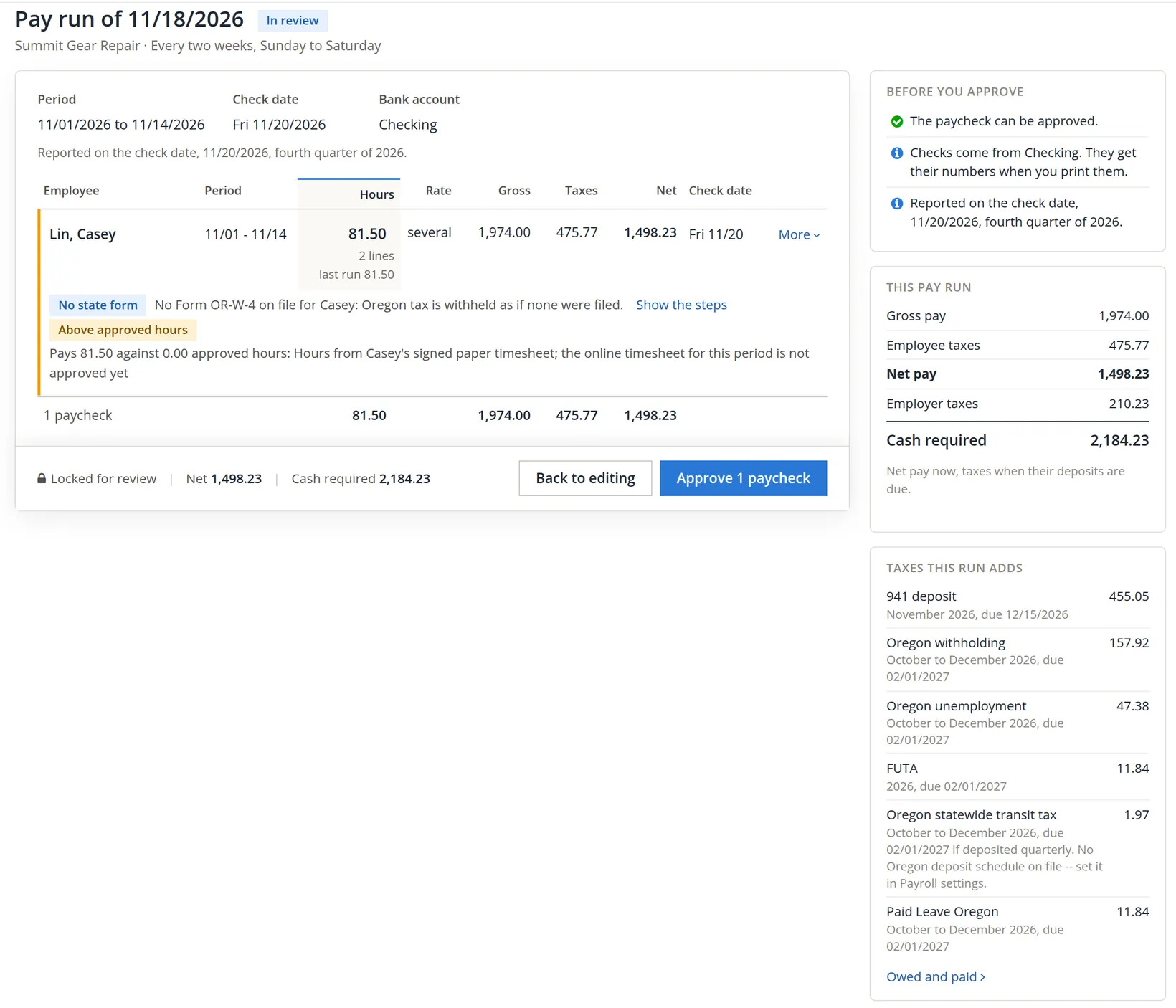
Taxes this run adds names every deposit the run adds to: 941 deposit 455.05, Oregon withholding 157.92, Oregon unemployment 47.38, FUTA 11.84, Oregon statewide transit tax 1.97 and Paid Leave Oregon 11.84, together 686.00. Where no Oregon deposit schedule is on file, the due date it shows is an assumption, and the line says so (Chapter 11.3).
Approval of the first run posted journal entry 2, dated on the check date. Opened from the paycheck it says Belongs to paycheck #1001 and is changed there, not in the journal.
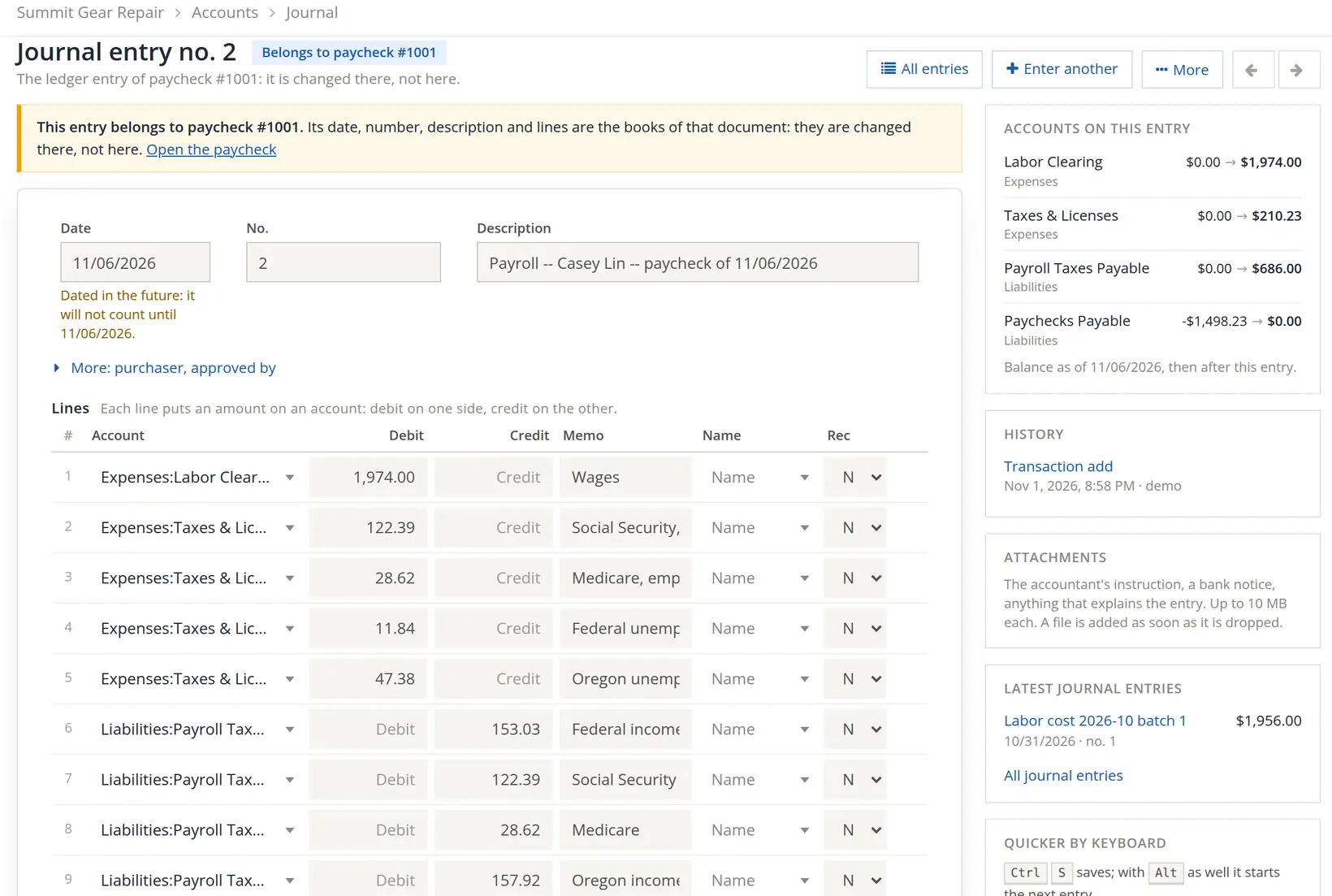
The totals balance: debits 1,974.00 + 210.23 = 2,184.23; credits 686.00 (475.77 withheld plus 210.23 employer taxes) + 1,498.23 net pay = 2,184.23.
Print the checks
- 1
Press Print 1 check
The Print checks dialog shows the bank account, the first number (1001), the paper and the signature setting, and lists the checks. Press Print 1 check.
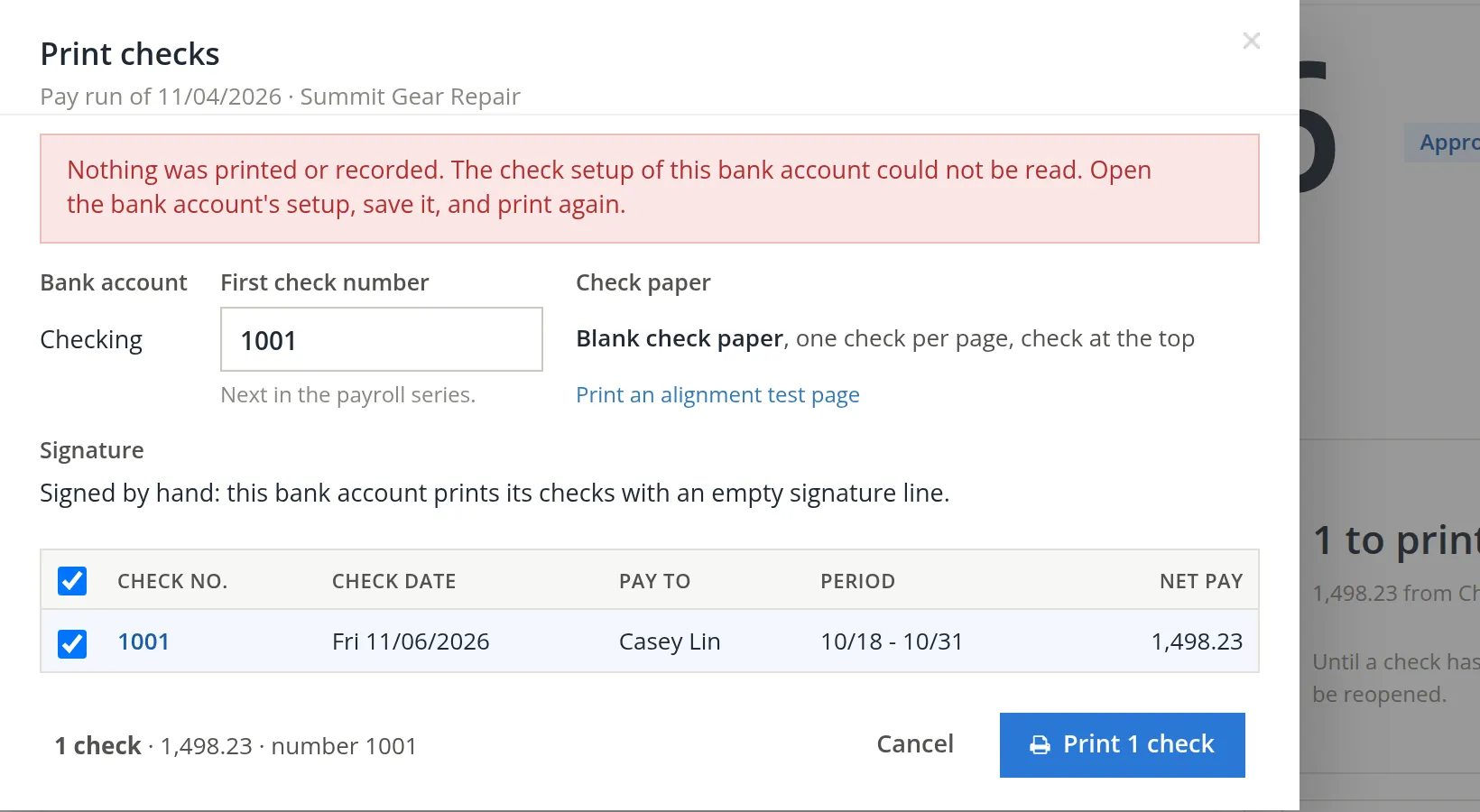
The new books had never printed a check, so Checking had no bank name, routing number or account number to put on one. Nothing was recorded, and number 1001 was not used.
- 2
Fill in the bank account's check setup
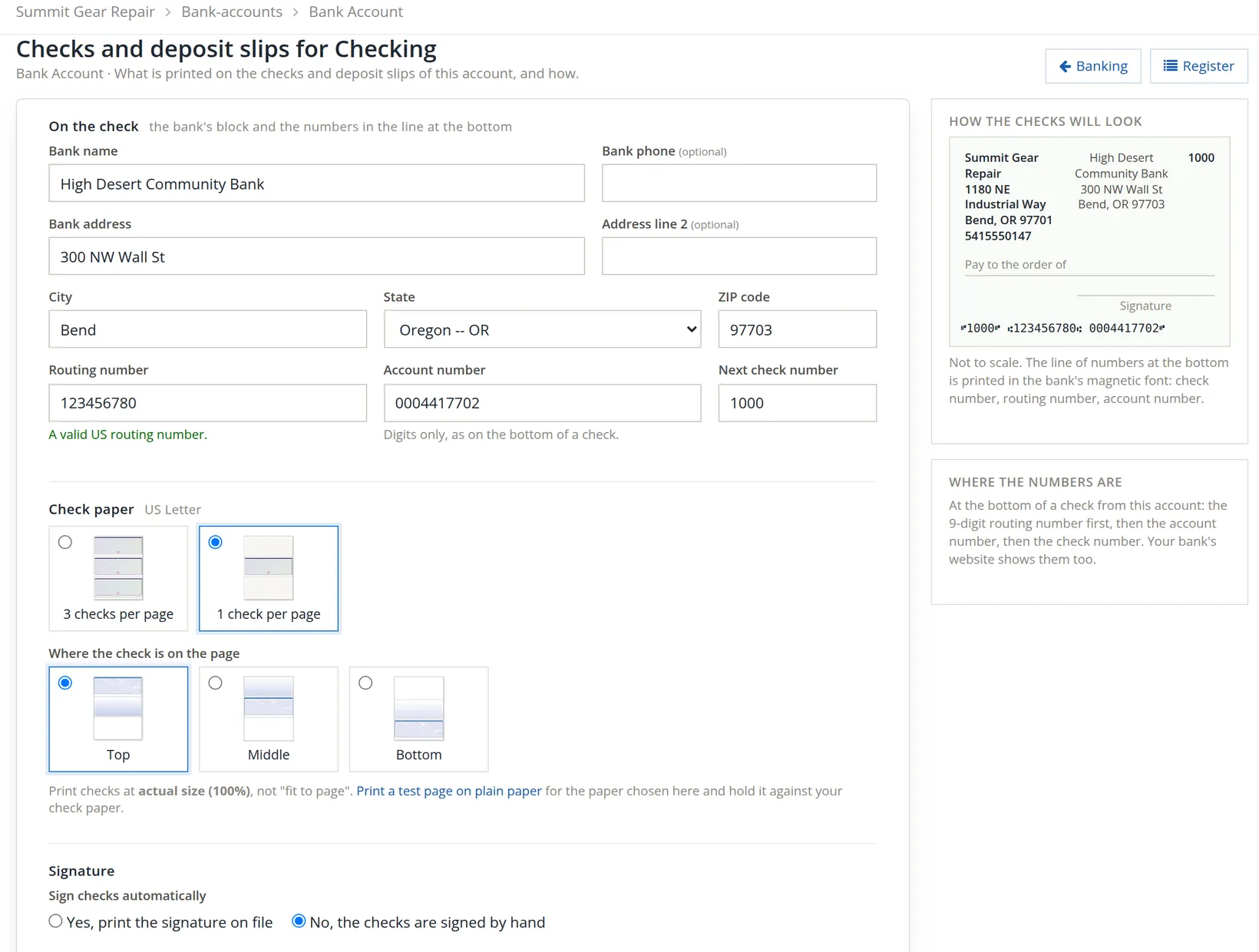
Open the bank account's setup (Change in bank account setup on Payroll's check settings leads there; Chapter 4.5 covers it). Type the bank's name and address, the routing number and the account number, and press Save. The page confirms the routing number is a valid US one and shows how the checks will look.
- 3
Print again and answer the question
Back on the run, Print 1 check opens the PDF and asks Did the checks print correctly? Look at the paper before answering. Yes, it printed correctly keeps number 1001; It needs reprinting and Nothing printed, put it back are the other two answers. Until you answer, the check counts as printed, and the Paychecks page reminds you.
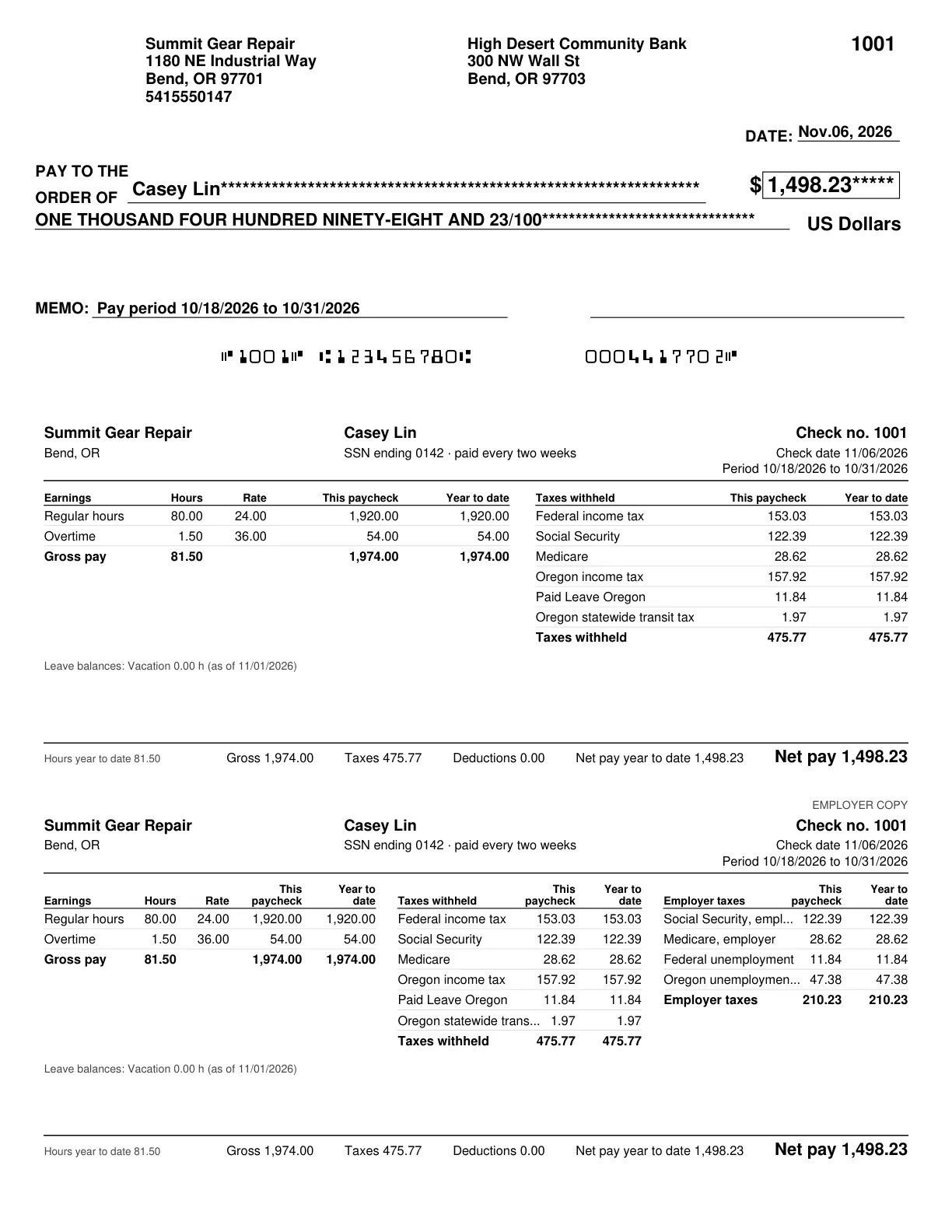
Printing posted a second entry, journal 3, dated 11/06/2026: a debit of 1,498.23 to Paychecks Payable and a credit to Checking. The liability made at approval is now paid by the check.
The cash-required figure is real money. Summit Gear Repair's Checking showed $0.00 in these practice books; in a real business, move the money in before the check reaches the bank.
Where the timesheet meets the paycheck
Chapter 12.4 ended with the Timesheet Tie-out failing for October: Casey had 81.50 approved hours and no paycheck. Run it again: Reports → Timekeeping → Timesheet Tie-out, month October 2026.
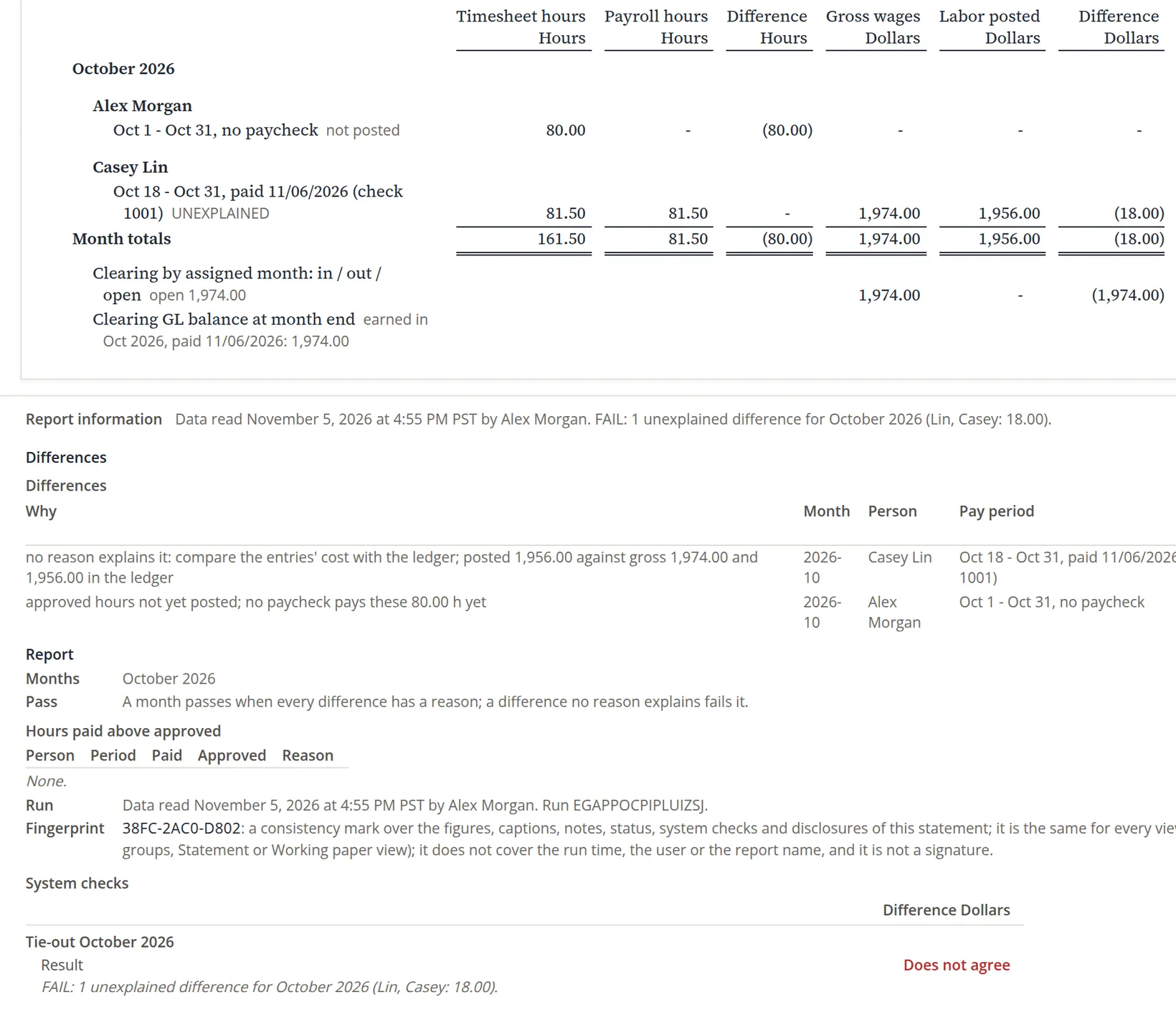
Reading it. The hours tie. The dollar difference is the overtime premium: the labor posting costed all 81.50 hours at the standard 24.00 (81.50 × 24.00 = 1,956.00), while payroll paid the 1.50 overtime hours at 36.00. 1,974.00 − 1,956.00 = 18.00, which is 1.50 × 12.00. The tie-out lists it as unexplained because no posting has taken it out of Labor Clearing yet: the October true-up that would book it waits for an account (Chapter 12.2). When that true-up is posted, paycheck 1001's 18.00 goes to Labor rate variance, because its overtime line was typed at 36.00 with no pay rate on file and took that rate as its own base rate, so no premium was split out. That fault is fixed for new paychecks: an overtime line typed the same way now takes the paycheck's Regular rate of the same department, 24.00, as its base, so for a paycheck made today the true-up books the 18.00 to Overtime premium instead. Paycheck 1001 stays as it was. An owner in this position would reclass the 18.00 from Labor rate variance to Overtime premium after the true-up and add it to box 12 TT of Casey's W-2 at year end (Chapter 11.4).
Alex's 80 hours are a different matter. A sole proprietor is not an employee and is not paid through payroll; the owner takes draws. The tie-out lists those hours as unposted, and they will stay so.5
Two counts of approved hours. The tie-out counts the approved hours on the timesheets, 81.50 for Casey in October. The pay run's check on hours above the approved timesheets counts only the hours Timekeeping handed to payroll, which for October is 0.00 (Section 2). The two can differ, as they do here; Hours paid above approved lists only paychecks whose hours were explained with a reason in the pay run, so it reads None for October.
Hours typed by hand are where mistakes hide. The tie-out compares them with the approved timesheet the same day, while the run can still be corrected.
Every pay run
- [x] The run's period and check date match the schedule and the timesheets.
- [x] Hours typed from approved timesheets, overtime on its own line.
- [x] Every block fixed; every warning read and understood.
- [x] Hours above the approved timesheets corrected in Timekeeping, or explained in More.
- [x] Gross, taxes and net checked on at least one paycheck.
- [x] Cash required is in the bank account.
- [x] Approved, printed, and the printing question answered.
- [x] Timesheet Tie-out run for the month.
Check your understanding
1. On which day's rate is a paycheck paid?
Answer
The rate in force on the last day of its pay period.
2. What is the difference between a block and a warning?
Answer
A block stops the paycheck until it is fixed; a warning lets it through once you have read it, like the missing OR-W-4.
3. Show that net pay is 1,498.23.
Answer
Gross 1,974.00 less taxes 153.03 + 122.39 + 28.62 + 157.92 + 11.84 + 1.97 = 475.77 gives 1,498.23.
4. The first print failed. Was check number 1001 used up?
Answer
No. The dialog said nothing was printed or recorded; the second print used 1001.
5. Why does the tie-out still show 18.00 for Casey?
Answer
The overtime premium: payroll paid 1.50 hours at 36.00, the labor posting costed them at 24.00.
Notes
- The pictures come from Summit Gear Repair, the practice books the demonstration user owns, where the timesheets of Volume 12 live. All names, numbers and figures are made up, and nothing here is tax or legal advice. ↑
- When an hourly employee's timesheet is approved while they are on payroll, Timekeeping feeds the approved hours to the pay run, marked from approved hours. When a contact who already has approved timesheets is added to payroll, those timesheets are fed too, from the first day of the first period to pay onward. Casey's timesheet was approved before payroll was switched on, and the hand-over starts at 11/01, so nothing was fed for October and the hours were typed. ↑
- Until November 2026 the employee page refused a rate that started before the one on record, so typing the rate on the paycheck was the only fix. ↑
- The box is free text, and the page gives no list of accepted words. under_25 and 25_or_more are the two sizes in the Oregon tables BizBooks360 loads. ↑
- Owner's draws are recorded in Banking and Equity, not in Payroll. The 80 hours remain useful for costing jobs. ↑