
Chapter 11.3
Payroll taxes
Every paycheck creates tax debts: money withheld from the employee and money the employer owes on top. This chapter shows where those taxes come from, how to confirm the figures only your business can give, what it means to stop working a tax out, whom the taxes are paid to, and how to see what is owed, when, and what has been paid.
When you finish this chapter you will be able to:
- Group payroll taxes by the deposit they belong to.
- Read Rates we use and tell a standard rate from your own.
- Confirm the year's company figures, and check an approved paycheck against today's rates.
- Explain what turning a tax off does, and why it asks first.
- Record the agencies taxes are paid to.
- Read Owed and paid and Filed returns, and know when a deposit can be recorded.
Taxes travel in families
A business does not pay each tax separately. Taxes are gathered into the deposits and returns the agencies ask for. BizBooks360 groups them the same way, which is why the pay run listed 941 deposit, Oregon withholding, Oregon unemployment, FUTA, Oregon statewide transit tax and Paid Leave Oregon rather than a dozen lines.
| Deposit | Taxes in it (Casey's paycheck) | Who pays | Amount | Schedule |
|---|---|---|---|---|
| 941 deposit | Federal income tax 153.03; Social Security 122.39 + 122.39; Medicare 28.62 + 28.62 | Employee and employer | 455.05 | Monthly, by the 15th of the next month |
| Oregon withholding | Oregon income tax | Employee | 157.92 | Quarterly |
| Oregon unemployment | 2.4% of wages | Employer | 47.38 | Quarterly |
| FUTA | 0.6% of the first 7,000.00 of wages | Employer | 11.84 | With Form 940, unless more than 500.00 builds up |
| Oregon statewide transit tax | 0.1% of wages | Employee | 1.97 | Quarterly (assumed; see Owed and paid) |
| Paid Leave Oregon | 0.6% of wages; the employer's share is 0.00 for an employer under 25 people | Employee (and employer) | 11.84 | Quarterly |
The six amounts add to 455.05 + 157.92 + 47.38 + 11.84 + 1.97 + 11.84 = 686.00, exactly the credit to Payroll Taxes Payable on the paycheck's journal entry (Chapter 11.2). That is the figure this chapter follows.
Rates we use, and confirming your figures
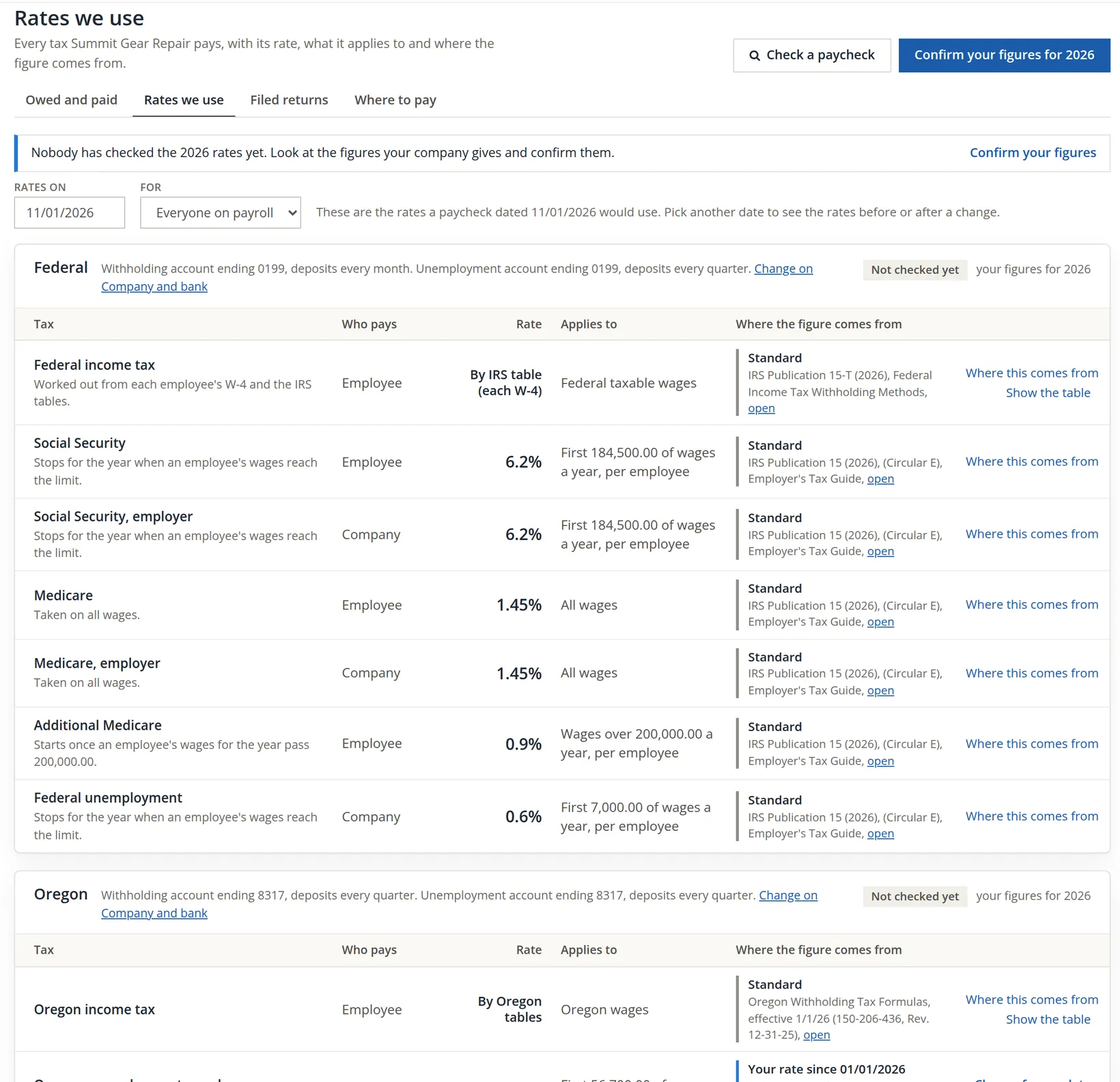
Payroll → Taxes → Rates we use lists every tax the business pays, with its rate, what it applies to, and where the figure comes from. Most lines are Standard: tables BizBooks360 loads from the agency's publication, which nobody in the books can change. A few are Your rate: figures only your company has, such as the unemployment rate on the state's notice.
- 1
Confirm your figures
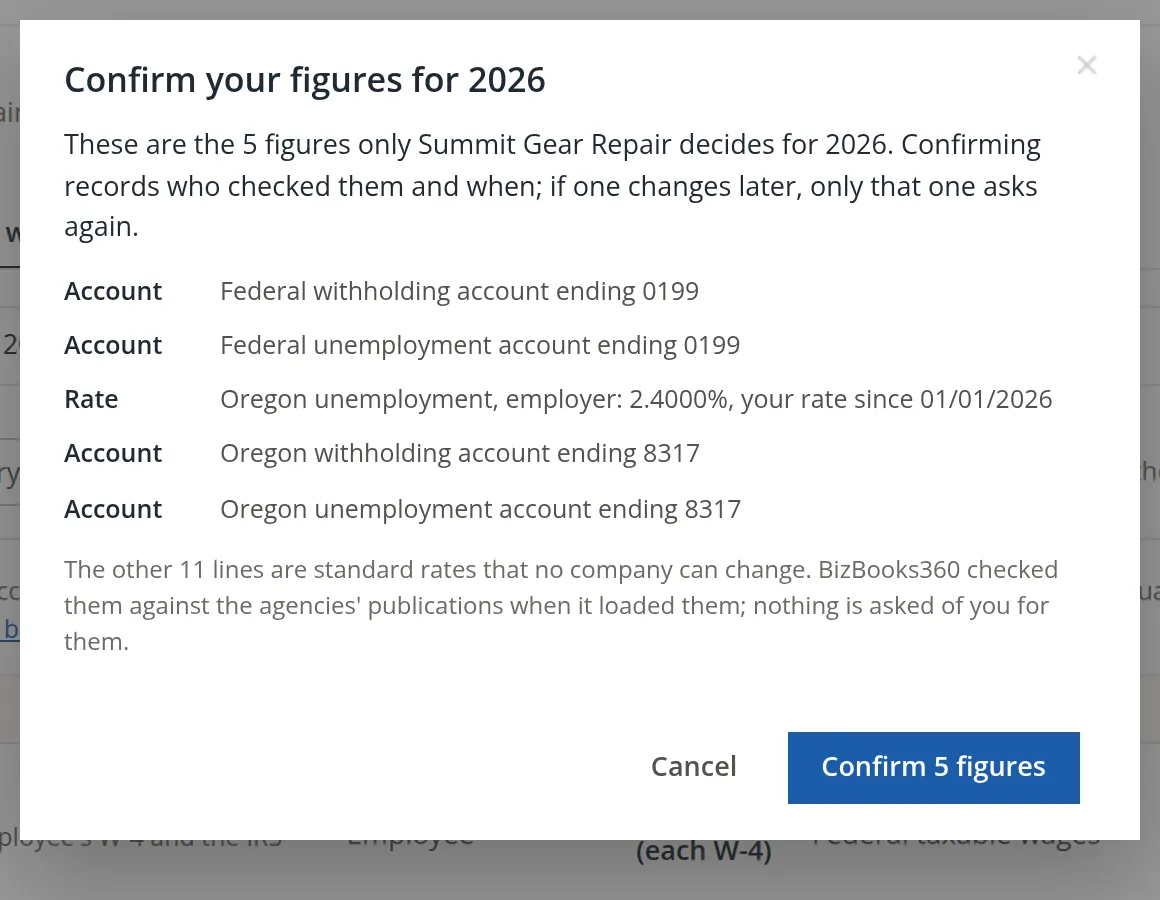
Press Confirm your figures. The dialog lists only the five figures Summit Gear Repair decides: its four tax accounts and its unemployment rate. Read each against the agency's letter and press Confirm 5 figures. The page answers Confirmed 5 lines for 2026. and each group now says who checked it and when.
- 2
Check a paycheck
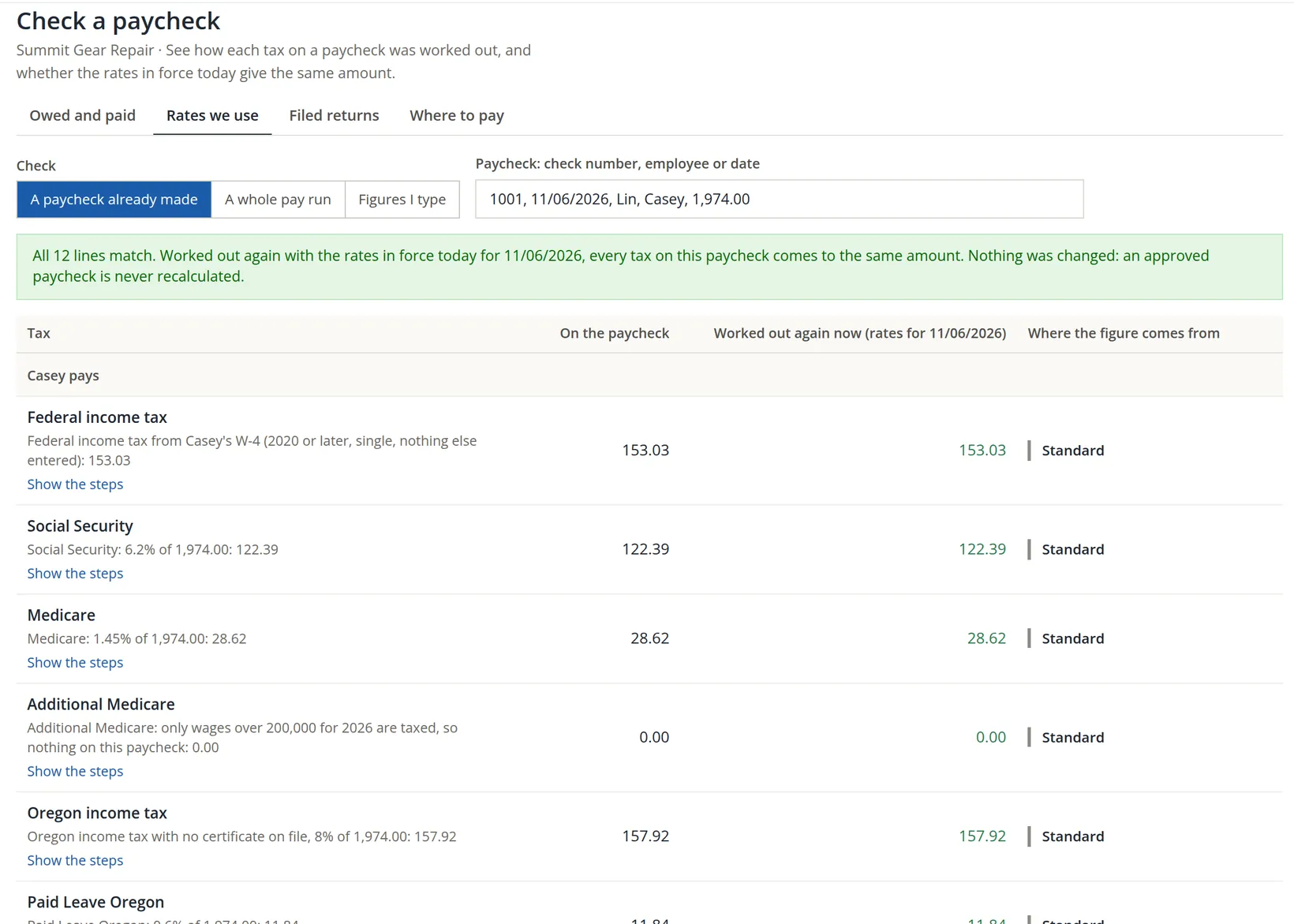
Check a paycheck works any approved paycheck out again with today's rates and puts the two side by side. Choose A paycheck already made and pick check 1001. Nothing is changed: an approved paycheck is never recalculated. A difference tells you a rate changed after the paycheck was made.
Taxes processed: turning a tax off
Some businesses handle a tax outside BizBooks360, for example while moving from another payroll provider. Payroll → Settings → Taxes processed lists every tax with a tick. Every tax is worked out until it is turned off here, and turning one off asks first.
To see what it asks, we unticked Oregon statewide transit tax and pressed Save changes once. Nothing was saved. The page explained the consequence and added an I understand box that must be ticked before a second save.
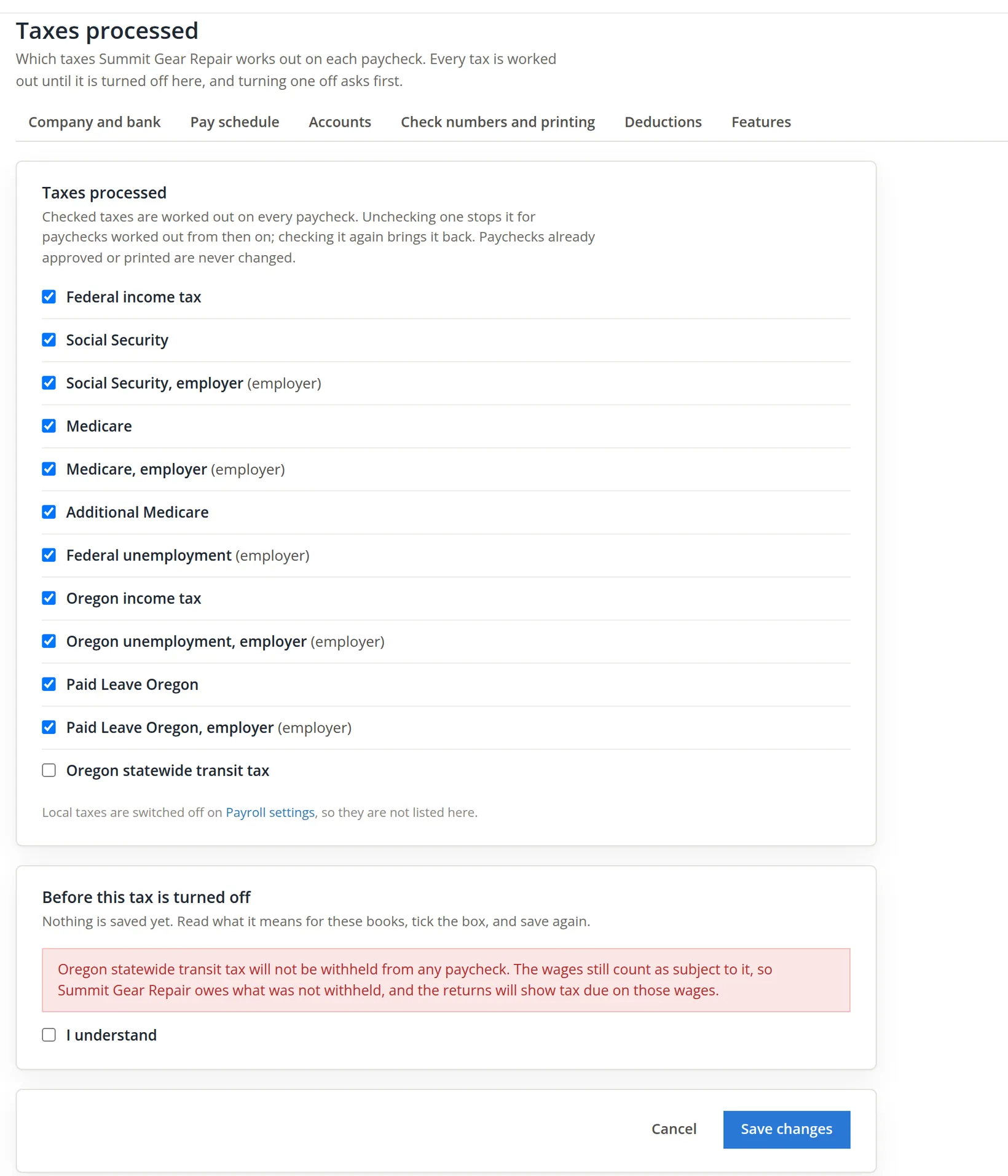
We pressed Cancel: Summit Gear Repair keeps every tax on. Had the change been saved, a turned-off tax would print as 0.00 on later paychecks and appear on the Skipped taxes report (Chapter 11.4). Paychecks already approved never change.
Turning a tax off stops BizBooks360 from withholding it. It does not end the business's duty to pay it. Do it only when another system is withholding and paying the tax, and write down which one.
Where to pay
A deposit names the agency it was paid to. Payroll → Taxes → Where to pay keeps the list.
- 1
Add the IRS
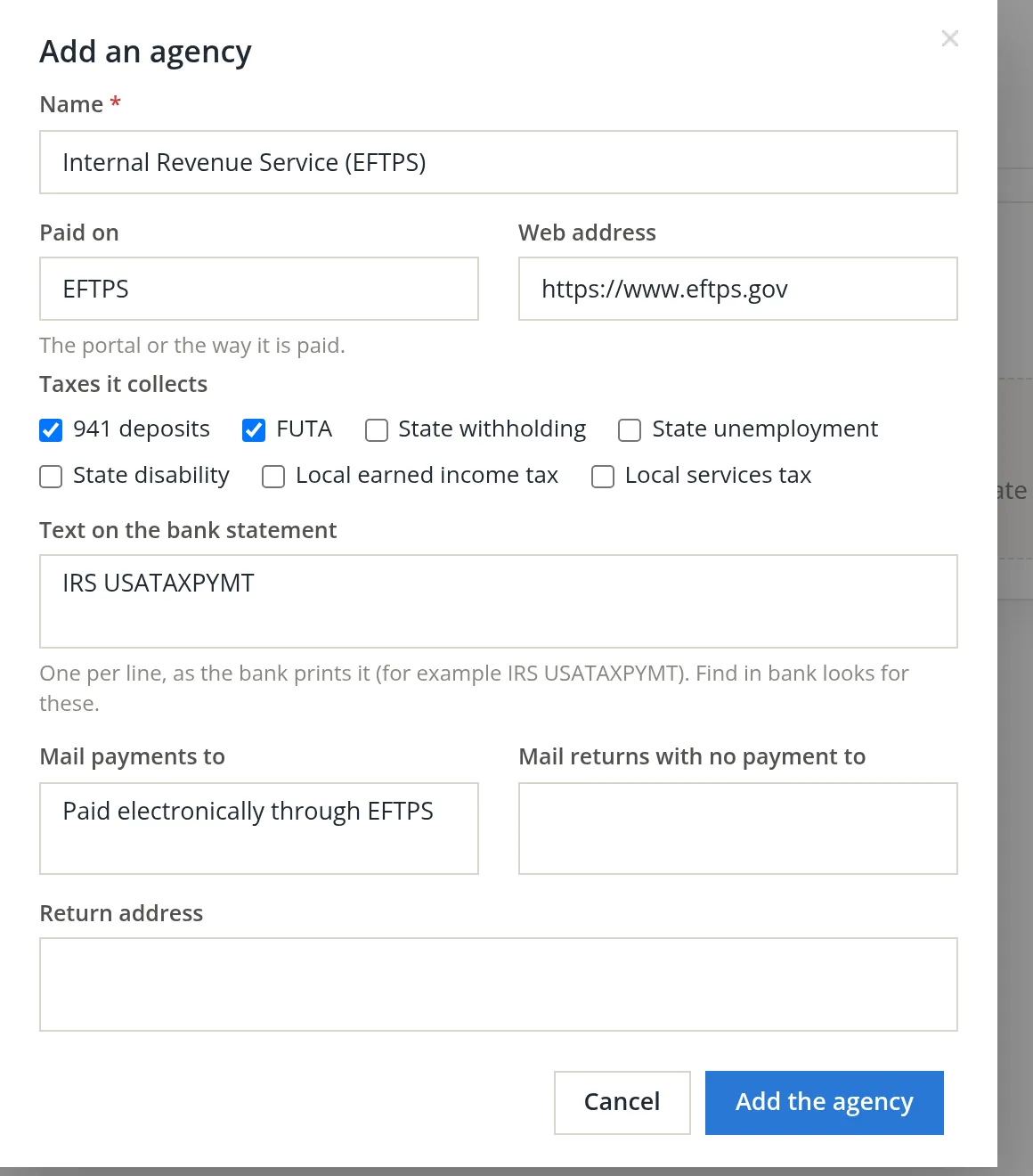
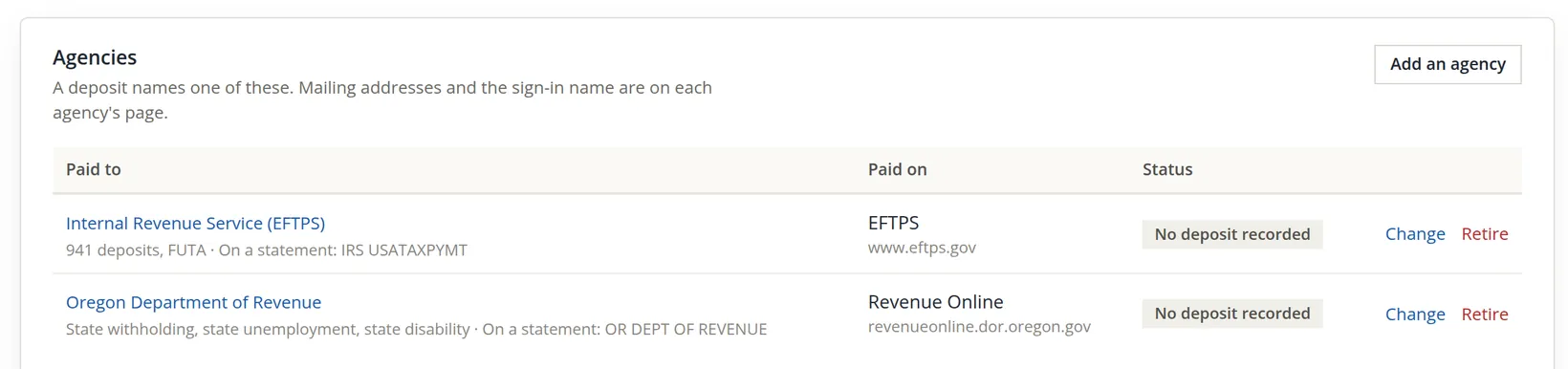
Add an agency. Name: Internal Revenue Service (EFTPS). Paid on: EFTPS, the IRS's payment system. Tick 941 deposits and FUTA. Under Text on the bank statement type how the bank prints the payment, here IRS USATAXPYMT; Find in bank looks for it later. Press Add the agency.
- 2
Add the state
Oregon collects withholding, unemployment and its other payroll taxes together through the Department of Revenue. Add it with state withholding, state unemployment and state disability ticked, paid on Revenue Online.
Owed and paid
Payroll → Taxes → Owed and paid shows, as the books show it, what has been withheld and owed, what was deposited, and what is left, by deposit period. A paycheck counts from its check date. Opened on November 2, the page said No taxes accrued yet, because check 1001 is dated November 6. With the As of date set to 11/06/2026 it shows the whole picture.2
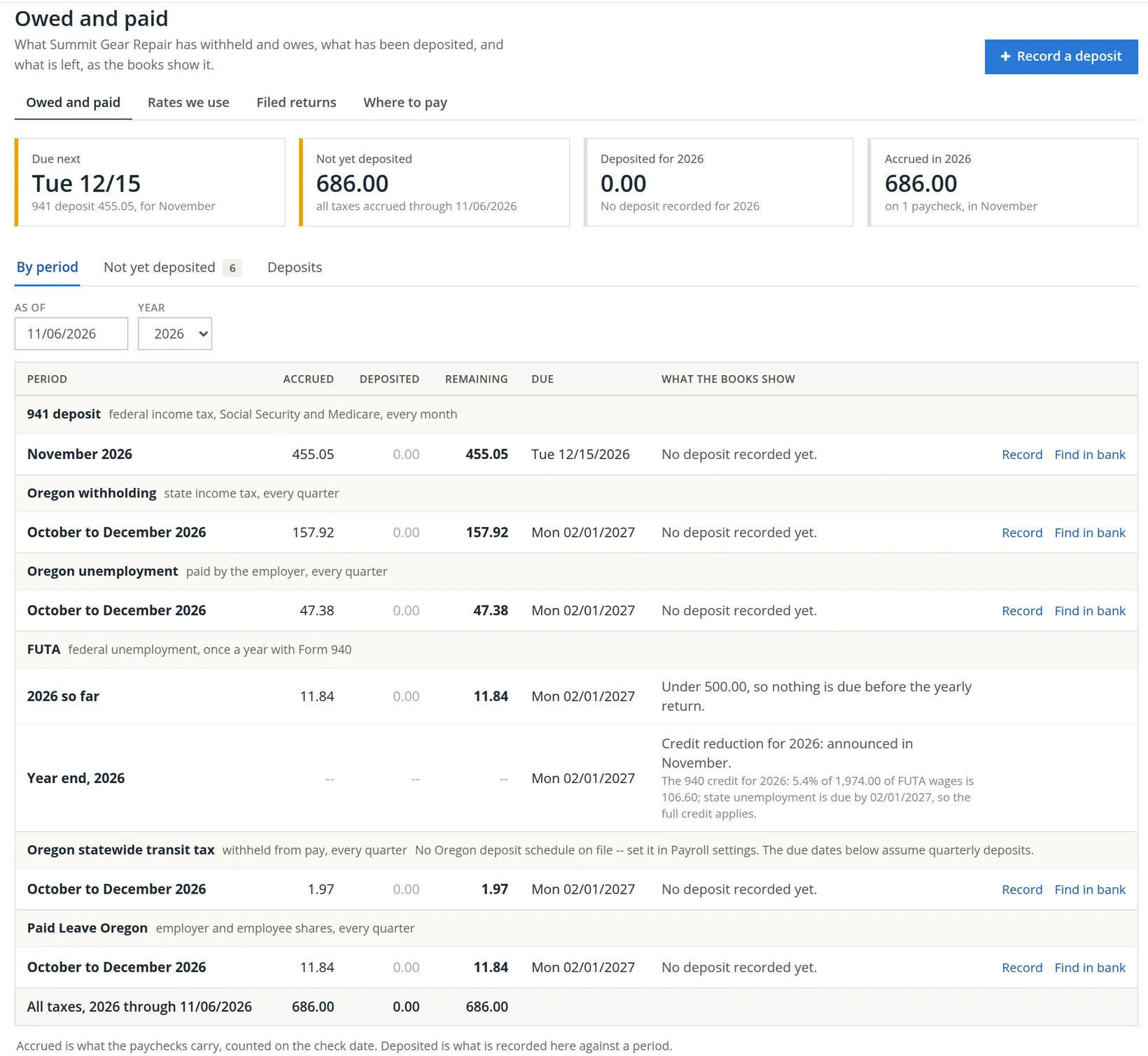
Reading the FUTA line. The federal unemployment tax is 6.0% of the first 7,000.00 of each employee's wages, less a credit of up to 5.4% for paying state unemployment on time. The page shows the credit: 5.4% of 1,974.00 = 106.60. What remains is 0.6% of 1,974.00 = 11.84, the figure on the paycheck. Because it is under 500.00 for the year, nothing is due until Form 940.
Reading the two Oregon lines at the bottom. The statewide transit tax and Paid Leave Oregon are deposited on their own. The transit tax group carries a grey note because BizBooks360 has no Oregon deposit schedule on file for it: No Oregon deposit schedule on file -- set it in Payroll settings. The due dates below assume quarterly deposits. Its due date, 02/01/2027, is then an assumption, not a fact from the agency; the note itself says where to settle it. Paid Leave Oregon shows no such note.
- 1
Record the deposit once it is made
When the 941 deposit has been paid through EFTPS, press Record on its line (or Record a deposit at the top) and fill in the deposit. Deposited then shows what was paid against the period, and Remaining what is left. Find in bank looks for a statement line with the agency's text. In these practice books the deposit could not be recorded yet, as the next paragraph shows, so its form is not pictured.
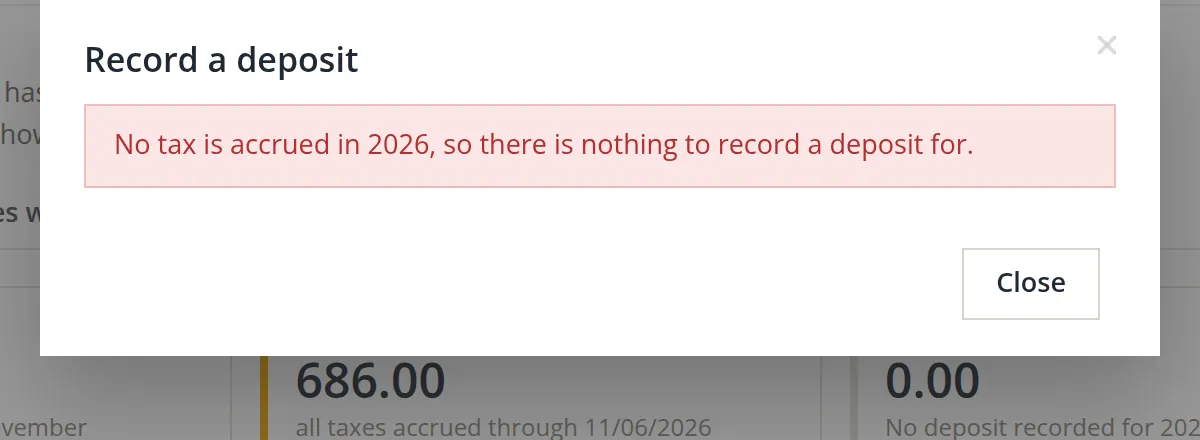
Too early. We pressed Record on November 2. The dialog refused: the paycheck does not count until its check date, so on that day there was nothing to deposit for.
Due next is the date that matters. A monthly depositor pays the 941 deposit by the 15th of the month after the check date; paying late costs penalties that no software can undo.
Filed returns
When a return has been sent, mark it on Payroll → Taxes → Filed returns with Mark a return as filed. A mark never stops a later change; it makes sure the change is noticed, so you know to file a correction. Summit Gear Repair has nothing to mark yet: the fourth quarter has not ended. The page speaks of the returns reported to the IRS and Oregon, the books' own state.
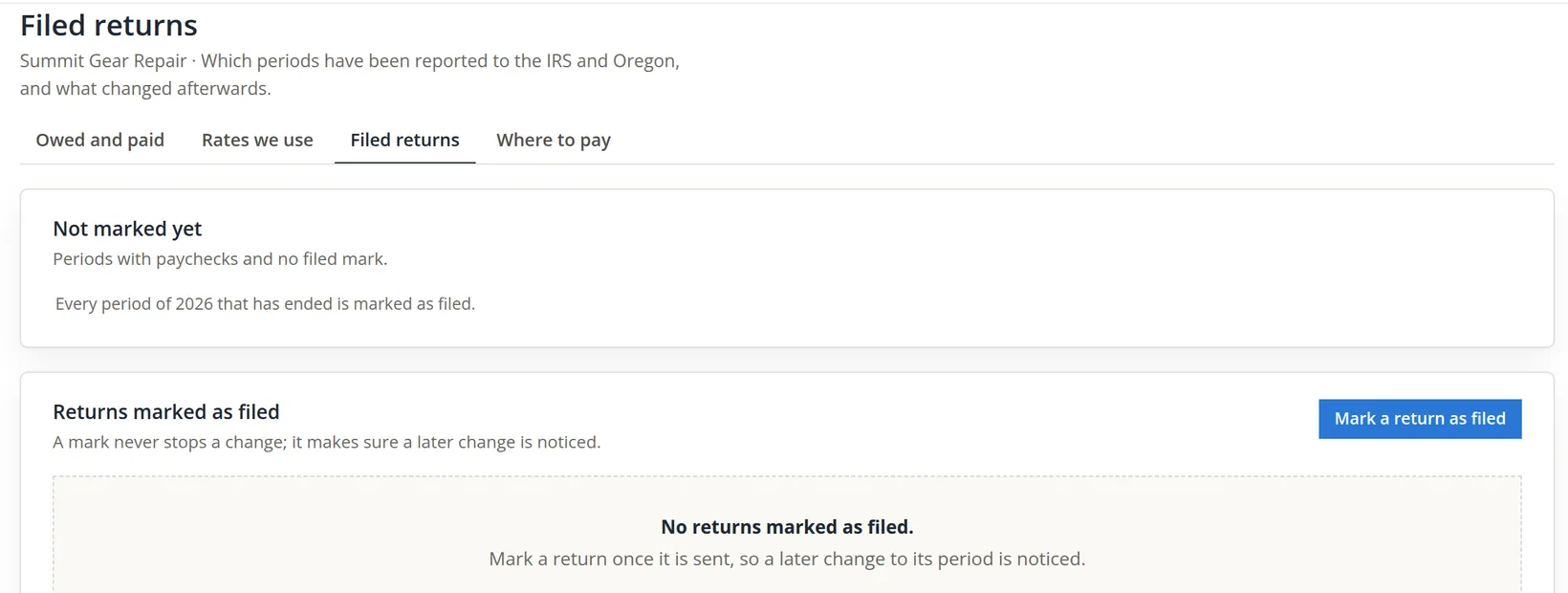
BizBooks360 prepares worksheets for the returns, not the forms themselves; Chapter 11.4 shows the Form 941 and W-2 worksheets. Filing and paying happen at the agencies.
Payroll taxes, every month and quarter
- [x] Start of the year: the new unemployment rate entered and the year's figures confirmed.
- [x] After each pay run: Owed and paid shows the new amounts and their due dates.
- [x] Each deposit made at the agency and recorded on its line.
- [x] Each statement: Find in bank matches the deposits.
- [x] Each quarter: the return filed from the worksheet and marked as filed.
- [x] Taxes processed: every tax ticked, unless another system handles it.
Check your understanding
1. Which taxes make up the 941 deposit of 455.05?
Answer
Federal income tax 153.03, plus both halves of Social Security (244.78) and Medicare (57.24).
2. Which figures does Confirm your figures ask about, and why not the others?
Answer
Only the company's own: its tax accounts and its unemployment rate. The standard rates come from the agencies' publications and no company can change them.
3. You turn the transit tax off. Does the business still owe it?
Answer
Yes. The wages still count as subject to it; the business owes what was not withheld.
4. Why could no deposit be recorded on November 2?
Answer
The only paycheck is dated November 6 and counts from its check date.
5. Why is no FUTA payment due this year?
Answer
The 11.84 owed is under 500.00, so it is paid with Form 940.
Notes
- The pictures come from Summit Gear Repair, the practice books where the first paycheck was made. All names, numbers and figures are made up. Nothing here is tax or legal advice: rates, schedules and thresholds change, and your accountant decides what applies to your business. ↑
- The As of box appears once the page has something to show; the first view was opened with the date given in the page address. ↑