
Chapter 12.4
Timekeeping reports
Nineteen reports read the timekeeping records: the signed timesheet itself, who is late or waiting, every change and who made it, where the labor cost went, and whether hours, payroll and the ledger agree. This chapter shows which report answers which question, and how to read the ones a manager and an auditor reach for first.
When you finish this chapter you will be able to:
- Pick the right timekeeping report for a question.
- Run the Timesheet report for a period and read its certification, approvals and change appendix.
- Use Timesheet Status and the Entry Change Log to follow up late, on-behalf and exception items.
- Tie posted labor cost to the journal with Labor Distribution.
- Read a Timesheet Tie-out difference and say why it appears.
- Find leave balances, expense claim lines and today's floor check.
Where they are, and which to use
Reports → All reports has a Timekeeping group: timesheets as certified and approved, and every change behind them. Its nineteen reports are split into four sub-sections, each with a line saying what it is for: Timesheets and hours, Labor cost and payroll, Projects and billing and Controls and audit. The quickest way to one report is to type part of its name in Find a report, at the top right of the page or at the top of the Reports menu (Chapter 6.1).
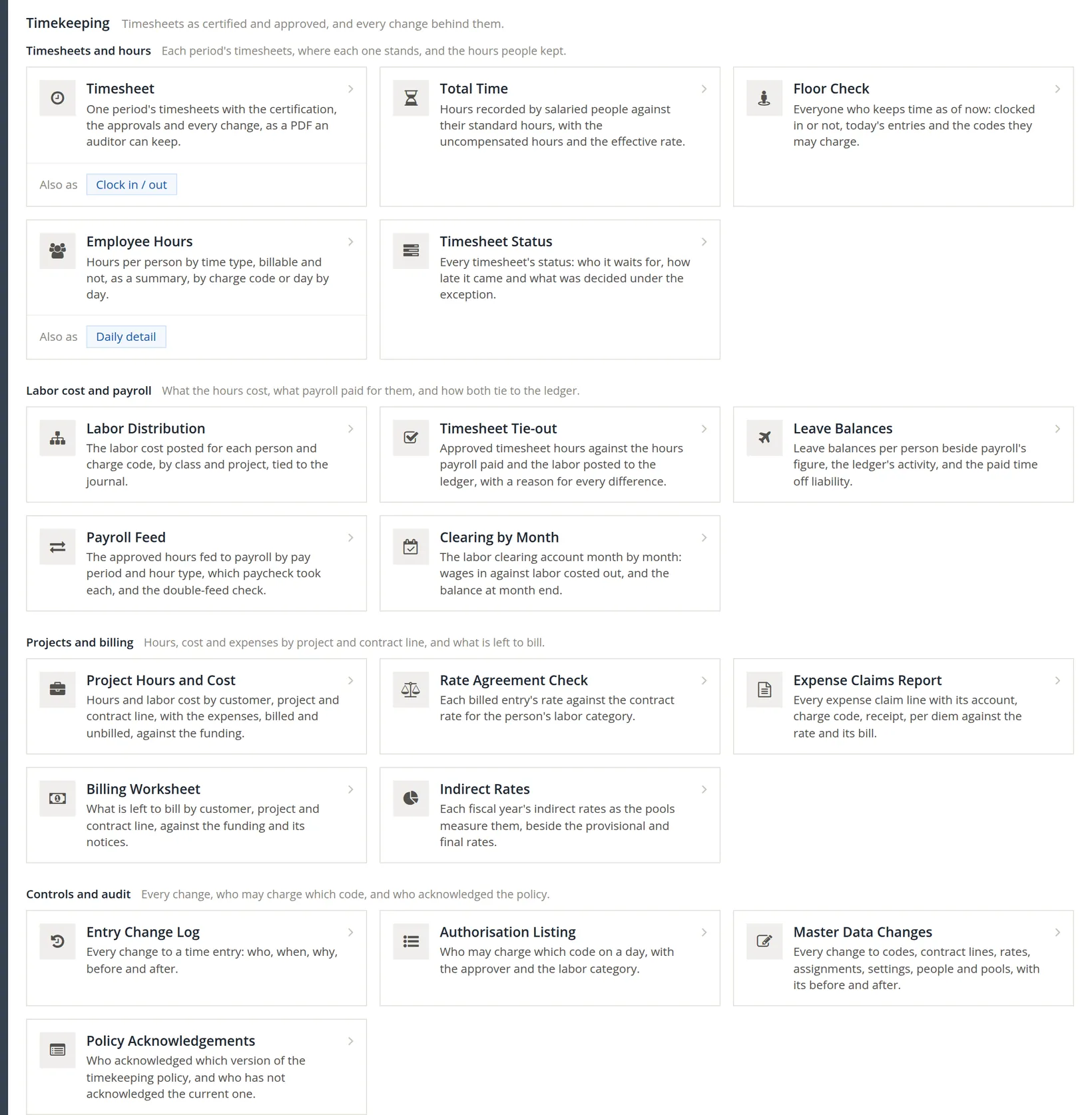
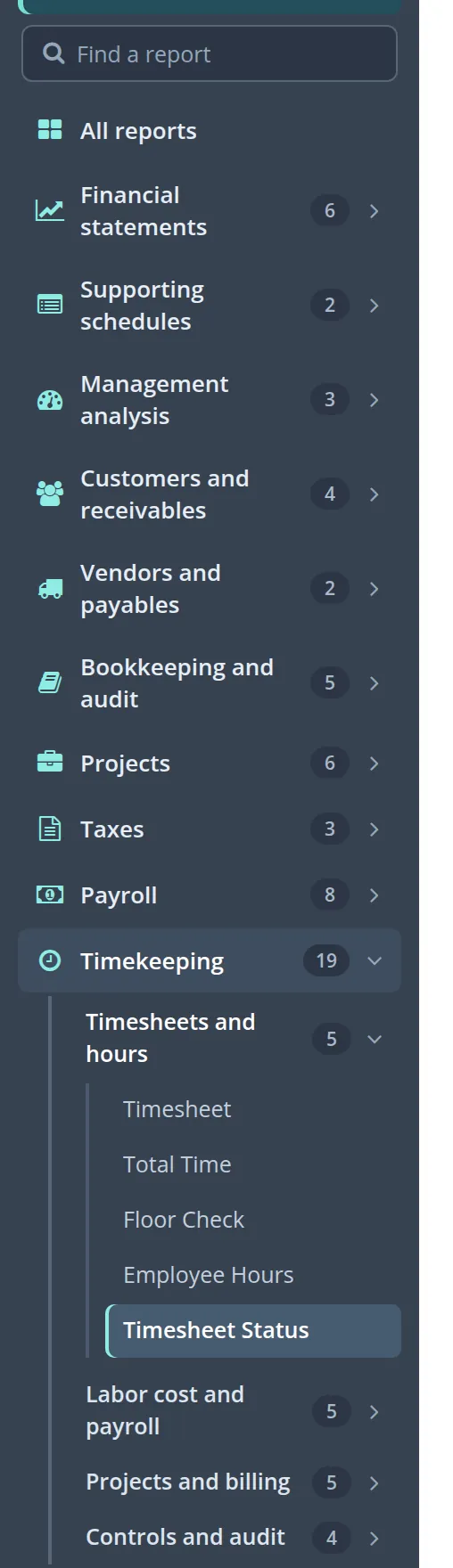
The sidebar follows the same plan. Under Reports each group carries its count, Timekeeping shows 19, and opening it shows the four sub-sections with their own counts; opening a sub-section lists its reports, and the report you are on is highlighted.
| Question | Report |
|---|---|
| What exactly did this person certify, and who approved it? | Timesheet |
| Who has not submitted, who is late, what waits on whom? | Timesheet Status |
| Who changed this entry, when, from where, and why? | Entry Change Log |
| Who is working right now, and on what? | Floor Check |
| How many hours did each person record, by type? | Employee Hours |
| Where did the labor cost go in the ledger? | Labor Distribution |
| Do hours, payroll and the ledger agree? | Timesheet Tie-out, Payroll Feed, Clearing by Month |
| Salaried people's hours beyond their standard? | Total Time |
| Leave owed and its liability? | Leave Balances |
| What was claimed, on which account, with what receipt? | Expense Claims Report |
| Hours and cost by project and contract line; rates billed against the contract; who may charge which code; what is left to bill | Project Hours and Cost, Rate Agreement Check, Authorisation Listing, Billing Worksheet (Volume 7) |
| Changes to codes, rates and people; policy acknowledgements; indirect rates | Master Data Changes, Policy Acknowledgements, Indirect Rates |
The Timesheet report
The Timesheet report is the signed record: one period's timesheets with their certification, approvals and every change, as a PDF an auditor can keep.
- 1
Choose the people and the period
Pick people in People (everyone in your view when none is picked) and one Period. A run covers one period.
- 2
Choose the revision, the appendix and the form
Latest revision or Every revision; With the change appendix or without; Timesheet or With clock in and out. Then Run report.

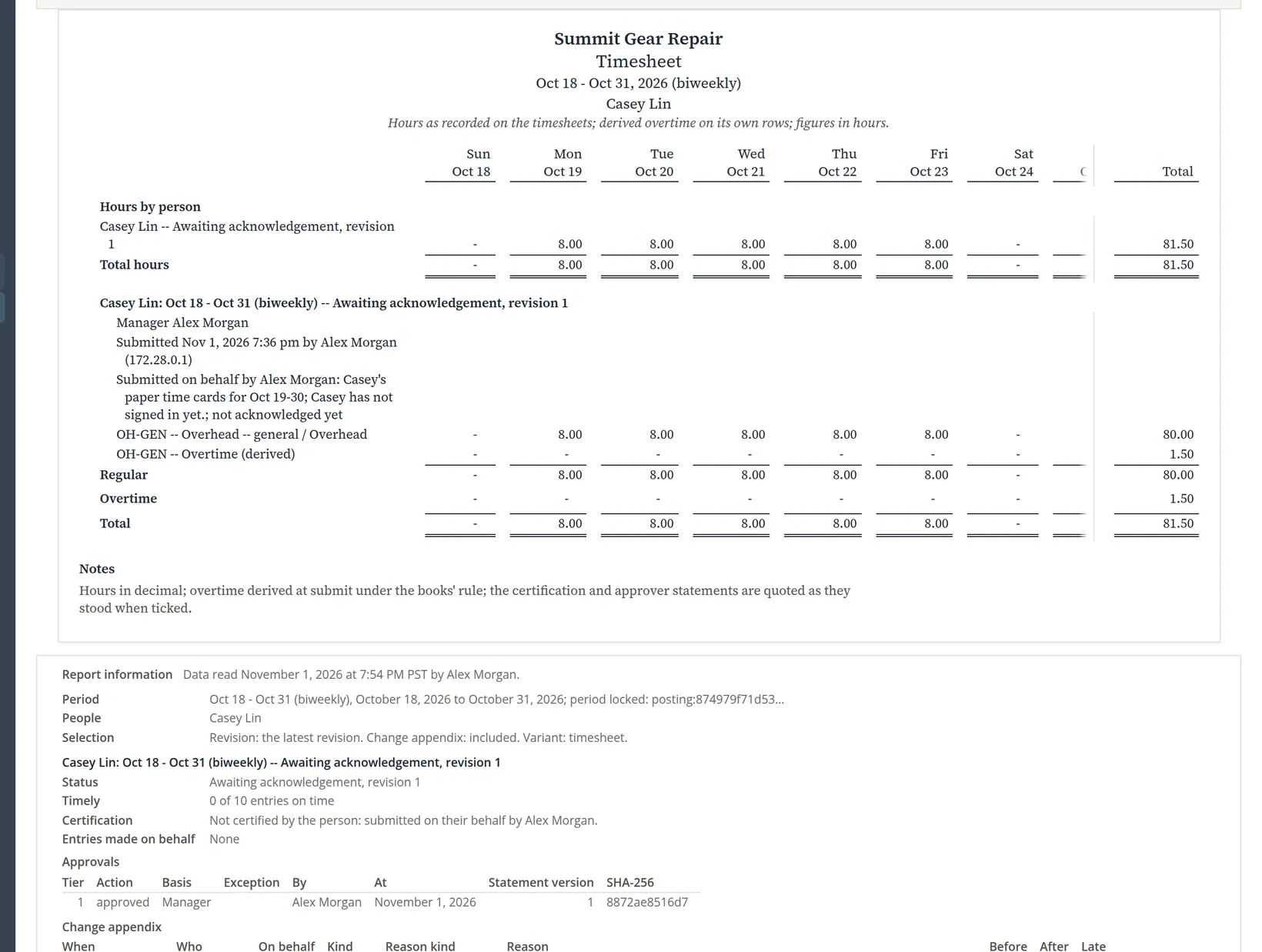
Reading this example. Hours add up day by day: ten days of 8.00, with 9.50 on Oct 27, give 81.50; the books split 1.50 of them to overtime on Oct 30, leaving 80.00 regular. A timesheet that is not approved yet prints with the words DRAFT -- includes hours not yet approved. My Time's Print timesheet menu item prints the same report for your own period.
An auditor asks for the timesheet as it stood when it was approved. Run with Every revision and the appendix for a period that was reopened: each revision, its certification and the changes between them are printed.
Timesheet Status: who and what is waiting
The report opens on The current period, so the first thing you see is who still owes this period's timesheet. To look back, choose another Period (or From and To), optionally people, a manager or a status, and press Apply. Hide filters folds the filter panel away; it then reads Filters with the number set, such as (2 set). This report answers on screen; CSV, PDF and Excel sit at the top right.
Two columns answer the questions a manager asks before the due day: Missing days, the work days of the period with no entry yet (on Thursday, November 5, before 5 pm, Alex and Casey each show 3: Monday to Wednesday, Nov 2-4; today counts only once the working day is over, at 5 pm company time, so from then on Thursday counts too and both show 4), and Corrections pending, the correction entries made with Correct... on an approved timesheet (Chapter 12.2) that are not yet approved. Missing days counts only while the books require time for every work day.
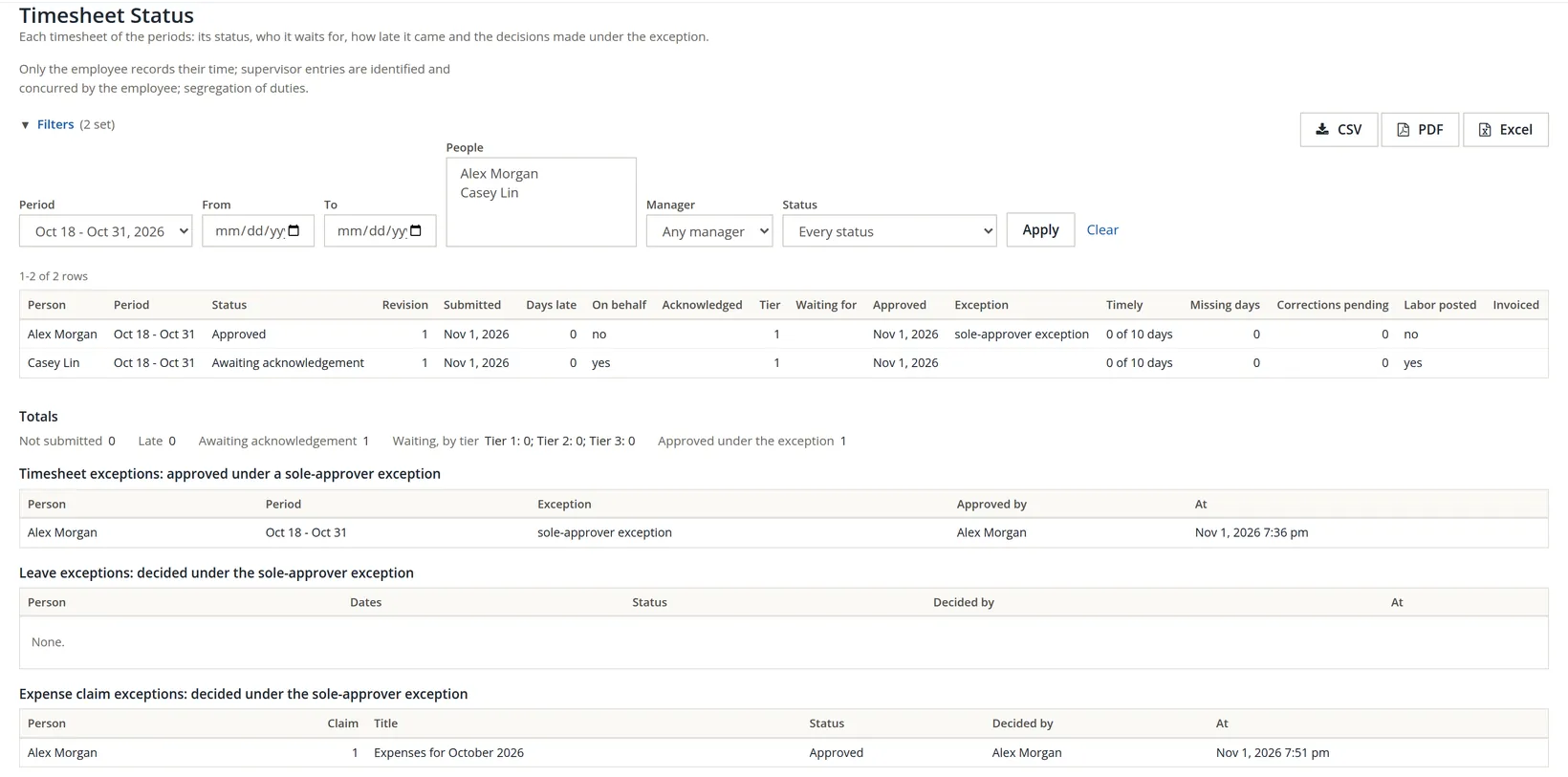
The three exception tables are the honest record of a one-person office: every decision the owner made about their own time, leave or money is listed here, with its date.2
The Entry Change Log
Every change to a time entry, newest first: who, when, on whose behalf, the kind of change, the reason, hours before and after, and the address it came from. Filter by person, period, kind, reason kind, on behalf, code, dates or late only.
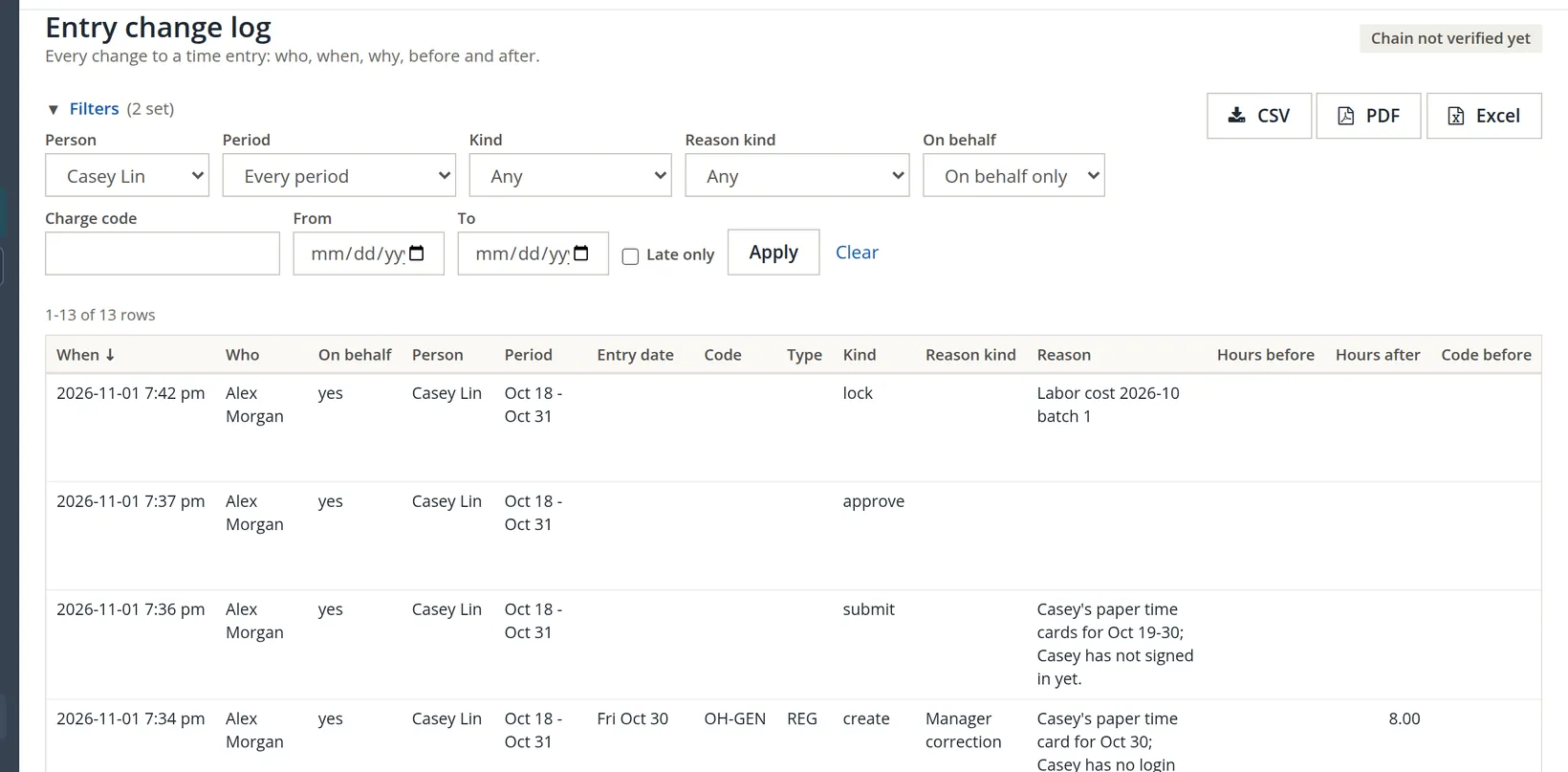
The chip in the corner reports the change chain: each change is linked to the one before it, so a row altered or removed behind the program's back would break the chain. The books check the chain every night, and Timekeeping → Audit runs a check on demand. The chip then reads Chain intact as of the time of the last check that passed (in the sample books today, Chain intact as of Nov 4, 6:15 pm), or Chain BROKEN with where the break is. Chain not verified yet, as in this picture taken on November 1, appears only before the chain has ever been checked.
Today: the Floor Check
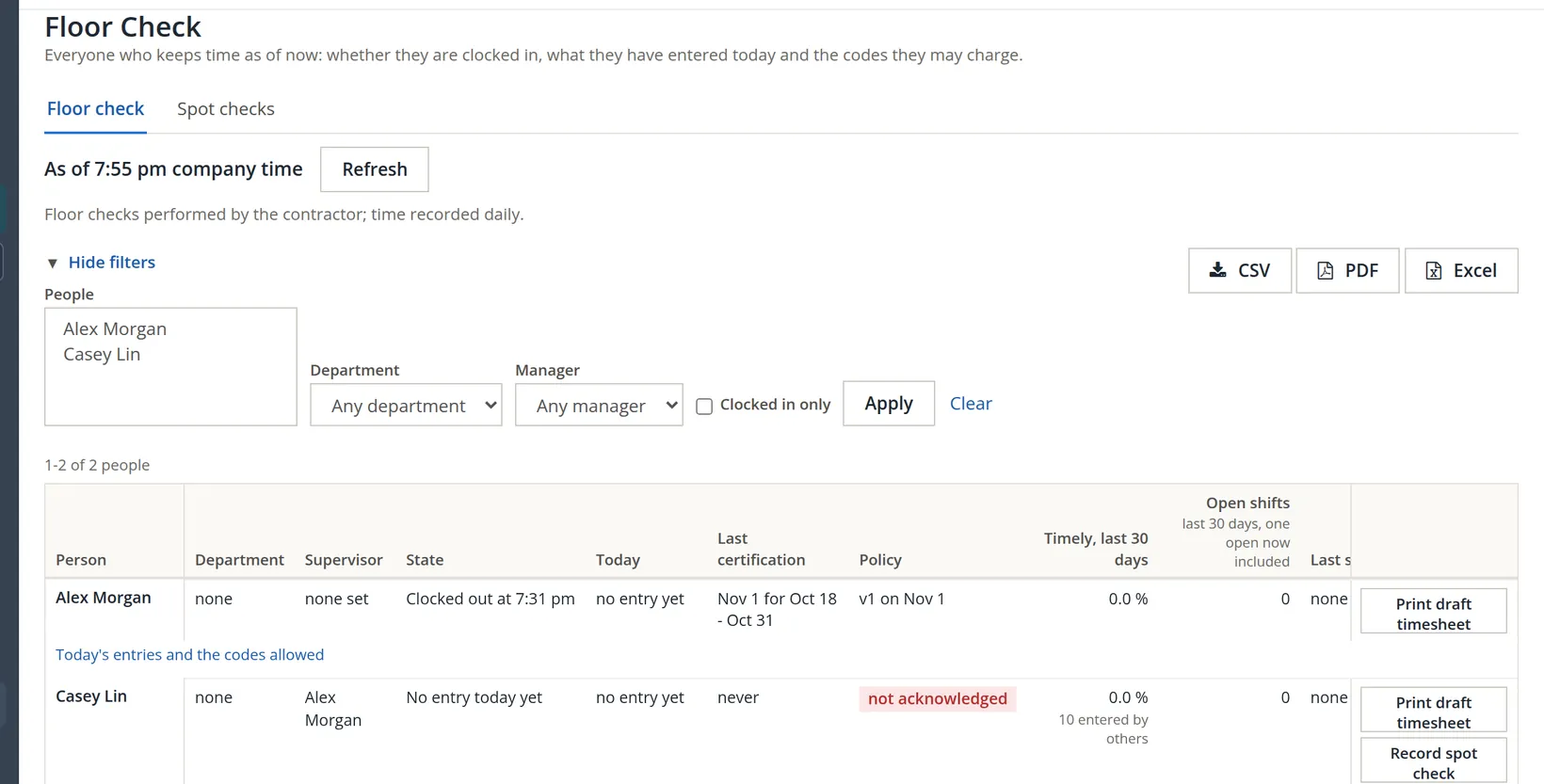
A floor check is an unannounced visit in which a supervisor or auditor compares what people are doing with what their timesheets say. The report shows everyone who keeps time as of now: clocked in or not, what they have entered today, their last certification, the policy version they acknowledged and how timely they have been. The Spot checks tab records the visits.
Employee Hours
Hours per person by time type, with the billable split and the share of days recorded on time. Choose From and To, the Entries (approved and locked only, or every entry), and the Form (summary, by charge code, or daily detail).
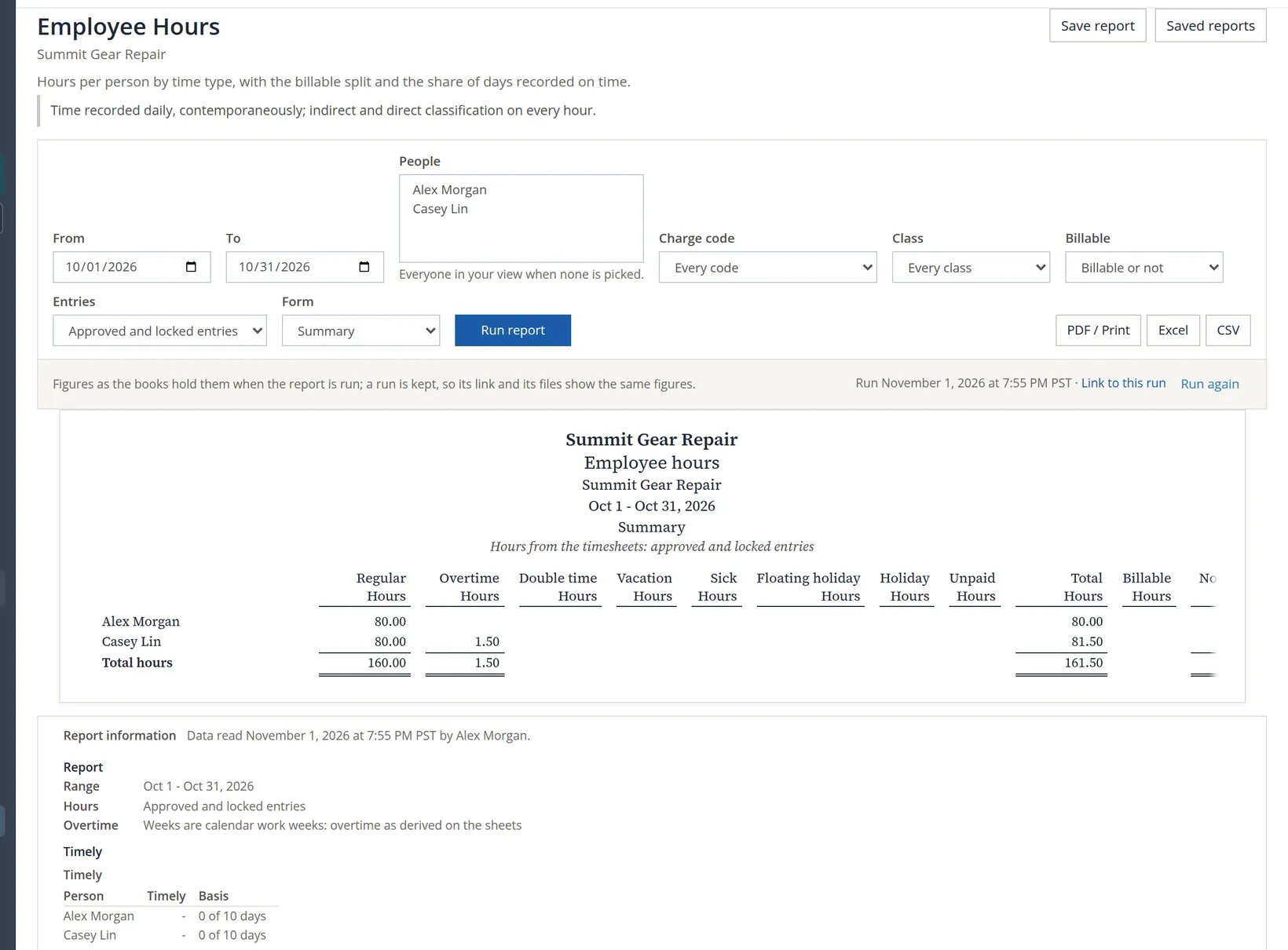
Checking it. 80.00 + 80.00 regular + 1.50 overtime = 161.50. The two timesheets of Oct 18 - Oct 31 fall wholly in October.
Labor Distribution: tying cost to the journal
The labor cost the posted batches put on the labor accounts, by class, project and person. Choose a month or a fiscal year and run it.
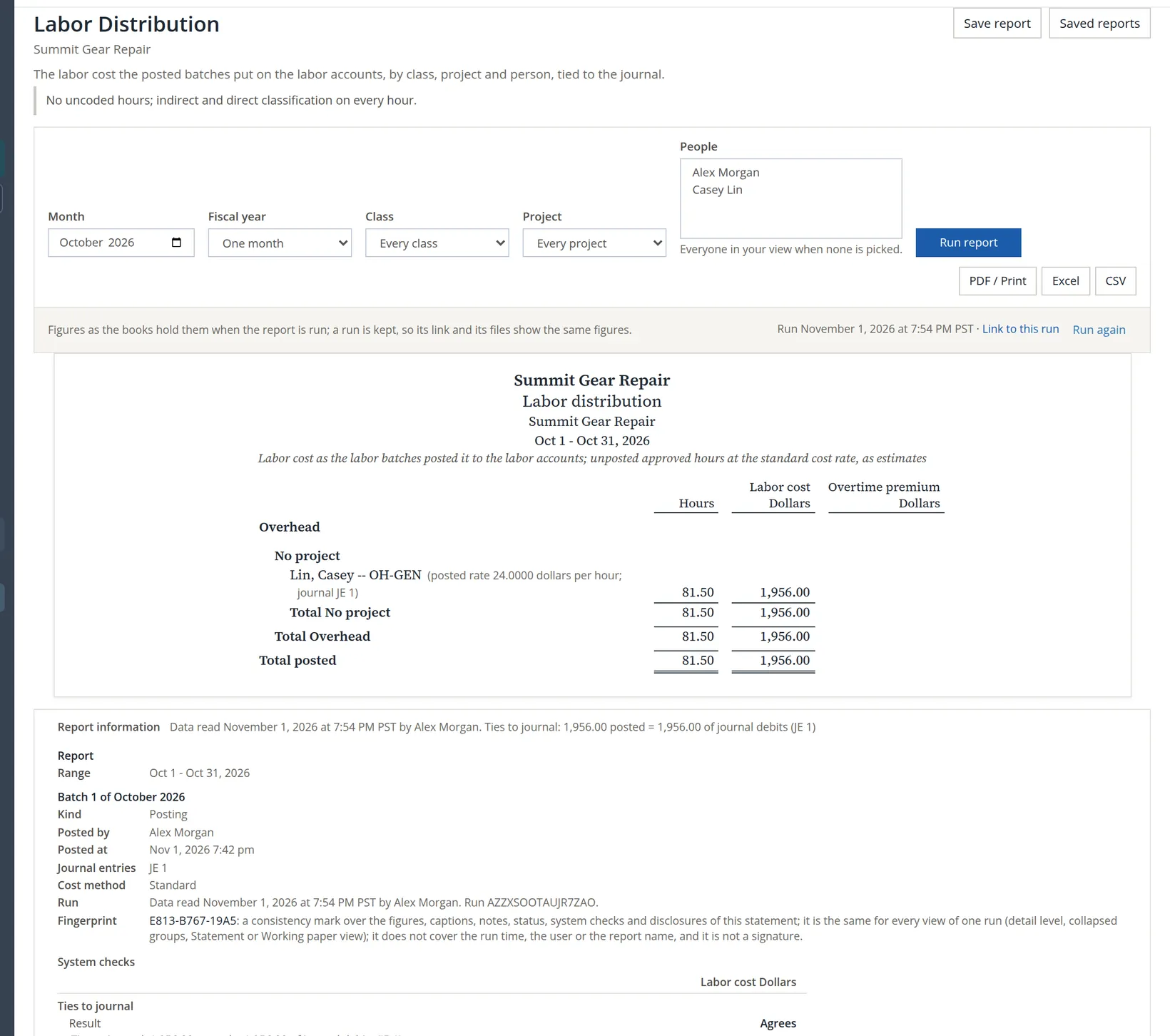
Unposted approved hours, if any, appear at the standard cost rate and are marked as estimates. Alex's 80 hours do not appear: Alex is not paid for hours, so they carry no cost.
Timesheet Tie-out: when the three do not agree
The tie-out compares, for each person and pay period, the approved timesheet hours with the hours payroll paid and the labor posted to the ledger, and gives a reason for every difference. It shows posted figures only: hours not yet posted are a difference, never an estimate.
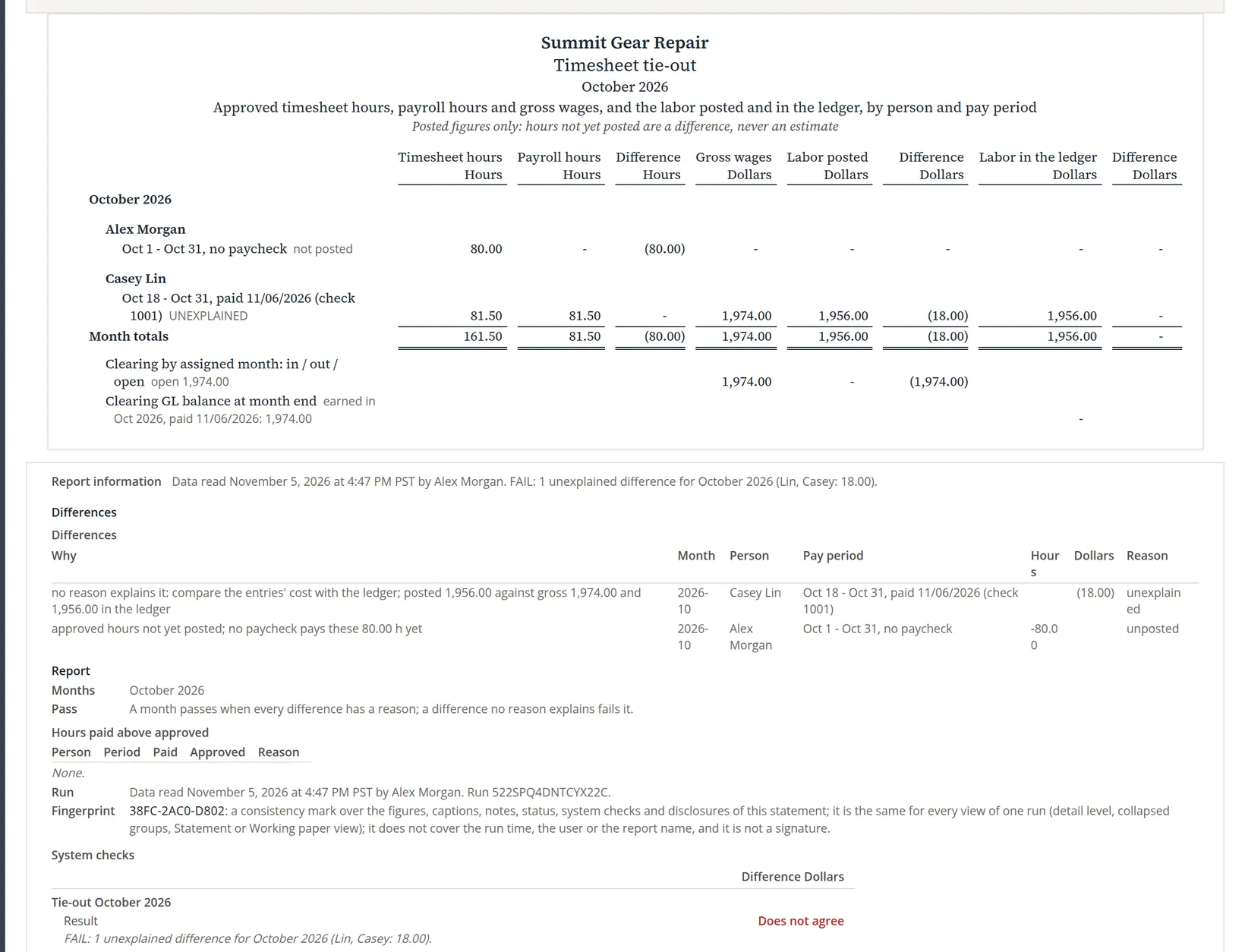
Why it fails. The hours agree: payroll paid the same 81.50 hours the timesheet holds. The dollars do not. Paycheck 1001 paid 80.00 regular hours at $24.00 and 1.50 overtime hours at $36.00, time and a half: $1,920.00 + $54.00 = $1,974.00. The October labor posting, under the standard method, costed all 81.50 hours at Casey's $24.00 cost rate: $1,956.00. The difference is the overtime premium, the extra half-rate on the overtime hours: 1.50 × $12.00 = $18.00. The labor posted in the ledger is right as far as it goes, which is why the ledger column agrees.
The tie-out calls it unexplained because the entry that would explain it has not been posted. Under the standard method, Labor costing turns the paycheck into a true-up that clears the $1,974.00 out of Labor clearing and books the $18.00 to Labor rate variance (for paycheck 1001; see the next paragraph); in the sample books that posting waits, because no Labor rate variance account is set yet (Chapter 12.2, When payroll pays the month). That is also why Labor clearing for October still shows 1,974.00 open. Once it is posted, the paycheck's dollars are fully accounted for and the difference has its entry. Alex's hours raise no alarm: Alex is not paid for hours, so there is no posting and no pay to compare; the row is listed as unposted, a difference with a reason.3
The $18.00 also says something about paycheck 1001 itself. Its overtime rate was typed on the paycheck with no pay rate on file (Chapter 11.2), so the overtime line took 36.00 as its own base rate and no premium was split out; when that true-up is posted, the $18.00 goes to Labor rate variance. That fault is fixed for new paychecks: a paycheck made the same way today takes the Regular rate of the same paycheck and department, 24.00, as the base, so its true-up books the $18.00 to Overtime premium instead. Either way, the gap stays unexplained on the tie-out until the true-up is posted. Paycheck 1001 stays as it was; an owner in this position would reclass the $18.00 from Labor rate variance to Overtime premium after the true-up, and add it to box 12 TT of Casey's W-2 at year end (Chapter 11.4).
The Timesheet Tie-out, the Payroll Feed (which approved hours reached which paycheck) and Clearing by Month (what payroll put into Labor clearing and what the postings took out) read paychecks. Without the Payroll module they show differences or nothing at all, and between a payday and the month's true-up posting they show the difference that posting will close. That is expected, not an error in the timesheets.
Leave and claims
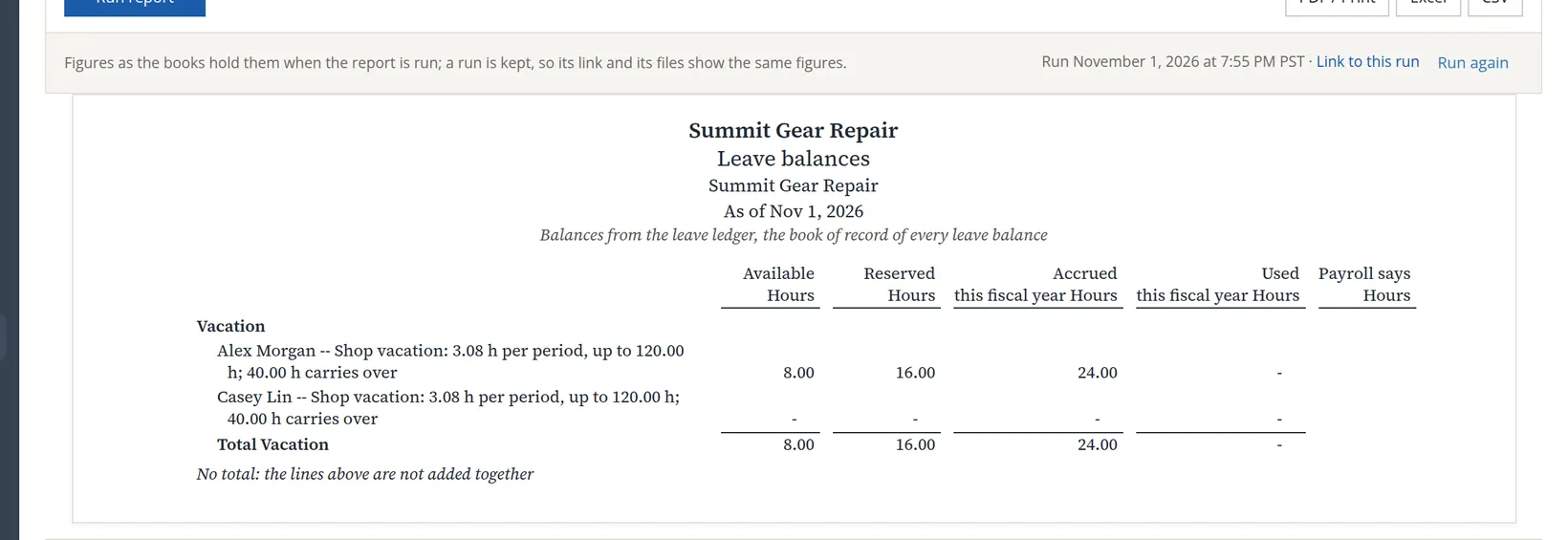
Leave Balances shows each person's balances by kind beside payroll's figure, with Show set to Balances, Activity (the ledger rows) or PTO liability (what the business owes in dollars).
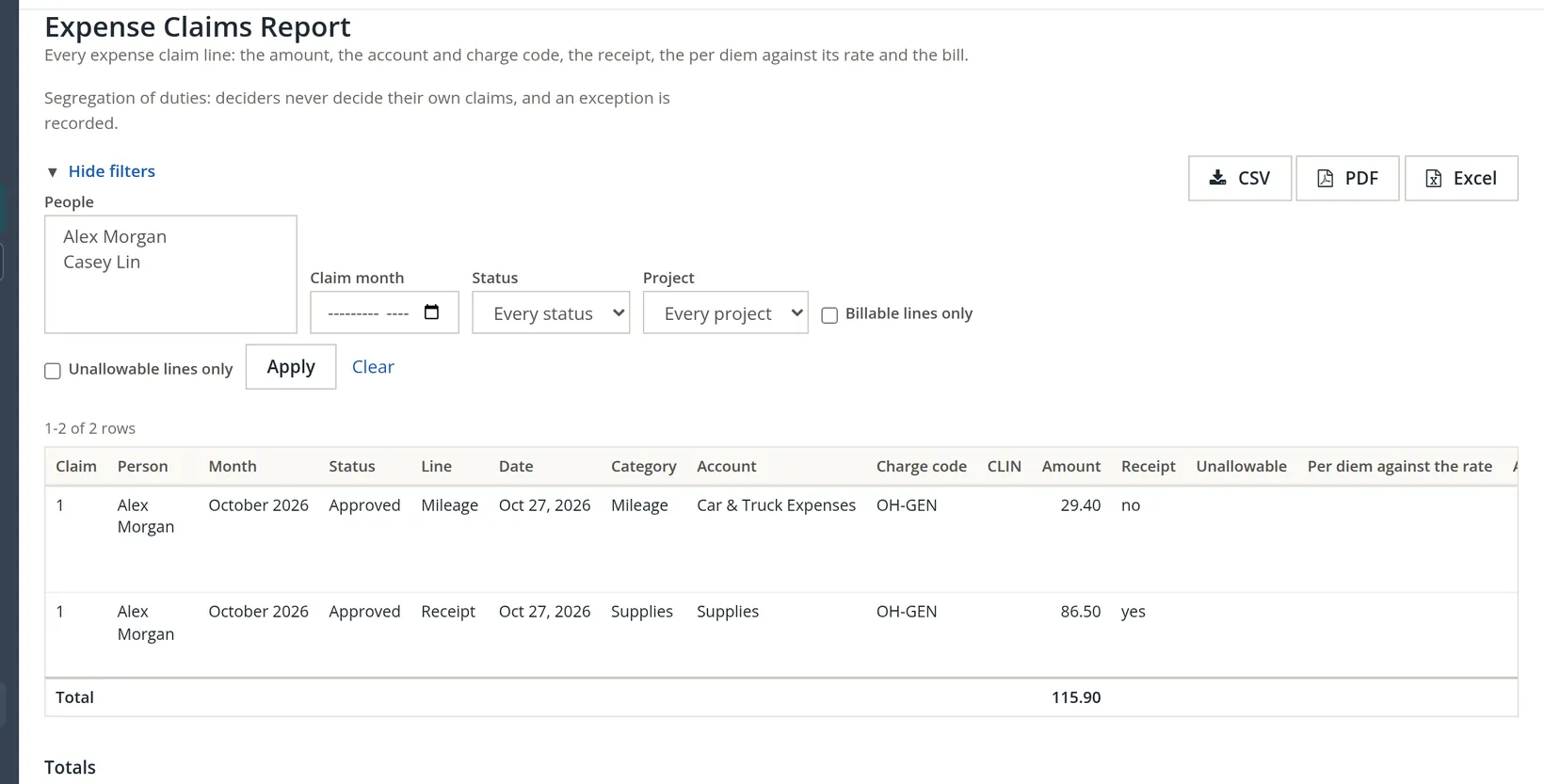
Expense Claims Report lists every claim line: the amount, the account and charge code, whether a receipt is attached, per diem against its rate, and the bill.
A monthly report pack
- [x] Timesheet Status for each period of the month: nothing unsubmitted, waiting acknowledgements followed up.
- [x] The Timesheet report PDF for each period, with the change appendix, filed.
- [x] Entry Change Log reviewed for on-behalf and late entries.
- [x] Labor Distribution ties to the journal (Agrees).
- [x] Timesheet Tie-out differences each have a reason; an unexplained one usually means the month's payroll true-up is not posted yet.
- [x] Leave Balances and the Expense Claims Report saved with the month's records.
Check your understanding
1. An auditor asks who approved Casey's October timesheet and on what basis. Which report, and what does it say?
Answer
The Timesheet report: tier 1, approved, basis Manager, by Alex Morgan, with the statement version and its mark.
2. Where do you see every decision the owner made about their own time, leave or claims?
Answer
Timesheet Status, in its three exception tables.
3. Labor Distribution says Agrees, but the Tie-out says Does not agree. Can both be right?
Answer
Yes. Labor Distribution compares the posting with the journal, which match at $1,956.00. The Tie-out also compares with payroll: paycheck 1001 paid $1,974.00 gross, $18.00 more, because the overtime premium was paid but has not been posted yet.
4. Why does Total Time show nothing for Summit Gear Repair?
Answer
It reports salaried and exempt people against their standard hours; both people here are hourly.
5. What does the Floor Check's 0.0 % timely figure tell a manager about Alex?
Answer
None of Alex's recorded days in the last 30 were entered on time: all were late entries, which the change log explains.
Notes
- The pictures come from Summit Gear Repair, which the practice user owns; in Summit Outfitters Inc. nobody keeps time yet, because only its owner can add people to Timekeeping. All names and figures are made up. ↑
- The exception tables follow the period filter: the vacation request of Nov 12 - Nov 13 appears when the period Nov 1 - Nov 14 is chosen. ↑
- Volume 11 covers the Payroll module. Before a paycheck pays a period, its row reads no paycheck, and the whole of its hours and posted cost appear as the difference. ↑