
Chapter 15.1
Company, Fiscal Year and Departments
The facts every document and report draws on: who the business is, where it is, how the IRS knows it, when its year ends, how often it closes, and the cost centers its people work in.
When you finish this chapter you will be able to:
- Find any settings page from the Settings overview and read the state each card reports.
- Tell the book name from the legal name, and say which details print on documents and which only steer the books.
- Change the company's contact details, read the change history and recover from a refused save.
- Explain what the fiscal year end and the closing period decide, and why February 29 is refused.
- Add departments as cost centers and explain why each needs its own name.
- Say what Delete these books does, and how long you have to change your mind.
The Settings overview
Every company-wide choice in BizBooks360 lives under Settings in the left menu. The first page, Overview, groups the pages into cards: Company, Accounting, Closing and books, Users and plan and Your account, followed by one card for each module the books use (Projects, Timekeeping, Property Management, Payroll). Each line names a page, says in a few words what it holds, and shows its state at the right. The Company card has five lines; the last, Policies, keeps the business's written procedures, their versions and who has read them. A yellow tag means something still needs your attention; a green tag means it is in order.
The settings in this volume apply to everyone who opens these books. They are not personal preferences. Change them with the same care you would give to a journal entry, and tell the people who share the books.
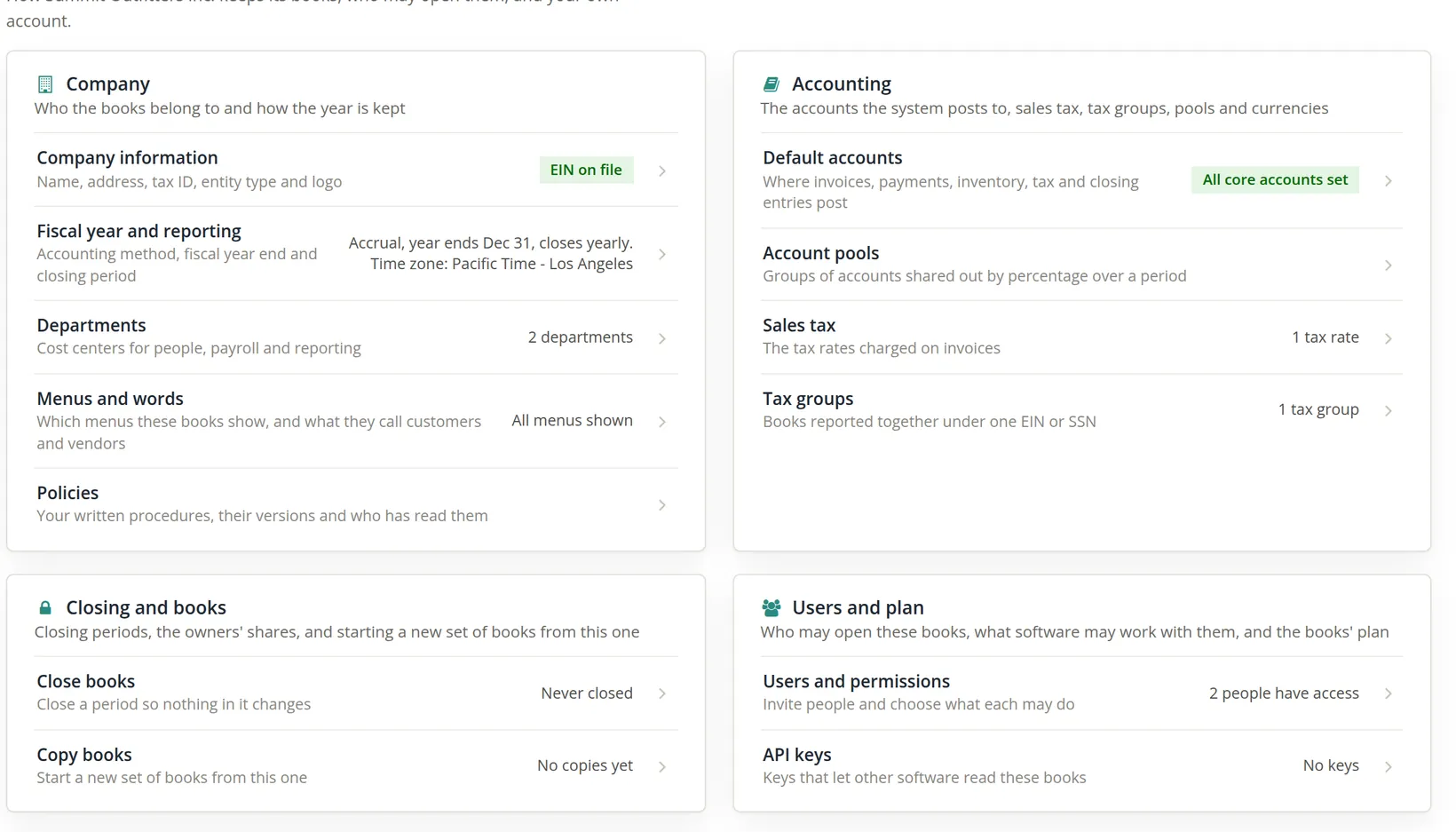
Under Settings in the left menu is a Find a setting box. Type the first letters of a word, such as fiscal or logo, and the menu narrows to the pages that match, each listed with its card (Fiscal year and reporting, under Company). Each word you type must match the start of a word: fis finds the fiscal year page, while letters from the middle of a word, such as scal, find nothing. It is quicker than remembering which card a page lives on.
Company information
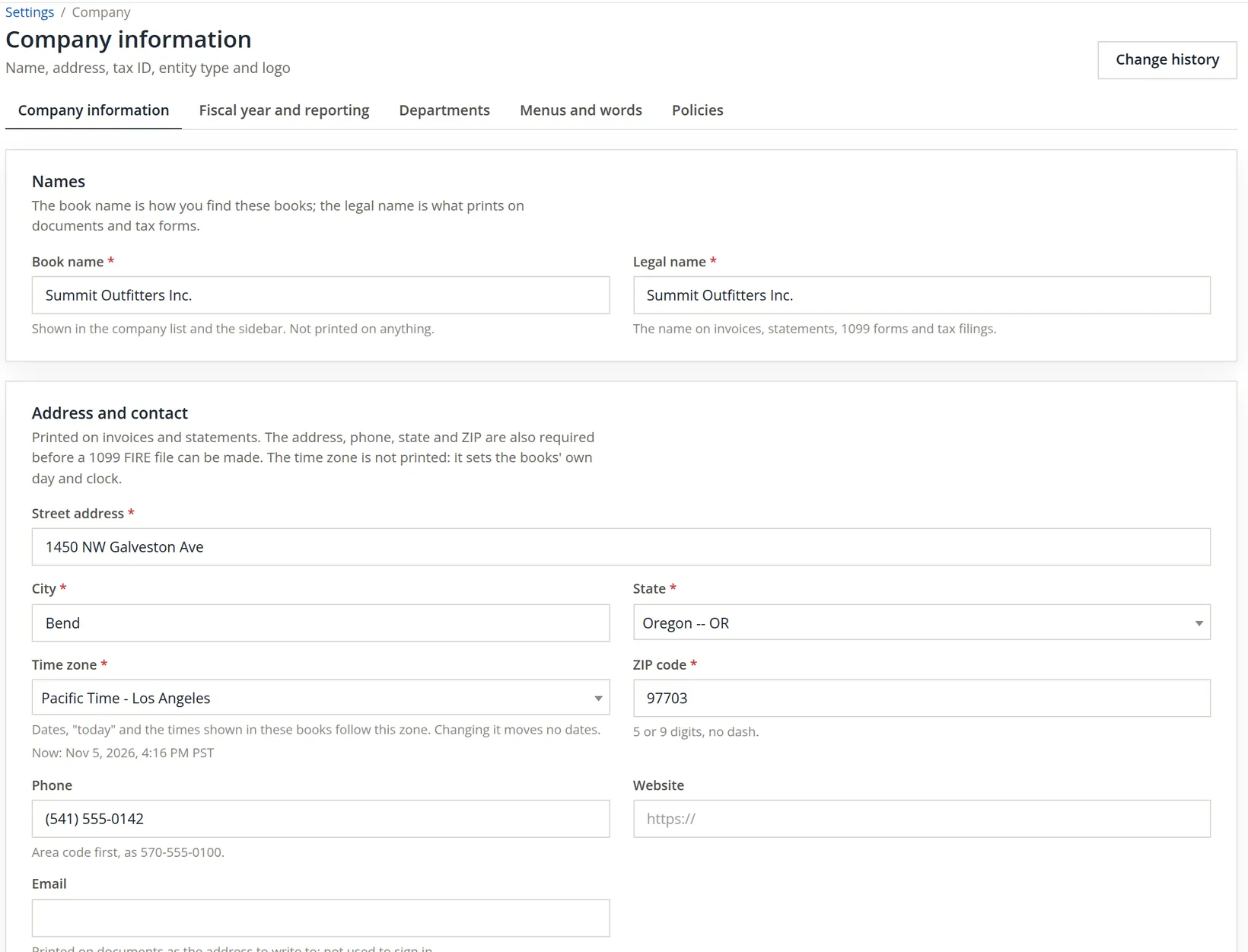
Settings → Company → Company information. The page is a column of cards, all saved by one Save changes button near the foot. Five tabs along the top lead to the other pages of the Company group: Company information, Fiscal year and reporting, Departments, Menus and words and Policies.
| Card | Fields | Where it shows |
|---|---|---|
| Names | Book name, legal name | Book name: company list and sidebar only. Legal name: invoices, statements, 1099s, tax filings |
| Address and contact | Street, city, state, time zone, ZIP, phone, website, e-mail | Printed on invoices and statements; address, phone, state and ZIP are needed for a 1099 FIRE file. The time zone is never printed |
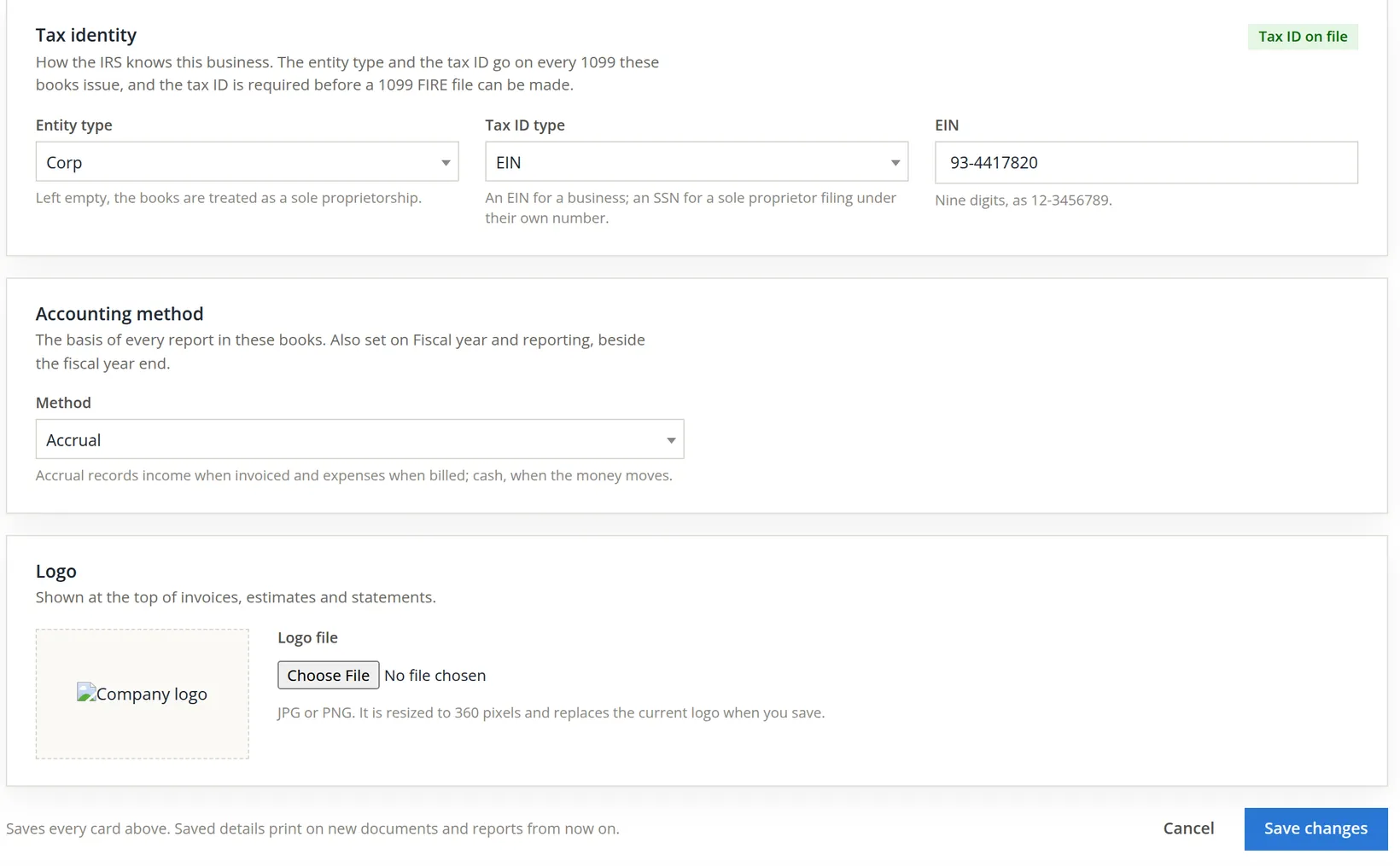
| Tax identity | Entity type, tax ID type (EIN or SSN), the number | Every 1099 the books issue; the Tax Report's choice of return |
| Accounting method | Accrual or cash | The basis of every report (also on Fiscal year and reporting) |
| Logo | A JPG or PNG | The top of invoices, estimates and statements |
Below the main form are three cards with their own buttons: Return facts (the activity code and method the Tax Report prints, Chapter 6.8), State numbers for Forms 1099 (Chapter 6.9), and Delete these books (below). Each acts on its own; the main Save changes does not touch them.
Delete these books
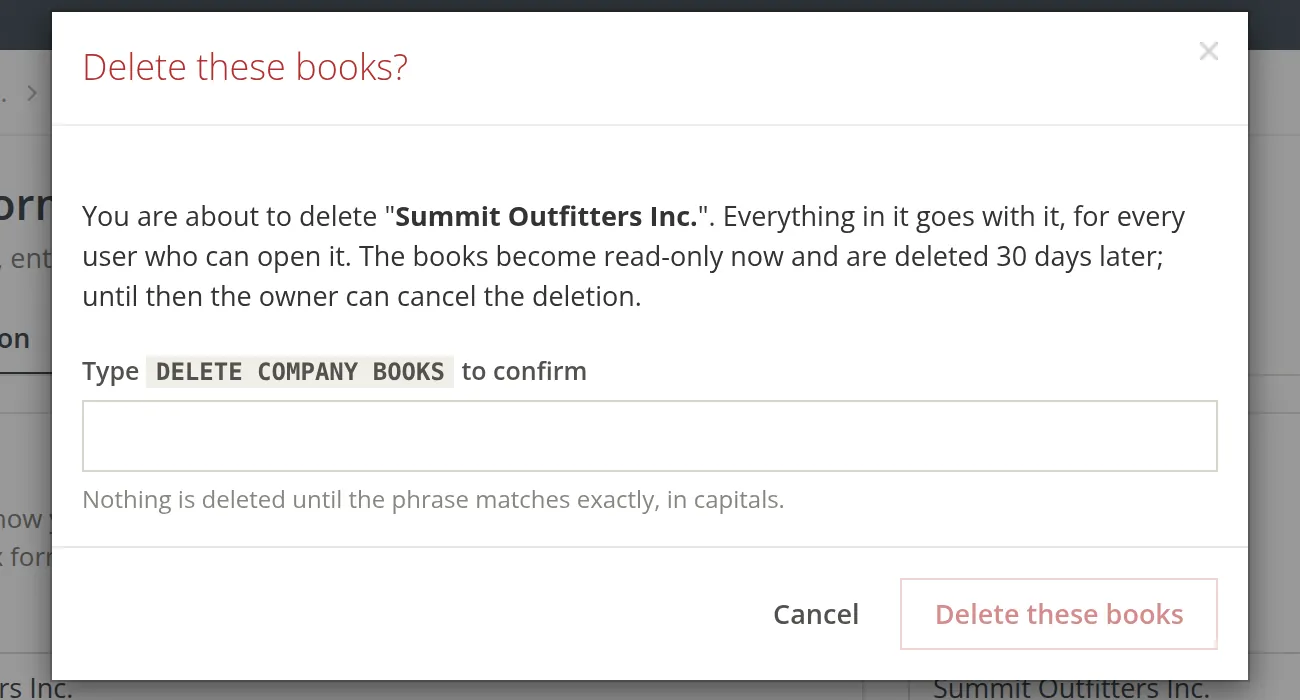
The last card on the page removes the whole set of books, for everyone who can open it: every transaction, contact, product, report and document. Only the owner of the books can use it. A member whose permissions include deleting books still sees the button, but the request is refused: only the owner can schedule a deletion. Pressing Delete these books opens a dialog that asks you to type the phrase DELETE COMPANY BOOKS, in capitals; the red button in the dialog stays greyed out until the phrase matches.
The deletion does not happen at once. From the moment you confirm, the books become read-only and are deleted 30 days later.3 Every page of the books shows a red banner, These books are scheduled for deletion on <date>. They are read-only until then. The owner sees a Cancel deletion button in it. Cancelling makes the books changeable again (The deletion is cancelled. The books can be changed again.). The books cannot be scheduled for deletion while they still keep copies of Forms 1099 or hold contract cost records; the page then says why.
Thirty days is a safety net, not a backup. Make a full backup under Tools → Backup & Restore (Chapter 14.3) before you schedule a deletion, and tell everyone who works in the books: from that moment they can read but not enter anything.
Add the website and office e-mail
Summit has launched a website and set up a shared office mailbox, and wants both on every invoice. The ZIP code is also being brought up to the full nine-digit ZIP+4 the post office gave the store, 97703-4416.
- 1
Open the page and type the new details
Open Settings → Company information. In Website type https://summit-outfitters.example; in Email type office@summit-outfitters.example. In ZIP code type 97703-4416.
- 2
Do not leave a required box empty
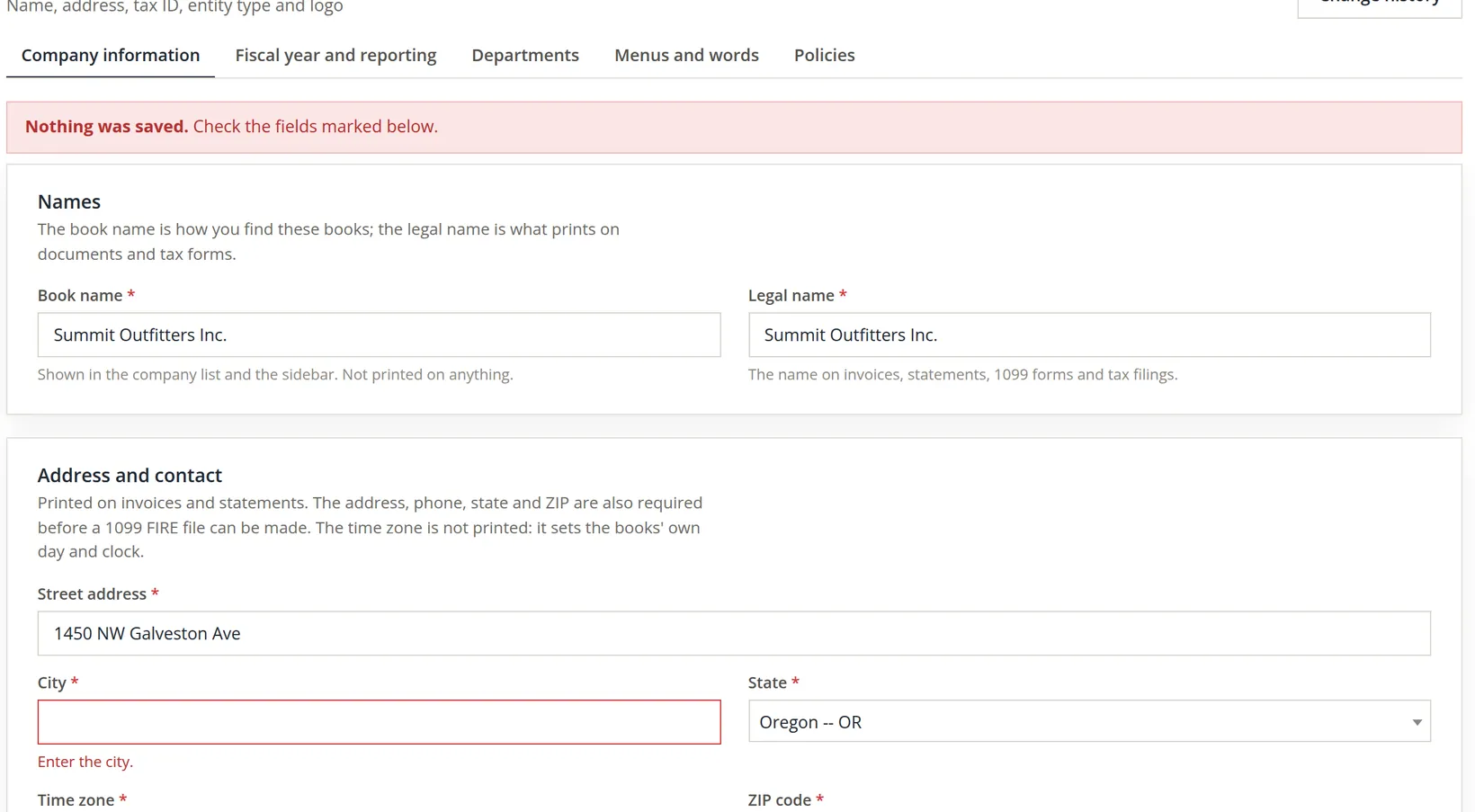
While retyping the address, the bookkeeper cleared the City box by accident and pressed Save changes. The page refuses the whole save: nothing on any card is stored until every box marked with a red star is filled.
- 3
Fix the field and save again
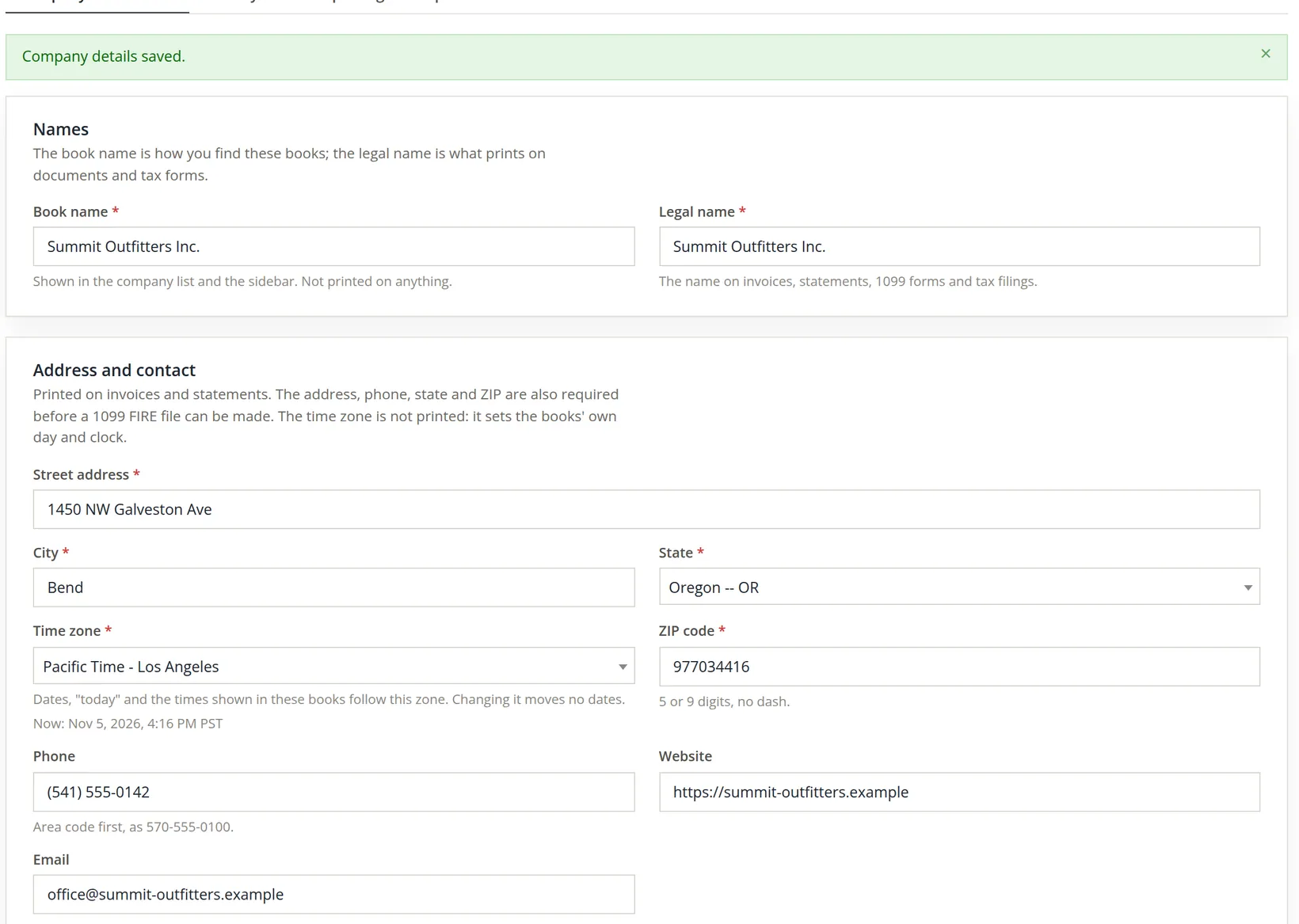
Type Bend back in City, check the other boxes are still as you typed them, and press Save changes. A green banner confirms the save.
- 4
Read back what was stored
Look at the ZIP code. The box takes digits only, so the dash you typed is dropped and the ZIP is stored as 977034416, nine digits. That is the form the help line under the box asks for (5 or 9 digits, no dash), and it is what a 1099 FIRE file needs.
- 5
Check the change history
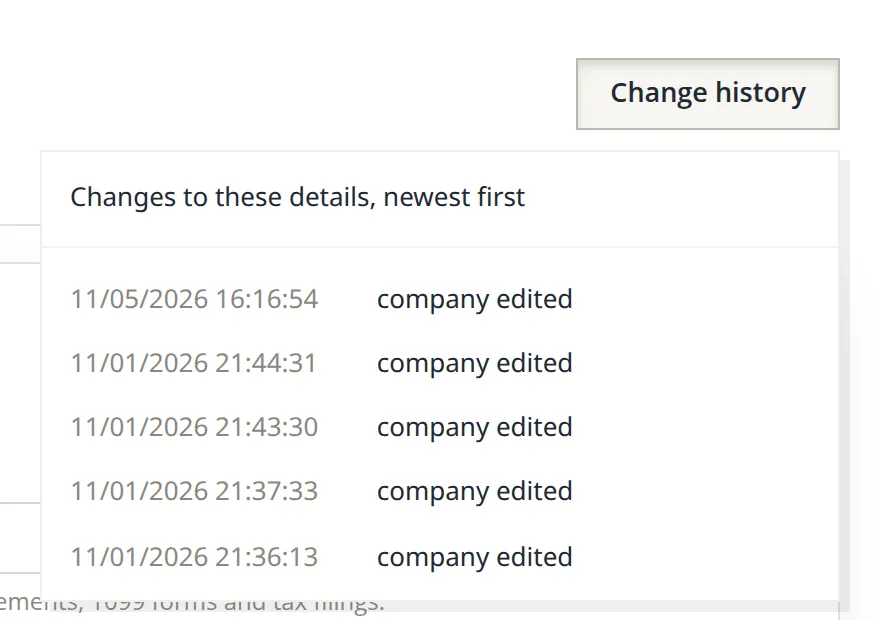
Press Change history at the top right. Each save is listed with its date and time, newest first. The list tells you when the details changed, not which field: keep a short note in your month-end file of what you changed and why.
The note at the foot of the form says it plainly: saved details print on new documents and reports from now on. An invoice already sent keeps the address it was sent with. If a customer needs a corrected copy, reprint it after the change (Chapter 2.8).
Fiscal year and reporting
A fiscal year is the twelve-month period the business measures its results over. Most small businesses use the calendar year, ending December 31. Seasonal businesses often end the year at their quietest month, so that the year-end stock count and the closing work fall when the shop is slow. Many retailers end their year on January 31, after the holiday returns are in.
Settings → Fiscal year and reporting holds three choices and one switch:
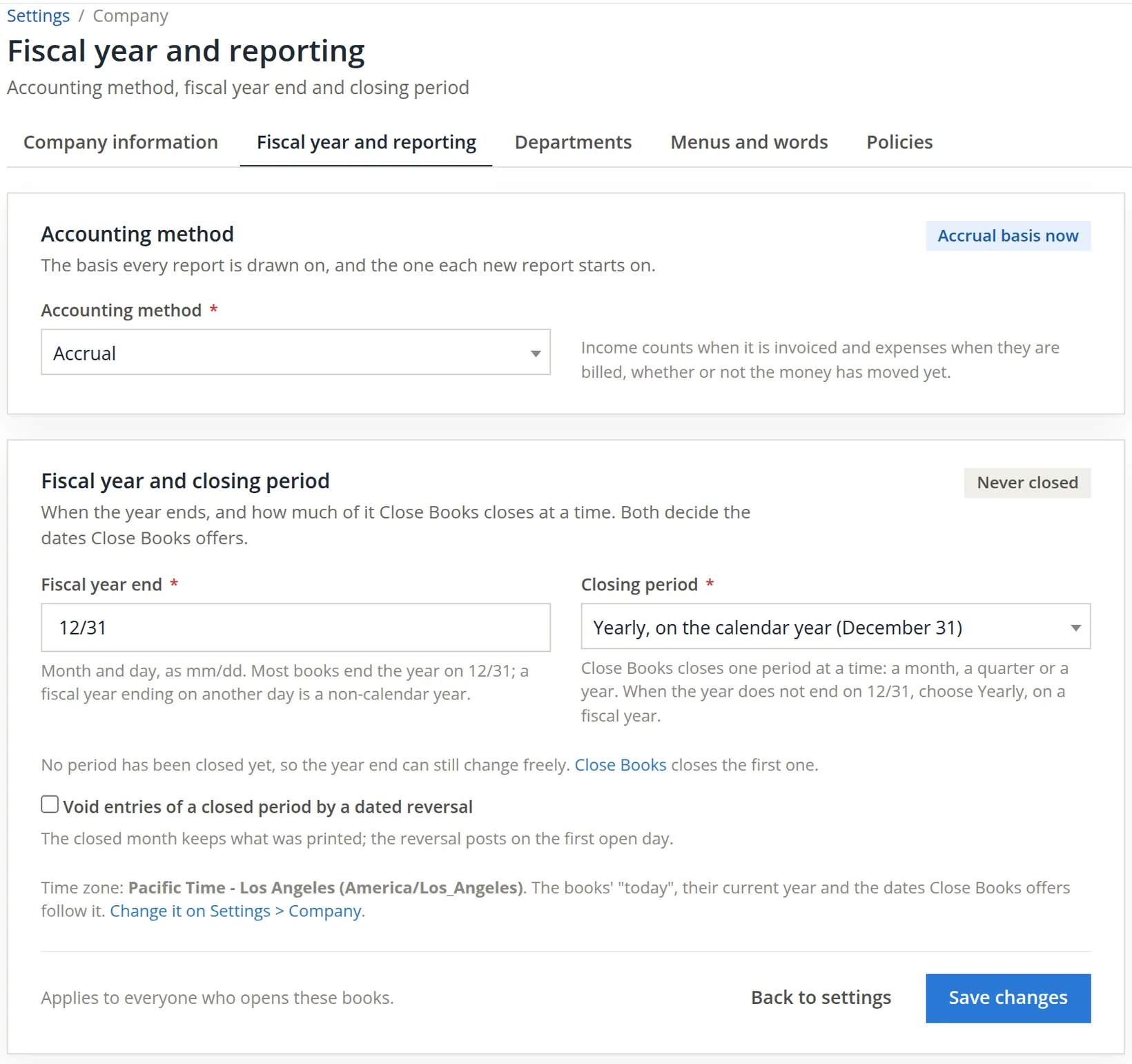
- Accounting method. Accrual counts income when invoiced and expenses when billed; cash counts them when the money moves. This is the method each new report starts on. It is the same setting as on Company information.
- Fiscal year end, as month and day, mm/dd.
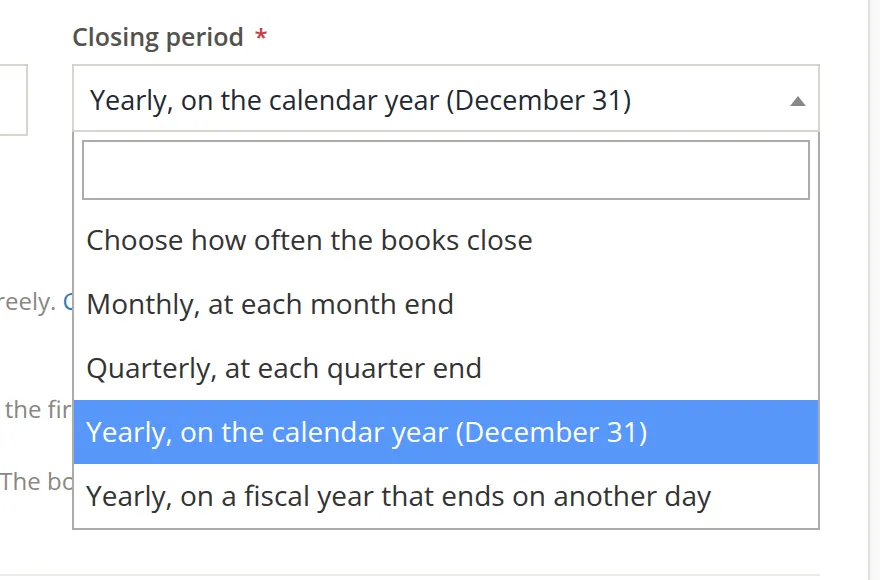
- Closing period: how much of the year Close Books closes at a time: a month, a quarter or a year. If the year does not end on 12/31, choose Yearly, on a fiscal year that ends on another day.
- Void entries of a closed period by a dated reversal, a tick box, off unless you tick it. When it is on, voiding an entry dated in a closed period leaves the closed month as it was printed and posts a reversal on the first open day instead. Saving with it ticked adds a line to the green banner: An entry of a closed period is voided by a dated reversal on the first open day. Close Books (Chapter 15.5) explains closed periods.
Try a February year end
Summit's owner asked whether the year could end with February, after ski season. The bookkeeper opened the page to see what the books would accept before taking the question to the accountant.
- 1
Type the year end
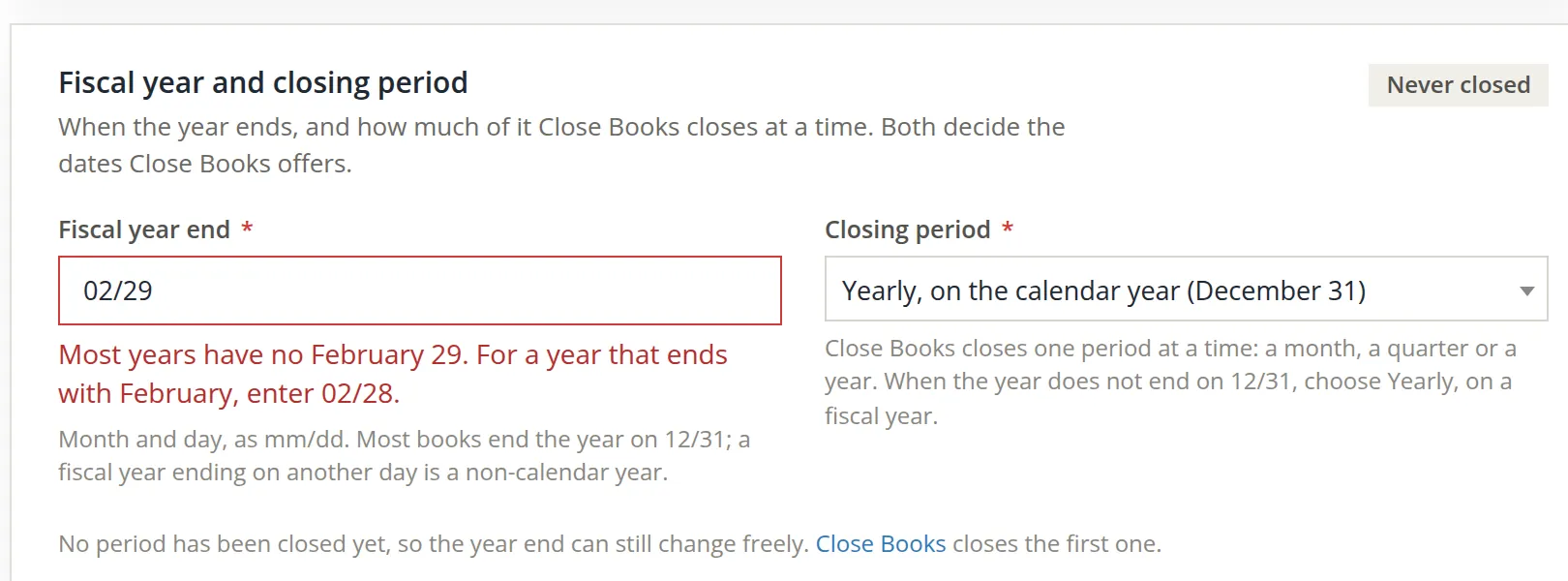
In Fiscal year end the bookkeeper typed 02/29, the last day of February in 2028, and pressed Save changes.
- 2
Read the refusal
The page refused it and saved nothing. The year end comes round every year, and most years have no February 29: a 02/29 year end would fall on March 1 in three years out of four. For a year that ends with February the page asks for 02/28.
- 3
Leave the page, or save a real decision
Summit's accountant advised keeping the calendar year for now, because the corporation's tax year is the calendar year.5 The bookkeeper left the page with Back to settings, so 12/31 and Yearly, on the calendar year stayed as they were. Had the decision been to change, the steps are: type 02/28, choose Yearly, on a fiscal year that ends on another day, and save.
While the tag reads Never closed, the year end can change freely. If a close was re-opened, the tag says Not closed (re-opened) and the page adds that no period is closed now, so the year end can change freely again until Close Books closes it once more. Once Close Books has closed a period (Chapter 15.5), the dates already closed are fixed, and a new year end has to fit around them. Decide the fiscal year when you set the books up, and treat it as permanent.
Departments
A department is a cost center: a part of the business whose costs you want to see on their own. People and their pay rates are assigned to one, hours are clocked against one, and payroll reports can be run by one. An entry keeps the department it was recorded with, so moving a person to another department later does not rewrite last month.
Summit has two sides that cost money in different ways: the retail store, and the rentals and guiding business. Its owner wants staff costs split between them.
- 1
Add the first department
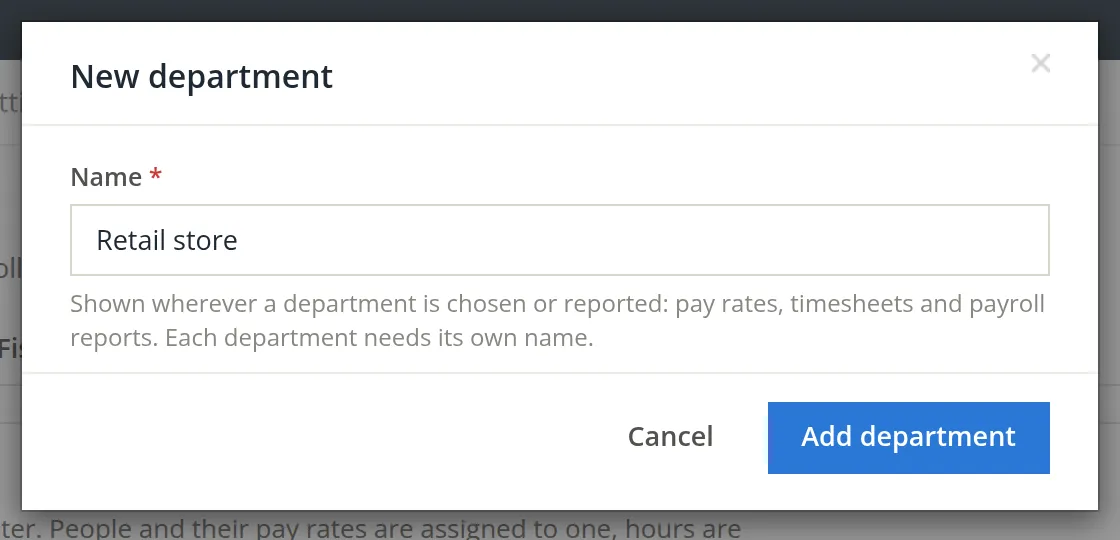
Open Settings → Departments and press New department (or Add the first department on an empty list). Type Retail store and press Add department. A banner confirms "Retail store" was added.
- 2
Add the second, and watch for duplicates
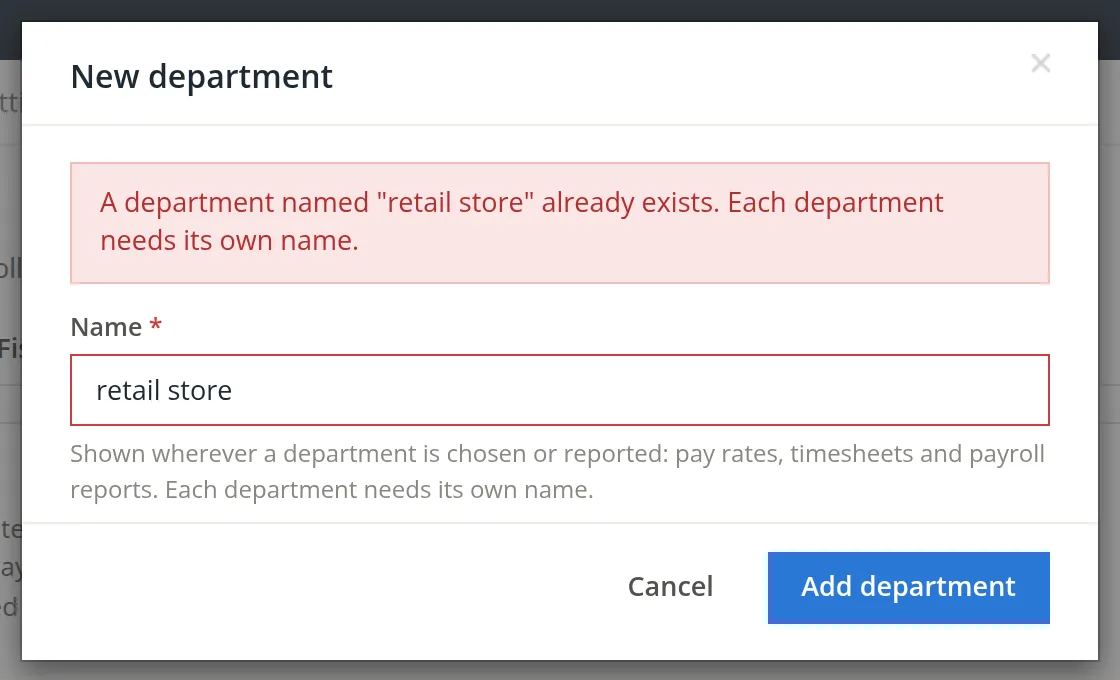
Add Rentals and guiding the same way. A colleague then tried to add retail store in lower case, not seeing that it was already there. The dialog refused it: names are compared without regard to capitals, and each department needs its own name, so reports never show two lines for the same cost center.
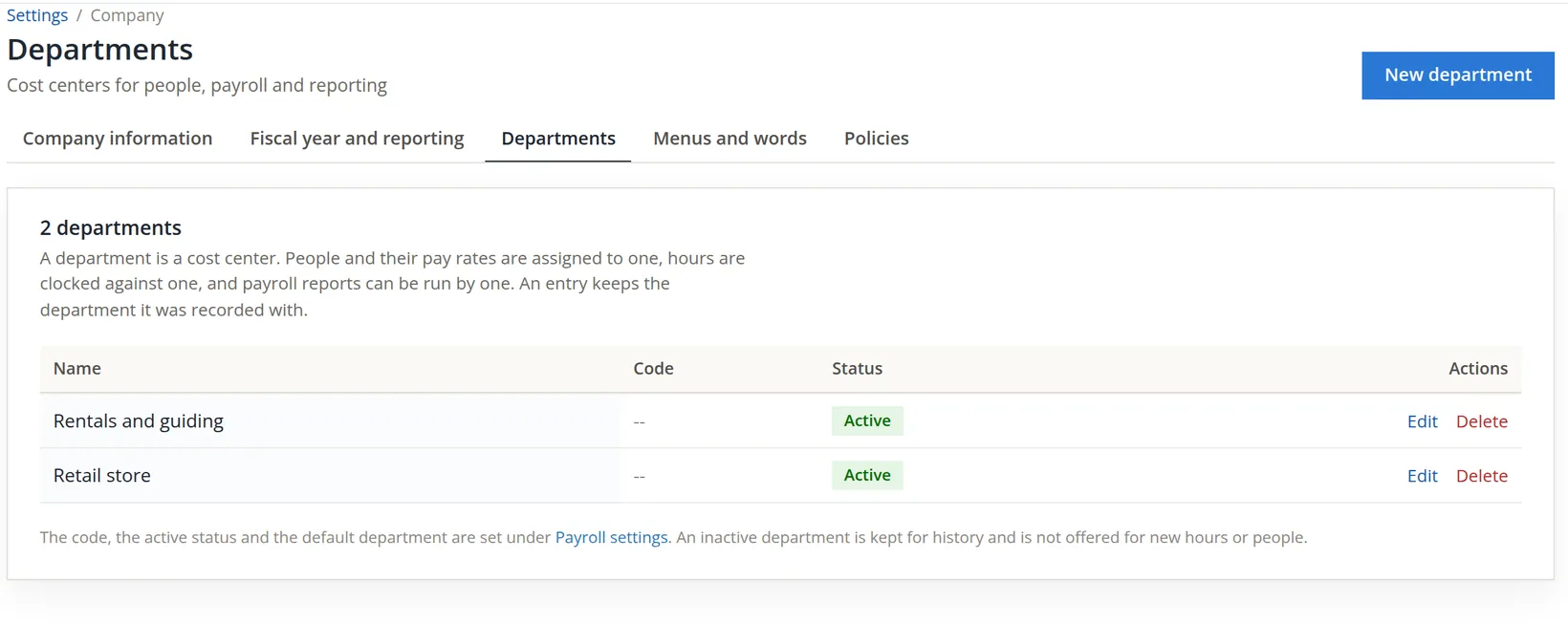
When a department closes, make it inactive in Payroll settings (Chapter 11.1) instead of deleting it. An inactive department is kept for history and is simply not offered for new hours or people, so old reports still add up.
Company settings in order
- [x] The legal name matches the registration; the book name is easy to recognise in the company list.
- [x] Street, city, state, ZIP and phone are filled in, so 1099 FIRE files can be made.
- [x] Entity type and EIN are right, and the overview shows EIN on file.
- [x] The time zone is where the business keeps its books.
- [x] The fiscal year end and closing period are agreed with the accountant before the first close.
- [x] Departments exist for each cost center you want to report on, each with its own name.
- [x] A note of what changed, and why, is in your month-end file.
- [x] Before anyone schedules a deletion, a full backup exists and everyone who uses the books has been told.
Check your understanding
1. You rename the book name to "Summit (main store)". What do customers see on their next invoice?
Answer
No change. The book name is only shown in the company list and the sidebar; the legal name is what prints.
2. A save on Company information shows "Nothing was saved." Was the logo you chose stored?
Answer
No. The form saves every card together or nothing; fix the marked field and save again.
3. Why does the page refuse 02/29 as a fiscal year end, and what should you type instead?
Answer
The year end recurs every year and most years have no February 29, so it would drift to March 1. Type 02/28.
4. Summit's year ends January 31. Which closing period fits a yearly close?
Answer
Yearly, on a fiscal year that ends on another day.
5. You move an employee from Retail store to Rentals and guiding. What happens to the hours they clocked last month?
Answer
Nothing: each entry keeps the department it was recorded with.
6. The owner pressed Delete these books and confirmed by mistake. Is the data gone?
Answer
No. The books are read-only and are deleted 30 days later. Until then the owner presses Cancel deletion in the red banner and the books can be changed again.
Notes
- For this chapter the website, e-mail and ZIP+4 were saved in the practice books for the pictures and then set back to the store's earlier details (in November 2026 as well, for the revised pictures). The two departments were kept. The deletion dialog was opened and closed without typing the phrase; nothing was deleted. ↑
- On the practice books the logo preview shows only its label, Company logo, because no logo file was uploaded. Choose a JPG or PNG and save; the page resizes it to 360 pixels. ↑
- Since November 2026 deletion waits 30 days. Before then the card warned that deleting could not be undone, and the books went at once. ↑
- The entity type and tax ID decide which return the Tax Report follows and what prints on 1099s. Which entity type and number are right for your business is a question for your accountant or attorney. This manual is not tax or legal advice. ↑
- A corporation generally adopts its tax year on its first return, and changing it later usually needs IRS approval. The books' fiscal year need not match the tax year, but keeping them the same saves a reconciliation every year. Ask your accountant. ↑