
Chapter 10.1
Fixed Assets and Depreciation
How to record something the business bought to use for years, let BizBooks360 work out its depreciation schedule, post each period's depreciation in one run, and prove that the asset register agrees with the general ledger.
When you finish this chapter you will be able to:
- Explain cost, salvage value, useful life, depreciation and net book value, and why a contra account is used.
- Add a fixed asset bought with company money, and read its depreciation schedule before saving.
- Run depreciation for a period and read the journal entry it posts.
- Use an asset's own page to see what has been recorded against what the schedule expects.
- Tie the asset register to the ledger, and explain any difference.
Why a van is not an expense
A tank of fuel is used up this month, so it is an expense this month. A van will be used for years. Charging its whole price to July would make July look like a disaster and the next five years look better than they are. Accounting instead puts the van on the balance sheet as an asset at its cost, and spreads that cost over the years it is used. Each period's share is depreciation, an expense like any other.
Four numbers decide the schedule:
| Term | Meaning | Summit's van |
|---|---|---|
| Cost | Price plus tax, delivery and setup: everything paid to get it working | $38,500.00 |
| Salvage value | What it could sell for at the end of its life | $6,500.00 |
| Useful life | The years it will be used | 5 years |
| Method | How the cost is spread across those years | Straight line |
Straight line spreads the depreciable amount evenly: (cost − salvage) ÷ life = (38,500 − 6,500) ÷ 5 = 32,000 ÷ 5 = $6,400 a year, or $533.33 a month. After five years, $32,000 has been charged and the van is carried at $6,500, its salvage value.
Where does the depreciation go? Not straight off the van account. BizBooks360 offers a separate accumulated depreciation account, a contra-asset: an asset account with a credit balance that sits under the asset it reduces. The van stays at its $38,500 cost; accumulated depreciation grows; and the balance sheet shows both and the difference, the net book value. A reader can then see how old the company's equipment is, which a single net figure hides.
The Fixed assets page
Open Fixed assets in the left menu. Before the van, Summit's register was empty.
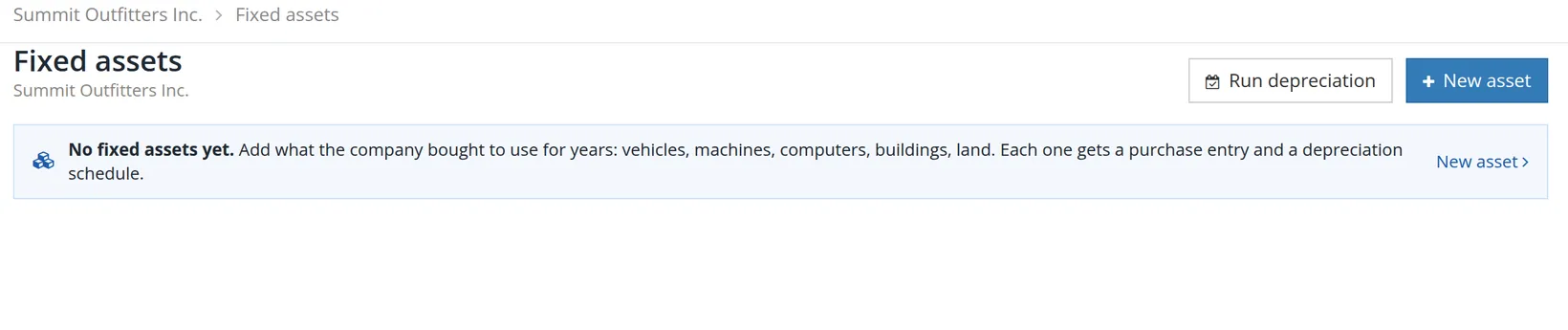
Summit's ledger already held fixed-asset accounts with balances, posted by journal entries before anyone used this page. The register only knows the assets entered here. Procedure C shows how that difference surfaces, and what to do about it.
Add the van
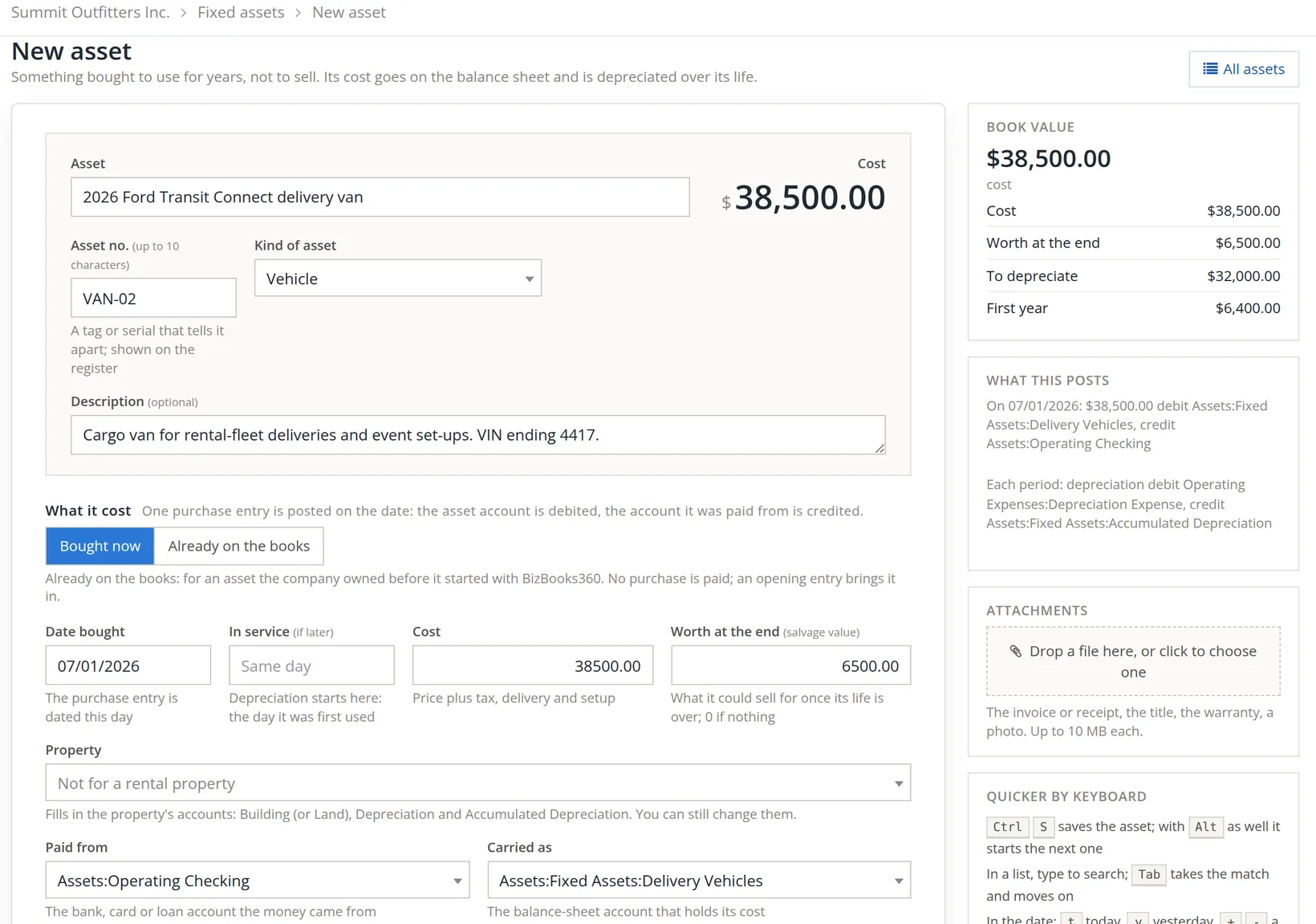
Click New asset. The form has three parts (what it is, what it cost, how it loses value) and a rail on the right that recalculates as you type. In books that keep rental properties, as Summit's now do, a Property list sits under the dates.
- 1
Name it 1, number it 2, choose the kind 3
Use a name a stranger would recognise, with the year and model. The asset number (up to 10 characters) is the tag or serial shown on the register; we used VAN-02. The kind (Vehicle, Computer, Machinery, Commercial Building, Nondepreciable Land and others) fills in the IRS's usual life for that kind further down.
- 2
Choose Bought now 4
Bought now posts a purchase entry: the asset account is debited and the account it was paid from is credited. Already on the books is for an asset the company owned before it started with BizBooks360; it posts an opening entry instead, and asks what was depreciated before then.2
- 3
Give the dates 5, the cost 6 and the salvage value 7
Date bought dates the purchase entry. In service is when depreciation starts; leave it empty when the van was used from the day it was bought.
- 4
Leave Property on Not for a rental property 8, then choose Paid from 9 and Carried as 10
The Property list ties an asset to a rental property (Accounts → Rental properties). Choosing a property fills in its accounts, the Building (or Land), Depreciation and Accumulated Depreciation accounts, and you can still change them. The link is those accounts: open the asset again and the form shows the property it posts to. The van serves the shop, not a rental, so it stays on Not for a rental property.3
Paid from is the bank, card or loan account the money came from: Operating Checking. Carried as is the balance-sheet account that holds the cost. The form starts with a general Assets:Depreciable account; we chose Summit's own Assets:Fixed Assets:Delivery Vehicles. The rail's What this posts 11 spells out both entries before anything is saved.
- 5
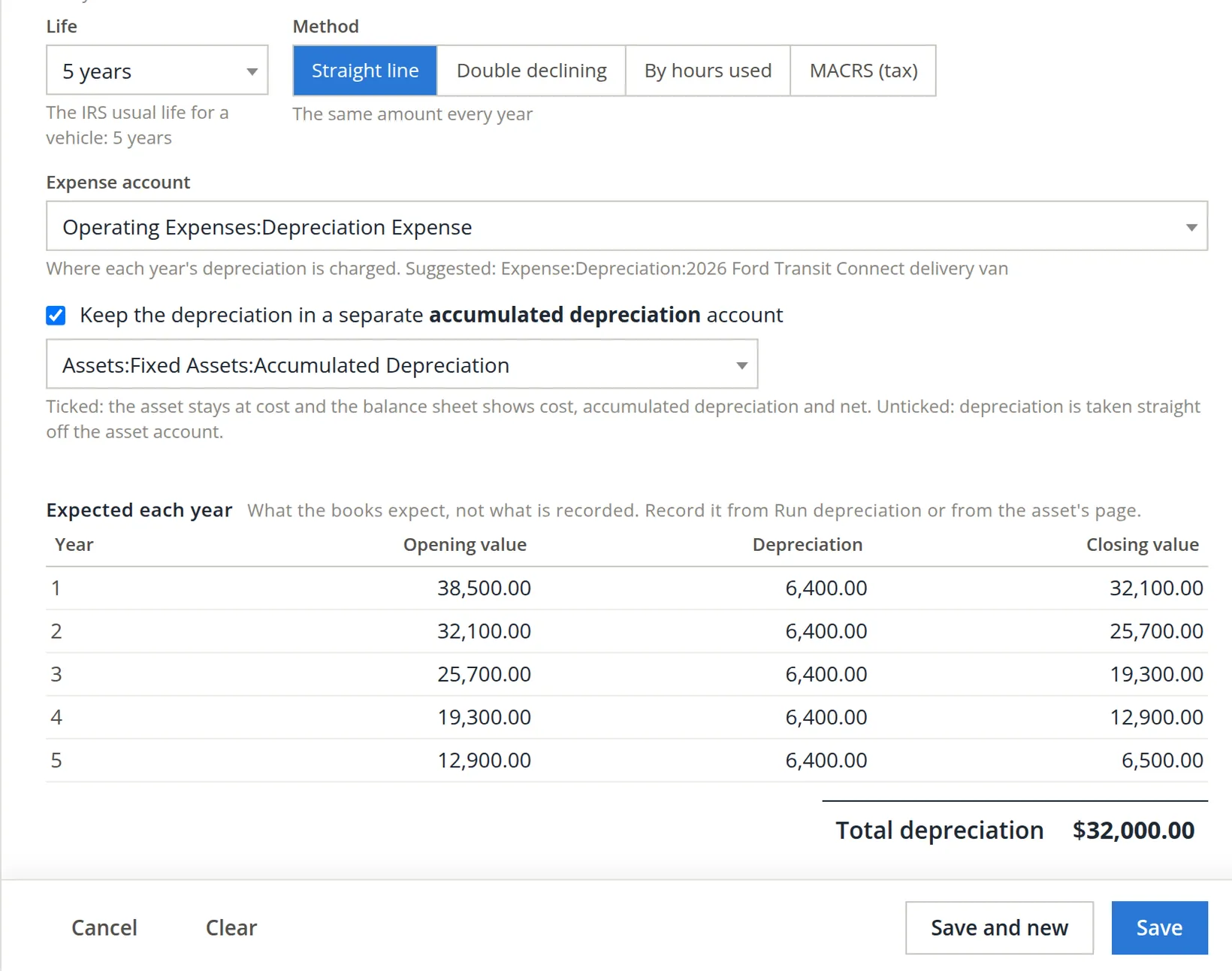
Check the life 1 and the method 2
Choosing Vehicle filled in 5 years, "the IRS usual life for a vehicle". The methods are Straight line (the same amount every year), Double declining (more in the early years), By hours used (by the hours it works each year) and MACRS (tax), which asks for a convention and a rate.4
- 6
Choose the expense account 3 and the accumulated depreciation account 4 5
The form suggests a new account for each asset, such as Expense:Depreciation:2026 Ford Transit Connect delivery van. Summit keeps one Operating Expenses:Depreciation Expense and one Assets:Fixed Assets:Accumulated Depreciation for everything, so we chose those; a small business rarely needs an account per asset. Leave Keep the depreciation in a separate accumulated depreciation account ticked.
- 7
Read the schedule 6, then Save 7
Expected each year shows five rows of $6,400.00, from $38,500.00 down to $6,500.00, total $32,000.00. If those numbers surprise you, a field above is wrong. Save and new keeps the form open for the next asset.
The slip the form caught
On the first attempt the salvage value went in as 65000, one zero too many. The rail showed it at once (To depreciate $0.00), and Save refused.
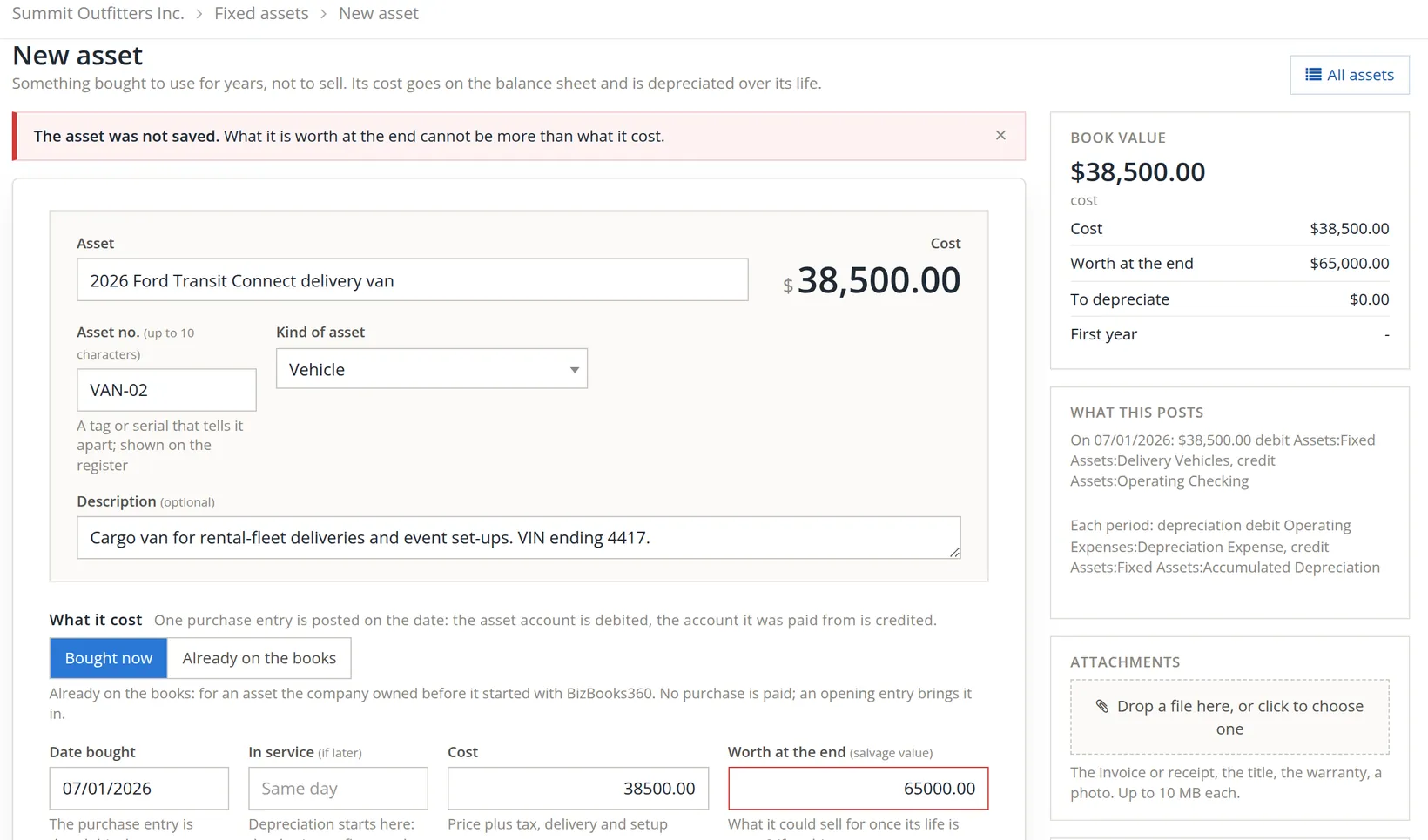
Correcting it to 6500 brought the rail to To depreciate $32,000.00, First year $6,400.00, and the asset saved. The form makes the other checks you would expect: a name, an asset number of up to 10 characters, a kind, dates as month/day/year, an in-service date not before the purchase, a cost, a life and a method, and both accounts.
The Book value card turns every slip into a number you can sanity-check. A van whose first year of depreciation is $64,000 or $640 has a wrong cost, salvage or life.
The register after saving
Saving returns to the register. The van posted its purchase entry, dated 07/01/2026: debit Delivery Vehicles $38,500.00, credit Operating Checking $38,500.00.
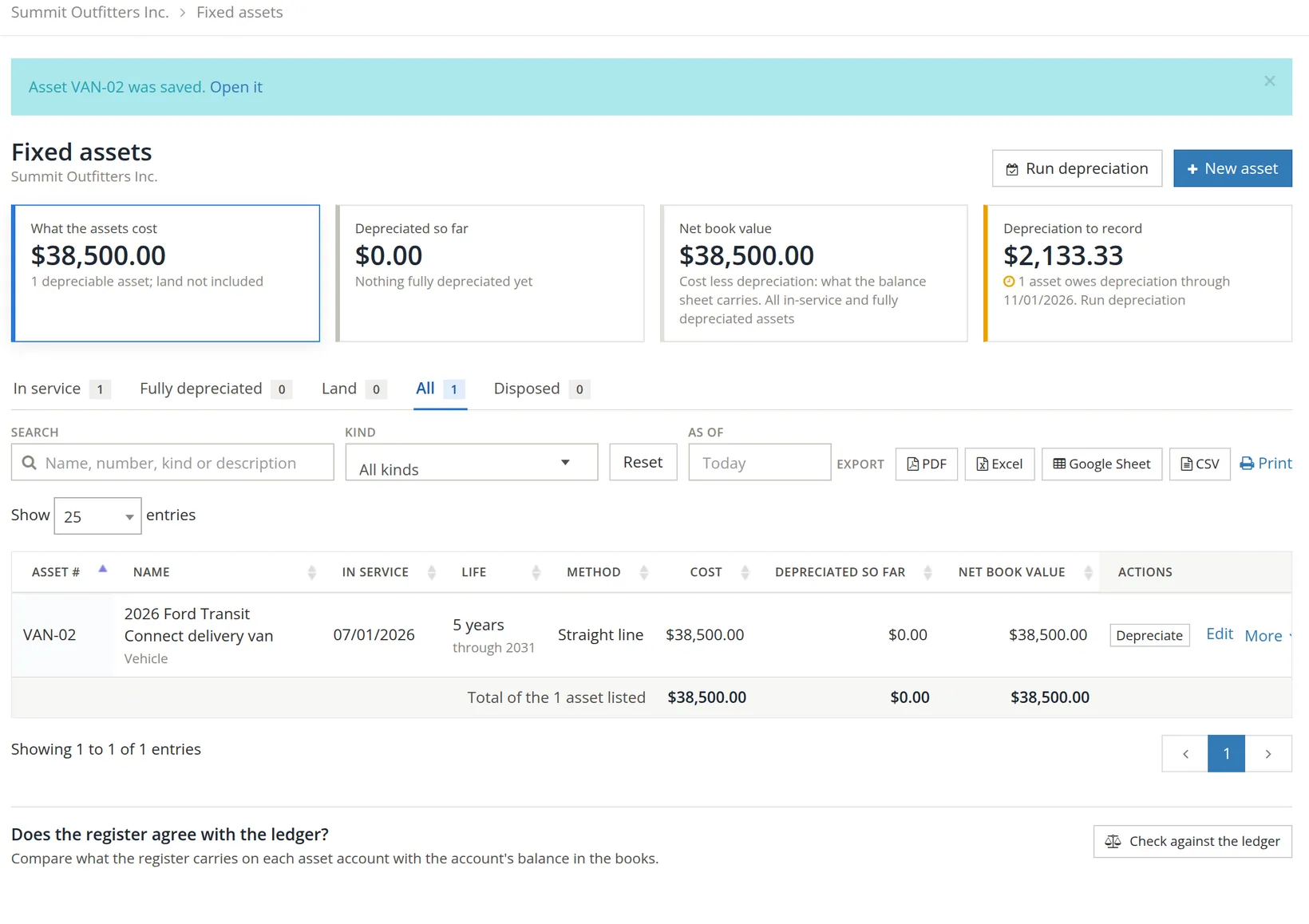
Why $2,133.33? BizBooks360 earns depreciation by whole months. The in-service month counts in full, and a month is earned once its last day has passed.5 From July 1 to November 1, four months are complete (July, August, September, October): $6,400 × 4 ÷ 12 = $2,133.33.
The register also exports to PDF, Excel, Google Sheet and CSV, and prints. The As of date produces the register as it stood on an earlier day, for example at year-end for the accountant.
Run depreciation for the month
A run records depreciation for every asset at once, one entry per asset, for what is owed through a date. Do it once a month, after the month's last day.
- 1
Click Run depreciation and set Record through
We chose 10/31/2026, the end of October. The entries are dated this day.
- 2
Check each row
Each asset shows its cost, what is depreciated so far, and what the schedule expects through the date less what is already recorded. The Record box is filled with that amount. Change it if you must, or clear it to leave the asset out of this run.
- 3
Read What this posts, then Record 1 entry
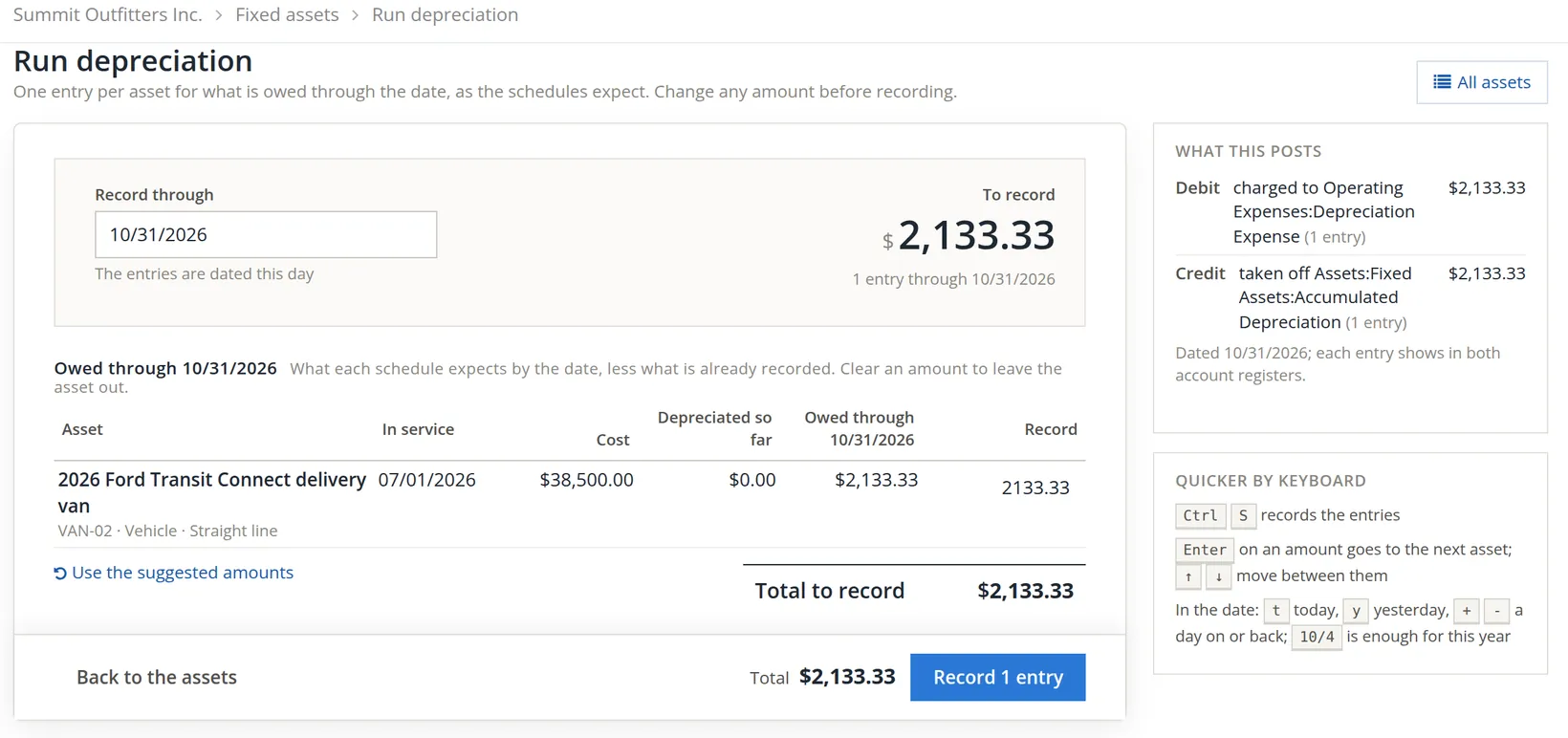
The entry the run posts, in journal form:
| Date | Account | Debit | Credit |
|---|---|---|---|
| 10/31/2026 | Operating Expenses:Depreciation Expense | 2,133.33 | |
| Assets:Fixed Assets:Accumulated Depreciation | 2,133.33 |
The run asks no second question; the register opens with the totals updated.
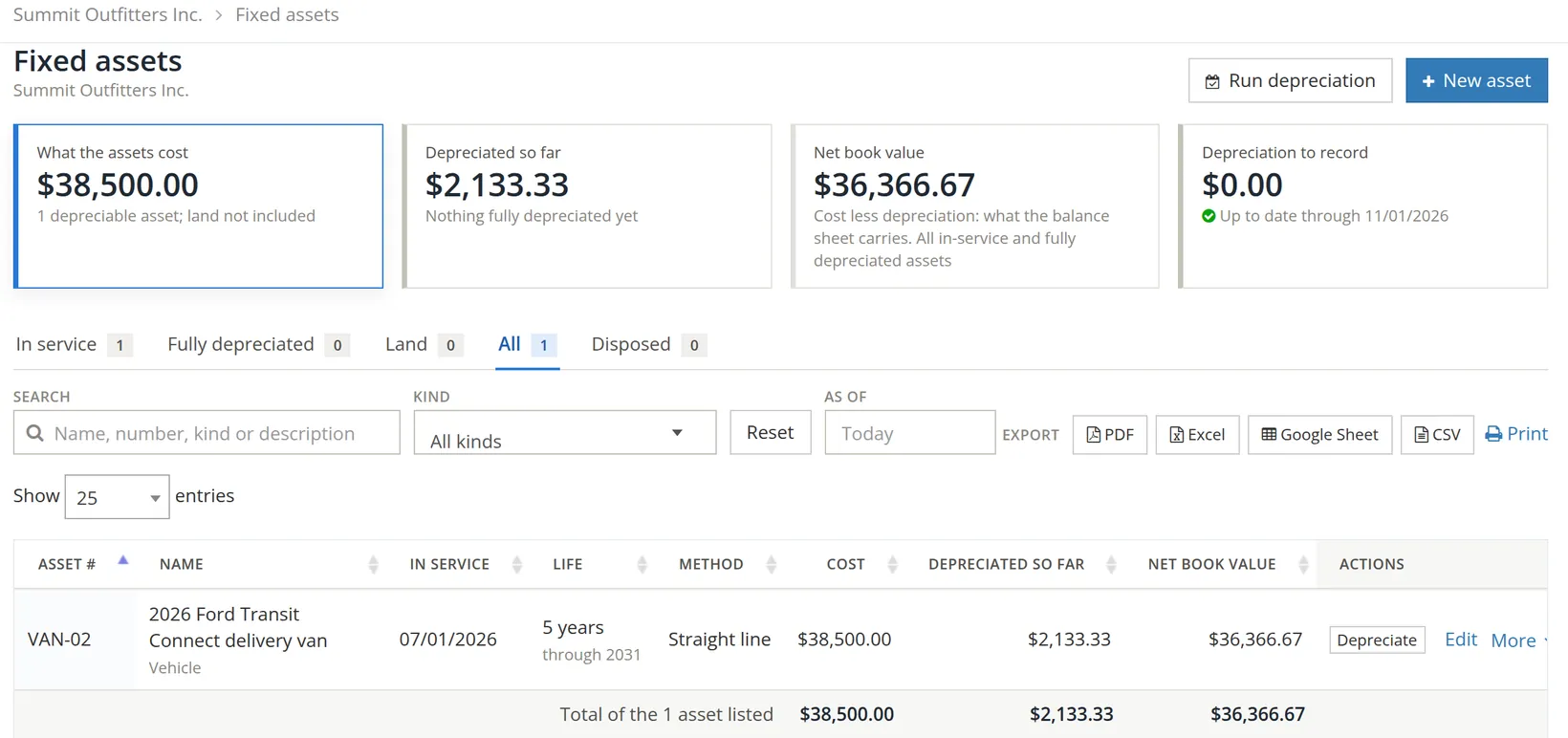
Run depreciation through the last day of the month before you print the month's Profit and Loss (Chapter 6.2). A month without its depreciation overstates profit. A run can be reversed from the Run depreciation page if it was posted in error; closed periods cannot be changed (Chapter 15.5).
One asset's page
Click Depreciate on the asset's row in the register. Its page compares what the schedule expects with what has been recorded.
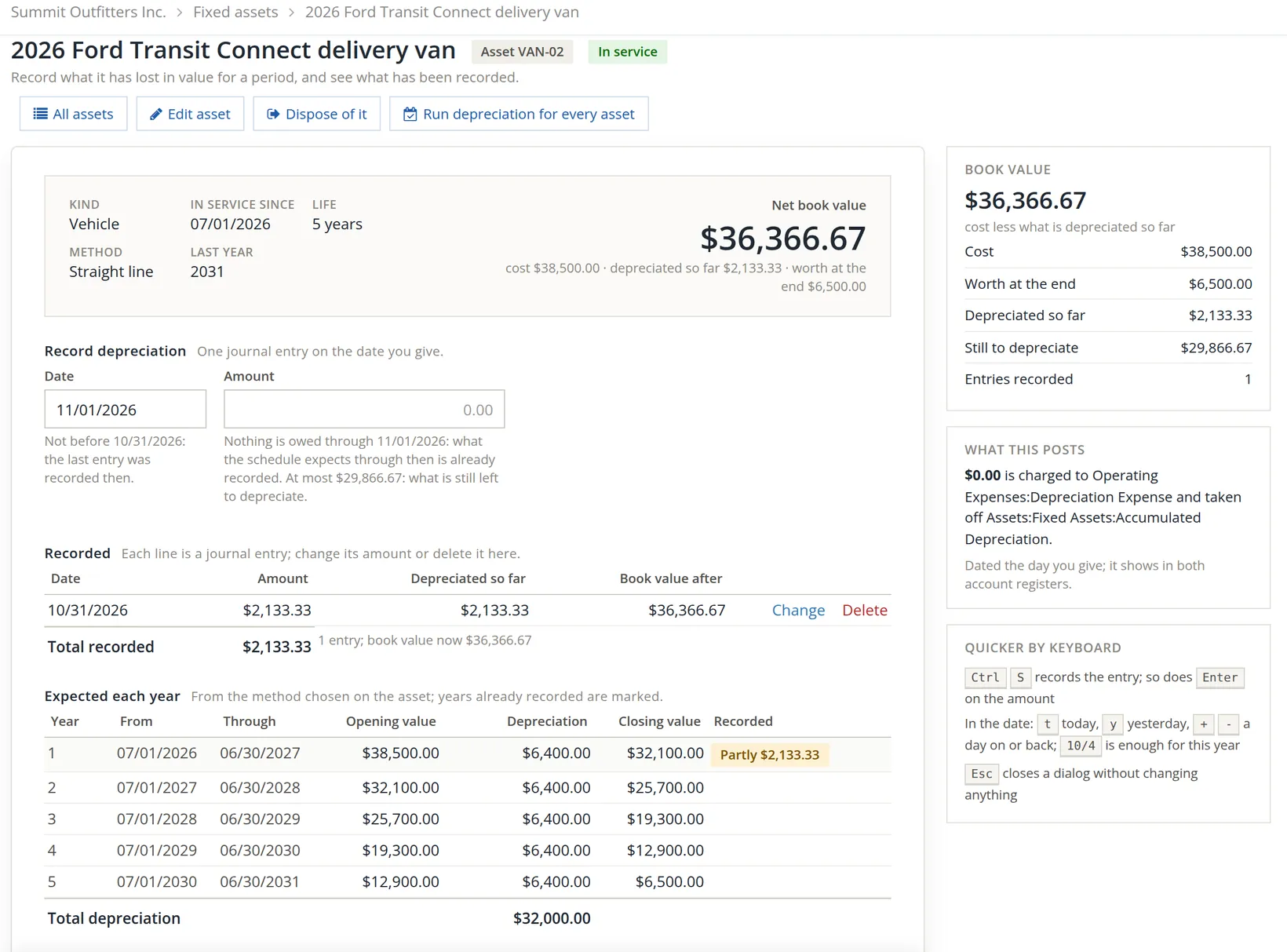
Note that the schedule's years run from the in-service date (July 1 to June 30), not the calendar year. Year 1 will be complete when June 2027's depreciation is recorded: 12 × $533.33 ≈ $6,400.00.
| Book value card | Amount |
|---|---|
| Cost | $38,500.00 |
| Worth at the end | $6,500.00 |
| Depreciated so far | $2,133.33 |
| Still to depreciate | $29,866.67 (38,500.00 − 6,500.00 − 2,133.33) |
| Net book value | $36,366.67 |
When the van is sold or scrapped, Dispose of it records the disposal with its date and proceeds, catches up any depreciation still owed, and posts the gain or loss.
The entry in the ledger
Every entry the asset pages post is an ordinary journal entry, visible in both account registers (Chapter 4.2). Open Accounts → Chart of Accounts and the Accumulated Depreciation account.
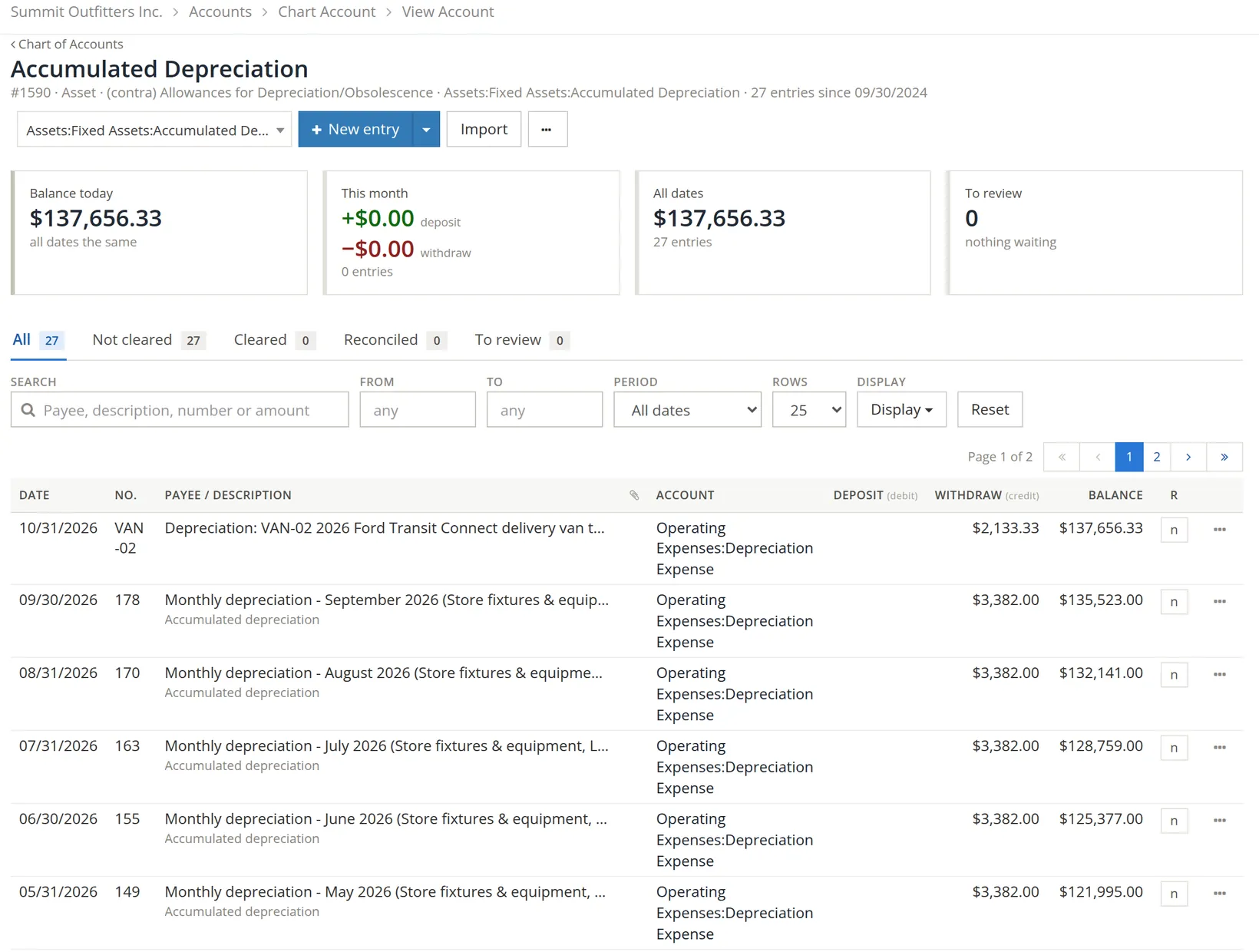
Those older lines matter. They were posted by hand, as journal entries, for assets that were never entered on the Fixed assets page. The next section shows how the register notices.
Tie the register to the ledger
An asset register is only useful if it agrees with the books. At the foot of the register, Does the register agree with the ledger? compares, account by account, what the register carries with the account's balance.
- 1
Click Check against the ledger
- 2
Read each difference
Zero everywhere means the register and the ledger agree. A difference means the account holds entries the assets did not post, or an asset's entry was changed outside these pages.

Both differences have the same cause: assets the company owned before this page was used. Delivery Vehicles holds $77,000.00, so another vehicle costing $38,500.00 is in the ledger but not the register (77,000.00 − 38,500.00 = 38,500.00). Accumulated Depreciation holds $135,523.00 of depreciation from the monthly journal entries, for those older assets: 137,656.33 − 2,133.33 = 135,523.00.
The fix is to bring each older asset onto the register with New asset → Already on the books, giving its cost, the day the books took it over and the depreciation recorded before then, and choosing in Balanced against (the Paid from box takes that name for an asset already on the books) an account that keeps the cost from being counted twice. Then stop the hand-made monthly entries: from that point the run posts them. That clean-up needs the original purchase records and the accountant's depreciation workpapers, so we have left Summit's differences in place here.6
A single journal entry for $135,523.00 would make the totals agree and the register no more useful. The point of the tie-out is that every dollar of cost and accumulated depreciation belongs to a named asset.
For a lender or an auditor. Reports → Fixed Asset Schedule (under Supporting schedules on the All reports page) rolls cost, accumulated depreciation and net book value forward by asset class for any period, with exports to Excel, PDF and Google Sheets. It runs the same test: for Summit it opens with "The register does not agree with the ledger" and marks the schedule Draft until the differences above are cleared.
Month-end for fixed assets
- [x] Every asset bought this month is on the register, with the invoice dropped in Attachments.
- [x] Each new asset's schedule was read before saving; cost, salvage and life make sense.
- [x] Depreciation run through the last day of the month; Depreciation to record shows $0.00.
- [x] Assets sold or scrapped are disposed of, not deleted.
- [x] Check against the ledger shows no difference, or each difference is explained and on the clean-up list.
Check your understanding
1. A machine costs $12,000, will sell for $2,000 after 5 years, and is depreciated straight line. What is one year's depreciation?
Answer
(12,000 − 2,000) ÷ 5 = $2,000 a year.
2. The van went into service on July 1. Through September 15, how many months does BizBooks360 count?
Answer
Two: July and August. September is not earned until September 30 has passed.
3. Why keep accumulated depreciation in a separate account?
Answer
So the asset stays at cost and the balance sheet shows cost, accumulated depreciation and net book value, which tells a reader how worn the assets are.
4. The tie-out shows a difference on Accumulated Depreciation. Name two likely causes.
Answer
Depreciation posted by hand journal entries rather than by the run, and assets in the ledger that were never entered on the register. An asset entry changed outside the asset pages is a third.
5. What does Already on the books do differently from Bought now?
Answer
No purchase is paid: an opening entry brings the asset in, with the depreciation recorded before the books took it over.
Notes
- The van, its price, VIN digits and dates are invented for the sample company. The practice user is a member of Summit Outfitters Inc. and may add assets and record depreciation there. ↑
- The form's own words: "Already on the books: for an asset the company owned before it started with BizBooks360. No purchase is paid; an opening entry brings it in." It also asks for the day the books took it over and what was depreciated before then, and checks that the second is not more than there is to depreciate. ↑
- The Property list is new in November 2026 and appears only in books that keep rental properties. In books set up mainly for rentals it starts on the first property rather than on Not for a rental property, so check it before saving an asset that belongs to no rental. ↑
- The schedule in BizBooks360 is the book schedule. Tax depreciation (MACRS, section 179, bonus depreciation) is often different and is finished on Form 4562 by the preparer; the Tax Report marks that line for preparer input (Chapter 6.8). This is not tax advice. ↑
- This is a full-month convention for straight line and double declining: the month the asset goes into service counts whole, and the schedule's years are anniversary years from that month. MACRS rows follow the fiscal year instead. Amounts are rounded to the cent and never exceed what is left to depreciate. ↑
- If the older assets' depreciation was posted against the same accounts the register uses, an accountant should decide how the opening entries balance so that cost and accumulated depreciation are not counted twice. Record the decision in the asset's description. ↑