
Chapter 13.7
Renewals, rent increases and move-out
Every lease ends one of three ways: it is renewed, its rent changes and it goes on, or the tenant leaves. This chapter follows all three in one afternoon at the Riverside Fourplex: a fixed lease renewed at three percent, an at-will rent raised with the notice the software insists on, and a tenant who broke the lease, returned the keys and got back what was left of the deposit with an itemized statement. Two refusals along the way are explained and fixed.
When you finish this chapter you will be able to:
- Set the books' renewal defaults and approve the two templates this chapter needs.
- Open a renewal, make offers, read the rent-cap and notice checks, send the offer letter and record the tenant's answer.
- Explain what accepting an offer makes: a new lease for a fixed lease, a new rent term for an at-will lease.
- Raise the rent of an at-will lease from the earliest day the notice rule allows.
- Walk the guided move-out: notice, possession, inspection, final charges, withhold, refund, itemization, delivery and close.
- Withhold from a deposit, refund the rest, and know when a deposit is transferred instead.
What follows a lease's end
A lease is a promise with a date on it. Before that date arrives the landlord must decide, and tell the tenant, what happens next. BizBooks360 keeps that decision in a renewal: one record per lease, opened before the lease ends, holding up to three offers, the letter that carried them, the tenant's answer and what the answer made. You find renewals under Property Management → Leasing → Renewals, and on the Renewal card of every lease page.
The kind of lease decides what a renewal can make:
| Lease | How its renewal opens | What an accepted offer makes | In this chapter |
|---|---|---|---|
| Fixed term | On its own, every night, once the lease ends within the lead days (120 unless you set another number); or by hand | A new lease that starts the day after the old one ends; the deposit moves to it on that day | Priya Raman, unit 1 |
| At will (month to month) | Only by hand: it has no end to count back from | A new rent term on the same lease, from the new rent's first day; this is a rent increase | Morgan Diaz, 2B |
| Either, when the tenant leaves | No renewal: the guided move-out, from Move out... in the lease page's More menu | An ended lease, a vacant unit, the deposit withheld and refunded, an itemization statement | Marcus Bell, unit 2 |
A renewal moves through stages that the Renewals page counts as tabs: Not started (opened, nothing sent), Offers out (a letter went out and the offers wait for an answer), Accepted (renewed) and Not renewing (the tenant or the owner said no; tasks for the notice and the move-out follow). A renewal of a lease that ends is closed by the move-out automatically: an ended lease is not renewed.
The two checks on every offer
A rent increase is the one change to a lease the law watches most closely, so every offer carries two checks, worked out from the property's state and printed under the offer:
- Rent cap. The new rent is compared with the rent in force on the lease's last day (for an at-will lease, the day before the new rent starts). If the books hold a reviewed cap for the state, an offer above it is refused; there is no override. With no rule the line reads "Rent cap: no rule for OR" and the offer passes.
- Notice days. The days from the day the letter is sent to the new rent's first day. With a reviewed state rule, a short notice is refused outright. Without one the module uses its own default of 30 days, marked default, unreviewed; a shorter notice can then be sent only with a written reason of ten characters or more, kept with the offer and the new term.
Both checks run when an offer is saved and again when it is sent, from the send day. Summit's books hold no reviewed Oregon rule, so in this chapter the cap line says no rule for OR and the notice line counts against the 30-day default. That is what the software enforces today; it is not a statement of Oregon law.1
A green tick under an offer means only that the offer passes the rules these books hold. When the chip says default, unreviewed, no one has entered your state's real cap or notice period. Check them with counsel before the first letter goes out, and plan your notice from the statute, not from the default.
Set the renewal defaults and approve the templates
Two things must be in place before the first offer: the rules that fill offers in, and approved wording for the letters. Both live in Settings → Property Management.
- 1
Open Settings → Property Management → Leasing and find the Renewal defaults card
Until the first save the card says: "No rules saved yet: renewals open 120 days ahead and "Make default offers" makes no offers until you add them below." A property can override the books' rules on its own Settings tab (tick off Use books defaults).
- 2
Fill in one offer rule and click Save renewal defaults
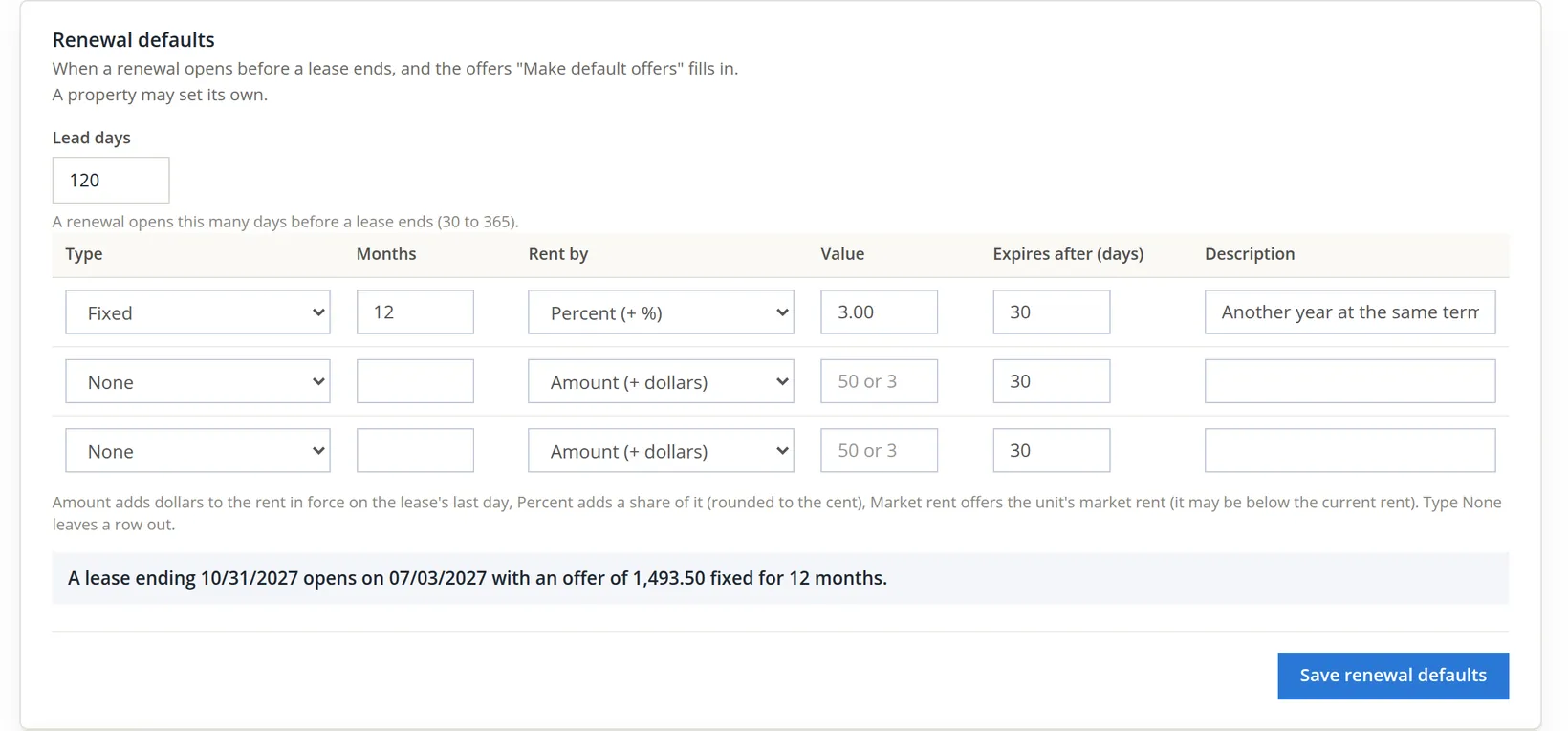
Summit's policy is one year at three percent: Type Fixed, Months 12, Rent by Percent (+ %), Value 3, Expires after 30 days, Description Another year at the same terms. Lead days stay at 120. Amount adds dollars instead, and Market rent offers the unit's market rent, which may be lower than the rent today. The sentence under the table tries the rule on a real lease before you save.
- 3
On Documents and messages → Templates, copy and approve Lease renewal offer and Deposit itemization
A system template cannot be edited and has no approved version, so it renders nothing. Click Copy on the Lease renewal offer row (group Letters; Preview is in the row's More menu): the copy belongs to these books and opens as draft v1. Read the wording, change it if you like, then click Approve v1 and confirm "Approve v1? Documents made from now on render from it." Do the same for Deposit itemization (group Statements). The same renewal letter serves both renewals and at-will rent changes.2
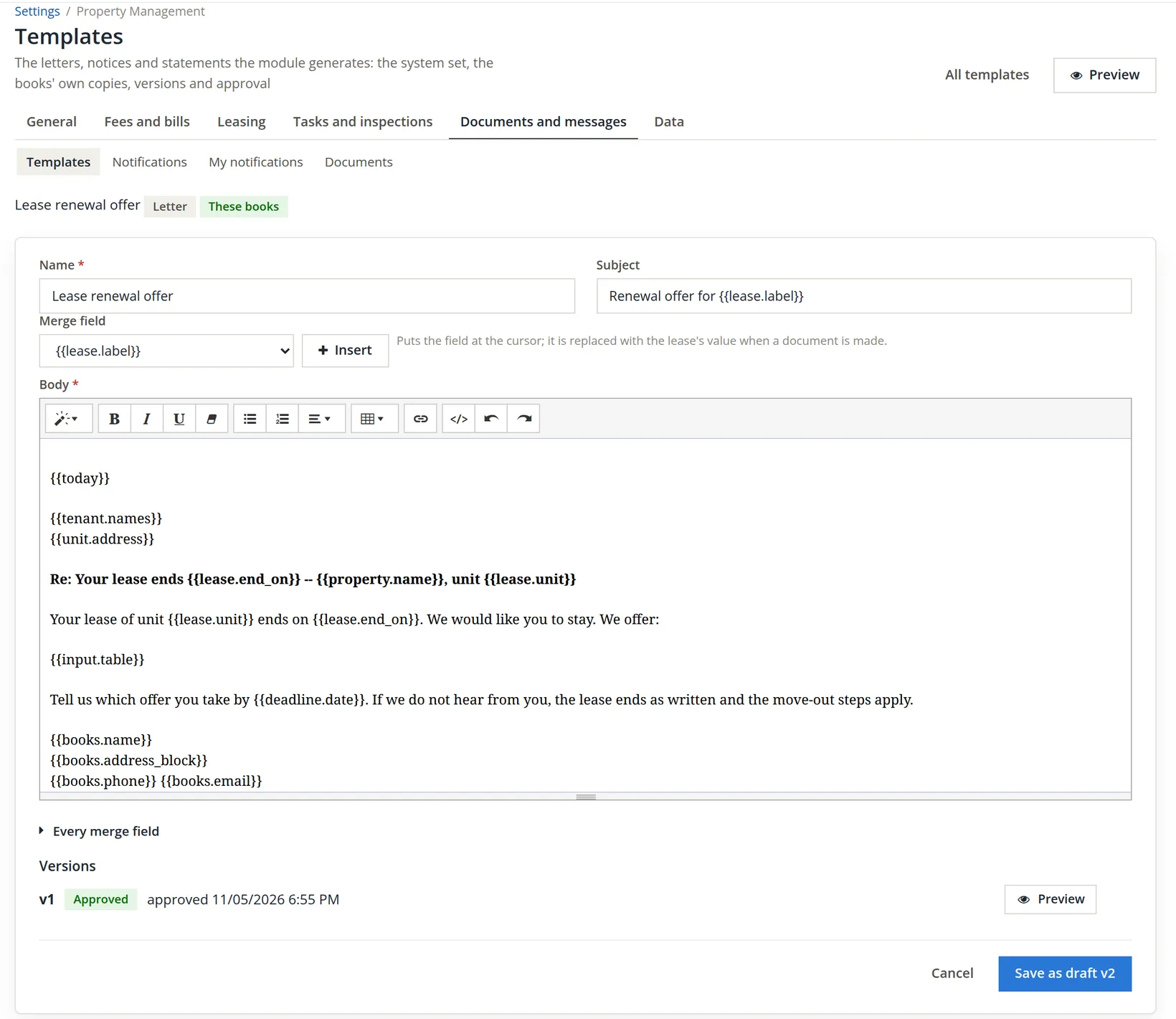
{{input.table}} (the offers) and the answer-by date. 5 the version row, v1 Approved, approved 11/05/2026 6:55 PM; before approval it read v1 Draft with the Approve v1 button. 6 a later wording change is saved as draft v2 and approved in its turn.Approval is a books-wide step, and the person who approves takes responsibility for the wording. Do it once, deliberately, before renewal season, not in the middle of sending a letter.
Renew a fixed lease
Priya Raman's lease ends in 56 days, inside the 120 lead days, so the nightly rules would open the renewal tonight. The office does not wait.
- 1
Open the renewal
On Renewals, click Open a renewal... in the page header, pick Unit 1 -- Riverside Fourplex / Priya Raman (fixed, ends 12/31/2026) and click Open renewal. (The lease page's Renewal card has the same button, and Renew lease... in the lease header's More menu opens the renewal page, opening the renewal first if there is none.) The renewal page opens with "Renewal opened. Make the offers below, or fill them from the default rules."
- 2
Click Make default offers and read the checks
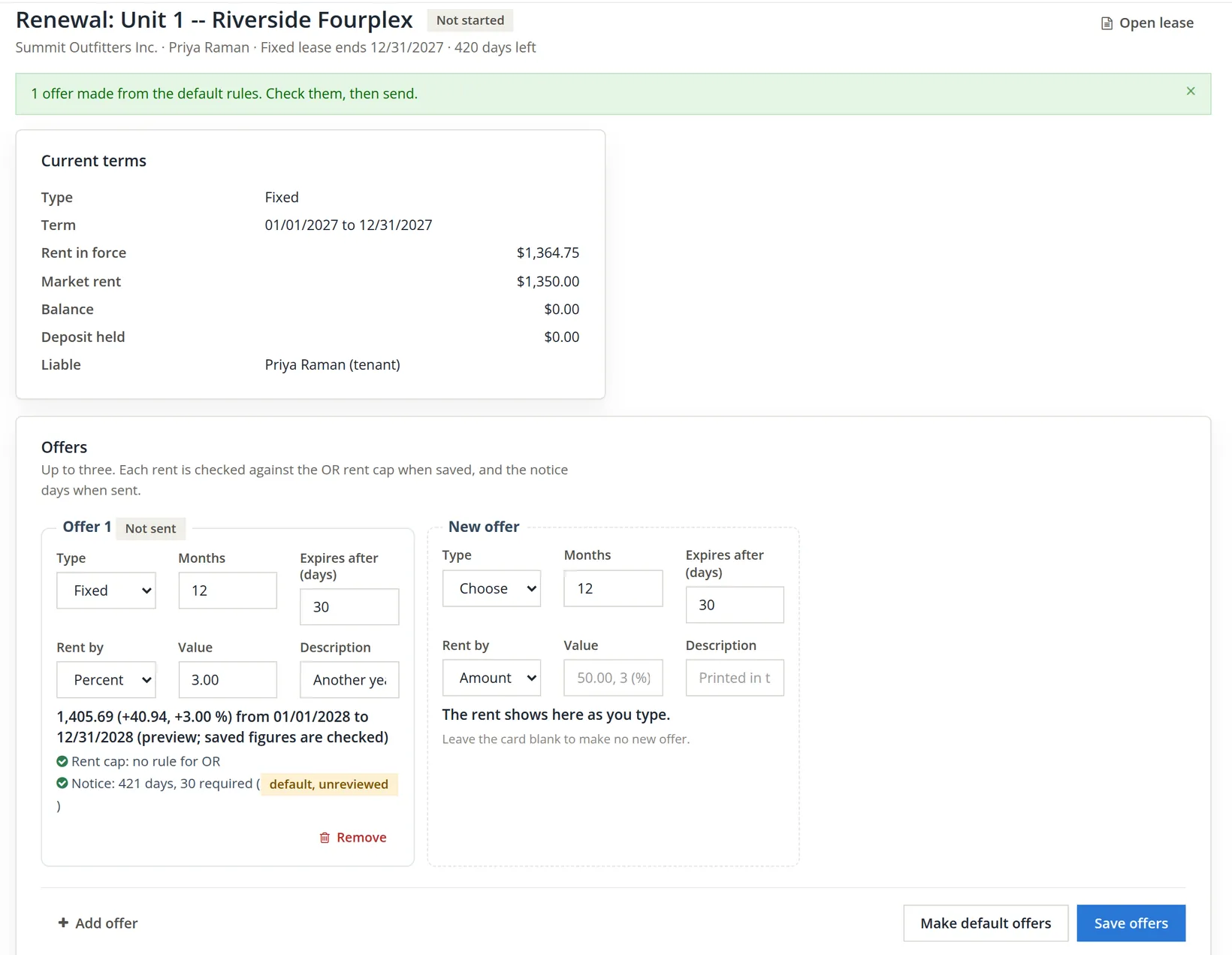
The rule from Procedure A becomes Offer 1, Not sent. You may change it, add a second or third offer on the blank card (or with + Add offer; a shorter or longer term, say) and click Save offers, or Remove an offer that was never sent.

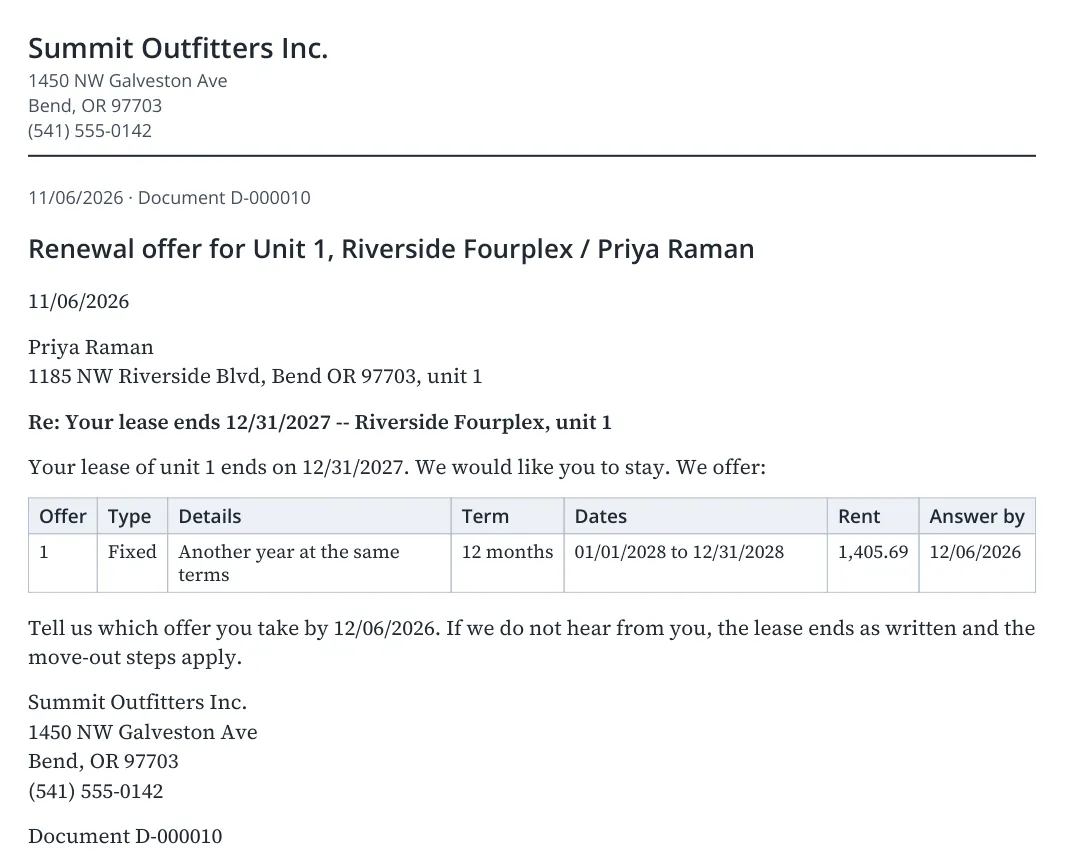
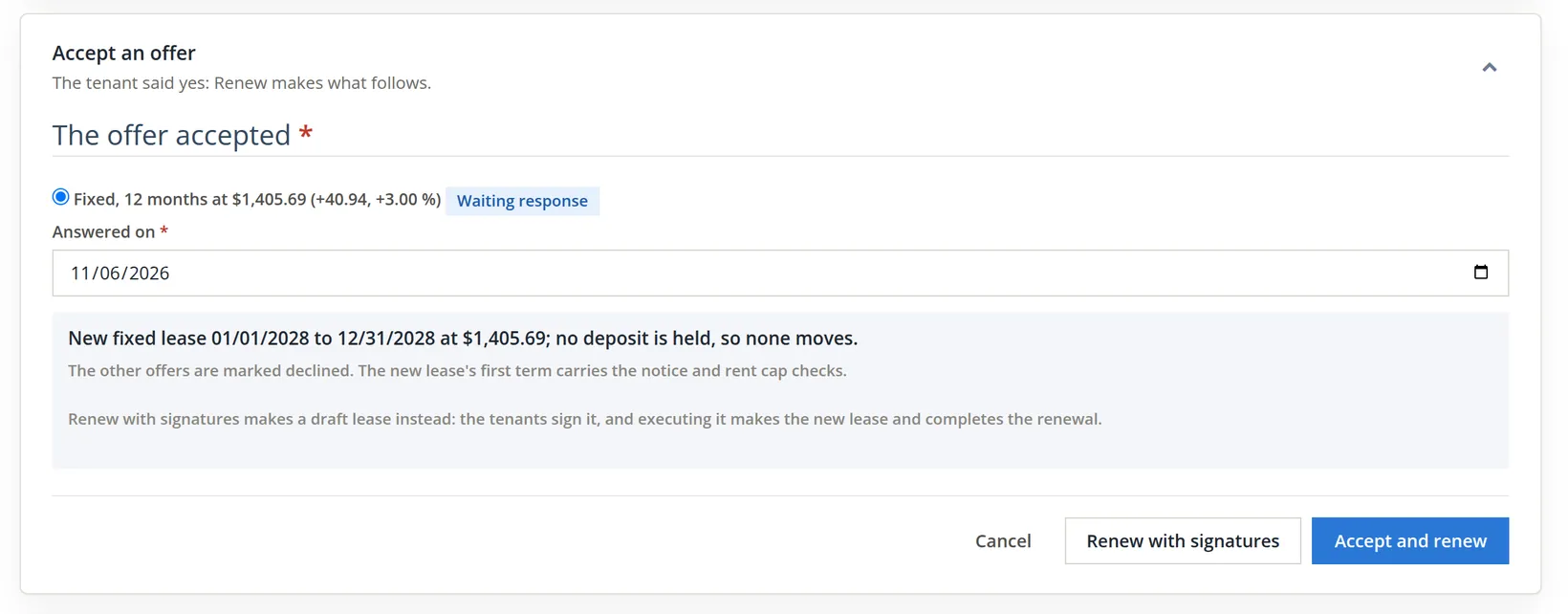
The pictures of the offer, the Send card, the letter and the Accept card were taken a day later, on 11/06/2026, on the next renewal in the same chain: the one of the lease Priya's renewal made (01/01/2027 to 12/31/2027, rent $1,364.75). Its default offer is the same rule one year on: $1,364.75 × 3% = $40.94, so $1,364.75 + $40.94 = $1,405.69 from 01/01/2028, and the notice runs from 11/06/2026 to 01/01/2028, 421 days.
- 3
Send the offers
Open the Send the offers card (the renewal page's cards fold; click a card's head to open it). It previews what the letter will carry and asks how it goes out. E-mail is greyed out while the books' sending switch is off; mail, hand delivery and text are recorded: they say what a person did. Priya came to the office, so Summit chose Hand delivered and the unit's address, then clicked Record the offers.
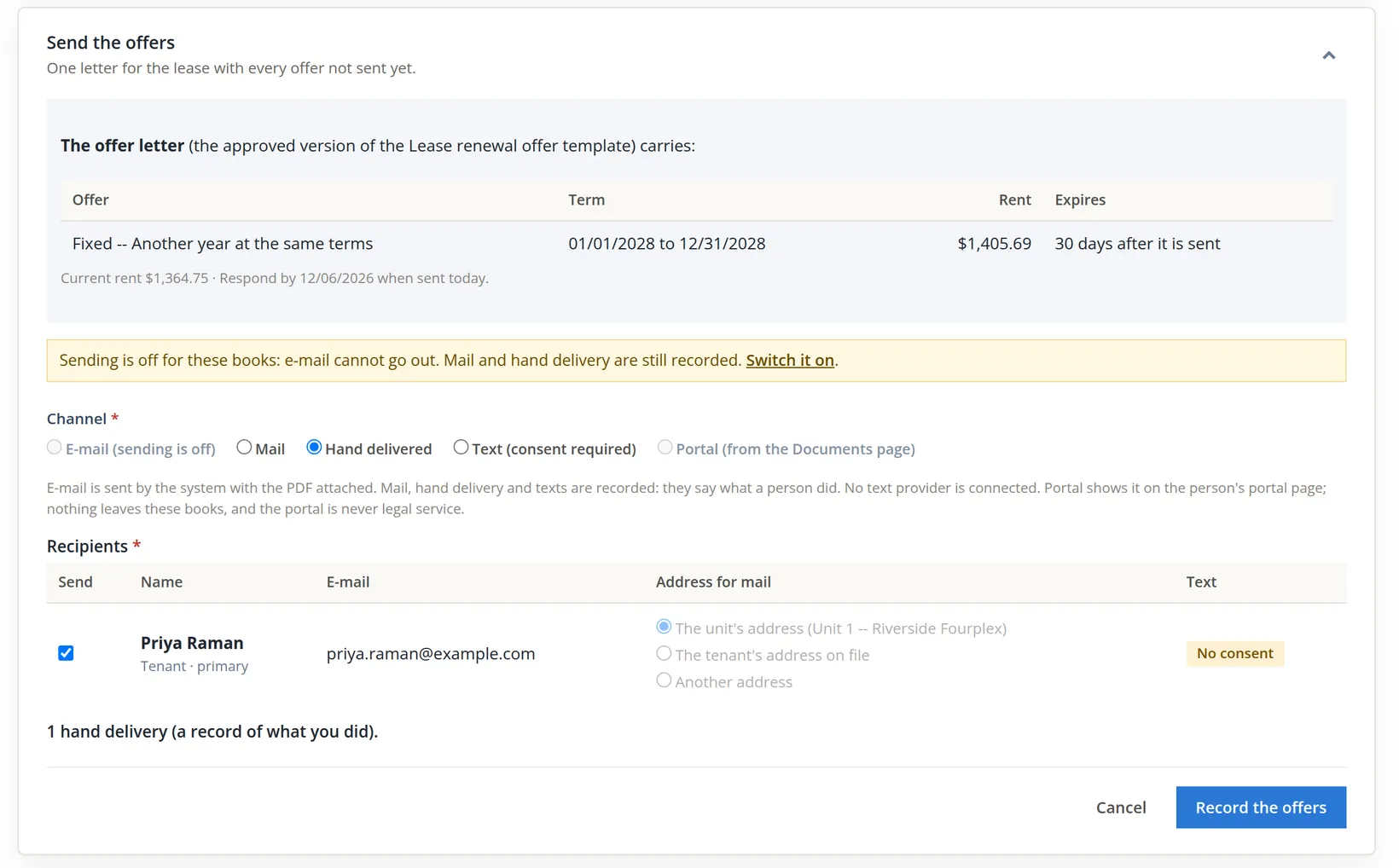
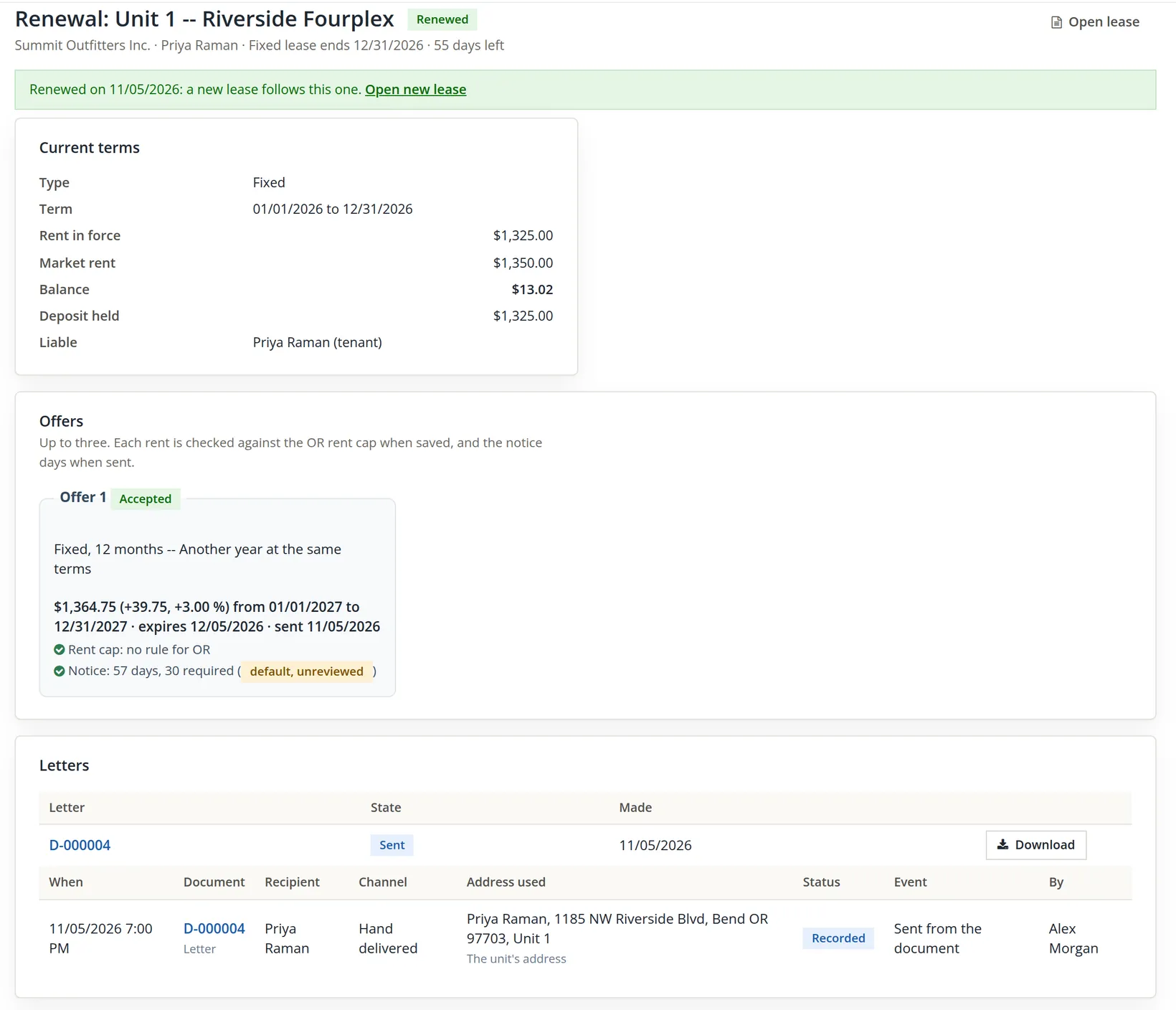
The page answers "Offer letter D-000004 recorded: 1 hand delivery to Priya Raman. The offers are waiting for an answer." The letter is a numbered document (Chapter 13.13), kept with the renewal (its number opens the document page; Download fetches the PDF) and on the Documents page, and the offer turns Waiting response. While the offer waits, the The answer so far row lets you mark it Review needed or Declined with a note.
- 4
Record the answer
Priya signed the reply slip before leaving the office. Open the Accept an offer card, pick the offer, keep Answered on at today (an answer cannot be dated in the future) and read the summary. Then choose: Accept and renew makes the new lease now; Renew with signatures makes a draft lease instead, which the tenant signs and you execute (Chapter 13.4). For Priya the summary read "New fixed lease 01/01/2027 to 12/31/2027 at $1,364.75; the deposit of $1,325.00 moves on 01/01/2027; the balance of $13.02 stays on the current lease." Summit chose Accept and renew and confirmed "Accept this offer and renew? The new lease (or term) is made now."
BizBooks360 opens the new lease with "Renewed: the new lease 01/01/2027 to 12/31/2027 starts on its own. The deposit moves on 01/01/2027." The new lease is Future, rent $1,364.75 due on the 1st, first due 01/01/2027, and its first rent term stores the notice facts (sent 11/05/2026, 30 days required) with the record; they are not shown on the lease's Rent history. Its Renewal card says "Balance on the prior lease (01/01/2026 to 12/31/2026): $13.02. It stays on the prior lease's ledger; nothing was posted again." Nothing on the old lease changes: Priya's prepaid credit and the utility invoice stay where they are, and Priya's December rent still posts on the old lease.
Raise the rent of an at-will lease
Morgan Diaz rents 2B month to month at $1,150.00. Summit wants $1,200.00 from the new year. An at-will lease has no end date, so its renewal never opens on its own: open it by hand from the lease page's Renewal card ("No renewal yet. An at-will lease has no end: its renewal is a rent change, opened by hand.") with Open a renewal, or with Renew lease... in the lease header's More menu.
- 1
Make the offer
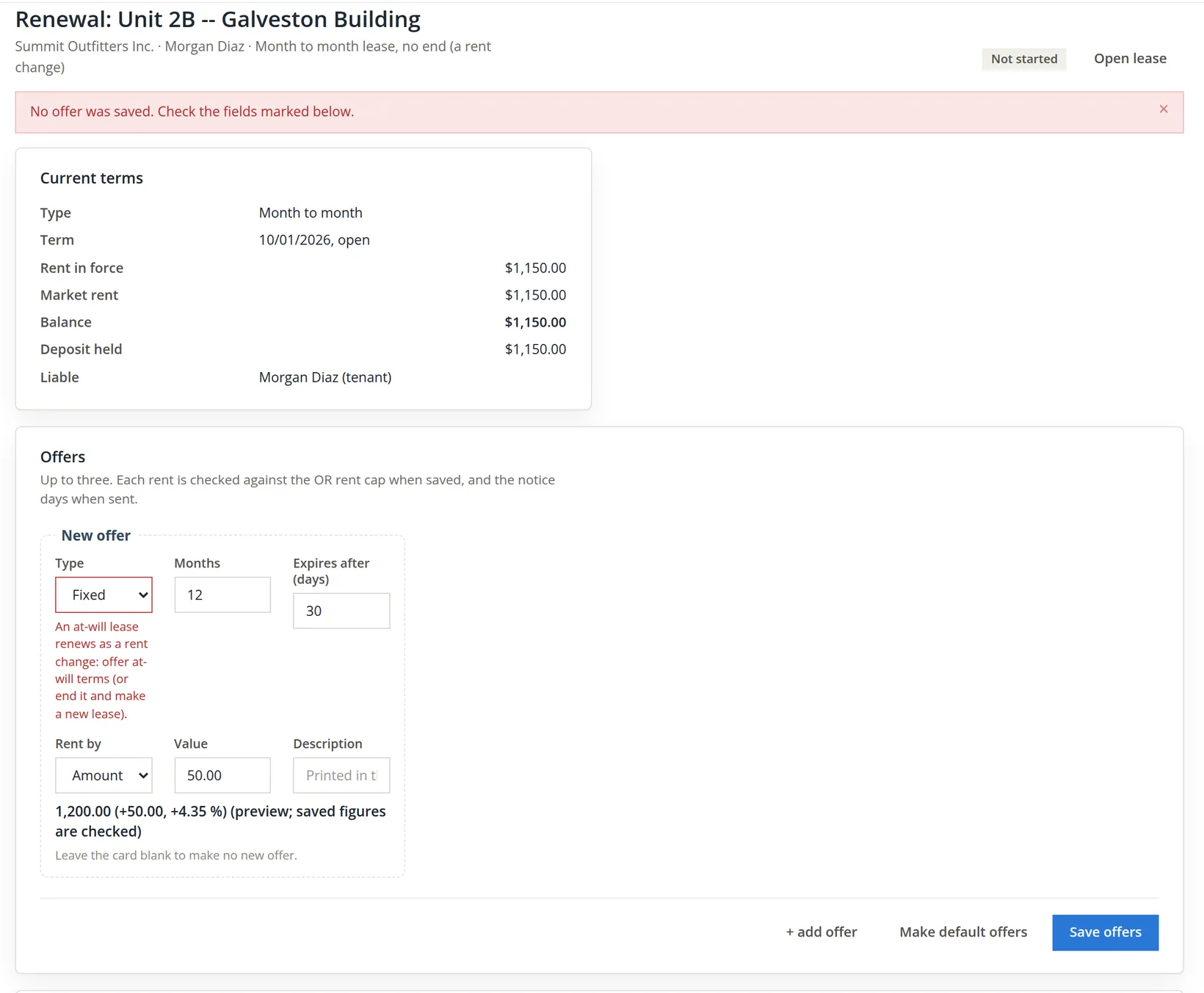
On the blank offer card choose the type, Rent by Amount (+ dollars), Value 50.00, and click Save offers. The preview under the card shows the result as you type: 1,150.00 + 50.00 = 1,200.00, an increase of 4.35 percent.
- 2
Fix it: choose At will and save again
The months field disappears, and the offer saves as "1,200.00 (+50.00, +4.35 %) from 01/01/2027, month to month", with Rent cap: no rule for OR and Notice: 57 days, 30 required (default, unreviewed). Notice that you never typed 01/01/2027. For an at-will lease the module picks the new rent's first day itself: the first rent due day on or after today plus the 30 notice days. Today plus 30 is 12/05/2026; the next due day (the 1st) after that is 01/01/2027. So the earliest start the notice rule allows is exactly the start Summit wanted.
- 3
Send and record the answer
As in Procedure B: Send the offers, Hand delivered (handed to Morgan at the door), Record the offers, which made letter D-000003; then Accept an offer and Accept and renew. An at-will lease has no Renew with signatures: the new term goes on the same lease.
No new lease is made. The lease's Charges tab shows the result in its Rent history:
| Effective from | Rent | Source |
|---|---|---|
| 10/01/2026 | $1,150.00 | Lease |
| 01/01/2027 | $1,200.00 | Renewal |
The rent schedule posts whatever amount is in force on each due day, so December posts $1,150.00 and January $1,200.00 with no further step. The new term also stores its notice facts (sent 11/05/2026, 30 days required) and both checks for the record; they are kept with the term, not shown in this table. Under the table the Charges tab has its own Rent change form (Effective from, New rent, Record the rent change). It records a rent term directly, without an offer or a letter; use the renewal route when you want the cap and notice checks run and the letter made, and keep the direct form for changes already agreed and documented elsewhere.
After the at-will acceptance the page returns to the renewal with "Accepted: the rent changes to $1,200.00 from 01/01/2027 on this at-will lease. No new lease is made and the deposit stays where it is." The renewal page reads "Renewed on 11/05/2026: a new term on this lease." and its history offer 1 accepted: rent 1,200.00 from 01/01/2027. A lease on hold (a payment plan, bankruptcy, a dispute) or with an eviction pending gets no offers at all. Minutes after this renewal was recorded, the collections office put Morgan on a payment plan (Chapter 13.6); the renewal page now says "Offers cannot be made or sent while the lease is on a payment plan hold. End the hold on the lease's Financials tab first." Settle the rent increase before, or after, the plan.
Start the guided move-out
Marcus Bell took a job in Portland. The lease runs to 06/30/2027, but on November 2 Marcus gave written notice, and today, November 5, returned the keys. In BizBooks360 a move-out is not a button but a gate: eight steps on one page, and the lease cannot be closed until the deposit has been settled in writing. Open it with Move out... in the lease header's More menu.
- 1
Record the notice
Type the day the notice was received and the day possession came back, choose a reason, and for each person on the lease tick Moves out, give the day they gave notice and their forwarding address (or tick Unknown and say why). If someone stays, it is a partial move-out: the lease goes on and the page offers to amend it. Click Record the notice.
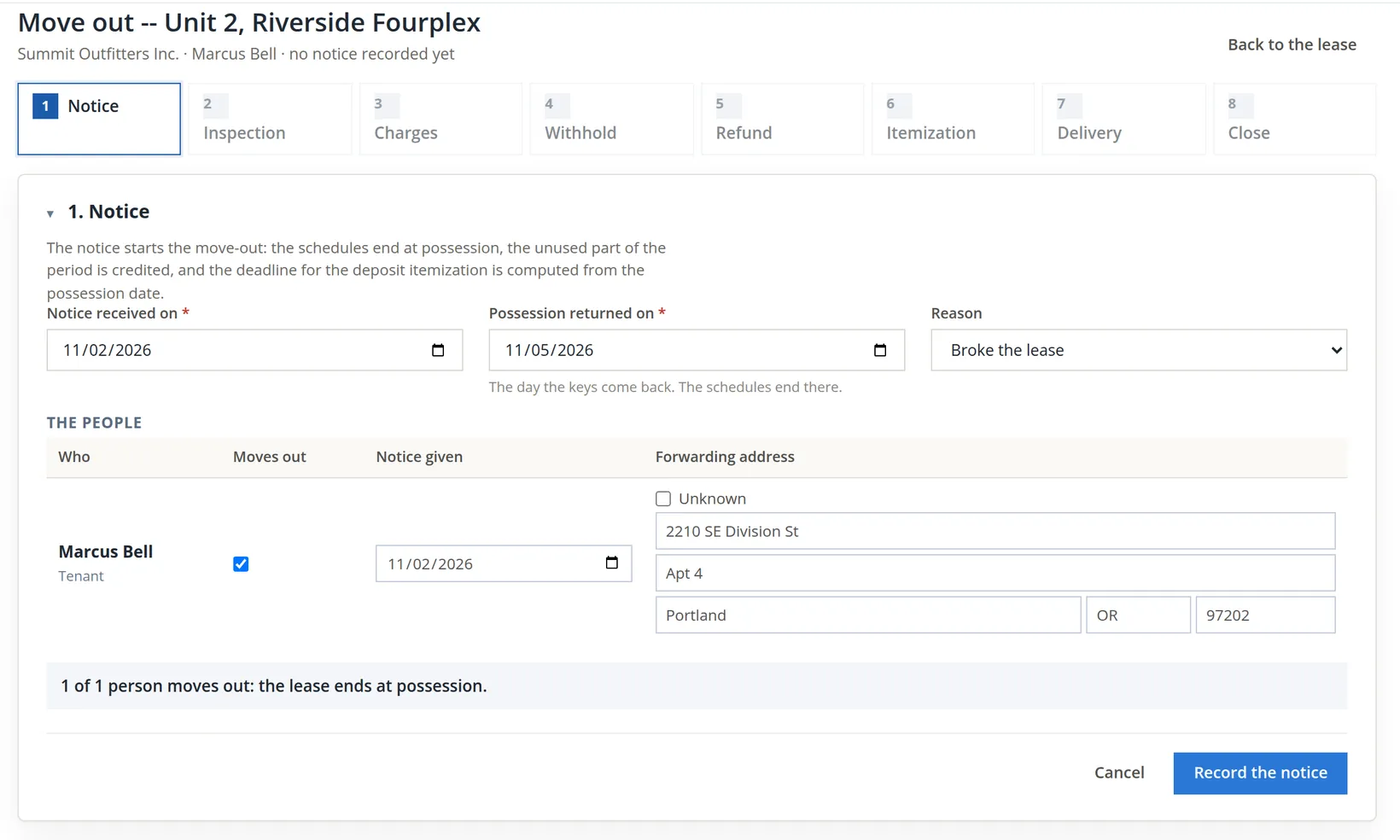
The answer is "Notice recorded. The itemization deadline is 12/05/2026 (30 days: the default, no state rule enabled). The schedules end 11/05/2026." Four things happened at once:
- The lease ended at possession: its rent and charge schedules stop on 11/05/2026, so no December rent will post.
- A blue banner now counts down to the deposit deadline: possession plus the state's return days, or 30 days, flagged default, unreviewed, when the books hold no rule. Here 11/05 + 30 = 12/05/2026. That is the module's default, not Oregon's deposit-return rule, which may set a different period and different consequences for a late statement; check it with counsel.1
- The unused part of the possession month was credited, if anything was billed for it. The credit is what was billed for the month × the unused days ÷ the days in the month. Had November's $1,350.00 rent been billed through the lease, Marcus would have received 1,350.00 × 25 ÷ 30 = $1,125.00 as a customer credit (Chapter 2.5). Nothing was: the import started the lease's billing at 12/01/2026, so no credit was posted and the Charges step lists none.3
- Any open renewal of the lease was closed as not renewing.
- Credits and concessions given during the lease (Give a credit on the Financials tab, Chapter 13.5) are separate from this proration credit; they do not change the final charges of step 3 or the deposit refund.
- 2
Record the inspection
Either start the move-out checklist (Chapter 13.9) and use its condition report, or upload the report you wrote. Summit walked the unit at 4:30 PM and uploaded the one-page report: everything good except the living-room carpet, stained near the patio door, with a cleaning estimate of $175.00. Inspected on 11/05/2026, inspector Alex Morgan, Record the inspection. The file goes to the lease's Files tab under Inspection.
- 3
Post final charges, if any
The Charges step posts one invoice to the lease for what the tenant owes beyond the deposit: unpaid utilities, a lease-break fee your lease allows, damage above the deposit. Each line needs an income account and an amount; the date may not be earlier than possession or the day the move-out was started. Marcus owed nothing, so Summit posted nothing. The carpet cleaning is settled from the deposit in the next step instead.
Withhold, refund or transfer the deposit
A deposit is not income. It is a liability, money the books hold for the tenant in Liabilities:Security Deposits Held:Riverside Fourplex, and it stays one until the books decide what happens to each dollar. There are three ways out of the liability:
| Action | What it posts | When |
|---|---|---|
| Withhold | A journal entry: deposits held → the income accounts you name, one line per reason (damage, cleaning, unpaid rent, fees, other) | Move-out, for amounts the lease and the law let you keep |
| Refund | A check or EFT from the deposit bank to the payees (Chapter 4.5 prints the check) | Move-out, for what is left |
| Transfer | A journal entry between two leases' deposit balances; both ledgers show it | A tenant moves to another unit, or a new lease takes over (a renewal does this by itself) |
- 1
Withhold the carpet cleaning
In step 4, click Withhold from the deposit, at the right of the step's Held line. Each line takes an income account, a category, a description the tenant will read on the itemization, and an amount. Summit chose Revenue:Riverside Fourplex:Late & Other Tenant Fees, category Cleaning, Carpet cleaning, living room (stain near the patio door).4
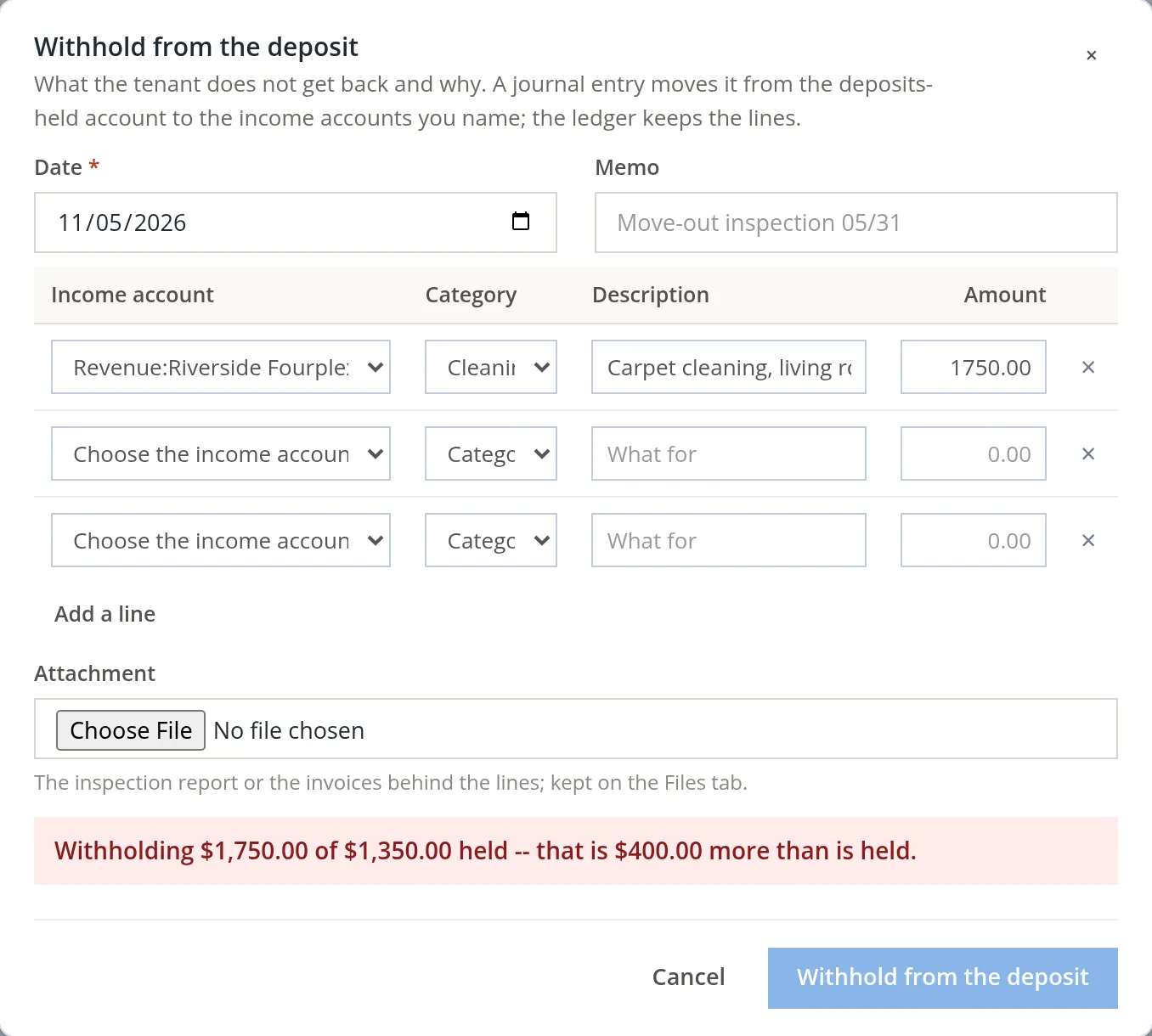
A withheld amount larger than the deposit is always a typing error or a misunderstanding: what a tenant owes beyond the deposit is a final charge (step 3), never a withhold. The dialog refuses it before anything is posted, and the server would refuse it again ("The lines add up to 1,750.00, more than the 1,350.00 held."). Summit retyped 175.00; the summary read "Withholding $175.00 of $1,350.00 held -- $1,175.00 stays with the deposit", and the save answered "Withheld $175.00 from the deposit." The entry is journal entry 207, debit deposits held $175.00, credit Late & Other Tenant Fees $175.00.
- 2
Refund the rest
In step 5, click Refund the deposit, again at the right of the Held line. The dialog proposes everything that is left, 1,350.00 − 175.00 = $1,175.00, to the tenant, by check, from the deposit bank, to the forwarding address. A refund from any other bank is refused. Summit left Queue for printing ticked, so the check gets its number when it is printed, added the memo Deposit refund, Riverside Fourplex unit 2 and clicked Write the refund.
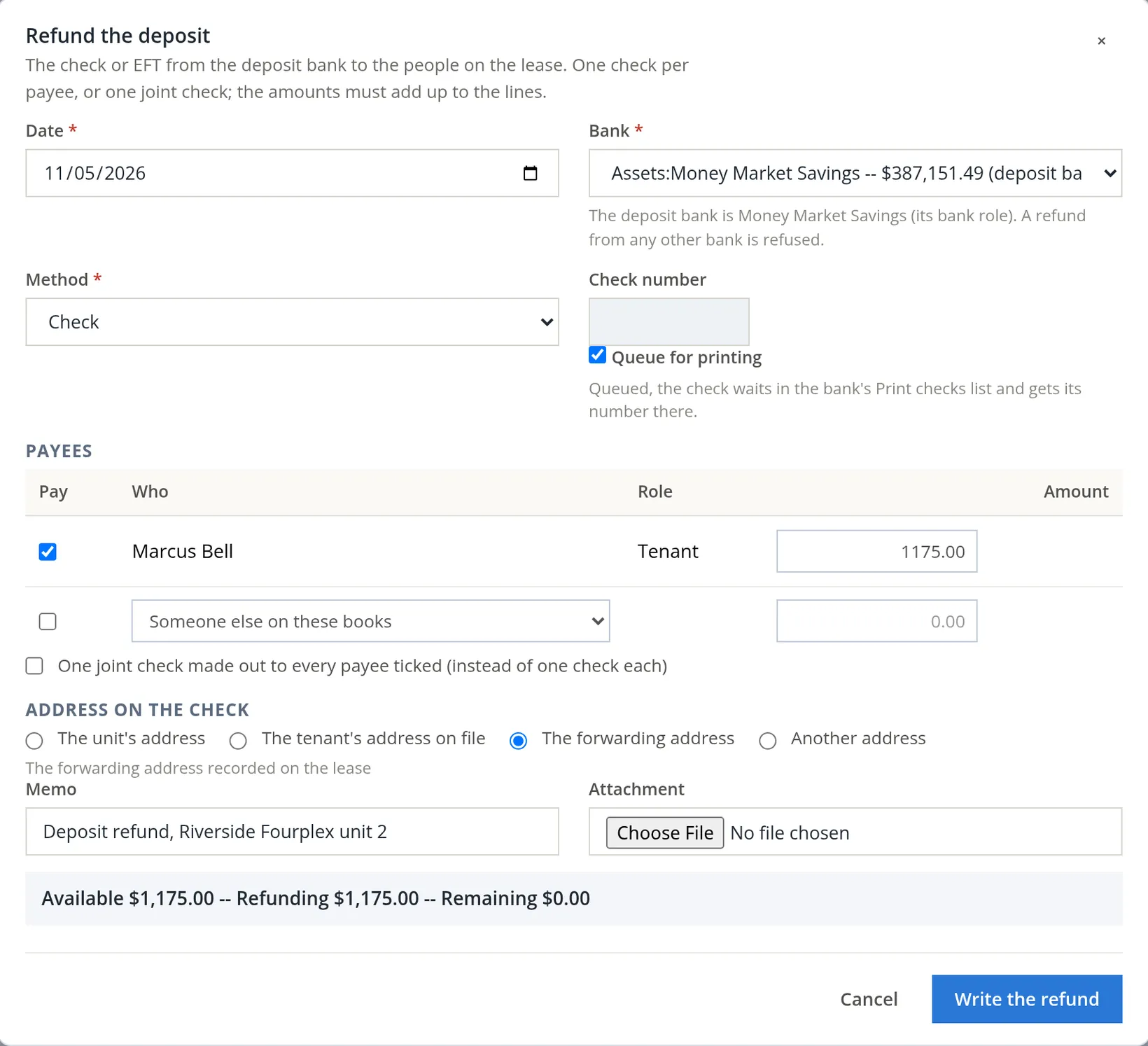
The answer is "Refunded $1,175.00 to Marcus Bell: queued for printing. $0.00 stays held." The check, Deposit refund R-1, lowers Money Market Savings from $387,151.49 to $385,976.49.
Transfer was not needed here, but you have already seen it work. When Priya accepted the renewal the page said "The deposit moves on 01/01/2027": on that day the module transfers Priya's $1,325.00 from the old lease to the new one by itself. Use the Transfer action (in a Deposits row's More menu, or on the lease's Financials tab) only when a tenant moves to another unit: choose the other lease and the amount, and Move the deposit writes one journal entry between the two leases' balances.
Make and deliver the itemization, then close
Many states require a written, itemized account of a deposit within a fixed number of days of move-out, and some take away the right to keep anything if it is late; check your own state's period and rules with counsel.1 BizBooks360 makes that statement from the ledger, so it cannot disagree with the books.
- 1
Generate the itemization statement
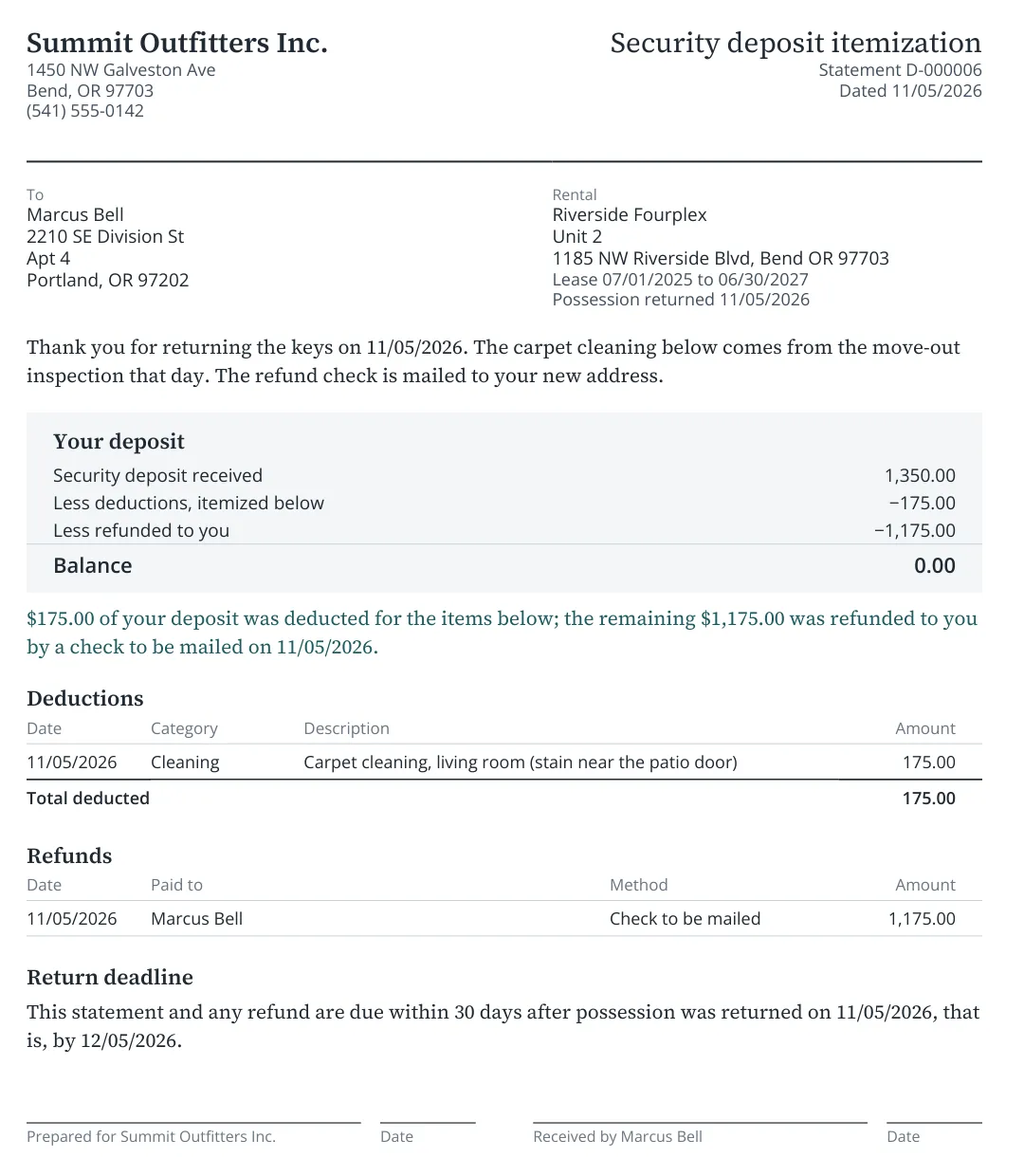
In step 6, type an optional message for the tenant and click Generate the itemization statement. The statement is a numbered document rendered from the approved Deposit itemization template: "Itemization statement D-000005 is ready. Preview it, then record how it is delivered."
- 2
Preview it before it goes out
Click Preview PDF and read it as the tenant will. Summit's first message thanked Marcus for leaving the unit "in good order", which sat badly beside a deduction for a stained carpet. Until a statement is delivered you may generate it again: Generate a new itemization statement supersedes D-000005 (kept, marked superseded) and issues D-000006 with the corrected message. After the delivery, the statement the tenant received stands.
- 3
Record the delivery
In step 7 choose the channel (e-mail is off for these books), the recipient and address, the day and who delivered it; attach the mail receipt as evidence if you have one. Summit mailed D-000006 with the refund check to the forwarding address: Mail, The forwarding address, delivered on 11/05/2026 by Alex Morgan, Record the delivery. The page answers "Delivery recorded: Mail on 11/05/2026 by Alex Morgan."
- 4
Close the move-out
Step 8 lists three gates. Each must read Passed before Close the move-out works. Click it and confirm "Close this move-out? The lease ends at possession and the unit goes vacant." While the move-out is open, a blue banner at the top counts down: "The deposit itemization is due 12/05/2026 -- 30 days left", marked default, unreviewed.1
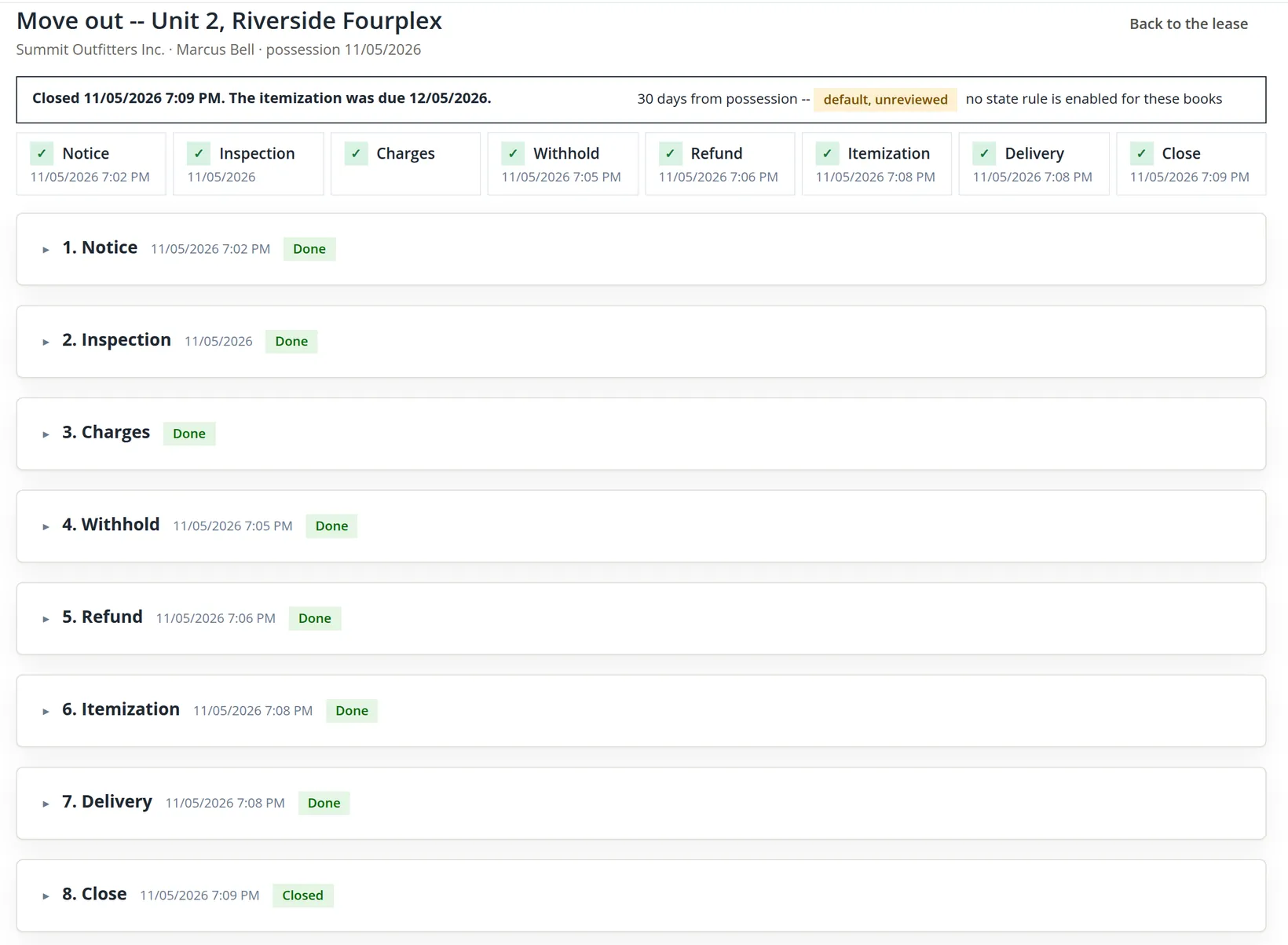
The answer is "Move-out closed. The lease is past; the unit is vacant." Riverside unit 2 is ready for the leasing pipeline (Chapter 13.3).
Reading the result
Property Management → Money → Deposits shows every lease's deposit beside the bank that holds it. Only leases with deposits held starts ticked; untick it to see leases whose deposit is gone, such as Marcus's.
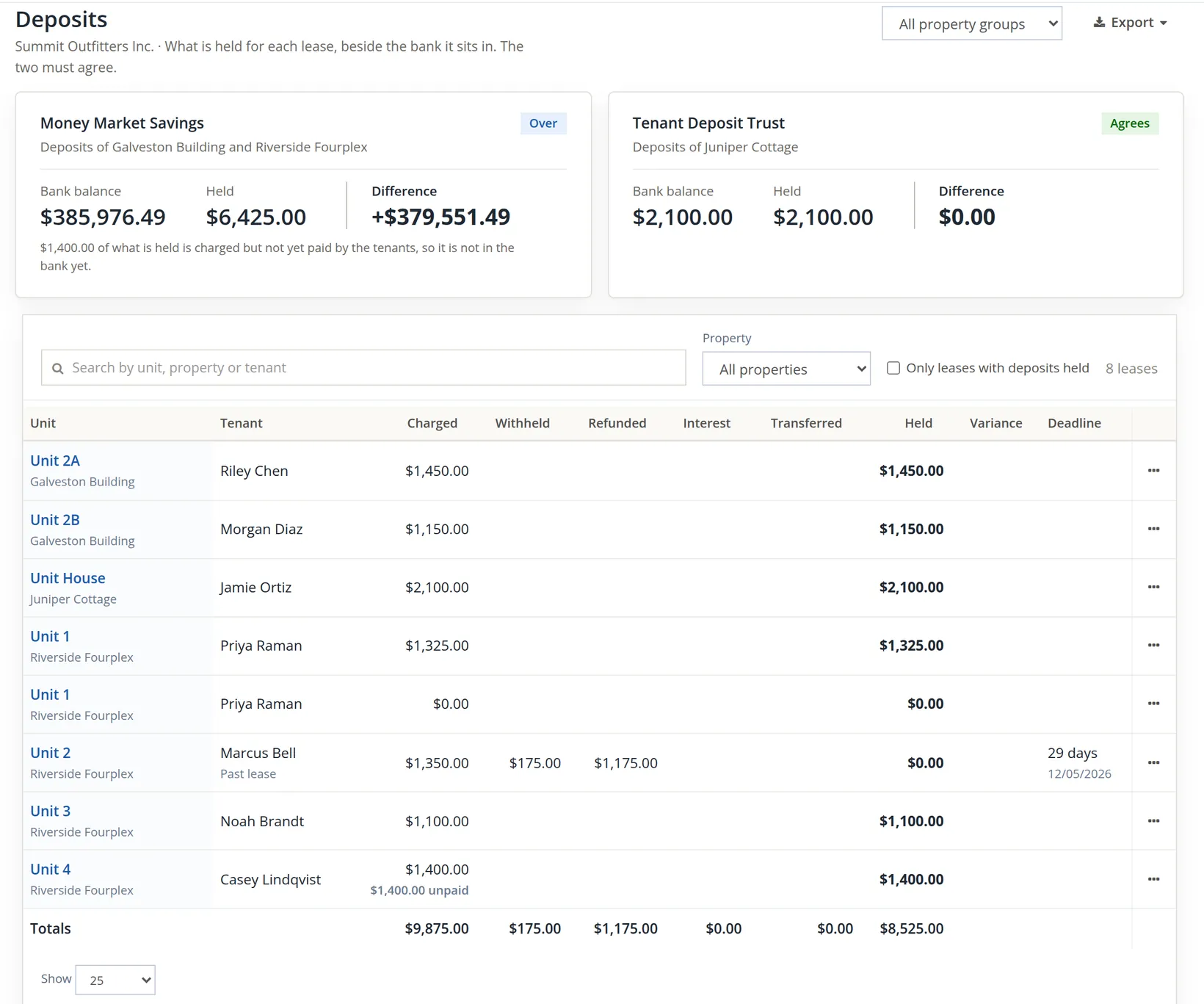
The records this chapter made feed the leasing and tenant reports (Chapters 13.14 and 13.15):
| Record | Lease | What it holds |
|---|---|---|
| Renewal (Renewed) | Riverside 1, Priya Raman | Offer Fixed 12 months, $1,364.75 (+3.00 %), letter D-000004 by hand, accepted 11/05/2026 |
| New lease (Future) | Riverside 1, Priya Raman | 01/01/2027 to 12/31/2027, rent $1,364.75, deposit $1,325.00 moving on 01/01/2027 |
| Renewal (Renewed) of that lease, made for the pictures | Riverside 1, Priya Raman | Offer Fixed 12 months, $1,405.69 (+3.00 %), letter D-000010 by hand, accepted 11/06/2026; a further lease 01/01/2028 to 12/31/2028 (Future) |
| Renewal (Renewed) and rent term | Galveston 2B, Morgan Diaz | At will, $1,200.00 (+50.00) from 01/01/2027, letter D-000003 by hand, accepted 11/05/2026 |
| Move-out (Closed) | Riverside 2, Marcus Bell | Notice 11/02/2026, possession 11/05/2026, broke the lease, deadline 12/05/2026, no proration credit |
| Deposit disposition | Riverside 2, Marcus Bell | Withheld $175.00 (journal entry 207, Cleaning), refunded $1,175.00 (check R-1, queued) |
| Itemization | Riverside 2, Marcus Bell | D-000006 by mail 11/05/2026 (D-000005 superseded) |
Renewals and move-outs
- [x] Renewal defaults set (lead days and at least one offer rule), on the books or per property.
- [x] Lease renewal offer and Deposit itemization templates copied, read and approved.
- [x] Your state's real rent cap, notice period and deposit-return deadline checked with counsel when the chip says default, unreviewed.
- [x] Each offer's two checks read before sending; the letter sent early enough for the notice.
- [x] At-will leases offered at-will terms; the new rent's first day read from the offer, not assumed.
- [x] No hold or eviction on the lease before you make offers.
- [x] Move-out notice with possession on or after the notice, and a forwarding address for every liable person.
- [x] Inspection recorded and its report kept before you withhold, so each deduction has evidence (good practice; the software does not require it).
- [x] Withholds within the deposit; anything more posted as a final charge.
- [x] Refund from the deposit bank to the forwarding address.
- [x] Itemization previewed, then delivered and recorded before the deadline; move-out closed.
Check your understanding
1. Priya's rent is $1,325.00 and the default rule is +3%. What rent does the offer show, and from what day?
Answer
$1,364.75 ($1,325.00 + $39.75), from 01/01/2027, the day after the lease ends.
2. Why could Summit not offer Morgan a fixed 12-month lease on the renewal page?
Answer
An at-will lease renews as a rent change on the same lease. To move Morgan to a fixed term, end the at-will lease and make a new lease.
3. Morgan's offer was saved on 11/05 for a new rent from 01/01/2027. Suppose the letter had not been sent until 12/10/2026. What would happen at Record the offers?
Answer
The notice check runs again from the send day: 12/10/2026 to 01/01/2027 is 22 days, short of the 30 required, so nothing is sent. Because the 30 days is the module's unreviewed default, the page says "Only 22 days' notice before 01/01/2027: 30 are required (default, unreviewed). Give a reason to send anyway." and the Send card shows a Reason the shorter notice is accepted field (10 to 300 characters, kept with the offer and the new term; only someone with edit access to the Rent roll may give it). With a reviewed state rule there is no reason box: the send is refused until you send sooner or offer a later start.
4. What does Accept and renew make for a fixed lease, and what happens to the deposit and the old balance?
Answer
A new lease starting the day after the old one ends. The deposit moves to it on that day; the old balance ($13.02 for Priya) stays on the old lease's ledger.
5. Marcus's November rent had been billed for $1,350.00 and possession is 11/05. What proration credit would the move-out post?
Answer
1,350.00 × 25 unused days ÷ 30 days in November = $1,125.00, as a customer credit on the lease.
6. The carpet needed $1,500.00 of work against a $1,350.00 deposit. How do you record it?
Answer
Withhold the whole $1,350.00 for the damage, and post the $150.00 that is left as a final charge on the Charges step, which the tenant then owes. A withhold can never exceed what is held, and posting the full $1,500.00 as a charge as well would count the damage twice.
7. You notice a wrong word in the itemization after the delivery was recorded. Can you generate it again?
Answer
No. Before delivery a new statement supersedes the old one under a new number; after delivery the statement the tenant received stands. Send a separate letter to correct it.
Notes
- The module's state rules come with reviewed entries for some states only; Summit's books hold none for Oregon, so the rent-cap line reads no rule for OR and the notice and deposit deadlines use the module's 30-day defaults. Oregon has its own statewide rent-increase limit, notice period and deposit-return rules, which may be stricter than these defaults. Nothing in this chapter is legal advice; confirm the current figures with counsel before you rely on them. ↑
- The system set also holds a Notice of change of rent and a Notice of non-renewal. The renewal page sends the Lease renewal offer letter for fixed and at-will leases alike; the other two are used by other steps and need their own approval. ↑
- The credit is computed only from rent and charge invoices of the lease for the possession month (and never exceeds what was billed). The Riverside leases were imported on 11/05/2026 with their November rent settled outside the module and the next due date 12/01/2026 (Chapter 13.2), so there was nothing to credit. ↑
- The Riverside block of the chart also has Tenant Reimbursements and Forfeited Deposits income accounts. Many offices book cleaning and repair recoveries to Tenant Reimbursements; choose one convention and keep it, since the Charges By Account report groups by the account. ↑