
Chapter 2.5
Customer Credits
How to give a customer credit they can use later (for a return, an overpayment or goodwill), how to use it on one of their invoices, and when to take an amount off a single invoice instead.
When you finish this chapter you will be able to:
- Say when a customer credit is the right tool, and when it is not.
- Give a credit, and explain the entry it makes.
- Use the credit on one of the customer's invoices.
- Read the Customer credits page.
Contents
Which tool for which situation
| Situation | Use |
|---|---|
| You owe the customer something, to come off whatever they buy next: a return, an overpayment, a goodwill gesture | Customer credit (this chapter). It waits on the customer's account until used. |
| One invoice was simply too high, and you want it reduced now | Issue credit on that invoice: on the Invoices list, open the invoice's More menu and choose Issue credit ("Reduce what is owed on this invoice"). An invoice made by a property lease is the exception: its Issue credit page opens with a banner, "Created by lease ... Credit it from the lease: on its Financials tab, Give a credit applies a credit or concession to this charge (or holds it for the next scheduled charge).", an Open in lease button and no Save. Credit it with Give a credit on the lease (Chapter 13.5). |
| The invoice is wrong in every way: wrong customer, never delivered | Void the invoice (Chapter 2.1). |
| An invoice line has a typo, and the invoice is unpaid | Edit the invoice and save the change. |
When a customer has already received an invoice, do not quietly change its price. Give or issue a credit. The customer's copy and your books then tell the same story, and the reason is on record.
What happens in the books
Giving the credit records a cost and a debt: the business has given something away, and now owes the customer that much.
| Event | Debit | Credit |
|---|---|---|
| Credit given, $90.00 | Expenses: Customer Credits 90.00 | Liabilities: Customer Credits 90.00 |
| Credit used on invoice 1237 | Liabilities: Customer Credits 90.00 | Accounts Receivable 90.00 |
After both, the liability is back to zero, the customer owes $90.00 less, and the $90.00 sits as an expense on the Profit and Loss.2
Give the credit
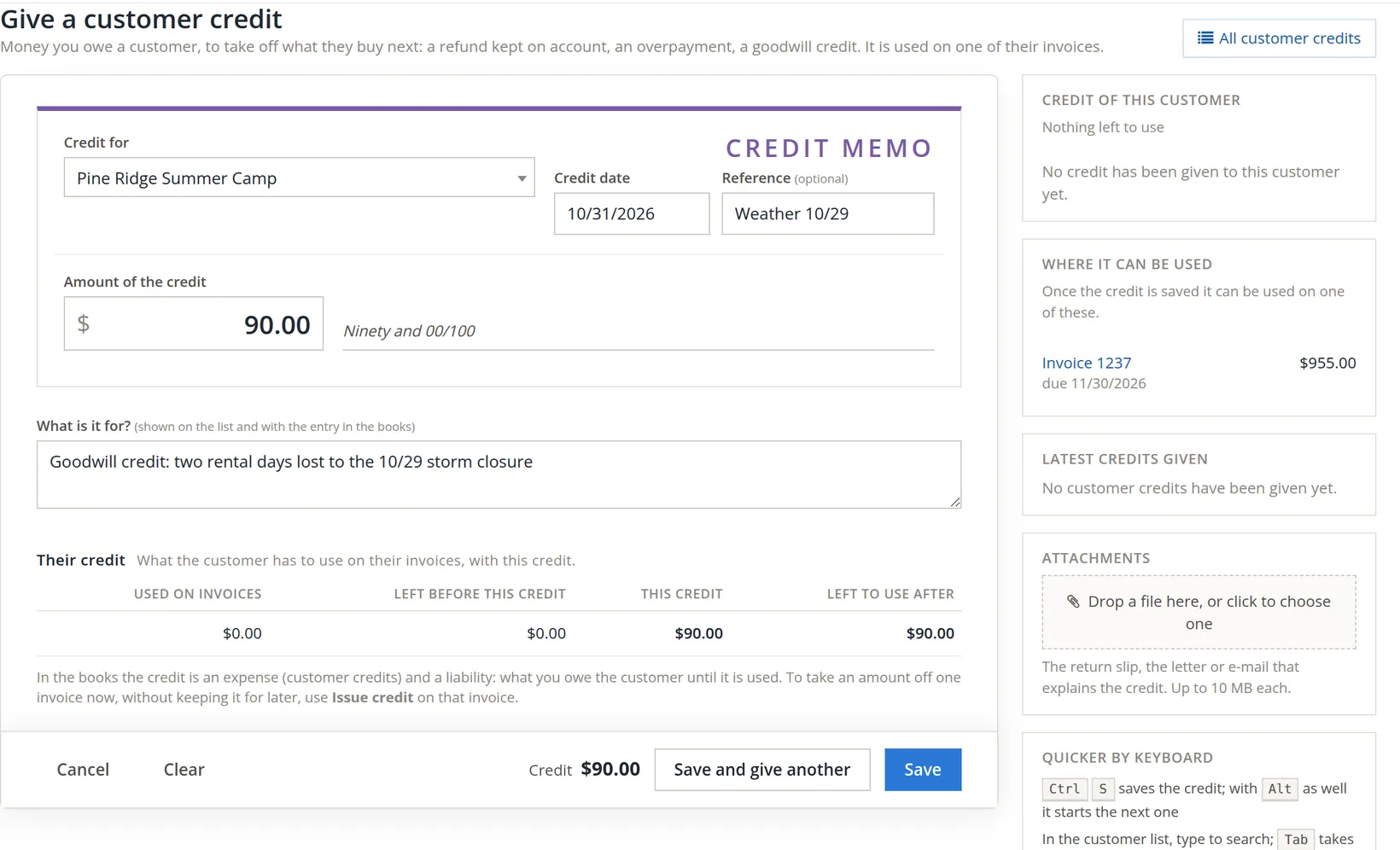
Go to Sales → Customer Credit and click + Customer credit.
- 1
Choose the customer 1
The side panel shows what credit they already have and the invoices it could go on A.
- 2
Set the date 2 and an optional reference 3
A return slip number, the customer's claim number, or a few words such as "Weather 10/29".
- 3
Type the amount 4
The box accepts a sum: typing
2*45gives 90.00. The amount is written out in words beside it. - 4
Say what it is for 5
This shows on the credits list and with the entry in the books. Write it for an auditor a year from now.
- 5
Check Their credit 6 and save 8
The line shows what the customer will have to use afterwards: $90.00. Save and give another 7 clears the form for the next one.
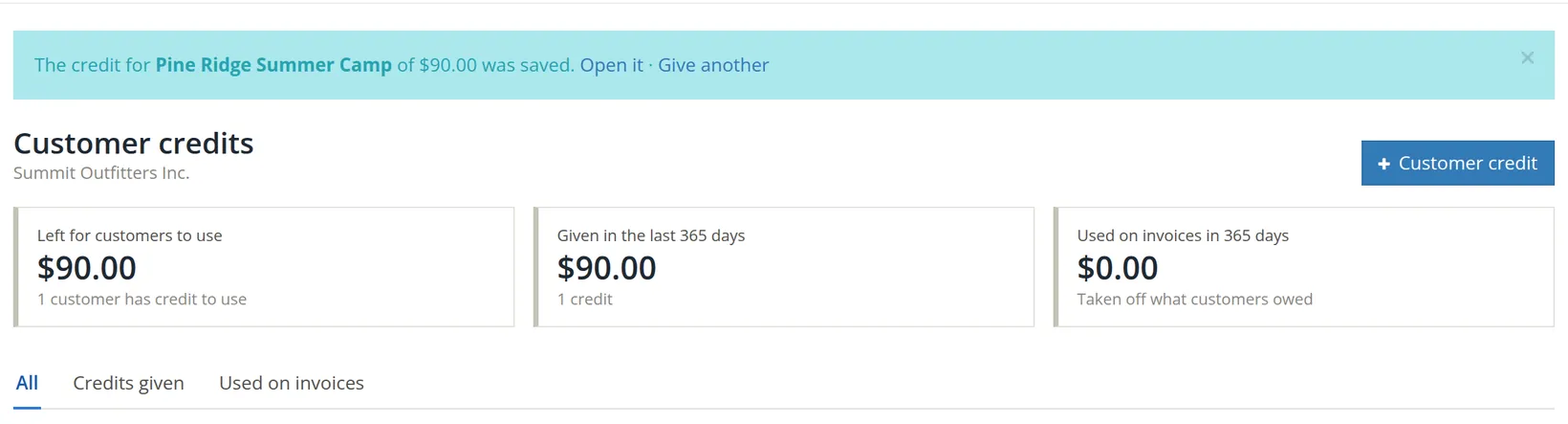
Drop the return slip, or the e-mail that agreed the credit, on Attachments. Credits reduce income, so they are among the first things an auditor or a business buyer will ask to see.
Use it on an invoice
- 1
Open the invoice
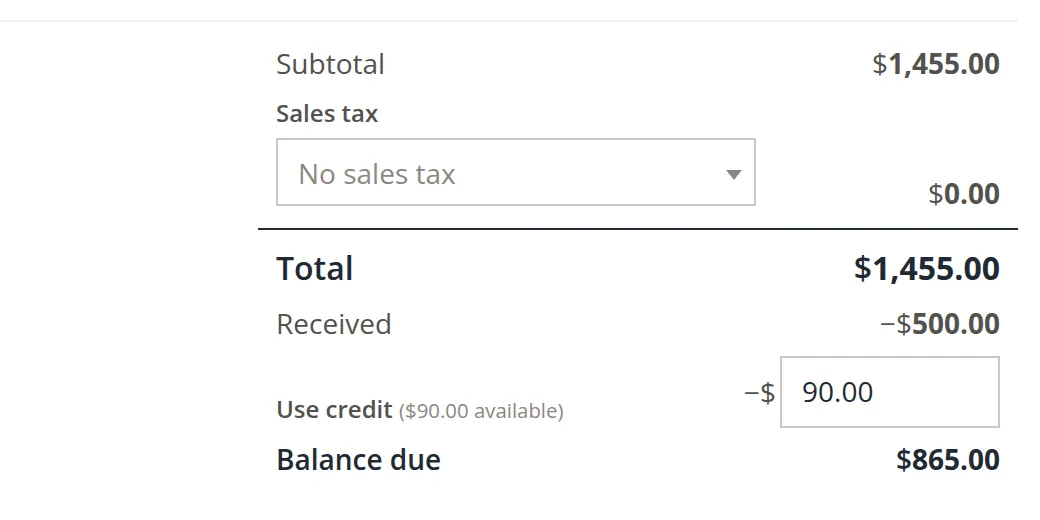
Open one of the customer's unpaid invoices, here invoice 1237.
- 2
Find Use credit in the totals 1
It appears only when the customer has credit, and says how much: "($90.00 available)".
- 3
Type the amount to use 2
All of it, or part. Balance due 3 drops at once: $955.00 less $90.00 is $865.00.
- 4
Click Save changes
If you send the invoice again, the customer sees the credit taken off.
The Customer credits page
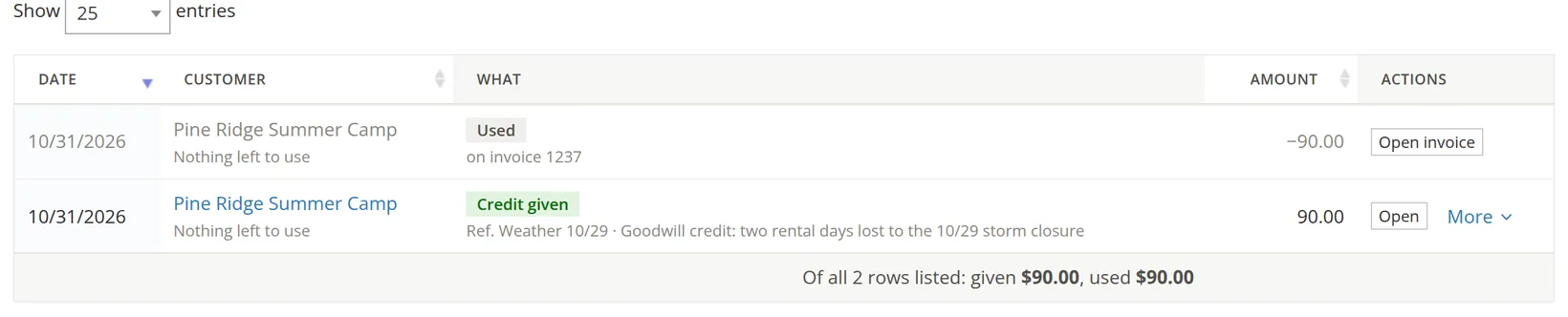
Three cards: Left for customers to use (the liability today), Given in the last 365 days, and Used on invoices in 365 days. The list shows each credit given and each use of one as its own row; the tabs Credits given and Used on invoices separate them. Credits that did not start on this page are listed too, with the same Open and More: a credit or concession given from a lease (its reference line reads Concession CN-... (rent reduction), and the lease made its entry, Chapter 13.5) and an opening prepaid balance brought in by an import (Opening prepaid balance as of ...). All of them add to Left for customers to use.
A credit left on the books for years is still a debt. Review Left for customers to use at year-end. Customers you will not sell to again should be contacted about a refund; unclaimed balances may be subject to your state's unclaimed property rules.3
Check your understanding
1. A customer returns a $60 jacket bought on an invoice they already paid. They will shop again next month. Which tool?
Answer
A customer credit of $60, used on next month's invoice.
2. You invoiced 12 kayak tours but only 10 happened, and the invoice is unpaid. Which tool?
Answer
Issue credit on that invoice for the 2 tours, or edit the invoice if it has not yet gone to the customer.
3. Where does an unused $90 credit appear on the balance sheet?
Answer
Under liabilities, in Customer Credits: money owed to the customer.
4. After using the credit, what does the customer owe on invoice 1237?
Answer
$865.00: $1,455.00 less $500.00 received less $90.00 credit.
Notes
- Notes give background, exceptions and the reasons behind a rule. ↑
- BizBooks360 keeps each use as a negative credit of the customer, which is why the list shows the use as its own row of −90.00. ↑
- Rules on unclaimed customer balances differ by state. Ask your accountant before writing an old credit off. ↑