
Chapter 2.3
Receiving a Customer Payment
How to record money a customer paid against an invoice, in full or in part; where the money should go; and how to give the customer a receipt.
When you finish this chapter you will be able to:
- Record a payment against an invoice, in full or in part.
- Choose correctly between Undeposited Funds and a bank account.
- Explain the entry a payment makes in the books.
- Find, change, delete and print a payment.
Contents
Before you begin
Have the evidence of payment in front of you, and record exactly what it says:
- Who paid, and which invoice it is for. A check stub or remittance advice usually says.
- How much, to the cent.
- How: cash, check, card, ACH, EFT, wire.
- The reference: the check number, or the confirmation number of an electronic payment.
- The date you received it.
A check that sits in a drawer is still owed, as far as your reports know. The customer gets a reminder for an invoice they have paid, and your overdue list loses its meaning. Record it today, deposit it tomorrow.
What happens in the books
When the invoice was saved, BizBooks360 recorded that the customer owed you: Accounts Receivable went up and income went up. A payment does not touch income again. It moves the amount from "owed to us" to "money we hold":
A payment in full
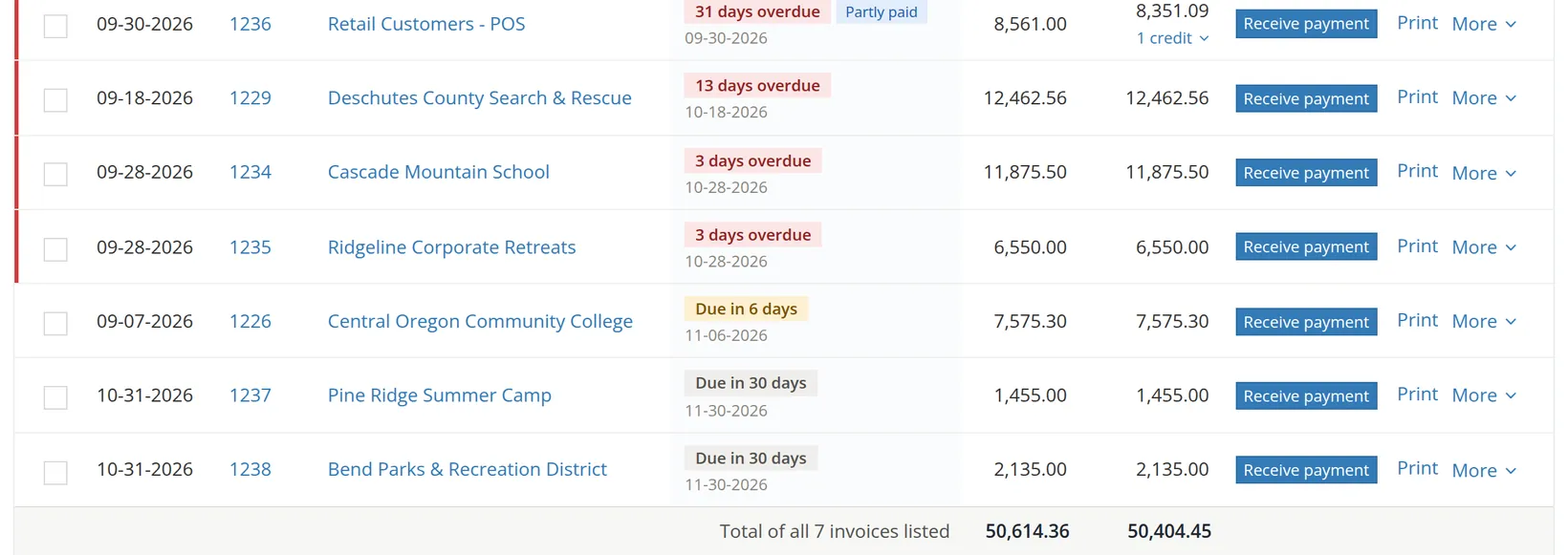
Bend Parks & Recreation District sends check no. 50721 for $2,135.00, paying invoice 1238.
- 1
Open the payment form
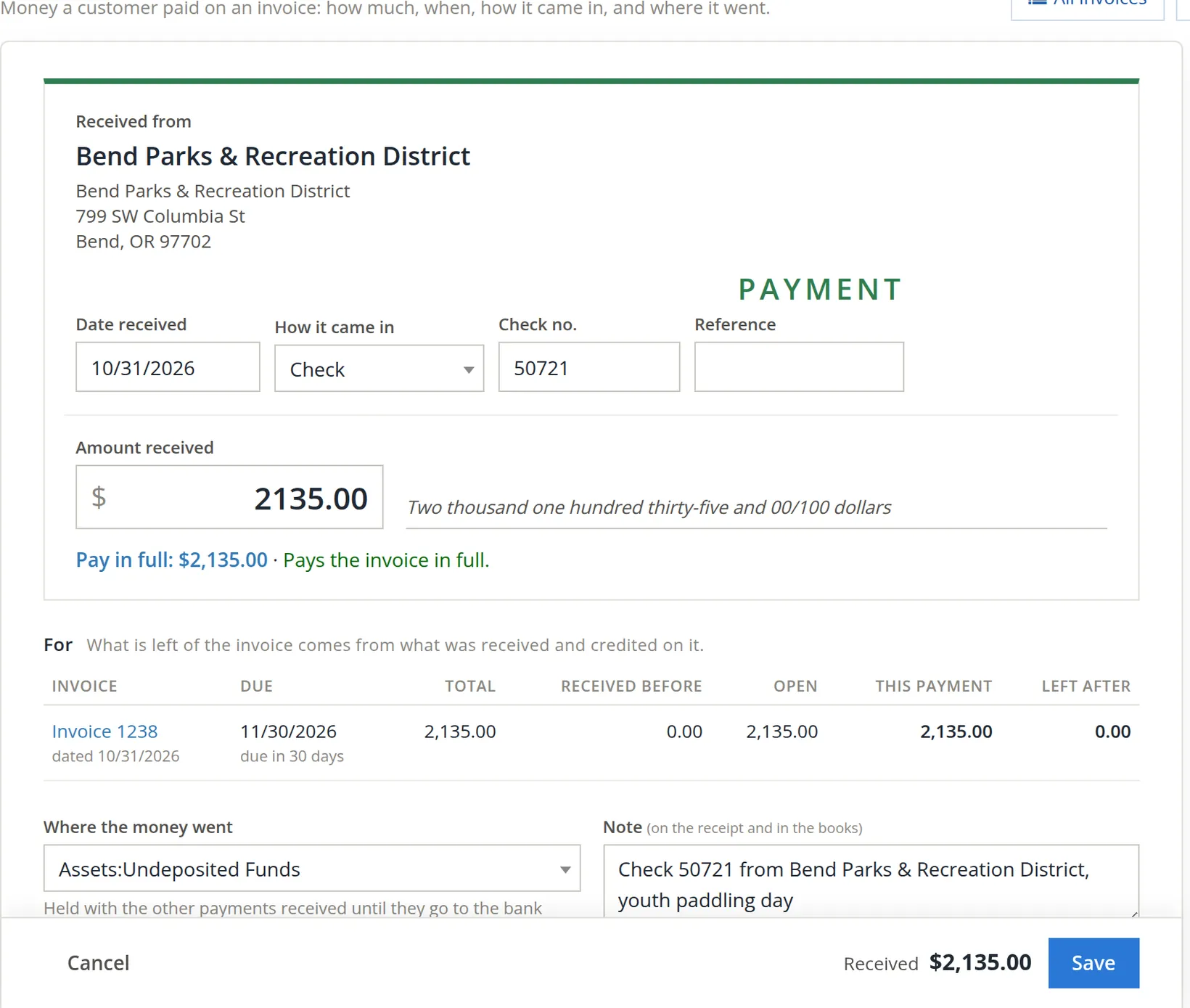
Go to Sales, find the invoice and click Receive payment A. The same link sits beside each invoice in the Dashboard's Needs attention list. The form opens with the customer filled in and the amount set to what is owed.
- 2
Set the date received 1
The day the payment reached you, not the date written on the check.
- 3
Choose how it came in 2 and type the number 3
Choices: Cash, Check, Credit card, ACH, EFT, Wire transfer, Other. For a check the next box asks for the Check no.; for an electronic payment it asks for the Confirmation no. Reference holds anything else, such as the customer's own payment number.
- 4
Check the amount 4
It starts at the full amount owed, written out in words underneath so a misplaced decimal stands out. Pay in full 5 confirms what that does: "Pays the invoice in full."
- 5
Read the invoice line 6
Total, received before, open, this payment, and Left after. Here: 2,135.00 open, 2,135.00 paid, 0.00 left.
- 6
Choose where the money went 7
A check you will take to the bank with others goes to Assets:Undeposited Funds. Section 4 explains the choice.
- 7
Add a note 8 and save 9
The note prints on the receipt and stays in the books. The button reads Received $2,135.00 Save, a last check of the amount. Press Ctrl+S to save from the keyboard.
Drop a photo of the check, or the remittance advice, on Attachments in the side panel of the payment form. When a customer says "we paid that in October", the proof is one click away.
Part of an invoice
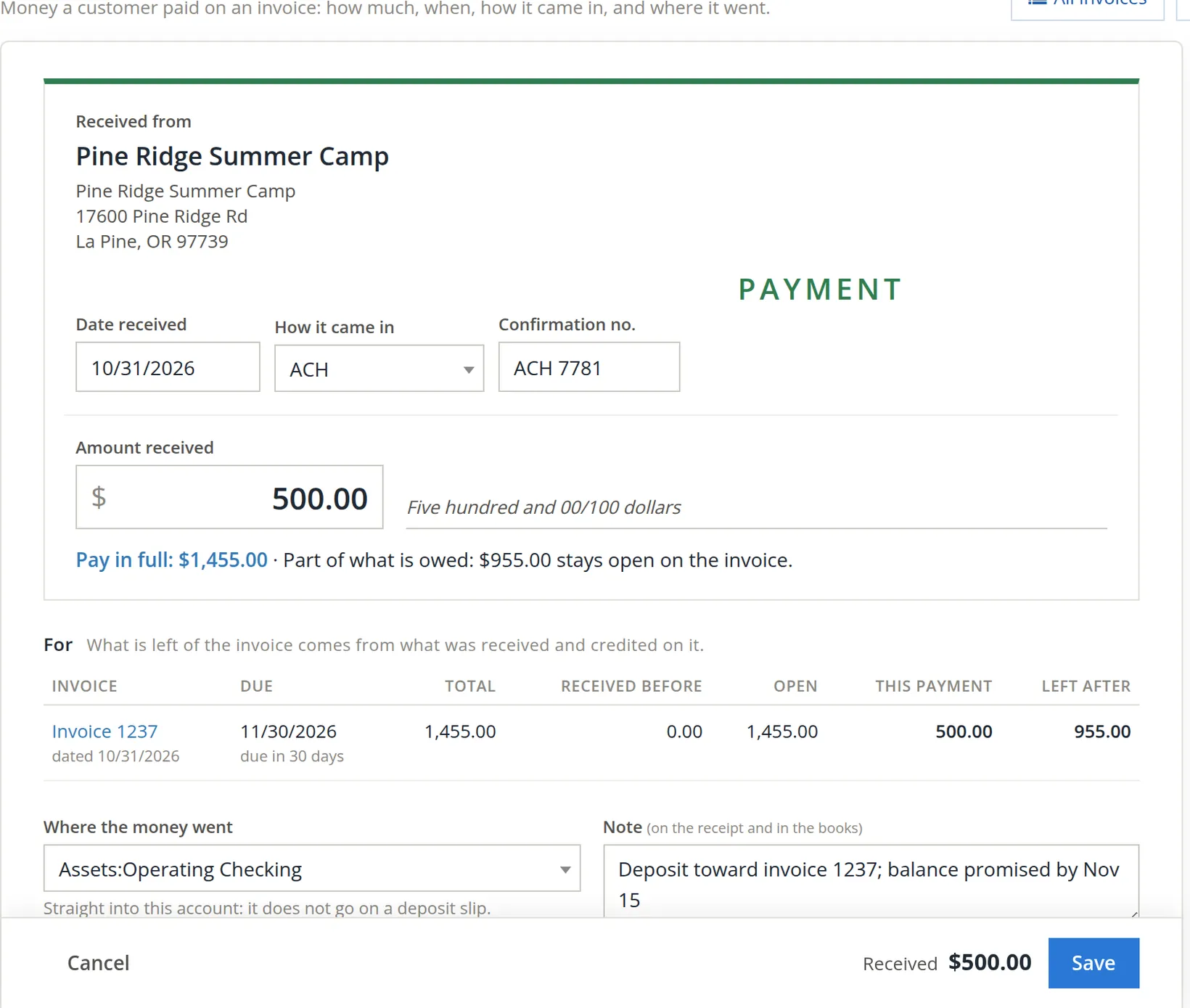
Pine Ridge Summer Camp sends $500.00 by ACH toward invoice 1237 ($1,455.00) and promises the rest by November 15. Follow Procedure A with two differences.
- 1
Choose ACH 1 and type the confirmation number 2
- 2
Type the amount actually received 3
Replace the full amount with 500.00. The line under it changes to say what will happen: "Part of what is owed: $955.00 stays open on the invoice." 4, and Left after shows 955.00 5.
- 3
Choose the bank account it landed in 6
An ACH payment is already in the bank, so it goes Straight into this account: Operating Checking. It never goes on a deposit slip.
- 4
Note the promise, and save
"Balance promised by Nov 15" in the note reminds whoever follows up.
After you save: receipt, status, changes
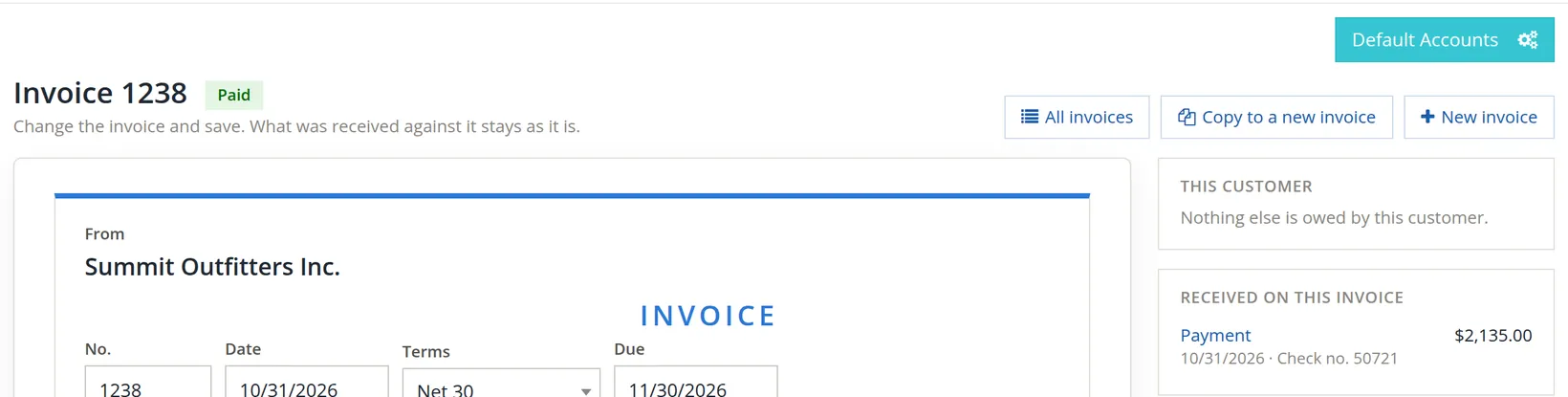
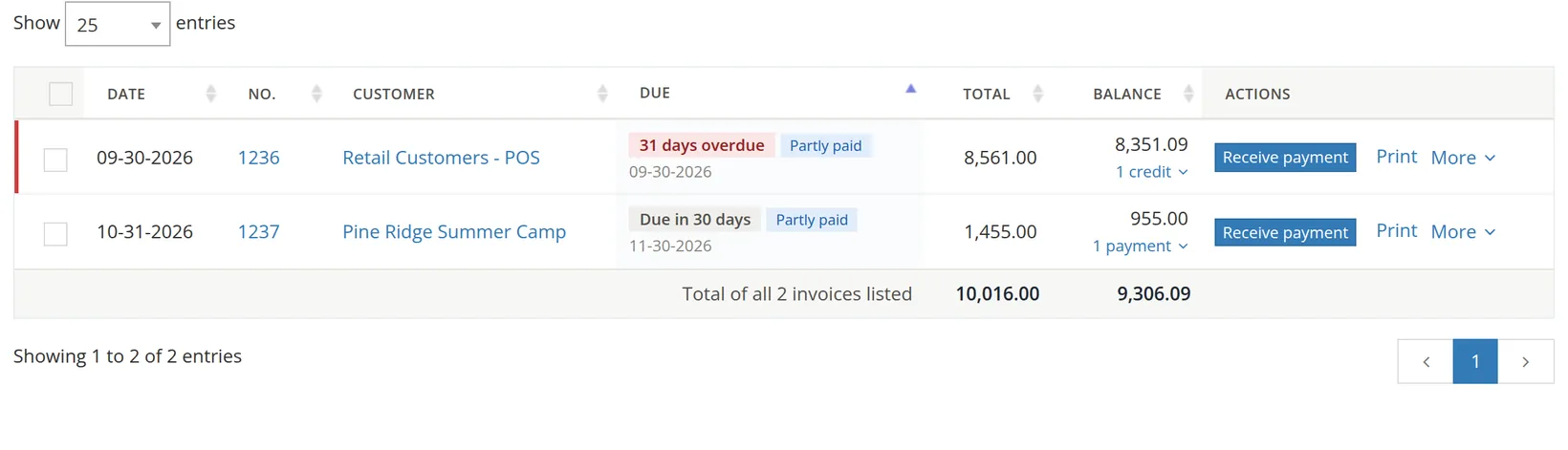
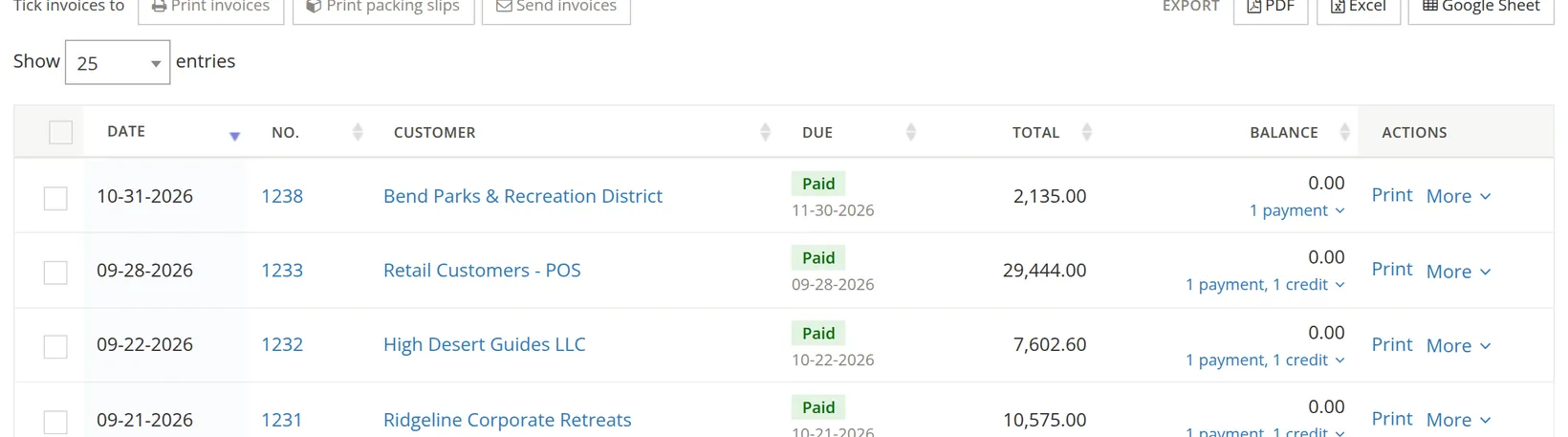
A green banner on the Invoices page confirms each payment, with links: "Payment of $2,135.00 from Bend Parks & Recreation District on invoice 1238 was saved. The invoice is paid in full. Open the payment · Print the receipt". For a partial payment it adds Receive more on it.
The invoice changes status by itself
Fully paid invoices move to the Paid tab; partly paid ones show under Partly paid and still count as unpaid. The card Received this month grows by each payment.
Printing a receipt
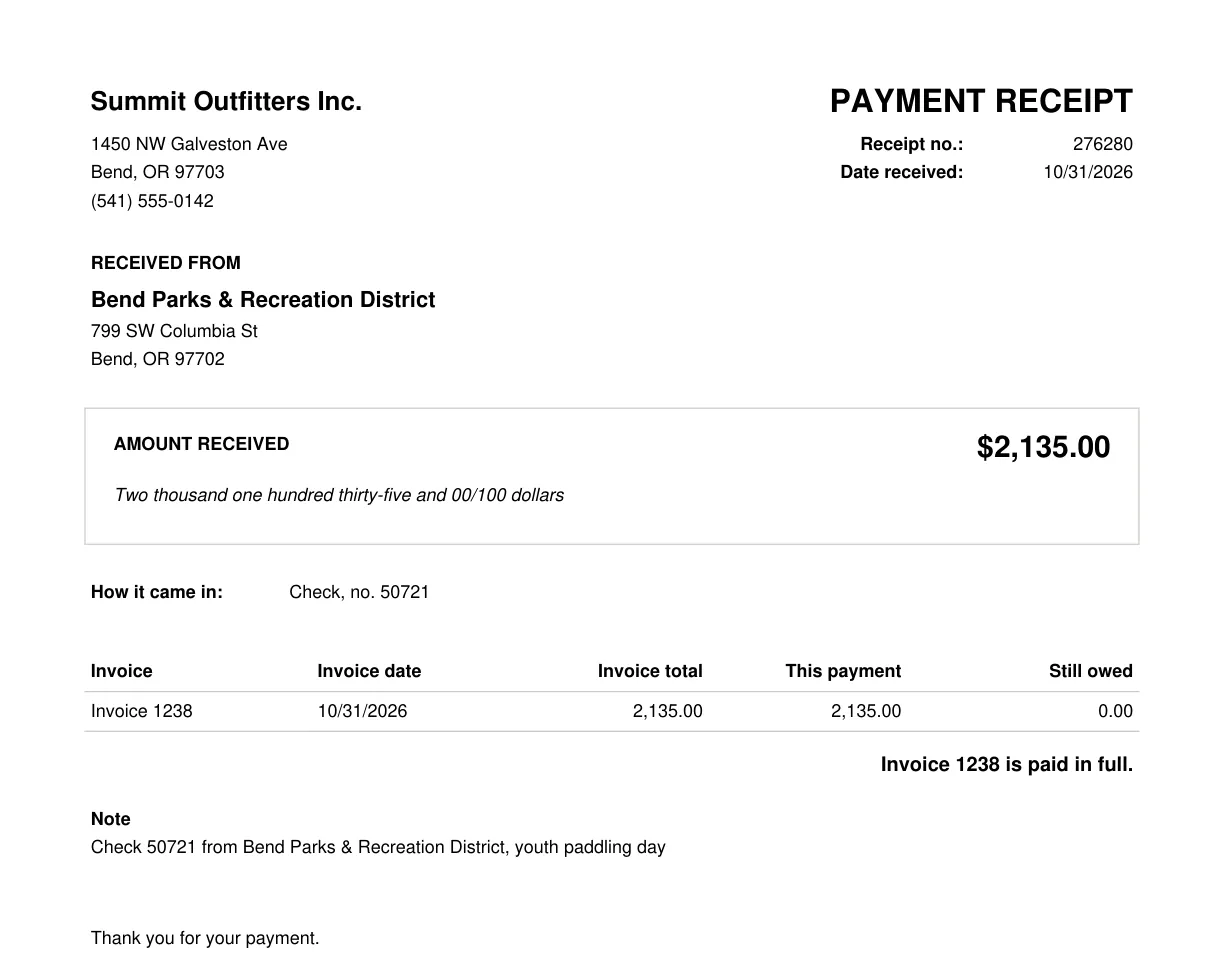
Click Print the receipt in the banner, or on the payment itself. The PDF names the payer, the amount in figures and words, how it was paid, each invoice it covers and what is still owed.
Changing or deleting a payment
Open the payment (from the banner, from "1 payment" on the list, or from Received on this invoice). Change anything and click Save changes, or click Delete. The invoice becomes open, partly paid or paid again according to what is then received on it.

Once a payment held in Undeposited Funds has gone onto a deposit slip, it is part of that deposit, and the deposit is part of your bank reconciliation. Change the amount of such a payment only if the deposit was wrong too, and fix both.
Undeposited Funds or straight to the bank?
The question is simple: has this money already arrived in the bank as one amount on its own?
| How it was paid | Where to put it | Why |
|---|---|---|
| Checks and cash you will take to the bank | Undeposited Funds | Several will go in on one deposit slip, and the bank statement will show one total. Grouping them on a deposit (Chapter 4.6) makes that total match. |
| ACH, EFT, wire | The bank account | Each arrives on its own and shows on the statement on its own. |
| Card payments | Payments Clearing, if you have it; otherwise Undeposited Funds | The processor pays out a day or two later, in batches, less its fee. |
BizBooks360 says which you chose right under the box: "Held with the other payments received until they go to the bank together on a deposit slip" or "Straight into this account: it does not go on a deposit slip."
Common mistakes and how to fix them
| Mistake | What happens | Fix |
|---|---|---|
| Recording the payment as new income (a sales receipt or deposit to an income account) | Income is counted twice and the invoice still shows unpaid. | Delete that entry and record the payment against the invoice. |
| A check recorded straight into the bank | The bank register never matches the deposit line on the statement. | Open the payment and change Where the money went to Undeposited Funds, then make the deposit. |
| Full amount left in when only part was paid | The invoice shows paid; the customer is never asked for the rest. | Open the payment, correct the amount, save. |
| Payment put on the wrong invoice | One invoice looks paid, another overdue. | Open the payment, delete it, and record it again on the right invoice. |
| Customer paid more than was owed | The extra has nowhere to go. | Pay the invoice in full and keep the extra as a customer credit for their next invoice (Chapter 2.5). |
Check your understanding
1. Does recording a $2,135.00 payment increase income?
Answer
No. It moves the amount from Accounts Receivable to Undeposited Funds (or the bank). Income was recorded by the invoice.
2. A customer pays by ACH. Undeposited Funds or the bank?
Answer
The bank account. It arrived on its own and will not go on a deposit slip.
3. You receive $500.00 on a $1,455.00 invoice. What does the invoice show afterwards, and on which tab?
Answer
955.00 left, with "1 payment" under the balance, on the Partly paid tab. It still counts as unpaid.
4. Why does the amount appear in words on the form?
Answer
So that a slip such as 21,350.00 for 2,135.00 is obvious before you save.
5. Where do you find the payment later to print a receipt?
Answer
From the banner after saving, from "1 payment" on the invoice list, or from Received on this invoice on the invoice itself; then Print the receipt.
Quick reference card
Receive a payment
- Sales → invoice → Receive payment.
- Date received, how, number.
- Amount: full, or what really came.
- Where it went.
- Note, then Save.
Where it went
- Checks and cash: Undeposited Funds.
- ACH, EFT, wire: the bank.
- Cards: Payments Clearing.
- Then deposit (Chapter 4.6).
Afterwards
- Print the receipt.
- Attach the check or advice.
- Partly paid? Follow up the rest.
- Mistake? Open the payment, change or delete.