
Chapter 1.2
Creating a New Company
How to start a fresh set of books with the setup wizard: six short pages of plain questions that build a chart of accounts, tax settings and a starting checklist for your kind of business.
When you finish this chapter you will be able to:
- Explain what the setup wizard builds and why each question matters.
- Answer the six pages of the wizard for a real business.
- Choose a starting date and an accounting method with confidence.
- Review the accounts before they are created, and finish the first-week checklist.
Contents
Before you begin
Every answer can be changed later, so do not wait for perfect information. These facts make the three minutes go smoothly:
- What the business does, and how customers pay: invoices, card, cash, online.
- How it is taxed. The return it files: Schedule C, Form 1065, 1120-S or 1120. Your last tax return or your accountant will know.
- Who works there. Just you, employees on payroll, or contractors.
- What it owns or owes. Vehicles, equipment, loans, credit cards.
- The day the books should start, usually January 1 of this year.
Open a separate company for each business that files its own tax return. Two shops owned by one LLC can share books and be told apart with departments or projects. Two LLCs each filing a return need two companies.2
How the wizard builds your books
A chart of accounts used to be the hardest part of starting books. You had to know, before you had made a single entry, every category the business would ever need. The wizard turns that around. It asks about the business in plain words, and each answer adds only the accounts it needs. You watch the result grow in the panel on the right of every page.
It also sets the plumbing that beginners never see: which accounts invoices, bills and payments post to, where sales tax goes, which tax-return line each account maps to, and how the year closes.
Page by page
Start from the company list (Chapter 1.1) and click New company. The wizard opens on page 1.
- 1
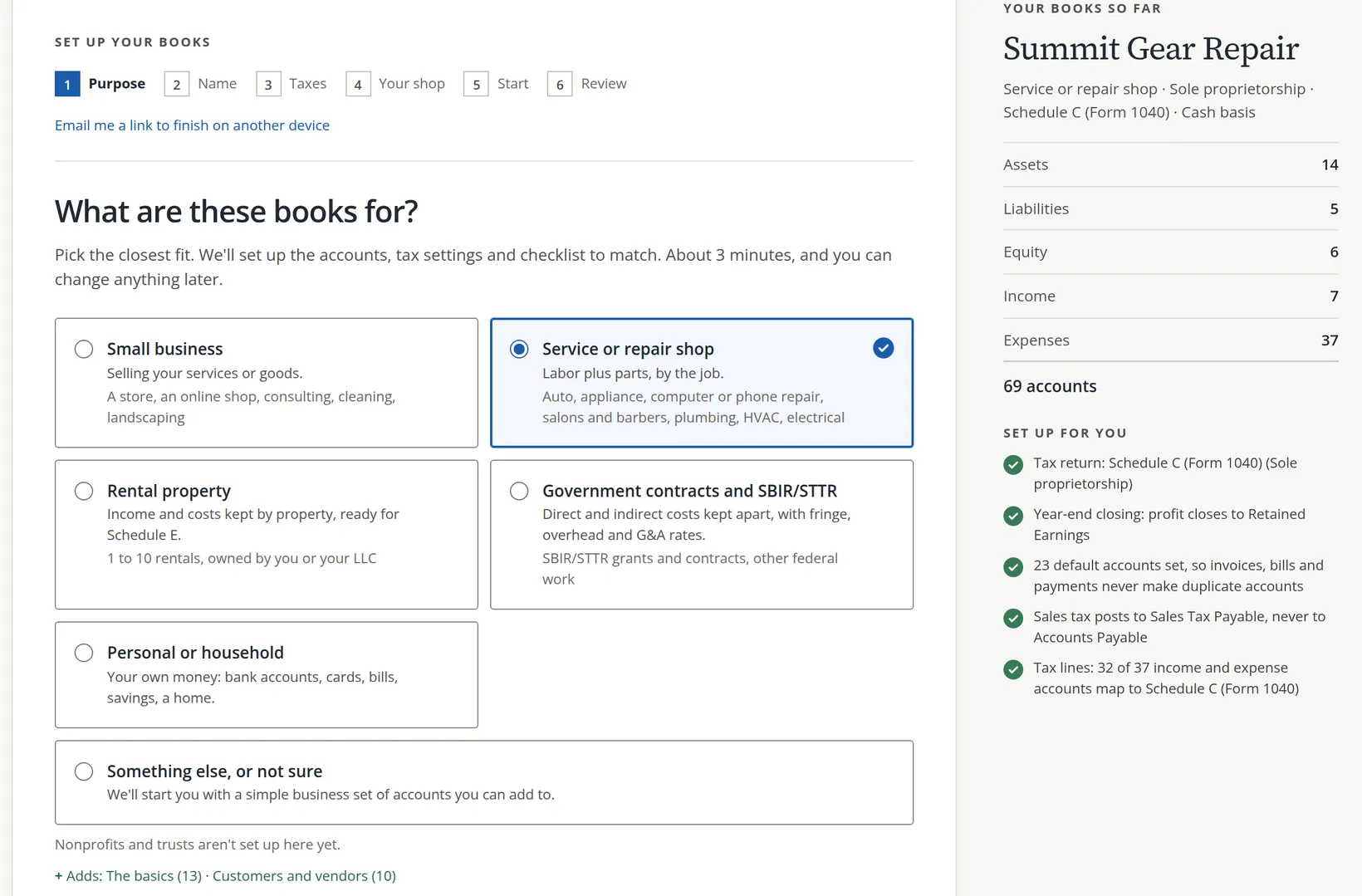
Page 1. Pick what the books are for 2
Choose the closest of six: Small business, Service or repair shop, Rental property, Government contracts and SBIR/STTR, Personal or household, or Something else, or not sure. The choice decides which questions come on page 4. Summit Gear Repair is a Service or repair shop.
Then click Continue: name your books at the bottom.
Nonprofits and trusts are not set up by the wizard yet. They report in a different shape, with net assets instead of owner's equity.
- 2
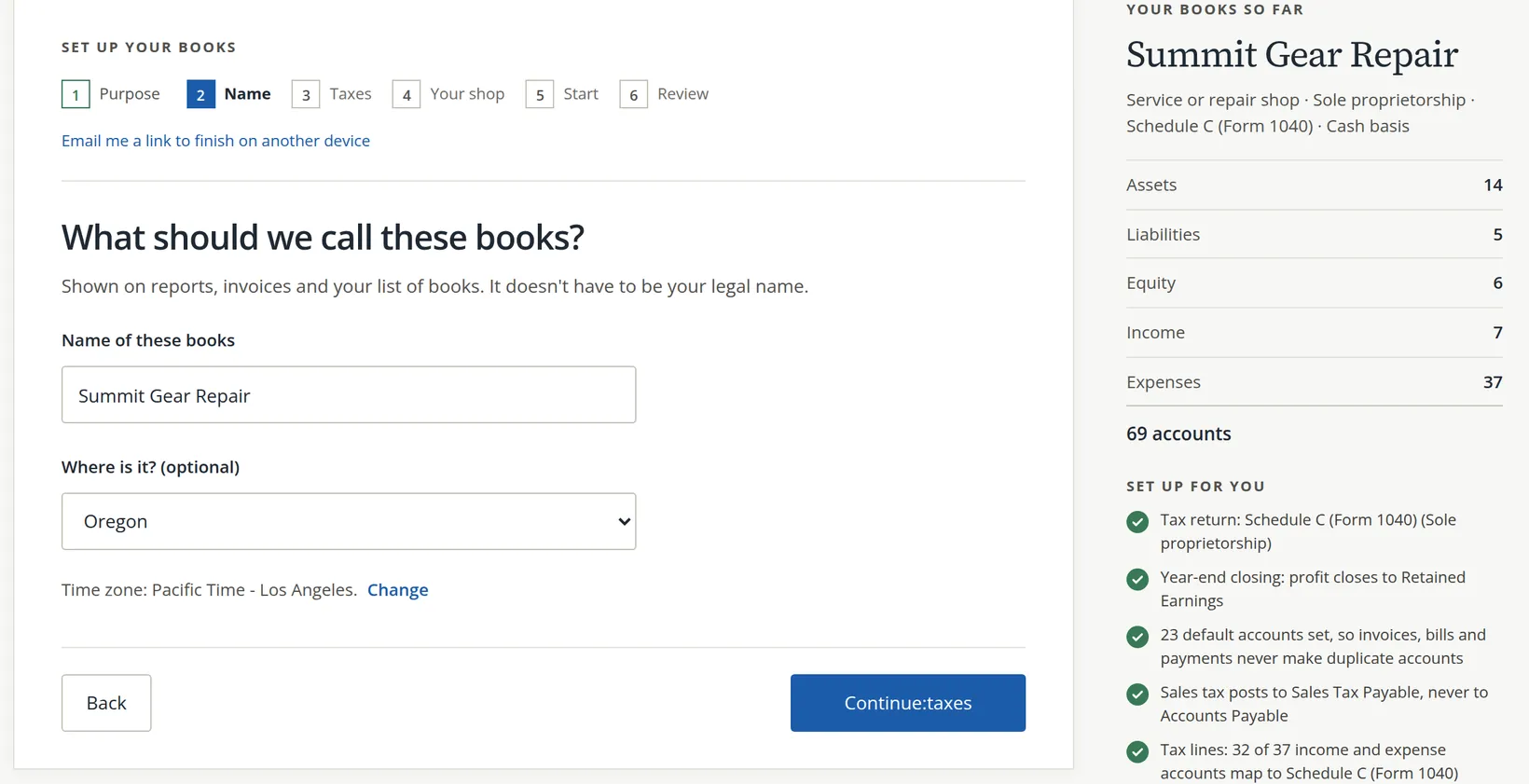
Page 2. Name the books 1 and say where they are 2
The name appears on invoices, reports and the company list. It does not have to be the legal name, so a trading name is fine. The state is optional but helps with sales tax and payroll later.
Check the time zone. It decides what "today" means for dates on new entries. Click Change 3 if it is wrong. Then Continue: taxes 4.
- 3
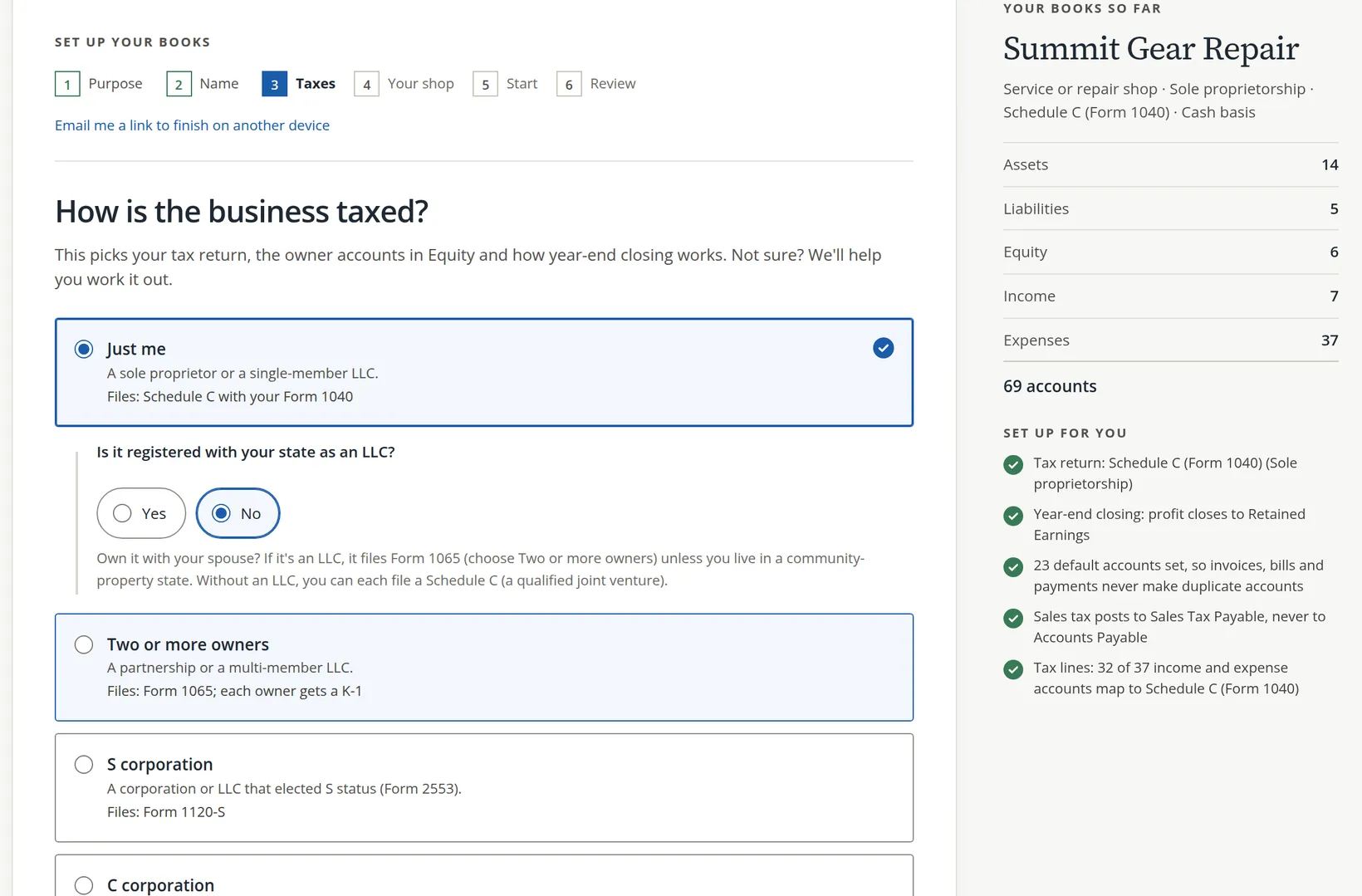
Page 3. Say how the business is taxed 1
This choice picks the tax return the accounts map to, names the owner accounts in Equity, and sets how the year closes.
Choice Who it fits Return Just me A sole proprietor or single-member LLC Schedule C with Form 1040 Two or more owners A partnership or multi-member LLC Form 1065, with a K-1 for each owner S corporation A corporation or LLC that elected S status Form 1120-S C corporation A corporation that pays its own income tax Form 1120 Answer any follow-up question 2. If you do not know, choose I'm not sure and answer three quick questions instead. Then continue.
The tax choice is easy to change today and tedious to change after a year of entries, because owner draws and year-end closing depend on it. A two-minute call to your tax preparer now is time well spent.
- 4
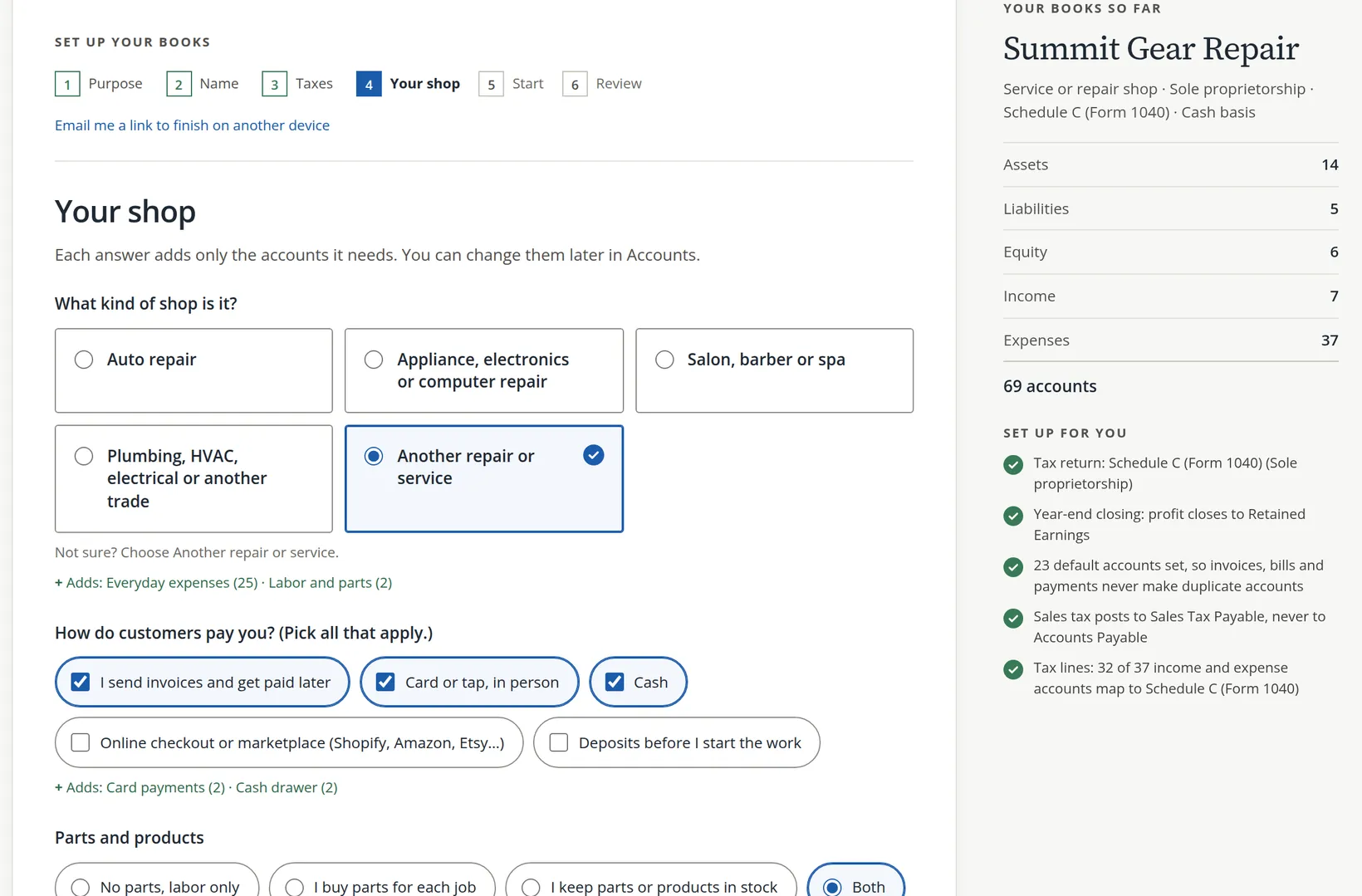
Page 4. Describe the business
Page 4 is named for your answer on page 1 (Your shop, Your business, Your rentals and so on) and may run to a second screen. For a repair shop it asks:
- What kind of shop it is. Summit Gear Repair chose Another repair or service.
- How customers pay: invoices, card, cash, online, deposits. Tick all that apply. Card adds a Payments Clearing account; cash adds a Cash Drawer.
- Parts and products: none, bought per job, kept in stock, or both. Stock adds Inventory and Cost of Goods Sold.
- Sales tax: yes, no or not sure.3
- 5
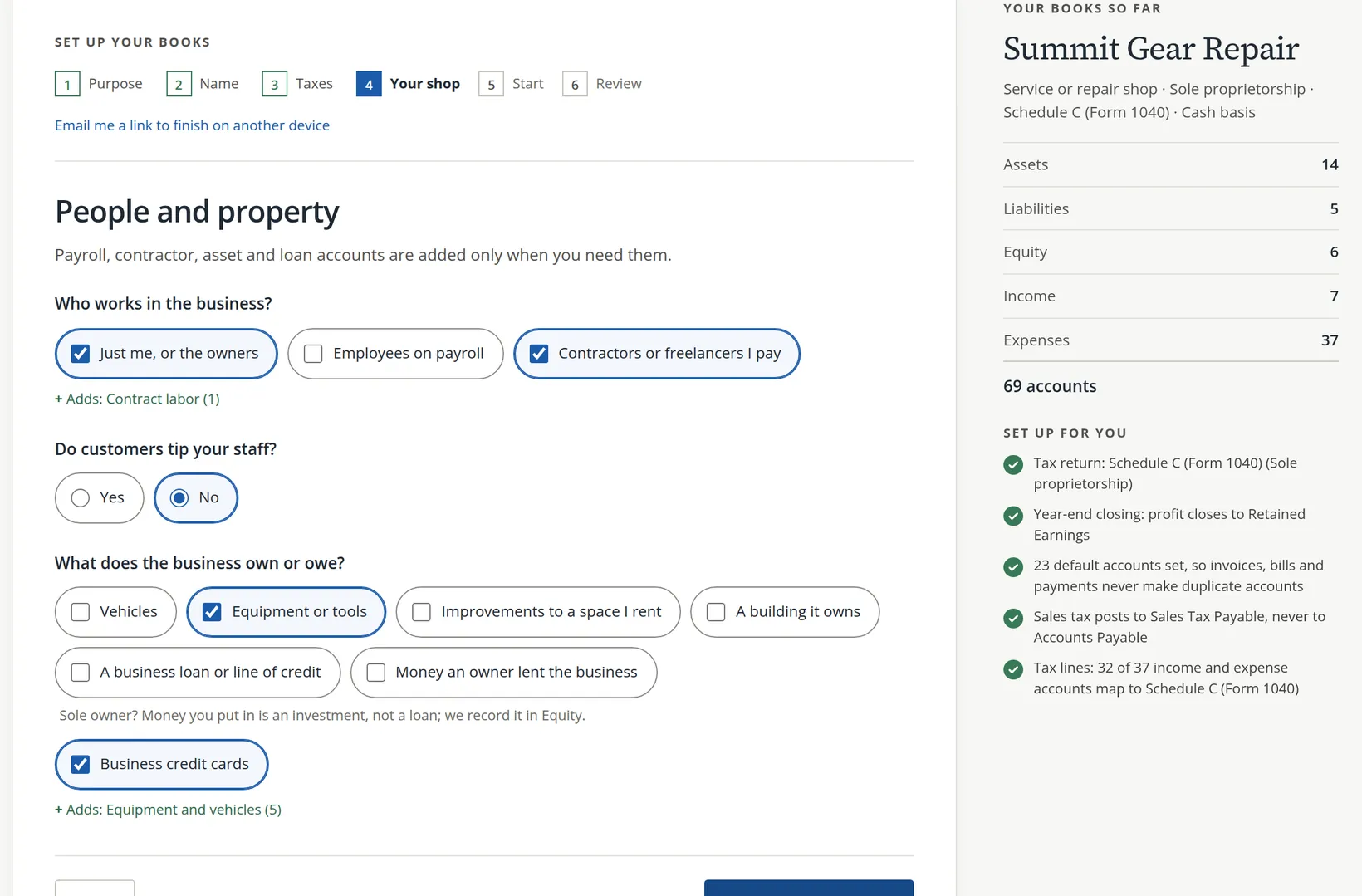
Page 4, continued. People and property
Who works in the business (owners, employees on payroll, contractors) and what it owns or owes (vehicles, equipment, a building, loans, credit cards). Payroll, contractor, asset and loan accounts are added only if you tick them.
- 6
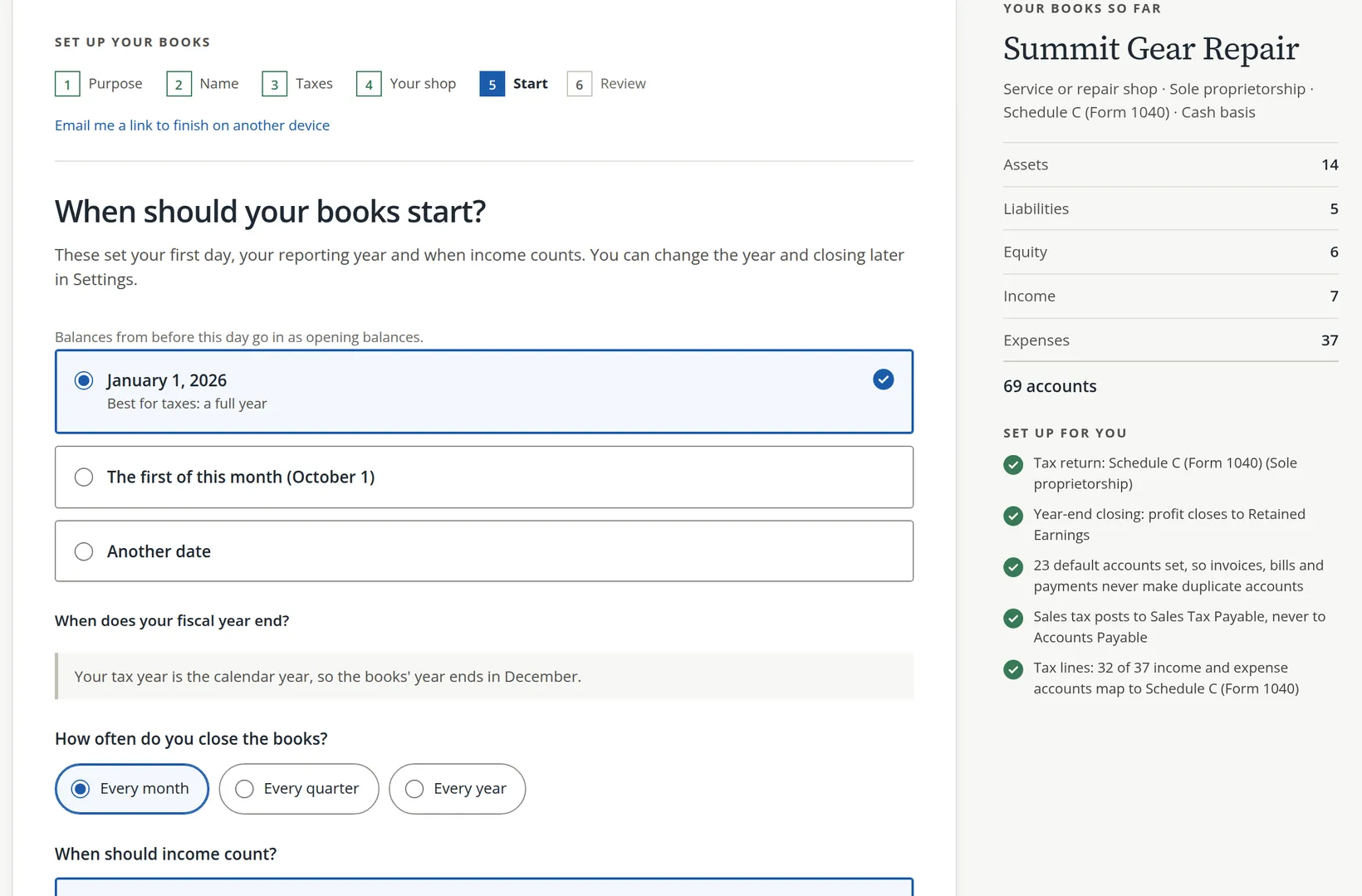
Page 5. Choose when the books start 1
January 1 of this year is marked Best for taxes: a full year, because your tax return covers the full year. Balances from before the start date go in as opening balances.
- 7
Set how often you close 2 and when income counts
The fiscal year end follows your tax year. Closing Every month means you check and close each month as it ends, so mistakes surface within weeks instead of at tax time (Chapter 15.5). Choose When the money arrives (cash basis) unless your accountant says otherwise. Section 4 explains both choices, and both can be changed later in Settings → Fiscal year and reporting. Then Continue to review.
Review and create
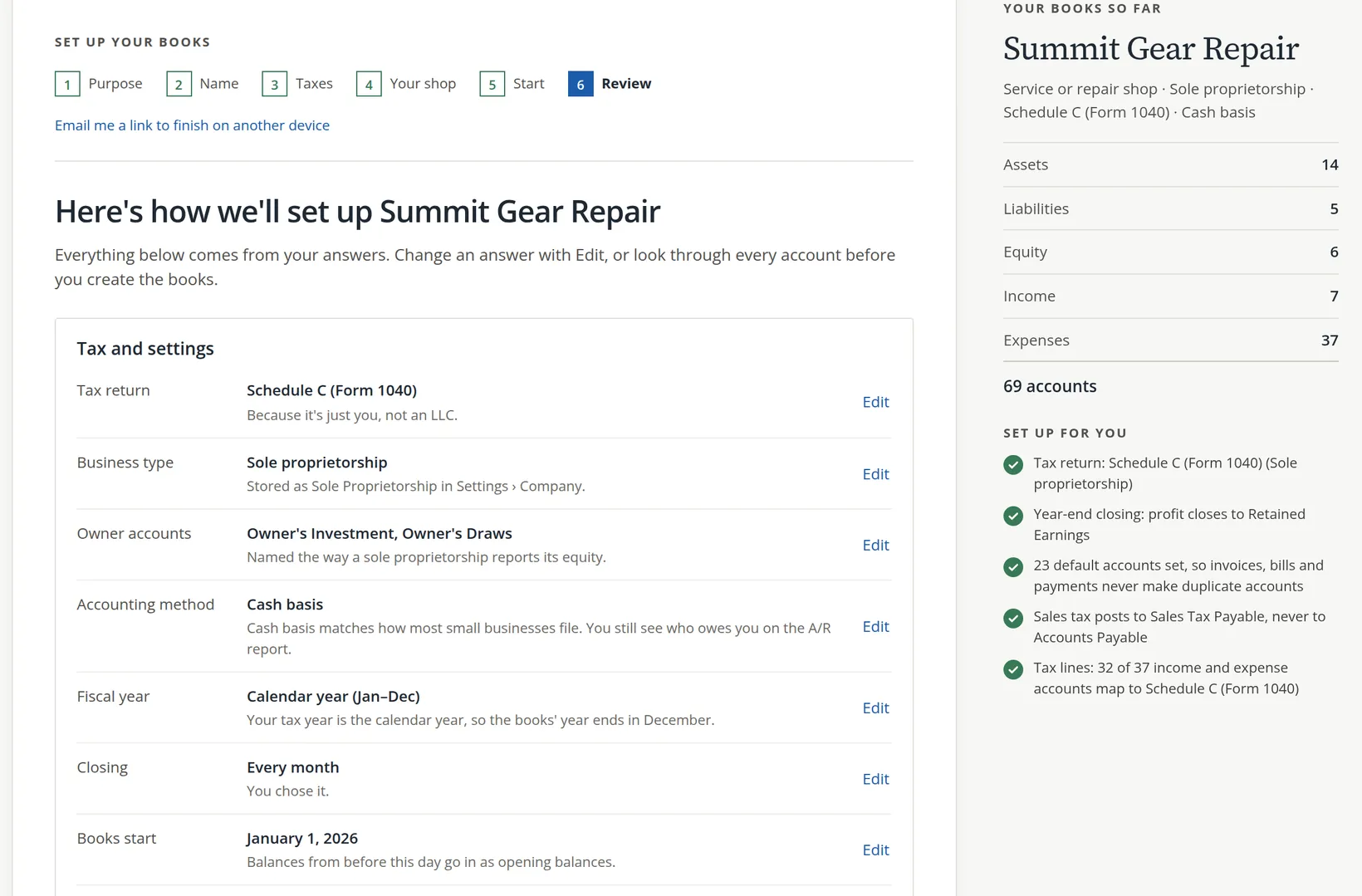
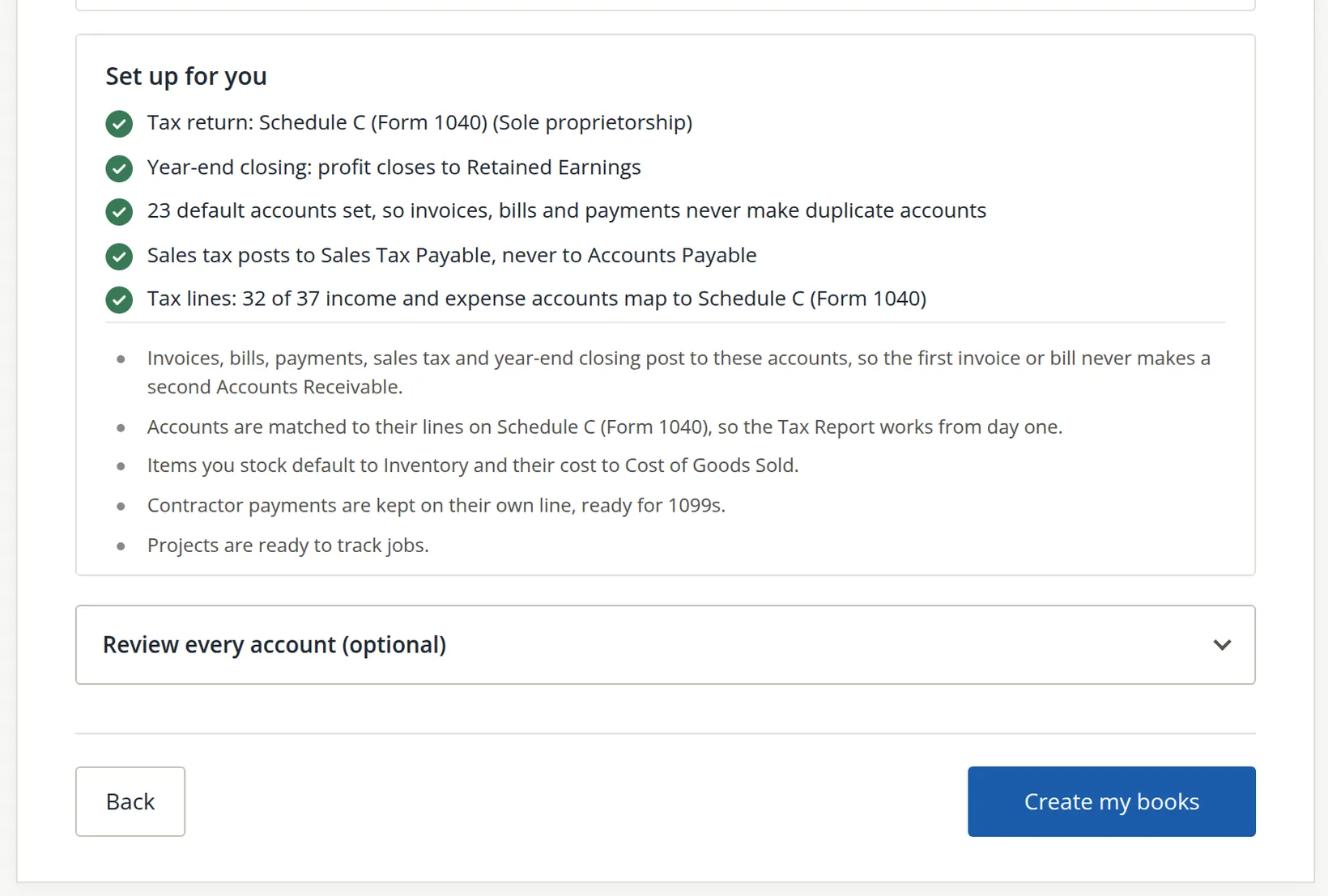
Nothing has been created yet. Page 6 shows every decision and every account so you can check before you commit.
- 8
Read Tax and settings
Tax return, business type, owner accounts, accounting method, fiscal year, closing, start date and time zone. Click Edit 1 beside anything that is wrong. On that page the Continue button now reads Back to review, which brings you straight back here.
- 9
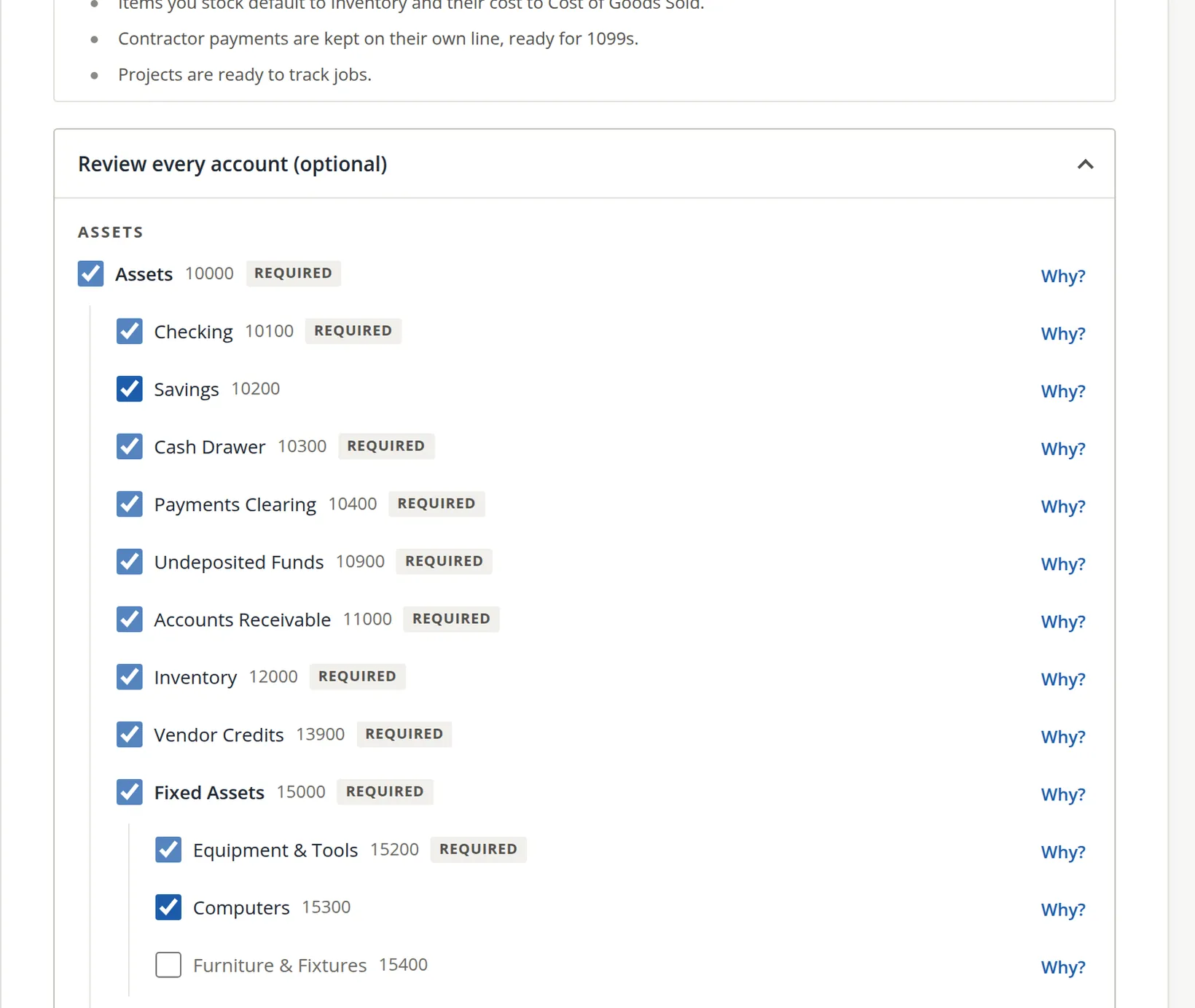
Look through the accounts
Your accounts lists the groups and why each was added. To see every single account, open Review every account (optional).
- 10
Click Create my books 2
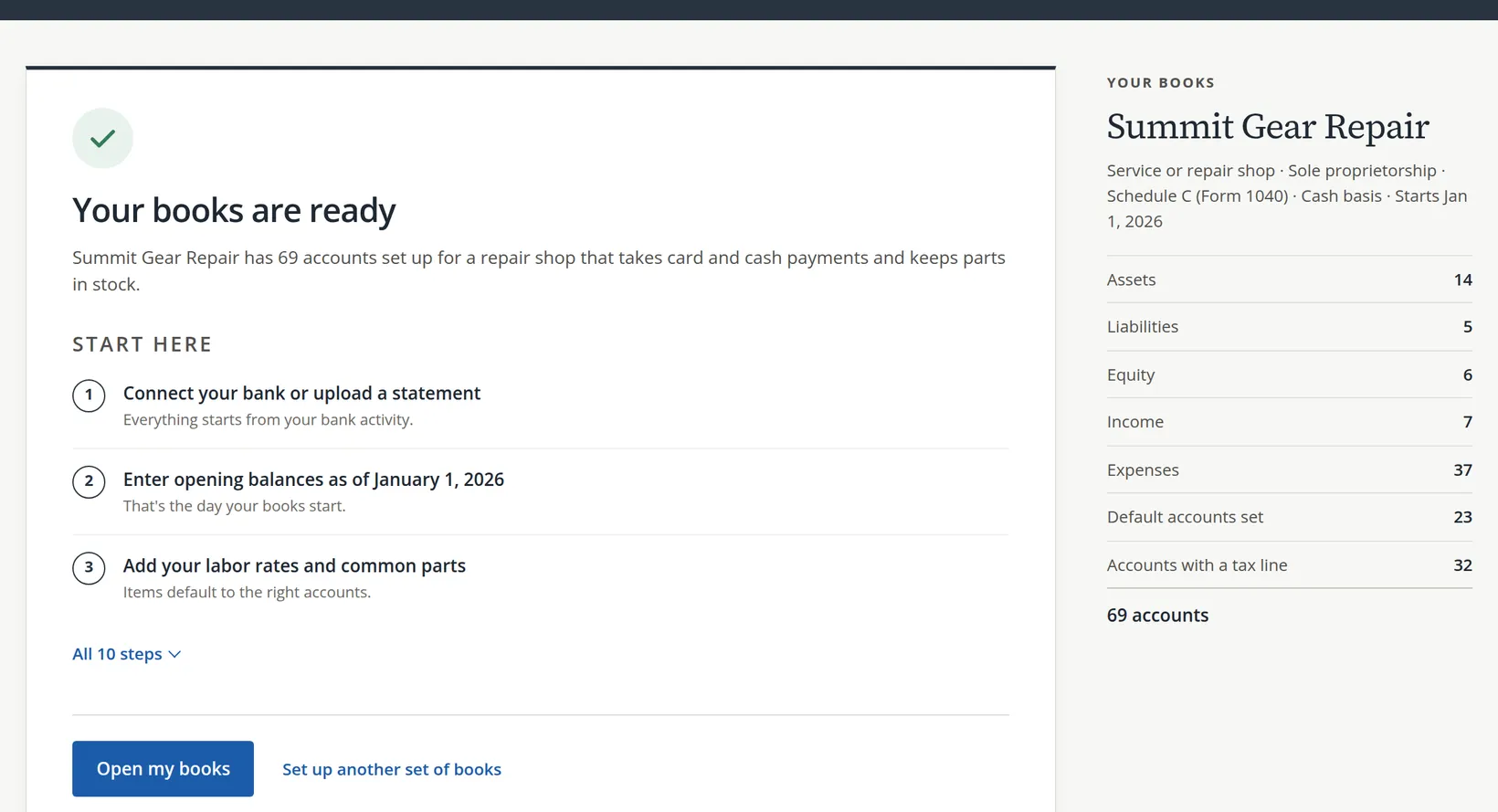
BizBooks360 builds the company. It takes a few seconds.
- 11
Click Open my books 1
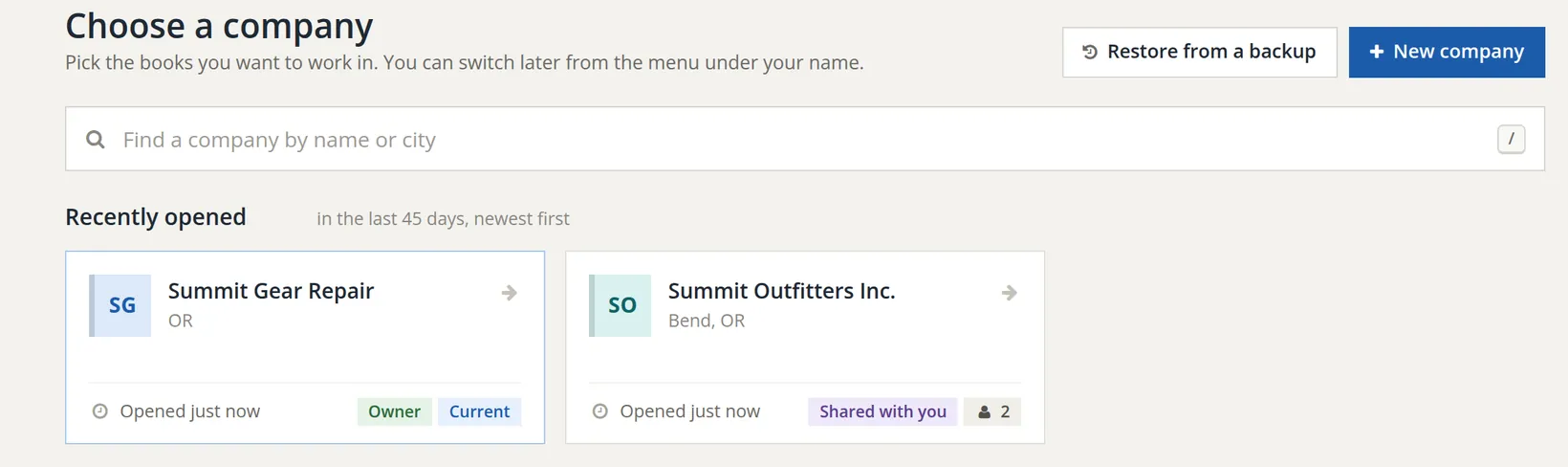
The new company opens on its Dashboard. You are its owner, and it appears in your company list tagged Owner.
Your first week: the starting checklist
A new company's Dashboard opens with Get your books going, a checklist of ten steps chosen from your answers. Summit Gear Repair's list starts with connecting the bank, entering opening balances and adding labor rates and parts, then card payouts and the cash drawer float because the shop takes cards and cash.
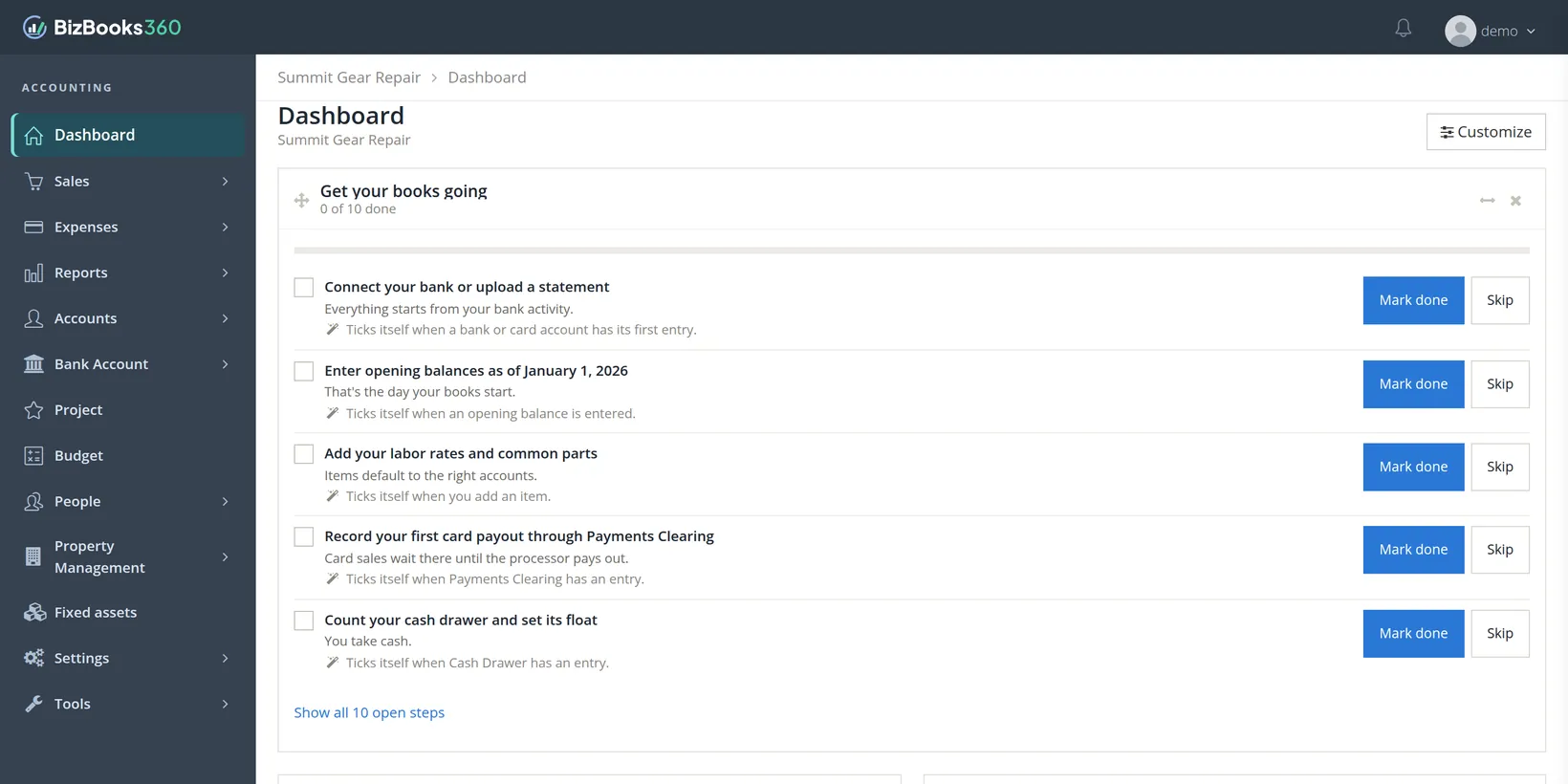
The order is deliberate. The bank account comes first because nearly every later entry touches it. Opening balances come second because every report after the start date builds on them. Reconciling a bank account whose opening balance is wrong is a frustrating afternoon.
The two big decisions, explained
When should the books start?
The start date is the line between history and bookkeeping. Before it, you record only balances: what was in the bank, what customers owed, what you owed. After it, you record every transaction. January 1 is the usual choice because your tax return covers the calendar year, and a full year of entries makes the return straightforward. Starting mid-year is fine for a brand-new business: choose the day it began.
Cash or accrual?
| Cash basis | Accrual basis | |
|---|---|---|
| Income counts | When the customer pays | When you invoice |
| Expenses count | When you pay | When the bill arrives |
| Example | A $400 repair invoiced December 20 and paid January 5 is January income. | The same repair is December income. |
| Best for | Most small businesses; matches how most file | Larger businesses, inventory-heavy firms, lenders who ask for it |
Either way, BizBooks360 still tracks who owes you and whom you owe, so you never lose sight of unpaid invoices or bills.6
Common mistakes and how to fix them
| Mistake | What happens | Fix |
|---|---|---|
| Two businesses in one company | Their profits mix, and neither return can be prepared from the reports. | Create a second company and move the second business's entries there. |
| Wrong tax choice | Owner accounts and year-end closing are set up for the wrong kind of business. | Change the business type in Settings → Company information (Chapter 15.1) before posting much. |
| Start date too early | Months of history to enter that your tax preparer did not need. | Start on January 1 of the current year and enter opening balances. |
| Wrong time zone | Entries made late in the evening get tomorrow's or yesterday's date. | Fix it in Settings → Fiscal year and reporting (Chapter 15.1). |
| An account you need is missing | Nothing to post to. | Add it in Accounts → Chart of Accounts (Chapter 5.1). |
Check your understanding
1. When are the accounts actually created?
Answer
Only when you click Create my books on page 6. Until then your answers are a saved draft.
2. A sole owner puts $5,000 of savings into the new shop. Is that a loan to the business?
Answer
No. For a sole owner it is an investment, recorded in Equity (Owner's Investment). The wizard says so on the People and property page.
3. The shop takes card payments. Which account did the wizard add for that, and why?
Answer
Payments Clearing. Card sales wait there until the card processor pays them out to the bank, often a day or two later and less fees.
4. Why is January 1 marked "Best for taxes"?
Answer
Because a calendar-year tax return covers January to December. Books that start January 1 hold every entry the return needs.
5. You set up books on your phone and want to finish at your desk. What do you do?
Answer
Click Email me a link to finish on another device. The link goes to your own e-mail; after you sign in at your desk the wizard picks up the saved draft.
Quick reference card
The six pages
- Purpose: what the books are for.
- Name, state, time zone.
- Taxes: which return.
- Your business, then people and property.
- Start date, closing, cash or accrual.
- Review, then Create my books.
Safe defaults
- Start January 1 of this year.
- Close every month.
- Cash basis, unless told otherwise.
- Tick only what the business really has.
First week
- Open my books.
- Connect the bank or upload a statement.
- Enter opening balances.
- Add your products and services.
- Work down the checklist.
Notes
- Notes give background, exceptions and the reasons behind a rule. You can follow every procedure without them. ↑
- Each company is a closed set of books with its own balance sheet. Moving money between two companies you own is recorded in both: as a loan or an owner's contribution in one, and the matching entry in the other. ↑
- Oregon has no general sales tax, so Summit Gear Repair answered No. The wizard still adds a Sales Tax Payable account so that if you ever do collect sales tax, it is recorded as money owed to the state and never counted as income. ↑
- The pictures were taken late on October 31 Pacific time, which is why the second choice reads "The first of this month (October 1)". The wizard counts dates in the time zone chosen on page 2. ↑
- Required accounts are ones BizBooks360 posts to by itself: Accounts Receivable for invoices, Undeposited Funds for payments waiting to be deposited, Imbalanced for an entry whose two sides do not match, and similar. Removing them would leave those entries nowhere to go. ↑
- Under the cash basis you still enter invoices and bills. The reports count them when paid. The Aged Receivables report (Chapter 6.6) still shows every unpaid invoice. ↑