
Chapter 1.4
The Dashboard
How to read the first page you see every day: what needs attention, how healthy the business is, where cash is heading, and how to arrange the page around the questions you ask most.
When you finish this chapter you will be able to:
- Work the Needs attention list from the Dashboard.
- Read the six measures of Business health and say what each means.
- Interpret the cash balance, cash forecast and bank account widgets.
- Recognise the Property Management widgets when that module is on.
- Add, remove, move and resize widgets.
Contents
What the Dashboard is for
The Dashboard answers four questions in the order a manager usually asks them:
- Is anything on fire? Overdue invoices and bills, things to review. (Needs attention)
- Is the business healthy? Margins, growth, how fast customers pay. (Business health)
- Will we have enough cash? Today, and over the next weeks. (Cash balance, Cash forecast, Bank accounts)
- Are we making money, and who owes whom? (Income and expenses, Where the money goes, Money owed to you, Bills to pay)
Each box is called a widget. Every figure is calculated from your books when the page opens, and many figures link to the list or report behind them.
The widgets read your entries. If last week's deposits are not entered, the cash balance is wrong, however good it looks. The Dashboard is a summary, not a substitute for keeping the books up to date and reconciling them.
Needs attention
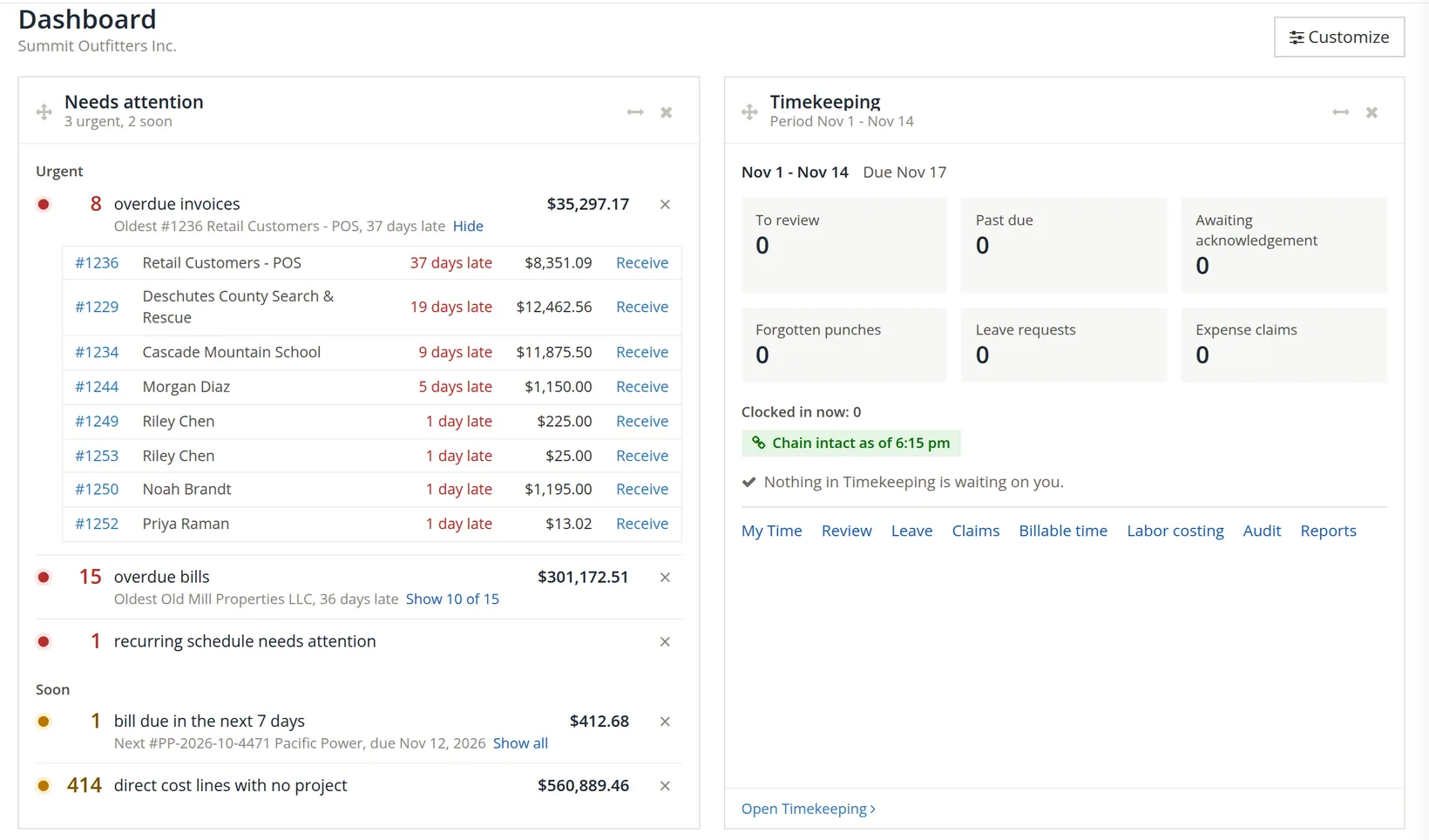
The first widget lists what is waiting for you, most urgent first. The lines are sorted under headings: Urgent 8 (red lamps: overdue invoices and bills, a recurring schedule that needs attention, Chapter 14.1), Soon (amber lamps: bills falling due this week, direct cost lines with no project) and, when there are such lines, When you can. The headings appear only when more than one kind is present, and the subtitle under the widget's name counts them; in the figure it reads 3 urgent, 2 soon.
Each line starts with its coloured lamp and the count as a large figure 9, then the words, then the total on the right and a ×. Under the words of an invoice or bill line sits one fact: the oldest item (Oldest #1236 Retail Customers - POS, 37 days late) or the next one due. The words are a link to the page that deals with them: the Invoices list on its Overdue tab, the Expenses list on its Overdue view, and so on. Six lines show at first; any more wait behind Show N more.
- 1
Show the documents behind a line 4
Click the small Show all beside the fact line. The line opens into a short table 6: each overdue invoice, its customer, how many days late, the balance, and a Receive link (on a bill line, Pay). Click the invoice number to open it, and Hide to fold the table away. A long list shows only part: Summit's bill line offers Show 10 of 15, the ten oldest. When the whole widget holds three lines or fewer, the first line's table is already open.
- 2
Act, or dismiss 5
If you have already dealt with it (you called the customer, a payment is on its way), click ×. The line stays away until something changes, such as another invoice becoming overdue.
- 3
Follow a link line 7
Some lines have no table to show, only their link. Summit's last line under Soon, 414 direct cost lines with no project ($560,889.46), counts the entries of the open period posted to accounts that are mapped to a direct project cost but name no project. Clicking its words opens the Books Health report (Reports → Bookkeeping and audit) on that test, where each line can be found and given its project (Volume 7).2
If the company uses Timekeeping, the Timekeeping widget sits beside Needs attention with timesheets to review, forgotten punches, leave requests and expense claims. Volume 12 explains it.
Business health
Six measures, each over the last 90 days and compared with the 90 days before. A green mark means the measure is in a good range or improving; amber and red mean look closer.
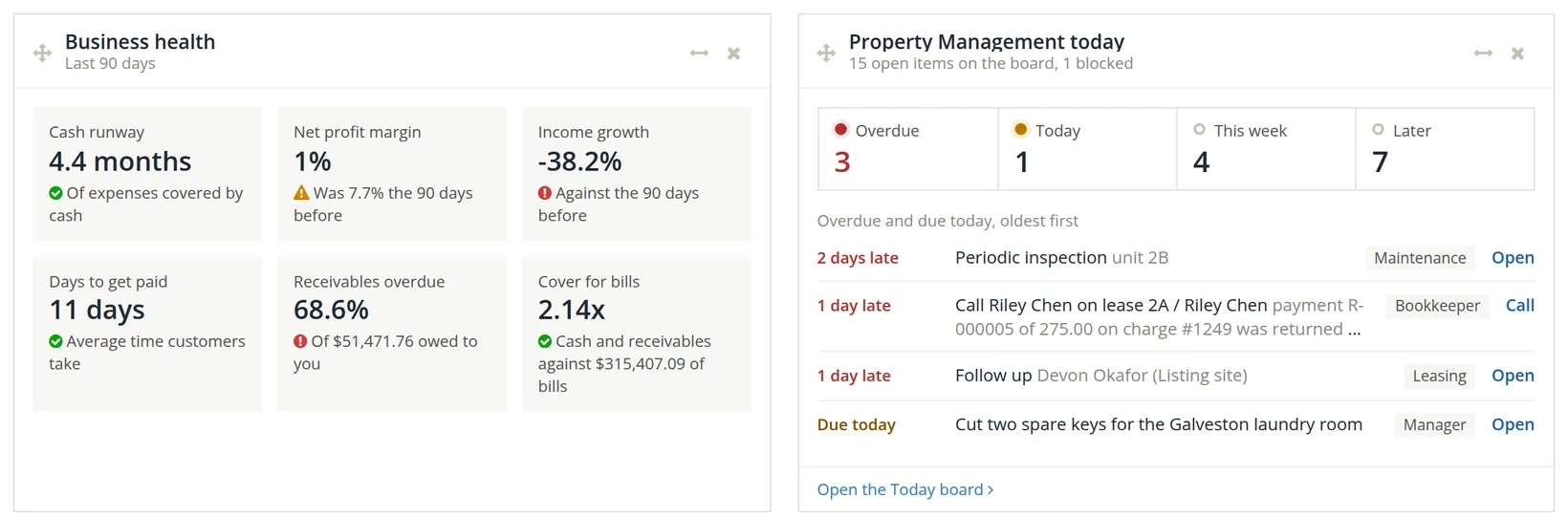
| Measure | What it tells you | Summit's figure |
|---|---|---|
| Cash runway | How many months of spending your cash would cover if no money came in. | 4.4 months |
| Net profit margin | Net income as a share of income: how many cents of each dollar of sales you keep. | 1%, down from 7.7% |
| Income growth | Income against the 90 days before. | −38.2% |
| Days to get paid | The average time customers take to pay an invoice. | 11 days |
| Receivables overdue | The share of money owed to you that is past due.3 | 68.6% of $51,471.76 |
| Cover for bills | Cash plus receivables, divided by unpaid bills. Above 1 means you could pay every bill.4 | 2.14× |
Summit looks rich (2.14× cover, 4.4 months of runway) but its margin fell from 7.7% to 1% and income fell by more than a third. Plenty of cash today can hide a business that is slowing down. The comparison lines under each figure are where the story is.
Cash: balance, forecast, bank accounts
Cash balance
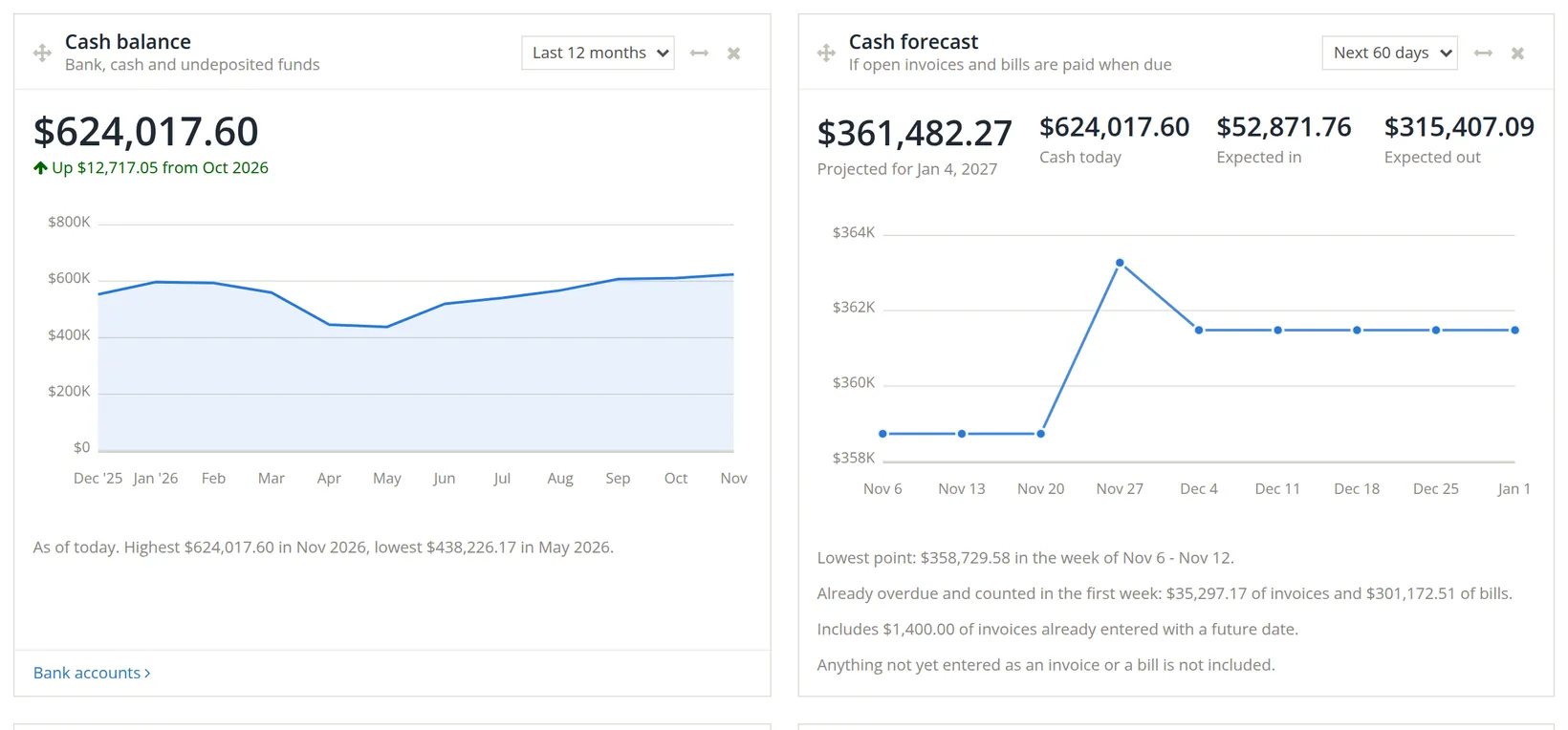
The month-end total of your bank, cash and undeposited funds accounts, as a line over 6, 12 or 24 months 2. The sentence under the chart gives the highest and lowest months.
Cash forecast
Where cash is heading over the next 30, 60 or 90 days 1, if every open invoice and bill is paid on its due date. It starts from cash today, adds expected in (open invoices) and subtracts expected out (open bills), week by week. For Summit: $624,017.60 + $52,871.76 − $315,407.09 = $361,482.27, the figure projected for Jan 4, 2027. Expected in is $1,400.00 more than the $51,471.76 customers owe today because it also counts an invoice already entered with a future date.
Bank accounts
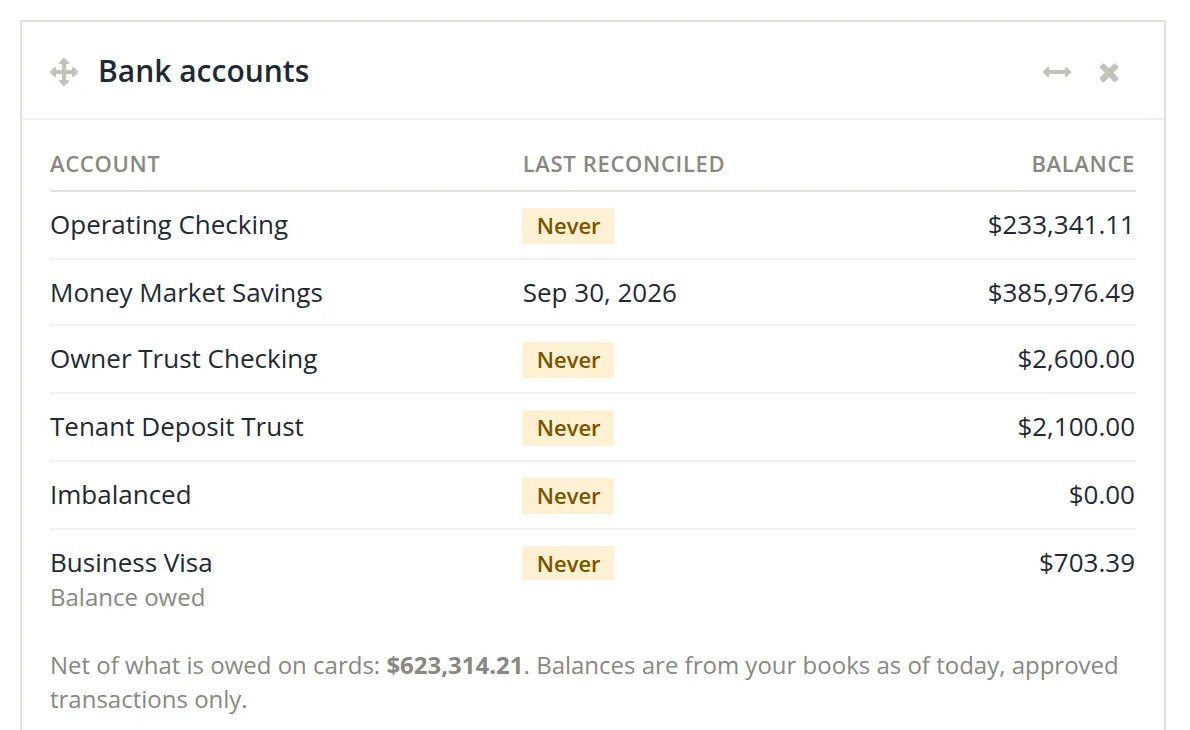
The balance of each bank and credit card account in the books, and when each was last reconciled. A card shows what is owed on it, and the line underneath gives the cash net of card balances. In Summit only Money Market Savings has a date (Sep 30, 2026, reconciled in Chapter 4.4); every other account says Never, a warning: until an account is reconciled, nobody has checked its balance against the bank.
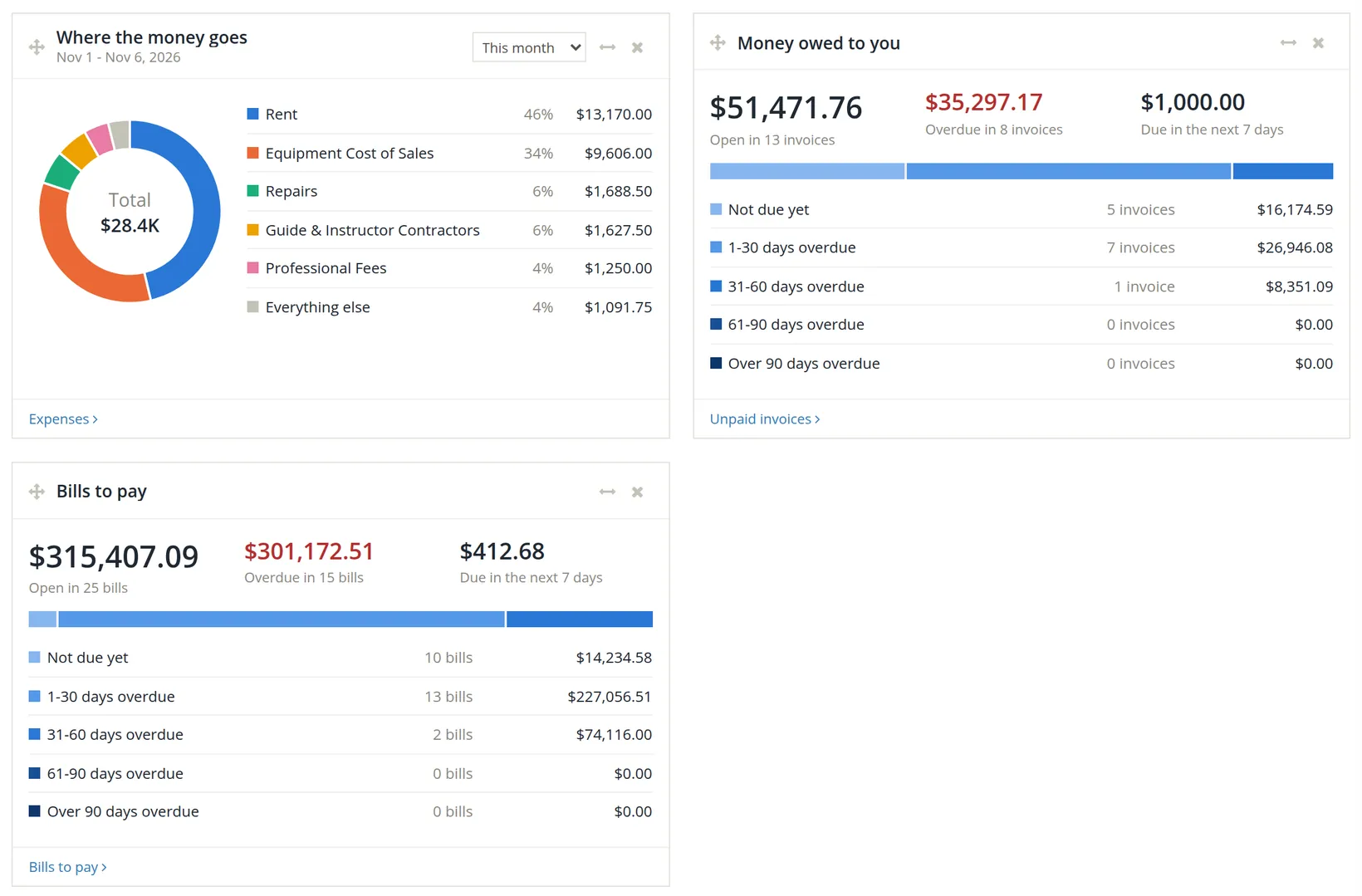
Summit's forecast counts $35,297.17 of overdue invoices as arriving in week one (and $301,172.51 of overdue bills as paid in it). If those customers keep paying late, the real low point will be lower. Before relying on the forecast for a big purchase, look at Days to get paid and the overdue list.
Profit and the money owed
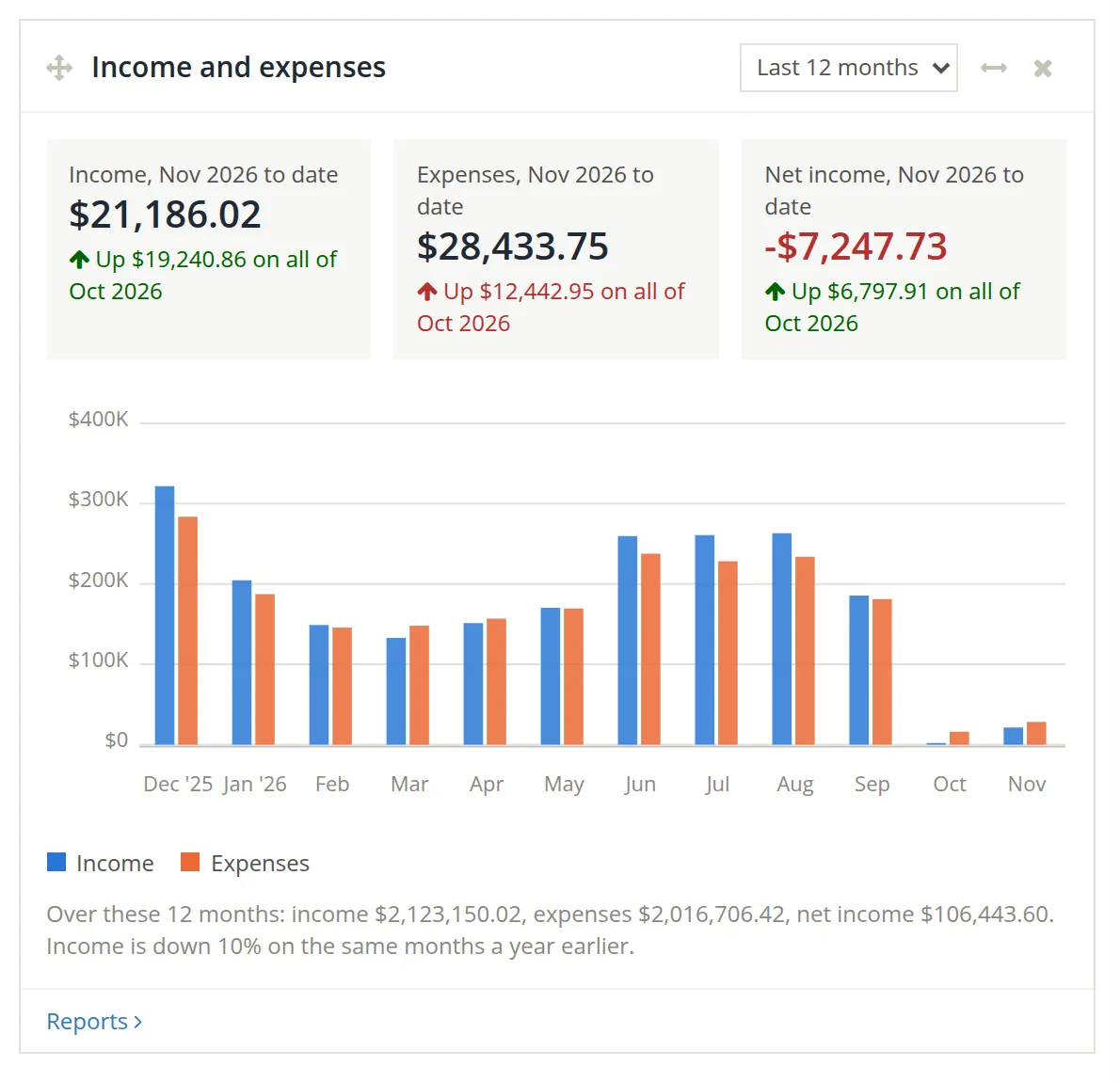
Income and expenses sets income against spending month by month, with this month to date compared with all of last month, and the twelve-month totals in a sentence underneath. Where the money goes shows this month's biggest expense accounts as shares of all spending; choose another period from its list 2.
Money owed to you and Bills to pay are mirror images. Each gives the open total, the overdue part, what falls due in the next 7 days, and a bar splitting the total by age: not due yet, 1 to 30, 31 to 60, 61 to 90 and over 90 days overdue.
Early in a month, the cards set a few days against a whole month, so "Income, Nov 2026 to date" usually looks small against all of October. In the sample it reads Up $19,240.86 only because October's income in these practice books was unusually small. Either way the comparison is lopsided: compare like with like by opening the Profit and Loss report (Chapter 6.2) for the same days of each month.
Property Management widgets
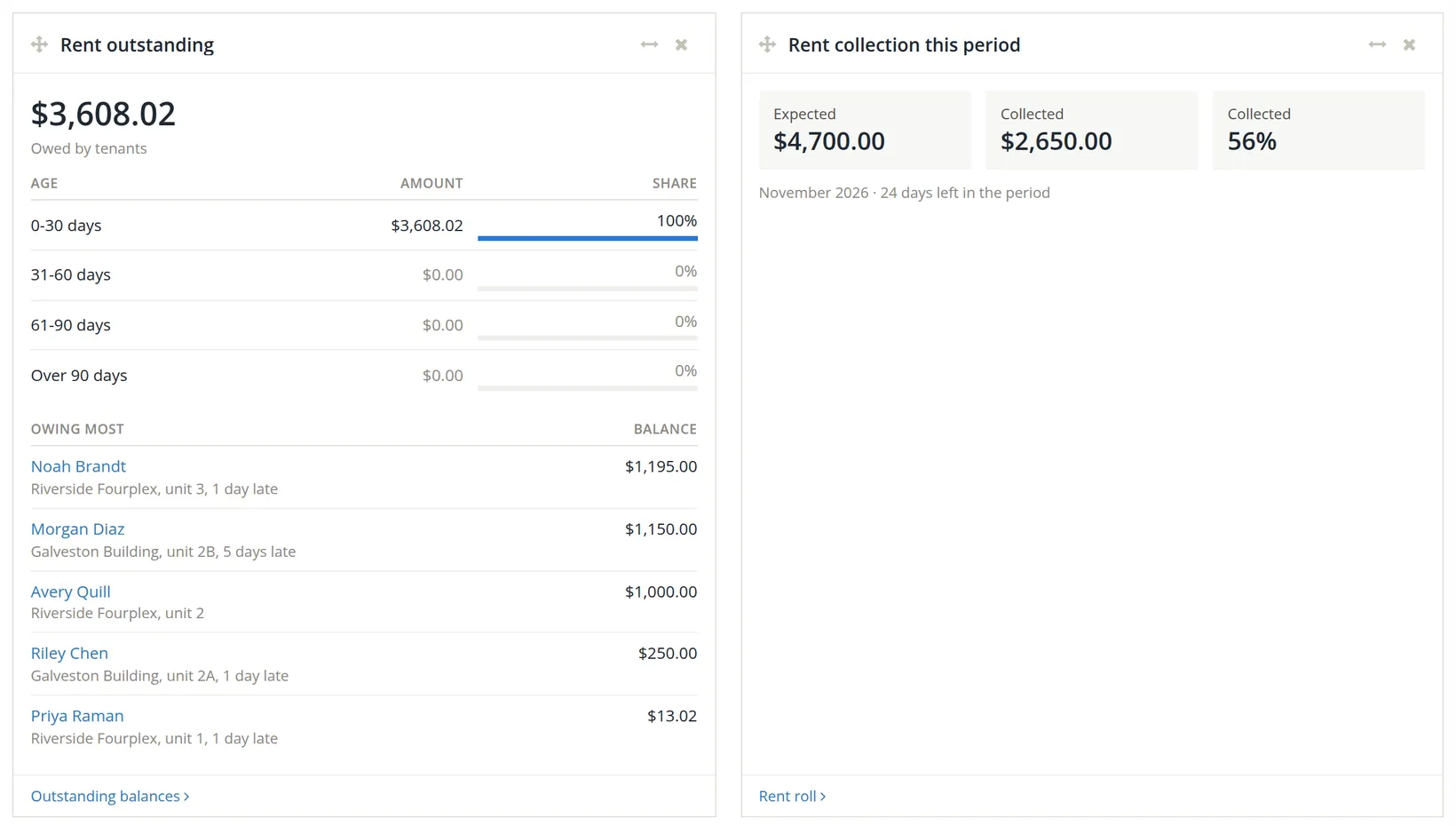
When the Property Management module is switched on, seventeen more widgets join the Dashboard, all switched on at first. They answer the questions of a rental office: what the office has to do today, what tenants owe and how old it is, how much of this period's rent has come in, late fees waiting to be posted, renters insurance, the month-end close, notice and court deadlines, tasks, work orders, bills waiting for approval, vacancies and listings, expiring leases, rental applications, the trust accounts' last reconciliation, owner cash, reserve shortfalls and negative owner funds. Each ends in a link to the page behind it. Volume 13 explains those pages; the Today board behind Property Management today is in Chapter 13.10.
Arrange your Dashboard
Nineteen widgets are available in every company, plus the seventeen Property Management widgets where that module is on, so the sample company's panel has thirty-six switches. Twenty-seven are on in the sample: ten of the nineteen and all seventeen property widgets. The rest wait in the Customize panel.
- 1
Click Customize
A panel slides in from the right with a switch for every widget, grouped under At a glance, Property Management (only where the module is on), Cash, Profit, Invoices and Bills. The list is long, so the panel scrolls; Reset to default stays at its foot.
- 2
Switch widgets on or off 1
Each change is saved at once; the panel says Saved. Close the panel to see the result.
- 3
Move a widget
On the Dashboard, drag it by the handle (the four-way arrow) at the top left of the widget and drop it where you want it.
- 4
Change a widget's width
Click the two-way arrow at its top right. Each click steps to the next width; hover over it to see the current one.
- 5
Hide a widget
Click × at its top right. Switch it back on in Customize any time.
- 6
Start over with Reset to default 2

| Widget | What it shows | In the sample |
|---|---|---|
| Needs attention | Overdue invoices and bills, transactions to review, other things waiting | On |
| Timekeeping | Timesheets waiting on you, past-due sheets, forgotten punches | On |
| Business health | Runway, margin, growth and speed of payment, over 90 days | On |
| Property Management (17) | Only where the module is on; listed in Section 5 | All on |
| Shortcuts | Buttons for new invoice, bill, expense, transfer, journal entry | Off |
| Cash balance | Month-end cash, bank and undeposited funds | On |
| Cash forecast | Where cash is heading if invoices and bills are paid when due | On |
| Bank accounts | Each bank and card balance, what is left to review, last reconciled | On |
| Income and expenses | Month by month, with last year for comparison | On |
| Profit and loss | Income, expenses and net income against the period before | Off |
| Where the money goes | Biggest expense categories as shares of spending | On |
| Top customers | The customers you invoiced most | Off |
| Money owed to you | Unpaid invoices: open, overdue, by age | On |
| Top 10 receivables | Customers who owe most, or the largest unpaid invoices | Off |
| Overdue invoices | Past due, longest overdue first | Off |
| Invoices coming due | Due within the number of days you choose | Off |
| Bills to pay | Unpaid bills: open, overdue, by age | On |
| Top 10 payables | Vendors you owe most, or the largest unpaid bills | Off |
| Overdue bills | Past due, longest overdue first | Off |
| Bills coming due | Due within the number of days you choose | Off |
A two-minute daily routine
- Needs attention. Open each line. Act on it or dismiss it with a reason in mind.
- Bank accounts. Anything left to review? Import or enter yesterday's activity (Volume 4).
- Cash forecast. Does the low point fall below what you need to keep in the bank?
- Money owed to you. Anything newly overdue? Send a reminder today, not at month-end.
- Bills to pay. What falls due this week? Schedule the payments (Chapter 3.3).
Check your understanding
1. Summit's cash is $624,017.60, receivables $51,471.76 and unpaid bills $315,407.09. Show how "Cover for bills 2.14×" is worked out.
Answer
(624,017.60 + 51,471.76) ÷ 315,407.09 = 675,489.36 ÷ 315,407.09 = 2.14.
2. The forecast says cash stays above $358,000. Name one reason the real figure could be lower.
Answer
Overdue invoices may not be paid in week one, and spending not yet entered as a bill (payroll, card purchases) is not included.
3. You dismissed "15 overdue bills". When will it come back?
Answer
When something changes, such as a sixteenth bill becoming overdue.
4. A bank account shows "Last reconciled: Never". Why does that matter?
Answer
Its balance has never been checked against the bank's statement, so every figure built on it (cash balance, runway, forecast) is unverified.
5. You keep books for three clients. Can each have its own Dashboard layout?
Answer
Yes. The layout is saved for each company.
Notes
- Notes give background, exceptions and the reasons behind a rule. You can follow every procedure without them. ↑
- Other link lines appear only to the people they concern: policies you have not read yet (Settings → Policies), a month-end close that is late (to the owner and the people who close the books), expense accounts with no cost class (in books with government contract controls), and a compensation cap missing for the year (to people who may change project settings). The direct cost line goes to people who may read Books Health, in books whose accounts are mapped to project cost elements. ↑
- Summit: $35,297.17 overdue ÷ $51,471.76 owed = 68.6%. A figure this high means most of what customers owe is already late, a signal to tighten collections. ↑
- Accountants will recognise this as a close cousin of the current ratio, which divides all current assets by all current liabilities. The Dashboard version uses only cash, receivables and unpaid bills, so it is quicker to read but less complete. ↑