
Chapter 13.5
Rent, payments and late fees
Rent posts itself; collecting it does not. This chapter follows the first of the month at Summit's Galveston Building: who owes what, a late fee set up, computed and posted, two payments received, one of them applied the wrong way and put right, and the deposits checked against the bank. Then, later in the week, a tenant's check comes back unpaid, and a promised concession runs into the rule that a lease's charges are changed only from the lease, and is given from the lease with Give a credit.
When you finish this chapter you will be able to:
- Explain how rent invoices are posted and where receipts go.
- Read the Outstanding balances aging.
- Write a late fee policy and post the fees the daily run computes.
- Receive a payment and control which charges it pays.
- Mark a returned (NSF) payment and charge the returned-payment fee.
- Say which credits a lease can give, and how to give a concession.
- Read the Deposits bank cards and explain each difference.
How rent reaches the books
Each lease has a rent schedule, a recurring entry run by the books' recurring engine (Chapter 14.1). On each due date it posts an ordinary invoice to the primary tenant, crediting the property's Rents account. You do not type rent invoices.
A lease that starts in the past catches up. Morgan's lease was entered on November 1 with a start of October 1; on its next run the schedule created both missed invoices, 1243 for October and 1244 for November, each dated its own due date.1
A tenant's payment is an ordinary customer receipt. Received from the lease, it goes where the receive form's Deposit to says. The form starts on the books' default account for customer payments, the same place a store customer's payment goes; at Summit that default is Operating Checking. A managed property's payments start on its operating trust bank instead.2
| Event | Debit | Credit |
|---|---|---|
| Rent invoice posts | Accounts Receivable | Revenue:Galveston Building:Rents |
| Late fee posts | Accounts Receivable | Revenue:Galveston Building:Late & Other Tenant Fees |
| Deposit invoice posts | Accounts Receivable | Liabilities:Security Deposits Held:Galveston Building |
| Tenant pays | The Deposit to account (Operating Checking at Summit) | Accounts Receivable |
| A concession is given (Procedure E) | Revenue:Galveston Building:Rent Concessions | Liabilities:Customer Credits |
| The concession is applied to a charge | Liabilities:Customer Credits | Accounts Receivable |
Who owes what: Outstanding balances
Money → Outstanding balances ages every open lease balance as of a date. Start the rent day here. Pick a property (or a property group) to keep the list to one building, change As of to look back, and click Show; nothing is written. The picture below was taken with the date set to the evening before rent day, so it shows what was already owed when November began.
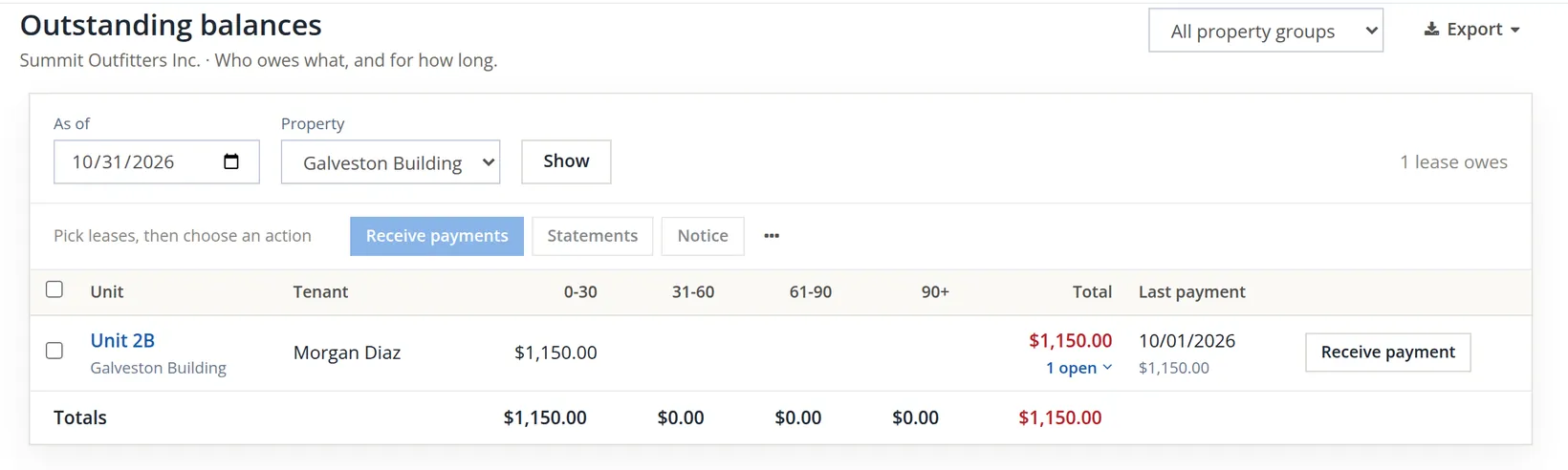
On the morning of November 1 both November rents post, and October's rent turns 31 days old. Before anything was received that day, the page read:
| Lease | 0-30 days | 31-60 days | Total |
|---|---|---|---|
| 2A Riley Chen (November) | $1,450.00 | -- | $1,450.00 |
| 2B Morgan Diaz (November, October) | $1,150.00 | $1,150.00 | $2,300.00 |
| Total | $2,600.00 | $1,150.00 | $3,750.00 |
Write the late fee policy
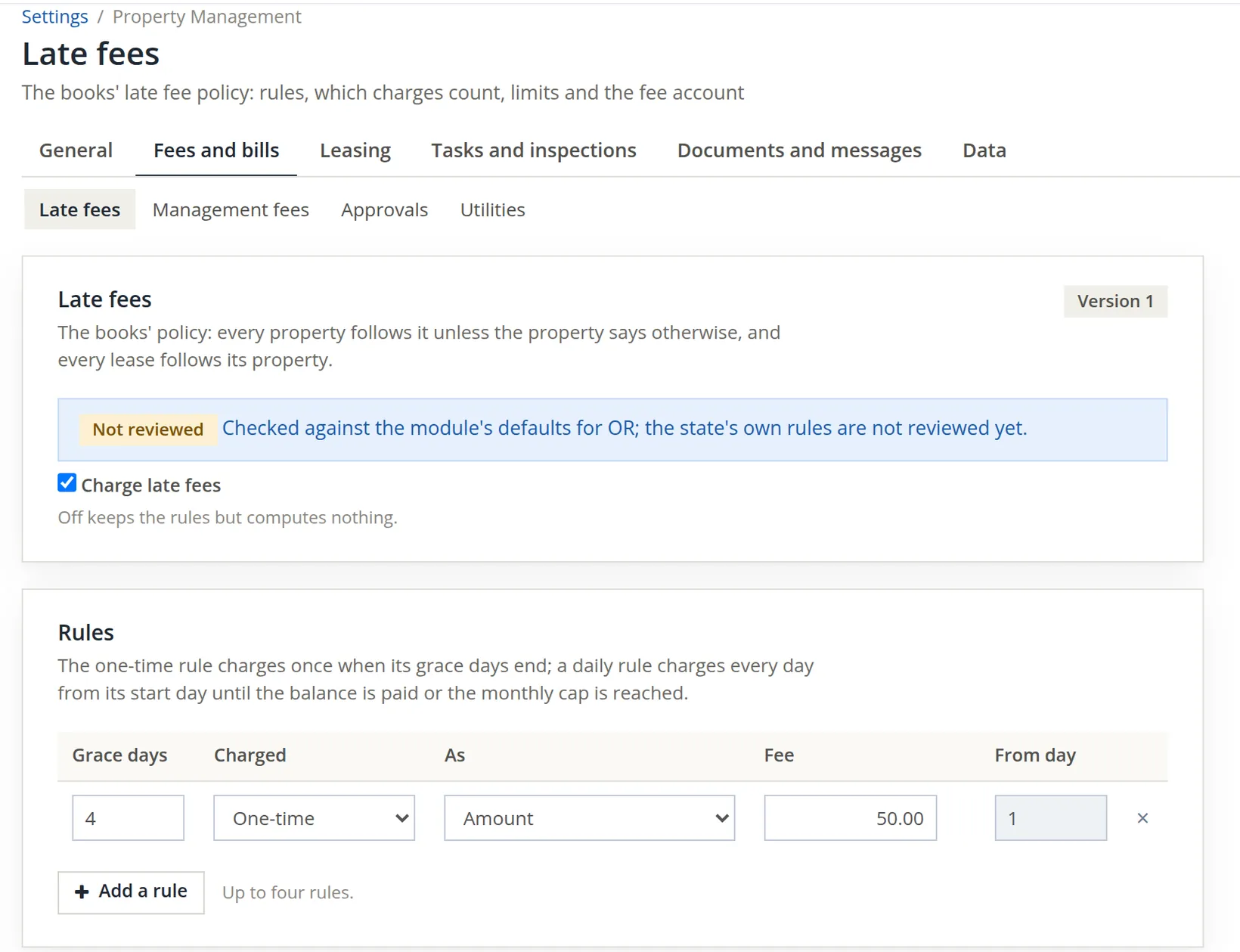
Late fees are computed only under a policy. Open Settings → Property Management → Late fees; the page sits on the Fees and bills tab, beside Management fees, Approvals and Utilities. The books' policy applies to every property unless a property sets its own, and every lease follows its property.
- 1
Tick Charge late fees and write the rule
A rule has grace days, a kind and a fee. One-time charges once when the grace days end; Each day charges daily until the balance is paid or a monthly cap is reached. The fee is an amount or a percent of the balance. Summit uses one rule: 4 grace days, one-time, $50.00. Up to four rules may be combined.
- 2
Choose which charges count and where the fee goes, then Save policy
A fee is computed on the open balance of the ticked accounts only; fees, deposits, returned-payment charges and the subsidy share never count. Summit ticks only Rents, so a late fee never earns a late fee. The fee income account is the building's Late & Other Tenant Fees. A minimum balance and a monthly cap are optional. The page answers "Policy saved as version 1."
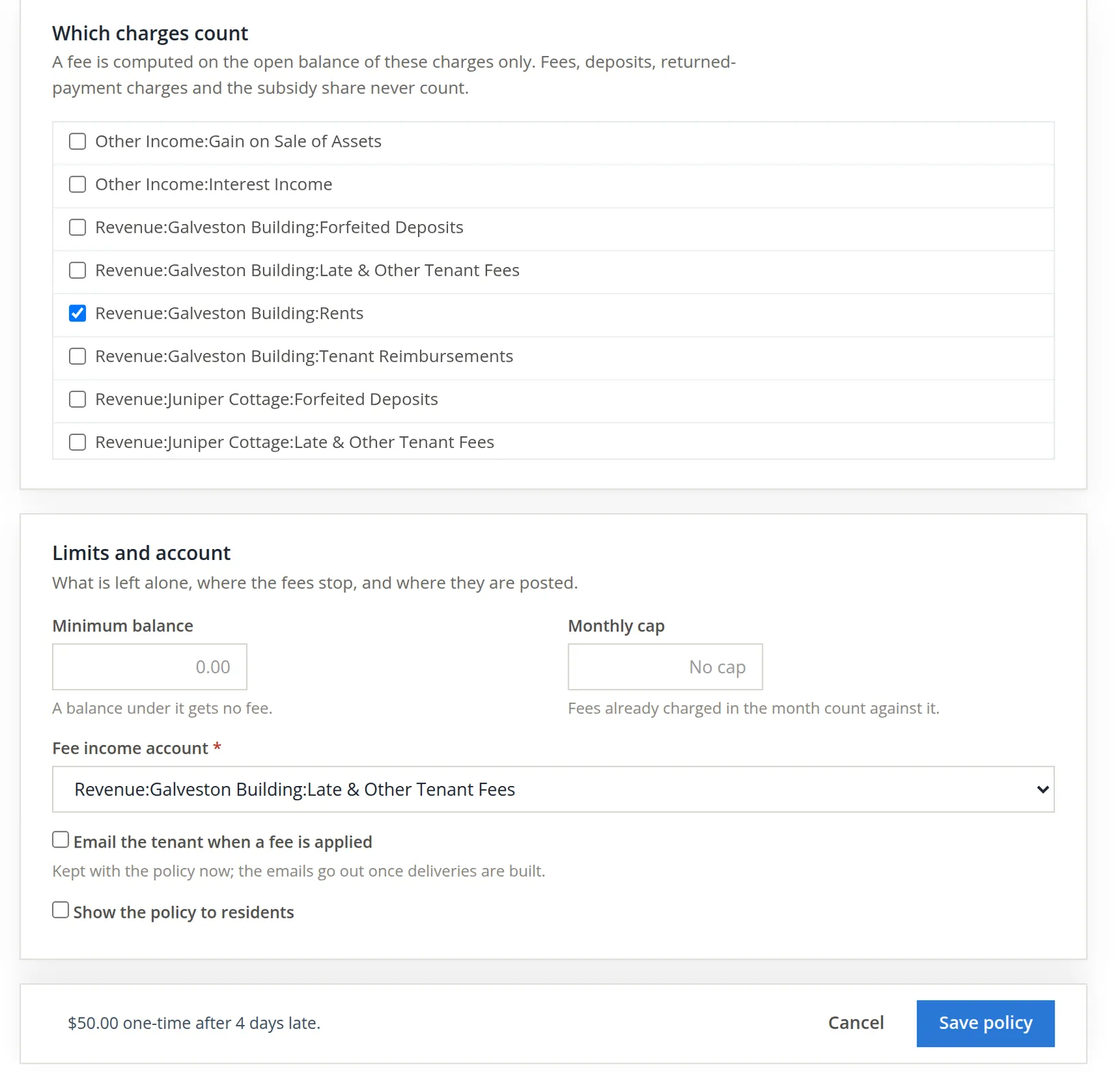
Every save makes a new version, and each fee records the version that computed it. If you change the fee next year, last year's fees still show the rule that produced them.
Review and post the day's late fees
The module works out late fees once a day (the daily run; Summit's batches are stamped 9:20 PM on the books' clock) for every lease with an eligible balance past grace. Because Summit's general setting says late fees wait for review (Chapter 13.1), nothing is charged until someone decides. Open Money → Late fees.
- 1
Click Compute today's fees
The button sits at the top right of Late fees review. On a day the daily run has already happened, it opens the batch that exists rather than making a second one. Until a batch exists the page says "No fees computed today." An earlier batch is opened from the Batch picker under the title, with Open.
- 2
Decide each line: Post, Waive or Skip
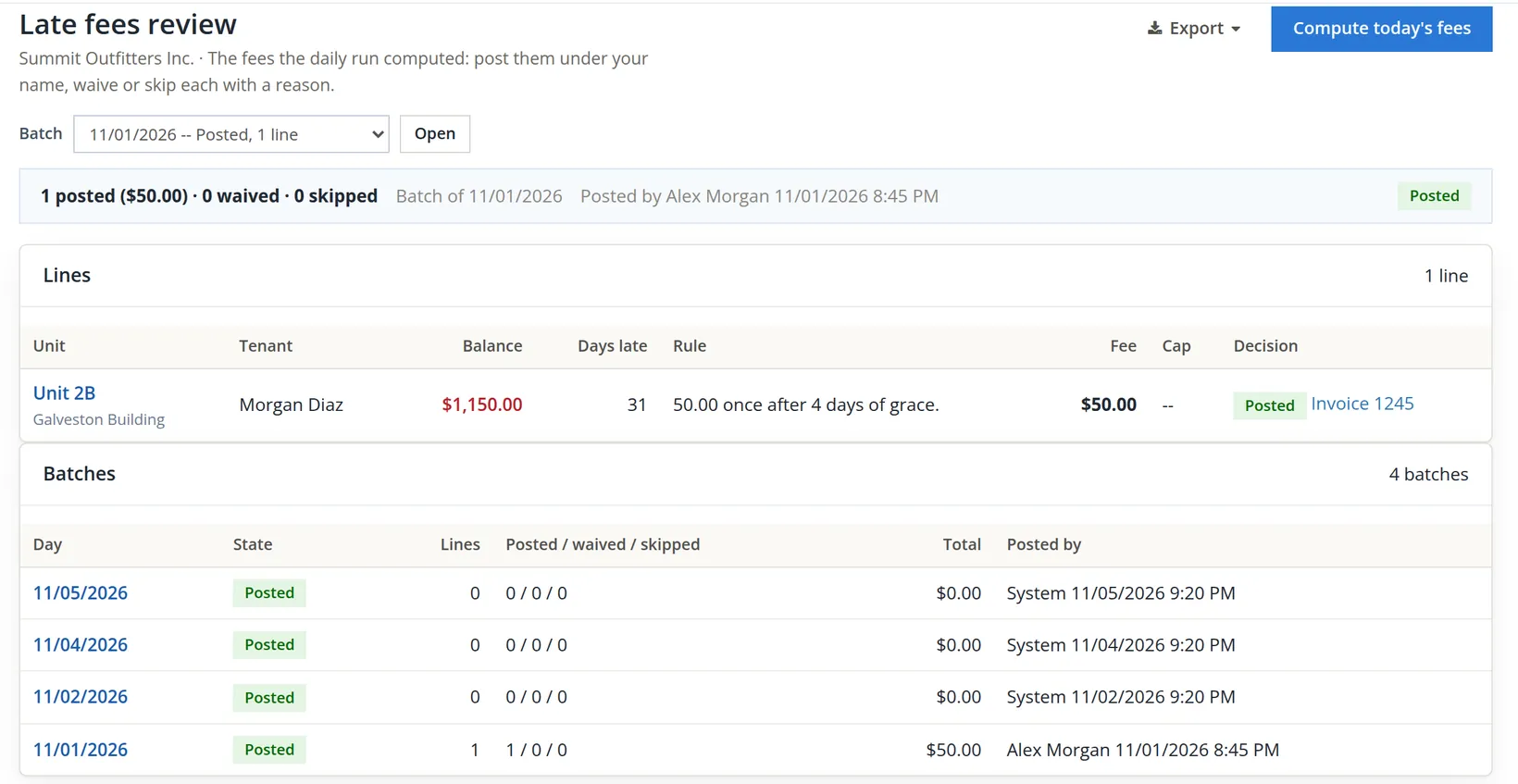
Only Morgan's October rent is past grace: $1,150.00, 31 days late, fee $50.00. Riley's and Morgan's November rent were due today and are inside the four grace days. Choose Post on the line, then the button under the lines, which counts what you chose: Post 1 fee, $50.00. Once posted, the line's Decision reads Posted with the invoice it made.
| Decision | What it does |
|---|---|
| Post | Makes one invoice per fee, under your name. Morgan's became invoice 1245, memo "Late fee: 31 days late on 1150.00 as of 11/01/2026". |
| Waive | Records the fee and a credit against it, so the waiver shows on the lease. |
| Skip | Charges nothing but keeps the line with your reason. |
The daily run leaves a batch each day it runs, even when nothing is past grace. By November 6 the picker reads 11/05/2026 -- Posted, 0 lines, 11/04/2026 -- Posted, 0 lines, 11/02/2026 -- Posted, 0 lines and 11/01/2026 -- Posted, 1 line; the empty ones are posted by System. Export appears in the header when the open batch has lines. A batch can never be dated before one that exists, so fees cannot be computed for a day already passed. Chapter 13.6 picks up the story with the 11/05 batch and Morgan's November rent, which is past grace from November 6.
Receive a payment, and check what it pays
That afternoon Morgan brought check 3361 for $1,200.00 with a note: "October rent and the late fee." Open the lease and click Receive payment, the filled button at the right of the lease header (or Receive payment on the Outstanding balances row). The form opens at the top of the Financials tab.
- 1
Type the amount, method, payer and check number, and check Deposit to
Deposit to is where the money goes: Undeposited Funds until a bank deposit takes it, or straight into a bank. Leave it on the books' default unless the money went somewhere else; Morgan's check went into Operating Checking.
As soon as the amount is typed, the form spreads it over the open charges, oldest first. Read the Apply column before you save. Morgan's form did this:
Open charge (all of lease 2B) Open The form applied Morgan's note meant Invoice 1243, Rent 2026-10, dated 10/01/2026 $1,150.00 $1,150.00 $1,150.00 Invoice 1244, Rent 2026-11, dated 11/01/2026 $1,150.00 $50.00 $0.00 Invoice 1245, Late fee, dated 11/01/2026 $50.00 $0.00 $50.00 The two November charges carry the same date, and the form chose the rent. Saved like this, the fee would stay open and November's rent would look partly paid: the opposite of what Morgan wrote on the note. The allocation rule is a setting (oldest charge first or by account priority); when a payer tells you what a payment is for, the payer's instruction wins.4
The form makes the same choice whenever two charges share a date. The pictures in this procedure show it on November 6, on Riley's lease after the returned check of Procedure D: Riley offered $25.00 in cash "for the returned check fee", and the form put it on the chargeback.
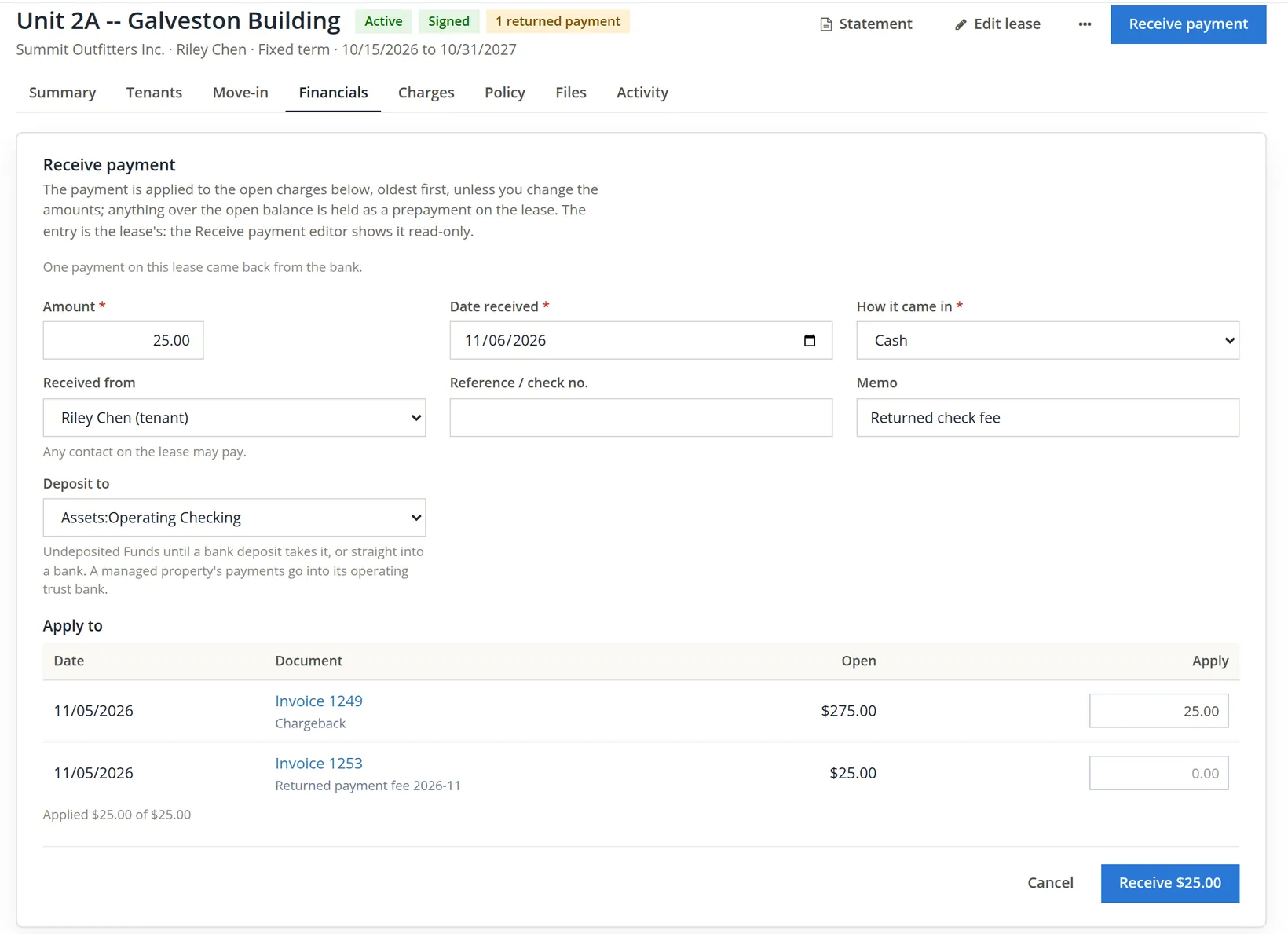
- 2
Change the apply amounts, then click Receive
For Morgan, type 0.00 against invoice 1244 and 50.00 against invoice 1245. The line under the table must still read Applied $1,200.00 of $1,200.00; then click Receive $1,200.00. The receipt is numbered R-000003.
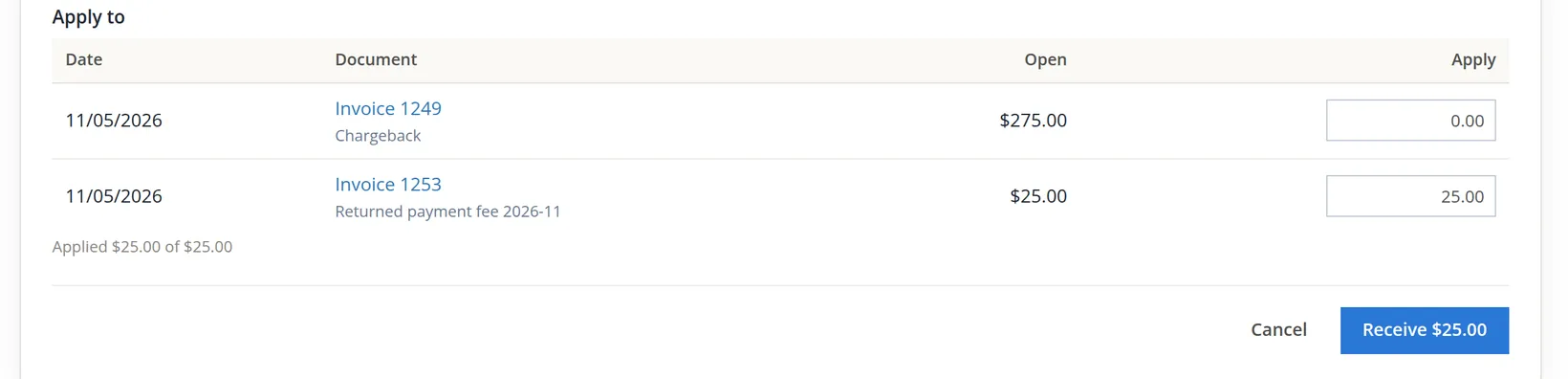
Anything over the open balance is not refused. Had Morgan's check been $1,200.00 with only November's rent open, a line under the table would say "Prepayment: $50.00 is held on the lease and applied to its next scheduled charge (rent or a recurring charge)." The next rent or recurring charge takes it automatically; a one-off charge, such as a utility bill-back or a fee, does not. With nothing open at all, the form says "Nothing is open on this lease. A payment received now is held as a prepayment on the lease and applied to its next scheduled charge (rent or a recurring charge)."5
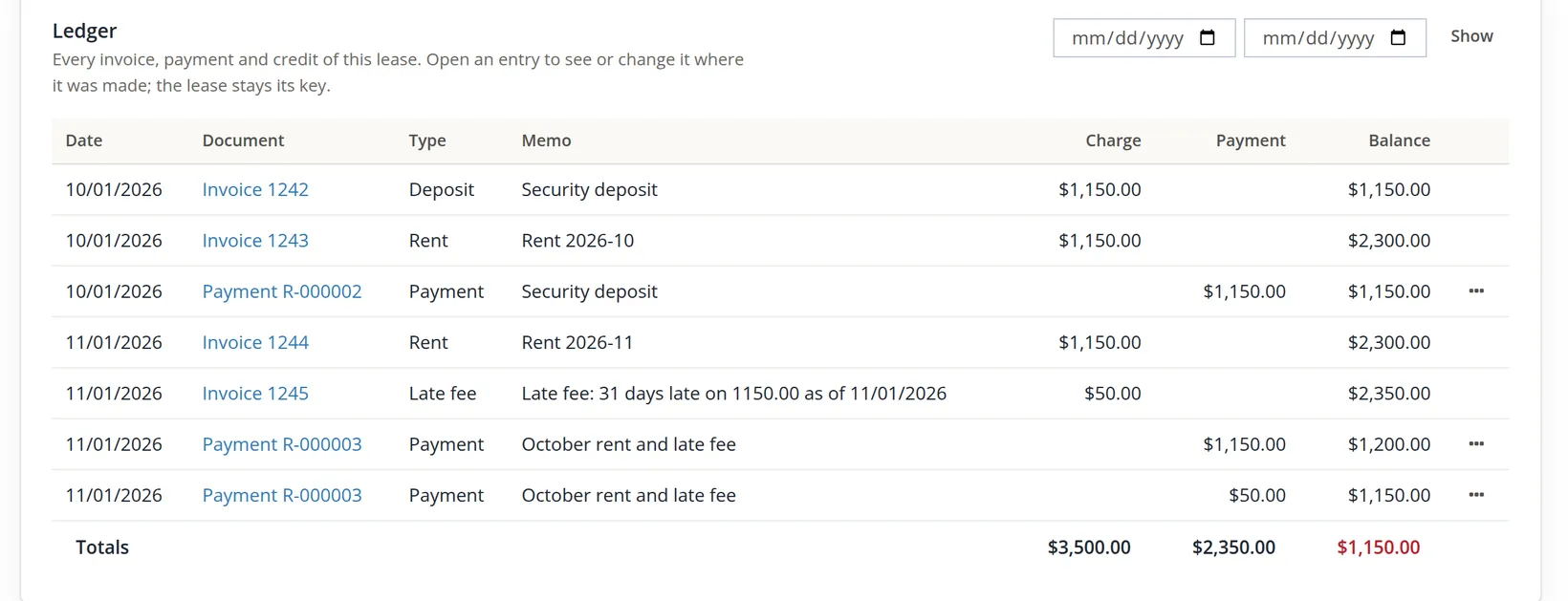
- 3
Receive Riley's ACH the same way
Riley's bank transfer of $1,450.00 has one open charge to pay, so the form's allocation is right as it stands. Method ACH, reference ACH 20261101-RC, receipt R-000004.
Each payment line on the ledger has Mark returned (NSF) in its ··· menu. Use it if a check bounces: it reopens the charges and keeps the history (Procedure D). A lease's receipt cannot be deleted anyway; the books refuse it and point you to the lease.
End of the day
Back on Outstanding balances one lease still owes: Morgan, $1,150.00 in the 0-30 column, last payment 11/01/2026 of $1,200.00. The arithmetic ties:
| Amount | |
|---|---|
| Owed this morning | $3,750.00 |
| + late fee posted | $50.00 |
| − Morgan, check 3361 | ($1,200.00) |
| − Riley, ACH | ($1,450.00) |
| Owed tonight | $1,150.00 |
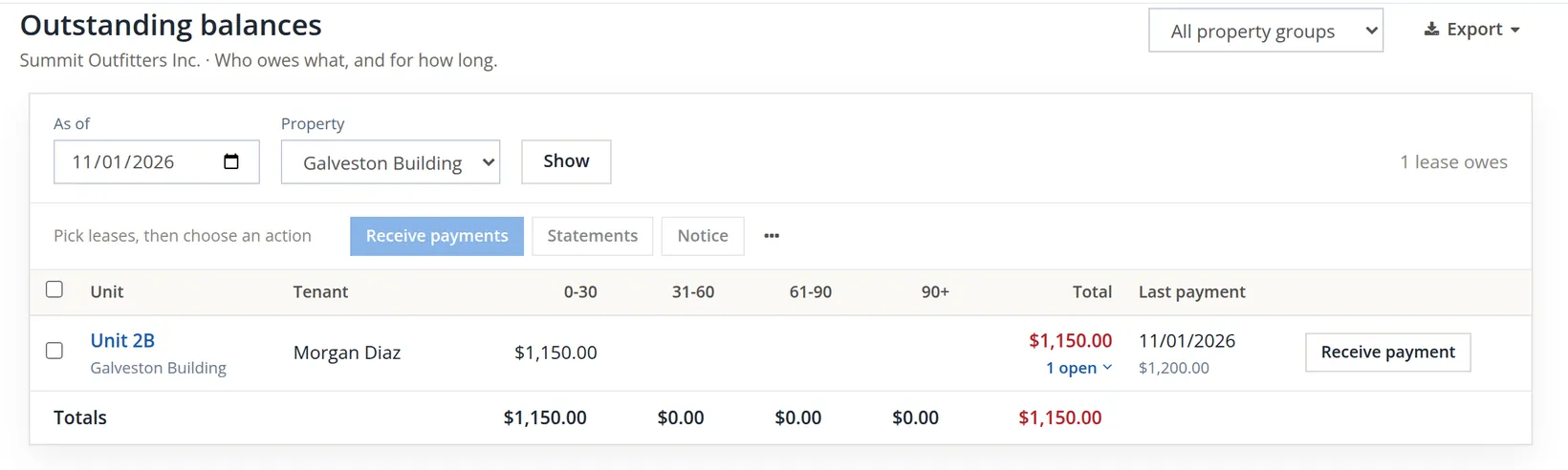
If November's rent is still open after the grace days, the next daily run proposes another fee, and Money → Collections lists the lease as past due. From there you can make a notice, which is frozen when made and records how and when it was served; the expiry follows the state's notice days. On November 1 Collections read "Nobody is past due." By November 5 it lists Morgan, $1,150.00, 4 days past due. The page, its notices, payment plans and eviction cases are the subject of Chapter 13.6; a payment plan is set on the lease's Holds card, under the receive form on the Financials tab, and pauses late fees and notices while it runs.
Deposits held against the bank
Money → Deposits compares, for each deposit bank, the deposits the leases say are held with the bank's balance. "The two must agree." The top of the page holds one card per deposit bank; under the cards, a table lists every lease with a deposit held (the box Only leases with deposits held is ticked by default), each row ending in a ··· menu of its deposit actions.
Each card names its bank and, in the small line under the name, the properties whose deposits it holds. Below are three labelled lines: Bank balance (what the books say the account holds), Held (the deposits the leases say are held there) and Difference (bank balance minus held). The difference is signed: a plus means the bank holds more than the deposits, a minus means it holds less. A chip in the corner reads the difference for you.
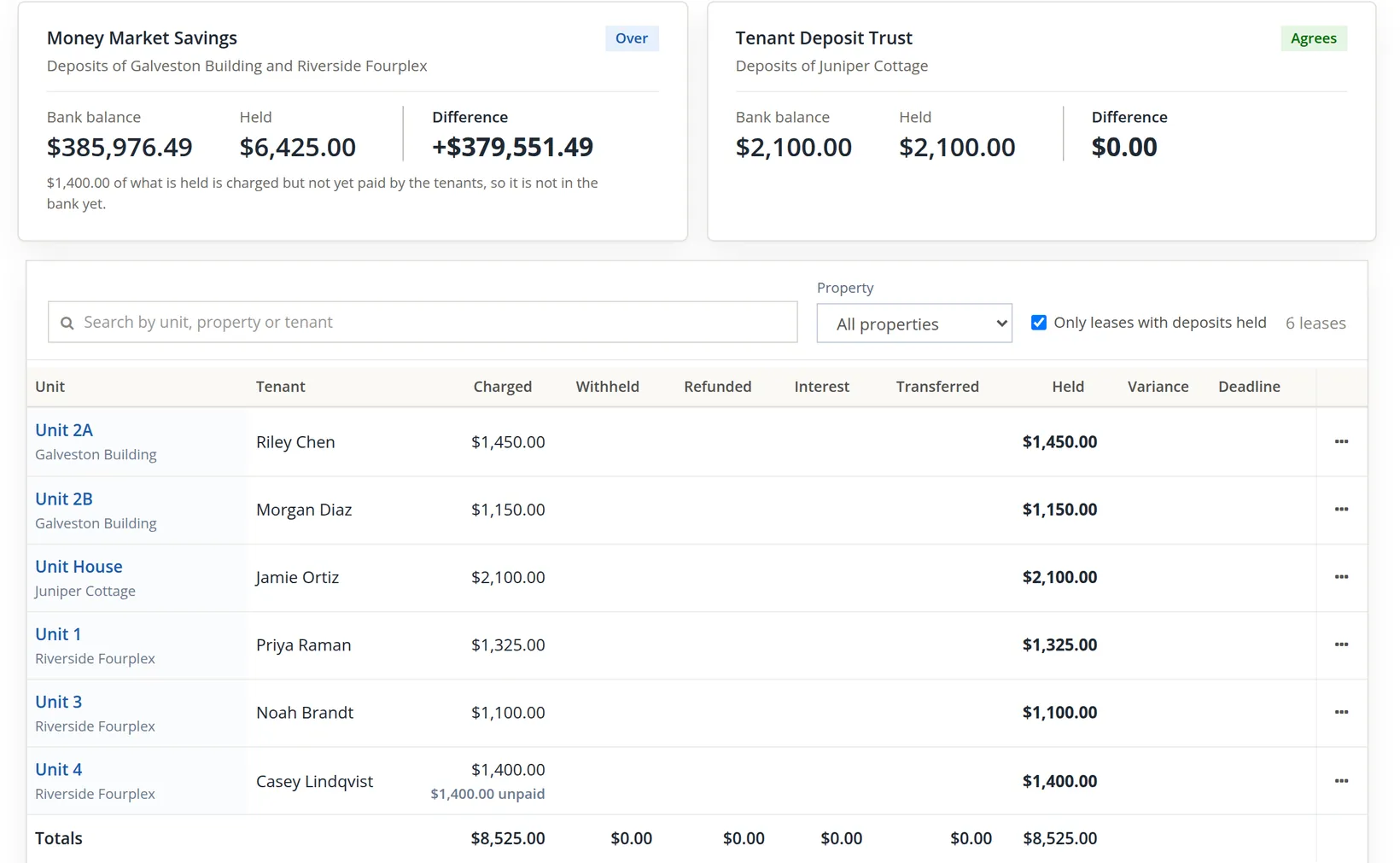
Read the first card as arithmetic: $385,976.49 − $6,425.00 = +$379,551.49. Summit's deposit bank is the same Money Market Savings account that holds the store's savings, so the bank is "over" by that amount, which is simply the store's money. The page is doing its job; the set-up is what makes it noisy. The Riverside deposits (units 1, 3 and 4) sit with the Galveston two because the fourplex, imported in Chapter 13.2, uses the books' default banks.
One of them is not in the bank at all. Unit 4's $1,400.00 deposit has been charged to the tenant but not yet paid, so the card adds a line under the figures: "$1,400.00 of what is held is charged but not yet paid by the tenants, so it is not in the bank yet." The table marks the same lease $1,400.00 unpaid. Here the bank is over anyway, so the chip stays Over; on a dedicated deposit account the same unpaid deposit would make the bank short by exactly that amount, and the chip would read Waiting on tenants.
The second card shows what a dedicated account looks like. Juniper Cottage is a managed property (Chapter 13.11), and its deposit sits in its own Tenant Deposit Trust account: bank balance $2,100.00, held $2,100.00, difference $0.00. Any figure other than zero there would be a real question.
| Chip | When | What to do |
|---|---|---|
| Agrees | The difference is zero. | Nothing. |
| Over | The bank holds more than the deposits. | Expected when the account also holds other money; otherwise find the receipt that should not be there. |
| Waiting on tenants | The bank is short by exactly the deposits charged but not yet paid. | Nothing is wrong with the bank; the card says how much is "charged but not yet paid by the tenants, so it is not in the bank yet." |
| Short | The bank holds less than the deposits, for any other reason. | The difference turns red and, when no deposit is waiting on a tenant, the card says "Move $X into" the bank "to cover the deposits, or check the deposits were banked there", with a Make a transfer link (Chapter 4.7). |
| Balance unknown | The books cannot read the bank's balance. | Check the account in the chart. |
Open a separate savings account for tenant deposits, add it to the chart as a bank account, choose it in Settings → Property Management → General as Deposits are held in (or as the Deposit bank under Bank roles; a property may name its own), and deposit each security deposit there. The Deposits page then becomes a one-line monthly check, like Juniper's card.
A returned check (NSF)
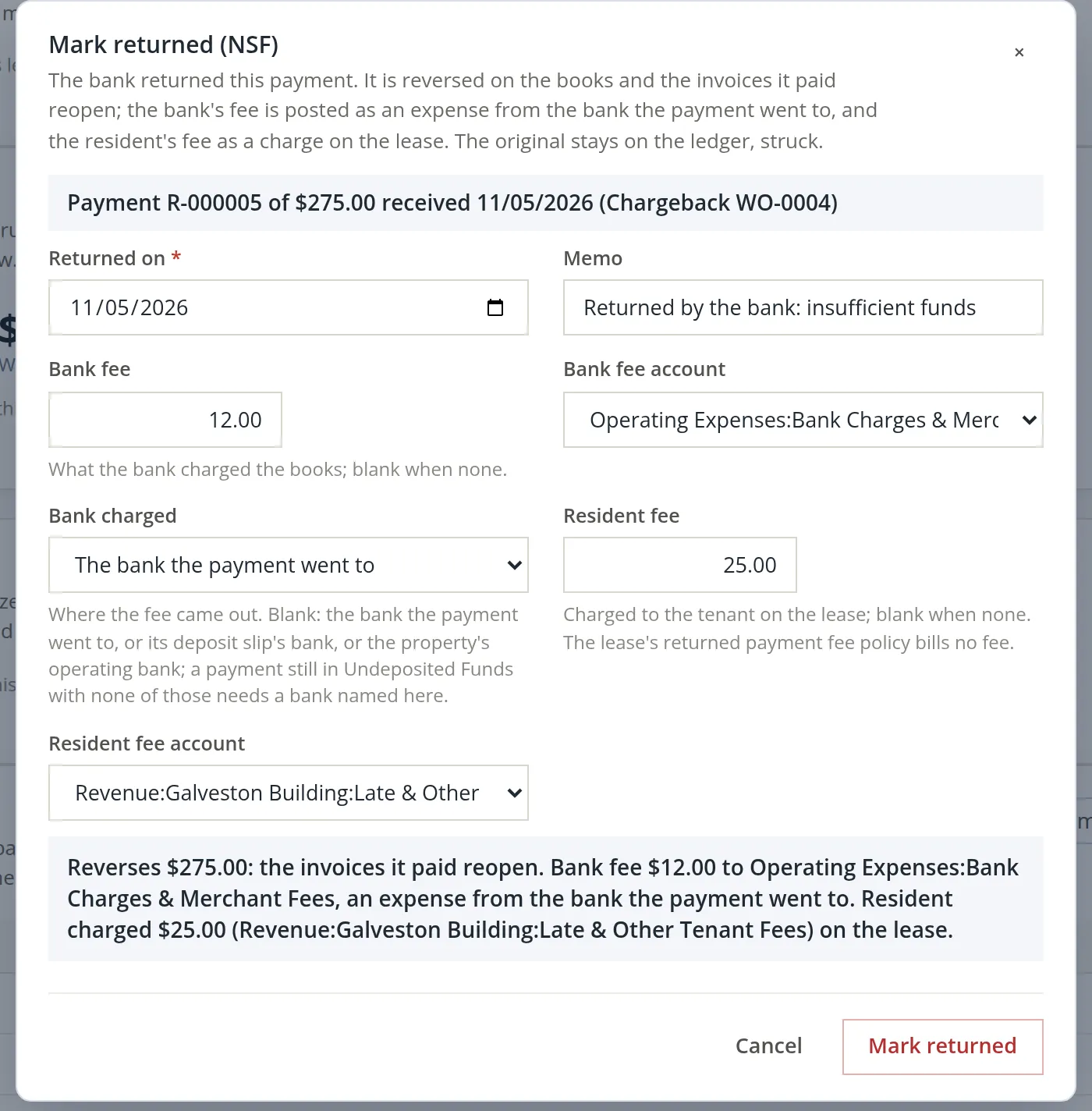
On November 5 Riley paid the $275.00 roof-repair chargeback (invoice 1249) with check 1187. It was received on the lease the usual way (Procedure C), applied to invoice 1249 and numbered R-000005. The bank then returned the check unpaid: insufficient funds, with a $12.00 returned-item fee charged to Summit. Summit's lease allows a $25.00 returned-payment fee.6
A returned payment is never deleted. It is reversed: a second entry, dated the day the bank returned it, mirrors the receipt, so the charge is owed again and the money leaves the bank it went into. The original receipt stays on the ledger, struck through, so anyone reading the lease later sees that a payment came and went.
- 1
Open the lease, then Financials; on the payment's row open the ··· menu and choose Mark returned (NSF)…
Every row of money received on the ledger ends in that menu, and the choice is shown in red because it reverses money. It is not offered on a credit, on a reversal, or on a payment already returned.
- 2
Fill in the dialog
Enter the date on the bank's notice in Returned on and a memo. Type the bank's fee and its expense account; the dialog proposes the books' bank charges account when the chart has one. Leave Bank charged on its first choice, The bank the payment went to, when the fee came out of the bank the payment went into; pick another bank only if the fee came out elsewhere. Then check Resident fee, the fee the tenant owes, and its income account. The dialog starts both from the lease's returned payment fee policy; Summit sets no such fee, so the field was blank, the help under it said "The lease's returned payment fee policy bills no fee.", and $25.00 was typed in. Read the summary line before you save.
- 3
Click Mark returned and confirm
The browser asks "Mark this payment returned? The payment is reversed on the books and the invoices it paid reopen. This cannot be undone here." After OK the page answers "Payment of $275.00 marked returned. The invoices it paid reopened; the fees are posted." and the lease header gains a chip, 1 returned payment.
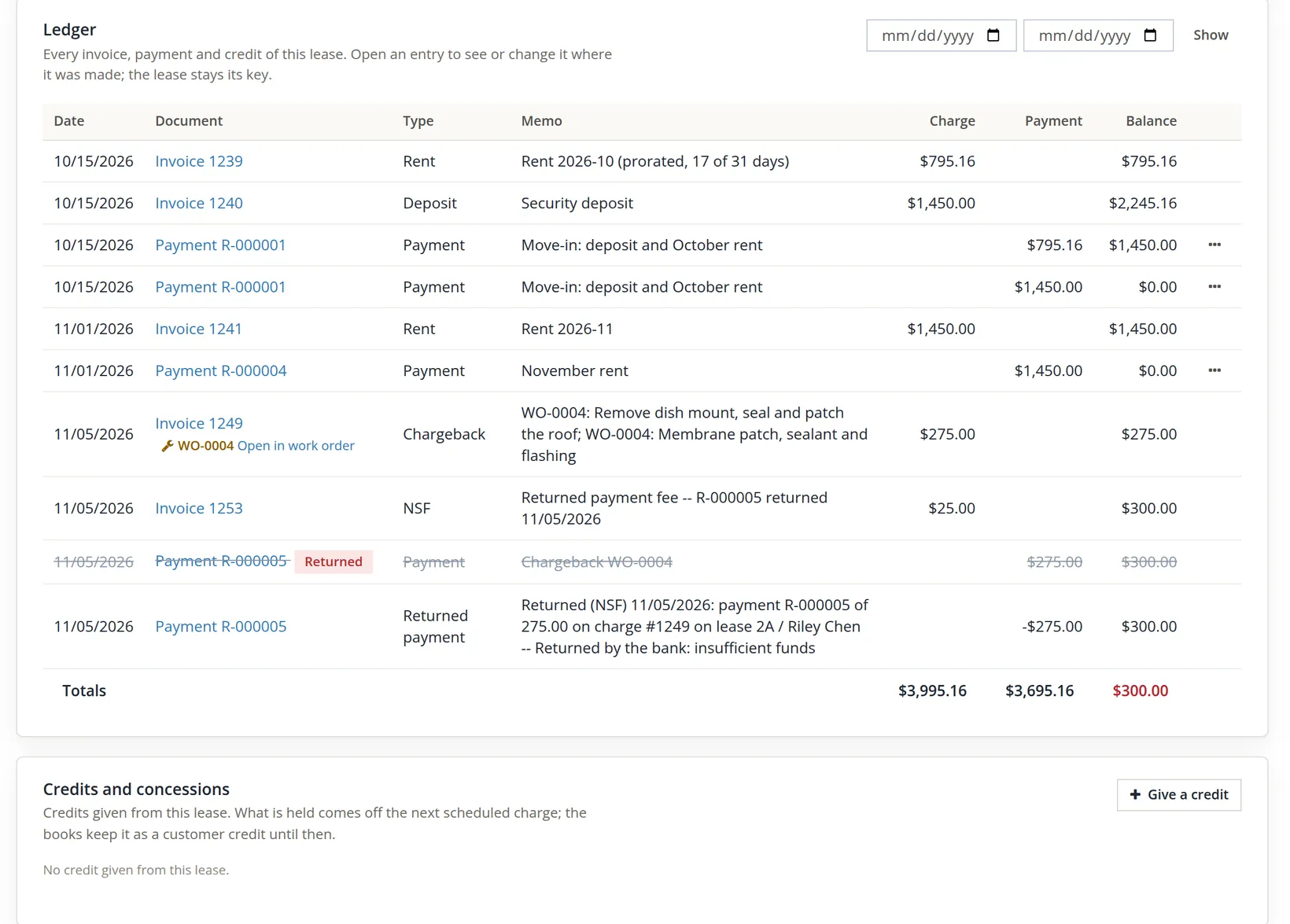
One click wrote four things. The arithmetic ties: Riley owed $275.00, paid it, had it returned and was charged the fee, so $275.00 − $275.00 + $275.00 + $25.00 = $300.00 is owed. Operating Checking took in $275.00 and gave back $275.00 and the $12.00 fee, so the bank is $12.00 lower than before the check arrived.
| Record | Debit | Credit | Amount |
|---|---|---|---|
| Reversal of R-000005, dated 11/05/2026 | Accounts Receivable (invoice 1249 open again) | Operating Checking | $275.00 |
| Bank fee, an expense numbered NSF R-000005, payee Riley Chen | Operating Expenses:Bank Charges & Merchant Fees | Operating Checking | $12.00 |
| Resident fee, invoice 1253 Returned payment fee | Accounts Receivable | Revenue:Galveston Building:Late & Other Tenant Fees | $25.00 |
| A to-do on Today for the bookkeeper, high priority | "Call Riley Chen on lease 2A / Riley Chen: payment R-000005 of 275.00 on charge #1249 was returned by the bank 11/05/2026 (fee 25.00 charged)" | ||
How the returned-payment fee behaves:
- It comes from the policy, and you have the last word. The dialog fills Resident fee from the Returned payment fees card on the lease's Policy tab (set for the books, a property or one lease). Without a policy nothing is filled in and you may type one; a blank field charges the tenant nothing.7
- It is a charge of its own, an invoice of the lease dated the return day, labelled Returned payment fee and locked like every lease charge. On the receive form it is listed with the kind Returned payment fee.
- It never earns a late fee. Procedure A's "which charges count" excludes returned-payment charges whatever is ticked.
- It may be capped by the state. When the module holds a returned-payment fee rule for the property's state, a larger fee is refused with "The returned payment fee in [state] is at most [amount]". The module holds no such rule for Oregon, so nothing checked Summit's $25.00.8
After one return the receive form notes "One payment on this lease came back from the bank." From the second it asks "2 payments on this lease came back from the bank. Take certified funds only from now on?" with a Certified funds only button. Once switched on, the lease takes only cash, a cashier's check, a money order or a wire; a personal check, card, ACH or EFT is refused. Allow any method again switches it back.
A concession credit, given from the lease
When Riley called about the check on November 6, they also complained about the noise and the blocked stair during the roof repair. Summit agreed to two things: $50.00 off the roof-repair chargeback now, and $100.00 off December's rent while the stair is closed for repainting. In ordinary sales work the first would be a credit on the invoice (Chapter 2.5). On a lease it is not, and the reason is worth understanding before you try.
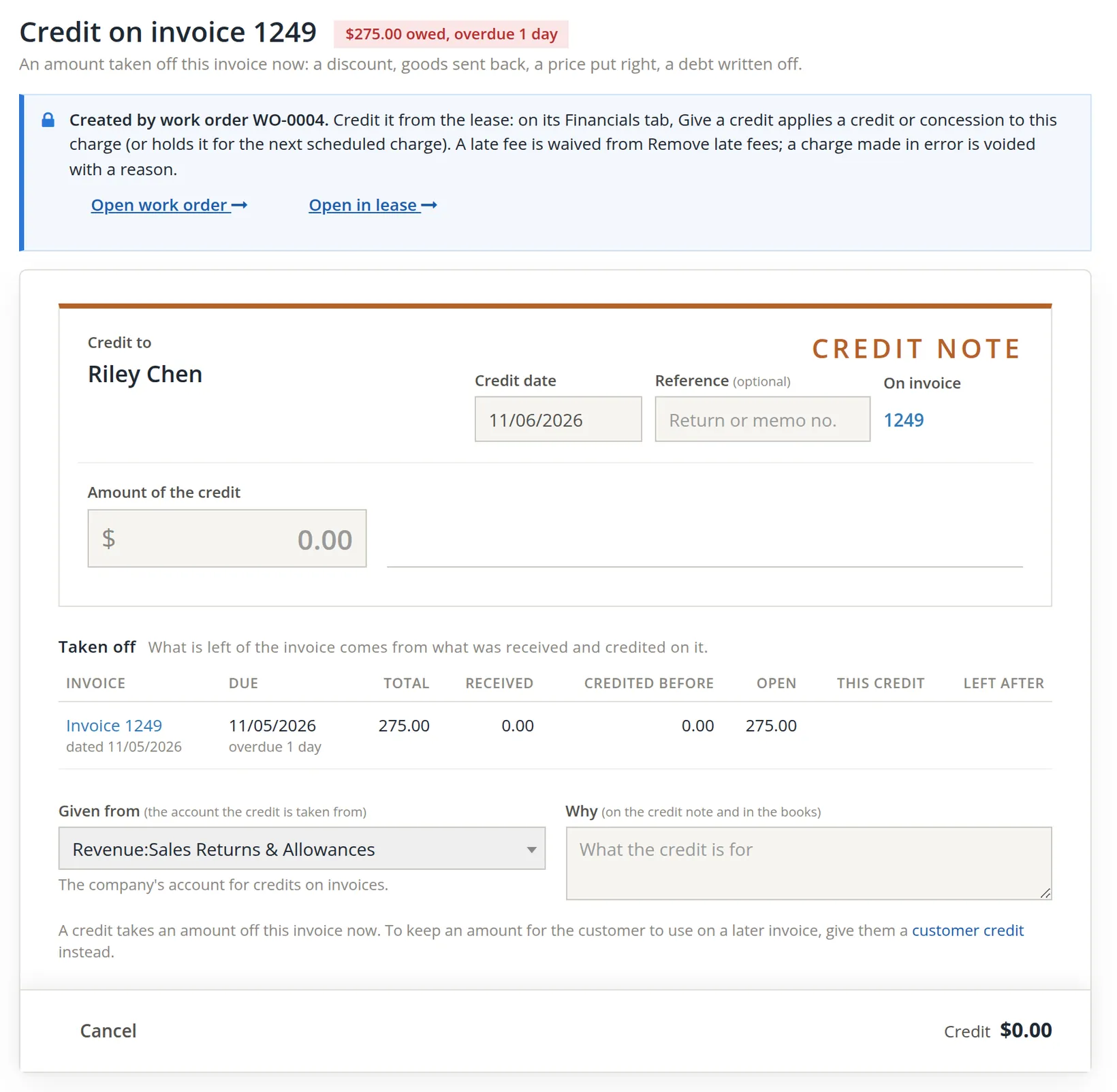
Every charge a lease makes (rent, deposit, late fee, chargeback, returned-payment fee) is the lease's record. Its amount, dates, customer and lines, and any credit applied to it, are changed only from the lease, so the lease ledger, the aging and the tenant's statement can never disagree. The Sales pages still open the invoice, but they will not change it. The lease has its own credit instead: Give a credit.
- 1
If you start from Sales, follow the banner to the lease
In Sales, Issue credit for invoice 1249 opens as for any customer invoice (Chapter 2.5), but a locked banner sits at the top and the page has no Save: nothing can be written there. The banner's Open in lease opens the lease's credit form with this charge already chosen.
- 2
Or open Give a credit on the lease
From the lease itself there are two ways in: the lease header's ··· menu, Give a credit…, or the + Give a credit button of the Credits and concessions card on the Financials tab, under the ledger. Both open the form at the top of the Financials tab. Giving a credit needs the Lease ledgers edit right, the same right as voiding a charge or marking a payment returned; the books' owner and staff have it.

- 3
Fill in the credit
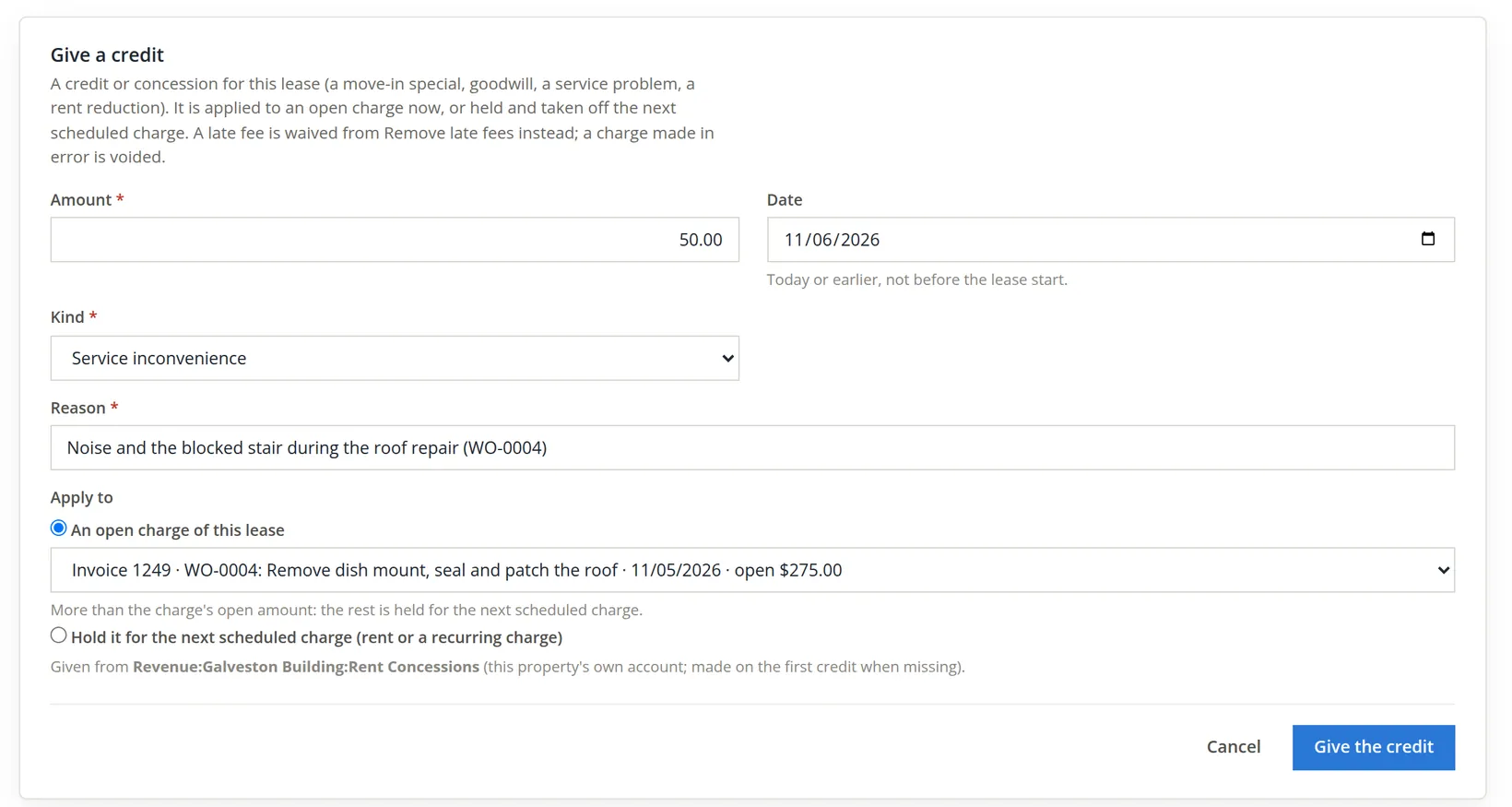
Amount and Kind are required: Move-in special, Goodwill, Service inconvenience, Rent reduction or Other. Date starts on today; it may be earlier, but not before the lease start, not in the future and not in closed books. Reason is required too, up to 300 characters; it is kept with the credit for the staff and is not shown to the tenant, whose portal and statement show only the credit and its kind.
Under Apply to choose one of two things. An open charge of this lease takes the credit off that charge now; the picker lists each open charge with what is left on it (a deposit is never listed: it is held, not earned). Hold it for the next scheduled charge keeps the credit until the next rent or recurring charge posts. For Riley: $50.00, Service inconvenience, the reason, and invoice 1249.
- 4
Click Give the credit
The page answers "Credit CN-C0172F of $50.00 given. $50.00 applied to the charge." Two checks guard against a slip of the keyboard. A credit of more than one month of the lease's scheduled charges asks first: "A credit of [amount] is more than one month of this lease's scheduled charges (1450.00). Give it?" And a credit of more than twelve months of them (or of what is left of the term, when that is shorter) is refused outright: "Check the amount; a larger credit is given in parts." That ceiling is never less than one month, nor less than the open balance of the charge you chose.
- 5
Give the December credit, held for the next scheduled charge
Open Give a credit again: $100.00, Rent reduction, reason "December rent 100.00 lower while the stair is closed for repainting, agreed with Riley 11/06", and Hold it for the next scheduled charge (rent or a recurring charge). The page answers "Credit CN-A249D3 of $100.00 given. $100.00 held for the next scheduled charge."
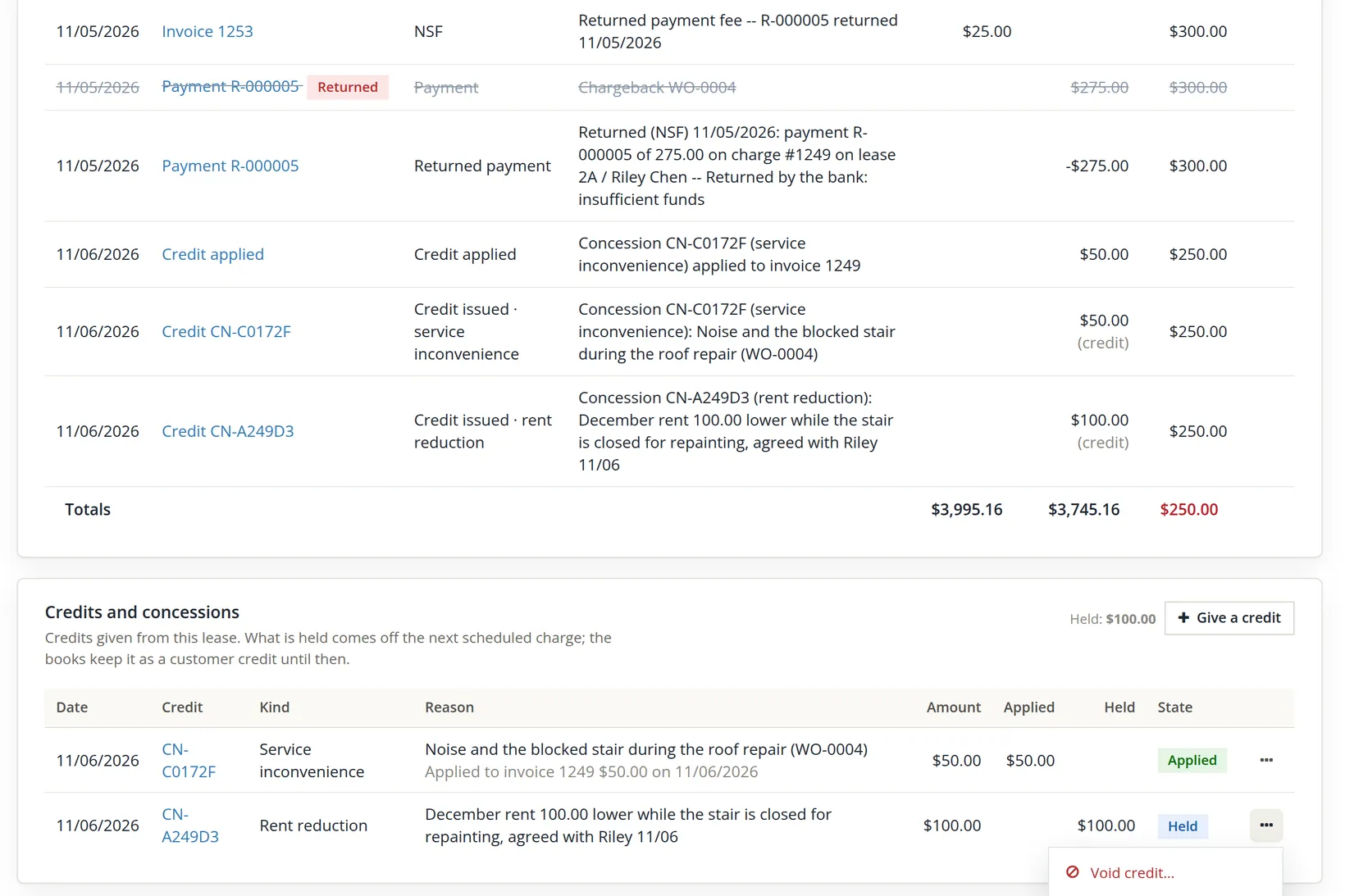
The arithmetic ties. Riley owed $300.00 after the returned check: invoice 1249 at $275.00 and the fee, invoice 1253, at $25.00. The applied credit takes invoice 1249 to $225.00, so $225.00 + $25.00 = $250.00 is owed. The held $100.00 owes Riley nothing in cash and lowers no balance yet; when the December rent of $1,450.00 posts on 12/01/2026, the schedule takes the held credit off it first, and $1,350.00 is left to pay.
| Record | Debit | Credit | Amount |
|---|---|---|---|
| CN-C0172F given, 11/06/2026 | Revenue:Galveston Building:Rent Concessions | Liabilities:Customer Credits | $50.00 |
| CN-C0172F applied to invoice 1249 | Liabilities:Customer Credits | Accounts Receivable (invoice 1249) | $50.00 |
| CN-A249D3 given and held | Revenue:Galveston Building:Rent Concessions | Liabilities:Customer Credits | $100.00 |
| CN-A249D3 applied when December's rent posts | Liabilities:Customer Credits | Accounts Receivable (December's invoice) | $100.00 |
Rent Concessions is an income account that nets the rents, so a concession lowers the property's income rather than adding an expense. While a credit is held it is a liability of the books, owed to the tenant, exactly like prepaid rent; it reduces no receivable until a charge takes it. How a held credit is used:
- Only by a scheduled charge. Rent or a recurring charge of the lease takes it when it posts; a one-off charge, such as a chargeback or a fee, does not.
- Before the tenant's prepaid money. A concession lowers what is owed, so it is applied first; prepaid rent then pays what is left.
- Oldest first, for the same tenant. Several held credits are used in the order they were given, and only on a scheduled charge billed to the same tenant the credit was given for.
The account comes from Settings → Property Management → General, card Accounting, Rent concessions account. Its default, each property's own Rent Concessions, is the one to keep: each property gets Revenue:<property>:Rent Concessions on its first credit, so the property's income, owner statement and tax schedule show the concession. A company-wide account may be chosen for the books' own properties; a managed property always uses its own, so its owner statement shows the concession (Chapter 13.11).9
- 6
To take a credit back, void it with a reason
On the credit's row choose ··· → Void credit…. A reason form opens under the row and says what will happen, for example that $50.00 "comes back off the charges it was applied to, which are owed again." Type the reason and click Void the credit. The page answers "Credit [number] voided. What it took off the charges is owed again." The row stays on the card, struck, with the reason. A void is refused when the credit or any use of it is dated in closed books, or when the tenant has since used that credit elsewhere so that taking it back would leave their credit below zero; and a credit cannot be edited: void it and give it again.
An applied credit counts as money received on the charge it went to. To void a charge made in error that also carries a concession, void the concession first, then the charge.
Give a credit is the general credit of a lease. The module still has three credits tied to one purpose each, and each is given where that purpose lives:
| Credit | Where | Chapter |
|---|---|---|
| A credit or concession (move-in special, goodwill, service problem, rent reduction) | Financials, Credits and concessions, Give a credit | this chapter |
| A late fee waived | Financials, Late fees card, remove fees, Waive with a credit | 13.6 |
| The unused days of the last month | The guided move-out | 13.7 |
| An application fee waived, before there is a lease | The applicant's fee | 13.3 |
A lower rent for several months is still best given as a rent change, before the rent posts: on the lease's Charges tab, under Rent change, enter Effective from and New rent, then Record the rent change (Chapter 13.4), and record a second change to bring the full rent back. Each invoice then posts at the lower rent, and the lease's rent history shows why. For one month, a held Rent reduction credit, as for Riley, does the same job in one step.10
A concession changes what the lease says the tenant owes. Put it in writing with the tenant, add a note to the lease's Activity tab, and attach the letter on Files, so the credit has a reason anyone can find, beyond the line kept with it.
Rent day
- [x] Outstanding balances read as of today; nothing unexpected in 31-60 or older.
- [x] The late fee batch reviewed: each line posted, waived or skipped with a reason.
- [x] Every payment's Apply column checked against what the payer said it was for.
- [x] Receipts landed in the bank you expect (or, with Undeposited Funds as the default, were put on a bank deposit).
- [x] Deposits page read card by card; every difference explained (Over by other money, Waiting on tenants, or Short and fixed).
- [x] A returned check marked returned on its ledger row, with the bank's fee and any resident fee; the call to the tenant made from Today.
- [x] A concession agreed in writing, then given from the lease with Give a credit: applied to the open charge it concerns, or held for the next scheduled charge, with its kind and reason.
Check your understanding
1. Rent is due on the 1st with 4 grace days and a one-time $50.00 fee. On which date does the first fee appear for unpaid rent?
Answer
On the 6th, the first day the rent is more than four days late. With review on, the run proposes it and it posts when someone posts the batch.
2. Why tick only the Rents account under "Which charges count"?
Answer
So that fees are not charged on other fees or on other kinds of income. Deposits and fees never count anyway.
3. A $1,200.00 payment for "October rent and the late fee" was applied $1,150.00 to October and $50.00 to November's rent. What is wrong, and how do you fix it before saving?
Answer
The fee is left open and November looks part-paid. Change the apply amounts: 0.00 on November's rent, 50.00 on the fee.
4. Where does a tenant's payment go when received from the lease?
Answer
Into the account chosen in the form's Deposit to, which starts on the books' default account for customer payments (Operating Checking at Summit), or on its operating trust bank for a managed property.
5. The Deposits page shows Money Market Savings "Over" by +$379,551.49. Is money missing?
Answer
No; the bank holds more than the deposits because it also holds the store's savings. A dedicated deposit account, like Juniper Cottage's Tenant Deposit Trust, would make the check meaningful.
6. A card shows Held $2,600.00, Bank balance $1,450.00 and the chip Waiting on tenants. What does that tell you?
Answer
The bank is short by exactly the $1,150.00 of deposits that are charged but not yet paid. Nothing is wrong with the bank; the tenant has not paid the deposit yet. Any other shortfall would read Short.
7. Riley's $275.00 check comes back. The bank charges $12.00 and Summit charges Riley $25.00. What does Riley owe now, and how much lower is Operating Checking than before the check arrived?
Answer
Riley owes $300.00: the $275.00 charge reopens and the $25.00 fee is added. Operating Checking is $12.00 lower: the $275.00 came in and went out again, and the bank's fee went out.
8. Why does the Sales credit page not let you take $50.00 off invoice 1249, and where is the concession given instead?
Answer
Invoice 1249 is a lease charge, changed only from the lease, so the lease ledger and the books cannot disagree; the page shows a locked banner and has no Save. The banner's Open in lease opens Give a credit on the lease's Financials tab, which applies the concession to the open charge now or holds it for the next scheduled charge. A rent change is for lowering future rent over several months.
9. Riley holds a $100.00 rent-reduction credit and has $30.00 of prepaid rent. The December rent of $1,450.00 posts. What does Riley still owe, and in what order were the two amounts used?
Answer
$1,320.00. The held concession is taken off first ($1,450.00 − $100.00 = $1,350.00), then the prepaid rent pays $30.00 of what is left ($1,350.00 − $30.00 = $1,320.00). In the worked example Riley had no prepaid rent, so $1,350.00 was left there. Neither would be used on a one-off charge such as a chargeback.
Notes
- The schedule's page in Tools → Recurring Transactions lists each entry it created; a lease's schedule is changed on its lease, not there. When no background worker runs, opening the recurring pages moves the due work on. ↑
- The Deposit to picker lists Undeposited Funds and the books' bank and cash accounts; its help reads "Undeposited Funds until a bank deposit takes it, or straight into a bank. A managed property's payments go into its operating trust bank." Receipts left in Undeposited Funds go on a bank deposit afterwards (Chapter 4.6). The Sales payment pages are no way around this: a payment on a lease's invoice entered there (Chapter 2.3 or 2.4) is refused with a message naming the lease, so every lease payment goes through the lease's own form, its receipt number and its allocation. Chapter 13.11 covers a managed property, whose receipts must land in its trust bank. ↑
- Late fee limits and the earliest day a fee may be charged are set by state law, and some cities add their own rules. Oregon, for example, does not allow a late fee until rent is more than four days late. This chapter is not legal advice. ↑
- The setting is A payment is applied on the General tab (Chapter 13.1). By account priority pays the listed accounts first; listing Late & Other Tenant Fees ahead of Rents would have sent the $50.00 to the fee on its own. ↑
- The prepayment waits as a liability of the books, Liabilities:Prepaid Rent, until a charge takes it. Whether the next scheduled charge takes it on its own is the payment rule "Prepayments are applied to the next scheduled charge on their own" on the Payments card of Settings → Property Management → General (a lease may override it on its Policy tab). With that rule off, an amount over the open balance is refused instead. Chapter 13.15 shows the Prepayments Held report. ↑
- In the sample books the check was received and returned on the same day, November 5, so that the pictures share one date. In practice the bank's notice arrives some days after the deposit; enter the date on the notice. Returned on may not be earlier than the day the payment was received, nor later than today. ↑
- With a policy fee of, say, $25.00, the dialog starts at $25.00 and its help reads "Charged to the tenant on the lease. $25.00 is the lease's returned payment fee policy (Policy tab); change it or clear it for none." Summit's books set no returned payment fee, which is why the fee in this procedure was typed. Before November 2026 the dialog never filled the fee in, whatever the policy said. ↑
- States limit what a landlord may charge for a dishonored check, and some allow the bank's actual charge instead when it is higher. The module's state rules come with the module and are switched on per state; check your state's law yourself before you set a fee. This chapter is not legal advice. ↑
- If the books have no Revenue group to hold Rent Concessions, the credit is refused with "The books have no Revenue group to keep Rent Concessions in: choose the account in Settings > Property Management." On a managed property the concession reaches the owner when it is used on a charge, as a negative Rent Concessions line on the owner statement; a held concession moves nothing for the owner until then (Chapter 13.12). ↑
- The Credits Issued report (Chapter 13.15) lists every credit the module gave a lease, with its reason and the account it came from; a concession appears with the reason and origin concession and the Rent Concessions account. A rent change is not a credit and does not appear there; it appears in the lease's rent history on the Charges tab and, until it takes effect, in the Rent Increase report (Chapter 13.14). ↑