
Chapter 13.4
Leases, move-in and the rent roll
A lease is the contract that turns a vacant unit into rent. In BizBooks360 it is also the key that every invoice, payment, deposit and late fee of a tenancy hangs from. This chapter writes a lease, catches a date mistake, walks the tenant through the three move-in gates and activates the lease. It then turns an approved applicant into a draft lease, has it signed on the office screen and executes it.
When you finish this chapter you will be able to:
- Enter a lease with its tenants, rent, proration and deposit in one save.
- Work out a prorated first month and the amount due at move-in.
- Spot a lease saved with the wrong dates and correct it.
- Pass the three move-in gates, or override one with a reason.
- Activate a lease and read the rent roll.
- Turn an approved applicant into a draft lease, record the signatures in the app and execute it.
What a lease holds
A lease in BizBooks360 is saved in one step but holds five things: the unit, the dates and type, the people, the charges (rent plus any other recurring charge) and the deposit. When it is saved, the software makes the rent schedule, the deposit invoice and, when asked, the prorated first month. The tenant becomes a customer of the books; you never create the customer by hand.
| Lease type | End date | When it ends |
|---|---|---|
| Fixed term | required | On the end date; after that the lease shows Expired. |
| Fixed term, then month to month | required | Rolls into month to month after the end date. |
| Month to month (at will) | not needed | When either side gives notice. |
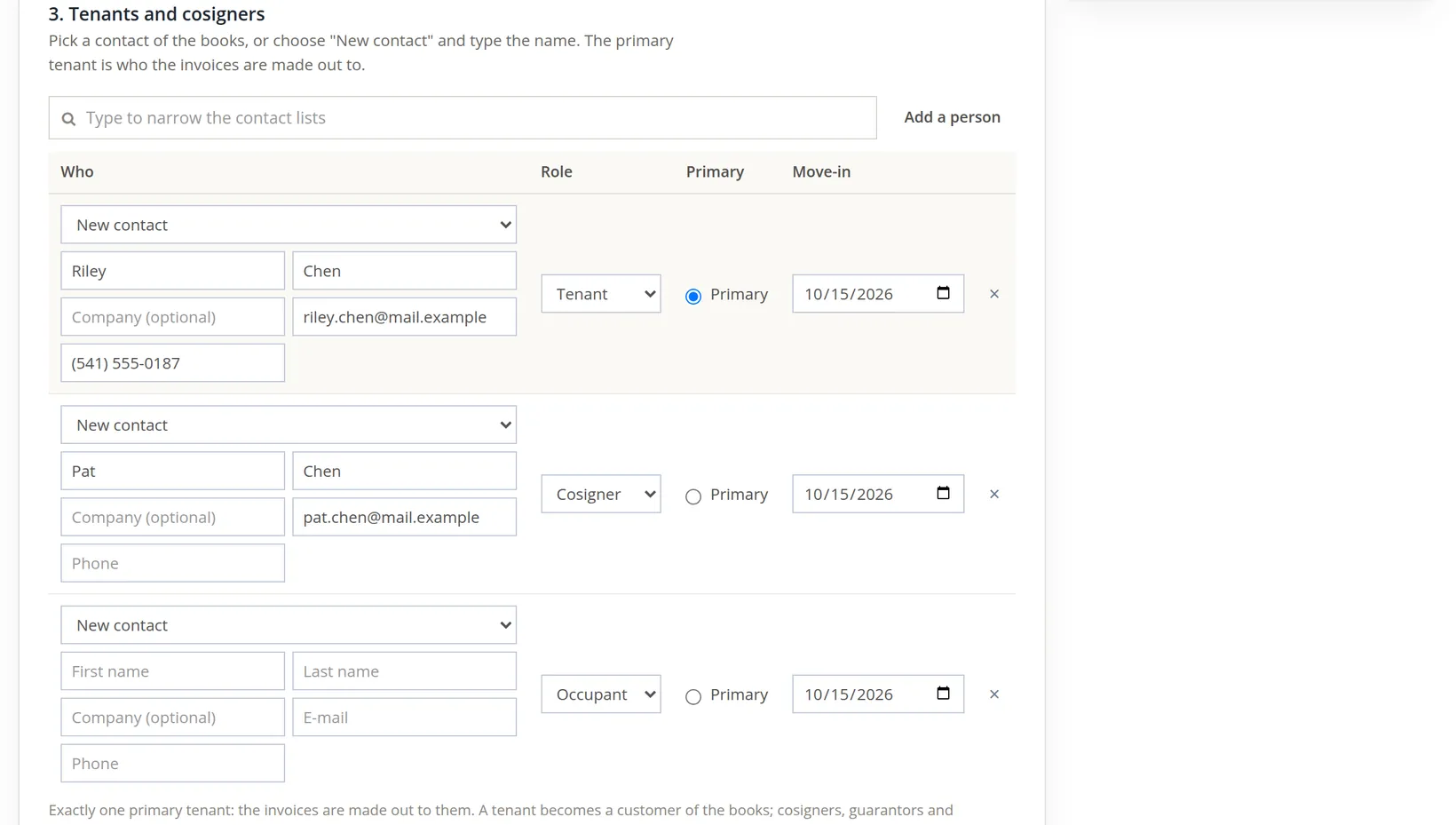
The people on a lease each have a role. Only the primary tenant receives the invoices; the form insists on exactly one.
| Role | Meaning | Has a ledger? |
|---|---|---|
| Tenant | Signs and lives in the unit. One tenant is primary. | Yes (the primary) |
| Cosigner, Guarantor | Promises to pay if the tenant does not. | No |
| Occupant | Lives there but did not sign, such as a child. | No |
| Billing contact, Subsidy payer | Someone else who pays all or part, such as a housing agency. | No |
Write the lease
Property Management → Money → Rent roll, then Add lease (on an empty rent roll the button reads Add the first lease). The form has seven numbered sections and a summary card on the right that updates as you type.
- 1
Choose the unit, the type and the dates
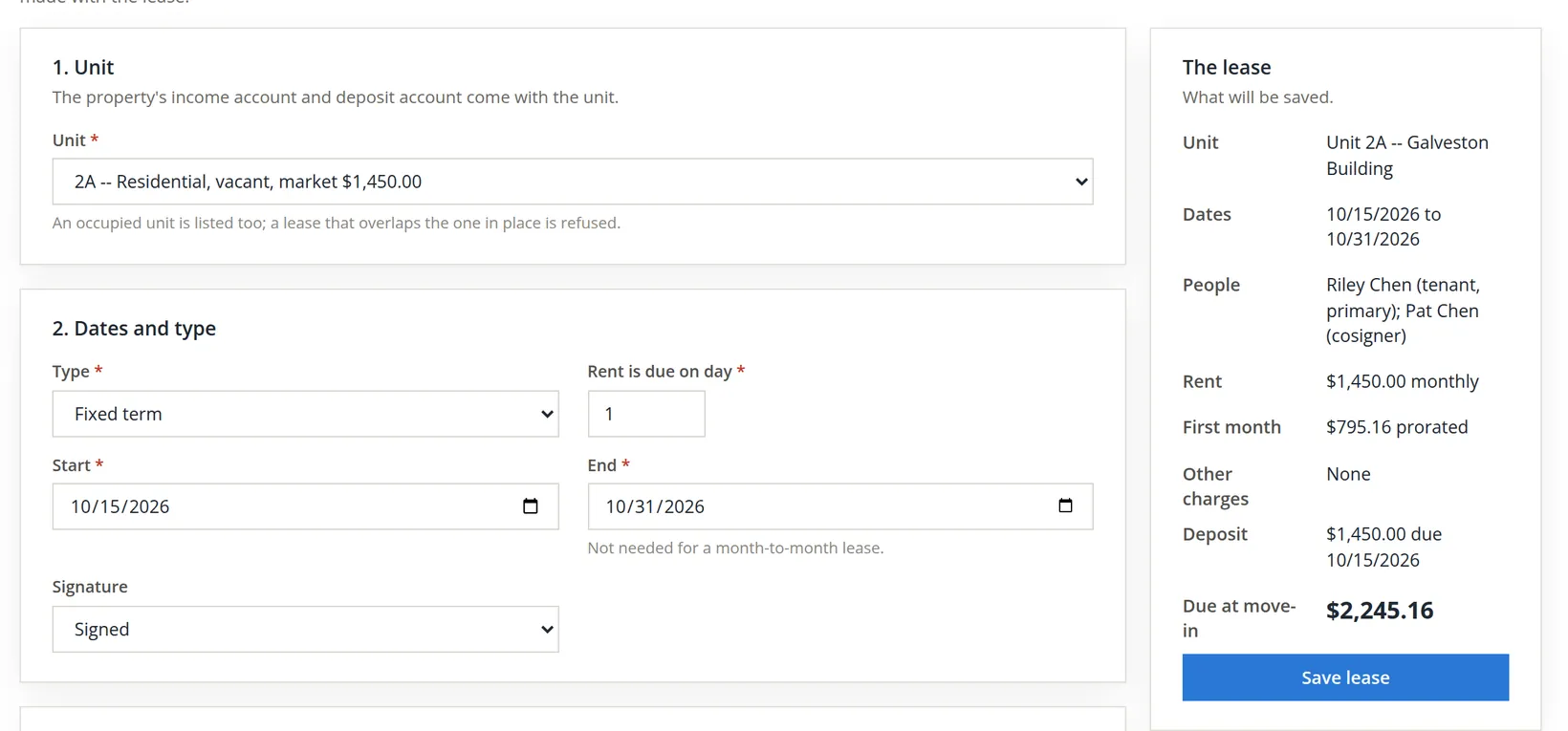
The unit list shows each unit's class, status and market rent. Occupied units are listed too, but a lease that overlaps one in place is refused. Riley's lease is Fixed term, rent due on day 1, from 10/15/2026. Set Signature to Signed if the paper is already signed.
- 2
Add the people
Pick an existing contact or leave New contact and type the name, e-mail and phone. Give each row a role and choose one Primary. Blank rows are ignored.
- 3
Enter the rent, the deposit and a note, then Save lease
Rent $1,450.00 monthly, first due 11/01/2026. Because the lease starts mid-month and the first due date is after the start, leave Prorate the first month ticked (it is ticked by default); the line under the box shows the result before you save. Create the invoice can post the invoice up to 10 days early, but "The invoice is always dated the due date." Deposit $1,450.00, due on move-in day. (Save as draft, beside Save lease, keeps the same lease as a draft to be signed in the app first; Procedure D shows that route.)
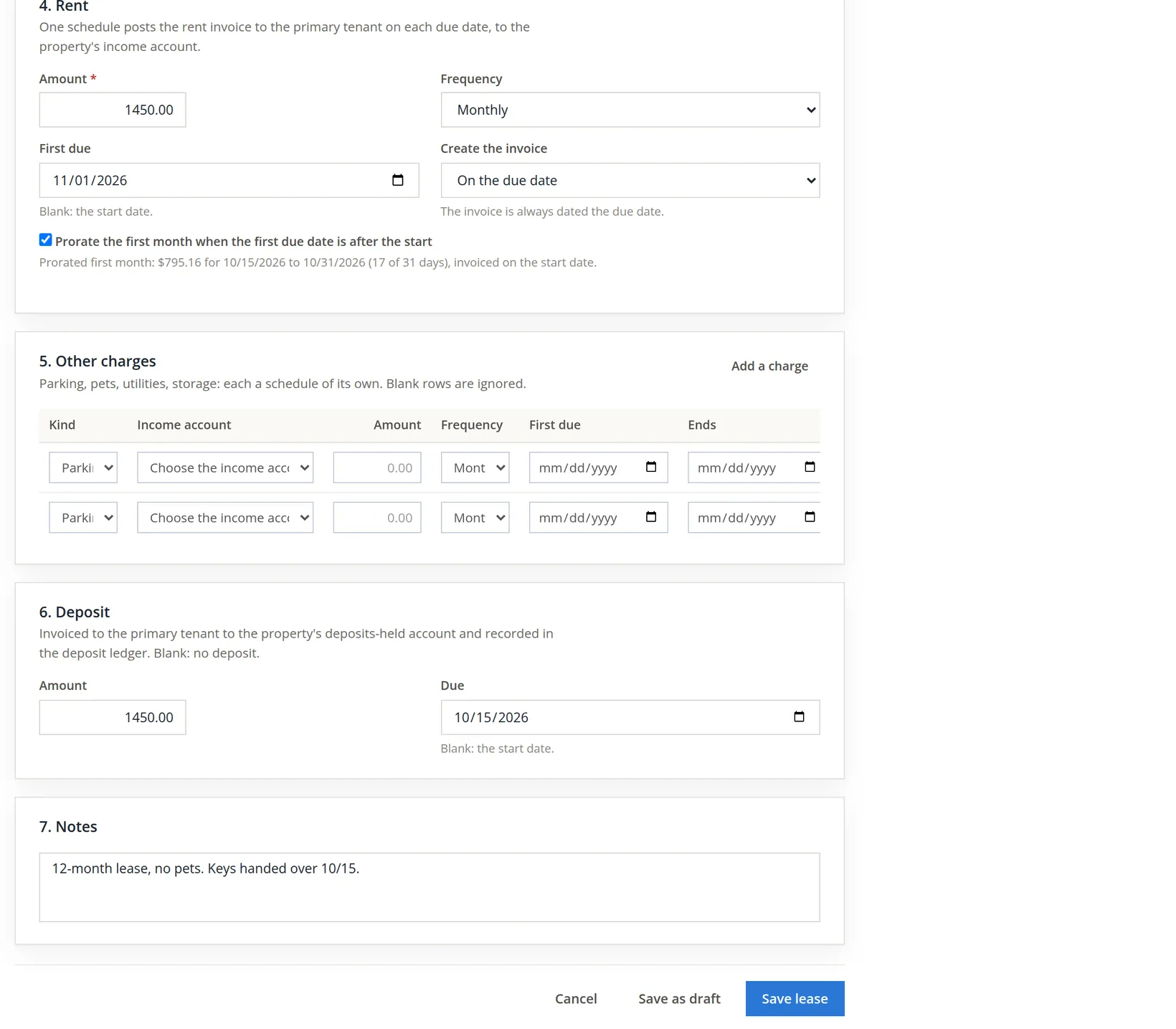
October has 31 days. Riley has the unit from the 15th to the 31st inclusive: 31 − 15 + 1 = 17 days. $1,450.00 × 17 ÷ 31 = $795.16. Due at move-in: $795.16 + $1,450.00 deposit = $2,245.16. The software uses the actual days in the month, so a February move-in prorates over 28 or 29.
The mistake the status caught
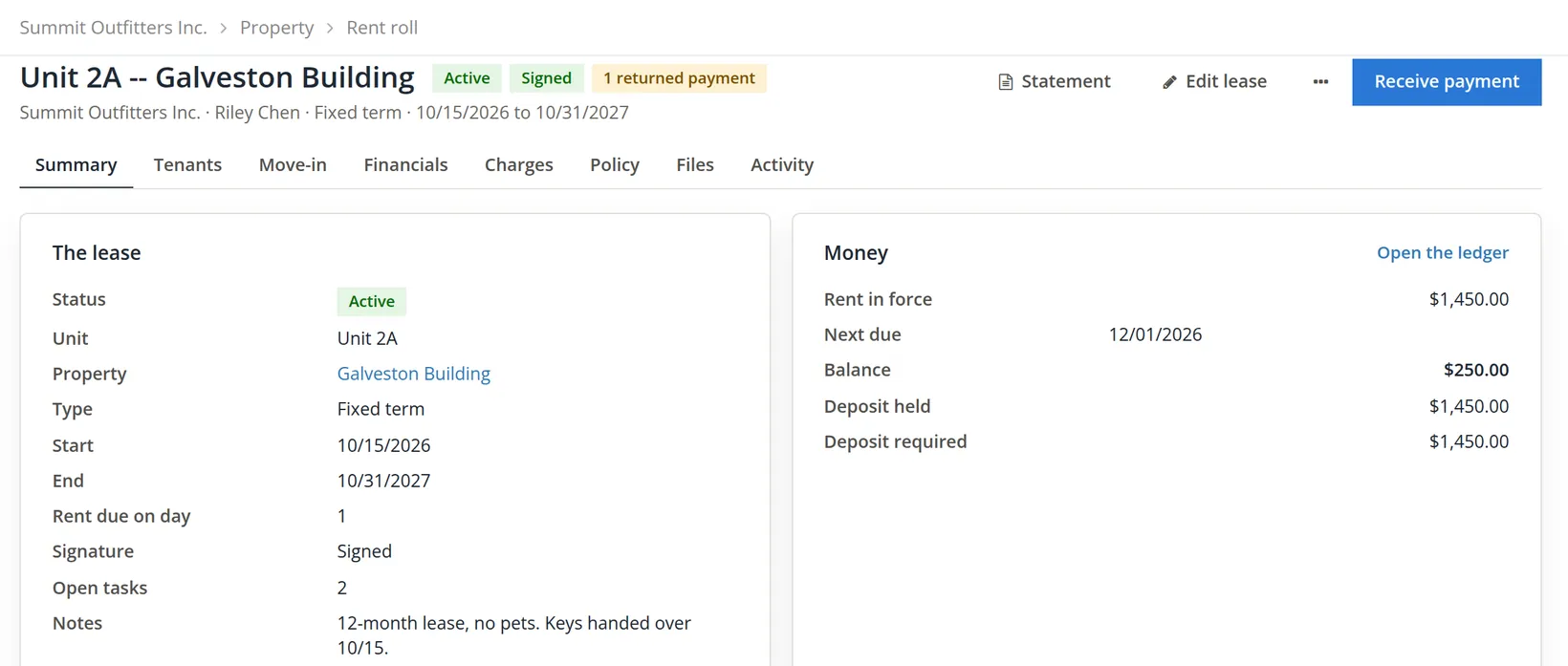
The lease saved and the page opened on its Summary tab with "Lease added. The rent schedule starts 11/01/2026; the deposit invoice is on the Financials tab."2 One word on the page was wrong, and it was the status.
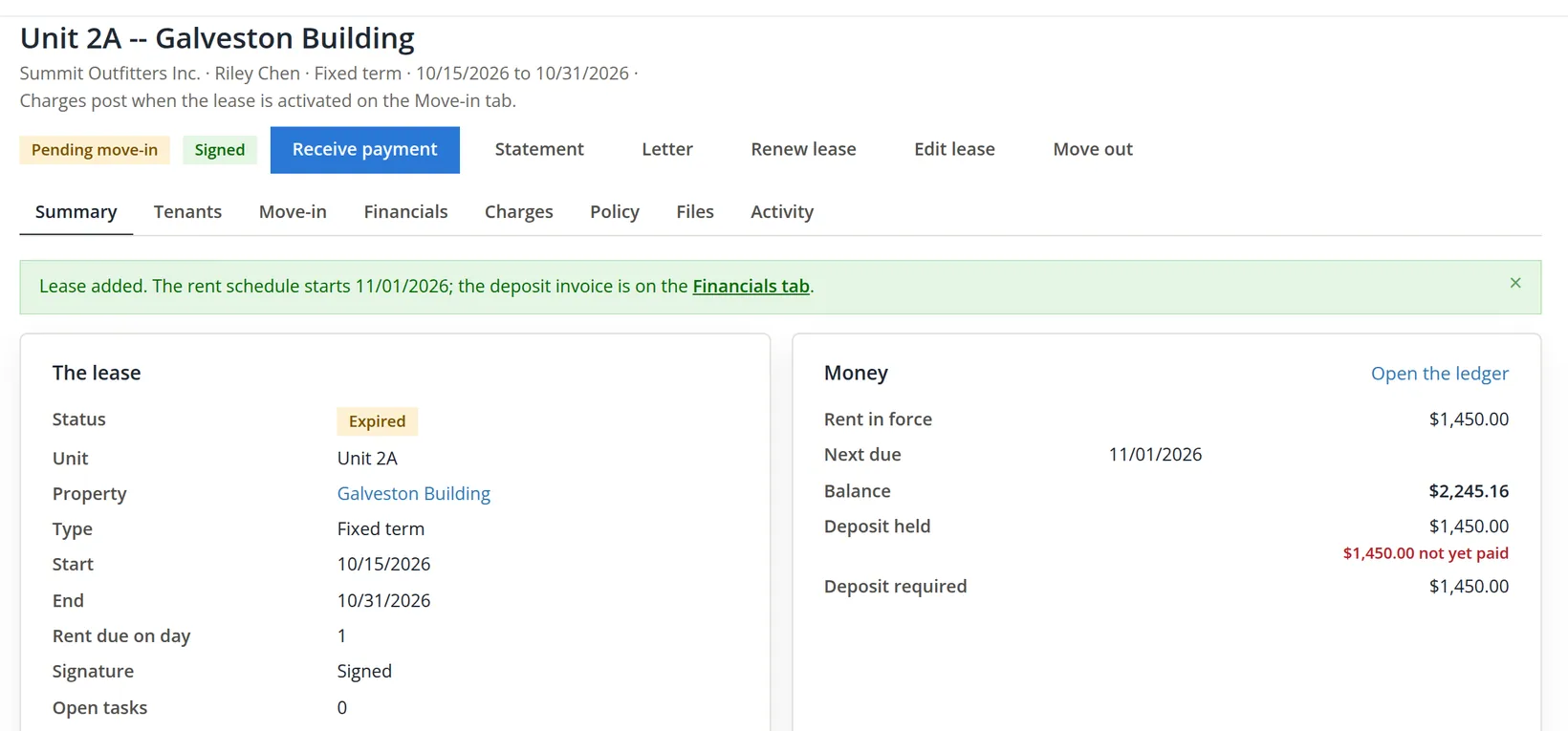
The status is worked out from the dates against today's date. A fixed-term lease whose end date has passed is Expired, even if it was saved a minute ago. The bookkeeper had typed 2026 for the end year instead of 2027. Nothing in the form was invalid (the end was after the start), so the save went through; the status is what gave it away.3
- 1
Click Edit lease, correct the end date, Save changes
The form holds the dates, type, signature, due day, the renters-insurance requirement and the notes. A changed end date moves the end of the lease's schedules too. The page answers Saved., the status turns Active and the activity log records "Changed end 10/31/2027."
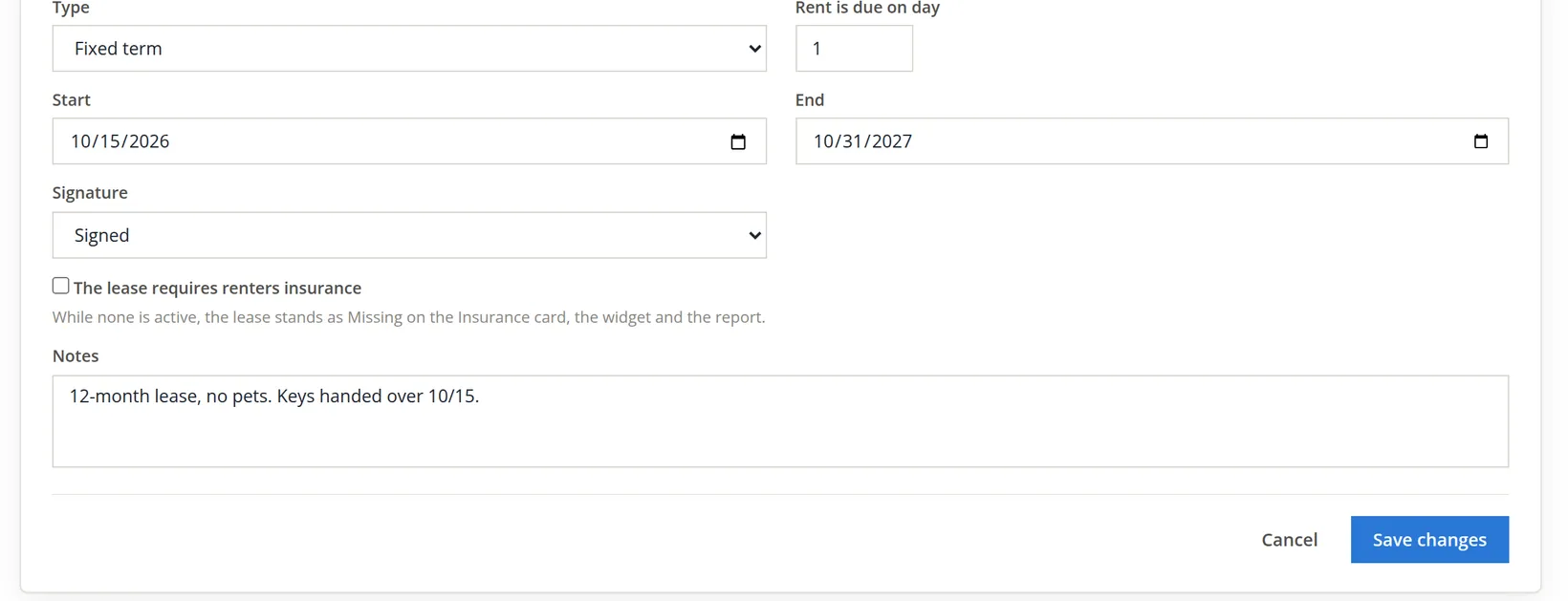
Future, Active, Expired and Past are the four states. A new lease that shows anything other than Active (or Future, if it starts later) has a date problem. Fix it before the first rent run, because the schedule ends with the lease.
Pass the move-in gates
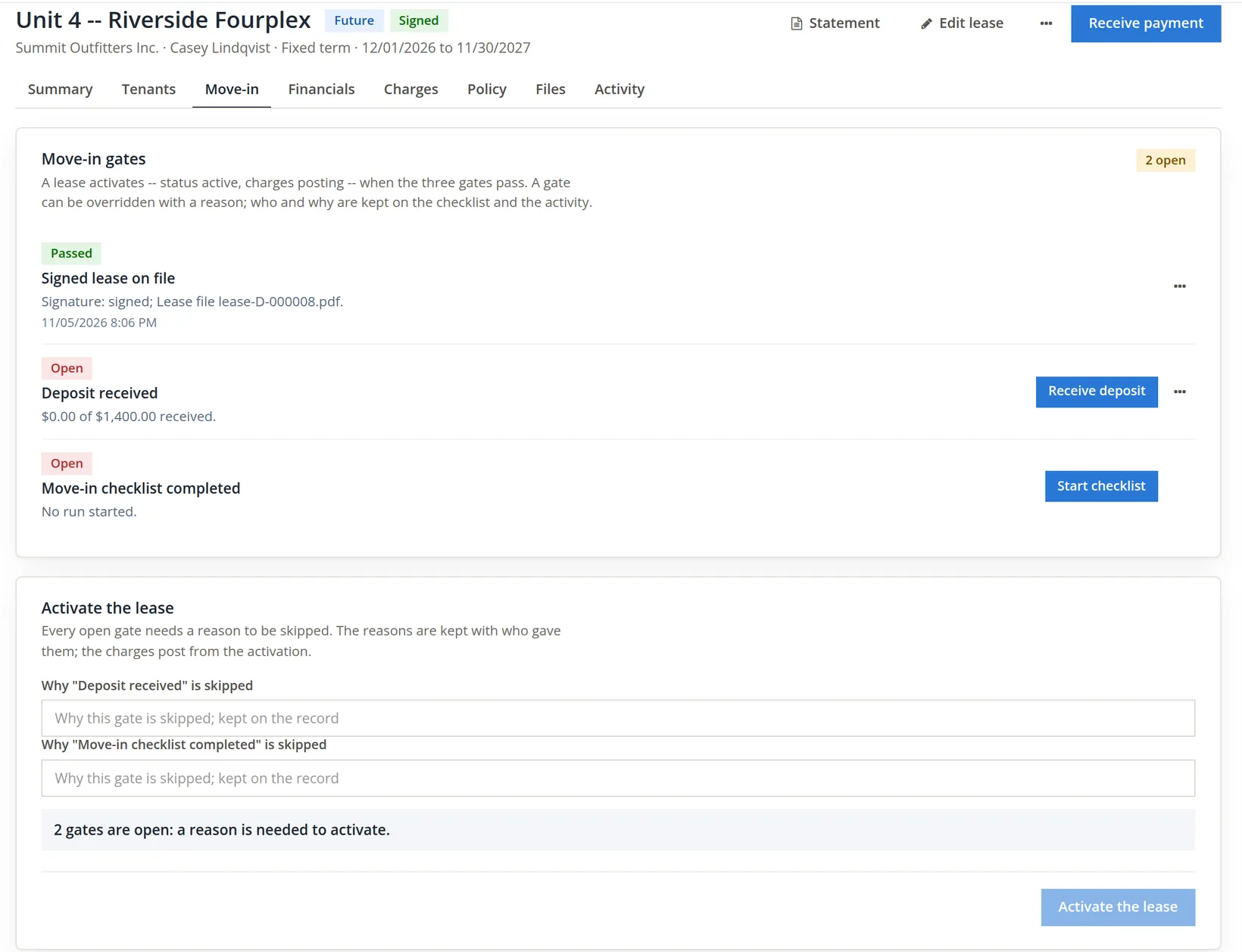
A new lease that starts today or earlier, like Riley's, is Pending move-in. Its schedule's charges wait until three gates pass: the signed lease is on file, the deposit is received, and the move-in checklist is complete. Open the Move-in tab. Each open gate has its next step as a small blue button at the right of its row; the ... menu at the end of the row holds the rest (the signatures, the lease file, the ledger, the condition report).
- 1
Gate 1: upload the signed lease
Click Upload signed lease; a small panel opens under the button. Choose the scanned PDF and click Upload. The file goes to the lease's Files tab under Lease, and the gate shows Passed.
- 2
Gate 2: receive the move-in payment
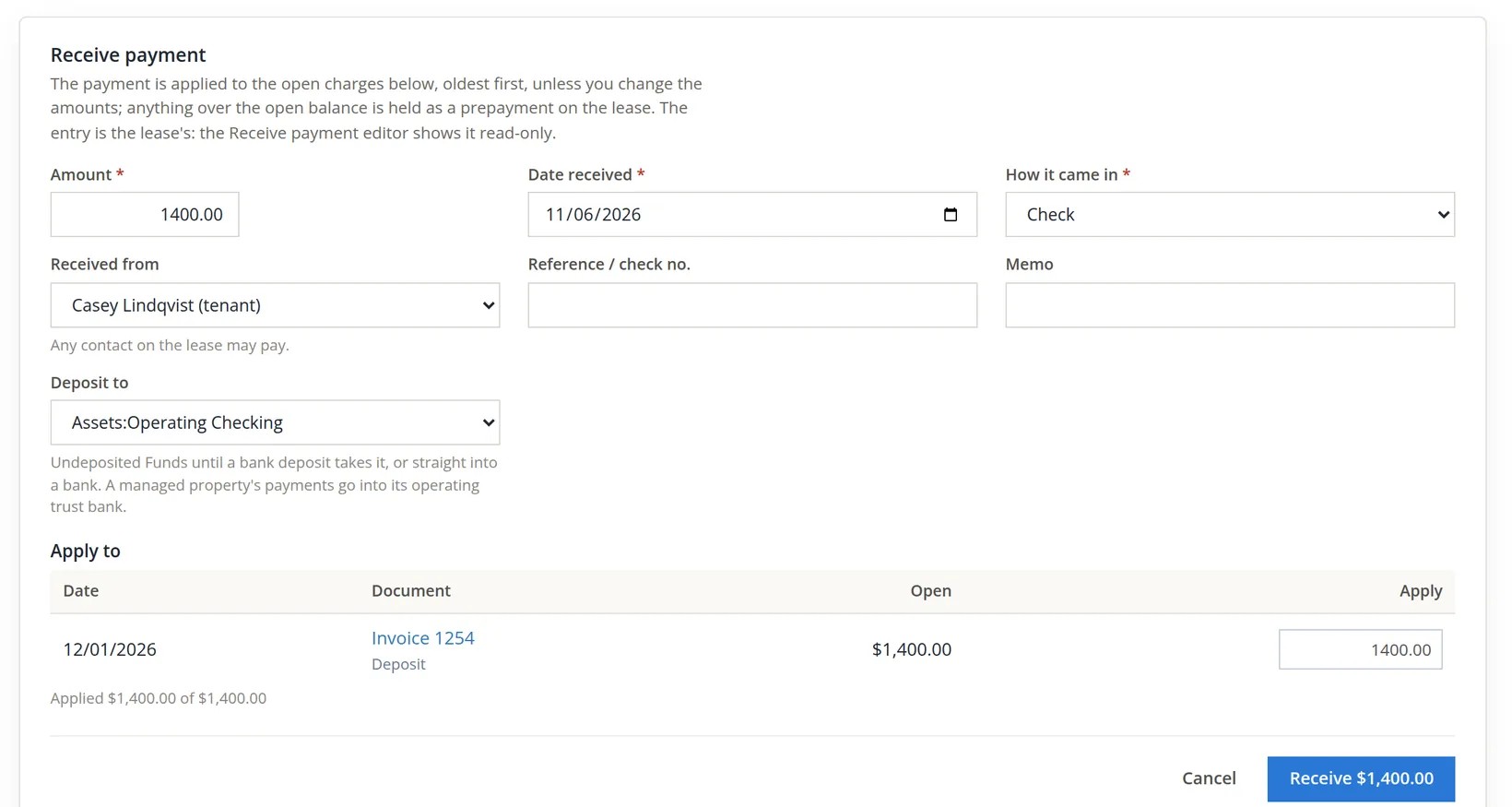
Receive deposit opens the lease's receive form on the Financials tab with every open charge listed. Riley paid both the deposit and the October rent with check 1042 on October 15, so the whole $2,245.16 is applied. Deposit to says where the money goes: Undeposited Funds until a bank deposit takes it, or straight into a bank. It starts on the books' payment account (Summit's is Operating Checking); a managed property's payments start on its operating trust bank (Chapter 13.11).
- 3
Gate 3: work through the move-in checklist
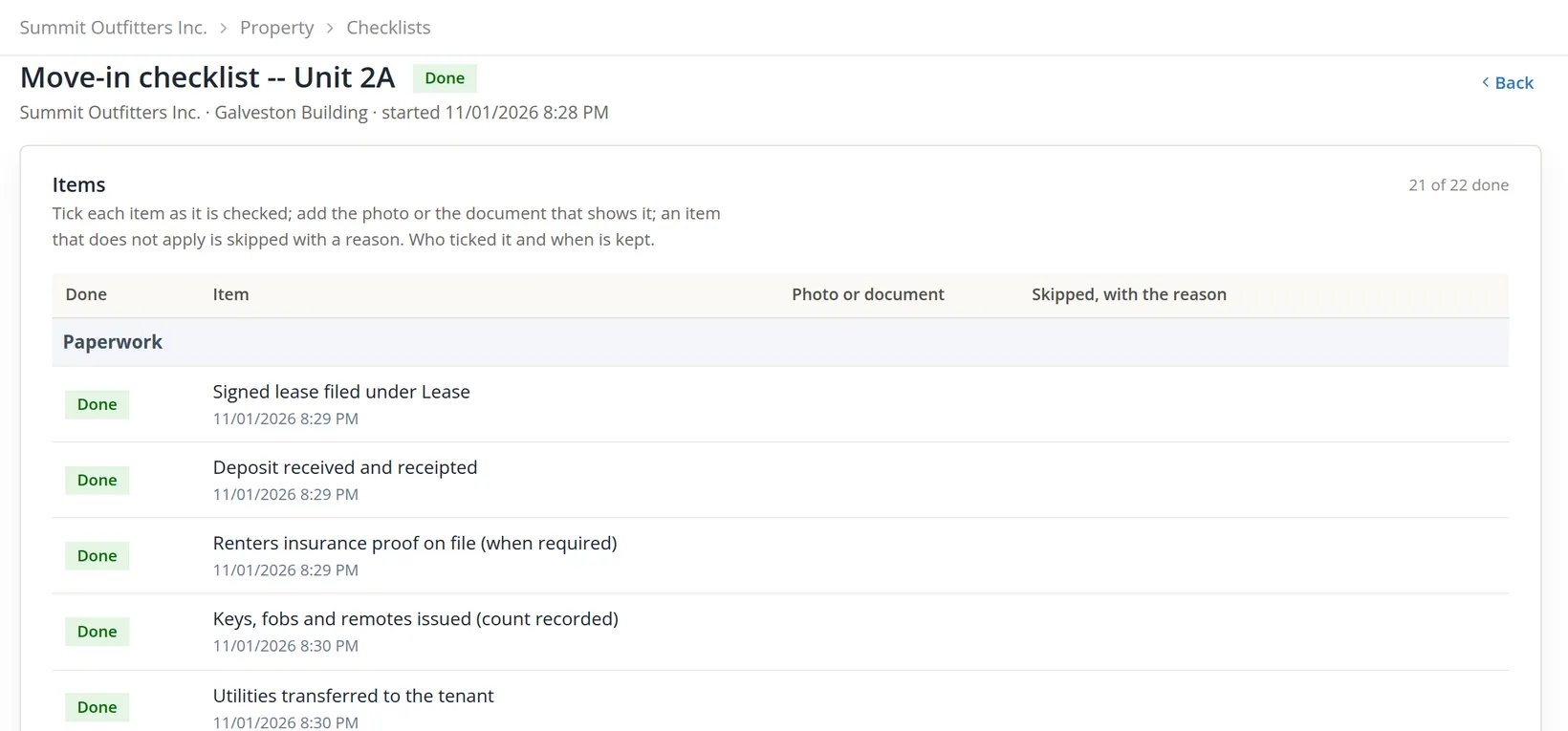
Start checklist opens a run of 22 items in eight groups: Paperwork, Entry, Kitchen, Bathroom, Rooms, Systems, Exterior and Closing. Tick each item and click its row's Save; the time and the person are recorded. An item that does not apply is skipped with a reason instead of ticked; on Riley's run, Parking space and storage was skipped because "Unit 2A has no parking space or storage", and the reason stays with the run. Once a run exists, the gate's button reads Open checklist.
- 4
Make the condition report
Enter the inspection date (the day of the walk-through, 10/15/2026) and the inspector, then Make the condition report. The report is refused while any item is neither done nor skipped. It is numbered (Riley's is D-000001, with a PDF preview and download at the foot of the run), filed on the lease's Files tab under Inspection, and it passes the third gate.
- 5
Back on the Move-in tab: Activate the lease
The tab now reads All gates pass. Activating turns the status chip from Pending move-in to Active and releases the held charges. For Riley that was the November rent: "Lease activated: move-in gates passed; 1 held charge posted.", invoice 1241, $1,450.00.
Activate with an override
Real move-ins are not always tidy. Morgan Diaz signed a paper lease for 2B on September 28 and walked the unit with Summit's manager on October 1, but the scan and the checklist were never entered. The deposit, $1,150.00 by check 3318, was received through the same receive form. Two gates are open; each can be skipped with a reason.
- 1
Type a reason for each open gate, then Activate the lease
The note under the boxes changes to "2 gates are overridden with a reason; activating records who and why." The activity log keeps one line per override, with the user's name.
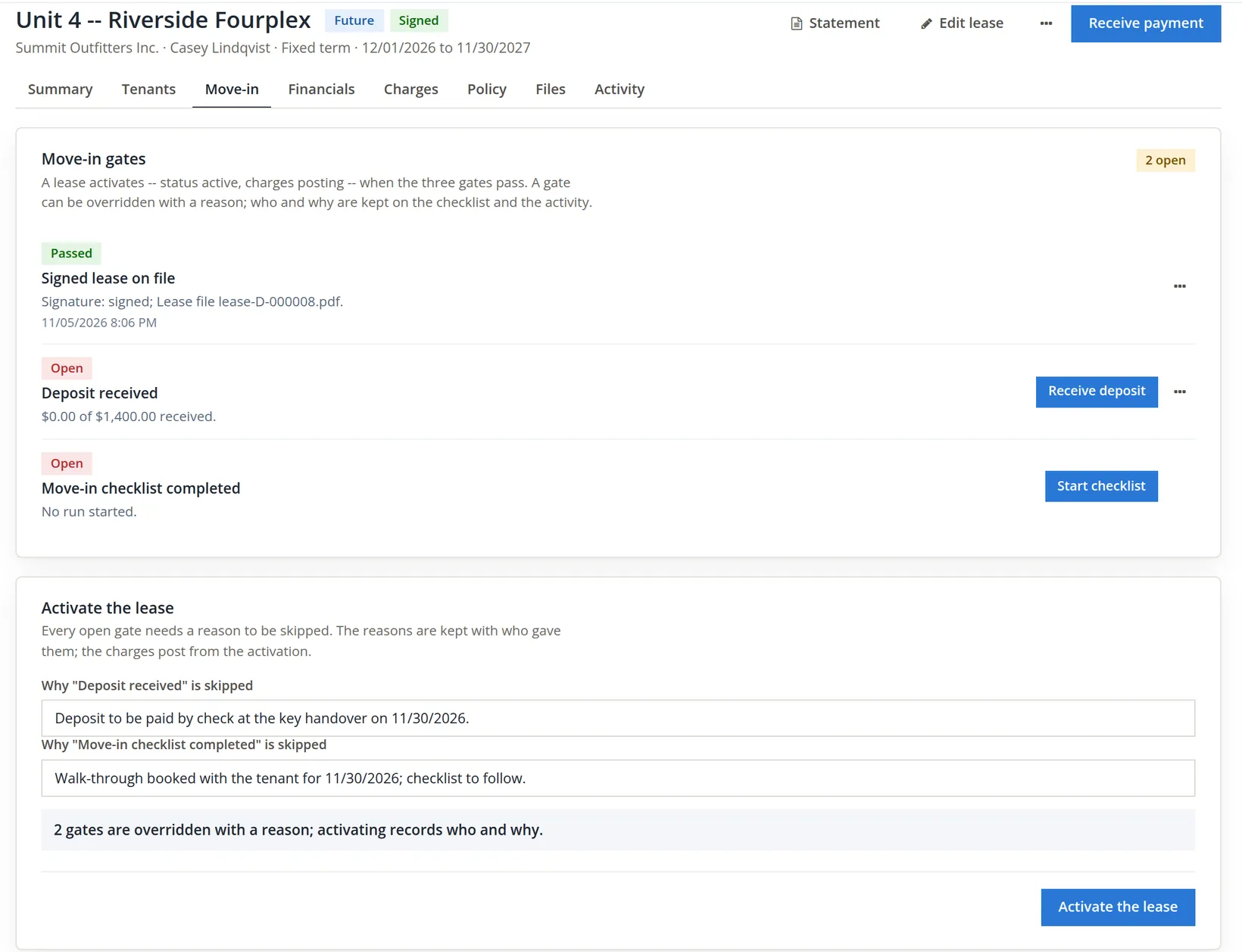
Write the reason as you would explain it to an auditor: what happened, when, and what will follow ("scan to follow"). Then upload the scan when it arrives; the override stays on the record either way.
The rent roll, the tenants list and the lease page
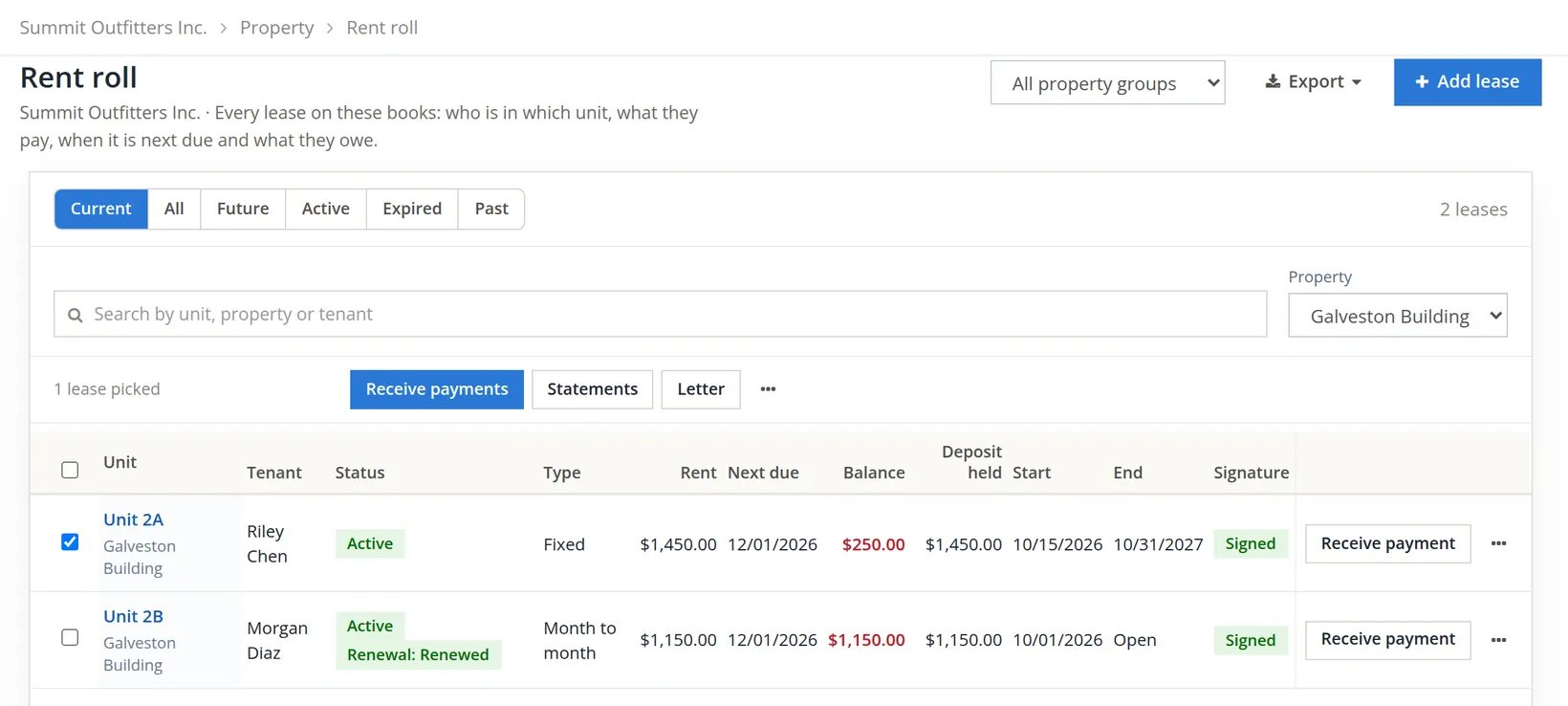
The Rent roll lists every lease with its unit, tenant, status, type, rent, next due date, balance, deposit held, dates and signature. Tick leases to act on several at once: the bar above the table offers Receive payments, Statements and Letter, and its ... menu Refund deposits and End leases.... Each row ends in its own Receive payment button and a ... menu that opens the lease. Properties and people → Tenants shows the same people as customers: how many invoices are open, what is overdue and what they owe.
| Lease 2A, Riley Chen | Charge | Paid | Balance |
|---|---|---|---|
| Invoice 1239, rent October 15 to 31 (prorated) | $795.16 | $795.16 | $0.00 |
| Invoice 1240, security deposit | $1,450.00 | $1,450.00 | $0.00 |
| Invoice 1241, rent November | $1,450.00 | -- | $1,450.00 |
| Total | $3,695.16 | $2,245.16 | $1,450.00 |
The deposit is a charge the tenant pays, but it is not income: it was invoiced to the property's Security Deposits Held account and recorded in the lease's deposit ledger. Chapter 13.5 collects November's rent, and Chapter 13.6 deals with the tenant who falls behind.
Every lease opens on the same page. The status chips stand beside the title (Active, Signed, and chips such as 1 returned payment, On hold: Payment plan or Eviction pending when they apply). At the right are Statement and Edit lease, a ... menu with Give a credit, Remove late fees (only while an unpaid late fee is open), Letter..., Renew lease... and Move out..., and Receive payment as the one blue button. The tabs below hold the rest.
| Tab | What it holds | Where it is taught |
|---|---|---|
| Summary | Status, dates, the Money card, the people, renters insurance, tasks, renewal and open work orders | this chapter |
| Tenants | Each person's role, move-in day, liability dates, notice and move-out, forwarding address, text-message consent and e-mail choices | this chapter |
| Move-in | The three gates and Activate the lease | Procedures B and C |
| Financials | Holds and payment plans, late fees, notices, the ledger, credits and concessions, and the deposit ledger | Chapters 13.5 and 13.6 |
| Charges | The rent schedule and the other recurring charges, with Add a charge | Chapter 13.5 |
| Policy | The late fee policy in force for this lease | Chapter 13.5 |
| Files | The lease, inspections, notices, statements and generated documents, by category | this chapter |
| Activity | Every change, with who and when | this chapter |
Draft a lease and sign it in the app
Riley's and Morgan's leases were signed on paper before anyone typed them in. The other way round is often better: write the lease in the books first, print or show the agreement the books make from it, collect the signatures, and only then let the lease start posting. That is a draft lease. Nothing is posted while it is a draft; it becomes a real lease only when it is executed.4
| Draft state | What has happened | What you can do |
|---|---|---|
| Drafting | The terms are saved | Edit terms, prepare for signature, cancel |
| Out for signature | The agreement (a numbered PDF) is made and the signatures are requested; the terms are frozen | Sign now, record a wet signature, execute without signatures, take it back to drafting (until the agreement has been sent), cancel |
| Signed | Every required signer has signed; a signature certificate is filed | Execute, cancel |
| Executed | The lease exists, with its schedule and deposit invoice | Open the lease |
| Canceled | Stopped with a reason; requested signatures voided | Nothing |
Casey Lindqvist was approved for Riverside unit 4 in Chapter 13.3. The listing asked $1,400.00 a month, a $1,400.00 deposit, a 12-month minimum, and gave the unit as free from December 1, 2026. Rowan Lindqvist, named under Occupants on Casey's application, will live there too.
- 1
From the applicant: Move in → Create draft lease
Leasing → Applicants, open A-000001 Casey Lindqvist, then the Decision tab. Under the approval sits the Move in card. Leave How on Create draft lease (the other choice adds the household to a lease that already exists), type 12/01/2026 in Start on and click Move in. Left blank, the start would have been the listing's available day or the move-in day the prospect wanted. The draft page opens with "Draft lease made from the application: the unit, the dates, the rent, the deposit and the household are filled in. Check the terms, then prepare it for signature."
The draft took the listing's terms and the household: Casey as the primary tenant and Rowan, named under Occupants on the application, as an occupant (a person named only on the application becomes a contact of the books when the draft is prepared). The terms: unit 4, fixed term 12/01/2026 to 11/30/2027 (twelve months), rent $1,400.00 due on day 1 and first due 12/01/2026, deposit $1,400.00 due on the start date, and the note "Drafted from application A-000001." Because the lease starts on the 1st there is nothing to prorate: due at move-in is $1,400.00 rent + $1,400.00 deposit = $2,800.00.
- 2
Fill the draft: Edit terms
Edit terms opens the same seven-section lease form as Procedure A, without the Signature field (on a draft, the signatures are recorded on the agreement itself). Check the people the application brought and add anyone missing with Add a person (leave New contact, type the first and last name, choose the role and the move-in day). Casey and Rowan were both there. A note about the occupant and the no-pets rule goes in section 7. Save draft answers "Draft saved. Nothing is posted until it is executed." and Back to the draft returns to the draft page. The second button, Save and prepare for signature, saves and goes straight on to step 4 when the books already have a lease template.
 Property Management > Templates, write your lease and approve it; Template picker reading No approved lease template, Landlord signer Alex Morgan, the line Signers: Casey Lindqvist (tenant); and the landlord signer, and a greyed Prepare for signature button" loading="lazy">
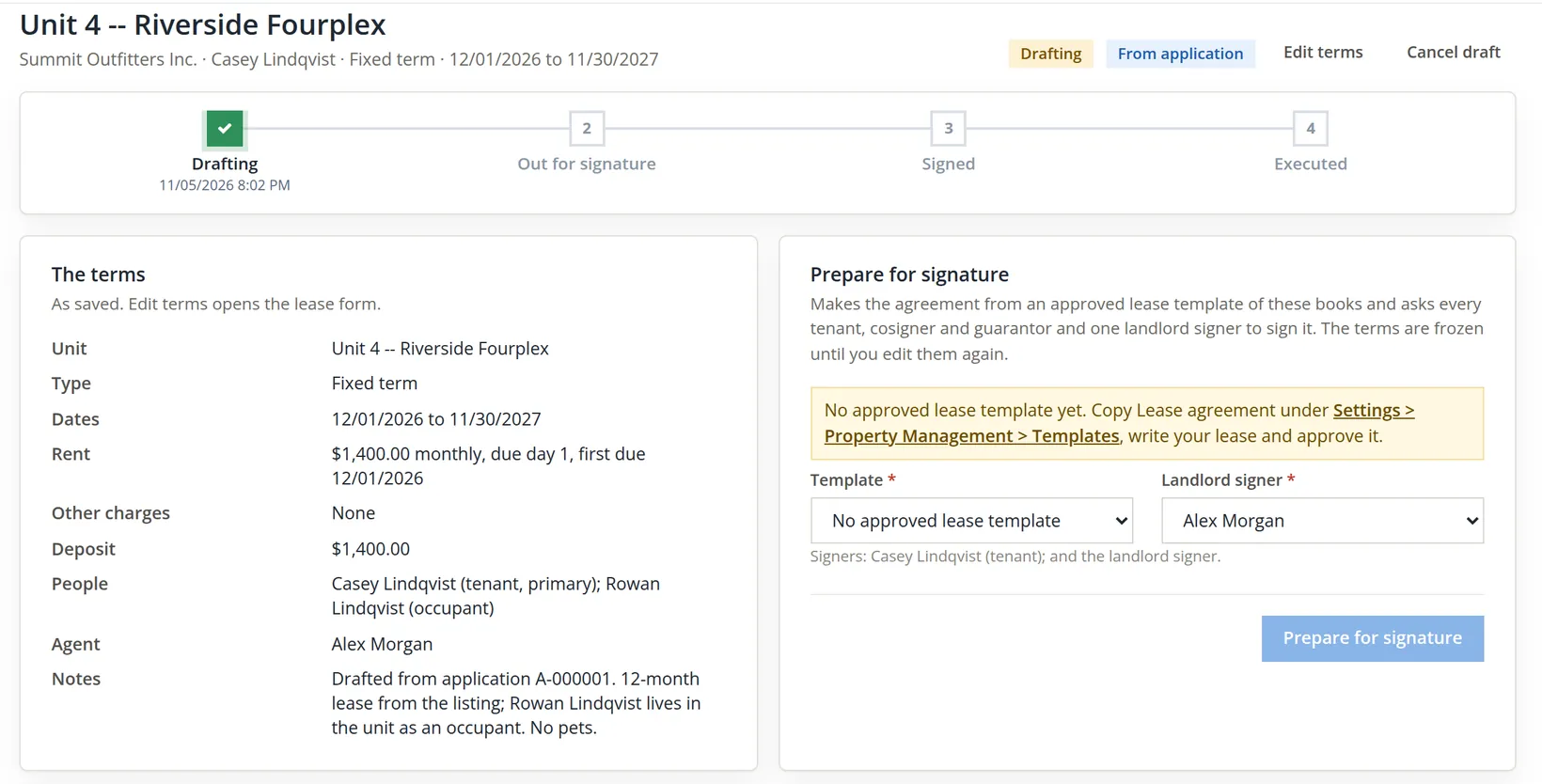
The Prepare for signature card would not work. It said: "No approved lease template yet. Copy Lease agreement under Settings > Property Management > Templates, write your lease and approve it." The agreement a tenant signs is a document the books generate from a template, and Summit had never approved one. Without it there is nothing to sign, and a draft cannot be executed until it has been prepared (the software answers "Prepare it for signature first.").
- 3
The fix: copy, write and approve the lease template
Settings → Property Management → Templates. The Lease agreement row reads System, No approved version. Click Copy: "Lease agreement is now these books' own copy. Edit its wording, then approve the draft; documents render from the approved version only." The copy already holds the merge fields that fill themselves from the lease (the property, unit and term, a table of the tenants, a table of the rent and charges, the deposit, the signature block and the document number) and one placeholder line, Write your lease text here. Summit replaced that line with seven short clauses of its own (use of the unit, rent, deposit, pets and smoking, repairs and entry, renters insurance, ending the lease), clicked Save draft v1, then Approve v1, and confirmed "Approve v1? Documents made from now on render from it."
The software supplies the frame and fills in the numbers; it supplies no legal wording. Landlord-tenant law differs from state to state (notice periods, deposit limits, required disclosures). Have the clauses reviewed by a lawyer who practises in the state where the property is, before you approve the version. This manual's clauses are an illustration, not legal advice.5
- 4
Prepare for signature
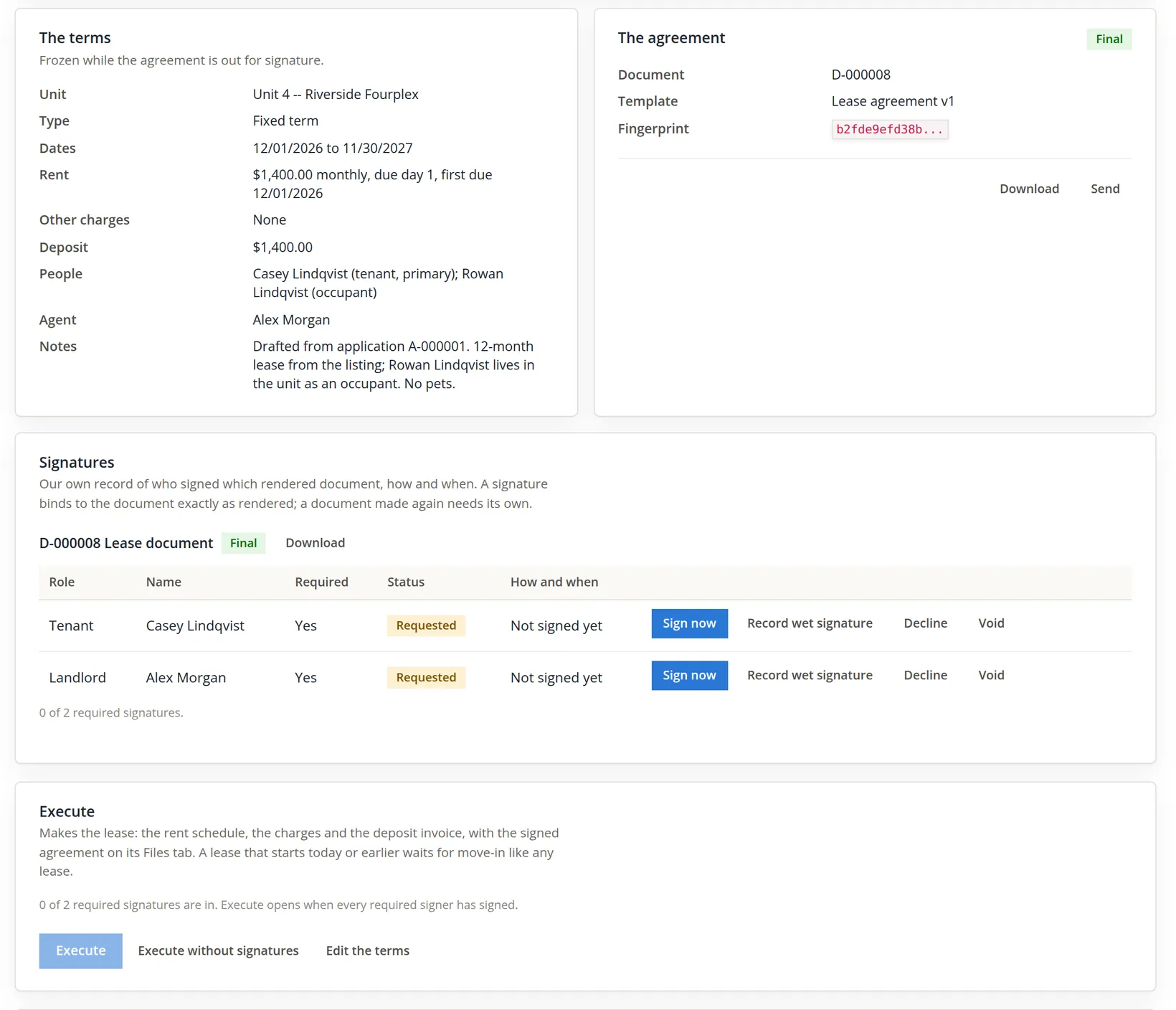
Back on the draft, the Template picker now offers Lease agreement (these books, v1). Landlord signer is the member who signs for Summit, Alex Morgan. The line under the pickers lists the signers: "Signers: Casey Lindqvist (tenant); and the landlord signer." Rowan is not on it. Tenants, cosigners and guarantors sign; an occupant lives in the unit but is not a party to the contract. Click Prepare for signature: "Out for signature: agreement D-000008 is ready to sign. Sign now when a signer is with you, or record the signed paper."
- 5
Collect the signatures: Sign now, once per signer
Casey came to the office. Sign now on the tenant row opens a screen meant to be handed across the desk. Casey can open the agreement in a new tab and read it, then types their full name, ticks I have read the statement above and clicks Sign. The signing screen sits in the page beside the sidebar, so the office can keep its place in the app. The page answers "Signed by Casey Lindqvist. Hand the screen back to the office." Alex Morgan then does the same on the landlord row, and the answer adds "All signatures are in: the document is signed and its certificate is filed."
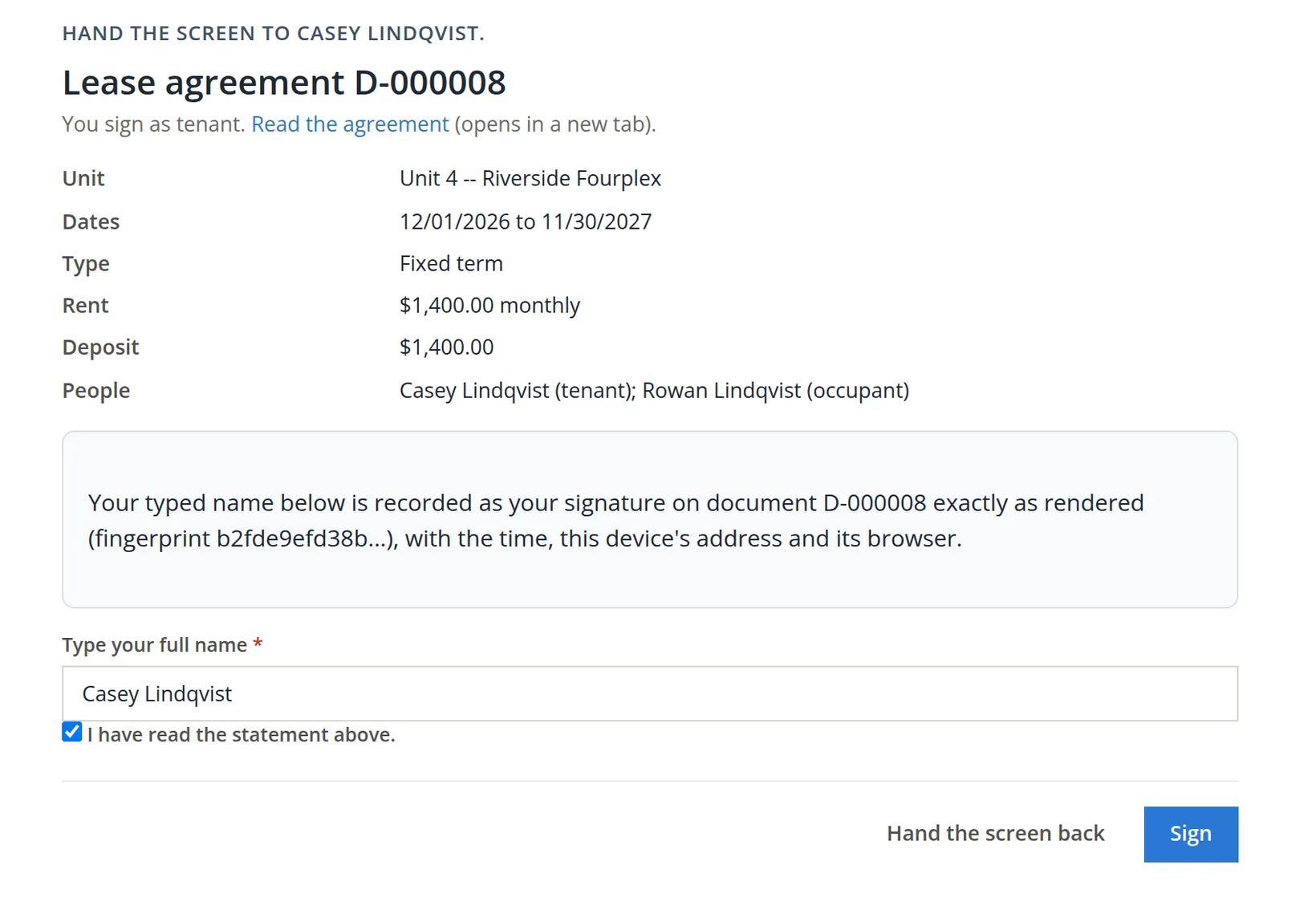
The draft is now Signed. The How and when column reads, for example, Typed 'Casey Lindqvist' 11/05/2026 8:07 PM with the device's address, the count reads 2 of 2 required signatures -- the document is signed, and the agreement card names the signature certificate D-000009: one page that lists each signer, the method, the time and the fingerprint of the document they signed.6
- 6
Execute
The button is open now. Executing opens the new lease with "Lease made from the draft. The signed agreement is on its Files tab; its move-in gates are on the Move-in tab." Because it starts on December 1, its status is Future, with the chip Signed. The Money card shows a balance of $1,400.00 with the note "$1,400.00 is dated after today": the deposit, invoice 1254, dated 12/01/2026. The rent schedule posts its first $1,400.00 on 12/01/2026. The Files tab holds D-000008 (Lease, signed) and the certificate D-000009. Back on the draft, the Terms card no longer says the terms are frozen; it reads "As executed: the lease was made from these terms."
Unlike Riley's and Morgan's leases, this one is not Pending move-in, and nothing is held: a lease that starts after today is saved with its rent schedule already active and its deposit invoice already made, and the first rent posts on 12/01/2026 whatever the gates say. Only a lease that starts today or earlier waits, as in Procedure B, until it is activated. The Move-in tab still lists the three gates as a checklist for the handover (the Signed lease on file gate has already passed and names the agreement's file, lease-D-000008.pdf), and the lease may be activated early once they are done. Applicant A-000001 now reads Moved in, and its checklist ticked Lease drafted, Lease sent for signature and Lease executed on its own.
- 7
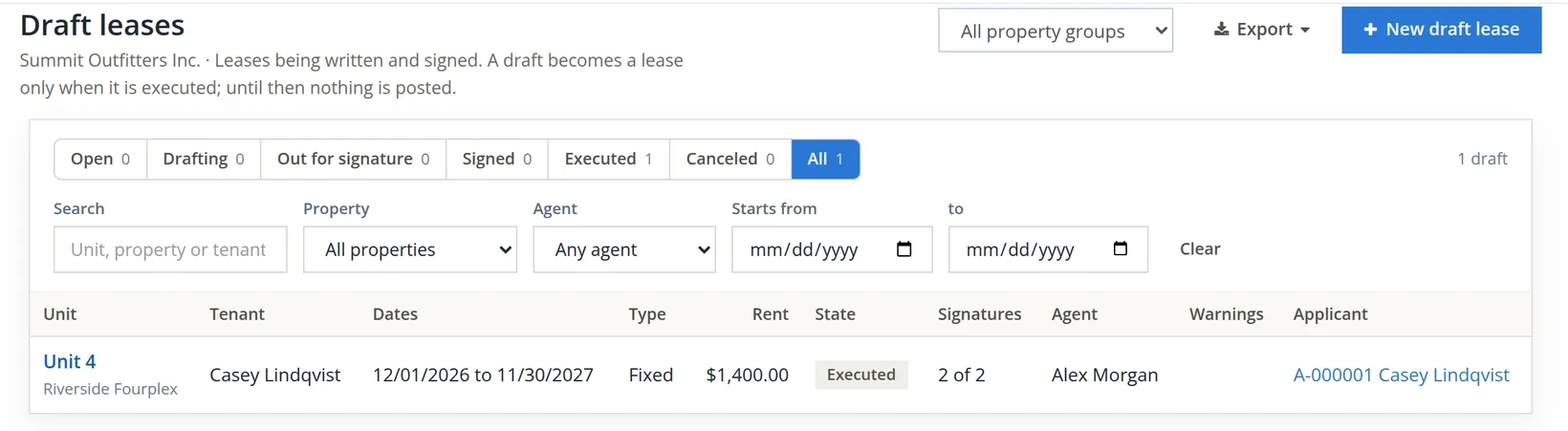
Find it again: Leasing → Draft leases
The list opens on Open, the drafts still in progress, so an executed draft drops out of the default view. Choose Executed or All.
Execute without signatures makes the lease anyway, marked Unsigned, but asks for a reason of at least 10 characters ("The tenant signs on paper at the key handover") and the Rent roll edit right; the requested signatures are voided with that reason. If the terms are wrong instead, Edit the terms takes the draft back to drafting: the agreement is superseded and every requested signature voided, because a signature binds only to the document as it was rendered.
Before you hand over the keys
- [x] The lease status is Active (or Future), and the dates in the header are right.
- [x] Exactly one primary tenant, with an e-mail for statements.
- [x] The proration line matches your own arithmetic.
- [x] The deposit invoice is paid and shows in the Deposits card as held.
- [x] The signed lease is on the Files tab, or the override says when it will be.
- [x] The condition report is made, or the override says where the paper record is.
- [x] The rent roll shows the lease with the right rent and next due date.
- [x] For a draft lease: the books have an approved lease template, every tenant, cosigner and guarantor has signed, and the executed lease shows Future (or Pending move-in if it starts today or earlier) with the deposit invoice on its Financials tab.
Check your understanding
1. A lease starts on March 10 at $1,240.00 a month, rent due on the 1st, with proration ticked. What is the first invoice?
Answer
March has 31 days; March 10 to 31 is 22 days. $1,240.00 × 22 ÷ 31 = $880.00, invoiced on the start date. April's full rent follows on April 1.
2. A lease saved a minute ago shows status Expired. What do you check first?
Answer
The end date, most likely typed in the wrong year. Correct it with Edit lease.
3. Which person on a lease receives the invoices?
Answer
The primary tenant. Cosigners, guarantors and occupants are recorded with a role but have no ledger.
4. What are the three move-in gates, and what happens when they pass?
Answer
Signed lease on file, deposit received, move-in checklist completed. Activating the lease then posts the charges that were held.
5. Is the $1,450.00 deposit part of Summit's rental income?
Answer
No. It is a liability, money owed back to the tenant, held in Security Deposits Held.
6. A draft lease names a tenant, a cosigner and two occupants. How many signatures does Prepare for signature request?
Answer
Three: the tenant, the cosigner and one landlord signer. Occupants do not sign.
7. Prepare for signature is greyed and the card says there is no approved lease template. What do you do?
Answer
Copy the Lease agreement template in Settings → Property Management → Templates, write the books' own lease text in place of the placeholder, save and approve the version, then prepare the draft.
Notes
- The tenants, occupant and cosigner are invented for this manual, with addresses on the reserved example domains, so no message can reach a real person. ↑
- Two charges were invoiced the moment the lease was saved: the prorated first month (invoice 1239) and the deposit (invoice 1240). The recurring rent waited for activation. The page's header line, "Charges post when the lease is activated on the Move-in tab", refers to that recurring schedule. ↑
- The module works the status out each time the page is read: Past once the lease is ended, Future before the start, Expired after the end, otherwise Active. The pills at the top (Pending move-in, Active) describe the move-in state, which is a separate thing. ↑
- A draft can also be started from New draft lease on the Draft leases page, or from Save as draft on the lease form. A draft made from an applicant carries the application with it, which is why the applicant's checklist follows the draft. ↑
- Documents are made only from an approved version. Saving new wording later creates a draft v2; the agreements already made keep the version they were rendered from (D-000008 names Lease agreement v1). ↑
- Three ways of signing exist. Typed, on the office screen, as here. Wet: a scan of the signed paper (a PDF) and the day written on it, which may not be after today. Through an outside e-signature service, which Summit has not switched on, so the books never e-mail a signing link. Signing from home on the tenant portal (Chapter 13.13) waits until the books approve a Signing statement template. The statement on the office signing screen in this chapter is the default shown while no such template is approved; once one is approved, its words appear there instead. ↑