
Chapter 3.4
Vendor Credits
How to record money a vendor owes you back (goods returned, an allowance, an overcharge) and how to use it to pay one of their bills.
When you finish this chapter you will be able to:
- Enter a vendor credit for an allowance or for goods sent back.
- Explain where the credit waits, and the entries it makes.
- Use the credit to pay one of the vendor's bills.
Contents
What happens in the books
A vendor credit is the mirror of a bill. The credit waits in an asset account, Vendor Credits, until it is used:
| Event | Debit | Credit |
|---|---|---|
| Credit for 4 bags returned, $76.00 | Vendor Credits 76.00 | Merchandise Inventory 76.00 |
| Credit used on bill INV319135 | Accounts Payable 76.00 | Vendor Credits 76.00 |
For returned stock, the credit takes the goods out of inventory. For an allowance or overcharge, it reduces the expense account the purchase was first put on.
Enter the credit
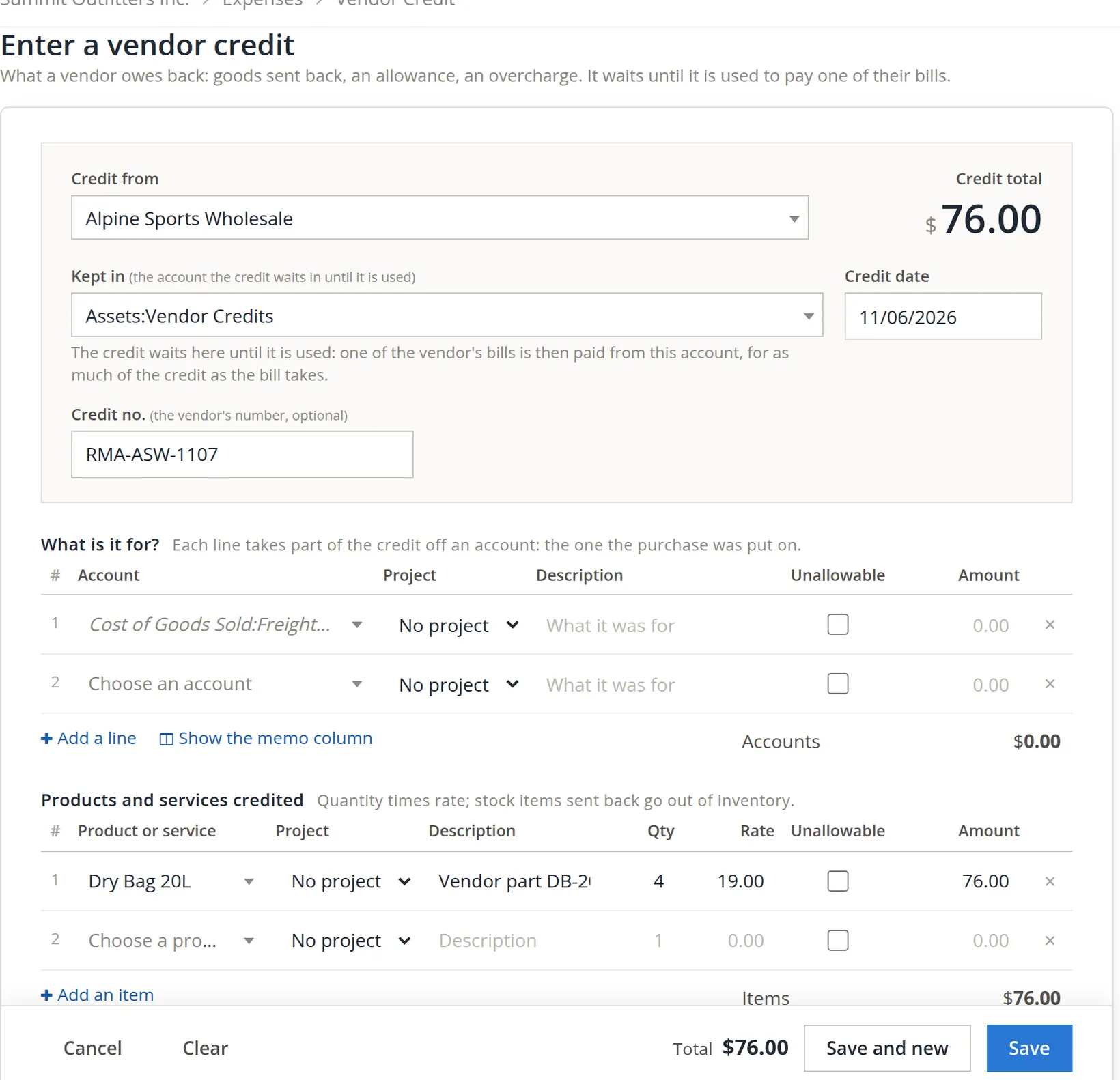
Go to Expenses and click + Vendor credit.
- 1
Choose the vendor 1
- 2
Leave Kept in as Vendor Credits 2
"The credit waits here until it is used: one of the vendor's bills is then paid from this account, for as much of the credit as the bill takes." The account is made the first time a credit is saved.
- 3
Set the date 3 and the vendor's credit number 4
- 4
Put the credit on the account the purchase went to 5, or on the items sent back 6
For an allowance on, say, freight, use an account line on Freight-In. For goods returned, click Add products sent back and enter each item, quantity and price 7. A line underneath confirms the stock: "Dry Bag 20L: 84 on hand, 80 after this credit."
Both tables have a Project column and an Unallowable tick, as on a bill (Chapter 3.2), and Default project for new lines sits under them. Returned stock for the shelves takes no project. If the original purchase was charged to a project, choose the same project here, so the credit lowers that job's cost as well.
- 5
Describe it, attach the credit memo, and save 8
Use it on a bill
- 1
Open the credit
Use Open the credit to use it on a bill in the banner after saving, or find it on the Expenses list.
- 2
Under the vendor's unpaid bill, click Use $76.00 of the credit on it 1
Every unpaid bill in the panel has its own link. Alpine has five, so take care to click the one under INV319135.
- 3
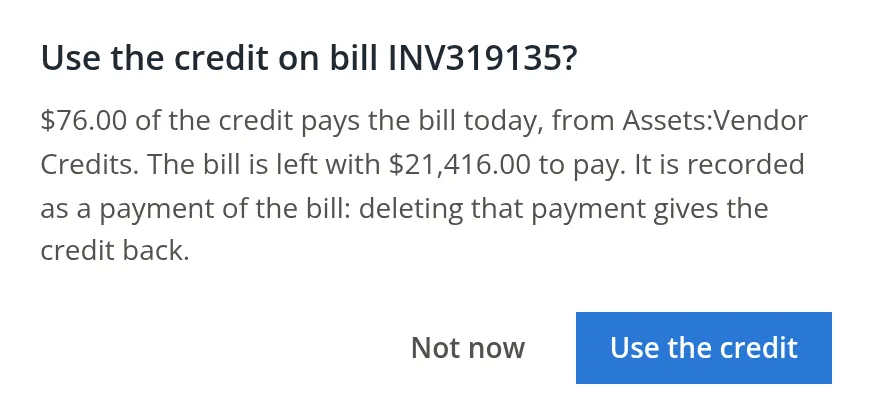
Read the confirmation and click Use the credit
It says exactly what will happen: the credit pays that much of the bill today, from Vendor Credits, and what is left to pay.
Good practice
- Wait for the vendor's credit memo before entering a credit, and use their number. A promise on the phone is not a credit.
- Use credits on the next payment run. An unused credit is your money sitting with the vendor.
- A refund by check instead? If the vendor pays you back rather than crediting your account, record the refund as a deposit into the bank on the Vendor Credits account, so the credit is cleared.2
- Changes leave a trail. Adding, changing or deleting a vendor credit is written to the books' Audit History (Chapter 6.7). A member can delete a credit only with the delete permission for vendor credits; otherwise ask the owner.
Check your understanding
1. You return 4 bags that cost $19.00 each. What happens to inventory?
Answer
It goes down by 4 bags and $76.00.
2. Where does the $76.00 wait until it is used?
Answer
In the asset account Vendor Credits.
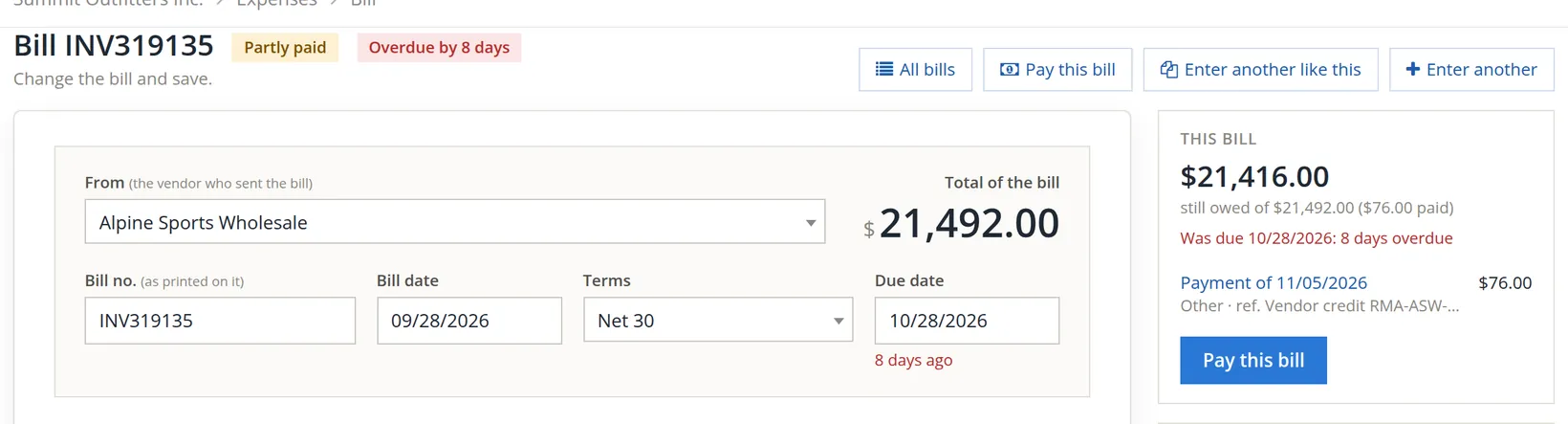
3. After using the credit, how much is left on the $21,492.00 bill?
Answer
$21,416.00.